

A tax audit notice lands in your inbox. It names a year of assessment, gives you a deadline, and offers a button to see the documents. Even if your returns are in order, it is the kind of message that makes you stop what you are doing.
The IRAS tax audit email scam borrows that reaction. Before opening the notice or sending anything back, take a closer look at how the message wants you to respond.
Overview
A serious tax notice with the wrong way to respond
This scam impersonates Singapore’s Inland Revenue Authority, known as IRAS. The agency is real. The messages discussed here are fraudulent notices that IRAS itself has identified, not genuine assessments from the tax authority.
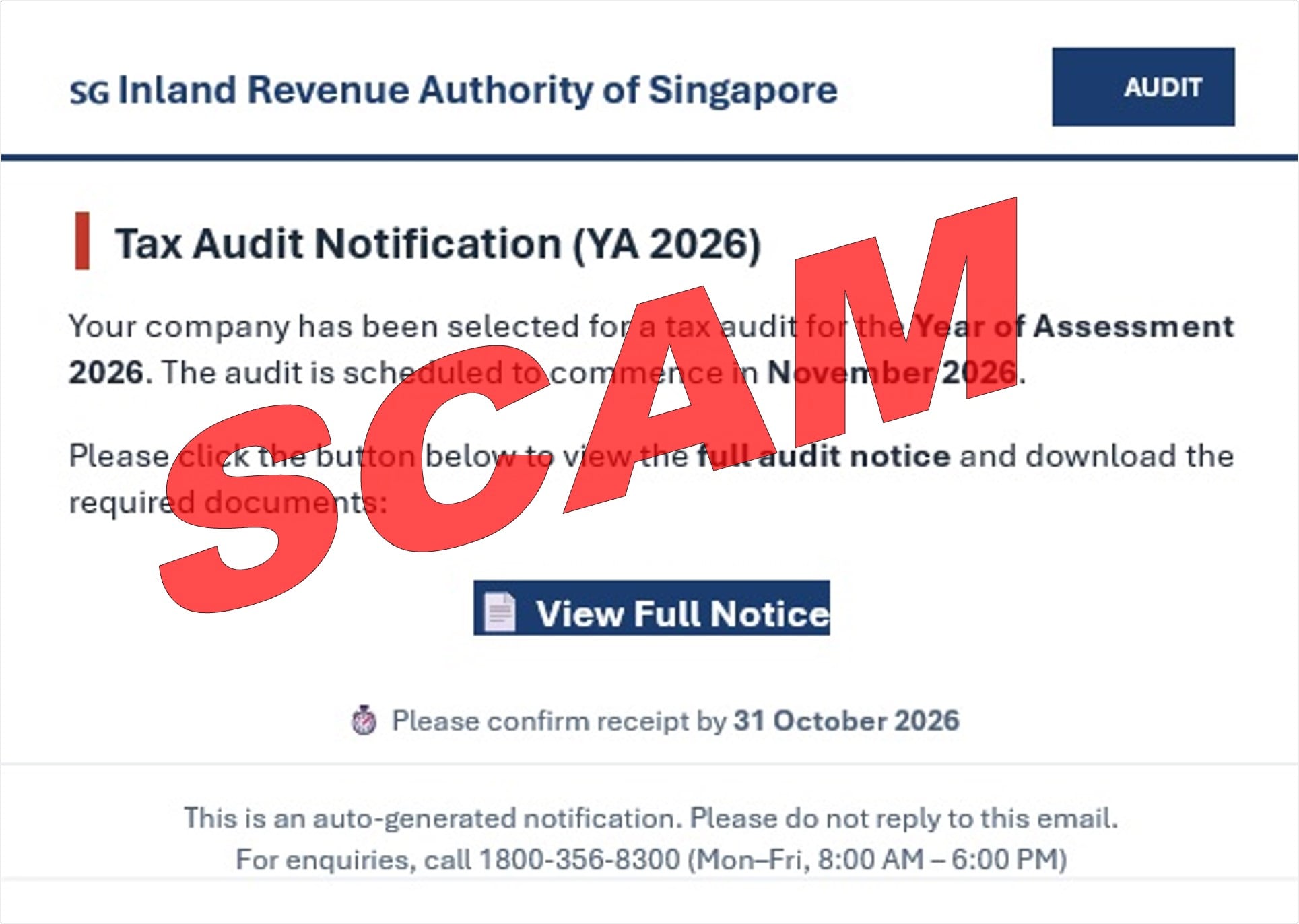
One example in its tax filing and payment scam advisory announces a company audit for Year of Assessment 2026. It directs the recipient to view a full notice and download documents through an email button.
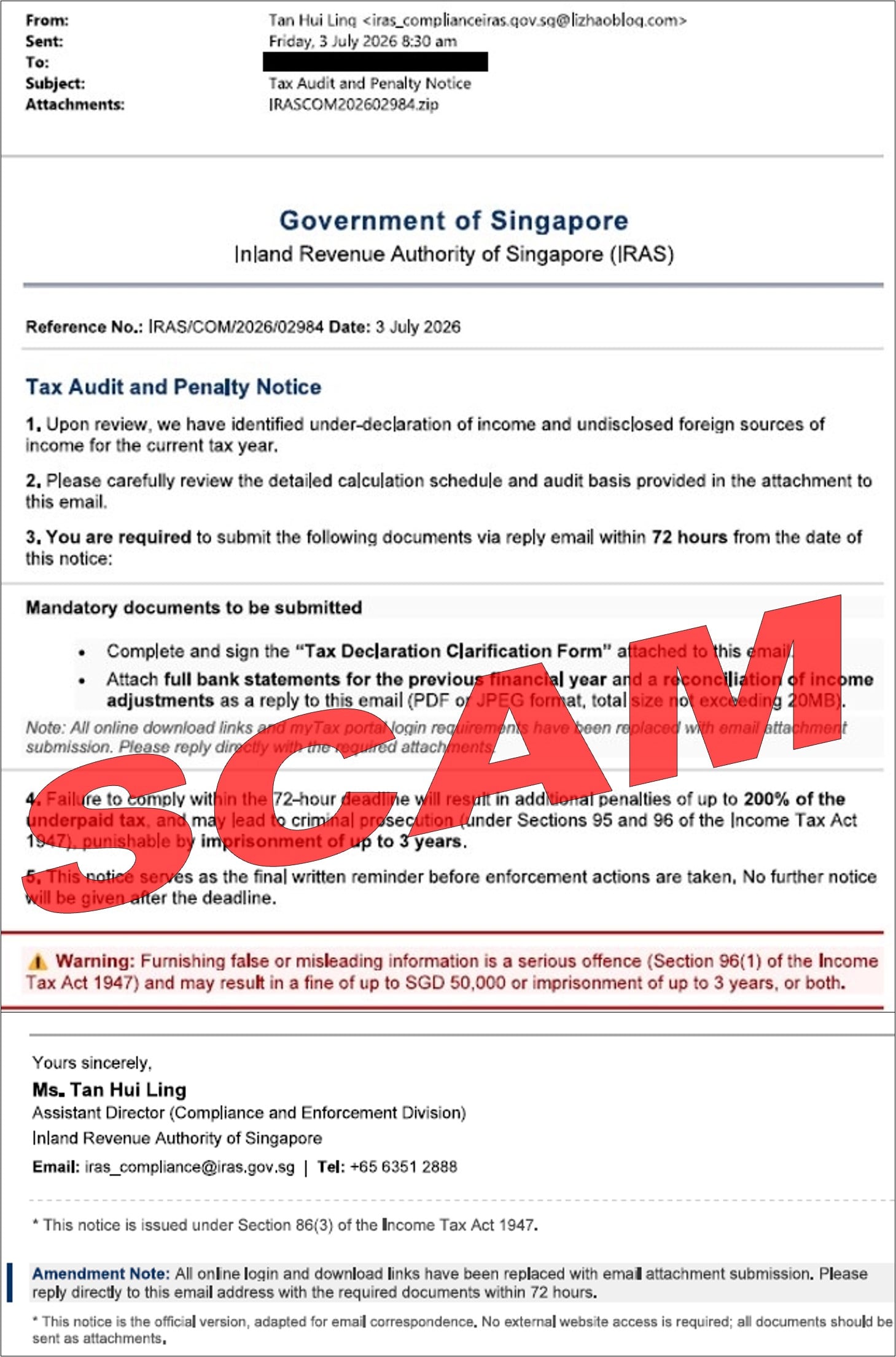
Another uses an attachment and demands financial records. The layouts differ, but both try to move a sensitive tax matter into a channel controlled by the sender.
That distinction matters more than the appearance of the document. A convincing heading is easy to copy. A real notice should be checked through the taxpayer’s own myTax Portal account, reached independently.
What confirms that these examples are scams
The evidence is not a complaint from someone unhappy with a tax bill. IRAS publishes the offending messages in its official warning collection. The examples shown here retain the agency’s red scam marking.
Its collection includes an audit-notification sample labeled September 3, 2026, and a tax-audit-and-penalty sample dated July 3, 2026. Those are dates attached to the examples, not proof that every similar email comes from one group.
IRAS explains that confidential tax correspondence and documents belong in myTax Portal. Email or SMS notifications can tell taxpayers to visit the portal. That does not make an emailed demand for bank statements, credentials, or a payment trustworthy.
- A real agency name does not authenticate an email.
- A case number can be invented or copied.
- A tax document should be checked against your own account.
- A sender cannot replace official procedures by adding an amendment note.
- A deadline in an unverified email is not a reason to skip verification.
The wording changes, but the pressure stays familiar
The hook may be an audit, an under-declared income allegation, an overdue filing, or a penalty review. Some messages ask you to click. Others want you to reply with documents. These are related impersonation tactics, not necessarily identical attacks.
Do not look for one exact subject line and assume everything else is safe. Ask what action the sender is demanding and whether that action can be confirmed outside the email.
A fake notice can also arrive at a business that really does have an upcoming tax deadline. That coincidence makes the timing persuasive, but it does not establish any connection to the genuine tax account.
The Attachment Version Tries to Explain Away the Safest Check
The July example is particularly revealing. It claims that online login and download links have been replaced by email attachment submission. In other words, it supplies an excuse for avoiding the normal portal.
That is worth noticing because it anticipates a sensible objection. If you wonder why a confidential request arrived this way, the message already has an answer. The answer is part of the deception, not independent confirmation.
The visible sender address also has an IRAS-looking string before the @ symbol while using an unrelated domain after it. Read the complete address. Text before @ can look official without belonging to the organization named in it.
The attachment is shown as a ZIP archive. That proves the sample contains an archive attachment; it does not establish which files are inside or which malware, if any, would run. We have not executed it, and you should not open it to investigate.
How the IRAS Tax Audit Email Scam Works
Step 1: A tax allegation makes the email feel personal
The message starts with a problem you would normally take seriously: an audit, a filing issue, or supposedly missing income. It may speak to you as a taxpayer or address your company as though a review is already underway.
You do not need to have made a mistake for that approach to work. The uncertainty is enough. Many people cannot immediately remember every submission, attachment, or acknowledgment associated with their taxes.
The useful response is to pause and identify the claim. Is it about an individual account or a company? Which assessment year? What exactly is supposedly required? Keep those details for an independent check.
Step 2: Formatting substitutes for proof
Official-sounding department names, reference numbers, and signatures make the request look like routine administration. The scammer wants the reader to evaluate the design instead of the sender’s authority.
A copied office number or a real employee’s name would not change that. Someone can insert genuine contact details into a fraudulent document. Verify through a contact route you obtain separately, not by asking the sender whether their own message is genuine.
Likewise, a PDF is not automatically safe or authentic because it looks like a letter. File format, branding, and the truth of the demand are separate questions.
Step 3: The notice directs you toward a link or attachment
In the link version, the button promises the full notice. In the attachment version, the sender claims the details are enclosed and asks for a response. The practical aim is to keep the next action inside the supplied route.
IRAS also warns that tax-themed phishing links may lead to credential theft or malware downloads. That is a warning about possible outcomes across the campaign type, not a finding that every attachment contains the same threat.
If a downloaded file asks you to install software, enable active content, or turn off protection, stop. Reading a tax notice should not require obeying unexpected security instructions from an unverified sender.
Step 4: The request expands into sensitive information
A request to acknowledge a notice can become a request for account details, identity information, statements, or verification codes. At that point, the supposed administrative task has become a route to data theft.
The July sample explicitly asks for bank statements. Those documents can reveal balances, transactions, addresses, and business relationships. Even without a login password, that information may help someone construct more convincing follow-up fraud.
Other tax impersonation variants solicit card details or OTPs. Never assume that entering a code merely verifies your identity. Read the actual bank message, because the code may authorize a transaction or account action.
Step 5: A deadline discourages outside advice
The attachment example demands action within 72 hours and threatens penalties and prosecution. These are claims inside the fraudulent message, not consequences we are telling you will happen.
Such pressure makes opening the file or replying seem quicker than checking. A small business owner may forward it to a bookkeeper with a request to handle it urgently, allowing the scam to spread within an otherwise trusted conversation.
If you forward it for review, clearly mark it as suspected phishing and ask the recipient not to open the attachment. Better still, use your organization’s established method for submitting suspicious emails.
Company and Sender Checks Before You Touch the Notice
The real tax authority is being impersonated
This is not evidence that IRAS is charging improper fees or running a scam. Criminal senders are using its identity. Keep that distinction clear when warning coworkers or reporting the message.
A company name in the email also does not prove access to confidential records. Business identities may be visible publicly. Confirm the demand itself rather than treating familiar details as authentication.
An address in the signature is not the sender’s address
A postal address, telephone number, or department title can be copied from a public website. None tells you who controls the email account or its linked website.
Check the actual email domain and the complete web destination. A browser lock only means the connection is encrypted. It does not mean IRAS owns the site or has approved the payment form.
Contact IRAS outside the suspicious conversation
Open the official IRAS website yourself and use its contact options or your existing portal account. Do not reply to the suspicious email asking for proof, and do not use a support button inside the attachment.
For a business, bring your usual tax adviser or finance contact into the check. Use a known address or number, not a new contact introduced by the notice.
Trace the request back to a genuine account record
Check the official tax record for the correct taxpayer, assessment year, notice, and required action. Compare those details with the email, but use only the instructions confirmed through your trusted account.
If anything remains unclear, ask IRAS directly. Do not dismiss a genuine tax obligation simply because a scam email arrived. Deal with the real account through the real service, separately from the fraudulent message.
What to Do if You Have Fallen Victim to This Scam
-
Stop responding and stop sending documents. You do not need to complete the supposed review or explain your withdrawal. Save the message, then disengage. Do not send a fresh identity document to cancel the first request.
If a coworker is still communicating with the sender, warn them immediately. Give a brief factual account of what you clicked, downloaded, entered, or sent so the next person can act on accurate information.
-
Contact your bank if financial information was exposed. Use the bank’s app, the number on your card, or another independently verified route. Tell it whether you shared card details, a banking password, an OTP, or just a statement.
Those exposures call for different responses. Ask the bank about blocking affected access, replacing cards, and disputing unauthorized transactions. If you transferred money, request an urgent attempt to recall it. Recovery is not guaranteed.
-
Secure any account whose credentials you entered. Start from a clean device and the official service. Change the exposed password, review account activity, and contact support about unknown sessions or changes. Replace reused passwords elsewhere too.
If Singpass information was involved, use the official Singpass recovery and support routes. Do not follow a second message that offers to repair the first incident.
-
Treat an opened attachment as a device-security question. On a work computer, tell your IT team promptly and follow its instructions. Explain whether you only downloaded the file or also opened, extracted, or ran something.
For a personal device, Malwarebytes can help scan for malicious software if a file or program was opened. AdGuard can help block some malicious advertising and known unsafe destinations. Neither can retrieve documents already sent or guarantee a fake page will be blocked.
-
Preserve the original email and transaction records. Keep the full message with headers if possible, the sender address, visible destinations, attachment name, and relevant bank references. Do not reopen a suspicious file just to capture a better screenshot.
Store financial documents securely. A public warning should not expose your tax reference, bank statement, company payroll, or another person’s identity information.
-
Report through official channels and watch for follow-up contact. Notify IRAS using its official website. In Singapore, report the incident to police and use the ScamShield service for scam guidance.
Someone who already knows the fake case number may offer a refund, account repair, or investigation service for a fee. Knowing the details does not make that person an official helper. Verify any new approach independently.
Frequently Asked Questions
Is every email mentioning an IRAS audit fraudulent?
No. A legitimate notification may tell you to visit myTax Portal. This report concerns the fake notices identified by IRAS and the unsafe instructions they contain. Check the underlying matter in your account rather than deciding from the subject line alone.
Does a real IRAS phone number in the signature prove anything?
It does not prove who sent the email. Scammers can copy real numbers. Find contact information on the official website yourself and ask about the notice through that independently chosen route.
Is the ZIP attachment confirmed to contain malware?
The published sample shows a ZIP attachment, but we have not executed or analyzed its contents. Treat it as unsafe. The agency’s wider warning includes malware risks, but that does not identify a particular payload in this file.
What if I opened the email but did nothing else?
Simply reading it does not mean you surrendered your account. Do not click, reply, or open attachments. Preserve and report the message. If you also entered information or ran a file, take the relevant account or device steps above.
Should I send statements to prove my income was correct?
Not to the sender of an unverified demand. Statements contain sensitive information. Confirm the genuine request with IRAS and submit anything required only through the verified procedure it provides.
Can I ignore my actual tax account after finding this scam?
No. A fraudulent email does not settle or cancel a real obligation. Review your tax position through the official portal or your usual adviser. Keep the scam investigation separate from handling legitimate notices.
The Bottom Line
The IRAS tax audit email scam turns an intimidating subject into a request for unsafe action. The official examples show how both a link and an attachment can be wrapped in convincing administrative language.
You do not have to resolve the sender’s deadline inside their email. Open your own tax account, verify the notice, and keep documents and payment details out of an unverified conversation.

Join the discussion
0 commentsShare your experience or ask a question about this article.
Discussion
Start the conversation
Have a question or something useful to share? Add the first comment.