

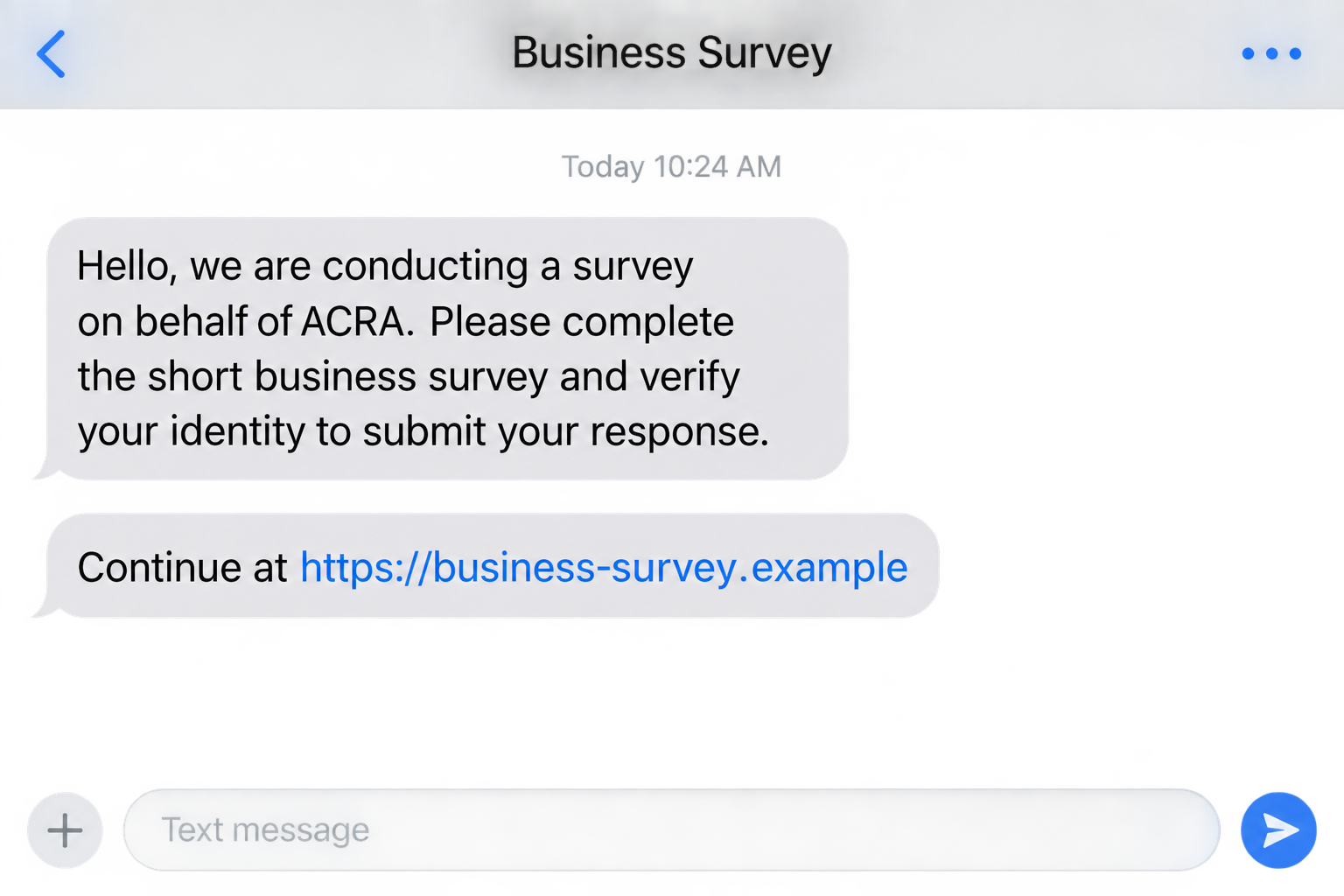
A short business survey arrives with ACRA’s name attached. The questions look routine, and the sender says there is just one more identity check before your response can be submitted. It feels like paperwork, not a purchase.
The ACRA survey scam hides its most important request inside that final step. Before providing a Singpass detail or approving anything, look at what the survey is really asking you to authorize.
Overview
The agency is real, but the survey claim is not
ACRA is Singapore’s Accounting and Corporate Regulatory Authority. Scammers use its name to make requests for sensitive information sound like legitimate business administration.
In its public scam advisory, ACRA warns about people claiming to conduct surveys on its behalf and asking for Singpass or bank details. The agency says it has not commissioned surveys requiring that information.
The advisory also identifies attempts to obtain Singpass access for registering businesses in victims’ names. That makes this an identity-abuse concern, not simply a suspicious questionnaire or a complaint about a real company’s service.
The notice was originally dated June 11, 2025, with an update shown in March 2026. It is an established, officially documented tactic, not something we are labeling a brand-new September outbreak.
A survey answer and an account approval are different things
Answering a question about a business is one action. Sharing a login password, giving someone a one-time code, or approving a service request is another. The scam tries to make those actions feel like parts of the same harmless form.
Singpass is a real digital identity system used across government and business services. That is why its credentials and approvals deserve more care than an ordinary questionnaire response.
You should understand the specific service and action involved before approving anything. A stranger’s explanation that a prompt is only for survey verification does not change what the prompt actually authorizes.
The request, not the promised reward, is the deciding factor
Some survey scams offer an incentive; others rely on a claimed official obligation. The ACRA warning does not establish one standard reward, one payment amount, or one fixed website.
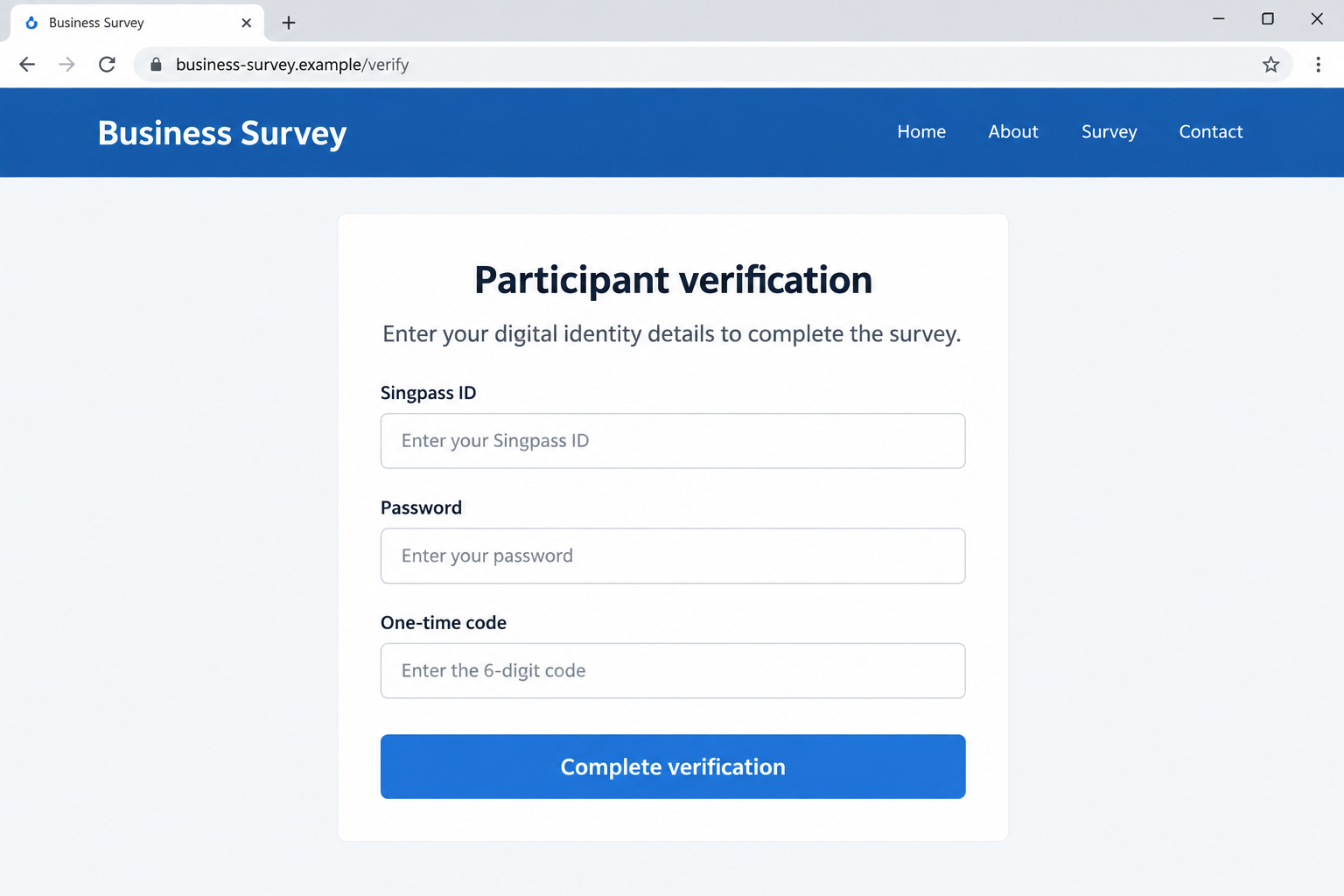
Our images are illustrative reconstructions using fictional web addresses. They show an impersonated survey and an unsafe credential request, not a live government form or a record of an individual victim.
- The contact claims to represent ACRA without independent verification.
- The survey asks for Singpass credentials or banking information.
- A message directs you to an unfamiliar verification page.
- The sender wants you to approve a request you did not initiate.
- Questions about the process are answered with urgency rather than a verifiable explanation.
You do not need to complete the survey to find out whether it is genuine. Ask the agency through a contact route found independently.
Why Identity Access Can Matter More Than an Immediate Payment
Many people judge a scam by whether money leaves their account. That can miss a request whose main target is identity access. A form that asks for no payment can still seek information or approvals valuable to a criminal.
GovTech describes Singpass as a digital identity used for government and business transactions. Losing control of an authentication step may therefore matter even when no card number is entered.
ACRA’s warning about unauthorized business registration gives a concrete reason to act. It does not mean every disclosed password automatically creates a company, or that a victim automatically becomes liable for whatever a scammer does.
The consequences depend on what information was obtained, which checks were completed, and what actions actually occurred. If something was done in your name, preserve evidence and ask the relevant agency how to correct the record.
Do not let uncertainty become a reason to wait. You can report that a credential was exposed before you know whether it was used. Early protection does not require proving the whole crime yourself.
How the ACRA Survey Scam Works
Step 1: A familiar authority gives the request credibility
The sender presents a survey as official research or business administration. ACRA’s name gives the message a reason to exist, especially for someone accustomed to forms and compliance reminders.
That familiarity is borrowed. A logo, agency name, or a few correct details about you do not establish that the sender has permission to collect information.
Start by asking how the contact can be verified outside the message. A real agency website and independently obtained support route are more useful than a badge or document sent by the same stranger.
Step 2: Ordinary questions lower your guard
A questionnaire may begin with details that seem unimportant. The danger is not necessarily in every question; it is in treating the whole process as safe after the first few familiar screens.
A useful habit is to reassess whenever the requested action changes. A question about business activity does not justify the next screen asking for a digital identity password.
Even if you spent several minutes on the form, you can stop. The time already invested is not a reason to finish an unsafe verification step.
Step 3: Identity verification becomes the condition for finishing
The sender asks for Singpass information or points you to a page that collects it. A related approach can involve a QR code or another authentication instruction. The exact route may vary.
The official advisory warns against sharing Singpass credentials and accepting unofficial messaging requests for access. It does not give every technical step of every incident, so do not assume the process will always look like our example.
Focus on the permission being requested. If the screen concerns a service or transaction you did not choose, reject it. If you cannot explain why the survey needs it, do not approve it.
Step 4: The information can be used outside the survey
The form’s description does not control how the information is used afterward. Someone who collects credentials may try to use them for a different purpose than the one described in the invitation.
ACRA specifically warns of attempts to register businesses in victims’ names. Other consequences should be checked based on the account activity, not assumed from the mere arrival of a message.
If a real confirmation or security alert appears, read it as a separate communication. Do not let the survey operator explain away an unfamiliar action simply by saying it is required to finish participation.
Step 5: Follow-up instructions can deepen the exposure
A person who notices a problem may return to the original contact for help. That gives the impersonator another chance to request a code, a payment, or a further account action.
Leave that conversation. Genuine support should be contacted separately. The person who requested the information is not an independent source of advice about whether it was safe to provide.
Also avoid confronting the sender or trying to recover control through threats. Your immediate priorities are securing access, documenting what happened, and notifying the agencies or providers whose services were involved.
Company and Identity Checks for a Claimed ACRA Survey
A research company must be verifiable independently
A sender may introduce itself as a contractor rather than the agency. Do not assume that a real company name proves authorization. An impersonator can borrow a contractor’s name as easily as a government name.
Ask ACRA through its official channels whether the specific request is authorized. Keep the identity claim separate from the requested action: even a plausible organization name does not justify sharing a password.
The official address is not an arbitrary survey link
ACRA identifies acra.gov.sg and bizfile.gov.sg among its official web services. Type a known address yourself instead of entering through a shortened link or a page supplied in a private conversation.
A business address in the footer is not enough. Neither is a privacy statement that says your data is secure. Those claims do not identify who actually controls the site collecting it.
Support should verify the survey, not demand your login
Use the contact information on the agency’s official website. Describe the sender, channel, and information requested. You can ask whether a survey exists without handing over your Singpass password.
If a supposed helpdesk asks you to continue on an unfamiliar messaging account, stop and verify again. Do not allow a transfer arranged by the original sender to substitute for an independent call or support request.
Trace any resulting filing through the real service
Check whether anyone actually used your identity or submitted a business filing without your permission. An unexpected confirmation or registration notice deserves prompt attention, even if no money appears to be missing.
If you discover a record you did not authorize, document it and contact ACRA. Do not pay an unsolicited cancellation service or alter unfamiliar records blindly. Ask for the proper correction procedure and, if needed, advice from a qualified professional.
What to Do if You Have Fallen Victim to This Scam
-
Stop the form and decline unexpected approvals. Do not provide the next code or scan another QR code to cancel your participation. Save the invitation and close the unfamiliar page.
Make a quick note of what you shared and whether you approved anything. Distinguish a name or phone number from a password, OTP, face-verification request, or completed transaction. That detail helps support prioritize the right response.
-
Secure Singpass through its genuine support route. Use the official Singpass website or app to follow recovery instructions. Review activity and report anything unfamiliar instead of relying only on whether you can still log in.
The Singpass support notice says the anti-scam hotline remains available around the clock through option 9. Obtain the current contact number from the official service before calling.
-
Tell ACRA if your identity may have been used. Explain the fake survey, the information exposed, and any unfamiliar business-related notices or records. Keep references to the case you open.
Do not assume a stolen credential means a registration definitely happened. Ask what can be checked. If a filing is confirmed, follow the agency’s correction process rather than accepting a stranger’s offer to erase it.
-
Contact your bank when banking information or money is involved. Use a known number or the bank’s app. Report passwords, card details, codes, or transfers separately so the bank understands the exposure.
Ask about restricting affected access and attempting to recover any transfer. Keep monitoring through the bank’s genuine tools. An email from the survey operator claiming everything was deleted is not proof that the information is safe.
-
Preserve evidence and make an official report. Keep messages, full web addresses, times, confirmation notices, and transaction records. Give these to police or the relevant agency through verified reporting channels.
Do not post identity numbers or login codes publicly. In Singapore, ScamShield offers scam guidance, including its 1799 helpline. Report urgent financial exposure to your bank rather than waiting for a general inquiry response.
-
Check software exposure and ignore paid recovery pitches. If the survey asked you to install an app or open an unusual file, treat that as a separate security issue. On a work device, involve your IT team.
Malwarebytes can help scan supported personal devices for malicious software. AdGuard can help block some unsafe advertising and known scam destinations. Neither cancels identity misuse or replaces official account recovery. Do not pay someone who promises those outcomes without verification.
Frequently Asked Questions
Has ACRA confirmed this survey scam?
Yes. Its public advisory warns about people claiming to conduct surveys on its behalf while asking for Singpass or bank information. It also warns about attempts to use stolen access for business registration.
Does every survey using a government name count as a scam?
No. Agencies can conduct genuine research. This warning concerns impersonated requests for sensitive login or financial information. Verify the specific survey independently rather than judging every questionnaire by appearance.
Can a form be dangerous if it never asks for money?
Yes. A password, authentication code, or approval can be valuable without an immediate payment. Think about access and identity as well as your bank balance when deciding whether to continue.
Does scanning a QR code always compromise Singpass?
No. The risk depends on the code, destination, and what you approve. Do not scan codes supplied by strangers for an unexplained verification task. Read the service and action shown in genuine authentication prompts carefully.
Will a stolen password automatically register a company in my name?
No automatic outcome is established by a disclosed password alone. Other checks and actions may be involved. Secure the account and ask the relevant service to investigate actual activity rather than guessing about what happened.
Who should I contact first after sharing information?
Prioritize the exposed service: Singpass for identity access and your bank for financial details or transfers. Then report the impersonation to ACRA and police, preserving the original messages and any evidence of unauthorized actions.
The Bottom Line
The ACRA survey scam makes sensitive access sound like the last step of an ordinary questionnaire. A survey does not become trustworthy because it uses a real agency’s name, and an authentication prompt is not just another answer box.
Keep your digital identity under your control. Verify the request outside the conversation, and if you already shared access, contact the genuine services promptly rather than waiting for a visible financial loss.

Join the discussion
0 commentsShare your experience or ask a question about this article.
Discussion
Start the conversation
Have a question or something useful to share? Add the first comment.