

You receive a message about an unpaid ERP charge. It sounds like a small motoring chore: check the vehicle account, clear the balance, and avoid another fee. The link offers a quick way to get it done.
The LTA ERP text scam is built around that ordinary moment. There is one detail worth checking before you reach for your card, even if you drove through an ERP gantry recently.
Overview
The road charge is a pretext for collecting payment details
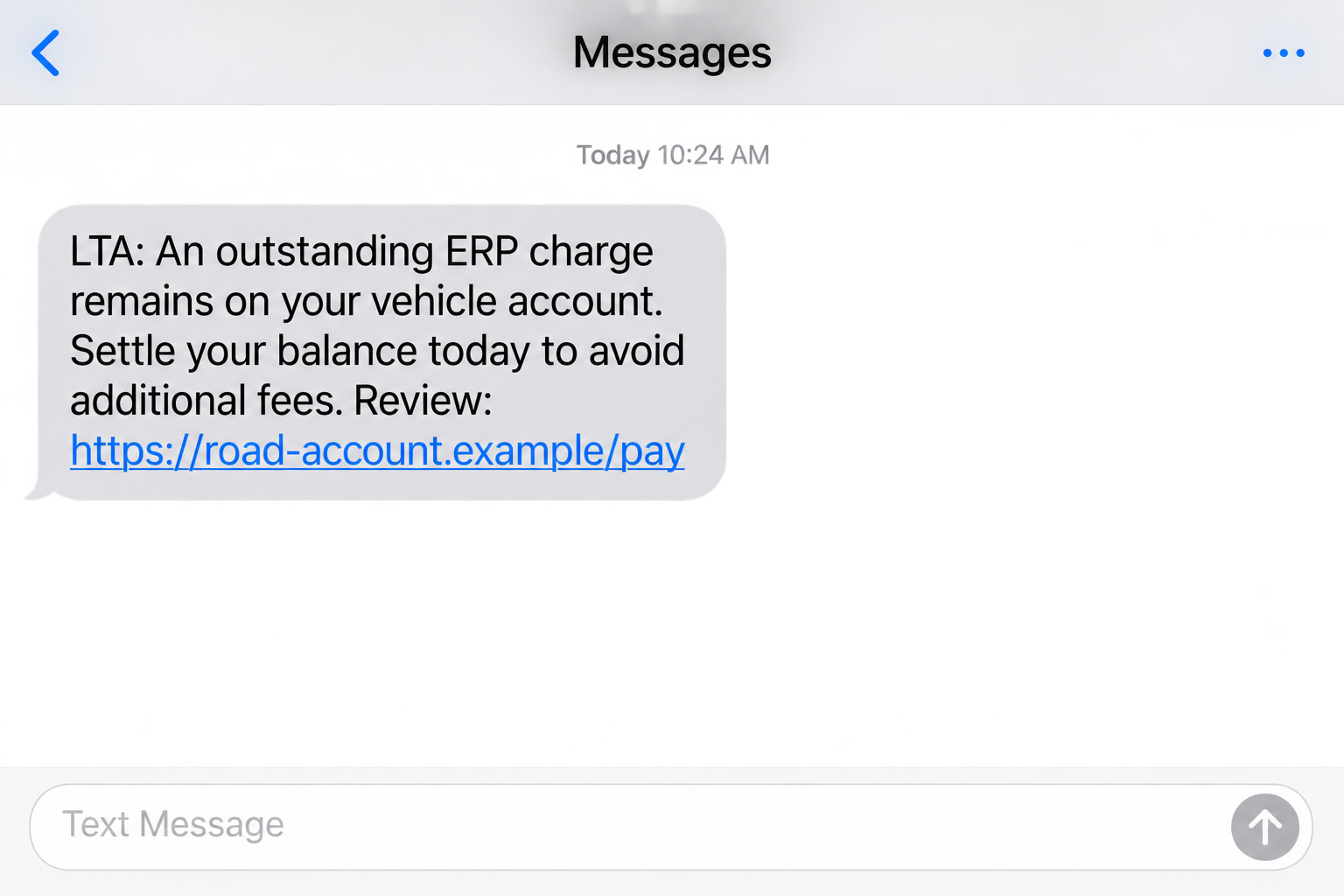
Scammers impersonate Singapore’s Land Transport Authority and send messages about supposedly unpaid Electronic Road Pricing fees. The message directs the driver to a website that resembles LTA or OneMotoring and asks for personal and financial information.
LTA and OneMotoring are legitimate services. The scam is the unauthorized message and imitation payment route, not the road-pricing system itself.
A Singapore Police warning issued June 22, 2026 describes this exact pattern. It reported at least 13 cases and at least S$74,000 lost since June 1, as of that alert. Those figures are a dated snapshot, not a current running total.
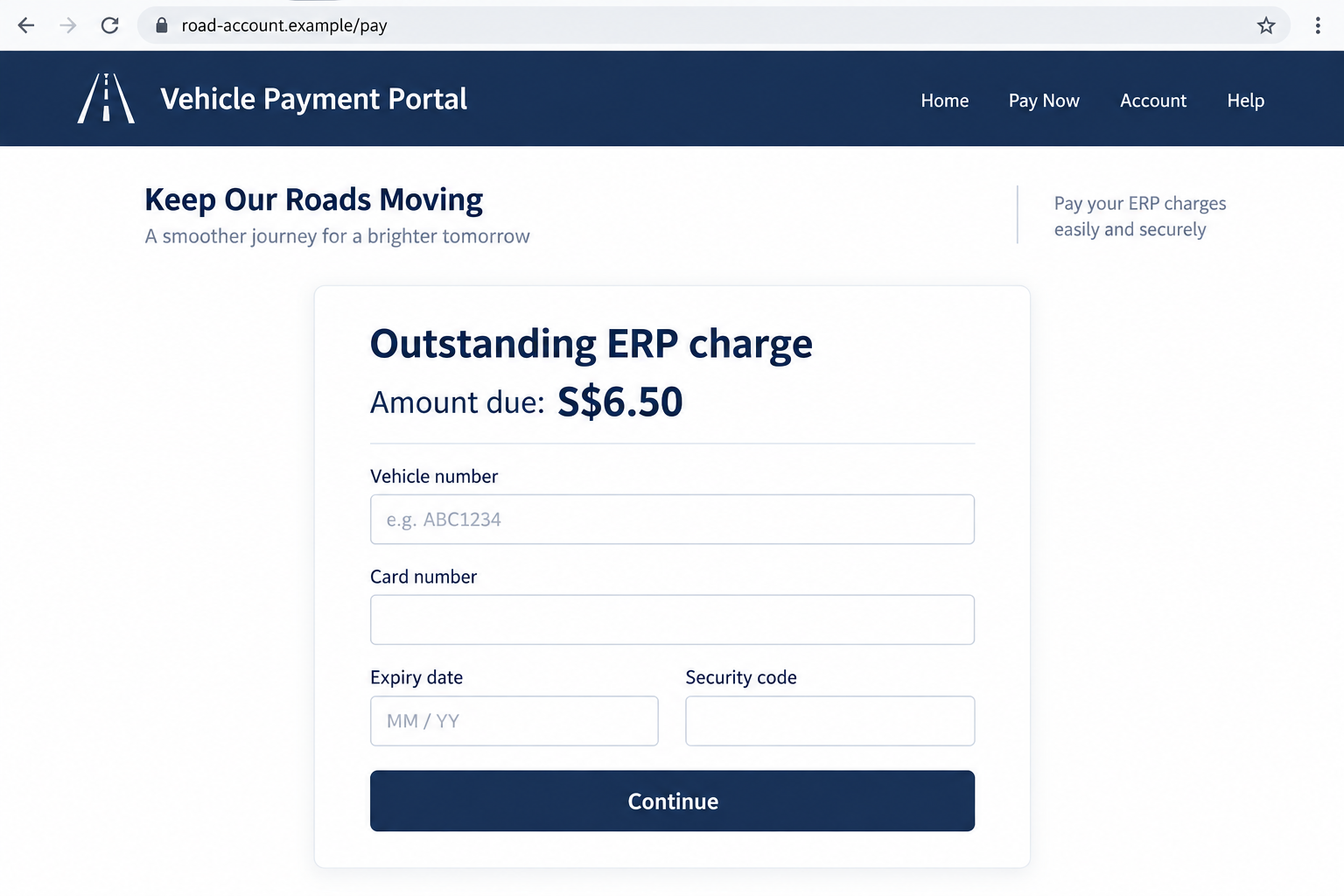
The reconstructed screens in this article illustrate the message-to-payment sequence. Their web addresses and S$6.50 example are fictional. They are not screenshots of a particular victim’s transaction or evidence of a standard fee.
The real notification does not provide this payment shortcut
The police warning draws a useful distinction: LTA messages about unpaid fees or road tax do not contain payment links to OneMotoring or a payment portal. An urgent pay-here link is therefore not just a cosmetic irregularity.
Official notifications can alert vehicle owners to a matter requiring attention. For a safe check, open the known official service yourself and review the account, rather than entering through the message.
This also prevents a common misunderstanding. Discovering a scam text does not mean you have no genuine motoring charges. It means the supplied link is not a trustworthy way to settle them.
The alert may change its story before it reaches you
Some messages describe an unpaid balance. Others mention a payment failure or an account review. Names, deadlines, and websites can change without changing the central trick: an unexpected message tells you to hand payment information to its destination.
Watch for the combination rather than waiting for an exact match to a screenshot:
- A surprise claim about your vehicle or road charges.
- A deadline tied to extra fees or account restrictions.
- A link that bypasses your usual way of checking OneMotoring.
- A page asking for card, banking, or verification information.
- A request to keep trying after the bank warns or declines.
The last point is a warning sign to recognize if it appears, not a claim that every reported LTA case included repeated payment attempts.
Why a Small Charge Can Lead to a Much Bigger Loss
A modest balance can feel too trivial to investigate. You may think paying it is easier than remembering your recent driving or dealing with a late charge. That makes the amount part of the persuasion.
But the amount displayed on a fake page is only text. It does not limit what someone might attempt after obtaining your card information or account access. The risk depends on what you disclose and authorize, not just what the page says you owe.
Consider a fictional driver who sees S$6.50 on the screen. Entering a card is one exposure. Entering an OTP is another. Approving a separate bank request is another still. Each action needs its own check.
Read bank notifications in full, including the merchant, amount, and action. A code for adding a card or approving a purchase should not be treated as a harmless road-account check because the webpage calls it verification.
How the LTA ERP Text Scam Works
Step 1: The message arrives during an ordinary day
The opening claim is designed to fit something drivers already recognize. You have a vehicle, road charges exist, and administrative reminders are common. That gives the sender a believable starting point without proving it knows anything about your driving.
If the text does not identify your vehicle, do not supply the missing detail to see whether a bill appears. A fraudulent page can display a convincing balance after any entry. That response would not establish a real account connection.
If it does identify a vehicle, the same rule applies. Familiar information can make a message persuasive, but verification still has to happen through a trusted service.
Step 2: A deadline makes the link feel useful
The warning about another charge or an unresolved account gives you a reason to act immediately. The link is presented as the solution to the problem the message just introduced.
Pause before deciding which part of the screen looks most official. You do not need to determine where the sender lives or how the message was sent to refuse an unsafe payment route.
Open the official LTA website or OneMotoring separately. If there is a genuine issue, you can deal with it there. Leaving the message does not prevent you from paying a legitimate charge.
Step 3: An imitation page makes the request look routine
The police describe lookalike LTA or OneMotoring pages that collect vehicle and personal information along with financial details. The borrowed design reduces the feeling that you have moved somewhere unfamiliar.
A logo, familiar color scheme, or security notice is not a connection to a government database. Those are visible page elements. You need to know who controls the address before deciding whether the form deserves your information.
Do not mistake an address containing government-looking words for an official domain. In a fictional address such as lta.gov.sg.account-check.example, the government-looking text is only part of a name controlled elsewhere.
Step 4: The page asks for more than a vehicle number
The point at which it asks for a card, banking credentials, or a verification code is especially important. A person trying to settle a bill may continue automatically because the first questions seemed harmless.
You can stop halfway. Entering your registration number does not obligate you to finish the payment form. Supplying one piece of information is not a reason to surrender the next.
Likewise, a screen saying the transaction is incomplete does not prove a charge failed. Check directly with your bank before retrying or using another card.
Step 5: The victim discovers an unrelated transaction
In the cases described by police, victims noticed unauthorized activity in their bank accounts. A fake completion screen or an emailed receipt would not rule that out.
Do not wait for the next statement if you think you entered information on a fraudulent page. Contact your bank while the details are fresh, even if you have not yet seen money leave.
The first honest description helps: say what information you entered, what requests you approved, and when. You do not need to know the technical name of the attack before asking for help.
Company and Website Checks for an ERP Payment Request
The authority named in the text is not the sender
Keep the real LTA separate from the person using its name. A text may claim to represent a government office while being sent by someone entirely unrelated to it.
A sender label should be one check, not the whole decision. The official alert identifies gov.sg as the sender ID for LTA SMS notifications. Still verify the requested action independently instead of trusting a screenshot or forwarded message.
The web address matters more than the page design
Reach OneMotoring through an official route you choose yourself. Do not experiment with slight variations of a suspicious address or try to repair its spelling.
A secure connection protects data in transit to whichever site you opened. It does not establish that the recipient is LTA. The same is true of a polished privacy notice or a familiar-looking footer.
Support must come from outside the payment page
A help chat on the suspect website belongs to the same unverified process. It cannot independently confirm that the website is genuine.
Use the contact options on the official LTA website for the motoring issue and your bank for financial exposure. A fake billing page is not the place to negotiate a refund or ask whether your card is safe.
A real payment should connect to a real record
The meaningful trail is your vehicle account and the authorized payment record. A transaction reference invented by a webpage does not connect the payment to an ERP balance.
Keep any genuine records you already have. If an amount is disputed or unclear, ask LTA through its established channels rather than accepting the text’s explanation. This is a billing check, not a test of whether you can spot every forged logo.
What to Do if You Have Fallen Victim to This Scam
-
Close the page and stop approving requests. Do not try another card, enter another OTP, or reply to a message claiming your first attempt needs correction. Save the message without revisiting the destination.
If you only tapped the link and supplied nothing, close it and check for unexpected downloads or permission prompts. A click alone does not establish that your bank account has been compromised.
-
Call the bank using a trusted contact route. Explain that the payment page impersonated LTA. Specify whether you exposed a card, banking login, OTP, or banking-app approval, because those details affect what needs to be secured.
Ask about blocking affected cards or access and reporting unauthorized transactions. If money was transferred, request an immediate recovery attempt. Do not assume a small advertised fee limits the possible loss.
-
Protect exposed credentials from a safe device. Change any banking or other account password you entered through the fake page, following the provider’s instructions. If you reused that password, change it on the other accounts too.
If you were asked for Singpass information, contact Singpass through its official website. The original road-charge story may conceal a different account action, so describe what the screen actually requested.
-
Check the device if you installed anything. An ERP text does not automatically mean malware was installed. If the page persuaded you to download or run software, however, investigate that exposure as well as the bank account.
Malwarebytes can help check a supported personal device for malicious software. AdGuard can reduce exposure to some malicious ads and known unsafe pages. They supplement careful verification; they do not reverse a payment or replace bank support.
-
Keep a clear record for the bank and police. Save the text, sender information, link, times, transaction references, and any bank alerts. Note which details you submitted. Do not publish your card, registration documents, or verification codes when warning other people.
Report financial loss to Singapore Police. For guidance on suspicious messages, contact ScamShield through its official website or the 1799 helpline.
-
Check the real vehicle account separately. Once urgent account protection is underway, review any actual balance through OneMotoring. Do not let a scam receipt convince you that a genuine charge was paid.
Be cautious if someone later offers to recover your payment for a fee. A person who repeats the amount or reference from the first scam may simply have access to the same stolen information.
Frequently Asked Questions
Does LTA send payment links for unpaid ERP fees?
The official police advisory says LTA messages about unpaid fees or road tax do not contain payment links to OneMotoring or payment portals. Check through the official service independently instead of using the text’s link.
What if I really have an unpaid road charge?
That does not authenticate this message. A genuine balance and a fraudulent text can exist at the same time. Verify the amount in your real account and pay only through a confirmed channel.
Can a scam page display a correct vehicle number?
Yes, knowing or repeating a vehicle number would not establish authority to collect money. If you entered it yourself, the page can simply display it back. Check the account through OneMotoring rather than trusting personalization.
Is the S$6.50 amount shown here a confirmed scam charge?
No. It is an illustrative amount in a generated example. The official warning does not say every message requests that sum. Different demands can use the same small-balance pretext.
Do I need a new card if I did not press Submit?
Tell your bank what you typed and where, even if you did not finish. A page may capture information before a final submission. Your bank can assess whether replacement or other protective action is appropriate.
Will reporting guarantee that I get my money back?
No one can promise that. Contacting the bank quickly gives it a chance to act and helps protect against further exposure. Preserve evidence and follow the bank’s dispute and reporting instructions.
The Bottom Line
The LTA ERP text scam uses a familiar driving expense to move you onto an unfamiliar payment page. The apparent convenience is the trap: you are asked to trust the message’s route before checking the bill.
Open OneMotoring yourself. If you already supplied financial information, call your bank promptly and explain exactly what happened. There is no need to keep cooperating with the page to put things right.

Join the discussion
0 commentsShare your experience or ask a question about this article.
Discussion
Start the conversation
Have a question or something useful to share? Add the first comment.