

When shopping online, it’s crucial to research unfamiliar retailers before making purchases. Caution is advised with the website Onyxaeon.com, which displays several characteristics that should cause consumers to think twice before buying.
This recently created sunglasses site shows multiple unusual signs, including no company details, prices that seem too good to be true, and stolen product images. This article will explore these warning signs without making outright accusations.
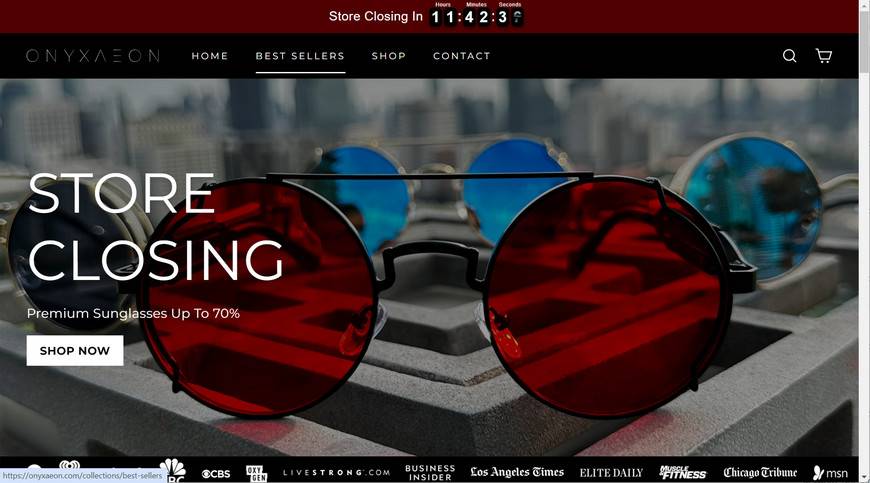
Evaluating the Red Flags of Onyxaeon.com
While Onyxaeon.com appears slick on the surface, various suspicious indicators give away its likely scam nature:
- Domain registered only a month ago – Far too new to have any legitimate presence, reputation, or inventory.
- Already holding sales and deals – Scam tactic to create false urgency and tempt impulse purchases.
- Lack of company information – No “About Us” details, company history, owners, physical address, or contact numbers.
- Copied stock images – Sunglass photos taken from wholesaler sites like Alibaba without authorization.
- Prices suspiciously low – Designer brands offered at impossibly huge discounts, even on “non-sale” pairs.
- Privacy-protected domain registration – Ownership details hidden because they don’t want to get caught.
With no verifiable corporate identity, no way to contact them, and demonstrating multiple known scam site behaviors, consumers should tread very carefully regarding Onyxaeon.com.
Avoiding Scam Websites
These tips can help protect you from being scammed:
- Research unfamiliar sites for reviews indicating legitimacy or fraud.
- Beware discounts that seem too good to be true on expensive products.
- Check sites like WhoIs to view domain registration transparency. Hidden owners are a major red flag.
- Reverse image search product photos to see if they were copied from other sites.
- Require valid contact channels like working phone numbers from online retailers. Email addresses alone may be scams.
- For high-cost items, only use trusted sites with years of reputation and history in business.
With minimal investigation, the multiple suspicious indicators around Onyxaeon.com should encourage most consumers to wisely avoid its supposed deals and shop for sunglasses through authenticated retailers instead.
What to Do if You Ordered from Onyxaeon.com
If you placed an order on Onyxaeon.com which likely will never arrive, take these steps to report the scam and recover lost money:
- Immediately dispute the charges as fraudulent with your bank or payment provider.
- File an online scam complaint with the FBI’s Internet Crime Complaint Center.
- Report Onyxaeon.com to the Federal Trade Commission to potentially get the site taken down.
- Leave reviews about the scam on consumer review sites to spread awareness.
- Monitor your credit card statements closely for any further suspicious activity.
- Consult a consumer protection attorney about legal options to recover payments sent to a verifiable scam.
Though the damage may be done, reporting this scam can help prevent others from falling prey. Spreading public awareness empowers consumers to recognize deceitful retailers misrepresenting themselves online.
The Bottom Line
Onyxaeon.com exhibits obvious signs of being an online retail scam, rather than a legitimate storefront. Consumers must watch for major red flags like no company details, unbelievable prices, stolen images, and hidden domain ownership to avoid such frauds. If duped, one must act swiftly to report the crime, recoup losses, and prevent further victims. Let Onyxaeon.com serve as a costly lesson in double-checking online sellers through careful research before making payments.

Reviews & discussion
0 commentsShare a firsthand experience, or ask a question.
Community reviews
onyxaeon.com
Moderated reader experiences, not an editorial verdict.
Start the conversation
Have a question or something useful to share? Add the first comment.