

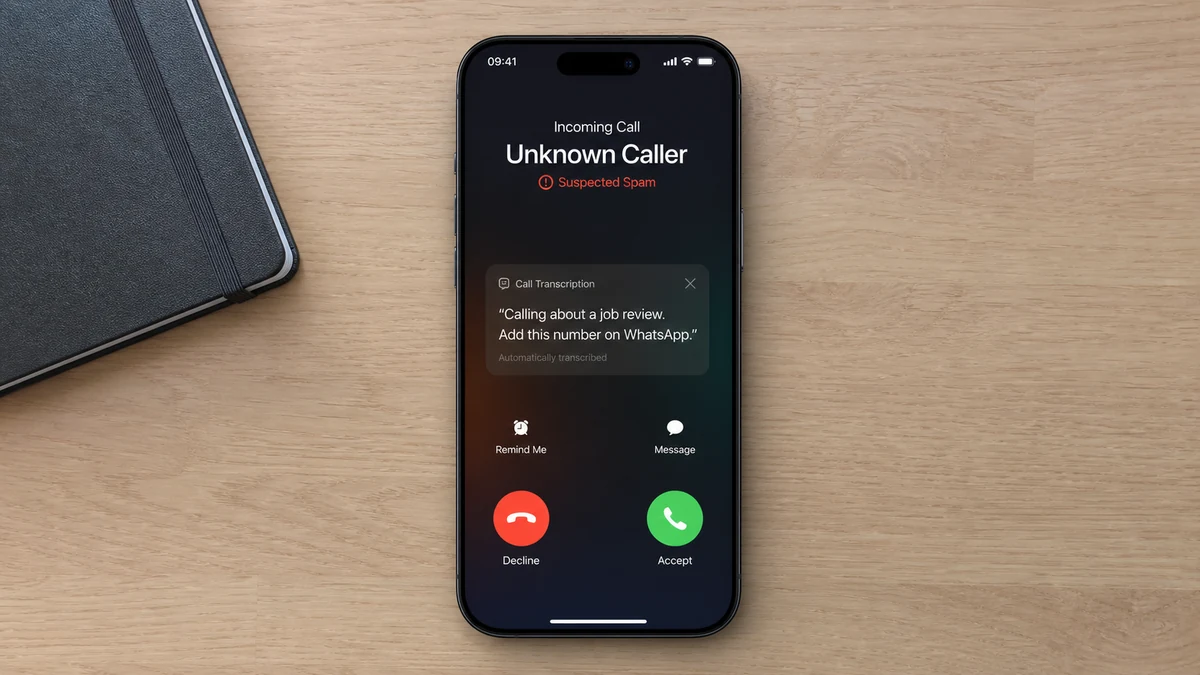
The phone rings while you are waiting to hear back from employers. A recorded voice says it is calling about a “job review,” tells you to add the number on WhatsApp, and disconnects before you can ask a question.
There is no company name and no role. For an anxious job seeker, the missing details can feel like a reason to respond instead of a reason to stop.
Overview
The call arrives at exactly the right emotional moment
A recent UK consumer report describes an unknown number calling at about 2 p.m. while the recipient was actively job hunting. A feminine recorded voice said, “I am calling you about a job review please add my number on WhatsApp,” then hung up.
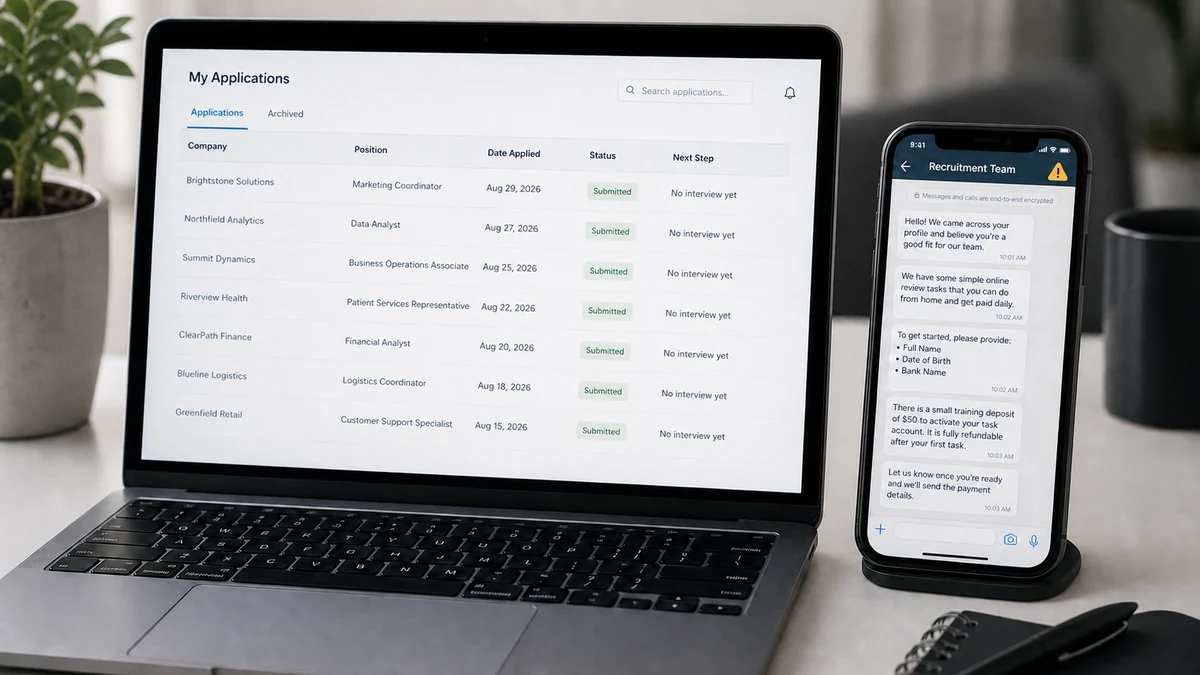
The recipient had not received email replies from the jobs they had applied for and worried that ignoring the call might mean missing a real opportunity.
That uncertainty is the hook. A genuine employer could identify the company, role, recruiter, and application. The recording supplied none of them.
The robocall appears designed to make the target initiate contact
The call did not present a complete job offer or link to a named vacancy. It pushed the recipient to add an unknown number on WhatsApp, where the next stage could happen outside ordinary recruitment channels.
Making the target start the WhatsApp conversation confirms that the number is active and that the person is interested in work. It also moves the exchange into a place where profiles, messages, files, and group invitations can be changed quickly.
The recording alone does not prove which downstream scam was planned. It is a lead-in. The next message could become a task scam, identity theft attempt, fake equipment payment, advance-fee recruitment scheme, or account-takeover trick.
A job application does not make every job-themed contact genuine
Criminals do not need a list of the exact vacancies someone applied for. Bulk dialling can reach many people who happen to be job hunting, and public profiles can reveal employment status or industry.
Warning signs in this approach include:
- A recorded voice gives no company or recruiter name.
- The phrase “job review” does not identify a normal hiring step.
- The call ends before questions can be asked.
- The recipient is told to add an unknown WhatsApp number.
- No matching email, application update, or portal message exists.
- The number may not match the employer’s published contact details.
- The future role, pay, hours, and location remain undefined.
- The contact method creates urgency around a job that has not been identified.
What This Call Establishes and What Remains Unknown
The report establishes that an automated or prerecorded job-themed call directed the recipient to WhatsApp. It also establishes that the recipient could not connect the message to any employer response already received.
The report does not publish the number, the carrier, an audio file, caller-ID data, or any WhatsApp conversation. No company, recruiter, role, website, or payment request was named.
That evidence gap matters. It would be inaccurate to claim that this specific call definitely led to crypto tasks, a fake cheque, malware, or identity theft.
It is still reasonable to treat the instruction as unsafe. Legitimate recruiters do sometimes use WhatsApp, but professional use does not remove the need to identify the employer and tie the contact to a real application.
The call may be sent at scale. A generic message can feel targeted because many recipients have recently applied for work, posted a CV, updated LinkedIn, or registered with a job board.
The safe response is not to guess which employer might be calling. Check each application through the employer’s official portal or contact the hiring team using details from the original job posting.
How the Job Review Robocall Works
Step 1: Bulk calls search for responsive job seekers
An automated system can dial large lists cheaply. The message needs only to sound relevant to a portion of recipients.
People waiting for application updates are more likely to interpret an unknown call generously.
Step 2: The recording withholds the details needed to verify it
No employer, job title, recruiter, or application reference is given. The ambiguity lets almost any job seeker imagine a possible match.
A vague phrase such as “job review” sounds administrative without committing the caller to a checkable claim.
Step 3: The target is sent to WhatsApp
The recording ends and leaves the recipient to add the number. The operator gains an active contact and a WhatsApp profile linked to it.
The target’s message can also signal language, time zone, urgency, and willingness to follow instructions.
Step 4: A recruiter persona supplies the missing story
Once contact begins, the operator can claim to represent a staffing agency, retailer, media company, hotel, app developer, or recognizable employer.
The vacancy can be adjusted to fit whatever the target reveals during the conversation.
Step 5: Easy work lowers normal hiring expectations
The role may involve product reviews, app optimization, data entry, hotel ratings, video likes, or simple remote administration. Immediate hiring is framed as efficiency.
There may be no real interview, manager, contract review, or company email.
Step 6: Money or identity data becomes the real task
The target may be asked to fund tasks, pay for training, buy equipment, deposit a cheque, receive packages, submit identity documents, or provide bank details for payroll.
A real job pays the worker. It does not require repeated deposits to release earnings.
Step 7: The operator uses losses to demand more
A fake dashboard may show commission that cannot be withdrawn until a negative balance, tax, verification, or premium task is paid.
If personal information was the objective, the recruiter may disappear after collecting the form and return later under another company name.
Why “Add Me on WhatsApp” Changes the Risk
WhatsApp is a legitimate communications service. The warning is not the app itself, but the attempt to make it the first and only verifiable recruitment channel.
When the target adds the number, the operator may see the profile name, photo, status, and other information allowed by privacy settings. That data can improve the next message.
A business profile badge or company logo does not prove employment by the named company. A WhatsApp Business account can be created by small businesses and individuals.
Messages can include links to cloned job portals, APK files, documents, QR codes, and group chats. The conversation can also be deleted or the account abandoned quickly.
Recruiters may legitimately schedule interviews through messaging apps after an established application. The sequence should still begin with a named role, company identity, and contact that can be verified outside the chat.
Do not save the number merely to inspect its profile if the call has no identifying details. A profile can be copied, and responding confirms that your number reaches someone interested in work.
If you already added the number but did not send anything, block and report it. Review profile privacy so unknown contacts cannot automatically view more information than necessary.
Never share the six-digit WhatsApp registration code. A recruiter does not need it to schedule an interview, verify a CV, or add you to a work group.
How to Verify a Real Employer Contact
Start with your application log. Match the company, role, date, job-board URL, recruiter name, and expected next step. If the caller cannot supply those details, do not fill them in on the caller’s behalf.
Open the employer’s website independently and find its careers page. Check whether the vacancy exists and whether the recruiter’s email domain matches the company.
Call the employer through a published switchboard or send a message through the application portal. Ask whether the number and recruiter are authorized.
Search Companies House for a UK company, but understand the limit. A real registration can be copied by an impersonator, and registration does not verify the person contacting you.
Read the job description closely. It should explain duties, hours, location, reporting line, required experience, pay structure, and hiring process.
A professional interview may occur by phone or video, but it should involve questions about the work. A text-only conversation followed by immediate hiring is a strong warning.
Do not send passport images, National Insurance details, bank information, proof of address, or right-to-work documents before verifying the employer and reaching the appropriate hiring stage.
UK guidance warns that text and WhatsApp messages can be used to collect details or charge fake recruitment and DBS fees. Genuine checks must follow an identifiable process.
Never install remote-access software for an interview. Screen sharing should not reveal banking, passwords, one-time codes, or personal documents.
If the role involves receiving money or parcels for the company, stop. You may be recruited as a money mule or package mule rather than an employee.
Where the Conversation Commonly Leads
One common route is a task scam. The “employee” clicks, rates, or optimizes products and sees commission on a dashboard. Later tasks require deposits, and the balance becomes trapped.
The FTC’s task-scam guidance describes unexpected WhatsApp or Telegram job messages, fake earnings, and demands to deposit money, often through cryptocurrency.
For a full example of that next stage, see MalwareTips’ Recom task scam investigation, where supposed product work becomes a cycle of deposits and invented debt.
Another route is payroll identity theft. The recruiter collects a passport, address, tax details, selfie, bank information, and signature through a polished onboarding form.
A fake-equipment scheme may send a cheque and instruct the new hire to buy a laptop from a designated vendor. The cheque later fails, while the payment to the fake vendor remains the victim’s responsibility.
An advance-fee version charges for background checks, DBS processing, training, software, uniforms, visas, or placement. GOV.UK advises job seekers not to send money before starting work.
A money-mule role asks the target to receive transfers and forward them, keeping a commission. The funds may come from other victims, creating financial and legal consequences.
A malicious-download version provides an interview app, assessment file, browser extension, or remote-management tool. It may steal credentials or give an operator control of the device.
The initial robocall does not tell us which path was intended. Its function is simpler: find a person willing to move from an unexplained call into a private chat.
Why Job Seekers Can Receive the Call Without a Known Leak
Job hunting creates many new contact points. A CV may appear on recruitment sites, agency databases, professional networks, portfolio pages, and employer systems during the same week.
Some services allow recruiters to search candidate profiles. A fraudulent account or compromised recruiter login can expose phone numbers without proving that the applicant’s primary email was hacked.
Public LinkedIn updates such as “open to work” can reveal timing even when the phone number is hidden. The operator can then send broad job messages to people in the same region or profession.
Data brokers and older breaches can connect a number with a name, job history, and location. The information may be outdated but still useful for a generic approach.
Chance is also powerful. Millions of people apply for work, so a bulk robocall will reach some recipients on a day when they expect employer contact.
Do not assume a specific job board caused the call without evidence. Check account access, privacy settings, and breach notifications, but avoid naming a company as the source of a leak based only on timing.
Use a dedicated email address for applications and consider a separate call-forwarding number. That separation makes unexpected contacts easier to compare with the places where the details were actually used.
Keep a simple application record with the official posting URL and recruiter details. It turns a vague call into a quick verification task instead of an anxious guessing exercise.
Remove old public CV files when they are no longer needed. A document indexed months earlier can continue exposing a phone number, address, references, and employment history long after the job search ends.
Company, Address, and Fulfillment Checks
The caller never identified a company
A real recruiter should be able to name the employer, vacancy, department, and source of the application. “Job review” is not a substitute for those details.
Do not disclose your application history to help an unknown caller choose a company to impersonate.
The phone number is not a verified business address
A UK-looking mobile number can be spoofed, forwarded, rented, or controlled abroad. Compare it with the employer’s official contact information.
Caller ID identifies what the network displays, not necessarily who made the call.
The WhatsApp profile can borrow branding
A logo, recruiter photograph, business label, or copied vacancy does not prove authorization. Contact the company through its own website and ask whether the profile belongs to it.
Do not rely on a certificate or registration document sent inside the chat.
Fulfillment is a real job, not dashboard earnings
A genuine role produces an identifiable employer, written terms, lawful onboarding, performed work, payslips, and wages paid to the worker.
Numbers inside a task platform, promised commissions, and pending payroll do not fulfill a job offer.
What to Do if You Have Fallen Victim to This Scam
- Stop the WhatsApp conversation. Do not send another document, deposit, training fee, tax, refund, or account code.
- Save the evidence. Capture the incoming number, call time, voicemail or recording, WhatsApp profile, messages, links, files, payment instructions, and claimed employer.
- Contact the real employer. Use the careers page, switchboard, or application portal you opened independently. Ask whether the recruiter and vacancy are genuine.
- Report and block the account. Use WhatsApp’s block and report controls. In the UK, forward suspicious texts to 7726 and follow GOV.UK reporting guidance.
- Call the bank or payment provider. If money was sent, explain that an authorized payment was induced by a fake job and ask about recall or dispute options.
- Protect identity documents. If passport, licence, National Insurance, selfie, or bank data was shared, record exactly what was exposed and follow the relevant identity-fraud process.
- Change exposed credentials. Replace reused passwords, revoke sessions, enable strong multi-factor authentication, and never share one-time codes.
- Scan with Malwarebytes. Run a full scan if you installed an interview app, extension, remote-access tool, or opened an unknown executable. A chat message by itself does not prove infection.
- Use AdGuard as preventive support. It can block many known phishing and malicious advertising domains, but it cannot verify a recruiter inside WhatsApp.
- Check for mule activity. Tell the bank immediately if you received or forwarded money for the supposed employer. Do not move remaining funds on the recruiter’s instructions.
- Report the fraud. Use Report Fraud in England and Wales, Police Scotland where appropriate, and notify the job board that hosted the copied vacancy.
- Ignore recovery and legal threats. Scammers may claim you owe a contract penalty or offer to recover a task balance for a fee. Do not pay either demand.
Frequently Asked Questions
Could a real employer ask me to use WhatsApp?
Yes, after a verifiable application and introduction. The problem here is an unexplained robocall with no company, role, recruiter, or matching email.
Did the caller know I was applying for jobs?
Not necessarily. Bulk calls reach many job seekers by chance. Public profiles, job boards, or exposed contact lists can also make targeting more specific.
Is adding the number dangerous by itself?
It confirms your number is active and may expose profile details allowed by your privacy settings. The larger risk begins when you reply, click, download, pay, or share data.
What does “job review” mean?
The phrase did not identify a recognizable hiring stage in the report. A legitimate caller should explain the role, company, and reason for contact clearly.
Can a WhatsApp Business profile be trusted?
No profile label alone verifies employment by the named company. Check the recruiter through official company contact details and the original application portal.
Should I call the number back to ask which job?
No. Review your applications and contact employers independently. Calling back or messaging confirms that the number reaches an interested job seeker and may start the scam.
The Bottom Line
The Job Review Robocall works by turning a job seeker’s uncertainty into the first message on WhatsApp. The caller provides no claim that can be checked, then asks the recipient to build the contact path.
Do not add the number to discover which opportunity it might be. A genuine employer can identify the vacancy and confirm the contact through its own domain or application portal. Until that happens, the safest response is no response.








