


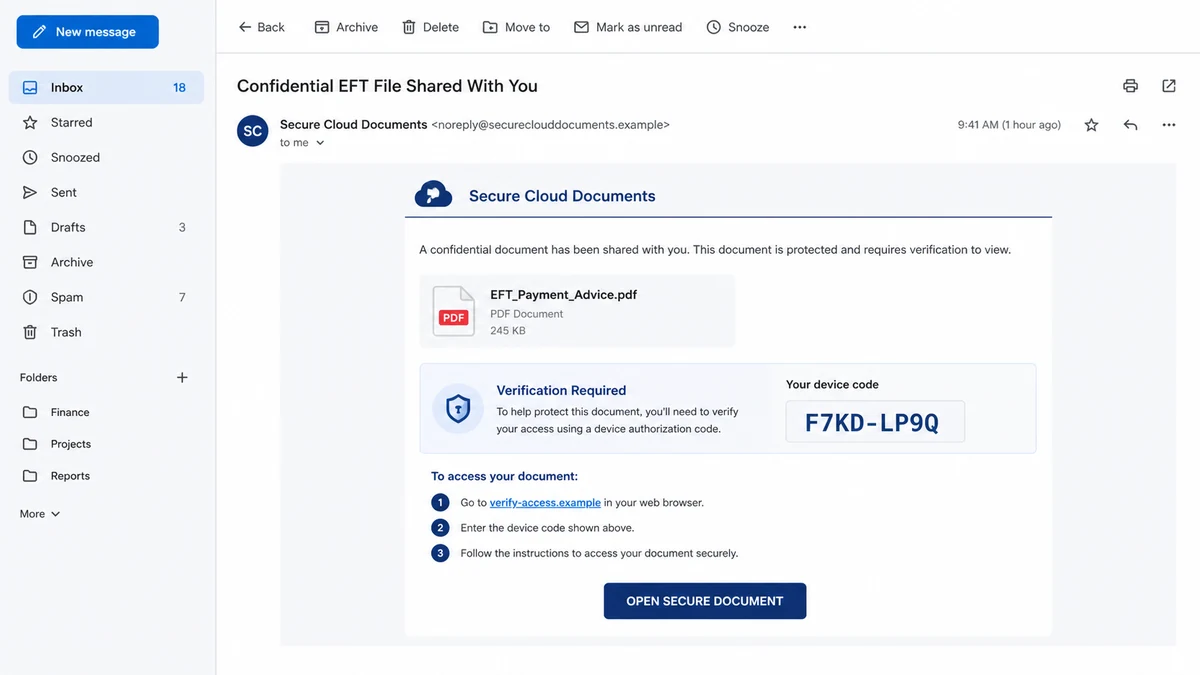
The email promises a protected invoice, shared document, voicemail, or collaboration request. It does not ask for a password. Instead, it supplies a short code and points the recipient toward a familiar account-verification page.
The page may be genuine, the connection secure, and multi-factor authentication active. Those reassuring facts are part of the trap.
The Kali365 device code phishing scam turns a normal sign-in feature into account authorization for someone else’s device. One approved code can give an attacker a path into mail, files, and workplace conversations.
Overview
The lure asks for authorization instead of a password
Traditional phishing sends a victim to a copied login form. Kali365 can use a different route. The message supplies a device code and tells the recipient to enter it into a cloud account’s legitimate device-sign-in page.
The FBI warned in May 2026 that Kali365 was being distributed as a phishing-as-a-service platform. It gives operators templates, AI-generated lures, tracking tools, and token-capture capabilities aimed primarily at Microsoft 365 environments.
The victim may never type a password into an attacker-controlled page. That removes one of the warning signs people are trained to notice.
The code belongs to the attacker’s sign-in attempt
Device code flow exists so a device with limited input can be authorized through another browser. The code identifies a pending authentication request.
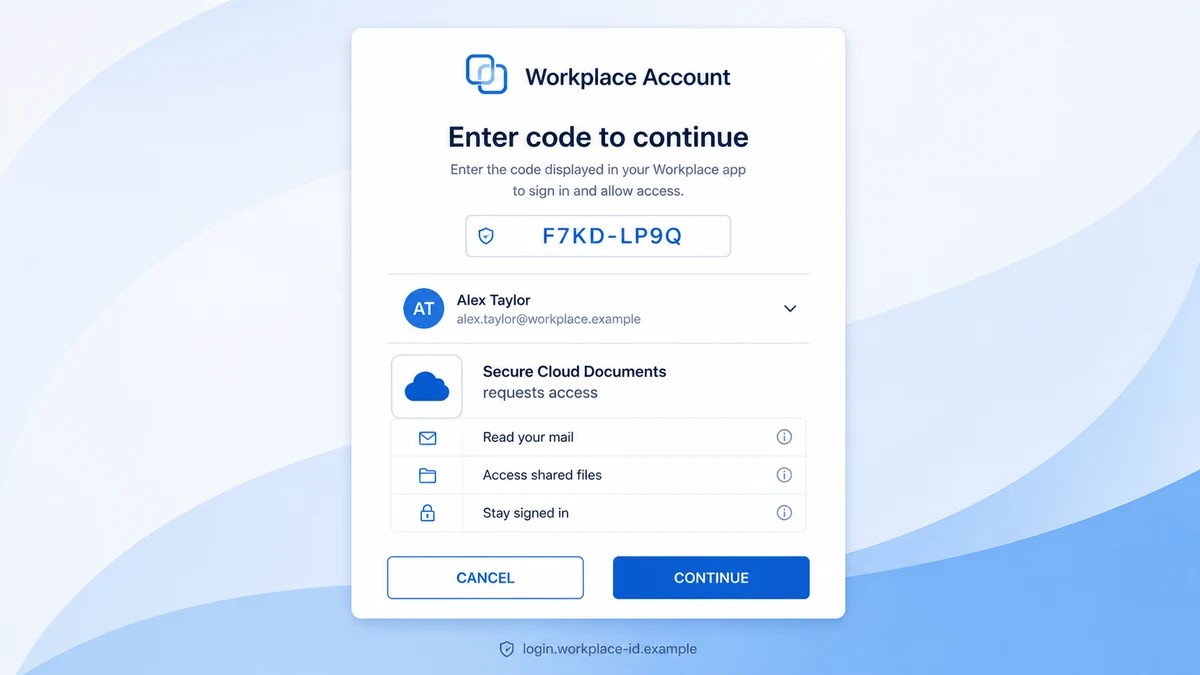
In this scam, the criminal starts that request on a device they control. The email persuades the victim to complete it. Signing in and entering the supplied code approves the attacker’s session, not the promised document.
MFA may be completed normally because the real user is authenticating on a real page. The security system confirms the user’s identity, while the social engineering hides what is being authorized.
Stolen tokens can outlive the phishing message
After authorization, the attacker can obtain OAuth access and refresh tokens. The FBI says those tokens may permit access to Microsoft 365 services such as Outlook, Teams, and OneDrive without another password or MFA prompt.
A password change is important, but it may not be enough if active sessions, refresh tokens, applications, or registered devices remain trusted.
Warning signs include:
- An unexpected document arrives with a device code.
- The sender tells you to copy a code into a sign-in page.
- The code was generated before you chose to sign in.
- The promised file never appears in the normal service.
- The authorization describes access unrelated to the document.
- A message claims MFA or verification requires this unusual flow.
- The sender pressures you to complete the code before it expires.
- New sign-ins, inbox rules, or devices appear afterward.
Why a Real Login Page Does Not Make the Request Safe
Checking the domain is essential, but it answers only one question: who operates the page? It does not explain who created the authorization request or what access it will grant.
A criminal can direct the victim to a legitimate verification page because the cloud provider is handling the final authentication. The malicious part began earlier, when the attacker requested a device code and wrapped it in a false document story.
The padlock also has a limited meaning. It protects the connection between the browser and the real identity provider. It cannot tell the user whether the code came from a coworker, an attacker, or a device they intended to connect.
MFA behaves as designed. The user proves identity and approves the flow. The scam defeats the human understanding of the request rather than the cryptography.
This is why generic advice such as “never enter your password on a fake page” does not cover the whole risk. The safer rule is never authorize a code you did not initiate on a device you control.
If a document truly requires access, open the known collaboration app or website independently. The file should appear in normal notifications, shared items, or an established conversation.
How the Kali365 Device Code Phishing Scam Works
Step 1: An operator chooses a trusted workplace lure
The phishing email may imitate a document-sharing service, cloud storage alert, invoice, electronic signature, payment advice, meeting, or voicemail. Familiar business tasks make the request feel routine.
Phishing-as-a-service lowers the technical barrier by supplying templates and campaign controls to different criminals.
Step 2: The attacker starts a device authorization request
On a device or session they control, the attacker begins the legitimate device code flow. The identity platform issues a temporary code linked to that pending request.
The code is not a document password. It is part of an authentication process for the attacker’s session.
Step 3: The code is delivered inside the false story
The victim receives the code with instructions to visit a verification page and enter it. Expiration creates urgency, while security language makes compliance feel responsible.
The message may claim that the code confirms the recipient’s identity, unlocks a confidential file, or satisfies new security requirements.
Step 4: The victim opens a legitimate sign-in page
The browser may display the real identity provider’s domain and certificate. If the user is not already signed in, a normal password and MFA sequence may appear.
Nothing about that page proves the email was legitimate. The code still represents the attacker’s request.
Step 5: Entering the code authorizes the wrong device
The victim submits the attacker-supplied code and approves the prompts. The identity service treats the action as a valid user authorization.
Permission language may be brief or overlooked because the user expects only to open a file.
Step 6: Access and refresh tokens go to the attacker
The attacker’s session receives tokens that can grant access to cloud resources. A refresh token may help maintain access after an access token expires.
The criminal can read email, search files, study payment threads, impersonate the victim, or send new lures from a trusted account, depending on the permissions and environment.
Step 7: The compromise expands through trusted conversations
Once inside, the attacker may add inbox rules, register devices, collect contacts, or wait for an invoice or sensitive exchange. Messages sent from the real account can be harder for coworkers to reject.
The original phishing email may be deleted or forgotten while token access continues.
What Individuals Should Check Before Entering a Device Code
Ask whether you personally started a sign-in on another device. If the answer is no, do not enter the code, even if the page is genuine and the sender appears familiar.
Open the shared service independently. Use a saved bookmark, official application, or company portal. Look for the document inside the normal account rather than through the email path.
Call the sender through a known number or begin a new message to an established address. A compromised coworker account can send a convincing lure, so verification should include the exact document and code request.
Read the authorization text as if it were a contract. A request to read mail, access files, remain signed in, or connect a device is not necessary merely to view an ordinary attachment.
Do not approve because the code will expire. Expiration is a security feature and a pressure tool in this context. A legitimate colleague can resend a real document through the approved system.
MalwareTips has documented credential lures built around supposed business files, including the Revised Invoice email scam. Kali365 changes the capture method, but the document remains a pretext for account access.
What Microsoft 365 Administrators Can Do
The FBI recommends restricting device code flow where the organization does not need it. A Conditional Access policy can block the flow for most users while preserving narrowly documented exceptions.
Audit existing device-code usage before blocking it. Some operational tools may rely on the feature, and emergency access must be planned carefully to avoid locking out administrators.
Monitor sign-ins that use device code flow, unusual locations, new devices, unfamiliar applications, and token activity that does not match the user’s normal pattern.
Train employees to report the exact lure. “The page was real” should not close the investigation. Security teams need the email, code, time, user, sign-in events, IP address, application, and token details.
Use phishing-resistant authentication where practical, but pair it with authorization awareness. Strong authentication does not protect a resource the user is socially engineered into granting.
Maintain a documented response that revokes sessions and tokens, removes unauthorized devices and applications, checks inbox rules, reviews audit logs, and searches for messages sent from the compromised account.
What an Attacker Can Do After the Mailbox Opens
Email access gives the criminal a map of relationships. Search terms such as invoice, payroll, wire, password, contract, tax, and confidential can locate high-value conversations quickly.
The attacker may create forwarding rules that copy selected messages while leaving the inbox apparently normal. Filters can hide security alerts, replies, and payment confirmations from the user.
A trusted mailbox can reset other accounts. Cloud storage, customer systems, payroll services, social networks, and internal tools may send recovery links to the compromised address.
Teams and collaboration access can reveal meetings, projects, coworkers, and current problems. That context supports a more convincing second message than the original generic lure.
One common objective is business email compromise. The attacker watches a real payment thread, then changes the beneficiary near the expected transfer date.
The criminal may also send the same device-code lure to contacts. Recipients are more likely to trust a document request from an account they already know.
Cloud files can expose identity documents, customer data, contracts, intellectual property, and incident plans. Download activity may happen without an obvious change to the file itself.
Persistent access can be quiet. A stolen token does not have to produce a password alert every time it is used, especially if the session remains valid.
Changing the password may interrupt some activity but leave other authorization artifacts. That is why the response must include sessions, refresh tokens, devices, applications, permissions, and mailbox configuration.
Administrators should determine the first unauthorized event and the last confirmed clean event. The review window should cover messages read, sent, deleted, forwarded, and downloaded during that period.
Organizations may have legal, contractual, insurance, or regulatory notification obligations depending on the data exposed. Security teams should involve counsel and privacy staff early when sensitive information was accessible.
A fast report from the employee can limit the damage. Training should reward people for reporting an approved code, even when they feel embarrassed, because silence gives token access more time.
Do not assume the incident is limited to one mailbox. The same token or identity relationship may expose shared drives, group mailboxes, meeting records, and applications connected through single sign-on.
Review actions taken under the user’s identity, not only successful logins. File downloads, sharing changes, mailbox searches, consent grants, and message deletions may reveal the attacker’s objective.
Resetting every employee can create disruption without finding the affected path. Scope the response from evidence, then apply broader containment when logs show the campaign reached additional users.
If the attacker sent messages internally, preserve copies before removing them. Message IDs, links, codes, and timestamps can help locate other recipients who completed the same authorization.
Close the incident only after monitoring confirms that suspicious sessions, applications, devices, rules, and outbound messages have stopped. A clean password event is a beginning, not the final proof.
Document which control detected the compromise and which one failed. That record can improve mail filtering, access policy, training, and response time before the next device-code lure arrives.
Company, Address, and Fulfillment Checks
The cloud brand is not the sender
A Microsoft, document-sharing, or workplace name inside the email does not identify who created the request. Inspect the real sender address, message authentication, link path, and established business context.
The identity provider may host a genuine authorization page while having no connection to the false invoice or shared-file claim.
The destination address answers only part of the question
A fake domain is an obvious stop, but a legitimate device-sign-in domain is not automatic approval. Confirm that the code was initiated by your own device and intended workflow.
Never use a domain written in the email as your only reference. Open the service independently through the organization’s documented access point.
Support must confirm the request through a known channel
Ask the internal help desk or sender whether the organization uses device code flow for that task. Provide the time and application name shown on the authorization screen.
A reply from the same suspicious thread is not independent support. Use the company directory, ticket system, or a known phone number.
The requested access must match the product
Opening one document should not silently require broad, persistent access to mail, files, contacts, or collaboration services. Read the permissions and stop when the scope exceeds the task.
Administrators should identify the application, client, token, device, and consent record. A familiar display name can be copied, so technical identifiers matter.
What to Do if You Have Fallen Victim to This Scam
- Contact your security or IT team immediately. Give them the email, device code, time, account, authorization page, application name, and every prompt you approved.
- Revoke active sessions and tokens. A password change alone may not end access. Administrators should revoke refresh tokens, sessions, and unauthorized device or application access.
- Change the password from the official account portal. Use a strong unique password and confirm that MFA methods and recovery information still belong to you.
- Review sign-in and audit logs. Look for device-code authentication, unfamiliar IP addresses, locations, applications, devices, and activity in Outlook, Teams, OneDrive, and related services.
- Inspect the mailbox. Remove unknown forwarding rules, hidden filters, delegates, connected apps, and sent messages. Check deleted items for evidence the attacker tried to hide.
- Warn coworkers and external contacts. Use a clean channel. Identify messages sent during the compromise and ask recipients not to open links or approve codes.
- Protect business payments. Review recent invoice, bank-detail, payroll, and gift-card conversations. Call counterparties through known numbers before any transfer.
- Preserve evidence. Export the original email with headers, sign-in logs, token events, affected messages, files, and administrative actions before retention windows expire.
- Report the incident. Organizations should follow legal and contractual notification duties and file with the FBI’s IC3 when appropriate. Include suspicious logins and unauthorized sessions.
- Scan affected endpoints. Kali365 device-code theft may not install malware, but associated lures can use additional techniques. Run Malwarebytes on devices that opened downloads or executed anything unusual.
- Block known malicious infrastructure. AdGuard can help stop many malicious domains and trackers at the browser or network edge. It cannot prevent approval on a legitimate identity page, so policy and training remain essential.
- Hunt for persistence beyond the password. Review application consents, registered devices, mailbox delegates, cloud sharing, API access, and newly created credentials.
- Expect a second lure. Attackers may use the compromised account or incident details to impersonate IT support. Verify every recovery instruction through the real help desk.
Frequently Asked Questions
Is Kali365 malware installed on my computer?
Not necessarily. Its device-code phishing flow can steal cloud access without installing software. Related campaigns may still use malicious files, so investigate the whole lure.
Can the sign-in page be the real Microsoft page?
Yes. The danger is the attacker-supplied code and authorization request. A real page does not make an unsolicited code safe.
Does MFA stop this attack?
MFA may be completed by the real user during the flow. The scam tricks that user into authorizing the attacker’s session, so MFA alone may not stop it.
Will changing my password remove the attacker?
It is necessary but may be insufficient. Revoke sessions, refresh tokens, unauthorized applications, and devices, then review cloud activity.
Should any email send me a device code?
Treat an unsolicited code as suspicious. Only complete a device flow that you personally initiated for a device and application you recognize.
Why would an attacker want my workplace mailbox?
It can expose files, contacts, password resets, invoices, internal trust, and payment conversations. The account can also spread the lure to others.
The Bottom Line
The Kali365 device code phishing scam is dangerous because several visible security signals can be real. The domain, encryption, password process, and MFA may all belong to the legitimate provider.
The question is not only where you signed in. It is who initiated the code and which device you authorized. If you did not start that request yourself, cancel it, report the message, and open the promised service independently.

Join the discussion
0 commentsShare your experience or ask a question about this article.
Discussion
Start the conversation
Have a question or something useful to share? Add the first comment.