

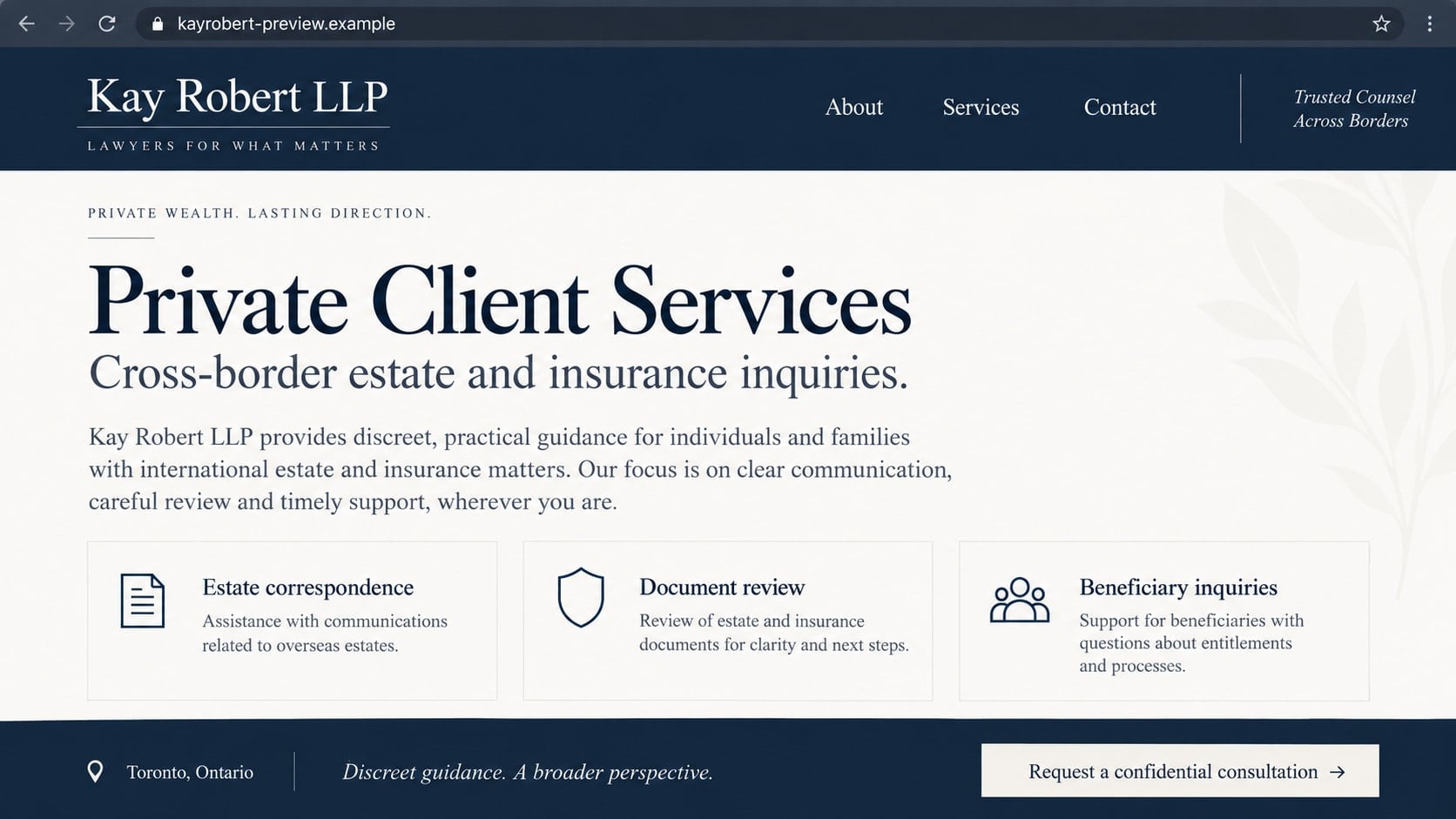
The website looks like a law office, complete with service pages and a Toronto address. If you arrived there after an unexpected legal message, that polished appearance can feel like the reassurance you were looking for.
But a website can be part of the claim you need to check, not independent proof of it. The historical Kay Robert LLP site shows why that distinction matters before you send documents or money.
Overview
What was the Kay Robert LLP scam website?
The domain kayrobertlawoffice.com appeared in reports in 2020 using the name Kay Robert LLP and a Toronto contact address. An anti-fraud database subsequently listed it as a fake lawyer website and recorded that its design had been copied from a different law firm’s site.
The AA419 record for the historical domain was added in December 2020 and later marked the site dead and expired. This is a warning about that recorded impersonation pattern, not a claim that the domain is currently serving the same content.
What is documented, and what remains uncertain?
The historical record identifies the site name, domain, claimed address, and contact numbers. Reports also noted reuse of a telephone number across other purported law-office identities. Those details justify caution about the online presentation but do not identify every person behind it.
No complete victim transaction or verified payment total is established here. The later document and payment scenarios below explain common risks of fake legal websites. They should not be mistaken for a confirmed sequence experienced by every person who encountered this particular site.
Why a convincing legal website is not enough
- A copied design can make an invented practice look established.
- An office address can be displayed without proving occupancy.
- A phone call answered professionally does not establish a license.
- Documents can name real institutions that have no connection to the sender.
- A new website address does not resolve the identity problem.
The warning concerns a specific historical website identity. It is not an accusation against an unrelated lawyer named Kay or Robert, the real firm whose material was reportedly copied, or businesses located at the displayed address.
How the Kay Robert LLP Website Scam Works
Step 1: An unexpected message creates a reason to look for a lawyer
A legal-looking approach may concern an estate, insurance matter, document request, or money supposedly awaiting a claimant. The recipient wants to know whether the sender is real, so checking for a website feels like a sensible first step.
That instinct is understandable, but a site supplied by the sender belongs to the same unverified chain. Finding the claimed firm at the address the message gave you does not constitute an independent check.
Start outside that chain. Identify the jurisdiction and the individual professional, then use the appropriate regulator’s directory. If the sender cannot provide a verifiable professional identity, do not compensate for that gap by trusting a more elaborate website.
Step 2: Copied presentation supplies borrowed credibility
A fake office does not need to invent an entire legal practice from scratch. It can borrow the organization, wording, and visual polish of a genuine firm’s website, replacing names and contact information while leaving the professional appearance intact.
The historical anti-fraud entry attributes this kind of copying to the Kay Robert site. That finding concerns the site’s presentation. It does not imply that the genuine practice supplied the scam’s services or participated in the operation.
Copied material can also create inconsistencies: different firm names in different sections, mismatched practice areas, or contact details that do not align. Such contradictions are useful prompts to investigate, but their absence does not prove authenticity.
Step 3: Contact details make the website feel accountable
The recorded site displayed 161 Bay St, Toronto, and a telephone number ending 1228. A city address and a local-looking number can make an overseas recipient feel that there is a real office they could contact if something goes wrong.
Those are historical displayed details, not verified present-day occupancy or number ownership. Do not call an old number as a test or accuse its current user. Numbers can change hands, and a published address does not prove that the advertised firm ever operated there.
Instead, compare the message with independently established professional records. If there is a real lawyer whose identity appears to be copied, ask that lawyer’s office whether the communication belongs to it.
Step 4: A plausible conversation starts collecting information
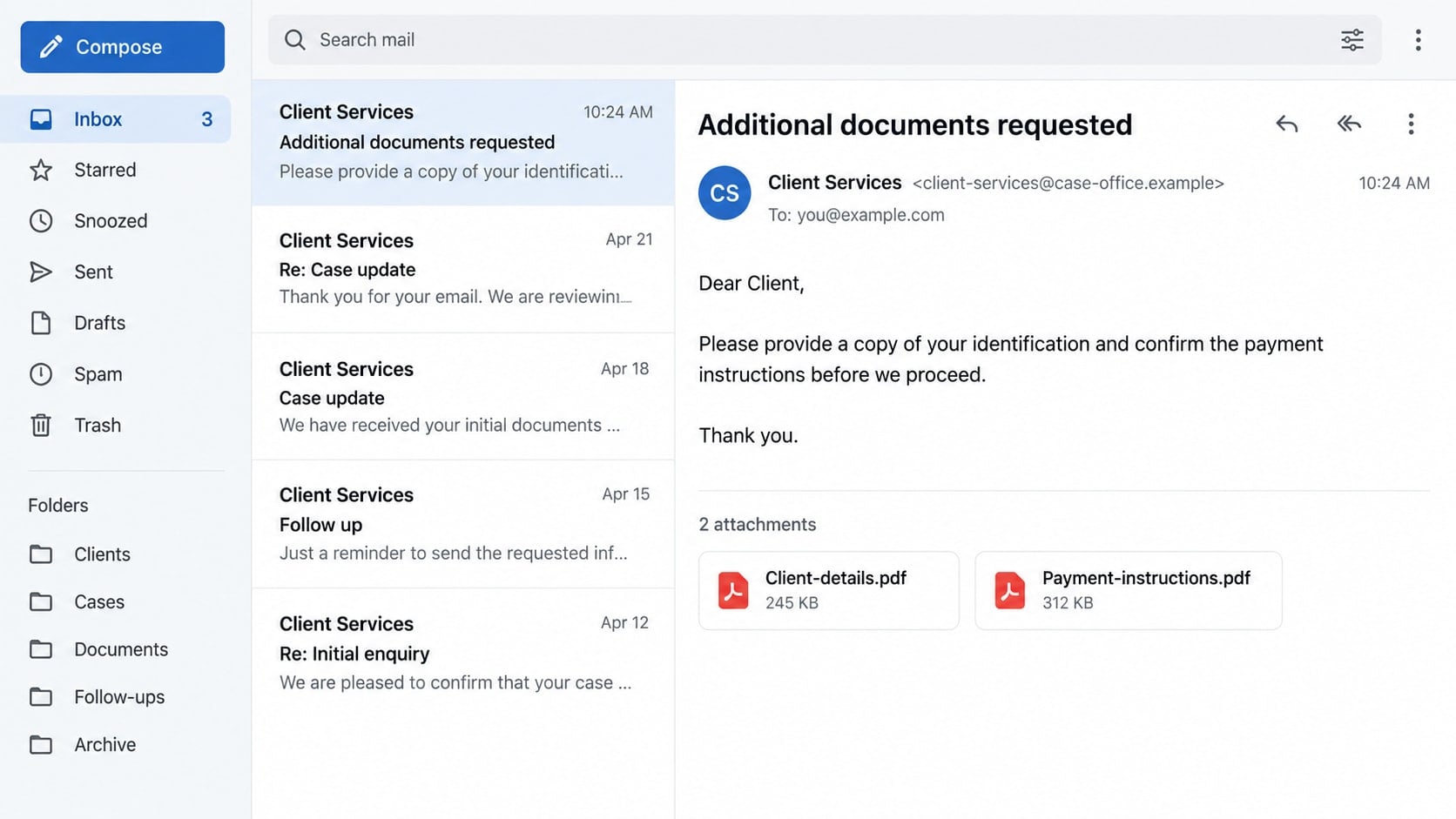
Once the recipient accepts the supposed office as real, requests for documents can seem routine. Legal matters often involve paperwork, so an unfamiliar form may not attract the same suspicion as a blunt request for a bank password.
The risk is the recipient, not merely the file format. A passport, proof of address, signature, and bank statement can expose valuable information when sent to an impersonator. Establish the real matter and professional before supplying such a package.
The generated screens in this article are explanatory reconstructions with fictional addresses. The second image shows a generic possible follow-up, not an original Kay Robert email or proof that those exact attachments were distributed.
Step 5: A claimed procedure can introduce a payment request
In fake-lawyer schemes generally, a sender may describe a fee as necessary to complete a review, release funds, or satisfy another institution. The language can sound administrative rather than promotional, which makes the demand easier to overlook.
A real lawyer can charge legitimate fees. The important questions are whether you have verified that lawyer, understand the actual service, and know who receives the money. A professional-looking invoice cannot answer those questions by itself.
Be especially cautious if the beneficiary account belongs to an unexplained individual or the sender wants cryptocurrency, gift cards, or secrecy from your bank. Do not pay simply because the website claims the next stage cannot begin otherwise.
Step 6: New identities can make an old story look refreshed
If a questionable site disappears, the sender may provide another web address or say the office has changed its name. That explanation can be true for genuine businesses, but it still needs verification. Moving a conversation does not establish the authority missing from the beginning.
Historical reports of reused contact details are useful investigative leads, not proof that every related-looking name belongs to one operator. Keep the domains, dates, and correspondence separate so a reviewer can evaluate the actual connections.
A dead website does not automatically resolve past exposure. If documents or payments were sent, act on that loss even if the original page no longer loads. Conversely, an expired-domain record should not be used to claim that an unrelated future owner is committing fraud.
Identity, Contact, and Payment Checks
Check the individual professional, not just the firm label
The Law Society of Ontario’s directory lets readers check a person’s licensing and practicing status and find contact information. Use it for a claim of Ontario legal practice rather than relying on a badge or biography hosted on the questioned site.
A search result for someone with a similar name is not enough. Compare the full identity and contact details, then reach out independently if there is uncertainty. This article does not claim that a current directory search proves no similarly named professional exists.
Confirm the address through a separate record
Large buildings can contain many offices, and businesses may use shared services. The presence of a prestigious address on a website therefore establishes very little on its own. Ask how it connects to the specific licensed person handling your matter.
Do not contact unrelated tenants as though they are responsible for the message. Provide the claimed address to the regulator or investigator when relevant. Avoid turning an unverified website footer into a factual statement about who occupies a building.
Ask for a clear description of the actual legal matter
Who is the client, what is the proposed service, and why are you being contacted? A legitimate inquiry should have a coherent explanation that can withstand independent advice. A vague promise of money combined with immediate document demands deserves a pause.
If the message says a court, insurer, or bank requires action, verify through that institution’s genuine channel. Do not assume that an attachment bearing its name was issued by it. A document’s heading is another claim to assess.
Verify payment instructions before every transfer
Even a genuine legal relationship can be targeted by payment-instruction impersonation. Confirm new or changed bank details through a contact route you established earlier. Do not use a replacement telephone number included in the same email requesting the change.
Keep a written explanation of the amount, purpose, and recipient. If instructions conflict with the agreement or verified firm’s details, stop until the discrepancy is resolved. Pressure to skip that check is itself relevant information.
What to Do if You Have Fallen Victim to This Scam
- Pause the supposed legal process.
Do not send further identity material, signatures, or payments while the sender’s identity remains unresolved. You can investigate independently without replying to every demand or agreeing to a new deadline.
If a genuine legal deadline might be involved, consult a professional you choose yourself. Do not let the questionable sender be your only source of advice about what happens if you stop responding.
- Keep a record of the website and correspondence.
Save the exact domain, page images already available, emails, attachments, phone numbers, and payment requests. Record when each item was received. Avoid reopening suspicious files merely to take a better screenshot.
Preserve original files when safe and note what you personally did. A useful timeline distinguishes visiting a page, submitting documents, signing an agreement, and transferring money. Those events create different types of exposure.
- Notify the financial provider about any transfer.
Give the provider the recipient information and transaction reference and explain that a purported legal service may have been an impersonation. Ask immediately about available recall or dispute options and any account safeguards it recommends.
Do not pay a second office to recover the first payment without independently verifying its credentials and service. A guaranteed refund for an advance charge can reproduce the original problem under a more reassuring label.
- Assess the identity documents you shared.
Make a list of each document, identifier, and signature supplied. Contact the relevant issuing authority if a passport or license was exposed, and follow your country’s identity-fraud guidance. Ask financial institutions about additional protections when account information was included.
U.S. readers can use IdentityTheft.gov to organize appropriate next steps. A credit freeze may be relevant to exposed credit identity information, but it does not prevent every possible misuse of documents.
- Check any account or device access separately.
If a portal collected a password, replace it through the genuine service and review active sessions. If an attachment or supposed document viewer installed software, run a Malwarebytes scan and remove untrusted remote-access applications.
AdGuard can help reduce exposure to some deceptive advertisements during further research. It does not verify professional licenses or determine whether a legal invoice is valid. Continue using official directories and independently obtained contact information.
- Alert the relevant regulator or impersonated office.
Send factual evidence through official reporting channels. If a real firm’s materials were copied, notify it using verified details. Do not send sensitive documents to a new address merely because someone claims to be investigating the copied site.
Explain which identity appeared on which message and when. Historical contacts and current contacts should not be merged without evidence. This helps protect innocent professionals and gives investigators a more accurate picture.
- Report the loss and monitor follow-up approaches.
Use the appropriate fraud-reporting and police channels for your location. Keep report numbers and update them if you receive new payment instructions or threats. Do not attempt to confront an alleged operator based only on a website address.
Expect that someone may later claim to be a refund specialist, investigator, or replacement lawyer. Verify each approach afresh. Knowledge of your case details can come from the original correspondence rather than a legitimate investigation.
A Better Way to Verify an Unexpected Law-Office Message
Use a short independent checklist before discussing the substance: confirm the professional, confirm the office, and confirm that the office sent the message. Only then consider what information the actual matter requires.
If any step fails, do not fill the gap with assumptions about the website’s appearance. A well-written biography and a working contact form are easy to provide. A verifiable professional relationship is the part that matters.
When helping someone else check a message, avoid making them feel foolish for believing the presentation. Offer to locate the official directory with them and preserve the documents. A practical verification step is more useful than an argument about whether the website looks convincing.
Frequently Asked Questions
Is kayrobertlawoffice.com still an active scam site?
The historical anti-fraud record marks it dead and expired. This article does not establish current operation or ownership. Treat the old domain as an identifier of the recorded case, not as a site to visit or a current contact to use.
Was the genuine firm whose design was copied involved?
The reported copying does not establish its involvement in the scam. A legitimate business can be a victim of impersonation. Check any message through independently verified contacts rather than assuming copied material was supplied with permission.
Does a Canadian phone number prove a Canadian lawyer is calling?
No. A number’s format does not verify the caller’s identity, location, or license. Historical numbers may also be reassigned. Use the relevant professional directory and a separately established contact route to verify a claimed lawyer.
Can a fake law website use HTTPS?
Yes. An encrypted connection protects data in transit to the site, but it does not prove the operator is a licensed professional. A secure-looking address cannot establish whether the person receiving your documents has a legitimate reason to request them.
Is every request for an ID document suspicious?
No. Genuine legal work can require identification. Verify who is requesting it, why it is needed, and how it will be handled before sending it. The fact that real lawyers request documents does not authenticate a particular unknown sender.
What if I only viewed the website?
Viewing a page does not automatically mean money or identity information was stolen. Close it, avoid follow-up submissions, and review any downloads or permissions you accepted. Additional recovery steps depend on what you actually shared or installed.
The Bottom Line
The Kay Robert LLP case illustrates how a copied legal website can make an unverified identity seem established. The important check happens outside the website: identify the professional and contact the real office through independent records.
Keep historical evidence in its proper context, and do not send documents or payments while the identity is unresolved. If you already acted, preserve the trail and address the financial, identity, or device exposure that actually occurred.

Join the discussion
0 commentsShare your experience or ask a question about this article.
Discussion
Start the conversation
Have a question or something useful to share? Add the first comment.