

A KYC email account verification notice says your mailbox needs attention. The wording sounds official, and the possibility of losing a familiar address is unsettling.
You may use that address for almost everything. Before rushing to confirm it, find out what this unexpected account review is really asking you to prove.
Overview
The warning borrows compliance language to threaten mailbox closure
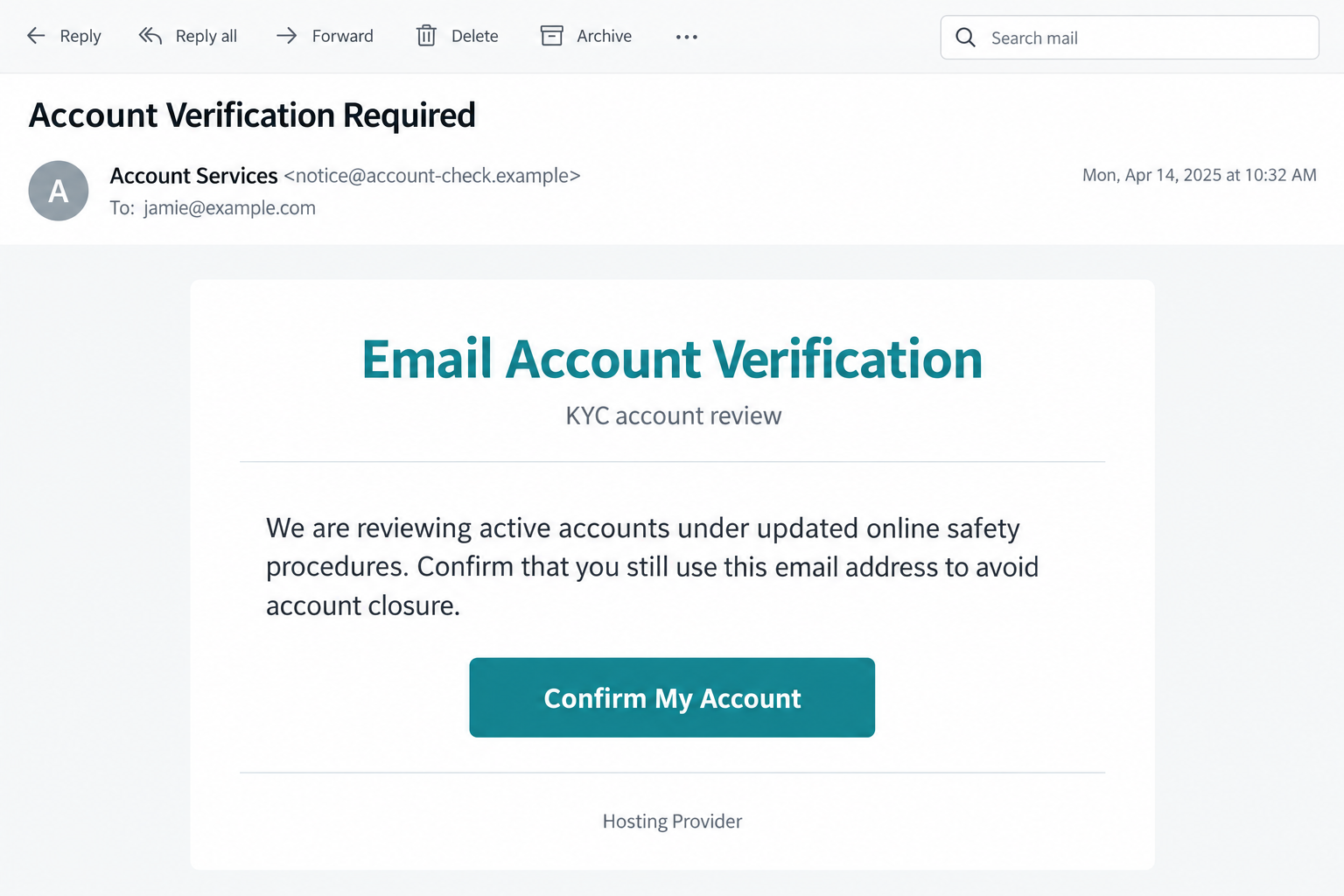
The KYC email account verification scam presents a phishing request as a mandatory account review. Its immediate target is the recipient’s email login.
Reported versions claim that updated online-safety requirements require confirmation of active users. Without confirmation, the message suggests the address could be disabled or closed.
One notice frames this as credential maintenance. Another promises to distinguish active accounts from inactive ones, then directs the reader toward an account-confirmation button.
The problem is the unsupported handoff to a provider-styled login page. The message’s official-sounding language does not authenticate that page or establish a real regulatory obligation.
The documented mailbox version is not a cryptocurrency verification
KYC stands for Know Your Customer. Fraudulent messages also misuse that phrase in financial and cryptocurrency settings, but this article concerns the email-account version.
That distinction matters. The message here threatens access to correspondence and uses a mailbox sign-in design, rather than proving a legitimate need to identify a financial customer.
A copied provider theme can match the address you enter. Personalization makes the page recognizable without establishing that the real provider operates it.
- An unexpected notice cites broad online-safety rules without identifying a verifiable policy change.
- Continued use of an email address supposedly depends on one urgent confirmation.
- The sender speaks as a hosting or account service without an independently verified relationship.
- The confirmation journey requests mailbox credentials outside the trusted account route.
The claim needs verification, not compliance by default
A real provider may require information for a particular service or jurisdiction. That possibility does not make every message containing “KYC” a legitimate request.
The decisive check is whether your actual provider confirms the specific requirement through its genuine dashboard, published policy, or established support channel.
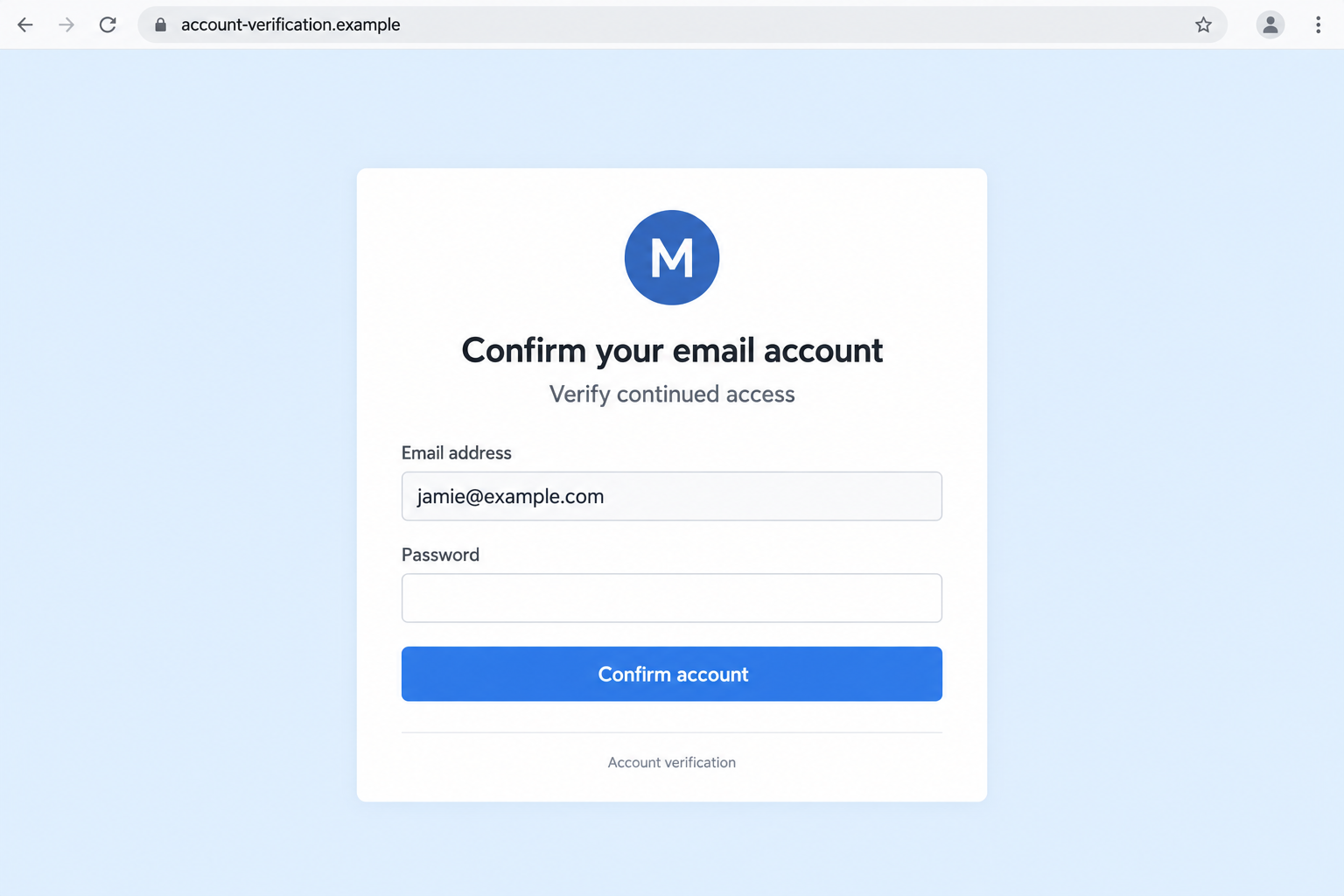
The accompanying images use fictional addresses to illustrate the pressure and password form. They do not document a particular recipient’s account or a currently active destination.
Why This Particular Warning Can Feel So Credible
The account is ordinary, but the threatened disruption is not
Most people do not think of their inbox as critical infrastructure. Then someone mentions closure, and suddenly every subscription, appointment, and password reset comes to mind.
For a small business, the consequences sound even larger. Customers use the address, orders arrive there, and an interruption can feel expensive before anything has actually happened.
The warning exploits that dependency. It does not need to describe a dramatic security breach when a simple claim about continued access can create enough pressure.
Administrative phrases discourage questions
“Account review” and “credential maintenance” resemble routine internal procedures. Readers may assume an administrator already checked the details and only needs a final acknowledgment.
References to regulations add another layer. Nobody wants to disregard a legal requirement, especially when the message gives no clear way to evaluate it.
Yet a vague reference is not proof of a law. The notice should identify the provider, affected service, actual requirement, and independently accessible instructions.
If those details are missing, do not fill the gaps with your own assumptions. A sender has to establish authority before asking for sensitive information.
KYC is not a magic word that makes a request official
Financial businesses sometimes conduct legitimate identity checks. Those checks concern a specific regulated service and occur through a verified process, not any page supplied by a stranger.
An email account may be linked to financial services without being that financial service. The sender cannot establish a bank’s requirement merely by naming your mailbox.
Similarly, MetaMask explains that ordinary wallet use does not require its own KYC account verification. Service context matters.
That comparison is not a claim that every KYC notice shares an operator. It shows why a familiar compliance label must be checked against the actual product.
How the KYC Email Account Verification Scam Works
Step 1: A notice makes an active mailbox seem at risk
The process begins with an account-maintenance email. Its apparent purpose is to filter inactive users and preserve access for people who confirm their address.
That framing makes the recipient want to prove something they already know: they still use the account. Confirmation sounds easy because the underlying question sounds harmless.
Imagine receiving it after checking your inbox several times that morning. You might think one click will clear a mistaken flag and prevent an avoidable interruption.
This is an illustrative situation, not a reported customer experience. The mechanism relies on fear of interruption rather than evidence that an account is actually inactive.
Step 2: The email assigns authority to an unverified sender
The message invokes online safety and an administrative team. It may identify itself as a hosting provider without showing a verifiable account notice inside the genuine service.
Generic authority is convenient for the attacker. Different recipients can interpret the same words as their workplace host, personal provider, or domain administrator.
A recognized display name is weak evidence. Expand the sender details and consider whether the address matches a communication route your provider actually uses.
Even a convincing address is not sufficient by itself. A compromised sender can send misleading mail, and copied branding can conceal a completely different destination.
Step 3: The confirmation button sends you to a familiar-looking form
The reader is invited to confirm account activity through the supplied link. That moves a simple acknowledgment into an authentication step controlled by the message’s destination.
The documented mailbox variant leads to a page imitating the recipient’s email service. Colors, a logo-like mark, and familiar fields make the request feel expected.
Some phishing designs adapt to the supplied address. Seeing your own provider’s style does not prove the page was delivered by that provider.
Check the actual hostname before entering anything. A page does not become an official account portal because it displays a recognizable inbox brand.
Step 4: A password is collected under the account-review pretext
The person expects to confirm continued use. Instead, the form asks for information that can unlock the mailbox if accepted by the real service.
A prefilled address can reduce the friction. The remaining task appears to be entering the password, as though an existing account session simply needs renewal.
The request is not evidence of a real KYC review. A counterfeit form can accept any typed information without verifying identity, policy compliance, or account activity.
Additional requests for codes or authentication approval should also be refused. Such follow-ups are possible phishing tactics, not established features of every message in this case.
Step 5: The mailbox can become a route into other relationships
If the stolen credential works, an intruder may read mail, exploit reset links, or impersonate the owner. Accounts with reused passwords create further opportunities.
A business inbox can also reveal vendor conversations and payment routines. That knowledge can support believable fraud later, even if the original notice looked administrative.
These are risks arising from compromised access. We do not have evidence that every recipient suffered those outcomes or that a particular attacker accessed each account.
The practical response is still clear: revoke unwanted access and inspect account changes rather than waiting for the fictional verification process to finish.
How to Verify a Genuine Account Requirement
Open the account independently and look for the same notice
Leave the email untouched and launch the provider’s normal app or trusted website. Review account notifications, security settings, and any administrative messages available there.
If nothing matches, contact support through that genuine service. An absent dashboard notice is a reason to investigate, not a universal rule proving every email fraudulent.
For managed work accounts, your IT administrator can confirm whether a compliance request was issued. Send the suspicious message through your organization’s reporting process.
Request a specific policy, not another urgent link
A useful answer should identify what information is needed, why, which service requires it, and how to submit it safely. The email’s vague wording is insufficient.
Do not seek reassurance by replying to the sender. A phishing operator can invent an explanation, a deadline, and a support identity just as easily.
For example, an administrator can confirm whether the review applies to ordinary users or only to billing contacts. The suspicious email leaves that scope conveniently unclear.
If a real verification is required, completing it through an independently confirmed account route avoids handing credentials to the notice’s unknown destination.
Keep a copy of the verified policy and support response. That record can help coworkers evaluate similar messages without repeatedly relying on the same urgent email.
Likewise, avoid calling a number included in the questionable notice. Find contact information from an account or provider website you reached independently.
Keep identity documents out of an unverified process
A request may escalate from a password to an ID image, address, or payment detail. Never provide additional information simply because you already started the process.
Each new disclosure creates its own exposure. If an identity document was sent, record exactly what it contained and seek recovery advice appropriate to your location.
The documented email login trap does not establish that ID uploads occurred. This precaution applies if the message you received asks for more than the reported form.
What to Do if You Have Fallen Victim to This Scam
- Record the interaction without continuing it.
Stop using the confirmation page. Note whether you entered credentials, sent documents, approved a notification, or supplied an authentication code.
Save the message and any screenshots already available. You do not need to reopen the suspected form or repeat a login attempt to obtain evidence.
- Recover control through the actual provider.
Replace the exposed login with a new, unique password. If locked out, begin account recovery through the official service instead of accepting help from the sender.
Google’s compromised-account guidance explains relevant security reviews for Google users. Follow your own provider’s process if the affected account is elsewhere.
- Inspect access that survives a password change.
Check recent devices, sessions, linked applications, recovery contacts, and security methods. Sign out unwanted sessions and remove unauthorized entries where the provider allows it.
Review application-specific passwords too, if your service uses them. Ask an administrator to check access tokens when the account belongs to a managed organization.
- Restore the mailbox’s intended behavior.
Examine forwarding, filters, delegates, and rules. Remove unfamiliar destinations or changes after confirming they are not legitimate settings used by your team.
Look through sent, deleted, and spam folders for unexpected activity. A quiet inbox can conceal messages moved by a rule rather than indicate that nothing happened.
- Protect accounts that depend on this address.
Change reused credentials first. Then review important financial, cloud, shopping, and social accounts for resets or access notices around the suspected compromise.
Enable stronger authentication where supported. Do not approve unexpected prompts while investigating, even when a caller claims approval is necessary to secure the account.
- Address any extra device or identity exposure.
If the process included a downloaded verifier or suspicious attachment, use updated Malwarebytes software to check the device and remove unwanted browser extensions.
AdGuard can help limit deceptive advertising and access to some known malicious pages. It cannot validate a compliance request or reverse information already disclosed.
For exposed identification documents, consult IdentityTheft.gov in the US or your local identity-theft service. Follow advice specific to the document and account involved.
- Notify others and submit a phishing report.
Tell your workplace security team if business mail was involved. Warn contacts if messages sent from your account requested money, documents, or account verification.
Use the provider’s phishing-report option, then remove the notice from routine view. Ignore follow-ups offering paid recovery or another supposed compliance shortcut.
Frequently Asked Questions
What does KYC mean in this email warning?
It refers to Know Your Customer. The scam borrows that compliance term to present an unsupported mailbox-confirmation demand as an official obligation.
Can an email provider ever require identity verification?
A provider may have legitimate requirements for a particular service. Confirm the exact request independently rather than assuming that an unsolicited login link satisfies it.
Is this the same as a MetaMask KYC email?
No. This article addresses mailbox credentials and threatened email closure. Wallet-verification scams misuse similar language but involve a different service and potential exposure.
Why does the page look like my own email provider?
Phishing sites can copy a provider’s design and personalize the screen using your address. Visual familiarity does not authenticate the domain hosting the form.
Does confirming my address require giving this page my password?
Do not give an unverified page that password. Check any required action inside the genuine service or ask its verified administrator how confirmation is handled.
What if I submitted only an incorrect password?
An incorrect, unique value does not unlock the account. However, secure any service where that value is valid, and review any other information you supplied.
The Bottom Line
The KYC email account verification scam uses administrative pressure to make an unverified password request feel mandatory. The cited compliance language is not proof of authority.
Confirm requirements through your real provider. If you disclosed a working credential, repair account security, access permissions, and mailbox rules rather than completing the sender’s review.

Join the discussion
0 commentsShare your experience or ask a question about this article.
Discussion
Start the conversation
Have a question or something useful to share? Add the first comment.