


The email sounds like a warning meant for anyone who keeps XRP in a hardware wallet. It names Ledger, mentions 1inch, and makes the suggested backup sound urgent.
The quickest way to make sense of it is to separate the market story from the action the message asks you to take.
Overview
The email says the way you store XRP puts it at risk
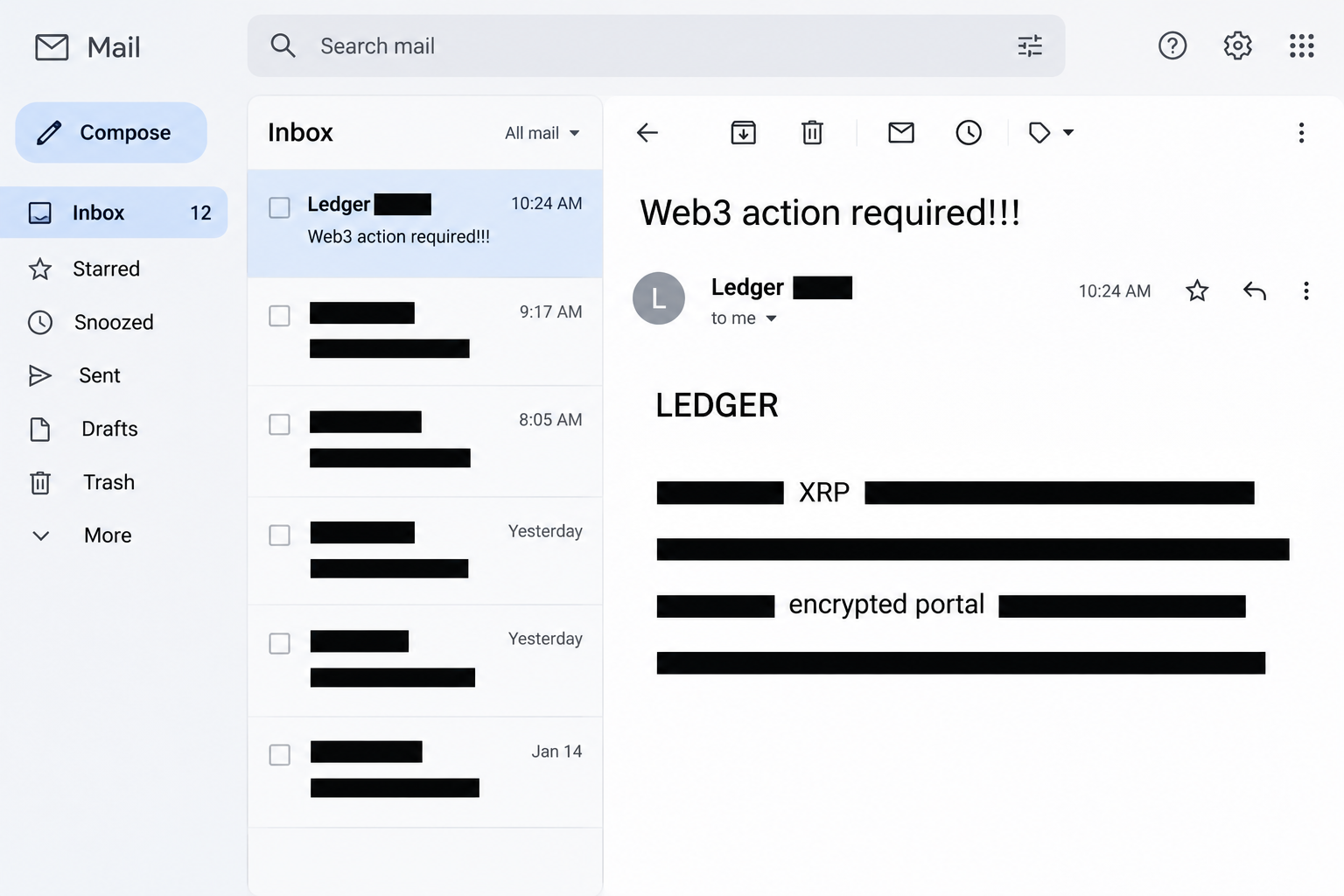
The Ledger account backup email scam was sent with the subject “Web3 action required!!!” It presents itself as a warning about XRP and other crypto assets.
The message claims that storing funds on an exchange or in a cold wallet could leave them vulnerable to liquidation. It offers an “encrypted” backup portal as the answer.
It uses a purported $10 billion investment to give a wallet request the feel of market news. That claim doesn’t explain why a backup is needed.
The image recreates the email’s headline and portions of that pitch. It does not show a real Ledger alert, wallet, or backup location.
The backup site switches from protection to secret collection
The link leads to an unrelated site calling itself a quantum backup service. The documented sequence shows a wallet selection screen and an import dialog.
The import dialog offered ways to provide a recovery phrase, a keystore JSON file, or a private key. These are sensitive ways to recover or control wallet accounts.
The lure is different from a site that only asks to see a public wallet address. Submitting secrets can give someone the ability to use keys away from your device.
No transaction from a particular victim is established here. What the reported screen shows is a request for material that should never be handed to an unsolicited backup portal.
Genuine Ledger and 1inch connectivity is not this backup service
Ledger’s announcement about 1inch describes connecting a Ledger signer to a service for swaps. It does not describe uploading a recovery phrase to this portal.
Ledger’s phishing guidance says the company and its support teams never need you to disclose your recovery words. That is the rule to apply here.
When you look at the request, distinguish the information involved:
- A public address can identify an account on a chain without giving the holder of that address control.
- A hardware device PIN is meant to protect access to the device, not to approve a backup website.
- A secret recovery phrase can recreate accounts derived from it on another device.
- A private key can control the corresponding account without the original hardware.
- A keystore file can contain encrypted key material and should not be sent to an unverified service.
Why the Market Story Doesn’t Explain a Wallet Backup
An asset’s price and custody are different questions
The email implies a market event could erase assets in cold storage. It never identifies a real problem with your key or device.
Ledger explains where crypto assets are recorded. A hardware signer protects keys; the assets themselves are represented by records on the relevant blockchain.
A change in market price can affect what those assets are worth. It does not make a third-party website need the secret that controls your accounts.
Liquidation can have a specific meaning in a leveraged position. That is not what happens simply because you hold unleveraged XRP in an account controlled by a hardware wallet.
If you do use a trading or lending service, check the position in that service. Changing or sharing your backup doesn’t resolve its terms, balance, or collateral requirements.
Encryption claims don’t make the recipient of a secret trustworthy
The word “encrypted” says nothing by itself about who operates a portal. A page can use an encrypted connection and still receive every value you submit.
The safest questions are what a service needs, whose instructions describe it, and what happens to the sensitive material. A browser padlock doesn’t answer any of those.
A legitimate wallet import is a deliberate recovery action in a trusted environment. An unsolicited email has no reason to redirect that action to a website you’ve never used.
There’s also no benefit to checking the page with part of a real phrase. Keep all of it out of web forms, chat transcripts, and screenshots.
How the Ledger Account Backup Email Scam Works
Step 1: A market warning makes a routine check feel urgent
The subject calls for Web3 action and the email says XRP holders could miss important protection. It leans on forecasts and large alleged investment to make delay feel costly.
Nothing in the message ties those market claims to a defect in a recipient’s signer. The pressure comes from the announcement, not an account event you can verify.
If you own XRP but don’t use Ledger, the message can still feel relevant. That broad audience is one reason not to assume it was triggered by your account.
Step 2: A genuine brand relationship gets a different purpose attached to it
The email claims Ledger and 1inch partnered to offer a backup. The brand combination sounds plausible because the companies really have discussed an integration.
The missing piece is the purpose. Their published connectivity information concerns using a signer in a swap workflow, not sending the signer’s underlying secrets to an unrelated portal.
Asking whether the companies ever collaborated isn’t enough. Verify the actual feature, where it is offered, and whether it requires anything like what the message asks you to provide.
Step 3: The portal presents a familiar list of wallets
The destination offers options for multiple wallets, including the kind of logo or name a user might see in a genuine connection dialog.
The names do not authenticate the site. A page can portray a familiar platform without operating as part of that provider’s software.
The recorded sequence moves from a connecting state to an import dialog. Don’t interpret an import request as a routine second step when a connection appears to have stalled.
Step 4: Import fields replace the promised security check
The form offers a phrase, a keystore file, and a private key as alternatives. The language makes sharing one of them look like part of restoring or backing up access.
Those options are not equivalent in scope. A phrase may recreate a whole family of accounts, while a private key generally corresponds to a particular account.
The fact that a keystore may be encrypted also doesn’t make it safe to upload. Its risk depends on what it contains and what else you disclosed.
Step 5: Whoever gets a usable key no longer needs the hardware in your hand
If someone obtains the material needed to control an account, they may be able to use it elsewhere. There may be no approval prompt on your own device.
That is why changing the Ledger PIN is not the fix for a shared recovery phrase. The PIN controls access to the physical signer, not copies of the secret.
If you already entered something, prioritize protecting the affected accounts over finding the email again. Note the kind of material you shared without copying it into a new message.
What a Real Backup Decision Looks Like
Start by identifying which accounts and networks use the same recovery material. Make a private inventory of those accounts without putting the secrets online.
If you’re testing a backup, follow the device maker’s instructions. Do not check it by importing anything into a page from the email.
Keep hardware recovery and asset transfers separate. Restoring the same compromised phrase on a different signer does not make the old accounts private again.
If the signer is broken but the recovery material is still private, that is different from a phishing incident. Use the official provider’s support to decide how to regain access.
If the phrase was shared, focus on migrating to a fresh wallet. You may need separate guidance for assets that aren’t immediately transferable.
Check whether you have accounts on multiple networks or applications. An account that displays only one asset may not reveal every holding derived from the same secret.
Keep a written record of which public accounts were checked and which still need attention. This helps you avoid confusing a safe replacement address with the one you are leaving.
Confirm which holdings are involved before discarding any records. Don’t erase a working signer or throw away a backup during the first moments of an incident.
If your device can show the replacement receiving address, verify it on that trusted display. This reduces the chance of confusing your new account with another address.
Be wary of a site’s explanation that you must resubmit because only part of a phrase was valid. Stop immediately and tell support what you entered the first time.
If you shared a standalone key, ask which account it corresponds to. Don’t assume changing a credential for a different app removes access to that account.
What to Do if You Have Fallen Victim to This Scam
-
If you received the email but didn’t follow it, report it as phishing. Check any security notice directly with Ledger if you’re unsure whether there is a legitimate announcement.
You don’t need to change wallets simply because a message named an asset you hold. What matters is whether you exposed something or authorized a request.
-
If the backup page opened, leave without importing anything. If you accepted a separate wallet prompt, check its actual effect with the provider.
A visible logo doesn’t tell you whether the page connected to a wallet. Look in the wallet’s own connection records and activity, where available.
-
If you sent a recovery phrase or private key, treat the affected access as compromised. Use verified provider guidance on a trusted device to secure remaining assets.
A replacement wallet must use fresh recovery material. Don’t import the exposed phrase into the replacement and assume the accounts derived from it are now protected.
-
If you uploaded a keystore, describe exactly what else you entered. Tell verified support whether you also provided its password or another credential, without disclosing either again.
Ask about the affected account and any necessary replacement steps. An encrypted key file isn’t something to test by submitting it again to see whether it opens.
-
If you see an unexpected transfer, keep the relevant records. Write down the network, affected address, transaction ID, and what happened before you noticed the change.
The FBI’s cryptocurrency reporting guidance explains useful evidence for US reports. Use your appropriate local authority elsewhere, and keep recovery material out of all reports.
-
Do not let a recovery claimant take over the incident. Ignore requests to send gas money to a stranger, install remote support, or share the new phrase.
If an exchange may be able to identify a destination, contact it through its published support route. No private intermediary can promise that a completed transfer will be reversed.
What to Tell Verified Support
If you’re asking whether the message is genuine, share its subject and a screenshot with the addresses masked. There’s no reason to share the contents of your wallet backup.
If you submitted something, describe it precisely. A public address, a password for a keystore, and a complete recovery phrase each call for a different response.
Mention any balances you can no longer account for, but don’t measure losses against the amount named in the email. The claimed market investment is unrelated to your actual balance.
If you’re looking at old and new accounts after a recovery attempt, keep their records separate. A transfer you expected to make shouldn’t be counted as unauthorized.
Work through the provider’s verified support route even if your email or social account receives a convincing reply. A response appearing near a real incident does not make it legitimate.
Frequently Asked Questions
Is the Ledger and 1inch relationship made up?
There is a documented integration for connecting a Ledger signer to the 1inch service for swaps. That does not make the backup portal promoted in this email authentic.
Does a hardware wallet need a Web3 website to back up XRP?
This notice gives no reason to use the promoted site. Handle your signer’s recovery material using the device maker’s instructions, independently of any message about XRP prices.
Why does the site offer several ways to import?
Different wallets use different secret material and backup formats. The form tries to get one of those sensitive items instead of relying on a harmless public address.
Will changing my Ledger PIN stop someone who has my recovery phrase?
No, a PIN change protects access to your device. It doesn’t stop someone from recreating accounts on another wallet if they already have the phrase.
What if I closed the page without entering anything?
Viewing the page does not show that your recovery material was exposed. If you did more than view it, review the actual connection or transaction separately.
Should I give support my phrase to prove I’m the owner?
No, never include recovery words in a support request. Report the action you took and give only the relevant public records to the provider or authorities.
The Bottom Line
Do not use the Ledger backup link in the XRP email. Genuine Ledger and 1inch connectivity is unrelated to a portal that asks you to hand over wallet secrets.
If you shared something, treat that account or recovery material as exposed and secure what remains using verified support. A hardware PIN change won’t protect a copied key.

Join the discussion
0 commentsShare your experience or ask a question about this article.
Community experiences
Did this happen to you?
Your experience could help someone recognize the same scam. Submit a private report for our team to review.
I experienced this tooReports are reviewed before publication. Sharing publicly is always your choice.
Discussion
Start the conversation
Have a question or something useful to share? Add the first comment.