


A firmware warning is unsettling when the device in question protects your crypto. An email saying the upgrade has failed can make an ordinary day feel like an emergency.
Before you touch the wallet or its backup, check where that warning came from. An update you did not start deserves a closer look.
Overview
The email that says your Ledger update failed
The Ledger urgent update email scam starts with a claim that a hardware wallet cannot complete a system upgrade. It asks the owner to act before access is lost.
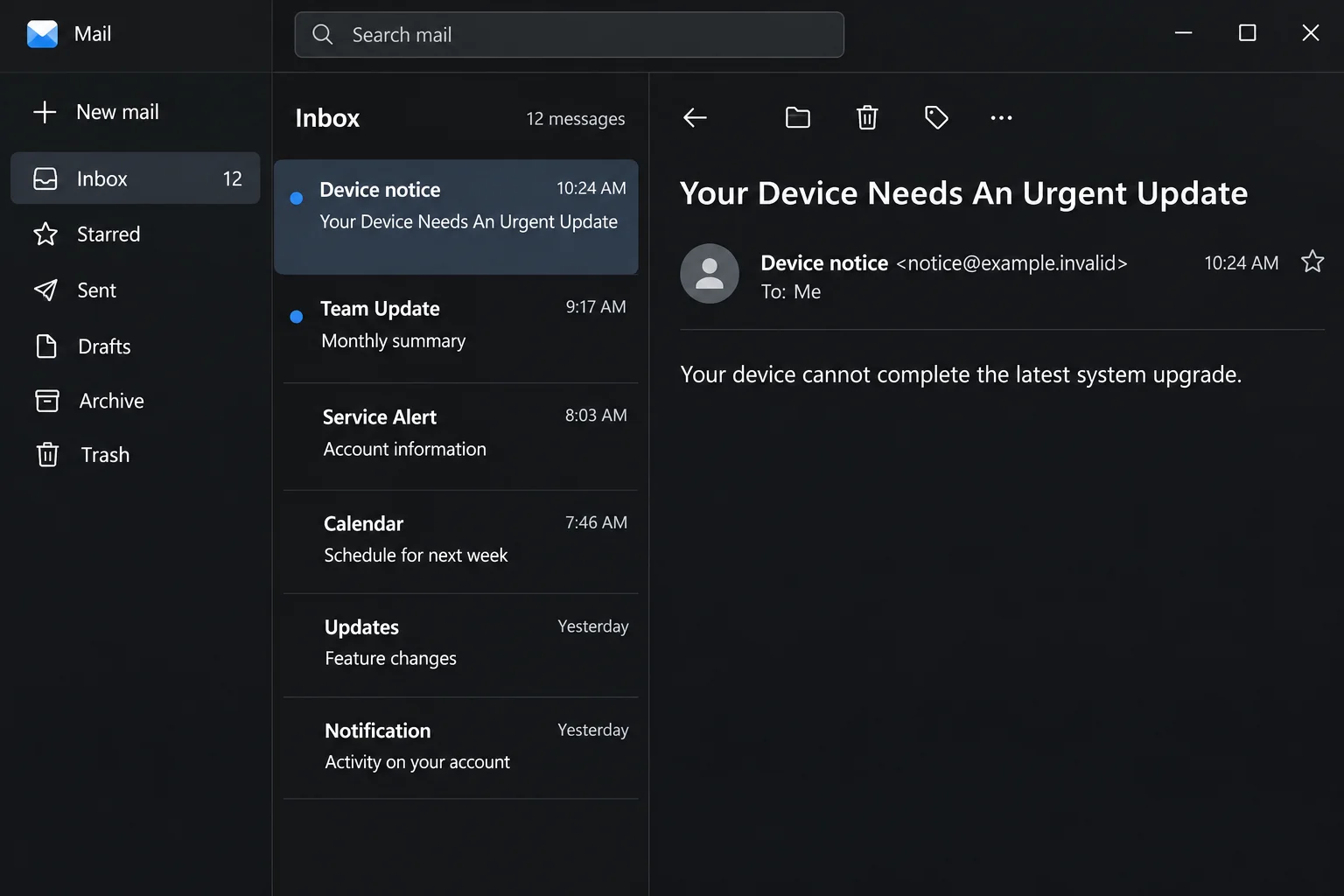
The subject in the documented campaign was “Your Device Needs An Urgent Update.” The message set November 1, 2026 as a deadline in the copy that was recorded.
That date is part of the message, not a Ledger maintenance schedule. An old deadline may pass while other versions of the lure keep circulating.
The request matters more than the calendar. Instead of directing the owner to check a device in the official app, the email sent readers to a site impersonating Ledger.
The visual above recreates the opening warning without reproducing the suspicious destination. The phishing page was a separate part of the reported incident.
What the counterfeit page wanted
On the reported page, the supposed update turned into a request to verify the recovery phrase. It offered choices for 12, 18 or 24 words.
A recovery phrase is not an account ID, an update code or an ordinary password. Anyone who obtains the correct phrase can usually reproduce access to accounts derived from it.
That can happen without the original hardware device or its PIN. The PIN protects local access to the physical device, not a separate copy restored from the words.
Your balance may still look normal after a disclosure. The absence of a transfer shows only that you have not spotted one at that moment.
If you use an optional passphrase or a shared signing setup, the exact exposure can differ. Treat the leaked recovery phrase as compromised and get advice suited to your setup.
What an email cannot tell you about your wallet
An inbox notice cannot prove firmware failed merely by naming the manufacturer. Check the device through the authentic app you normally use to manage it.
Ledger calls the app Ledger Wallet, previously Ledger Live. If you need to install or update it, start with Ledger’s official site or its verified distribution channel.
When reading an unexpected crypto notice, make these distinctions:
- The recovery phrase restores key access. Don’t enter it into an emailed page, a chat window, or a support form.
- A device PIN unlocks the hardware locally. It does not protect a recovery phrase somebody already copied.
- A transaction signature can authorize an action without revealing the recovery phrase. Check that exposure separately.
- A deadline written in a message is not proof that any firmware update is required.
How the Ledger Urgent Update Scam Works
Step 1: The sender announces trouble you weren’t looking for
Many people do not connect a hardware wallet every day.
A notice saying something went wrong with an upgrade can arrive when the owner has no recent device activity to compare.
The message rephrases that lack of information as a problem to fix. Instead of wondering whether any update took place, you may start wondering how to preserve access.
An authentic maintenance notification may be informative, but it cannot replace the information shown by the app and device during an update you intentionally started.
If the supposed failure exists only in your inbox, put the email aside. Open the tools you already trust rather than letting the sender choose the path.
Step 2: The deadline makes opening the backup seem urgent
The threat goes beyond an outdated wallet. The message suggests that failing to act could prevent you from accessing your assets.
For someone who sees the device as the place where the money sits, that is an effective nudge. It makes delay feel more dangerous than the request itself.
Crypto assets are recorded on their respective networks. Your Ledger stores and uses keys that help you control those assets. A threatening email cannot erase their balances.
Being unable to use one device is not automatically the same as losing access forever. The scam leans on that confusion to get the owner to reach for their backup.
Keep the written words offline. You can confirm whether there is an update without sending anyone the means to restore your wallet.
Step 3: The supposed fix asks for a secret it has no right to see
The next page is where the wording changes. Rather than merely showing an update status, it requests a recovery phrase under a verification label.
The choice of phrase length makes the form look prepared for different users. It also tells you exactly what the site is trying to collect.
There are legitimate situations where you restore a wallet yourself. That controlled process is not the same as sending your backup to a webpage reached from an email.
If a legitimate support representative helps you understand an error, they still don’t need the words. Close any page that makes disclosure a condition of assistance.
Don’t send a photo to prove which kind of backup you have. A clear photo of the words exposes the same secret as entering them individually.
Step 4: Stealing the backup bypasses the need to take the device
The reported incident shows a request for recovery words. It does not show a confirmed loss, identify the recipients, or establish how many people supplied a phrase.
The danger is what the secret makes possible. Someone with it could recreate the appropriate keys and initiate transfers elsewhere. They would not need to plug in your Ledger.
A password reset, factory reset or new PIN cannot make an exposed phrase secret again.
Even a new physical device is not a remedy if it is restored from that phrase.
That is why the response starts with the wallet’s remaining assets and independent access. Throwing away your old device in a panic can take away the access you need.
Step 5: An unchanged balance can leave you with the wrong impression
Some victims look at their balance, see no difference and assume the site didn’t receive the information. An ordinary balance cannot settle that question.
Review activity on every relevant chain and account, not just the one portfolio line you checked first. A portfolio display can lag or omit parts of your holdings.
A purported recovery agent may contact you later. Do not give them your new backup, grant remote access or send a fee to “release” a transfer.
Use Ledger’s phishing campaign guidance for known patterns. A newly worded email need not appear in a list to be dangerous.
Recovery Phrase Exposure Is Not the Same as Signing
If the only action was opening a link
Reading the notice or seeing the fake page does not give it the words that are on your paper backup. Close the tab and look for anything you actually submitted.
When the request looked odd and you stopped without signing or typing, the appropriate advice is different from a full wallet migration. Check the trusted app and report the notice.
If you saw a download, browser extension prompt or application installer as well, don’t run it. If you already ran it, seek device assistance from a separate trusted system.
A fake update webpage shouldn’t become your source of cleanup software. The identity of the installer is a separate question from the wording of the email.
If the site asked you to approve something
Look at the wallet activity and identify what you actually approved, if anything. A token allowance, a transfer, and recovery phrase disclosure are three different problems.
An allowance may be manageable through official or trusted network-specific tools. Revoking one approval doesn’t protect accounts when the recovery phrase itself has been disclosed.
If the transaction cannot be identified, get help through an established wallet or network support channel. A public transaction hash can be useful; the recovery words are never support evidence.
What to Do If You Fell Victim
-
Stop following the email and sort out what was exposed.
Make a note of whether you entered recovery words, signed anything, installed software or only opened the site. Do not record the words in a case note.
If you aren’t sure whether a typed phrase was submitted, handle it as potentially exposed. Don’t go back to test the form.
Use a separate clean device to research official help if you suspect the computer or browser has been compromised.
-
If the recovery phrase leaked, arrange a genuinely new wallet.
Generate a new phrase using trusted hardware and the manufacturer’s documented setup. Never put the old phrase into a site that promises to clean or rotate it.
Keep the new backup offline and separate. Don’t photograph it or use a connected clipboard to pass it between devices.
If you need both wallets to move funds, retain a way to access the old one until those transfers are verified. Do not reset the only working device prematurely.
-
Move remaining assets to receiving addresses you can verify.
Use the correct network for each transfer. Compare each receiving address with what your trusted setup displays. Don’t copy an address from a reply, pop-up or search advertisement.
Review all affected accounts, networks and ownership arrangements. If setup is complex or assets are constrained, consult official support without sharing either phrase.
Keep any fees and network conditions in mind. A delay or mistake on the destination network can complicate recovery, and an irreversible transaction offers little room for correction.
-
Investigate any action you signed separately.
Record the network, transaction hash and approximate time. For an allowance or other authorization, check trusted network-specific resources or ask experienced support for help.
Only take the action your situation calls for. Switching passwords does not revoke a blockchain permission, and revoking a permission won’t replace a leaked phrase.
A reputable support channel will not offer to test your fix by making you enter the new phrase into a web form.
-
Preserve evidence and report unauthorized transfers.
Use Ledger’s official support contact for device-specific questions. Have the subject line, timeline and public transaction identifiers handy rather than sending wallet secrets.
Report missing funds to the relevant authority. If you can reliably identify a receiving exchange, use its own security or fraud process, not contacts suggested by the sender.
Blockchain transfers are not automatically reversible. Be wary of anyone who guarantees recovery or asks to be paid in advance to trace or unlock funds.
Check Your Accounts After You Move Funds
When your immediate transfers are done, open the new wallet through the app you trust. Confirm the network and check that the amounts arrived at your verified addresses.
Look beyond the tokens shown on your default dashboard. Write down which accounts you checked and which still need attention so you don’t rely on memory under stress.
Update any address you intentionally reused for receiving regular payments. Tell the people who send to it through a known channel rather than publishing your entire wallet history.
Label the old account as compromised in your own records. An empty balance today does not make it a good address for tomorrow’s deposit.
If an exchange withdrawal or payment is already on its way to an old address, seek support promptly. Don’t assume you can cancel it after the network confirms it.
The next time a device notice arrives, open the wallet tool yourself. That small habit keeps an inbox message from choosing where you enter information or approve a transfer.
Frequently Asked Questions
Is “Your Device Needs An Urgent Update” a genuine Ledger message?
It was the subject of this phishing campaign. Verify an actual update through the Ledger app and device you already trust, rather than deciding from the subject alone.
Does a Ledger firmware update require entering my phrase on a website?
No. Never send your recovery phrase to a website to verify a device update. Follow the official instructions for the particular device you own.
Can someone use my phrase without knowing my PIN?
Yes. The PIN protects the physical device. With the usable phrase, someone may recreate the relevant wallet keys on a different device or setup.
Is my wallet safe if no transfer shows up?
A visible balance is not proof that the phrase stayed private. If you disclosed it, act on that exposure while you can still access any remaining assets.
Will resetting my Ledger stop someone who copied the phrase?
No. Resetting the device does not remove another person’s copy. Protect remaining assets with a genuinely new recovery phrase and addresses you independently verify.
Can Ledger reverse a fraudulent transfer?
There is no general reversal that Ledger can apply to a completed blockchain transfer. Keep the public transaction records and report the theft without expecting a guaranteed recovery.
The Bottom Line
A device update should not require you to hand a recovery phrase to a website. If an email pushes you toward that request, close it and verify the update independently.
If you entered the words, focus on the assets you can still protect. A new PIN secures the device, but it doesn’t protect an exposed wallet backup.

Join the discussion
0 commentsShare your experience or ask a question about this article.
Discussion
Start the conversation
Have a question or something useful to share? Add the first comment.