


An email with the subject “Good day” could be almost anything. This one looks like an ordinary note until a large number appears in the second paragraph.
The person signing it has an easily searchable name. Before deciding whether to answer, look at what the message expects you to do first.
Overview
The $600,000 offer comes from an unverified sender
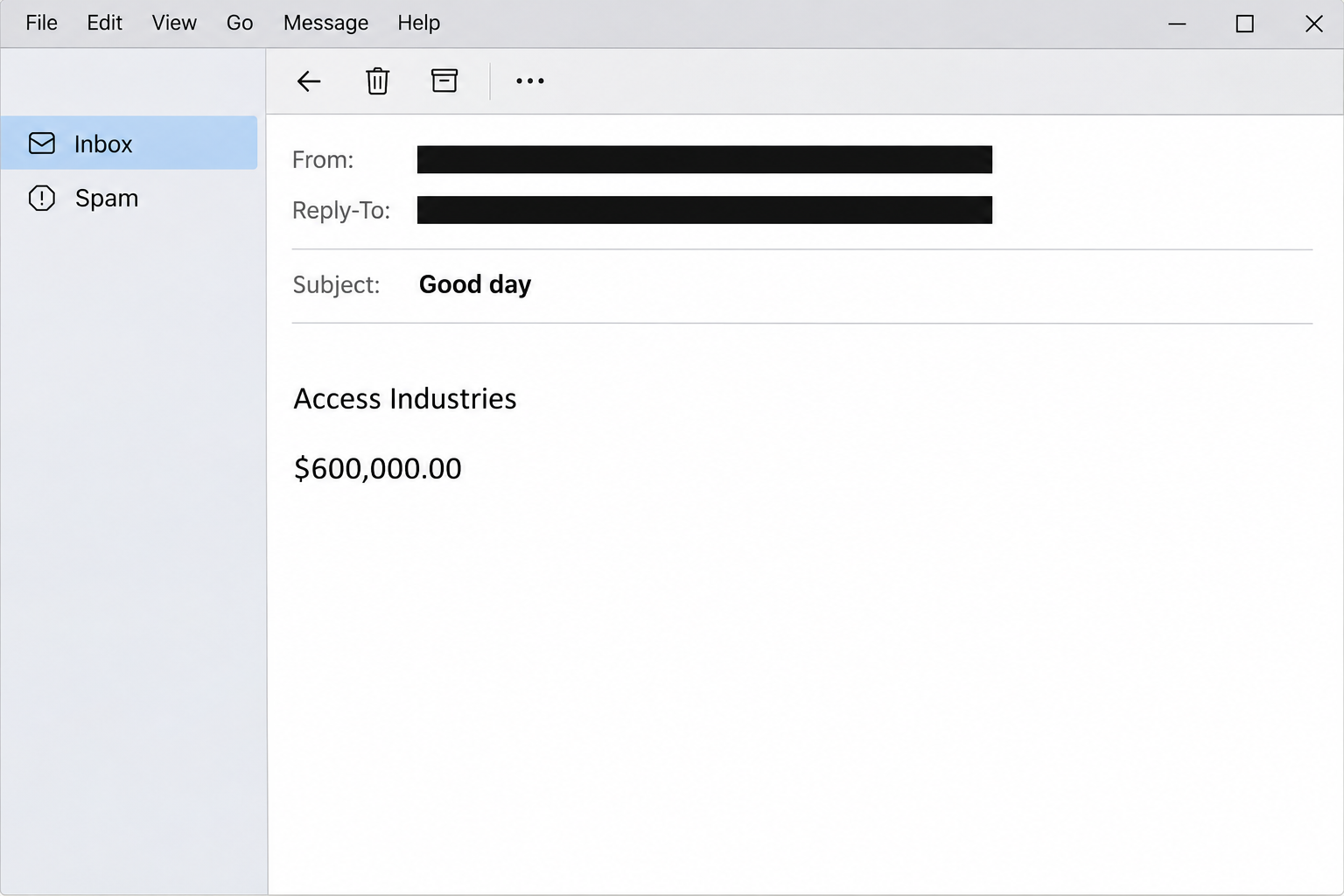
The Len Blavatnik donation email scam claims that Access Industries selected the recipient at random to receive $600,000. The first request is to reply and confirm the email address.
The sample gives no application number, eligibility rules or published award record. It says that receiving the email makes you a winner.
Len Blavatnik is a real person. Access Industries identifies him as its founder. His real business and philanthropy help explain why the claim may feel plausible.
They don’t show that he authored the message or that his company approved a donation. The email is using a recognizable name to get a personal reply.
The address that receives a reply is not the company
The visible From line in the sample does not match the identity in the signature. Its separate Reply-To line displays Blavatnik’s name alongside an address on a consumer mail service.
Reply-To tells an email app where to send an answer. It can legitimately differ from From, but here it does not establish that the donation is connected to the company.
The sample also shows “Undisclosed recipients” rather than identifying a single named beneficiary. That doesn’t reveal who actually received the email or how any addresses were collected.
- The promise is $600,000 per selected person.
- The stated selection method is a random email address, not a documented award process.
- The requested first step is an email reply, not a payment.
- The message asks you to move it out of Spam if necessary.
The opening email doesn’t show a fee or a payout
The evidence is the invitation and its routing details. It doesn’t show a transfer, a follow-up demand for money or a recipient’s account being accessed.
A supposed tax, handling charge or request for ID would fit a known advance-fee pattern. It should not be presented as something every recipient received.
The lead visual recreates the amount and header fields without showing the addresses. The original message also tells readers to rescue it from their spam folder.
Why a Genuine Philanthropist’s Name Isn’t Proof
A quick search can establish that a person exists. That search cannot tell you whether the person commissioned the email sitting in your inbox.
Think of the difference between a biography and an award notice. One describes somebody’s history; the other should connect a specific recipient with a verifiable program and administrator.
The Blavatnik Awards nomination instructions provide a concrete point of comparison. The U.S. national science awards use institutional nominations and published criteria.
Not every grant uses an institutional nomination. What matters is whether you can verify the process outside the message, without relying on the sender’s assurances.
If you applied for a grant, use the records you already have. Compare the program, application or nomination, and your original contact at the organization.
If you need to ask an organizer about a notice, use a number from its own site or your application materials.
Start the conversation with the program name, not with a password or a payment. The organizer should be able to explain how the award is handled.
Ask whether the program exists and how it contacts recipients. Don’t volunteer documents while you’re still establishing who would receive them and what they’re for.
How the Len Blavatnik Donation Scam Works
Step 1: The subject gives no reason to expect a windfall
The ordinary greeting doesn’t name a company, award or topic. A reader can’t tell from the inbox list that the message is about money.
Once the email is open, the surprise is immediate. It promises a life-changing sum from somebody you’ve never contacted, without explaining any real connection between you.
You haven’t been asked to buy anything at this point. That lack of an obvious cost gives the offer room to seem generous before you examine its origin.
If the message arrived in Junk, you don’t owe it a second chance. A notification about a real award can be verified through its organizer without rescuing this particular message.
Step 2: The sender borrows a biography instead of showing an award record
The message gives a full name and names Access Industries. Both can sound convincing to somebody who recognizes the name from business, music or charitable giving.
The invitation to read about him sends your attention toward facts that are easy to confirm. The part that needs proof is a different fact: whether this person picked you.
Even a link to a genuinely accurate biography would not identify whoever mailed it. Anyone can point to a page they didn’t write.
Look for an independently established grant or award record before treating the money as real. The captured message doesn’t give you such a record to match.
Step 3: Moving the message out of Junk normalizes the contact
The message anticipates that an email service might file it as spam. It asks you to put it back in your inbox if that happens.
A spam label alone isn’t conclusive, since legitimate mail can be filtered. But the sender has no authority to decide what you do with your safety warnings.
The useful move is to leave the conversation where it is while you assess it. Don’t add the address to your contacts or use a link from a follow-up.
This matters for someone helping a family member, too. Explain the mismatch without asking them to reopen the message and send a test answer.
Step 4: The reply shifts the exchange away from a public claim
The first message wants confirmation that your address is valid. That sounds like the smallest action on offer, which is why it’s easy to do without thinking.
A response can reveal your display name, signature, time zone or what you say about your circumstances. It can also tell the sender that you are listening.
Your mail app may direct a response to Reply-To rather than the original From address. In the sample, that separate address isn’t a verified Access Industries channel.
Don’t reply to decline or ask whether the offer is real. Neither action gets you independent confirmation, and neither is necessary to protect an award you never applied for.
Step 5: The next request can be smaller than the promised payoff
The Catalan Cybersecurity Agency’s warning describes unrelated donation scams that seek bank details, identity information or advance fees after people respond.
That pattern matters because the initial email may not mention a charge. Somebody who expects $600,000 may be more willing to pay an amount that looks small by comparison.
Reject any demand for a courier fee, tax payment or document charge. A follow-up with a different payee doesn’t make the transaction legitimate.
Keep what actually happened separate from what the sender promised. You can report an attempted scam without asserting that you saw a fee, paid money or lost anything.
What to Do if You Have Fallen Victim to This Scam
-
Keep the email and stop the conversation. Don’t click links or send a reply. If this message is in Spam, leave it there while you preserve the details.
Save a private copy if you responded or paid. Capture the From and Reply-To information and the message date. Keep any follow-up in its original form.
Do not post the unredacted email or ask another person to answer it. A genuine report does not require making contact with the sender again.
-
Report it through the mail service that received it. In Gmail on a computer, open the message without interacting with its contents. Choose More next to Reply, then Report phishing.
In Outlook.com, select the message in the list. Choose Report, then Report phishing above the reading pane. Reporting does not automatically block that sender in Outlook.
If your workplace supplies a security reporting button, use that route. If you have evidence of a payment or disclosure, save it before deleting or clearing the original.
-
If you replied but shared nothing sensitive, don’t escalate unnecessarily. You haven’t given the sender control of your mailbox just by answering an email.
Stop responding and watch for a new message under a different name. Treat an unsolicited accountant, courier or recovery agent as unverified even if they mention the donation.
If another email claims a password was changed, check your account through the service you normally use. Don’t adopt the follow-up message as a trusted help desk.
-
If you paid, call the organization that sent the money. Use your bank’s app, the number on your card, or the wire company’s published customer service channel.
Give the amount, date, payment reference and destination shown on your receipt. Explain that you were deceived into authorizing a payment if that’s what happened.
Ask whether the transfer can be stopped or recalled, or whether a dispute is available for the payment method used. Record the case number and the next response deadline.
If a gift card was involved, contact that issuer directly and keep the card and receipt. Don’t send more money while waiting for an answer.
-
Protect the information you actually disclosed. If you sent card details, alert the issuer. If you shared an ID scan, ask the issuing agency which protections apply.
If you’re in the United States and someone is using your identity, open IdentityTheft.gov, start a report, select what happened, and save the recovery plan it provides.
For exposed U.S. identity details, a credit freeze can restrict access to your file for new credit. Request the freeze from Equifax, Experian and TransUnion separately.
Use each bureau’s verified security-freeze page or published phone line, complete its identity check, and save the confirmation. Check all three; one freeze does not cover the other files.
A freeze does not stop charges on an existing card. Tell the issuer directly about suspicious activity, and plan to lift the relevant freeze temporarily for a legitimate credit application.
-
Keep a simple record of the incident. List what the sender promised, what you shared, when you paid and whom you contacted. Keep what actually happened separate from later guesses.
U.S. readers can open ReportFraud.ftc.gov, start a report, and describe the false offer and any loss. Save the confirmation with your other case details.
Elsewhere, use your country’s fraud reporting service or local police if money was taken or you were threatened. Do not send the fake donor a copy of your report.
If Someone You Know Is Still Considering the Offer
You don’t have to establish that every line in the email is false. Start with what the recipient can check: where their reply would actually go.
Look at the original message together without clicking anything. If Mail shows a separate Reply-To, point to it and compare it with a verified company contact found independently.
Then ask one practical question: which published program describes how this person qualified? A biography, an impressive signature and another email from the sender cannot answer it.
If money has gone out, help the person find the receipt and call the payment service. That comes before debating how believable the story sounded.
When there’s more than one payment, record each one separately. A gift card receipt and a bank transfer have different references and may need two different fraud reports.
Frequently Asked Questions
Is Len Blavatnik really giving me $600,000?
The documented email is not evidence of a real award. The person and company exist, but the message supplies no independently verifiable selection or payment record.
Why do From and Reply-To show different names?
They are separate fields, and Reply-To can send your response somewhere other than the displayed sender. Neither field authenticates a grant just because it contains a recognizable name.
What if the email has a link to a real article about him?
A genuine profile may tell you about his company or philanthropic work. It cannot authenticate the sender or tell you that you were selected for this offer.
Does a reply mean somebody now has my mailbox password?
A normal reply doesn’t disclose your password. If you later entered a password on an unfamiliar page, secure that account through its real provider and report that separate exposure.
Do I need to wait for them to ask for a fee?
No payment request is needed to reject an unverified offer. The original asks for a reply, and the visible sender details don’t establish a connection with the company.
What if I found the message in my Spam folder?
Leave it there or report it using your provider’s controls. Do not move the message to your inbox just because the person who sent it asks you to.
The Bottom Line
Don’t reply to the Len Blavatnik donation email. A real person and company name don’t verify this $600,000 offer, and the reply route doesn’t connect it to them.
If you only received it, report the message. If you sent money or documents, contact the bank, payment service or document issuer through a channel you found independently.

Join the discussion
0 commentsShare your experience or ask a question about this article.
Community experiences
Did this happen to you?
Your experience could help someone recognize the same scam. Submit a private report for our team to review.
I experienced this tooReports are reviewed before publication. Sharing publicly is always your choice.
Discussion
Start the conversation
Have a question or something useful to share? Add the first comment.