

If you have recently seen an unbelievable Facebook ad claiming to sell the PULSAR Helion 2 XP50 PRO at a massive discount through LIDL , you are not alone. These ads often show eye-catching banners with the LIDL logo, flashy deals, and an urgent call to action like “Buy Now” or “Limited Time Offer”. At first glance, the offer seems like a dream come true: a high-end thermal imaging monocular that usually costs thousands of euros, now available for just 49$. However, this is not a real promotion. It is a scam designed to steal your money and possibly your personal and financial data.
In this detailed article, we will break down how this scam works, why it is so convincing, and what you should do if you have already fallen victim to it.
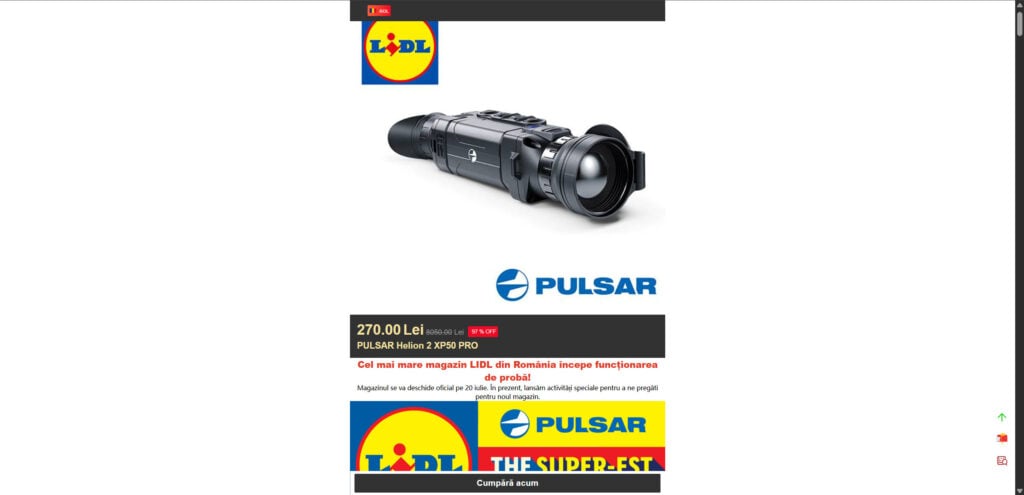
Scam Overview
The LIDL PULSAR Helion 2 XP50 PRO sale circulating on Facebook is a classic example of a fake clearance scam. The scammers behind this operation use well-known brand names, professional-looking images, and enticing price reductions to lure unsuspecting victims into providing payment information. Here are the key red flags that make this scam easy to identify:
1. Unbelievable Discounts
The real price of a PULSAR Helion 2 XP50 PRO thermal monocular is around €4,000 – €5,000. The scam website claims to sell it for only €50, which is a 97% discount. Such drastic price cuts on premium products are unrealistic and a major warning sign.
2. Fake Association with LIDL
The ad prominently displays the LIDL logo, creating the illusion that this is an official sale from LIDL Romania. However, there is no mention of this deal on LIDL’s official website or social media pages. Legitimate retailers never sell expensive products like high-end thermal cameras for a fraction of their market price.
3. Recently Created Domains
These scam websites often use newly registered domains that have no history or credibility. A quick WHOIS check typically reveals that the domain was created only days or weeks ago, often registered anonymously in another country.
4. Lack of Contact Information
A trustworthy online store provides multiple ways to contact them, including a physical address, phone number, and customer support options. Scam sites only provide a single email address, which usually goes unanswered.
5. No Social Media Presence
Apart from the paid scam ads on Facebook, these websites have no genuine social media presence. There are no verified pages, no customer reviews, and no official posts.
6. Copied Design and Content
The website design looks like a template, often filled with plagiarized text and stock images. Scammers invest just enough effort to make it look semi-professional while cutting corners on originality.
7. Fake Scarcity Tactics
They use psychological triggers like “Clearance Sale,” “Store Closing,” “Limited Time Offer” and “Free Shipping” to pressure you into making an impulsive purchase.
How the Scam Works
Understanding the mechanics of the scam will help you recognize similar tactics in the future. Here’s how the operation typically unfolds:
Step 1: Creating Fake Ads
The scammers design Facebook ads featuring the LIDL logo and the image of the PULSAR Helion 2 XP50 PRO. They include irresistible slogans like “Biggest LIDL Sale Ever” and “97% OFF – Only Today!”. These ads appear on your feed because the scammers use targeted advertising to reach potential victims.
Step 2: Redirecting to Fake Websites
Clicking on the ad takes you to a counterfeit e-commerce page. The page uses LIDL branding and the PULSAR logo to make the offer seem authentic. The price is slashed from $5000 to $50, which looks like a once-in-a-lifetime deal.
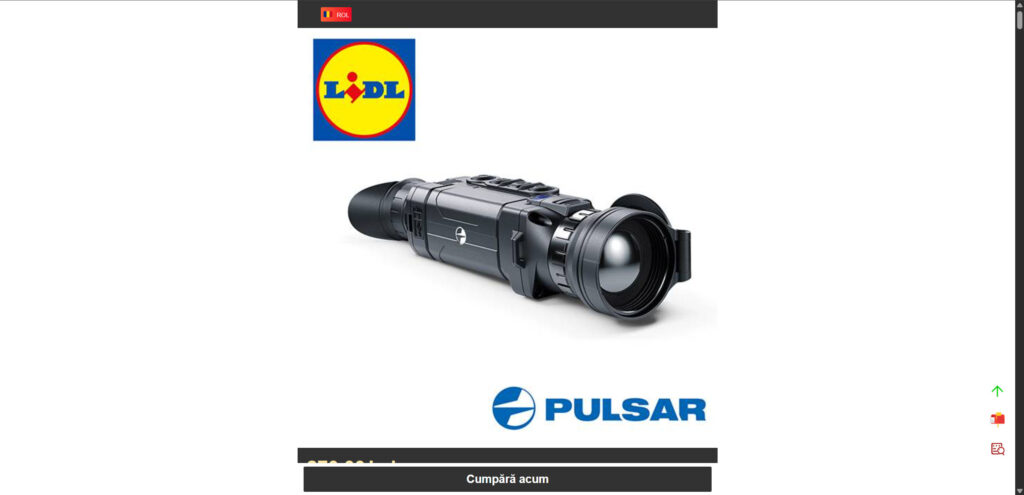
Step 3: Capturing Payment Details
Once you proceed to checkout, you are asked to provide:
- Full name
- Address
- Phone number
- Email address
- Credit or debit card details
This is where the real danger begins. After you pay, one of two things happens:
- You receive nothing at all.
- You receive a cheap counterfeit product worth a few dollars.
Step 4: No Refunds, No Contact
After the payment is processed, the scammers disappear. The email provided on the site either bounces back or goes unanswered. The refund policy is fake, and chargebacks are your only hope if you used a credit card.
Step 5: Potential Data Theft
Because you entered sensitive financial details on a fraudulent site, the scammers might use this information for identity theft or unauthorized transactions.
What to Do If You Have Fallen Victim to This Scam
If you suspect that you have been scammed, take immediate action. Here are the steps to minimize damage:
1. Contact Your Bank Immediately
- Inform your bank that you may have fallen victim to a fraudulent transaction.
- Request a chargeback if possible.
- Ask them to block your card and issue a new one.
2. Monitor Your Accounts
- Keep an eye on your bank and credit card statements for any unauthorized charges.
- Consider setting up transaction alerts for added security.
3. Report the Scam
- Report the fraudulent website to the National Consumer Protection Authority in your country.
- File a complaint with LIDL’s official customer service to make them aware of the scam.
- Report the scam ad on Facebook by clicking on the three dots in the ad and selecting “Report Ad”.
4. Check for Identity Theft
- If you provided personal data like your date of birth or ID number, monitor for signs of identity theft.
- Consider placing a fraud alert on your credit file.
5. Warn Others
- Share your experience on forums, social media, and consumer protection websites to prevent others from falling into the same trap.
The Bottom Line
The LIDL PULSAR Helion 2 XP50 PRO Facebook sale is a well-orchestrated scam designed to exploit trust in reputable brands and the allure of massive discounts. The rule of thumb is simple: If an offer looks too good to be true, it probably is.
Always verify deals by visiting the official websites of the brands involved. Never click on suspicious links in ads, and avoid entering your credit card details on unfamiliar websites. By staying informed and cautious, you can protect yourself and others from becoming victims of these scams.
Stay alert. Stay safe.
Here is a detailed, SEO-optimized FAQ section for the LIDL PULSAR Helion 2 XP50 PRO Facebook scam. It is structured for excellent readability, rich in relevant keywords, and designed to rank high on Google.
Frequently Asked Questions about the LIDL PULSAR Helion 2 XP50 PRO Facebook Scam
What is the LIDL PULSAR Helion 2 XP50 PRO Facebook scam?
The LIDL PULSAR Helion 2 XP50 PRO Facebook scam is a fraudulent online scheme that falsely advertises high-end thermal imaging devices (like the Pulsar Helion 2 XP50 PRO) for an unrealistically low price, usually around $60 to $80. The ads often use LIDL’s branding to appear trustworthy and claim the products are being sold during a “warehouse clearance” or “store closing sale.” In reality, these websites are fake and run by scammers.
Is LIDL actually selling Pulsar Helion 2 XP50 PRO devices for $60?
No, LIDL is not affiliated in any way with these scam offers. The Pulsar Helion 2 XP50 PRO is a high-end thermal monocular that normally retails for over $4,000. Any website claiming to sell it for $60 to $100 is highly suspicious and should be avoided. LIDL does not sell Pulsar thermal imaging equipment, either online or in-store.
How can I tell if a Facebook ad for this product is fake?
Look for these red flags:
- The website domain is newly created and unrelated to LIDL or Pulsar.
- The site offers a $4,000 product for under $100.
- Poor grammar or awkward phrasing in product descriptions.
- “Limited time” language such as “Clearance Sale” or “Store Closing.”
- Only an email is provided for contact. No phone number, address, or company registration.
- No social media links other than the ad itself.
- The “Buy Now” or “Confirm Order” button leads to suspicious checkout pages.
- Logos of real brands like LIDL or Pulsar are used without authorization.
What happens if I place an order on one of these scam websites?
In most cases, one of three things will happen:
- You receive nothing at all.
- You receive a cheap knockoff, like a toy or low-quality flashlight.
- Your credit card data may be stolen, leading to unauthorized charges or identity theft.
Scammers do not respond to refund requests, and chargebacks can be difficult unless initiated quickly through your bank or card provider.
Can I get a refund if I already placed an order?
If you paid using a credit card, contact your bank or card issuer immediately to request a chargeback due to fraud. If the transaction is recent, your bank might be able to reverse it. If you used a debit card, options may be more limited, but you should still report it. Avoid using direct bank transfers or prepaid gift cards on suspicious websites, as those are almost impossible to recover.
Is my personal information at risk?
Yes. If you submitted your name, address, phone number, and especially your credit card details, scammers may sell or use that data for future fraud. Monitor your account activity closely and consider placing a temporary hold or requesting a new card.
How can I report a scam website like this?
Here are several places where you can report the scam:
- Your bank or credit card company – for immediate fraud investigation.
- Facebook – report the ad as misleading or fraudulent.
- Google Safe Browsing – submit the URL at: https://safebrowsing.google.com/safebrowsing/report_phish/
- The real brands involved (LIDL and Pulsar) – so they can take legal action.
- Your local consumer protection authority or cybercrime division.
Why do scammers use the LIDL and Pulsar brand names?
Scammers use well-known, trusted brand logos like LIDL and Pulsar to gain credibility fast. Most victims trust the LIDL name and believe it’s an official store promotion. However, these companies are being impersonated without permission. This is a form of brand impersonation fraud, and it’s becoming increasingly common in fake “clearance sale” scams on Facebook and Google.
Are other people being scammed too?
Yes, hundreds of people across Europe and North America have reported similar scams involving fake clearance sales for high-end optics, tools, electronics, and outdoor gear. These scammers often use the same site templates, URLs, and ad copy, just changing the product and brand.
What should I do to avoid future scams like this?
- Always check the domain name. Scam websites often use odd or unfamiliar URLs.
- Never trust a deal that seems too good to be true.
- Avoid impulse purchases via Facebook ads unless they lead to known, reputable retailers.
- Search for product reviews and check scam-reporting websites before buying.
- Install browser extensions that flag phishing and scam websites.
- Bookmark the official websites of stores and brands you trust.
Is there a legitimate way to buy a Pulsar Helion 2 XP50 PRO?
Yes, if you’re interested in a Pulsar thermal device, buy it from:
- Authorized retailers listed on the official Pulsar website.
- Reputable hunting and optics stores.
- Verified Amazon or B&H Photo listings.
These sellers typically price the Pulsar Helion 2 XP50 PRO around $4,000 to $4,500 depending on the region and distributor.








