

If you’ve seen a Facebook ad claiming that LIDL is offering the Samsung Galaxy Watch 8 for an unbelievably low price, it’s important to stop and investigate before making a purchase. These ads often look convincing, featuring the Samsung logo, the LIDL brand, and slogans promising quick delivery and massive discounts. However, this is not a real promotion. It’s a scam designed to steal your money and personal information.
This article provides a comprehensive breakdown of the scam, how it works, and what steps you should take if you’ve been targeted or have already fallen victim.
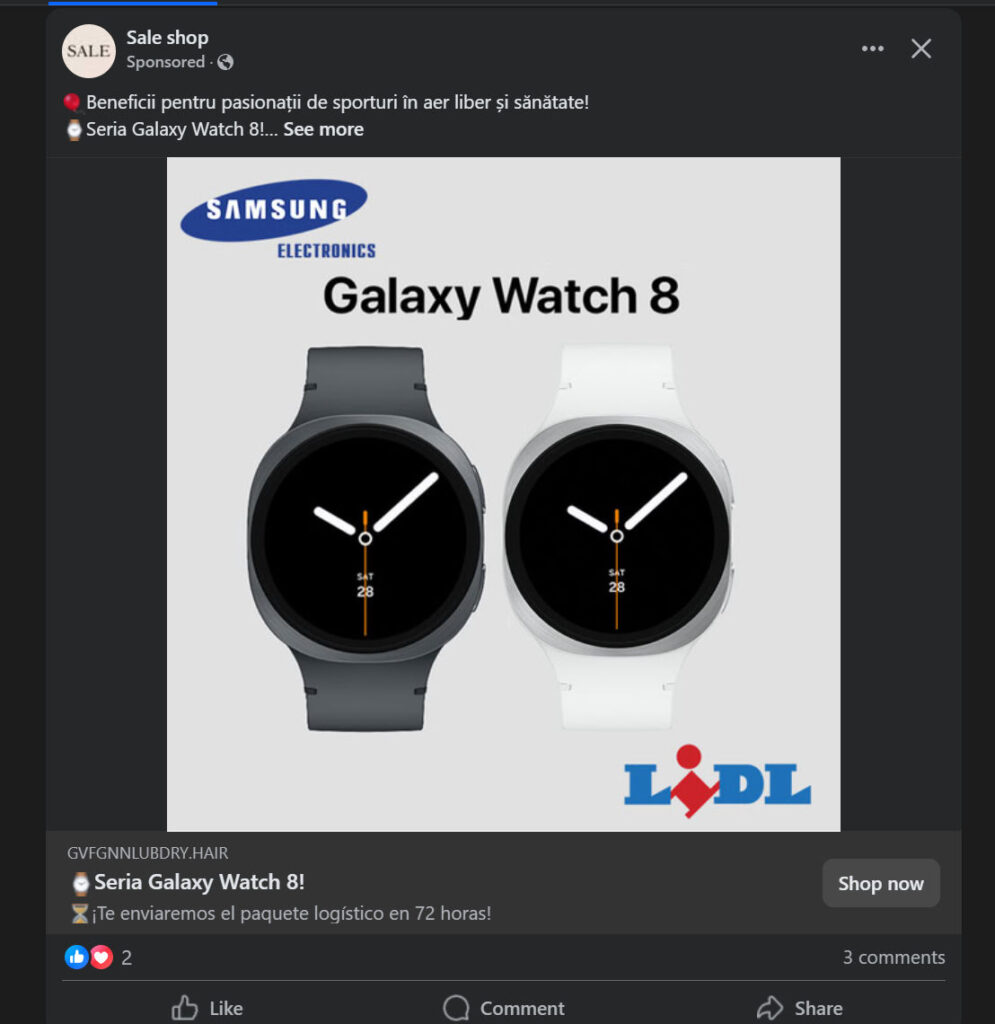
Scam Overview
The Facebook ads promoting the Samsung Galaxy Watch 8 at a discounted price through LIDL are part of an organized scam. Here are the primary warning signs that reveal this scheme as fraudulent:
1. Unrealistic Discounts
The official retail price of the Samsung Galaxy Watch 8 ranges from $350 to $500 depending on the model and region. The scam websites advertise the watch for $40 to $70, which is an unrealistic discount. Genuine retailers rarely, if ever, offer discounts of 80-90% on premium products.
2. Fake Brand Association
The scammers use the LIDL and Samsung logos to make the offer look legitimate. However, there is no official announcement from LIDL or Samsung regarding such a promotion. These companies do not run massive clearance sales through random Facebook ads.
3. Suspicious Website Domains
Clicking the ad leads to websites with strange domain names such as gvfg…lubdry.hair, which clearly have nothing to do with Samsung or LIDL. Most of these domains are newly created, which is a strong sign of a scam.
4. Limited Contact Information
Legitimate retailers provide multiple ways to contact customer support, such as email, phone numbers, and physical addresses. Scam websites usually only display a single email address or an incomplete contact form.
5. No Real Social Media Presence
Apart from the scam ad itself, these operations have no official social media pages or verified profiles. They only rely on paid ads to reach potential victims.
6. Poor Website Design
These fake sites often look like generic templates filled with stock photos, copied text, and vague product descriptions. There are no genuine reviews or security features like HTTPS encryption in many cases.
7. False Urgency and Scarcity Tactics
They use psychological tricks like “Hurry! Limited Stock”, “Order Now for Free Shipping”, and countdown timers to pressure you into buying without thinking.
How the Scam Works
To protect yourself, you need to understand the mechanics of this scam. Here’s a detailed breakdown:
Step 1: Creating Fake Facebook Ads
The scammers create sponsored ads on Facebook showing the Samsung Galaxy Watch 8 alongside the LIDL logo. The captions often include phrases like:
- “Special benefits for fitness lovers!”
- “Limited time offer – Samsung Galaxy Watch 8 for only $49!”
- “Free shipping in 72 hours!”
Step 2: Redirecting You to a Fake Website
When you click the ad, you’re taken to a fake online store. This site will:
- Display the Samsung and LIDL logos prominently.
- Show the original price slashed by 80-90%.
- Offer buy now buttons and promises of fast delivery.
Step 3: Collecting Personal and Payment Information
The scammers request your:
- Full name
- Address
- Phone number
- Credit card or debit card details
Once you enter this information, you’ve handed over both your money and sensitive data.
Step 4: Payment and Disappearance
After payment, one of two things usually happens:
- You receive nothing at all.
- You receive a cheap knockoff worth a few dollars.
There is no customer service, and refund requests go unanswered.
Step 5: Risk of Identity Theft
If you provided card details, scammers may use your information for unauthorized transactions or sell it to other criminals. This can lead to identity theft and long-term financial issues.
What to Do If You Have Fallen Victim to This Scam
If you already placed an order or shared your payment details, act quickly. Here are the steps to follow:
1. Contact Your Bank or Card Issuer Immediately
- Explain that you’ve been scammed.
- Request a chargeback if the transaction is recent.
- Block your current card and get a new one.
2. Monitor Your Accounts
- Check bank statements for any unauthorized transactions.
- Set up alerts for suspicious activity.
3. Report the Scam
- Report the fraudulent site to Facebook.
- Notify Samsung and LIDL through their official customer service channels.
- Submit a complaint to your local consumer protection agency.
- Report the URL to Google Safe Browsing.
4. Change Your Passwords
If you used the same email and password combination elsewhere, change them immediately to prevent hackers from accessing other accounts.
5. Stay Informed and Warn Others
Share your experience on social media and forums to help others avoid falling for similar scams.
The Bottom Line
The Samsung Galaxy Watch 8 Facebook sale claiming to be from LIDL is a scam designed to steal your money and personal information. Always verify deals by visiting official websites or trusted retailers. If the price seems too good to be true, it usually is.
Stay vigilant, research before you buy, and help spread awareness to stop these scams from harming others.
Stay safe online.
Here’s a detailed and SEO-optimized FAQ section for the LIDL Samsung Galaxy Watch 8 Facebook Sale Scam designed for maximum readability and search engine performance.
Frequently Asked Questions About the LIDL Samsung Galaxy Watch 8 Facebook Scam
What is the LIDL Samsung Galaxy Watch 8 Facebook scam?
The LIDL Samsung Galaxy Watch 8 Facebook scam is a fraudulent marketing scheme where scammers use fake ads on Facebook claiming that LIDL is selling the Samsung Galaxy Watch 8 at extremely low prices, often under $70. These ads use Samsung and LIDL logos to look authentic. When victims click the ad, they are redirected to fake websites that collect personal and payment information but never deliver the real product.
Is LIDL really selling Samsung Galaxy Watch 8 for under $70?
No. This offer is completely fake. The Samsung Galaxy Watch 8 is a premium smartwatch that retails between $350 and $500 depending on the model and region. LIDL does not sell Samsung smartwatches, and Samsung does not authorize such sales. Any site claiming these prices is a scam designed to steal your money and data.
How can I identify this scam?
Here are the main warning signs:
- Unbelievable discounts – Up to 80-90% off the original price.
- Strange domain names – Often unrelated to LIDL or Samsung (e.g., random strings of letters or unusual extensions like .hair).
- No contact information – Only an email, no phone number or physical address.
- Fake urgency tactics – Messages like “Only a few left!” or countdown timers.
- No official confirmation – The deal isn’t mentioned on LIDL’s or Samsung’s official websites.
What happens if I order from these scam websites?
If you proceed with the purchase:
- You may receive nothing at all.
- You might get a cheap counterfeit product worth a few dollars instead of a genuine Galaxy Watch.
- Your credit or debit card details may be stolen, leading to unauthorized charges.
- Personal information could be misused for identity theft or sold to other scammers.
Can I get a refund if I’ve already paid?
If you paid by credit card:
- Contact your bank or credit card provider immediately and request a chargeback.
- Inform them the transaction was fraudulent.
If you used a debit card or direct transfer, refunds are much harder to obtain, but report it to your bank right away.
Is my personal and financial data at risk?
Yes. Entering your details on a scam site exposes you to:
- Unauthorized transactions on your card.
- Identity theft, as scammers may sell your data.
To stay safe: - Block your card immediately and request a new one.
- Monitor your accounts for suspicious activity.
- Enable fraud alerts with your bank.
How do scammers make the ads look real?
They use:
- Official LIDL and Samsung logos.
- Stock images of Galaxy Watch 8.
- Professional-looking ad copy.
- Phrases like “Fast delivery in 72 hours” and “Special health benefits for sports lovers” to sound appealing.
How can I report the scam?
You should report:
- The ad on Facebook – Click the three dots on the ad and select “Report Ad.”
- The scam website to Google Safe Browsing.
- Notify LIDL and Samsung via their official customer service.
- File a report with your local consumer protection authority or cybercrime division.
Are there other scams like this?
Yes, this scam is part of a growing trend involving fake clearance sales. Similar scams often use trusted brands like Apple, Sony, or Dyson with huge discounts. The tactic is always the same: lure victims with an unbelievable deal, collect payment info, and vanish.
How can I protect myself from scams like this?
- Always verify deals on official websites before buying.
- Check the URL carefully – Avoid unfamiliar domain names.
- Be skeptical of deals that seem too good to be true.
- Use secure payment methods (credit cards, not bank transfers).
- Enable two-factor authentication on your accounts for added security.
Where can I buy a genuine Samsung Galaxy Watch 8?
To ensure you get a real product:
- Buy from the official Samsung website.
- Purchase from authorized retailers like Amazon, Best Buy, or major electronics chains.
- Avoid third-party sellers that do not have verified credentials.








