

Lululemon is a popular athletic apparel company known for its quality yoga pants and loyal customer base. However, scammers are leveraging Lululemon’s brand appeal to lure victims into a fake product reviewer program scam.
Fraudsters create convincing websites promoting a non-existent “Lululemon Product Reviewer Program” that supposedly rewards participants with a $750 gift card. But it’s just a ruse to harvest personal information and steal money.
This in-depth article will uncover how this insidious scam works, identify red flags to watch for, and provide tips to avoid getting swindled.
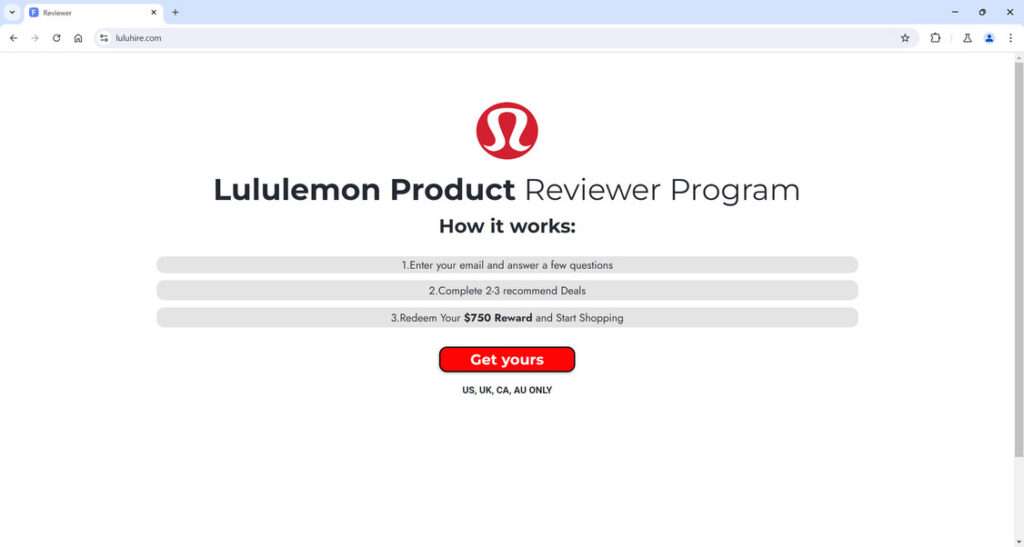
Overview of the Lululemon Product Reviewer Scam
This scam operates by enticing victims with the chance to review Lululemon products and earn a $750 gift card in return. Scammers build professional-looking websites advertising this fictitious opportunity, along with fake enrollment forms promising rewards upon completion.
However, there is no actual product reviewer program or gift cards. The scammers’ true intent is to collect sensitive personal data for identity theft, siphon money through recurring subscription fees, and potentially access devices to install malware.
The fraudsters combine the lure of free Lululemon gear with the legitimacy of being a “reviewer” to trick eager victims. But handing over information under this guise only leads to compromised accounts, financial theft, and wasted money on non-existent rewards.
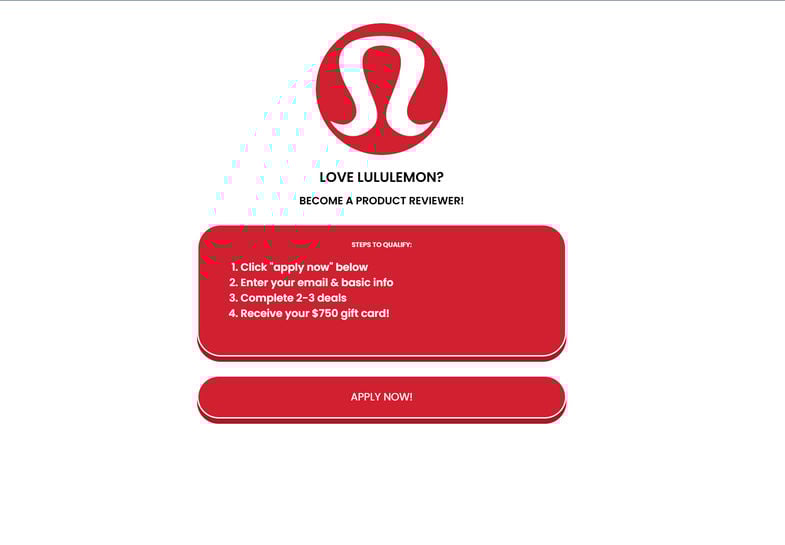
How the Scammers Carry Out This Con
Here are the illicit strategies scammers employ for this product reviewer scam:
- Fake websites – Scammers design sophisticated sites mimicking a real Lululemon product tester program, using the company’s images and branding.
- Social media ads – Promoted posts on Facebook, Instagram and TikTok drive traffic to the fraudulent reviewer enrollment pages.
- Pop-up ads – Deceptive pop-up ads also direct users to the phony Lululemon reviewer platforms.
- Spam emails – Phishing emails pretend to be from Lululemon Support offering the chance to review products.
- Rewards fraud – The scam claims users must complete “recommended deals” like subscriptions or downloads to earn the $750 gift card.
- Malware distribution – Downloaded apps or files contain malware to infect users’ devices.
- Personal data harvesting – Scammers steal info through questionnaires for identity theft and account compromise.
The scam evolves but continues deceiving eager victims with the lure of free Lululemon gear and gift cards. But in reality, engagement only leads to loss and fraud.
Breakdown of the Lululemon Reviewer Scam
Here is a walkthrough of how the predatory Lululemon reviewer con unfolds at each step:
Step 1: Encountering a Fake Reviewer Program Ad
The scam starts with the victim coming across a promotional post, email, pop-up, or website advertising the opportunity to become a product reviewer for Lululemon and get paid in gift cards.
The ads and messages appear credible with eye-catching images of Lululemon clothes and promises of rewarding reviewers. There may be false testimonials and urgent calls to enroll before slots fill up.
Step 2: Signing Up for the Fake Program
Deceived by the ads, victims click the link to sign up as a reviewer. They are taken to slick websites with Lululemon branding and sections to enter their name, email, phone number, birth date, physical address, and other personal details.
The data harvesting forms are designed to look like legitimate new account registration pages. But in reality, it’s just a scam to steal personal information.
Step 3: Completing Required Offers or Downloads
After submitting their sensitive data, victims are prompted to complete a few “recommended deals” or downloads to finish enrolling in the fake reviewer program.
This usually requires signing up for subscription trial offers, taking online surveys, or downloading third-party apps. The downloads may contain malware.
Step 4: No Payment and Ongoing Financial Fraud
Unfortunately, victims complete these tasks but never get paid the promised $750 Lululemon gift cards. Instead, the subscription trials they signed up for start auto-billing their cards monthly.
The personal info they submitted is now in the hands of scammers who steal identities and empty bank accounts. Devices infected with downloaded malware may have compromised security and hacked accounts.
In the end, the victims lose money and privacy while the scammers profit off their deception. There is no real Lululemon reviewer program – only a scam designed to defraud.
How to Avoid Falling Victim to the Fake Lululemon Reviewer Scam
Here are some tips to help spot and avoid this insidious con:
- Be skeptical of unsolicited emails or ads about lucrative reviewer opportunities requiring upfront personal data. Do your research.
- Verify using Lululemon’s official website – don’t just trust third-party pages claiming affiliations.
- Check for poor grammar and spelling errors on pages promoting the deal. This signals fraud.
- Avoid entering personal info on any unfamiliar sites offering the reviewer program.
- Beware downloads required to claim rewards – they likely contain malware.
- Read the fine print for any free trials to avoid unwanted charges.
- Monitor accounts and credit cards used on suspicious sites for fraudulent activity.
- Secure devices against potential malware infections from dubious downloads.
Staying vigilant against scams is your best defense. Real rewards never require handing over sensitive information or signing up for anything upfront.
Here is a section on how to identify the fake Lululemon product reviewer scam on social media and fraudulent websites:
How to Recognize This Scam on Social Media and Websites
The Lululemon reviewer scam relies on convincing social media ads and fake websites to lure in victims. Here are tips to spot their deceptive tactics:
Watch for These Red Flags on Social Media:
- Ads promoting an amazing opportunity to review Lululemon products for rewards should raise suspicions.
- Pressure tactics in ads urging users to sign up fast before reviewer slots fill up indicates a scam.
- Links in social media ads leading to unrelated domains instead of Lululemon’s site are a major warning sign.
- Poor grammar and spelling mistakes in the ad copy are common scam giveaways.
- Inspect the ad sponsor name, which may sound totally fake or nonsensical.
Be Wary of These Dubious Website Tactics:
- URLs with misspellings, extra words added, or unusual domain extensions like .xyz.
- Homepages using stolen Lululemon images in a sloppy, disorganized manner.
- Spelling/grammar errors throughout the site content and instructions.
- Forms asking for personal information and financial details upfront.
- Countdown timers or “limited time only” pressures to quickly sign up.
- Required downloads from outside sources that may contain malware.
- No business registration details, physical addresses, or contact information.
- No links going to Lululemon’s official social media pages or website.
Staying alert on social media and carefully inspecting websites can help identify scam tactics aiming to deceive eager victims. Avoid sites requiring personal data upfront and research legitimacy directly through the brand.
What to Do If You Already Fell for This Scam
If you fear you may have been conned by a fake Lululemon reviewer program, follow these steps:
- Contact your bank and card issuer to report possible fraudulent charges or subscriptions.
- Scan devices for malware if you downloaded any third-party apps or files.
- Change passwords on accounts where you used the same username/password combo. Monitor for suspicious activity.
- Place fraud alerts and request credit reports to check for accounts opened in your name.
- Report fake websites to cybersecurity authorities to aid scam shutdowns.
- Learn to spot scams going forward so you can avoid being victimized again. Look for warning signs like pressure tactics, urgency, and too-good-to-be true claims.
Stay proactive if you suspect you were targeted, and help authorities crack down on these criminals. And spread awareness about fake rewards programs to protect others.
Is Your Device Infected? Run a Free Malware Scan
Slow performance, constant pop-ups, or strange behavior? These are classic signs of a malware infection. The fastest way to find out is to scan your device with Malwarebytes Free — one of the most trusted malware removal tools available.
The free version detects and removes the most common threats, including:
- Adware — the cause of those annoying pop-ups
- Browser hijackers — unwanted redirects and changed homepages
- Trojans and spyware — hidden programs stealing your data
- Potentially unwanted programs (PUPs) — software you never asked for
👉 Select your device below — Windows, Mac, or Android — then follow the simple steps to download Malwarebytes, scan your system, and remove any threats it finds. The scan usually takes 5 to 20 minutes.
Run a Malware Scan with Malwarebytes for Windows
Malwarebytes is one of the most popular and trusted anti-malware tools for Windows — and it’s completely free for removing infections. It catches threats that many antivirus programs miss, including adware, browser hijackers, and trojans. Follow the steps below to scan and clean your PC in just a few minutes.
Download Malwarebytes
Click the button below to download the latest version of Malwarebytes for Windows from the official source. The free version is all you need — it will scan your computer and remove adware, browser hijackers, and other malicious software at no cost.
Download MalwarebytesOfficial installer for Windows 11 and 10. Your download starts right away.Want real-time protection? See Malwarebytes Premium Malwarebytes Free for WindowsScans and removes malware at no cost
-
Install Malwarebytes
When the download finishes, open your Downloads folder and double-click the MBSetup file. If Windows shows a User Account Control pop-up, click “Yes” to allow the installation.
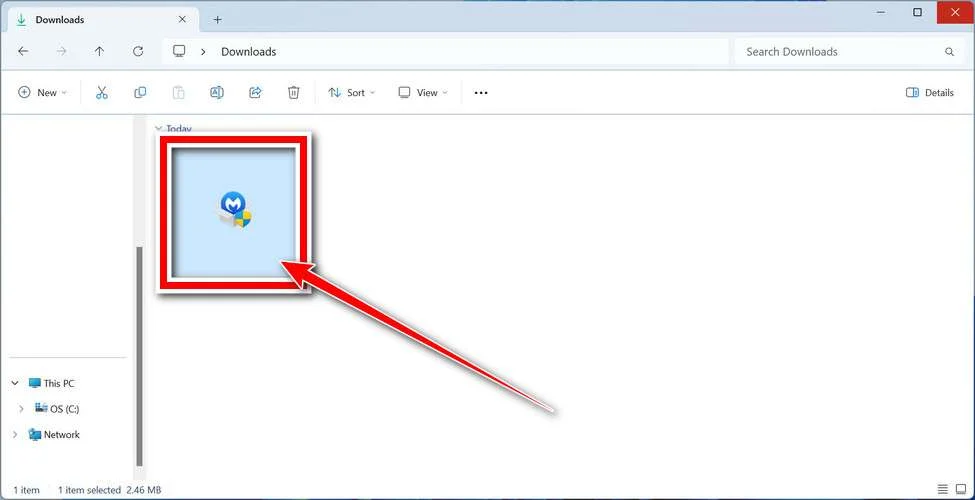
Follow the On-Screen Prompts to Install Malwarebytes
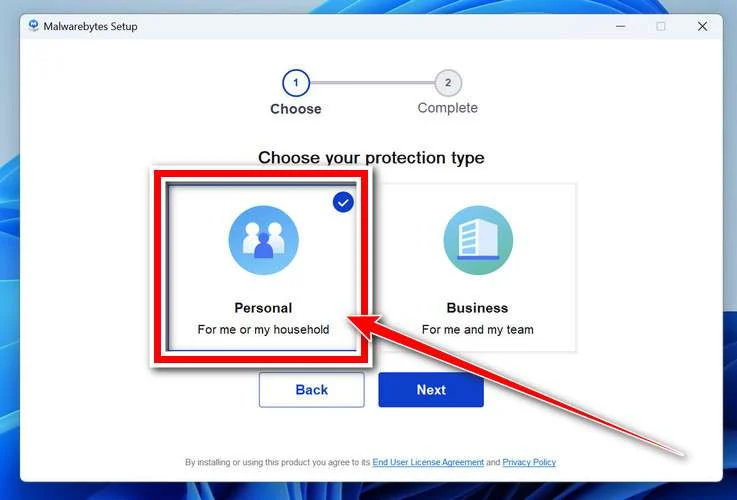
The setup wizard will walk you through a few quick screens:
-
Choose where you’re installing the program — “Personal Computer” or “Work Computer” — then click Next.
-
Malwarebytes will now install on your device. This usually takes under a minute.

-
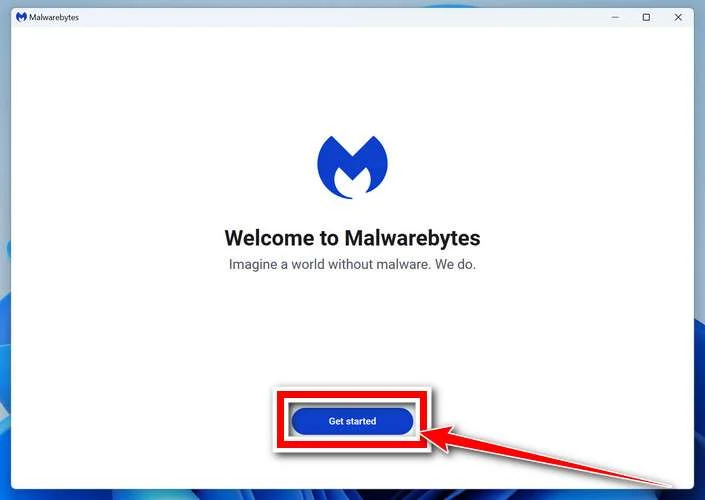
When installation is complete, the “Welcome to Malwarebytes” screen will open automatically.
-
On the final screen, click Open Malwarebytes to launch the program.

-
Enable “Scan for Rootkits”
Before scanning, turn on rootkit detection so Malwarebytes can find even the most hidden threats. Click the Settings gear icon on the left side of the screen.
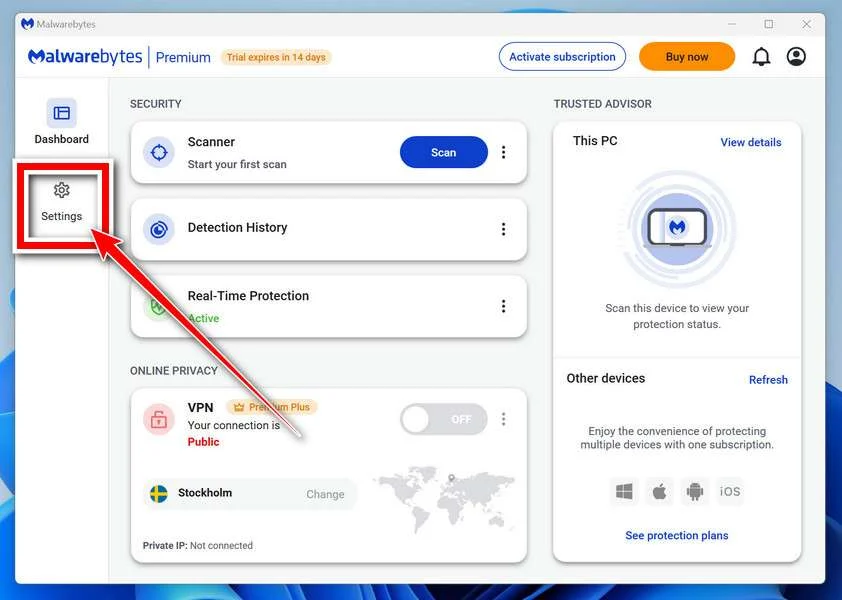
In the settings menu, find “Scan for rootkits” and click the toggle so it turns blue.

Done? Click “Dashboard” in the left pane to return to the main screen.
Start the Scan
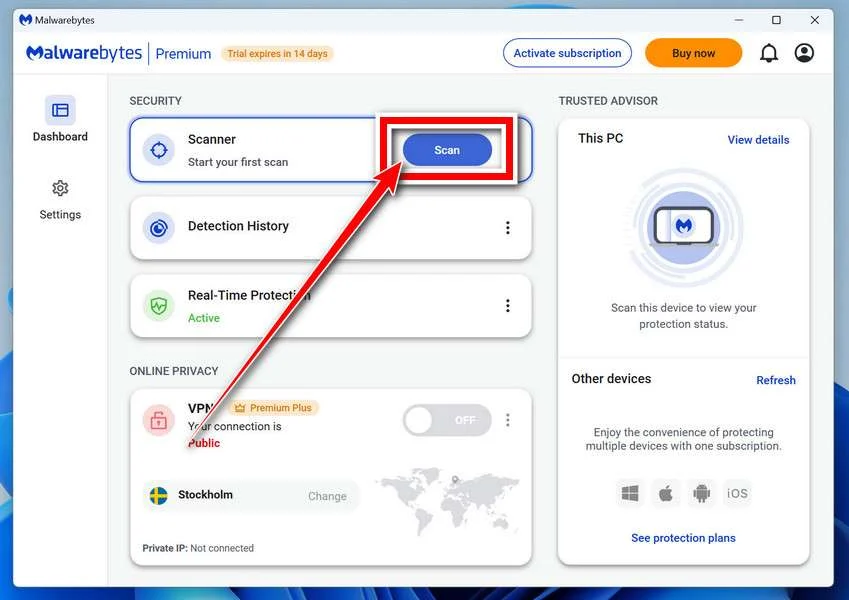
Click the blue Scan button. Malwarebytes will automatically update its virus database and start checking your computer for malware.
-
Wait for the Scan to Finish
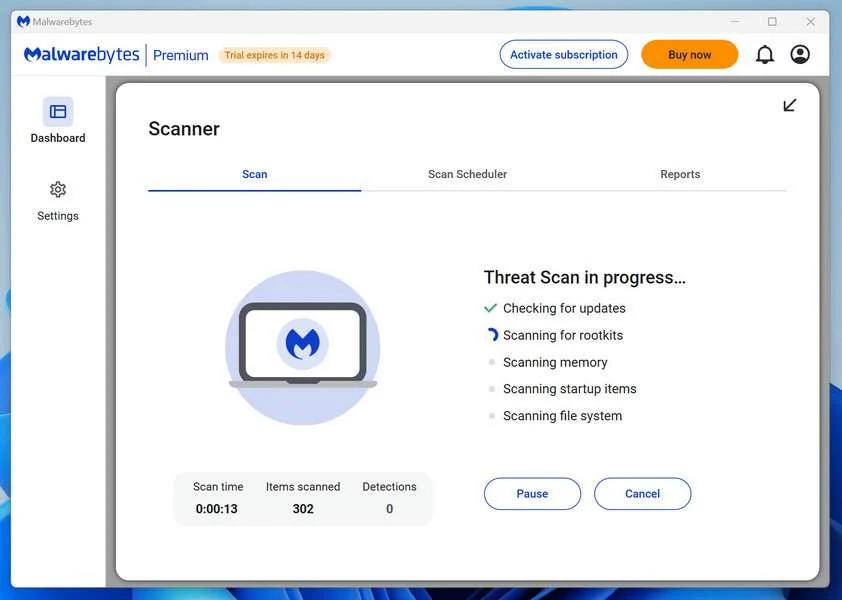
The scan checks your entire system for browser hijackers and other malicious programs, so it can take 5 to 20 minutes depending on your computer. Feel free to do something else — just check back occasionally to see the progress.
-
Quarantine the Detected Threats
When the scan is done, you’ll see a list of everything Malwarebytes found — malware, adware, and potentially unwanted programs. Click the “Quarantine” button to remove all of them at once.
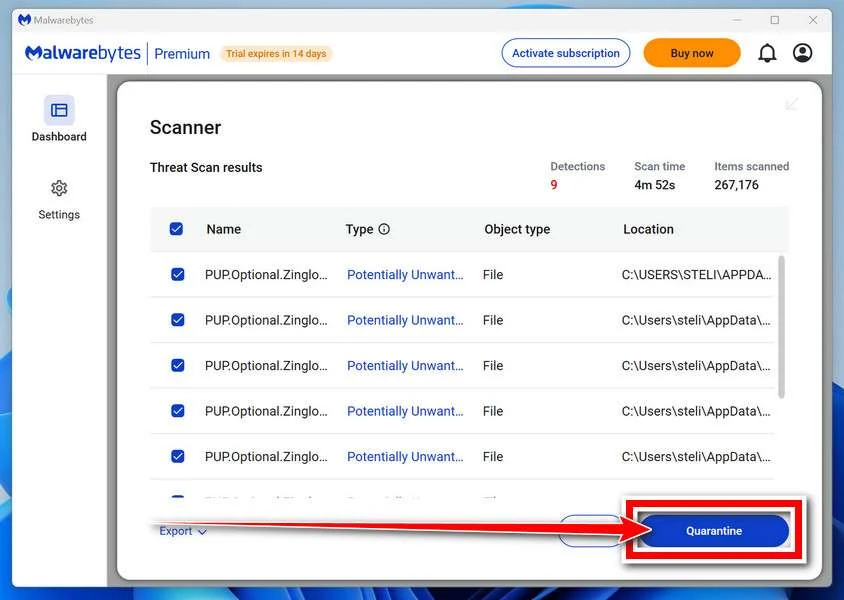
Malwarebytes will now remove the malicious files and registry entries and move them safely into quarantine.
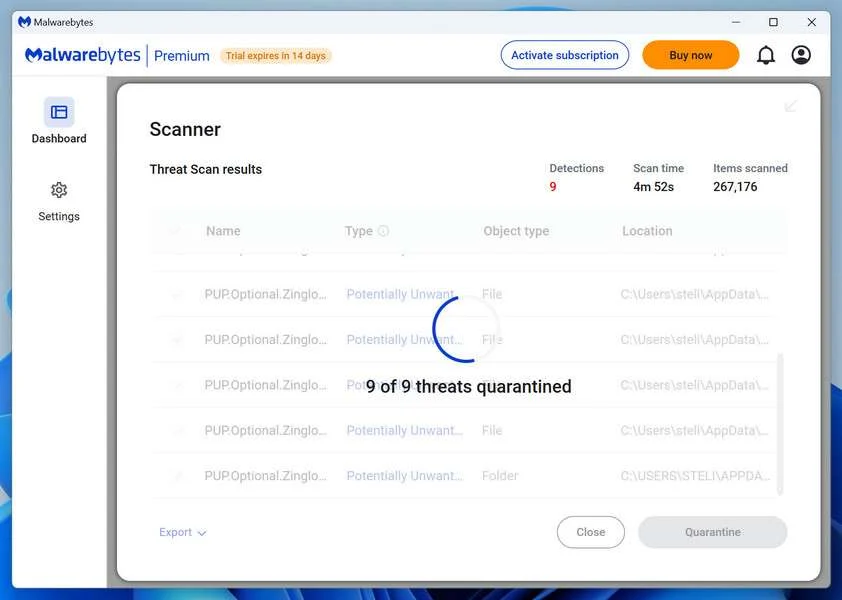
-
Restart Your Computer
Some threats can only be fully removed after a reboot. If Malwarebytes asks you to restart, click Yes. Once you’re logged back in, Malwarebytes has finished removing the threats it found.
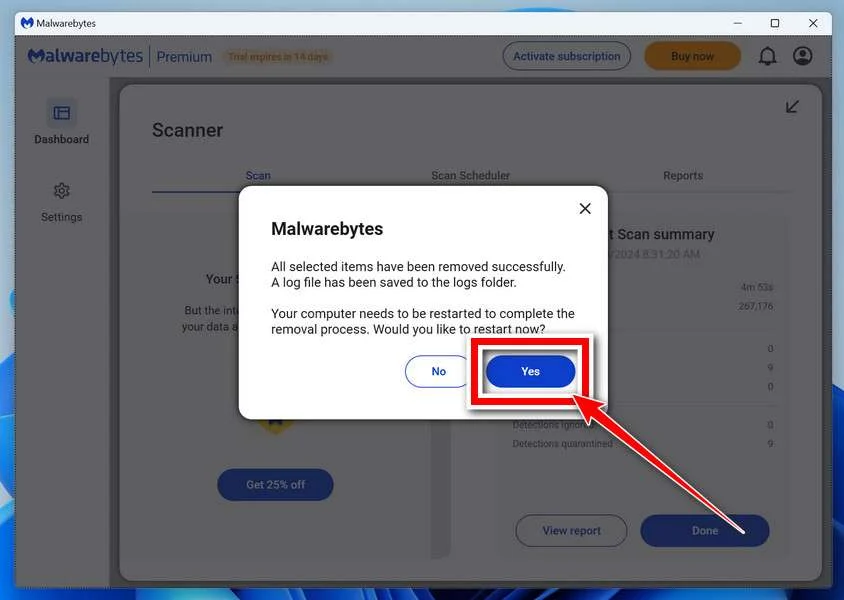
That’s it — your Windows PC is now clean of trojans, adware, and other malware, and should be back to running smoothly.
If you are still having problems with your computer after completing these instructions, then please follow one of the steps:
- Run a computer scan with ESET Online Scanner
- Ask for help in our Windows Malware Removal Help & Support forum.
Run a Malware Scan with Malwarebytes for Mac
Malwarebytes for Mac is a free on-demand scanner that removes the malware other security software tends to miss — adware, browser hijackers, and unwanted programs included. Cleaning an infected Mac with Malwarebytes has always been completely free, and it’s our go-to recommendation. Follow the steps below to scan and clean your Mac in just a few minutes.
-
Download Malwarebytes for Mac
Click the button below to download the latest version of Malwarebytes for Mac.
Download MalwarebytesOfficial installer for macOS. Your download starts right away.Want real-time protection? See Malwarebytes PremiumMalwarebytes Free for MacScans and removes malware at no cost -
Open the Malwarebytes setup file
When the download finishes, open your Downloads folder and double-click the setup file to begin the installation.
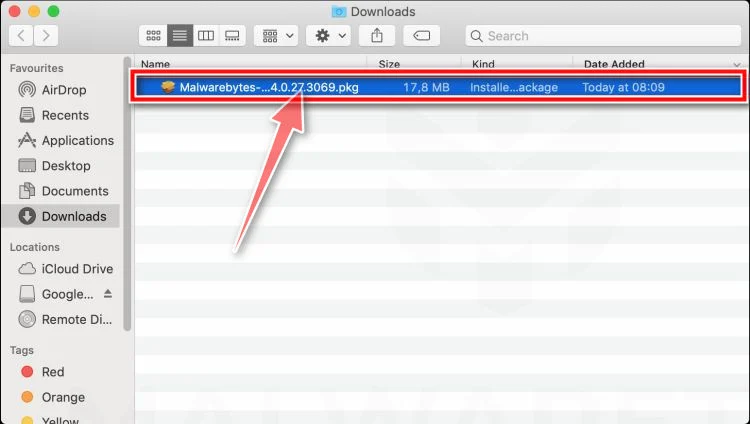
-
Follow the On-Screen Prompts to Install Malwarebytes
The Malwarebytes for Mac Installer will guide you through a few quick screens. Click “Continue” and keep following the prompts until the installation completes.
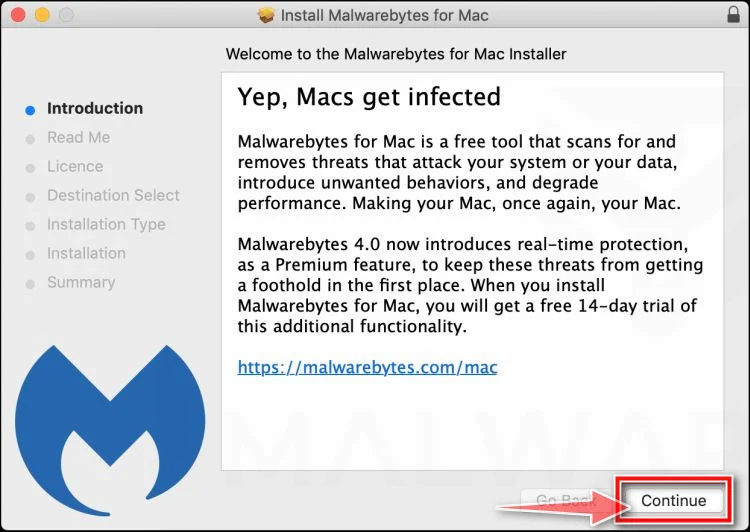
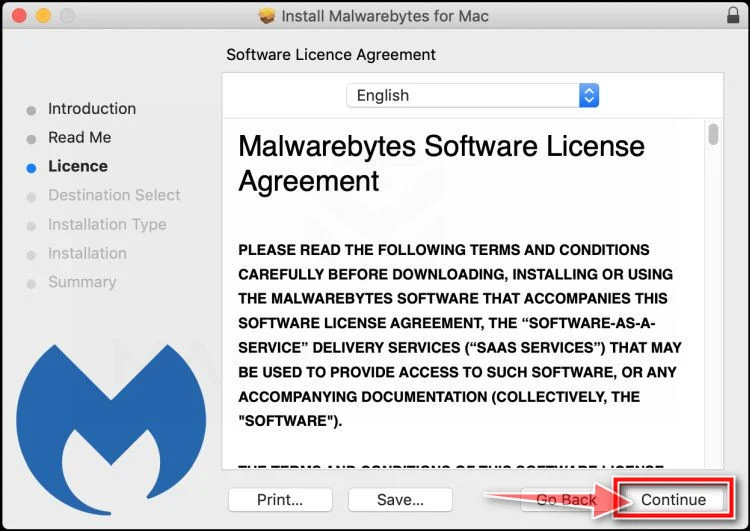
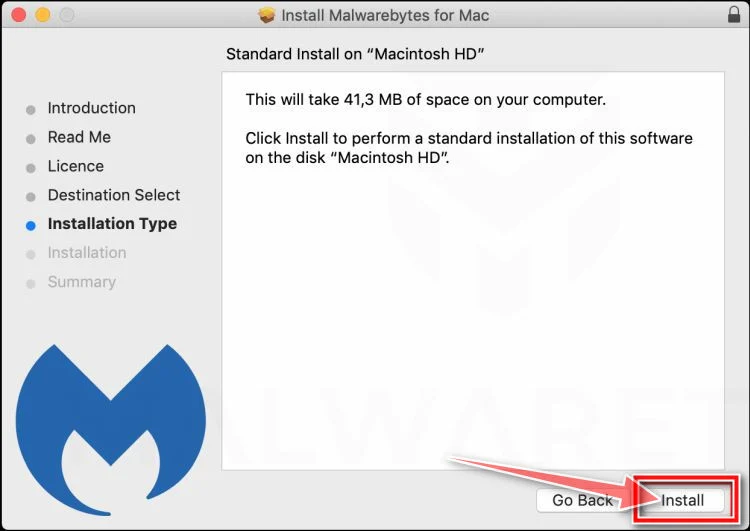
When the installation is complete, Malwarebytes opens to the Welcome to Malwarebytes screen. Click “Get started“.
-
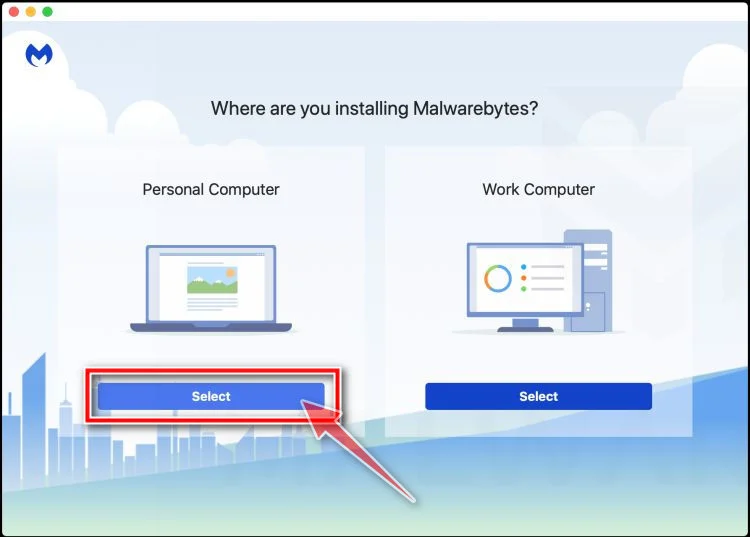
Select “Personal Computer” or “Work Computer”
Malwarebytes will ask what type of computer you’re installing it on. Click either Personal Computer or Work Computer, whichever applies.
-
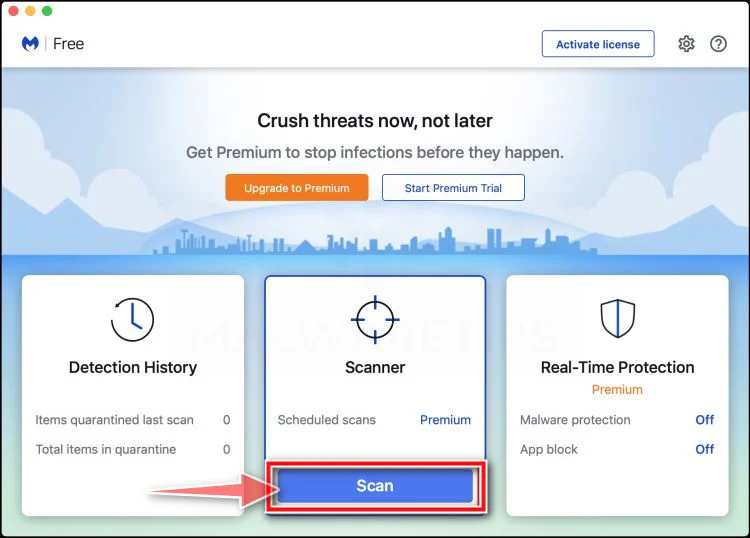
Start the Scan
Click the “Scan” button. Malwarebytes will automatically update its detection database and begin checking your Mac for malware.
-
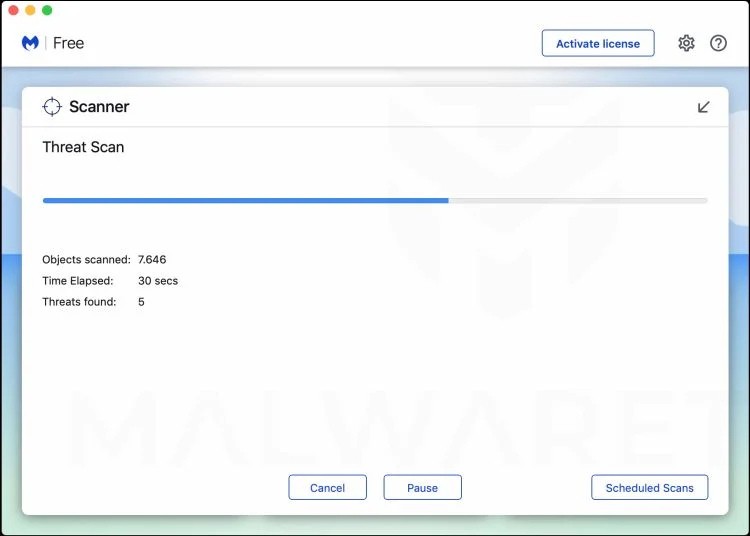
Wait for the Scan to Finish
Malwarebytes will scan your Mac for adware, browser hijackers, and other malicious programs. This can take a few minutes, so feel free to do something else — just check back occasionally to see the progress.
-
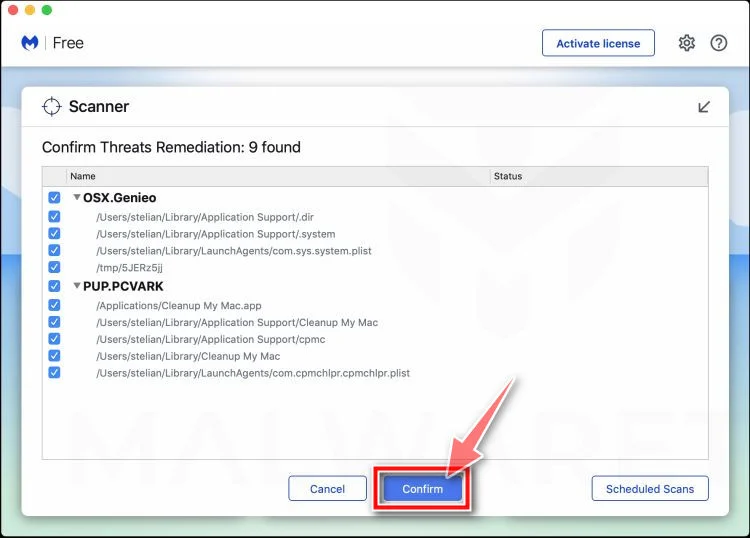
Quarantine the Detected Threats
When the scan is done, you’ll see a list of everything Malwarebytes found. Click the “Quarantine” button to remove all the threats at once.
-
Restart Your Mac
Malwarebytes will now remove all the malicious files it found. Some threats can only be fully removed after a reboot — if Malwarebytes asks you to restart, allow it. Once you’re logged back in, your Mac is clean.
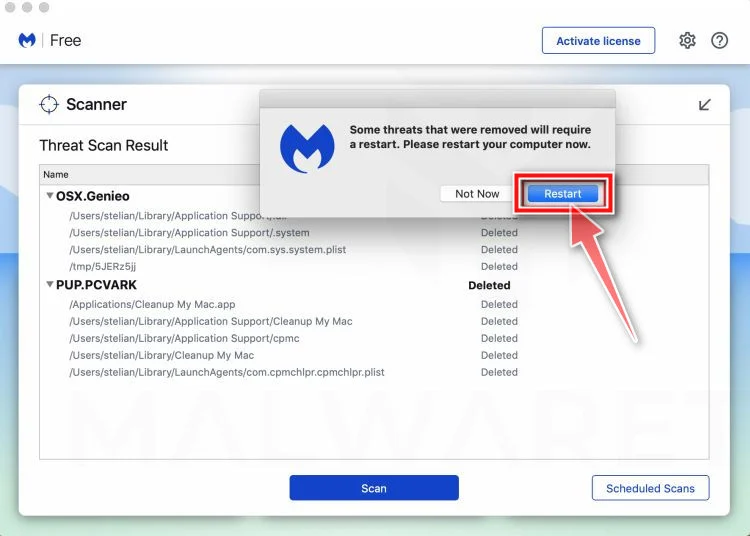
That’s it — your Mac is now free of adware, rogue browser extensions, and other potentially harmful software.
If you are still experiencing problems while trying to remove a malicious program from your computer, please ask for help in our Mac Malware Removal Help & Support forum.
Run a Malware Scan with Malwarebytes for Android
Malwarebytes for Android automatically detects and removes dangerous threats like malware and ransomware so you don’t have to worry about your most-used device being compromised. Aggressive detection of adware and potentially unwanted programs keeps your Android phone or tablet running smooth.
-
Download Malwarebytes for Android.
You can download Malwarebytes for Android by clicking the link below.
Get Malwarebytes for AndroidOpens Google Play in a new tab.Want real-time protection? See Malwarebytes Premium for AndroidMalwarebytes for AndroidScans your phone and removes malware at no cost -
Install Malwarebytes for Android on your phone.
In the Google Play Store, tap “Install” to install Malwarebytes for Android on your device.

When the installation process has finished, tap “Open” to begin using Malwarebytes for Android. You can also open Malwarebytes by tapping on its icon in your phone menu or home screen.

-
Follow the on-screen prompts to complete the setup process
When Malwarebytes will open, you will see the Malwarebytes Setup Wizard which will guide you through a series of permissions and other setup options.
This is the first of two screens that explain the difference between the Premium and Free versions. Swipe this screen to continue.
Tap on “Got it” to proceed to the next step.
Malwarebytes for Android will now ask for a set of permissions that are required to scan your device and protect it from malware. Tap on “Give permission” to continue.
Tap on “Allow” to permit Malwarebytes to access the files on your phone.
-
Update database and run a scan with Malwarebytes for Android
You will now be prompted to update the Malwarebytes database and run a full system scan.

Click on “Update database” to update the Malwarebytes for Android definitions to the latest version, then click on “Run full scan” to perform a system scan.

-
Wait for the Malwarebytes scan to complete.
Malwarebytes will now start scanning your phone for adware and other malicious apps. This process can take a few minutes, so we suggest you do something else and periodically check on the status of the scan to see when it is finished.

-
Click on “Remove Selected”.
When the scan has been completed, you will be presented with a screen showing the malware infections that Malwarebytes for Android has detected. To remove the malicious apps that Malwarebytes has found, tap on the “Remove Selected” button.

-
Restart your phone.
Malwarebytes for Android will now remove all the malicious apps that it has found. To complete the malware removal process, Malwarebytes may ask you to restart your device.
That’s it — your Android phone is now clean — no more malicious apps, adware, or browser redirects.
If you are still having problems with your phone after completing these instructions, then please follow one of the steps:
- Restore your phone to factory settings by going to Settings > General management > Reset > Factory data reset.
- Ask for help in our Mobile Malware Removal Help & Support forum.
Stay Protected: Block Ads and Malicious Sites
Now that your device is clean, keep it that way. Most infections start with a malicious ad or a fake download button — so blocking them at the source is your best defense.
We recommend AdGuard, which blocks malicious ads, phishing pages, and dangerous redirects before they can reach you.
👉 Download AdGuard and browse safely
Frequently Asked Questions About the Lululemon Product Reviewer Scam
1. What is the Lululemon product reviewer scam?
The Lululemon product reviewer scam is a fraudulent scheme where scammers create fake websites and ads promoting a non-existent rewards program for reviewing Lululemon products in exchange for gift cards.
2. How do the scammers attract potential victims?
Scammers use social media ads, pop-ups, spam emails, and fake websites advertising a lucrative Lululemon product reviewer opportunity. The ads promise rewards like gift cards for reviewing products.
3. What happens when victims sign up through the scammers’ links?
Victims are taken to convincing fake sites and asked to enter personal information and complete offers/downloads to enroll in the fake reviewer program. The scammers then steal their data and money.
4. What methods do the scammers use?
Tactics include fake Lululemon-branded websites, phishing emails, social media ads, pop-up ads, malware downloads, and subscription fee scams, among others. They adapt their methods often.
5. What types of data do victims end up providing?
Scammers trick victims into giving names, emails, physical addresses, phone numbers, birthdates, passwords, and sometimes financial information like credit card numbers.
6. Are there any legitimate Lululemon product reviewer programs offering rewards?
No. Lululemon does not currently have any public product reviewer programs rewarding participants with gift cards. Be suspicious of any ads claiming otherwise.
7. What are signs of the Lululemon reviewer scam?
Bad grammar/spelling, high-pressure tactics, asking for personal info immediately, links going to odd URLs rather than Lululemon’s site, required downloads, and more.
8. What should I do if I shared my information?
Change passwords, monitor accounts, check for identity theft, scan devices for malware, watch out for recurring fees, and report the scam.
9. How can I avoid this scam moving forward?
Verify offers on Lululemon’s real site, avoid entering personal data on unfamiliar sites, use antivirus software, learn red flags of scams, don’t download from random links, etc.
10. Where can I learn more about spotting and avoiding online scams?
Reputable cybersecurity blogs, technology websites, consumer protection agencies, and fraud awareness advocates on social media. Also, the FTC and FBI websites.
The Bottom Line
The Lululemon product reviewer scam relies on false promises of easy rewards like gift cards in exchange for personal information and fraudulent account sign-ups. But any real rewards program by a legitimate company like Lululemon would never require sensitive data or financial activity upfront before paying reviewers.
Use skepticism when assessing unsolicited deals requiring your participation first before payouts. Check company websites for verification, watch for scam red flags, avoid entering data on random sites, and secure accounts if exposed. Becoming an informed and vigilant consumer is the ultimate defense against falling for fake reviewer scams trying to profit off your participation.

Join the discussion
0 commentsShare your experience or ask a question about this article.
Discussion
Start the conversation
Have a question or something useful to share? Add the first comment.