

In today’s fast-paced, tech-driven world, a reliable charger is essential. Whether it’s your smartphone, tablet, wireless earbuds, or game controller, we all rely on multiple devices daily. That’s why products like the MagVolt Charger are so tempting: they promise lightning-fast charging, smart power management, device protection, and universal compatibility—all wrapped in a sleek, futuristic package.
But here’s the real question: is MagVolt really the revolutionary charging solution it claims to be—or just another overpriced gadget being sold through aggressive online marketing tactics?
This review takes a deep dive into MagVolt, analyzing its features, claims, marketing methods, and actual product origins. By the end, you’ll know whether this is a smart buy or a cleverly packaged scam.
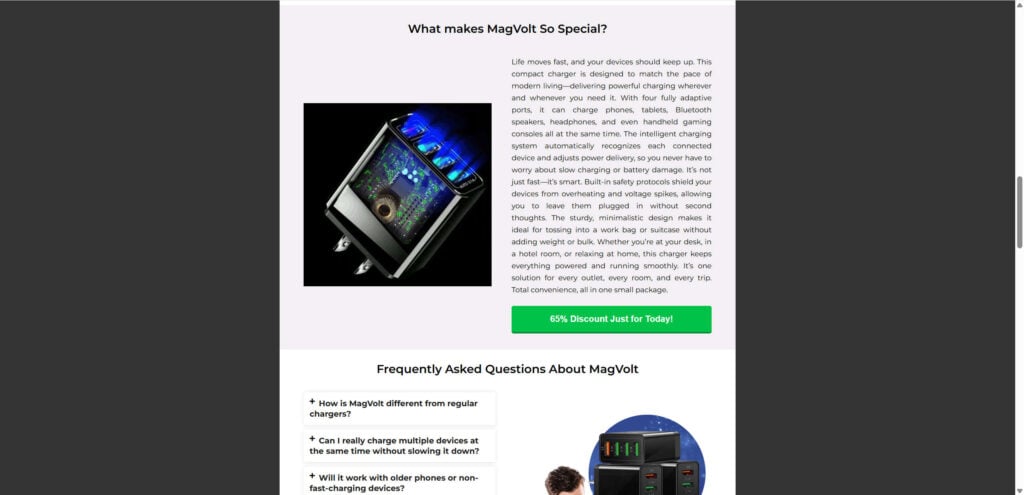
Overview of the MagVolt Charger
The MagVolt Charger is advertised as an “innovative, intelligent charging hub” designed to charge multiple devices at once without overheating, slowing down, or damaging batteries. The official websites often use flashy taglines such as:
- “Experience Lightning Fast Charging for Every Device.”
- “Smart Power Flow Technology that Extends Battery Life.”
- “65% Off Today Only – While Supplies Last!”
The promise is simple: instead of juggling different chargers and worrying about device safety, MagVolt offers an all-in-one solution. Let’s break down its main advertised features:
1. Multi-Device Charging
MagVolt claims to charge up to four devices simultaneously, at full speed, without sacrificing efficiency. The idea is that you can plug in a phone, tablet, headphones, and maybe even a gaming controller, and each device will charge at an “optimal” rate.
2. Quick Charge 3.0 Technology
The sales pages highlight QC 3.0 support, which is indeed a real standard used in fast-charging devices. However, MagVolt does not provide independent lab test results or certifications to prove its compliance with Qualcomm’s actual technology. This makes the claim questionable.
3. Advanced Surge Protection
MagVolt emphasizes built-in safety protections against power surges, overheating, and irregular current. While this is standard in most reputable chargers sold by brands like Anker or Belkin, MagVolt does not provide technical details, safety certifications (CE, FCC, RoHS), or proof of third-party testing.
4. Universal Compatibility
According to its marketing, MagVolt works with almost any USB-powered device—phones, wireless earbuds, tablets, handheld gaming consoles, and more. This part is technically true, since any USB charger with multiple ports can do the same thing.
5. Plug-and-Play Convenience
MagVolt promotes itself as a “just plug it in and go” product with no software or setup required. Again, this isn’t unique—it’s simply how all USB wall chargers work.
Marketing Style
When analyzing the MagVolt website, several aggressive marketing tactics immediately stand out:
- Scarcity & urgency – Claims like “65% OFF – Last Day to Grab This Promo!” are common. The truth is, these promotions are always running. It’s a classic scarcity tactic to push impulse buys.
- Stock images – Many of the images used appear to be generic product photos pulled from supplier websites.
- Buzzword-heavy descriptions – Terms like “smart power flow” and “device optimization” are vague and lack technical depth.
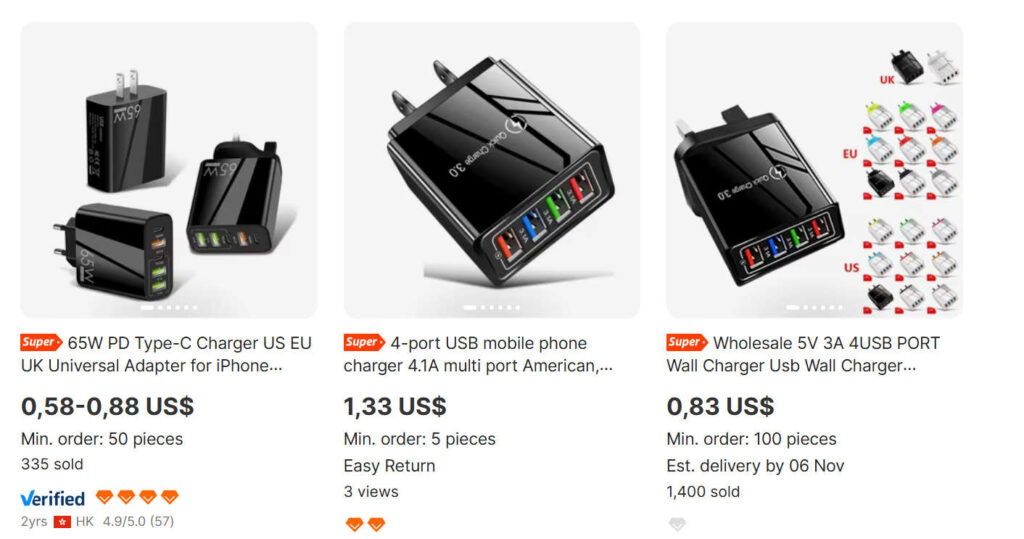
- Overpricing with fake discounts – The single unit is listed at $79.98 but “slashed” to $39.99, implying massive savings. On wholesale marketplaces, identical chargers cost $0.80–$1.50 per unit.
Red Flags in the Overview
- Unverified claims – No independent reviews or certifications.
- Massive discounts – A hallmark of dropshipping.
- No real branding – “MagVolt” appears to be a private label name slapped onto a generic charger.
- Limited customer support – Only email, no physical address, no phone number.
- No consumer protection evidence – The fine print reveals it’s “an advertisement, not a consumer protection update.”
In summary, while the product itself might work as a basic multi-port charger, there is nothing unique about MagVolt. Its marketing makes it appear like a high-tech innovation, but in reality, it’s a common product you can find on Alibaba or AliExpress for a fraction of the price.
How the MagVolt Operation Works
Now let’s peel back the layers and expose how the MagVolt business model actually works. This isn’t just about a charger—it’s about a classic dropshipping operation designed to maximize profit margins while minimizing accountability.
Step 1: Finding a Generic Product
Dropshipping companies like MagVolt start by sourcing generic products from platforms like Alibaba, AliExpress, or DHGate.
- The identical charger advertised as MagVolt can be found on wholesale sites for as little as $0.58–$1.50 each.
- Sellers in Shenzhen, Hong Kong, and other manufacturing hubs produce these chargers in bulk.
- They come in unbranded packaging, ready for resellers to slap their own name on.
Step 2: Creating a Branded Website
The next step is to build a slick, professional-looking sales page.
- The website typically has bold claims, flashy images, and persuasive copy.
- Scarcity tactics are used: “Last Day to Get 65% OFF – While Supplies Last.”
- Multiple upsell bundles are offered (buy 2, get 1 free; buy 3, get 2 free).
- Fake “before” prices ($79.99) are shown, even though the true cost of the item is less than $2.
Step 3: Running Ads and Targeting Consumers
MagVolt’s traffic comes primarily from social media ads and email campaigns.
- Ads emphasize “frustration-free charging” and highlight fake tech buzzwords.
- Target audiences include busy parents, remote workers, and gadget lovers.
- Often, video ads use stock footage to demonstrate the product.
Step 4: Fulfilling Orders via Dropshipping
When you buy from MagVolt:
- The company doesn’t ship from the U.S. or Europe.
- Instead, your order is placed with a third-party supplier in China.
- The product is shipped directly to you, often taking 2–4 weeks to arrive.
- Sometimes, customers receive the wrong plug type (US/EU/UK).
Step 5: Limited or Nonexistent Customer Support
Most dropshipping sites are known for:
- No phone support.
- Generic email addresses.
- No returns unless you ship the item back to China, which is expensive and impractical.
- Refunds are difficult to secure.
Step 6: Profit Margins
The profit margins are huge:
- Cost of product: ~$1.00
- Retail price on MagVolt site: $39.99–$79.99
- That’s a markup of 2000%–4000%.
Step 7: Replication Across Multiple Websites
Dropshipping sellers often create multiple domains to maximize reach.
- If one site gets flagged, they launch another.
- Sites like
get-magvolt.storeand variations exist. - The product branding is interchangeable—tomorrow, the same charger might be rebranded as “VoltPro,” “ChargeX,” or “MaxCharge.”
In short, MagVolt is not an original product or brand. It’s a generic Chinese charger marketed with inflated promises, massive markups, and questionable support.
What To Do If You Have Fallen Victim
If you already bought a MagVolt Charger and now feel misled, you’re not alone. Here’s what you can do:
1. Document Everything
- Save receipts, order confirmations, and website screenshots.
- Keep records of any email exchanges.
- These will be useful if you file a dispute or report.
2. Request a Refund
- Contact MagVolt support immediately (usually only via email).
- Be firm and direct in requesting a refund.
- If they refuse or ignore you, proceed to step 3.
3. File a Chargeback With Your Bank
- If you paid by credit card or PayPal, contact your bank or PayPal’s dispute center.
- Explain that the product was misrepresented (generic charger, false advertising).
- Chargebacks are often successful in dropshipping disputes.
4. Warn Others
- Leave reviews on Trustpilot, Reddit, or ScamAdviser to alert future buyers.
- Share your experience on consumer protection forums.
5. Report the Website
- Report the site to the FTC (Federal Trade Commission) if you are in the U.S.
- In the EU, report it to your local consumer protection authority.
- You can also flag the ads on Facebook or Instagram.
6. Learn for the Future
- Be cautious with products offering massive discounts and “last chance” deals.
- Check whether identical products exist on AliExpress or Amazon before buying.
- Only purchase tech accessories from trusted, established brands with real reviews.
Frequently Asked Questions About the MagVolt Charger
1. Is the MagVolt Charger a scam?
Yes, the MagVolt Charger is widely considered a dropshipping scam. The product is marketed as a premium “smart charger” with advanced features, but in reality, it’s a generic USB wall charger that can be purchased from wholesale sites like AliExpress or Alibaba for less than $2. Sellers rebrand it under the MagVolt name and inflate the price to $39.99–$79.99 while using aggressive marketing tactics such as fake discounts, “last day” promos, and buzzword-heavy claims.
2. How much does the MagVolt Charger really cost?
On the official MagVolt websites, the charger is listed at $79.98 with a “special discount” bringing it down to $39.99. However, the same identical charger is available on wholesale platforms for as little as $0.58–$1.50 per unit. This means MagVolt is selling a low-cost charger at a markup of over 2000%.
3. Does MagVolt really have “Smart Power Flow Technology”?
MagVolt heavily promotes features such as “Smart Power Flow Technology” and “Always-On Device Protection.” These terms are marketing buzzwords with no verified technical backing. Reputable brands like Anker or Belkin publish lab test results and certification details, but MagVolt offers no such evidence. Without certifications (such as CE, FCC, or RoHS), the claims are unverifiable.
4. Is the MagVolt Charger safe to use?
While the MagVolt Charger may function as a basic USB charging hub, its safety is questionable:
- No published certifications (UL, CE, FCC).
- No proof of independent testing.
- Potential risks of overheating, short circuits, or voltage irregularities.
For critical devices like smartphones, tablets, or laptops, it is safer to stick with trusted brands that have certified safety protections.
5. Why does MagVolt use “65% off today only” promotions?
This is a common dropshipping sales tactic. The website creates a false sense of urgency by claiming the discount is for “today only,” when in reality, the promotion is permanent. This manipulates buyers into making impulse purchases without doing proper research.
6. Where is the MagVolt Charger shipped from?
Although the websites often suggest fast domestic shipping, most MagVolt orders are dropshipped directly from suppliers in China. Delivery can take 2–4 weeks or longer, depending on customs delays. Some customers also report receiving the wrong plug type (US, EU, or UK), further confirming that products are shipped from overseas warehouses.
7. Does MagVolt provide reliable customer support?
No. MagVolt provides only a generic email address for customer support. There is no phone number, no live chat, and no physical address listed on the websites. Many buyers report difficulty obtaining refunds or even receiving replies to their emails.
8. Can I return the MagVolt Charger if I’m unhappy?
While the site may claim to offer returns, in reality, most customers face significant challenges:
- You may be asked to ship the charger back to China, which can cost more than the product itself.
- Refunds are often delayed or denied.
- Some customers report being completely ignored after requesting returns.
This lack of transparent return policies is another major red flag.
9. How do I get my money back if I bought MagVolt?
If you purchased MagVolt and feel scammed, here’s what to do:
- Contact the seller and request a refund.
- If ignored, file a chargeback with your credit card company or PayPal.
- Provide documentation, such as screenshots of the website and order confirmation.
- Report the site to consumer protection agencies such as the FTC (USA) or European Consumer Centre (EU).
10. What are alternatives to the MagVolt Charger?
If you need a safe and reliable multi-device charger, consider reputable brands like:
- Anker PowerPort series
- Belkin BoostCharge
- UGREEN multi-port chargers
- Aukey Omnia chargers
These brands provide real certifications, warranties, and proven safety protections. Prices are often similar—or even cheaper—than what MagVolt charges.
The Bottom Line
The MagVolt Charger is not a unique innovation—it’s a generic $1 charger sold under a flashy name with a huge markup.
While it might work as a basic USB charger, it is not worth $39.99–$79.99. The marketing relies on:
- Scarcity tactics
- Overhyped buzzwords
- Fake discounts
- Lack of transparency
This is a textbook dropshipping operation, not a trustworthy consumer brand.
If you want a reliable multi-port charger, skip MagVolt and instead buy from reputable companies like Anker, Belkin, UGREEN, or Aukey. You’ll get real safety certifications, customer service, and long-term reliability—often at the same or even lower price than what MagVolt charges.
Final Verdict: MagVolt is not recommended. Save your money and invest in a charger from a trusted brand.

Join the discussion
0 commentsShare your experience or ask a question about this article.
Discussion
Start the conversation
Have a question or something useful to share? Add the first comment.