


You find the lamp you wanted, check the delivery date, and place the order. Then the confirmation introduces a company you’ve never heard of.
There may be another name on the parcel when it arrives. Before deciding what those differences mean, it helps to put the names back beside their jobs.

Overview
The website and the merchant aren’t always the same business
Think about a shopping mall directory. Knowing which building you entered doesn’t tell someone which shop supplied the jacket you brought home.
Each name should answer a different question
Before investigating an unfamiliar company, work out why its name appeared. You could otherwise spend an afternoon researching the parcel handler while overlooking the merchant on your receipt.
- Which offer did you select, including its seller and chosen option?
- Which order confirmation records the agreement you actually made?
- Which document explains the particular delivery, return, or repair promise you need?
A useful check follows the purchase, not the logo
Start with your item and order number. A marketplace’s home page, a manufacturer’s catalog, and today’s lowest-priced listing can all describe something other than yesterday’s purchase.
This guide follows an ordinary US marketplace order. It doesn’t determine liability for a particular dispute, and another platform’s contact options or guarantees may differ.
How to Identify the Seller Behind Your Marketplace Order
Step 1: Keep the selected offer with the product
Save the product name, model, condition, selected option, and merchant shown before payment. Include the page address and enough surrounding information to identify that offer later.
A close-up of the lamp photograph won’t preserve which store was selected. A photograph of the receipt alone may omit the shade size you were choosing between.
Imagine two offers for the same lamp model. The first costs $109 and includes a bulb; the second costs $104 and explicitly excludes it.
If the needed bulb costs $12, the second purchase costs $116 before any other differences. Its lower headline price doesn’t buy the cheaper usable lamp under these assumptions.
These are invented prices, not a comparison of actual merchants. The point is to keep each price attached to its own contents instead of combining the best details.
That matters when a search result leads to one offer but the item page presents another. Check what remains selected when you’re ready to place the order.
Step 2: Read sold by separately from shipped by
Walmart explains its marketplace roles: an independent seller can keep inventory in Walmart fulfillment centers while Walmart picks, packs, and ships the order.
On that platform, use the seller name beside the sold-by information to inspect the merchant.
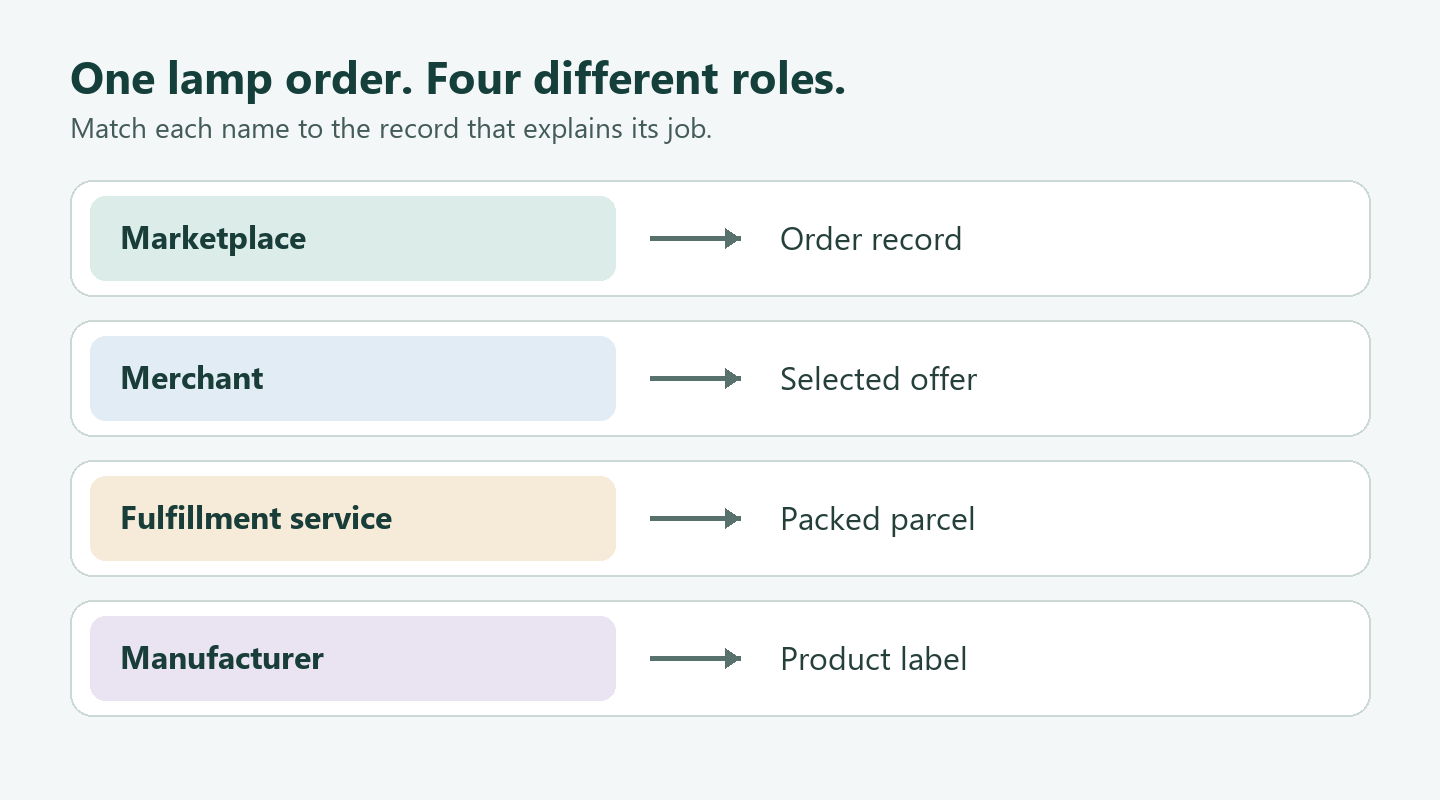
Now return to the hypothetical lamp. Suppose its listing names the merchant, its carton carries a warehouse label, and the instructions identify a manufacturer.
Those three documents can agree perfectly while displaying three different names. The difference alone doesn’t establish an invented company, counterfeit lamp, or concealed manufacturing country.
A more useful question is whether the documents connect to your item. An order number on the packing slip may supply that link even without matching business names.
Don’t infer where a product was manufactured from where its parcel first entered domestic tracking. Those are different facts, and neither replaces a readable product label.
Step 3: Check the actual order, not a replacement listing
Open the order you placed and compare its merchant and option with your saved offer. Keep both records if they disagree; don’t overwrite the earlier screenshot.
Suppose the item page now selects a different seller. That tells you about today’s offer, not necessarily who supplied the lamp already sitting on your desk.
The useful comparison is between the dated offer you accepted and your order confirmation. An undated current page cannot settle which merchant was selected at payment.
If the confirmation itself differs from what you intended, describe that precise discrepancy. Include the order reference rather than asking support to identify a purchase from its photograph.
A changed store display name may need explanation without meaning the contract disappeared. Preserve the earlier name and ask how it relates to the name now shown.
Step 4: Match the problem to the promise
A package containing the wrong shade raises a different question from a correctly supplied lamp developing a fault later. Describe what happened before selecting your support route.
For the wrong shade, put the selected option beside a picture of the received item. For the fault, keep the model label and the applicable written warranty.
Don’t assume a manufacturer’s product page supplies the warranty for every unit bearing that brand. The terms may identify a particular region, condition, model, or purchase channel.
If a document excludes your item, that doesn’t answer whether the merchant owes another remedy. Keep the seller’s purchase promise separate from the manufacturer’s written coverage.
Step 5: Keep the request attached to that order
Walmart documents a seller-contact route through Purchase History, the relevant order’s View Details, and Contact Seller. It states that sellers must respond within two business days.
Its help page also describes assistance when a seller is inactive. If that control is unavailable, use Walmart Customer Care rather than assuming the missing button ends your options.
The response deadline concerns a reply, not a refund.
Write the order reference and the specific mismatch in your first message. That gives the recipient a useful starting point instead of a general complaint about the brand.
Work Through an Order With a Split Discount
Now suppose your fictional receipt contains a $109 lamp and a $28 shade. It explicitly assigns a $9 discount to the lamp and $3 to the shade.
A separate $8 delivery charge covers the checkout, without assigning that charge to either item. Assume there are no taxes or other adjustments in this exercise.
| Entry on this fictional receipt | Calculation supported by that entry | Question it doesn’t answer |
|---|---|---|
| The lamp line explicitly receives a $9 discount. | The lamp’s recorded net amount is $100. | Its amount doesn’t describe the separate shade. |
| The shade line explicitly receives a $3 discount. | The shade’s recorded net amount is $25. | The entry doesn’t decide its return eligibility. |
| The receipt separately lists $8 for delivery. | The total is $100 plus $25 plus $8, giving $133. | No item receives a stated delivery allocation. |
If the shade is wrong, you can identify its $25 merchandise amount. Calling it a $28 purchase overlooks the discount actually assigned to that line.
Calling it a $133 shade purchase would include the lamp and delivery. Those are separate entries, even though the shopper paid everything in one checkout.
The unresolved $8 isn’t automatically refundable or nonrefundable. Ask how the applicable terms handle that charge instead of treating an accounting gap as an answer.
Nor should you divide the $12 discount equally between the two products. The receipt already supplies a different allocation, so that shortcut would replace a fact.
Now change just one premise: the receipt shows only a $12 order discount. You can calculate a $125 merchandise total, but not the individual net amounts.
Dividing proportionally might produce a plausible estimate. It still wouldn’t tell you what this merchant recorded, so label it an estimate rather than a documented shade amount.
The useful question becomes which item received which reduction. Send both item lines and the discount entry, rather than guessing a total and asking someone to explain it.
Which details should stay together in your own order note?
Record the order reference, merchant, selected model and option, promised contents, and current problem. Add the support reference beside the request it belongs to.
Leave an unknown field blank instead of filling it from a similar listing. You can add the missing information later without turning a guess into your starting assumption.
What Seller Disclosure Rules Can Actually Tell You
The FTC’s INFORM Consumers Act guidance distinguishes information a marketplace collects privately from information it must disclose to shoppers.
Its high-volume definition generally requires at least 200 separate sales of new or unused consumer products and at least $5,000 gross revenue on one marketplace.
Use any continuous 12 months within the preceding 24. Count only sales whose payments that marketplace or its payment processor handled.
Public disclosure adds a threshold of at least $20,000 annual gross revenue on that marketplace for a high-volume seller. Limited home-address and personal-phone exceptions apply.
A shopper cannot determine those sales figures from a seller’s display name. The thresholds explain the rule, not whether a particular merchant has met it.
When Two Parcels Belong to One Checkout
Imagine buying a lamp and a shade in one checkout. In this example, the order groups them together but records a different merchant for each line.
The shade arrives first and looks wrong. The lamp hasn’t arrived, so you have neither its box nor the packing slip that will accompany it.
Keep the shade’s item line, seller, parcel, and message together. Using the lamp’s label later would make a neat-looking file that describes the wrong return.
The shade’s delivery photograph shows its shape, while its packing reference links that parcel to an item line. Neither document needs to impersonate the other.
If postage or a combined discount appears, retain those lines too. Don’t silently distribute them equally between products unless the actual record supports that calculation.
A single parcel can create the opposite confusion. Two items arriving together still need their own model and quantity check; one box isn’t proof of one identical agreement.
Keep the buyer and recipient’s records connected
If the lamp was a gift, its recipient may know only the brand. You can supply the order reference and merchant without forwarding account credentials or unrelated purchases.
Mark which person holds each record. The recipient can photograph the label, while the buyer supplies the confirmation. Those records establish different parts of the same problem.
Suppose your sister opened the parcel but you contacted support. Say that she found the wrong shade, rather than describing the opening as something you personally watched.
That small distinction helps when a later question concerns the packaging. The person who saw it can answer without making you guess from a forwarded photograph.
What to Do If Your Marketplace Order Has Gone Wrong
-
Start with the exact order and affected item. Write a short factual description: wrong model, missing component, delivery problem, or the particular fault you observed.
Keep a photo of the received item beside its selected option. Don’t diagnose an internal defect from an external appearance alone.
-
Separate what you requested from what you received. If you selected an ivory shade but received blue, put those two descriptions beside their respective photographs.
Keep the reply with its reference number. An answer about the other item won’t resolve the issue you’re raising here.
-
Before shipping anything, obtain instructions identifying the item, address, and requested method. Retain the parcel record and the authorization as separate documents.
A sender label explains where a package came from. It doesn’t necessarily tell you where somebody has agreed to accept its return.
-
If the response concerns the wrong product or promise, correct that mismatch clearly. Quote your order reference and identify the document that answers it.
For example, explain that you’re requesting the selected shade, not asking the manufacturer to diagnose the lamp. That correction can save another round of irrelevant replies.
-
Before accepting a proposed resolution, compare its item, quantity, and amount with your request. Flag a reply that addresses the lamp instead of the shade.
If payment assistance becomes necessary, present the same consistent item-level account. Don’t call a purchase unauthorized simply because the goods disappointed you.
Frequently Asked Questions
Can a product photograph identify which offer I selected?
Not when both offers use that picture. Keep the surrounding option and contents information, especially if one price includes an accessory that the other excludes.
Does a fulfillment address identify the product’s manufacturer?
No, a parcel-handling address doesn’t establish who made the item. Use the product’s actual markings and documents rather than drawing that conclusion from the shipping label.
What if the item page now shows another seller?
Keep today’s page separate from your original confirmation. The later offer doesn’t, by itself, change the merchant recorded for the purchase you already made.
Should I send every receipt when explaining one problem?
Start with the affected purchase and relevant item. A stack of unrelated receipts can obscure which shade, option, and amount your question actually concerns.
Can I combine every item into one return?
Don’t assume that one checkout permits one combined parcel. Follow the instructions for the affected items and keep each authorization connected to the corresponding order line.
Can I fill in a missing model number from a similar lamp?
No, a lookalike picture doesn’t supply the missing identifier. Mark that field unknown and ask for the number attached to your actual order or product.
The Bottom Line
Don’t place the order until you can connect its merchant, item, and terms. Compare what you’re actually buying, not the best details borrowed from several offers.
If you already ordered, describe the precise problem with the correct item and amount. Obtain instructions identifying that item before packing a return or accepting a resolution.

Join the discussion
0 commentsShare your experience or ask a question about this article.
Community experiences
Did this happen to you?
Your experience could help someone recognize the same scam. Submit a private report for our team to review.
I experienced this tooReports are reviewed before publication. Sharing publicly is always your choice.
Discussion
Start the conversation
Have a question or something useful to share? Add the first comment.