

A message claims your Mercado Pago account needs attention. Another contact offers to help, and the explanation sounds close enough to normal support to be unsettling.
The Mercado Pago impersonation scam starts with that uncertainty. Before letting a supposed adviser guide your next action, look at what they want you to share.
Overview
The scam is an impostor’s account request, not Mercado Pago itself
Mercado Pago is a legitimate financial platform. Fraudsters imitate its messages and support contacts to obtain information or financial authorization that does not belong to them.
The company’s guidance on false messages confirms this impersonation pattern. It covers email, texts, and calls, not just one unusually written notification.
A contact asking for passwords, card security details, or private verification codes outside the genuine process is not a safe way to protect an account.
End that exchange and open the app independently. Confirm the account issue through the actual platform before paying, approving, or disclosing anything.
The opening can be a blocked account, debt, or security concern
Different messages create different reasons to respond. An account restriction, supposed fraud, pending payment, or urgent verification can all make an unfamiliar contact feel necessary.
A recent Mexico report described repeated callers claiming an outstanding debt. The recipient said their account showed no debt and that support rejected the calling numbers.
That is an attributed report, not proof of every call’s origin or a platform breach. Debt collection or an unusual voice alone does not establish fraud.
The independently documented scam is the false representation combined with requests for private credentials, codes, sensitive information, or unverified financial action.
- The contact arrives outside a support conversation you authenticated.
- A threat or urgent account problem discourages checking independently.
- A display name or copied branding substitutes for genuine verification.
- You are directed to an unfamiliar link or private adviser.
- The adviser asks for a code, password, card detail, or permission they should not receive.
- Your own app and official support route tell a different story.
A real verification message can still be used for the wrong purpose
A genuine SMS code is not proof that the person asking for it represents Mercado Pago. They may be trying to complete an action you did not intend.
The company’s cyberfraud guidance warns against private-code requests and risky screen sharing. The claimed security purpose does not make the request safe.
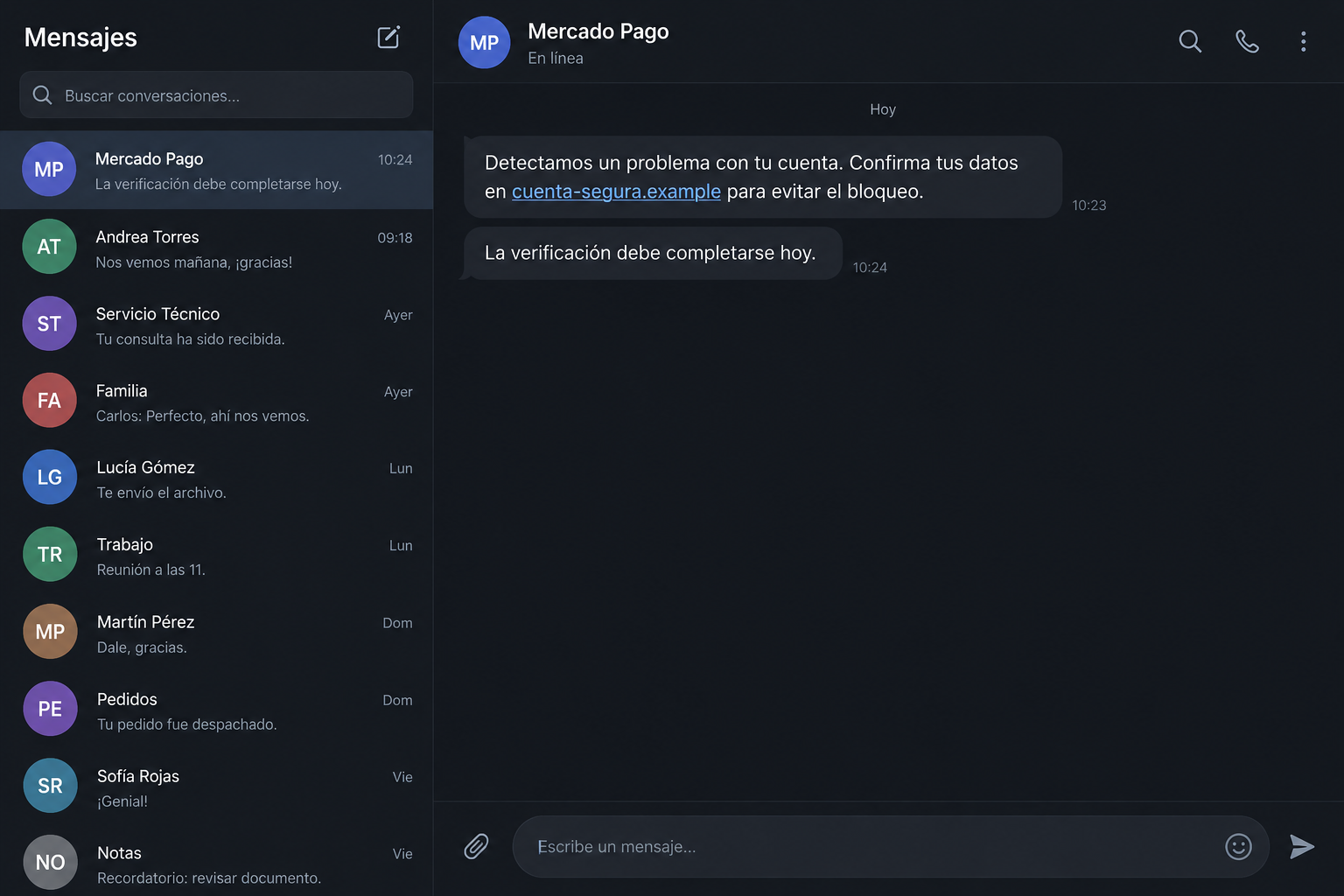
Our Spanish-language screens are fictional reconstructions. They demonstrate the warning and code-sharing stages, not messages captured from the particular debt-call report.
Receiving an unexpected message alone is not evidence that your account has been taken over. Review actual access and activity instead of accepting the contact’s diagnosis.
Why the Word Security Can Make a Dangerous Request Sound Helpful
People know financial accounts need identity checks. An impostor exploits that knowledge by describing an intrusive request as a necessary protection.
The conversation may begin with information that seems harmless. Confirming your name or discussing a familiar service can make the next question feel ordinary.
Then the contact asks for something more consequential. A code, login, card security detail, or authorization can affect what happens to your money.
Judge that action on its own. Answering an earlier question does not commit you to completing the caller’s next step.
An adviser may say that refusing will leave the account blocked. That pressure shifts your attention away from whether the adviser is authorized at all.
A genuine restriction should be reviewed through authenticated account channels. You do not need to give an incoming stranger control just because they mentioned a problem first.
Polite language is not a protection either. A patient caller can misrepresent a request as convincingly as an aggressive one.
Similarly, poor wording or a strange accent is not the fraud mechanism. The important evidence is the false identity, destination, disclosure request, or financial instruction.
This distinction protects real customers and legitimate support staff. It focuses the warning on deceptive behavior instead of nationality, voice, or dissatisfaction with service.
How the Mercado Pago Impersonation Scam Works
Step 1: A message introduces an urgent account issue
The opening asks you to act before a supposed deadline. It can threaten a block, announce suspicious activity, or say verification is incomplete.
A repeated notification can make the claim seem established. You may start thinking about how to resolve the issue before checking whether it exists.
The caller or sender may use your name. Knowing a personal detail is not evidence that they work for the platform or accessed its records.
Do not assume a data leak or a particular compromise explains that knowledge. The source of the information is usually not established by the message itself.
Open the genuine app through your normal route. Review your account without using the warning’s link, phone number, or assistance offer.
Step 2: The impostor supplies a convenient support route
The message directs you to a page, call, or chat where the same unverified operation can control the explanation. It feels like a shortcut to help.
A display name reading Mercado Pago does not verify the sender. Messaging accounts and email names can present a familiar identity without belonging to the organization.
A lookalike web address may also contain recognizable words. Read the actual destination instead of relying on the first brand name you notice.
Do not use a suspicious link as your test of whether the account needs attention. A real app and independently found support route offer a safer answer.
Mercado Pago’s published guidance recommends ending suspect calls and reaching support through the app. A separate channel breaks the impostor’s control over the verification.
Step 3: A security explanation requests private information
The supposed adviser asks for credentials or payment details, perhaps describing them as confirmation, validation, or a way to reverse a problem.
An account password is not a reference number. A card security code is not a conversation token. Sharing either can create risks beyond the stated issue.
Keep the difference between ordinary identification and private authorization clear. A real support process does not make every financial secret appropriate to disclose.
If you reached support yourself, still understand what a requested action does. Independent contact is valuable, but it does not remove the need to protect credentials.
Do not install an unknown application because the person says it will help verify your account. Software access can reveal information that you never intended to send.
Step 4: The impostor asks you to share a verification code
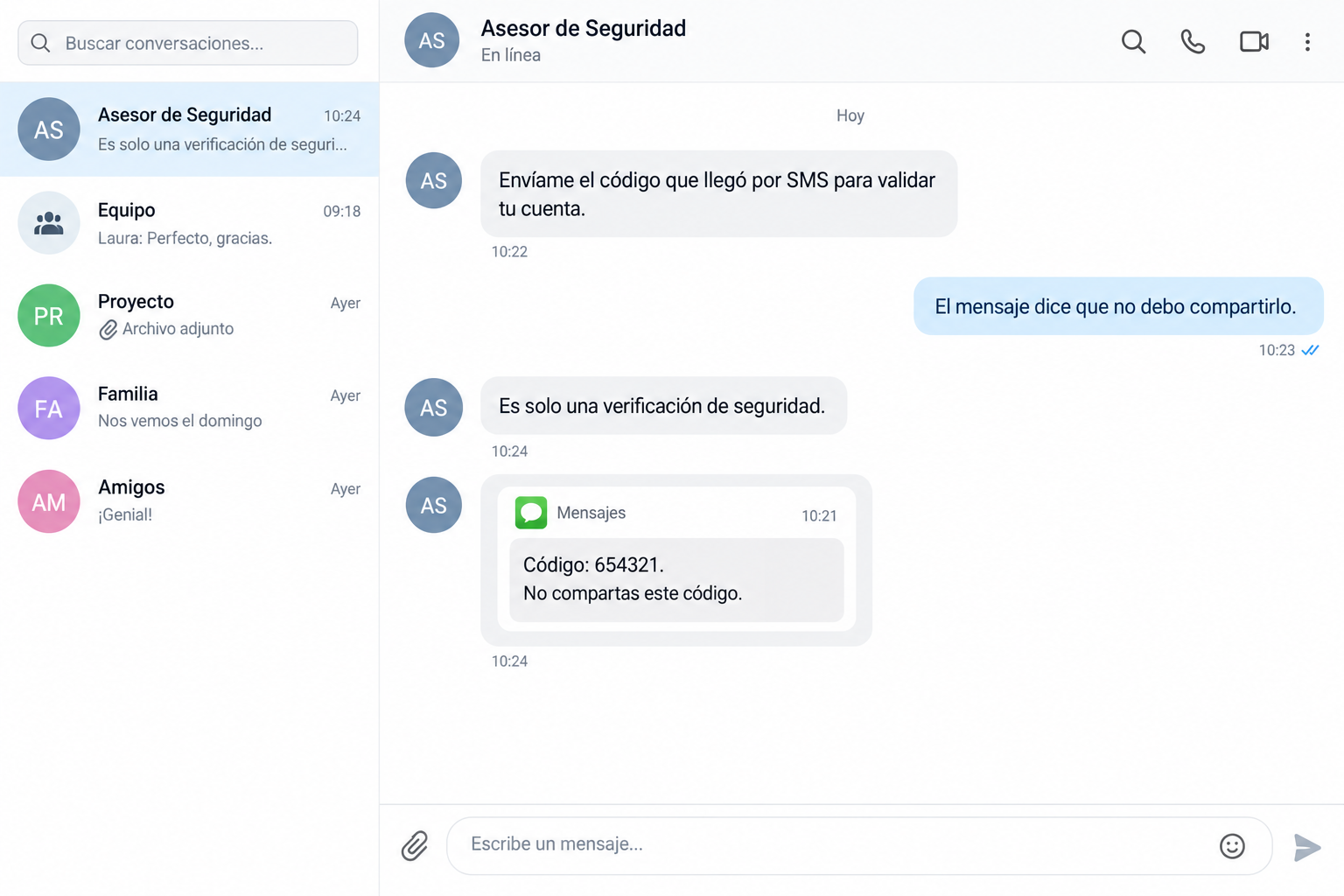
A code can arrive during the conversation and appear to confirm the caller’s story. Its timing may simply mean someone triggered an authentication attempt.
Read the entire notification, including the service and action it describes. Do not let the caller replace that explanation with a different purpose.
A message telling you not to share the code should not be overridden by an adviser saying it is only for security. That is the contradiction to notice.
The precise action varies by the account and flow involved. A code may support access or authorization; do not assume it is harmless because it expires quickly.
Our reconstructed chat illustrates this request. It is not evidence that the recent debt caller used that exact wording or successfully obtained a code.
Step 5: An apparent solution can conceal unauthorized action
The contact may announce that the issue is fixed after you cooperate. That reassurance is not a substitute for reviewing your actual account.
Check for unfamiliar sessions, changed recovery information, transactions, or approvals. Report what you find through the real service rather than asking the impostor to explain it.
If nothing changed and no private information was shared, do not invent a loss. Preserve the attempt and strengthen your normal verification habits.
If money or access was affected, stop the interaction and begin recovery immediately. A new request to repair the first problem can deepen the exposure.
Never transfer funds merely because an incoming contact calls the destination secure. A protective explanation does not authenticate the recipient or establish a refund.
What to Check When the App and the Caller Disagree
Inspect the account without the caller guiding you
Open your regular app and examine current activity. Keep the caller off the line while doing this so their instructions do not shape what you disclose.
An absent debt or transaction is useful information, but not the only check. Some issues need genuine support review rather than a conclusion drawn from one screen.
Use the authenticated help route to ask about the specific claim. Do not search random contact numbers and assume a professional-looking result is official.
Confirm the contact through the genuine help channel
The company’s official contact guidance explains support options. Start there or in the app, not with details supplied by the suspect message.
Provide the claimed issue, contact time, number, and relevant wording. Do not send an authentication code to make the inquiry more convincing.
If the concern involves a real bill, review that bill with authenticated support. Avoid confusing a genuine obligation with a stranger’s proposed payment route.
Keep other people out of the impostor’s pressure loop
A caller may approach a relative or colleague while trying to reach you. That creates social pressure, but it does not confirm their authority.
Ask those people not to confirm private records or pass along payment instructions. They can tell you about the contact without becoming part of its verification.
There is no need to identify an unknown number’s owner publicly. Report the behavior and let the appropriate institution investigate the details.
What to Do if You Have Fallen Victim to This Scam
-
End the message or call. Stop providing codes, credentials, card information, screenshots, or approvals. Do not accept another support transfer arranged by the same contact.
You can still review a legitimate account problem after hanging up. An actual service issue does not require you to remain with an unverified adviser.
-
Open Mercado Pago independently. Examine account access, settings, and activity through the app you normally use rather than an unfamiliar link.
If you cannot access it, begin recovery through the genuine help route. Avoid a private contact offering to restore it for a fee.
-
Replace disclosed login secrets. Use the real service to change exposed credentials and review recovery methods or devices that you do not recognize.
Secure linked email where relevant, especially if the same password was reused. The caller should not supervise these changes or receive the new information.
-
Report unauthorized activity through authenticated support. Give the transaction details and a truthful account of any code, approval, or information you supplied.
Ask what protection and investigation options apply to your situation. Do not assume a particular refund, universal deadline, or outcome from someone else’s experience.
-
Contact the issuer of an exposed card or bank account. Use an established number or app if the impersonation involved separate banking information.
Describe the suspected misuse clearly. The financial institution can advise about blocks, replacement, monitoring, or recovery options appropriate to the information exposed.
-
Preserve the evidence privately. Save messages, calling numbers, full web addresses, dates, receipts, and relevant account changes before deleting the conversation.
Redact codes and sensitive records from anything you share publicly. A clean timeline helps support connect the contact with what happened afterward.
-
Check risky software or downloads. If the contact introduced an app, remote access, or an unexpected file, get the device inspected before sensitive recovery work.
Malwarebytes can assist with supported-device checks. AdGuard may reduce known phishing-page exposure, but neither tool substitutes for account recovery or a bank investigation.
-
Use legitimate reporting and follow-up. Report the impersonating account on its platform and contact appropriate local fraud or police services when money or identity is affected.
Discuss the situation with someone you trust if repeated calls are frightening you. Ignore paid rescue offers and return only to verified institutions for updates.
Frequently Asked Questions
Is Mercado Pago itself a scam?
No. This report concerns people impersonating its communications or support to obtain private information or unauthorized financial action. Its legitimate service is separate from those impostors.
Can an adviser ask for my SMS verification code?
Do not share a private code with someone contacting you outside the genuine process. Mercado Pago warns that its passwords and security codes should not be disclosed this way.
Does a debt call automatically prove impersonation?
No. Verify the actual obligation and caller independently. The confirmed scam involves deceptive identity or credential and payment requests, not every unfamiliar collection call.
Why did the contact know my name?
The source of that information may be unknown. A correct name does not prove employment, access to platform records, or authorization to receive your credentials.
Does an unexpected code mean someone already controls my account?
Not necessarily. A notification may reflect an attempted action or a mistake. Review actual account activity without sharing the code or accepting an incoming caller’s interpretation.
Will security software return money lost to this scam?
No. Device checks can address software exposure, not reverse transactions. Recovery needs the relevant platform, financial institution, and reporting channels, with no guaranteed reimbursement.
The Bottom Line
The Mercado Pago impersonation scam turns concern about an account into a request for private access or authorization. A security label does not make that request legitimate.
Keep codes and credentials under your control. End the outside conversation, open the real app, and resolve any actual problem through authenticated support.

Join the discussion
0 commentsShare your experience or ask a question about this article.
Discussion
Start the conversation
Have a question or something useful to share? Add the first comment.