

An email says a payment is missing, and the amount is large enough to stop you scrolling. Then it introduces a deadline involving your mailbox.
When money and email access appear in the same warning, it helps to separate the questions before deciding what deserves your attention.
Overview
A large invoice mixed with a mailbox threat
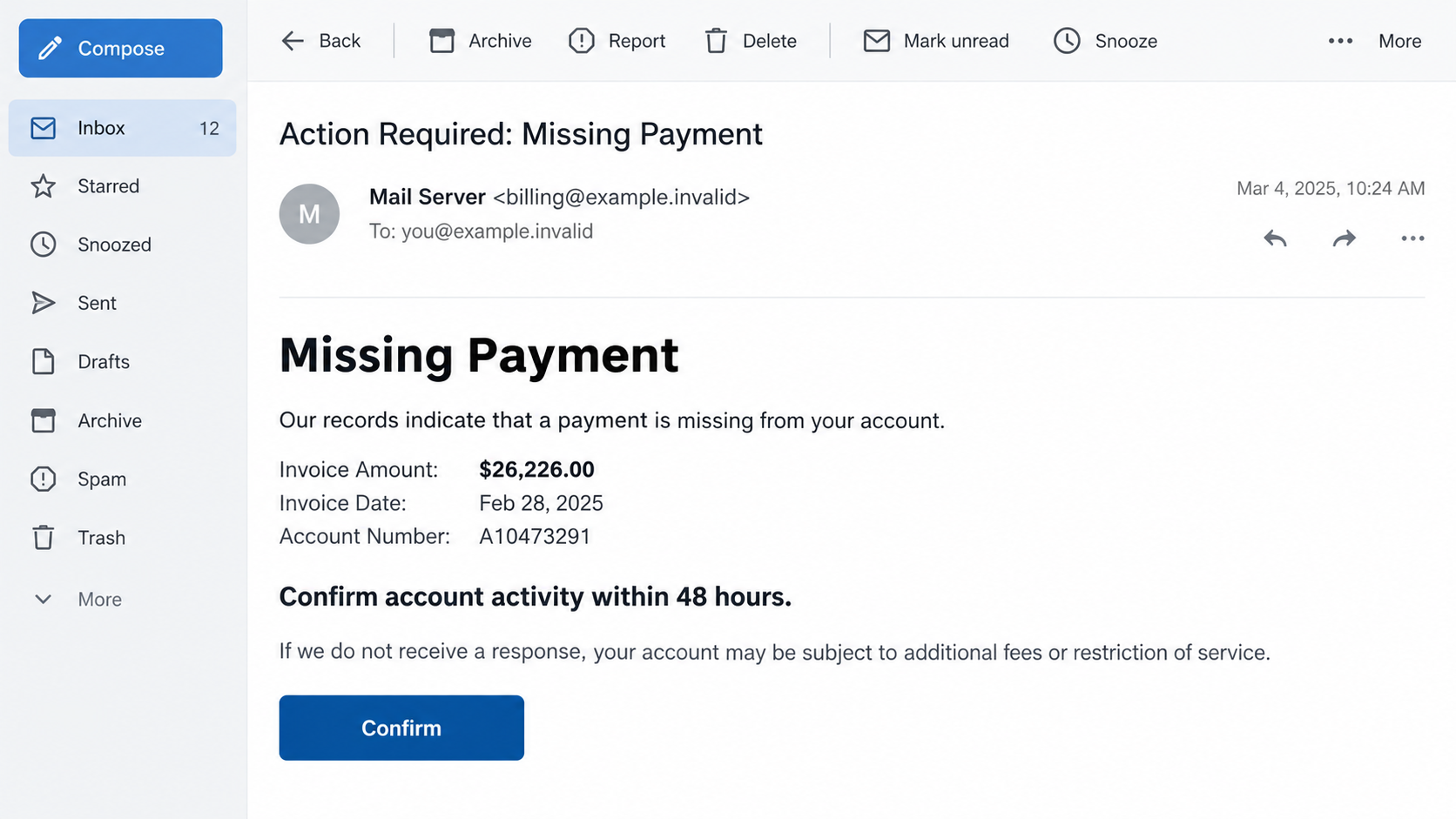
The Missing Payment email scam combines a supposed $26,226 invoice with a warning that the recipient’s email account may be disconnected or deleted.
The reported message gives the reader 48 hours to confirm account activity. That is not a coherent way to establish or settle a legitimate invoice.
Rather than explaining a clear commercial relationship, the notice moves between missing money and maintaining email access. Both ideas push the reader toward its button.
The amount is part of the lure. It does not prove you bought anything, owe that balance, or have an upcoming bank withdrawal.
The account-confirmation request is the immediate danger
The message presents itself as a mail-server notice and can incorporate the recipient’s domain. Personalizing that label does not demonstrate administrative access to your mailbox.
Its immediate request is to confirm activity through a link. That link should not become your route for checking either billing or account status.
- The alarming balance attracts attention.
- The mailbox deadline creates a second reason to act.
- A mail-server label makes the request look administrative.
- The confirmation button lets the sender choose your next destination.
The appropriate response is independent verification, not payment through the notice and not supplying a password to keep the account active.
The missing endpoint limits the technical conclusions
The destination was unavailable during the published examination of this specimen. Its precise final form and any successful data theft remain unverified.
Credential phishing is a plausible purpose for an account-confirmation lure. We cannot claim that a particular provider’s login page was successfully observed here.
The illustration uses fictional contact information to show the invoice-and-deadline pairing. It is not a bank record or an actual invoice issued to the reader.
Why the Two Warnings Do Not Fit Together
A genuine invoice normally connects an amount to a seller, an agreement, and goods or services. You should be able to reconcile it with records.
A mailbox-administration notice concerns the service providing your email. If payment affects that service, the account’s billing history should explain the relationship.
Here, a dramatic sum sits beside an activity-confirmation deadline. The reader is pushed to react before asking which problem the button supposedly solves.
Confirming that an email account is active does not establish that an invoice is correct. Nor does it resolve an unexplained commercial debt.
Someone frightened by the amount may overlook that gap. Someone unconcerned about the invoice may still worry about losing access to work or personal messages.
The notice therefore offers more than one emotional hook without providing the documentation needed for either claim.
Separating those claims breaks the pressure. Investigate a possible bill through accounting records, and investigate mailbox status through the actual email provider.
How the Missing Payment Email Scam Works
Step 1: The subject turns routine inbox checking into a billing concern
A missing-payment subject suggests an unresolved obligation. It can make a reader feel responsible for fixing something even before a seller or purchase is identified.
For a business inbox, this resembles the stream of reminders handled every day. For an individual, the unfamiliar amount can provoke immediate alarm.
Neither reaction proves the sender knows anything about your finances. A broad mailing can reach people who happen to be expecting genuine invoices.
Start by asking what transaction this relates to. If the message cannot be matched to your records, do not use its link to resolve the mystery.
Step 2: The balance makes the situation feel too important to ignore
The $26,226 figure creates a powerful interruption. It is large enough that many recipients would want reassurance even if they immediately doubt the demand.
That wish for reassurance can still produce the click the sender wants. You do not have to believe an invoice before investigating it unsafely.
The same applies to a due date printed beside the sum. Formatting a date as accounting information does not connect it to an actual agreement.
For a work account, route unfamiliar demands through your finance process. Do not approve or investigate them privately simply because the message appears urgent.
Step 3: A deletion warning changes the reader’s priority
The notice then threatens the email account itself. Losing a mailbox would affect communication, stored messages, and password-recovery access for other services.
This broadens the stakes beyond the alleged bill. Even readers who reject the amount may fear that ignoring the message risks a separate administrative problem.
The 48-hour window discourages slower checks. However, a deadline inside an unverified email has no independent authority over your account.
Check your account normally. If an actual service problem exists, use the provider’s support process or ask your organization’s email administrator.
Step 4: A personalized server label makes the button look relevant
Including your domain can make an automated notice seem as though it came from the system responsible for your mailbox.
But your domain is already visible in your email address. Repeating it requires no special access to your settings, messages, or administrator account.
A sender display name can likewise claim to be a mail server without proving that it is one. Treat it as a label to verify.
The requested confirmation moves you from a familiar inbox into a destination controlled by the message. That transition deserves more scrutiny than the decorative server name.
Step 5: The next request determines the exposure
If the linked page asks for account credentials, supplying them would create a separate security incident regardless of whether the invoice ever existed.
If it asks for money or payment details, the financial exposure must be handled with your bank. Do not assume every version follows one fixed route.
The unavailable endpoint prevents us from describing those later requests as observed in this particular specimen. They are response scenarios for anyone who continued further.
Stop at any unfamiliar request. You do not need to finish a form to learn whether the original claim was real.
Verify the Bill and the Mailbox Separately
Look for a transaction outside the warning
Search your own purchase records or accounting system for the relevant seller and amount. Work from information you already hold, not new instructions in the email.
If you find a plausible match, contact the established vendor representative. Ask whether the invoice is genuine and whether any payment instructions changed.
Do not send a full bank statement to an unknown correspondent to prove that you already paid. That can expose unrelated financial information.
For an unexplained large balance, a documented internal check is more useful than arguing with the address that delivered the warning.
Check actual email-service notices
Open your email provider using a bookmark or app you already trust. Check the account’s available security and billing notifications.
A company mailbox may be centrally managed. Staff members usually should not improvise service payments or configuration changes in response to external messages.
Ask your administrator whether any legitimate account action is required. Give them the original notice through the approved reporting process.
If mail is genuinely failing, document the symptom separately: messages bouncing, inability to sign in, or a service-status notice. Do not assume the suspicious email explains it.
Do not confuse a reachable page with a valid demand
A working page would only establish that a destination loads. It would not prove the debt or grant authority to demand your password.
An unavailable page also provides no complete account of what happened earlier. It may have changed or disappeared before you checked.
There is little value in repeatedly reopening the link to investigate that question. Preserve the address for a security team instead.
The FTC’s phishing guidance recommends contacting companies through a known website or number rather than details in suspicious messages.
What to Do if You Have Fallen Victim to This Scam
-
Identify what you exposed. Make a short timeline covering the link, any typed information, any downloaded file, and any payment you authorized.
There is no need to invent the worst outcome. A factual timeline helps you prioritize the account or payment method actually involved.
-
Replace a submitted password through the correct provider. Avoid the original message when reaching the recovery or security settings.
If the password was reused, change it on those other accounts too. Use distinct passwords so one exposed login does not unlock unrelated services.
Review recovery contacts and available session controls. Unexpected changes deserve attention even if you can still sign in successfully.
-
Check mailbox rules after credential exposure. Look for unfamiliar forwarding, filters, delegates, or sent messages that you cannot explain.
For organizational email, have IT review these settings and sign-in records. Do not erase useful evidence before the team has assessed it.
-
Alert the financial institution if you paid or supplied card data. Explain that an unexpected invoice and mailbox warning led to the transaction.
Provide the real amount and transaction reference, not merely the figure printed in the email. Ask about stopping, recalling, or disputing the specific payment.
Available remedies depend on the payment method and circumstances. Act promptly, but do not accept a stranger’s promise that recovery is guaranteed.
-
Handle suspicious downloads according to what ran. A file sitting unopened in downloads is different from an installer or attachment you executed.
If you ran something, Malwarebytes can help check a personal device. Get assistance from workplace IT when the computer belongs to your employer.
Scanning addresses software risk. It does not resolve an exposed account password or a completed bank transfer.
-
Undo browser permissions you did not intend to grant. Remove suspicious notification permissions or newly added extensions associated with the interaction.
AdGuard can help limit some advertising-related threats during browsing. It does not verify invoices, authenticate senders, or replace account recovery.
-
Report and preserve the relevant evidence. Use your email provider’s phishing-report option and the appropriate fraud-reporting route for your location.
Keep receipts, message headers, and bank case references privately. Avoid posting complete addresses, account numbers, or identity documents in public warnings.
-
Reject follow-up payment demands. A second correspondent may claim you must pay a processing fee to cancel the invoice or restore the mailbox.
Verify such claims through established support. Do not send more money to prove your identity or to unlock a supposed refund.
A Practical Rule for Finance and Shared Inboxes
Shared inboxes create a particular challenge: the person reading a reminder may not know who placed the original order.
Instead of treating that uncertainty as permission to click, use it as a reason to check the purchase owner and the accounting record.
Keep approval roles clear. Receiving an invoice does not automatically authorize someone to release payment or change the email service attached to the business.
Record who verified a questionable invoice and which independent contact they used. That prevents another teammate from reopening the same uncertainty later.
If a message asks for two unrelated actions, split them into separate verification tasks. Finance can check the balance; IT can check the mailbox.
This avoids letting one alarming claim authenticate another. A plausible invoice should not validate an unexpected password request.
Likewise, a genuine service outage should not validate payment instructions sent by an unknown correspondent. Real problems can coincide with unrelated scams.
When warning coworkers, describe the recognizable combination of a large balance and an account deadline. Do not rely only on the amount staying unchanged.
A sender can replace a number or date quickly. The more durable warning sign is a demand that combines unexplained billing with rushed account confirmation.
Frequently Asked Questions
Do I owe the $26,226 shown in the email?
The message does not establish a debt. Check your own records and any genuine vendor relationship before treating the amount as an actual obligation.
Will my email be deleted after 48 hours?
The suspicious notice does not prove that deadline is real. Verify account status through the actual provider or your workplace administrator.
How did the sender know my email domain?
The domain appears after the @ symbol in your address. Repeating it in a server label does not demonstrate access to your mailbox.
Was this campaign’s password-stealing page inspected?
The destination was unavailable in the reported examination. The exact landing-page behavior is unconfirmed, although the account-confirmation lure is clearly suspicious.
Should I reply to explain that the invoice is wrong?
Use a verified vendor contact if a real transaction might be involved. Do not rely on the suspicious sender to investigate its own demand.
What if I entered my password but did not pay?
Prioritize account security. Replace the exposed password, review sessions and mailbox settings, and notify IT for a work account even without financial loss.
The Bottom Line
The Missing Payment email scam joins an alarming invoice to a mailbox deadline. Neither claim should be accepted merely because both appear in an administrative-looking notice.
Check finances and email access independently. If you already responded, secure the specific information or payment method involved and preserve a clear record for support.

Join the discussion
0 commentsShare your experience or ask a question about this article.
Discussion
Start the conversation
Have a question or something useful to share? Add the first comment.