

A game page promises unlimited coins, unlocked characters, and premium features without the price. There is no complicated setup, the download looks ready, and the button seems to offer exactly what the official app withholds.
Then the route changes. A verification task appears, another page opens, and the file you came for remains just out of reach. That pattern matters more than the bright download counter.

Overview
What is the Modolix.com scam concern?
Modolix.com has been promoted as a source of modified Android application packages, commonly called mod APKs. These downloads claim to alter games or apps by providing unlimited currency, removed advertisements, unlocked content, or other advantages not offered by the original developer.
The concern is not just whether one promised modification works. Unofficial APK pages can funnel visitors into advertising offers, surveys, notification subscriptions, credential requests, or unsafe downloads. A user may give away data, install unwanted software, or violate a game account’s rules without receiving the advertised feature.
Why are mod APK offers so persuasive?
Mobile games are built around waiting, earning, or buying upgrades. A page that claims to remove those limits speaks directly to an existing frustration. Screenshots of large coin balances and comments about a “working version” make the shortcut feel tested by other players.
People also tend to view a free game modification as lower risk than an unfamiliar banking app. Yet an APK can request broad permissions, read device information, display overlays, or communicate with remote servers. The entertainment context does not make the software harmless.
Which warning signs should you notice?
- The Download button repeatedly redirects to surveys or sponsored offers.
- The site claims every popular game can be modified in the same way.
- A “human verification” page never provides the promised file.
- The APK has no verifiable developer signature or release history.
- Instructions ask you to disable Play Protect or another security feature.
- The page promises an impossible advantage with no technical explanation.
- Comments and download totals look generic, repetitive, or permanently current.
Modified software is not automatically malicious, and the name of a website alone does not prove what every file contains. The practical problem is that the official developer no longer controls the package. You must evaluate the page, the file, and the account consequences separately.
How the Modolix.com Scam Works
Step 1: Search results lead to a tempting shortcut
A user searches for a game name followed by “mod APK,” “unlimited money,” or “premium unlocked.” The landing page mirrors that search language in its title, description, and download buttons. It may list a current version number so the offer appears recently maintained.
The site can display game artwork, feature bullets, and an installation guide copied from other pages. None of those elements demonstrates that the advertised package was actually tested. They make a thin page look like a software catalog.
A countdown or download total adds social pressure. Numbers such as “3,418 downloads today” are easy to generate in a webpage and may not come from real activity. Treat them as marketing unless they can be independently verified.
Step 2: The download button starts a redirect chain
Instead of serving an APK, the button passes the browser through advertising or tracking domains. One tab may offer the file while another announces a prize, browser update, or device infection. The user has difficulty knowing which page belongs to the original action.
Redirect chains can vary by location, device, and time. A reviewer may see a harmless advertisement while another visitor reaches a subscription trap or malicious file. That inconsistency is one reason a single clean-looking visit cannot establish safety.
Do not approve notification requests along the way. A site allowed to send notifications can later place alarming security alerts or fake prize messages on the device, even when the browser is not open to that page.
Step 3: “Human verification” replaces the promised download
The visitor is told that automated traffic must be blocked before the file is released. The page offers tasks such as installing an unrelated app, starting a trial, completing a quiz, or entering contact information. A progress bar suggests that one small step will unlock the APK.
In many offer-wall schemes, completion earns advertising revenue for the page operator. The file may remain unavailable after one task, leading to a second or third requirement. Personal data entered into the offers may also be distributed to marketing partners.
The reconstructed offer wall below illustrates this diversion. It does not reproduce a specific transaction or prove that every visitor to a named domain receives the same route.
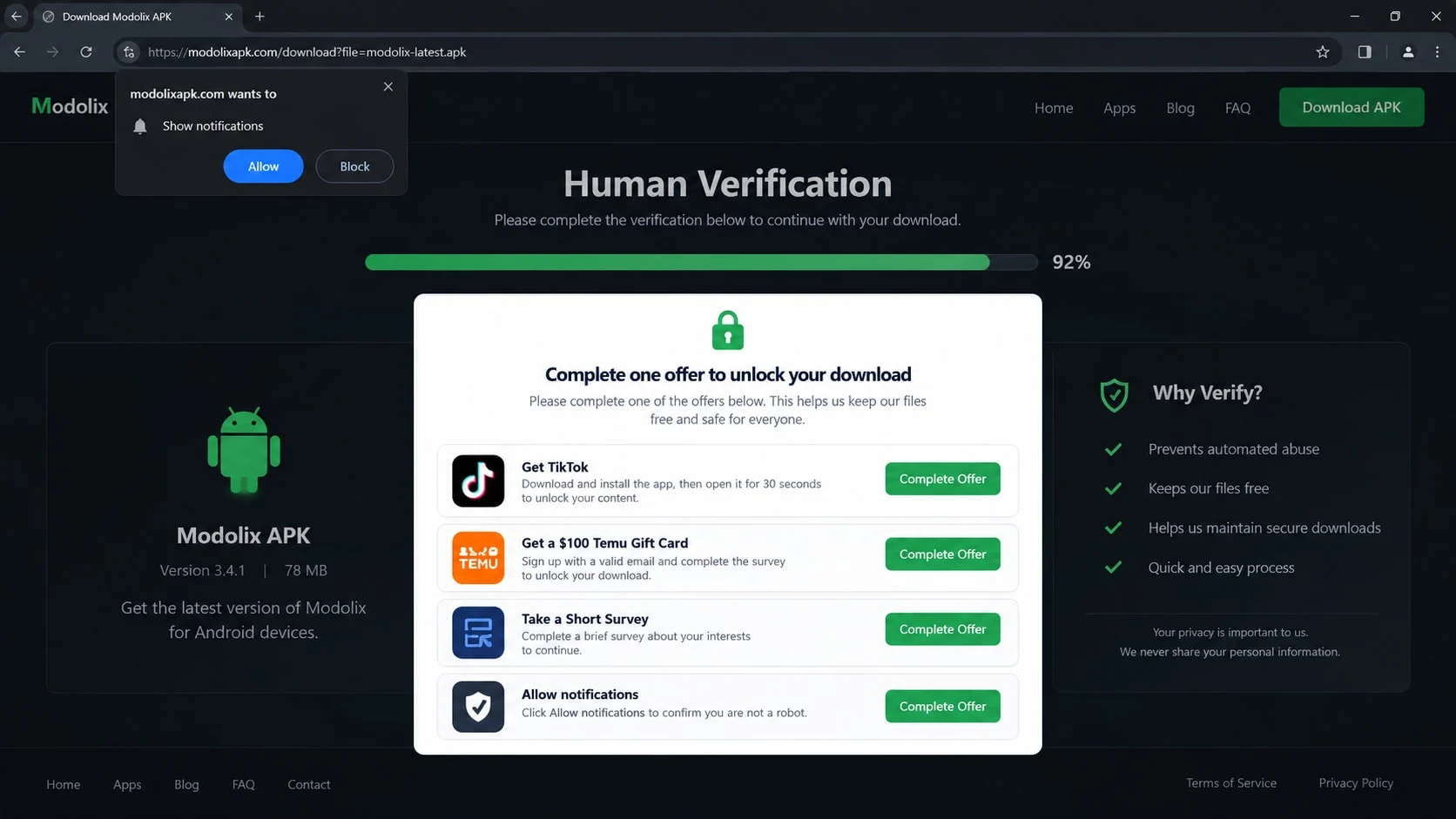
Step 4: The user is asked to weaken Android protection
Installing an APK outside Google Play may require allowing an app, such as a browser or file manager, to install unknown software. A risky guide may also tell the user to turn off Google Play Protect because it supposedly creates a false positive.
That warning should not be dismissed automatically. Google states that Play Protect checks apps from Google Play and other sources, can warn about harmful apps, and may disable or remove them. Turning it off removes a useful layer precisely when the source is least accountable.
Permission to install unknown apps is granted to a particular source on newer Android versions. Remove that permission again when it is no longer needed. Do not leave a browser permanently able to install packages.
Step 5: The APK asks for more access than the feature needs
A modified game may request contacts, SMS access, accessibility control, notification reading, device-administrator privileges, or the ability to appear over other apps. Those permissions do not fit a promise to add coins or remove advertisements.
Accessibility and overlay permissions deserve particular care because they can help malicious software observe or manipulate other screens. Read the request at the moment it appears. Do not approve it merely because an installation guide says every permission is required.
Some harmful packages delay suspicious behavior. The game may open normally while a background component collects data or downloads another module. A few minutes of apparently normal play is not a complete safety test.
Step 6: The account or device absorbs the consequences
Even a functioning modification can violate the official game’s terms. Server-side checks may detect impossible balances, altered code, or abnormal activity. The result can be a temporary suspension or permanent loss of an account and its legitimate purchases.
If the file steals a session token or password, someone else may take over the game account. Reused credentials can put email, social, and shopping accounts at risk too. The cost becomes much larger than the price of the feature the user tried to avoid.
A deceptive site may then offer a new “fixed” version or direct victims to a recovery service. Repeating the installation usually increases exposure. Stop, preserve the file details, and secure the device before testing another download.
How to Check a Mod APK Site and File
Identify the real developer and distribution route
Find the application’s official developer and website through the legitimate store listing. Compare the package name and signing information where your tools allow it. A matching icon or app name is not enough, because both can be copied.
Android’s developer-verification program is intended to connect distributed apps with verified developer identities. It improves accountability, but it is not a promise that every verified app is useful or safe. Official distribution and a known publisher remain important context.
Inspect the page before pressing Download
Look for a clear operator identity, meaningful contact details, a privacy explanation, and a consistent history. Search the exact domain and file name independently. Do not rely on reviews shown only by the download page itself.
Check where the button points without following a chain of offers. A file-hosting destination is not automatically unsafe, but a page that conceals every redirect and changes the task repeatedly is not giving you a transparent download.
Review the package and permissions
Do not install an APK whose origin you cannot explain. If you legitimately need to examine a file, scan it before installation and compare its hash or signature with a trusted release when one exists. A scan with no detection lowers uncertainty but cannot guarantee clean behavior.
Consider the promised function against the requested access. A single-player visual modification should not need SMS control or your contact list. If the app refuses to run without unrelated permissions, uninstall it rather than trying to make the request sound reasonable.
Separate the file risk from the account risk
An APK can be free of known malware and still expose a gaming account to a ban. Read the game’s rules and remember that modified clients may affect other players or purchases. “Working” and “permitted” are different questions.
Use a unique password and official authentication for the game account. Never enter a platform password into a mod site to “sync” currency. A third party cannot legitimately add server-controlled items simply because you provide login details.
What to Do if You Have Fallen Victim to This Scam
- Stop the redirect and uninstall the untrusted app.
Close all tabs opened by the download route. If an unfamiliar APK was installed, uninstall it through Android settings. Revoke device-administrator or accessibility privileges first if the system prevents removal.
Do not download a second tool from the same page to clean the first one. A supposed remover may be another package in the same campaign.
- Restore Android security settings.
Turn Google Play Protect back on if you disabled it, then run its scan. Remove permission for the browser or file manager to install unknown apps. Review notification access, overlay permission, accessibility services, and VPN profiles for entries you do not recognize.
Install Android and browser updates from their official settings. Updates close known flaws but do not erase accounts or data that have already been stolen.
- Scan the device and watch its behavior.
Run a Malwarebytes scan and remove detections after reviewing them. Look for new apps, unusual battery use, persistent pop-ups, or unexpected mobile-data activity. If a serious infection persists, back up essential personal files and seek qualified help before considering a factory reset.
AdGuard may block some advertising and tracking destinations involved in redirect chains. It cannot make an unknown APK trustworthy or reverse permissions already granted to an installed app.
- Secure accounts entered after the download.
From a trusted device, change any password typed into the site or modified app. Start with email, then the game platform and payment accounts. Use unique passwords and sign out unfamiliar sessions.
If the game supports linked social accounts, review those connections. Remove integrations you do not recognize and save the account recovery codes in a safe place.
- Cancel offers and monitor charges.
Review trials, premium SMS services, app subscriptions, and card transactions connected to verification tasks. Cancel through the legitimate provider, not through another link supplied by the mod page. Keep confirmation messages and screenshots.
Contact the payment provider promptly about unauthorized charges. Describe whether you knowingly began a trial, entered card details, or see a charge you did not approve, because the available dispute route may differ.
- Report the domain and file.
Report deceptive ads to the advertising platform and harmful files to the browser or security service that flagged them. Include the exact URL, package name, time, and redirect sequence without publicly sharing sensitive account data.
If personal information was taken, use the appropriate national fraud-reporting service. In the United States, reports can be filed at ReportFraud.ftc.gov.
- Contact the official game provider if needed.
If the account was accessed or suspended, use the developer’s verified support page. Be accurate about installing a modified client. Support teams need the real sequence of events to evaluate account recovery.
Ignore strangers who promise to restore banned accounts or generate lost currency for a fee. Those offers commonly repeat the same credential theft and payment pressure.
Frequently Asked Questions
Is Modolix.com proven to infect every visitor?
No. A domain can show different routes to different visitors, and simply viewing a page is not the same as installing a harmful APK. The warning concerns unverified files, redirects, offer walls, and the lack of official developer control.
Are all mod APKs malware?
No, but modification and redistribution break the original trust chain. You may not know who changed the code or what was added. A clean scan also cannot settle account-rule, privacy, or future-update risks.
Can completing a survey really unlock a download?
Some sites use legitimate promotional gates, but endless verification tasks are a common monetization pattern. If the promised file never appears or each completion triggers another offer, stop rather than submitting more information.
What if Play Protect calls the file harmful?
Do not turn protection off just to force the installation. Remove the file and use the official app source. A site that dismisses every warning as a false positive is asking you to accept risk it does not bear.
Can a mod APK steal a Google account?
A harmful app may attempt to capture credentials, read notifications, abuse accessibility, or steal session information depending on its permissions and behavior. Change exposed credentials from a trusted device and review active sessions if you suspect compromise.
Will a factory reset solve everything?
A proper reset can remove ordinary installed malware, but it does not cancel subscriptions, recover an account, or change stolen passwords. Secure online accounts first and avoid restoring the same untrusted APK from a backup.
The Bottom Line
The attraction of Modolix.com is simple: expensive or time-consuming game features appear to become free. The real decision is not whether the button looks convincing, but whether an unknown party should be trusted to alter software that runs inside your phone.
If the route turns into surveys, redirects, weakened security, or excessive permissions, leave it. Official app sources may not offer the shortcut, but they provide accountability that an anonymous modified package cannot.

Reviews & discussion
0 commentsShare a firsthand experience, or ask a question.
Community reviews
modolix.com
Moderated reader experiences, not an editorial verdict.
Start the conversation
Have a question or something useful to share? Add the first comment.