

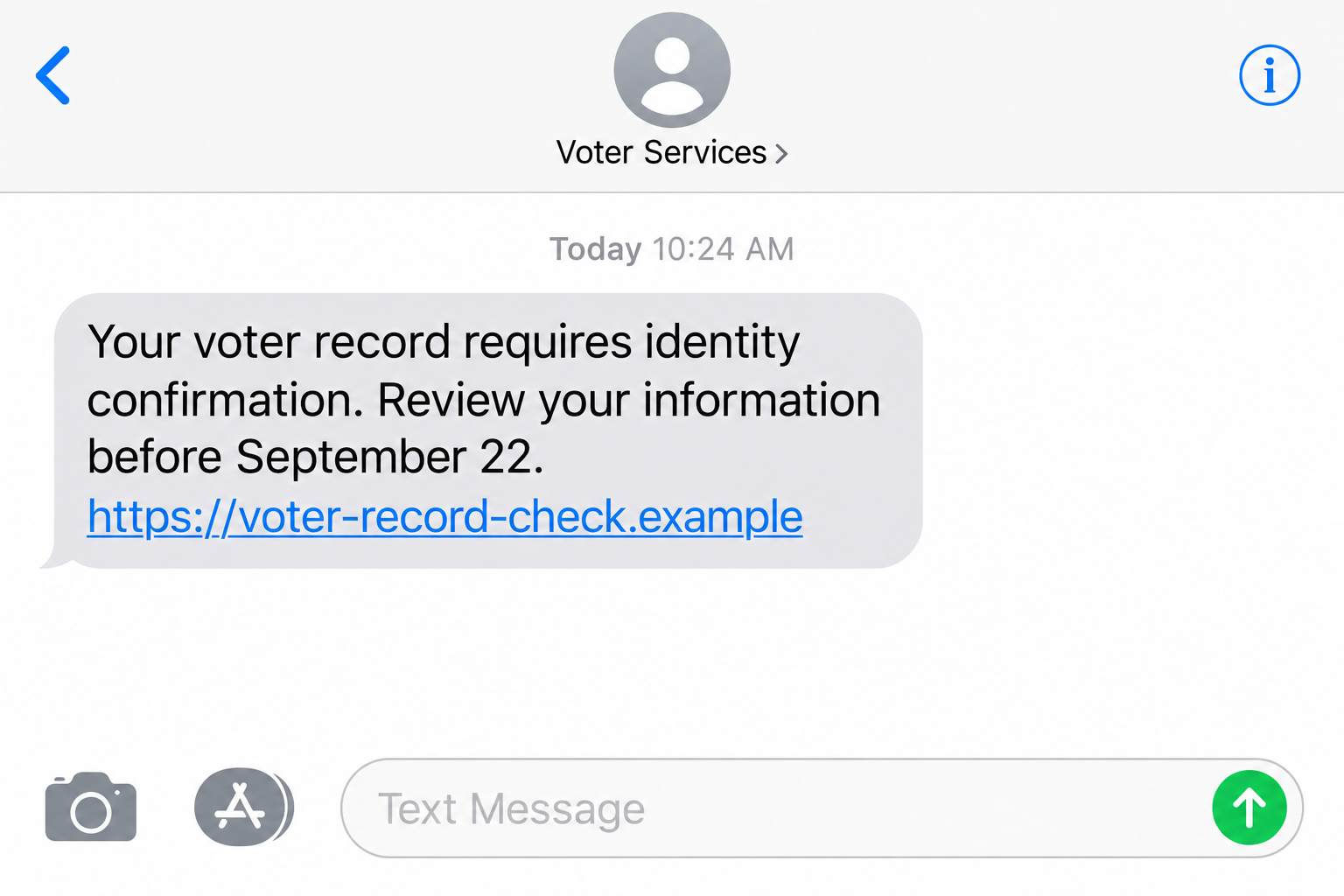
A text says there is a problem with your voter record. It does not accuse you of a crime or demand a large payment. It asks for something that sounds routine: confirm your identity so the record can be kept current.
The voter record verification text scam borrows the language of election administration to make an unfamiliar link feel official. Before answering, it helps to know what state officials have actually confirmed about the message.
Overview
A government-sounding request arrives by text
On September 17, 2026, the Rhode Island Department of State warned voters about a text claiming to concern voter registration and asking recipients to confirm their identity for their voter record.
The department said the message was not affiliated with it and was not authorized by it. That official warning is what establishes the message as an impersonation scam. This is not a complaint about the state’s real election services.
The wording is effective because voter records are real, elections have deadlines, and many people know that addresses or names sometimes need updating. The scam takes those ordinary facts and uses them to create an unauthorized verification process.
The warning confirms the impersonation, not every next screen
The Rhode Island Department of State alert confirms the suspicious identity-confirmation text. It does not publish the complete technical path, every web address, or a list of fields collected by every version.
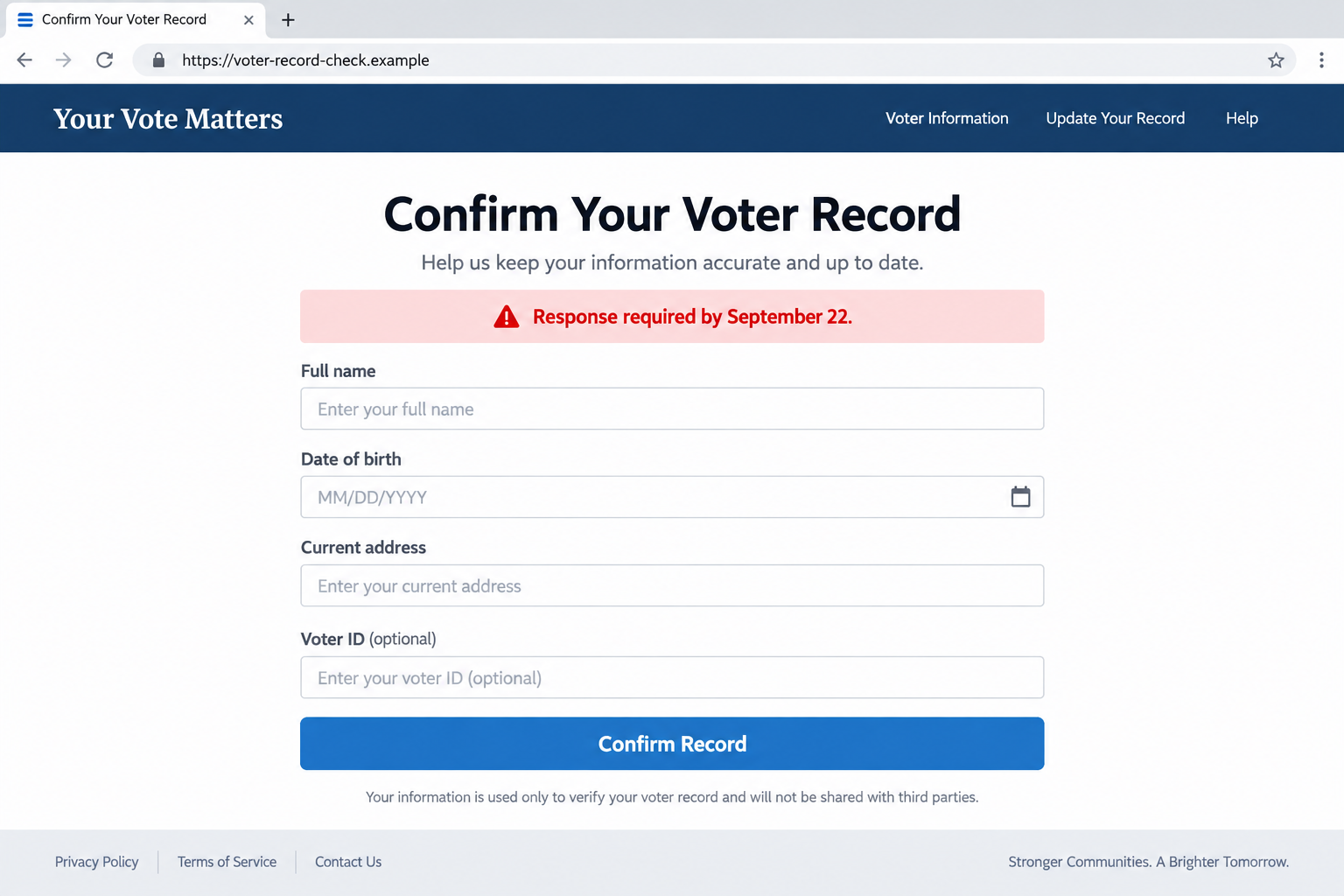
That boundary matters. Our images are non-functional reconstructions with fictional domains. The first reflects the confirmed text premise. The second illustrates the kind of identity form a phishing link may use, but it is not presented as a capture of the Rhode Island campaign.
Avoid assuming that every recipient sees the same page. Scam links can redirect differently, expire, or change after reports. The safe decision does not depend on reverse-engineering the destination.
Your voter status can be checked without the text
A real administrative question should survive an independent check. Rhode Island directs voters to vote.ri.gov and provides official Elections Division contact information on its own website.
That gives you a clean route around the sender. Close the message, open the official site yourself, and check the record there. If the text describes a genuine issue, you can address it without using its link.
- The text arrives from an unknown or unexplained sender.
- It uses election language to request identity confirmation.
- The link is not a web address you independently obtained.
- The message creates urgency around your ability to vote.
- It asks for information before proving who operates the form.
Why This Message Can Catch Careful People
Voting is important, but election administration is not something most people interact with every day. That makes it hard to recognize the exact tone, timing, and web address of a genuine notice from memory.
A scammer does not need to know whether your record has a problem. A broad message can reach registered voters, unregistered recipients, people who recently moved, and people who have never lived in Rhode Island. Each person may supply their own reason for believing it could apply.
Election periods also create natural urgency. The closer a deadline feels, the easier it is to accept the sender’s claim that one quick confirmation will prevent trouble.
Do not let that urgency turn a vague text into proof. The message may know your name or town from public or commercially available records. Familiar details can personalize a false request without connecting it to an election system.
The correct question is not whether the message looks plausible. Ask whether the state has confirmed this exact method and whether the requested action appears in the official account or record you opened independently.
What a Fake Voter Form May Try to Collect
A phishing page may ask for information that resembles a normal identity check, such as a full name, date of birth, address, phone number, or identification details. The official Rhode Island alert does not say that every one of those fields appeared in the reported message.
The concern is that a form controlled by an impersonator can keep what you type. Information that seems harmless in isolation can be combined with details obtained elsewhere to support account recovery attempts, targeted calls, or additional impersonation.
A later screen might also ask for a payment or financial information. That is a common escalation in government impersonation scams, but it is not confirmed as part of this specific alert. Do not add a card simply because the form calls a charge a processing fee.
The illustrative page below shows why the domain and requested fields deserve attention. It is not a live service and does not reproduce a real voter’s information.
How the Voter Record Verification Text Scam Works
Step 1: The text introduces a believable record problem
The sender claims that your voter registration, identity, or record requires confirmation. The wording can stay vague because the recipient fills in the missing context.
Someone who moved may think of an old address. A newly registered voter may wonder whether the application was completed. Another person may worry that ignoring the message will affect an upcoming election.
Pause at that first claim. A statement inside an unsolicited text is not evidence that anyone checked your official record.
Step 2: A deadline makes the supplied route feel necessary
The message may imply that immediate action is needed. A deadline reduces the chance that you will ask an election official, search for the real website, or discuss the message with someone else.
You do not have to solve the supposed problem inside the same conversation that announced it. Genuine registration rules and election dates are published through official channels.
Take a screenshot if you need evidence, then leave the message. Do not reply with personal details or ask the sender to prove itself.
Step 3: The link creates a separate identity process
A familiar color scheme, state name, seal-like symbol, or voter language can make a page look connected to an agency. Those visible elements are easy to copy.
Read the complete address. A state name inside a subdomain or page path does not place the site on an official government domain. A padlock only protects the connection to whichever operator owns that site.
If you already opened the page, do not enter test information to see how it responds. A convincing next screen does not prove the first page was genuine.
Step 4: The form turns concern into usable data
The form may begin with details that seem appropriate for a voter lookup. Once the first fields are complete, it can introduce more sensitive questions under the excuse of final verification.
Reassess whenever the requested action changes. A request for a ZIP code does not justify the next request for an identification image, account password, card, or one-time code.
You can stop even after submitting part of the form. Continuing does not recover information already entered, and it may expose more.
Step 5: Follow-up contact uses the first response as credibility
A person who replied or submitted information may receive another message that appears more specific. The sender now knows which story attracted attention and may repeat details from the first interaction.
A supposed election worker, fraud investigator, or account specialist could offer to correct the problem. Treat that as a new unverified approach, not proof that the original text was legitimate.
Return to the independently located Elections Division contact. The impersonator should never control both the warning and the route used to verify it.
Company and Sender Checks for a Voter Record Message
The election agency is real, but the sender is not authorized
Rhode Island’s Department of State and Elections Division are legitimate public bodies. The department explicitly says the text in its warning was not affiliated with or authorized by it.
Keep that distinction clear when reporting the message. The problem is unauthorized impersonation, not evidence that the official voter service is fraudulent.
A government name in the link is not a government domain
Look at the registered domain, not only the words closest to the left side of the address. Scammers can place official-sounding words before a domain they control.
Do not try alternative spellings of a suspicious address. Open vote.ri.gov from a fresh browser tab or navigate from an official Rhode Island government page.
Support must be reached outside the text
The state alert directs voters with questions to the Elections Division. Obtain the current phone number or email from the official website rather than from a search advertisement or reply message.
Describe the text without sending sensitive documents. An official can tell you how to verify your record without needing the password to your email or financial account.
The record itself is the traceable outcome
There is no order confirmation or parcel to track. The useful evidence is your voter record on the genuine service and any official correspondence connected to it.
If the official record shows no requested action, the text’s claim has not been validated. If the record does need attention, follow only the instructions on the official service.
How to Check a Voter Message Without Risking Your Record
Type the known government address yourself. Check your registration details using the state’s published process and contact the Elections Division when anything is unclear.
Do not use the suspicious message as a directory. That includes its link, phone number, email address, QR code, and any supposed case portal reached from them.
Search results can contain advertisements and lookalike sites, so inspect the destination even when you start with a search engine. A saved official bookmark or a link from a verified state page is safer.
Remember that a scam can coincide with a real administrative change. Finding a fraudulent text does not mean you should ignore an address update or registration deadline. Handle the genuine issue through the genuine system.
What to Do if You Have Fallen Victim to This Scam
-
Stop using the form and save the message. Close the page without entering another field. Preserve screenshots, the sender, the complete web address, and the time you received it.
Do not revisit the page just to improve a screenshot. If the link redirected, write down what you remember and keep the original text for investigators.
-
List exactly what you disclosed. Separate basic contact details from an identification number, document image, password, card, or authentication code. The response should match the exposure.
Do not assume that pressing Submit is the only way data can leave a page. Tell the relevant provider what you typed even if you closed the tab before the final button.
-
Secure any account credentials you entered. From a trusted device, open the real service and change an exposed password. Replace reused passwords elsewhere and review recovery information and active sessions.
If an email account was involved, protect it first because it may receive password resets for other services. Enable available multi-factor protection through the genuine settings.
-
Contact financial providers if payment data was exposed. Use the number on your card or the bank’s official app. Explain whether you entered a card, banking login, code, or approved a transaction.
Ask about blocking affected access and disputing unauthorized activity. Recovery is not guaranteed, but prompt reporting gives the provider a chance to respond.
-
Verify your voter record and report the impersonation. Use vote.ri.gov or the Elections Division contact listed by the state. Report the scam through the Rhode Island Attorney General’s official resources and the appropriate federal fraud-reporting service.
Clarify that you are reporting an unauthorized identity-confirmation text. Do not send your full identity document in an ordinary email unless an official procedure specifically requires it.
-
Check the device only for the exposure that occurred. Opening a webpage does not automatically prove malware was installed. If the page downloaded a file or persuaded you to install software, disconnect and investigate the device.
Malwarebytes can help scan a supported personal device for malicious software. AdGuard can block some known malicious domains and deceptive ads. Neither tool retrieves information already submitted or verifies a voter record.
Frequently Asked Questions
Did Rhode Island confirm a voter record text scam?
Yes. On September 17, 2026, the Department of State said a text asking recipients to confirm their identity for their voter record was not affiliated with or authorized by the department.
Does the warning mean every election-related text is fake?
No. The warning concerns the unauthorized message it describes. Verify any election communication through vote.ri.gov or the Elections Division instead of judging only by the topic.
Can I lose my registration by ignoring the scam text?
The scammer does not control your official record. Check the genuine record independently. If action is really required, follow the instructions provided by the official service.
What if the text knows my name or address?
Familiar details do not prove access to an election system. Names and addresses may come from public records, data brokers, previous breaches, or another source. Verify the request, not just the personalization.
Is the form shown here the actual Rhode Island phishing page?
No. It is a non-functional illustration with a fictional domain. The official alert confirms the identity-verification text but does not publish every destination screen or data field.
Should I reply STOP to an unknown election text?
Do not engage with a message already identified as suspicious. Use your messaging app’s report and block controls, preserve evidence when needed, and contact the real agency separately.
The Bottom Line
The voter record verification text scam makes a civic responsibility feel like an urgent account problem. Rhode Island officials have confirmed that the identity-confirmation text was not authorized.
Do not let the sender choose how you verify your right to vote. Open the official voter service yourself, protect any information you exposed, and report the impersonation through genuine government channels.

Join the discussion
0 commentsShare your experience or ask a question about this article.
Discussion
Start the conversation
Have a question or something useful to share? Add the first comment.