

The promise is wonderfully simple: click once, let a hidden system do the work, and watch a new stream of income grow automatically.
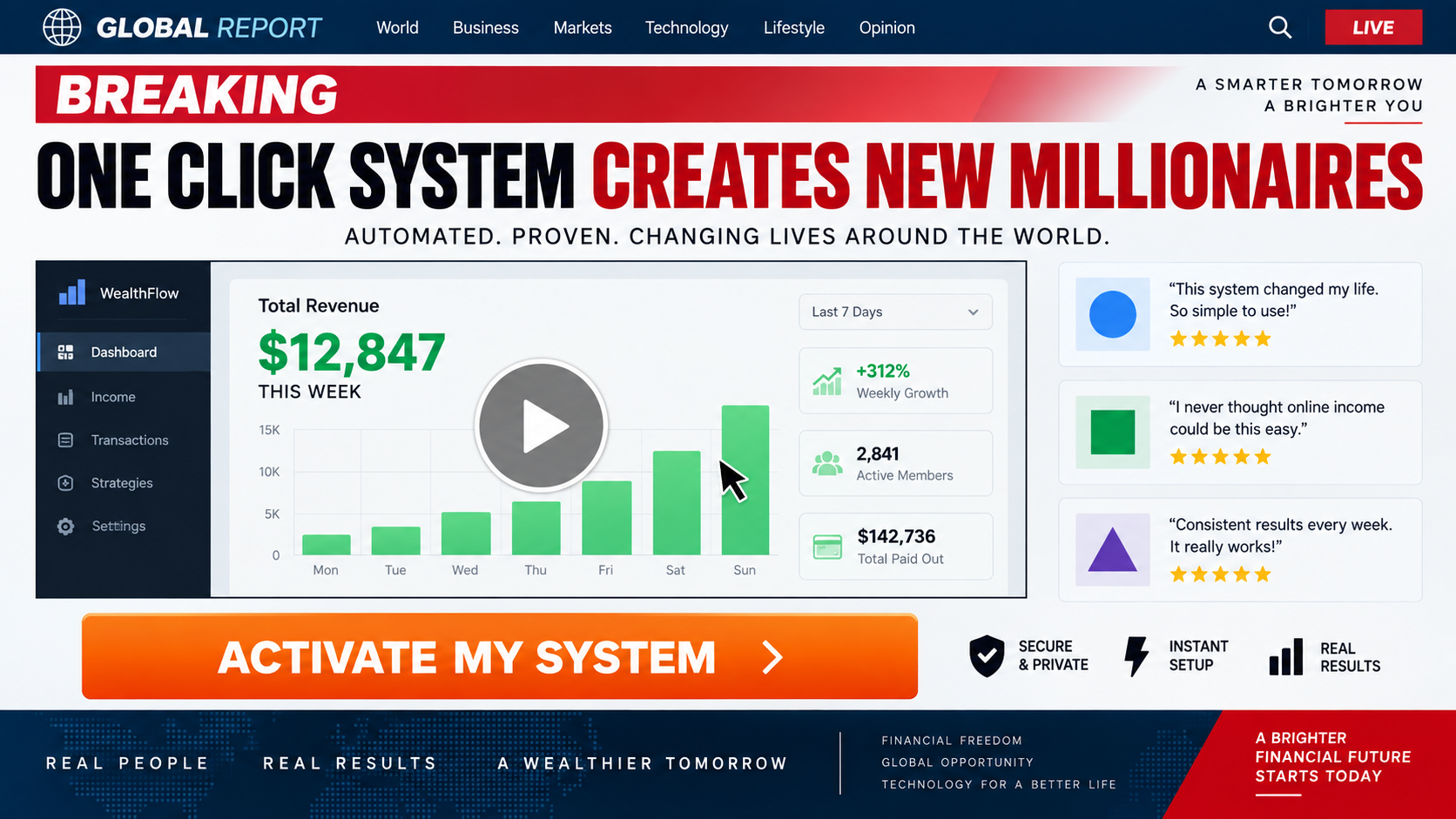
That idea has appeared under many names. One Click Income System packages it with fake news styling, dramatic testimonials, and a carefully staged purchase path.
Overview
An income story designed to outrun skepticism
One Click Income System is promoted as an automated online opportunity capable of helping ordinary beginners earn unusually large amounts with little effort.
The pitch may appear inside social advertising, a fake news article, or a sales video that resembles an interview rather than a direct advertisement.
Campaign materials have claimed the system creates more millionaires than cryptocurrency, coaching, and major online-store models combined. No reliable evidence supports that comparison.
The presenter and success stories lack verification
A figure identified as Alex Henderson has been used to narrate or front the opportunity. We found no dependable record establishing the claimed business history.
Testimonials can feature actors, stock imagery, invented names, or paid spokespeople. A confident video statement is not audited income evidence.
Large earnings screenshots also prove very little. Images can be edited, dashboards can be simulated, and revenue can be shown without costs or refunds.
The $97 sale may be only the entrance
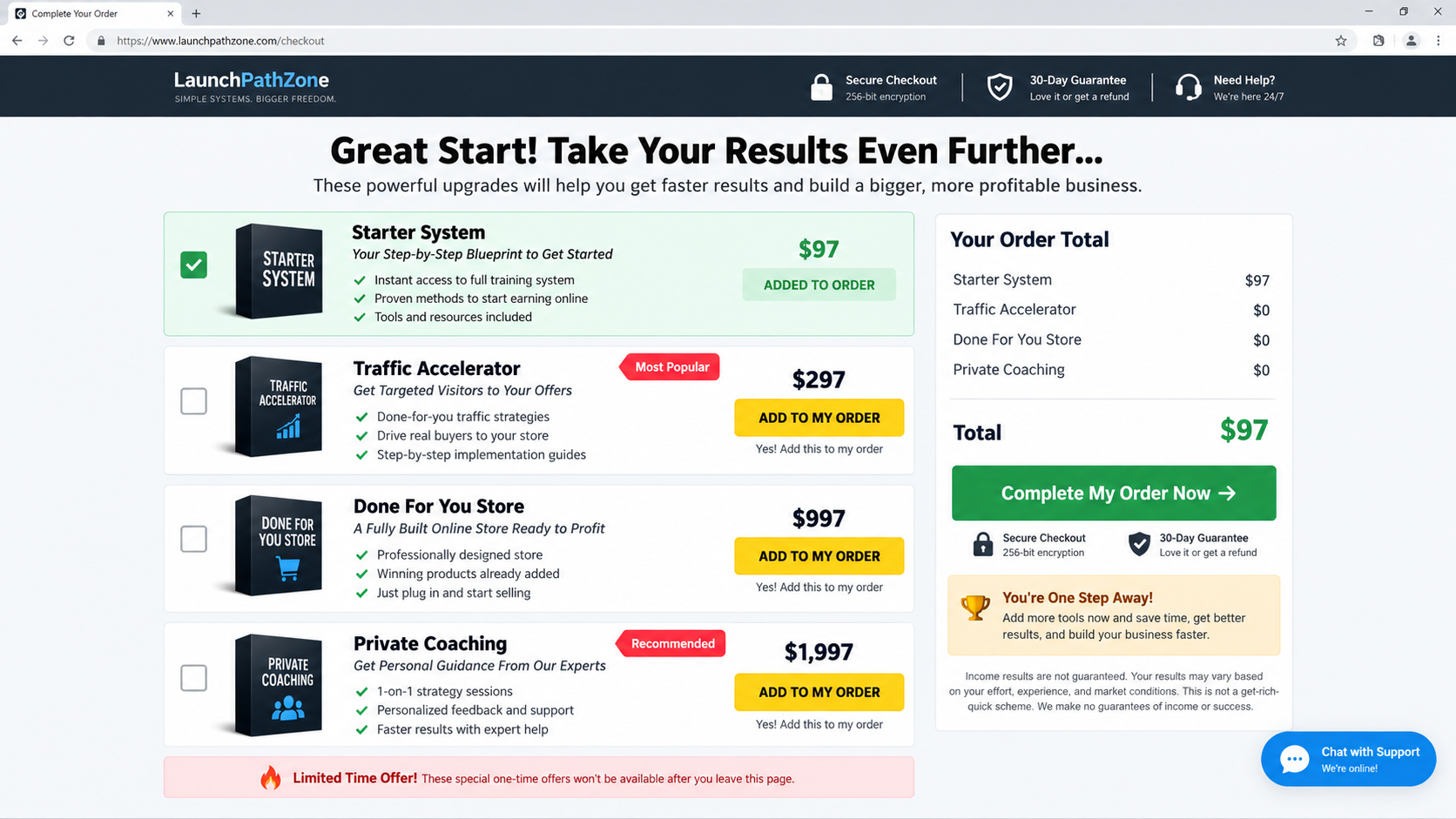
The initial system is commonly framed around a $97 payment. Once a customer buys, the funnel can present more expensive traffic, store, software, or coaching upgrades.
This progression changes the economics completely. Someone expecting a complete one-time solution may encounter hundreds or thousands in additional offers.
- Social ads use celebrities or familiar media styling to create authority.
- A fake article moves the reader from curiosity to a sales presentation.
- The video promises automation without clearly explaining the revenue mechanism.
- A $97 entry product opens a sequence of costly upsells.
- Refund and support problems may surface after the funnel has collected payment.
This is not a credible shortcut to dependable income. It is a high-pressure sales system whose clearest business model is selling the opportunity itself.
Is One Click Income System a Scam?
The promotion displays classic characteristics of a deceptive business-opportunity funnel: unsupported earnings claims, artificial scarcity, unverifiable success stories, and vague operational details.
We could not verify a transparent company with a proven technology that produces the advertised automatic results for typical customers.
The pages associated with the campaign may disappear or change. Historical versions reportedly used dwelpresswork.com for fake-news content and thinkbig.commarketnow.com for a sales presentation.
Those addresses should be treated as campaign artifacts, not permanent identifiers. Operators can move the same video and checkout to new domains quickly.
The FTC has previously acted against unrelated online schemes that used fake news, false celebrity endorsements, inexpensive entry products, and costly telemarketing upgrades.
That history does not prove government action against this particular campaign. It shows that the sales architecture is known and materially risky.
A real business requires customers, costs, skills, time, and uncertain outcomes. Any seller erasing those realities owes the buyer exceptional evidence.
How the One Click Income System Scam Works
Step 1: A celebrity or success headline creates curiosity
The first advertisement may imply that a famous entrepreneur, television personality, or news outlet discovered a simple method that established industries fear.
Names and pictures can be copied without permission. Artificial voices and altered video make false endorsements easier to produce at scale.
The ad avoids explaining the actual work. Its purpose is to make the viewer click before asking how any customer payment becomes sustainable profit.
Step 2: A fake news page softens the sales pitch
The next page may resemble a news story, complete with a publication-style masthead, reporter byline, comments, and references to economic hardship.
That layout lowers resistance because readers believe they are reviewing independent reporting. In reality, every section pushes toward the same registration button.
Check the domain, navigation, author archive, publication history, and unrelated articles. Fake outlets often collapse when visitors test anything beyond the promotion.
Step 3: The sales video promises automation
A long video explains that technology, artificial intelligence, or a secret online loophole handles the difficult work. Precise operational details remain scarce.
The narrator may say no experience, selling, product creation, audience, advertising knowledge, or technical ability is required. That leaves no credible engine for revenue.
Vague phrases such as “one click profits” and “automated commissions” sound technical while avoiding measurable promises about tasks, costs, and customer acquisition.

Step 4: Testimonials manufacture social proof
The presentation introduces people who supposedly escaped debt, replaced salaries, or earned five figures within weeks. Their accounts often cannot be independently verified.
Look for disclaimers stating that depicted people are actors or that results are exceptional. Such language can contradict the certainty used throughout the main pitch.
Even a genuine testimonial shows one experience. It does not reveal median profit, advertising expenditure, chargebacks, failed participants, or time invested.
Step 5: Scarcity pushes the $97 purchase
A countdown, limited enrollment notice, geographic exclusivity claim, or discounted “today only” amount encourages immediate payment.
Reloading the page may reset the timer. If availability repeatedly returns, the deadline is theater rather than a real capacity limit.
The checkout should identify the legal seller, complete deliverables, renewal status, refund method, and support contact. Missing information is a reason to leave.
Step 6: The buyer meets the upgrade ladder
After the starter payment, additional pages may offer a traffic accelerator, done-for-you store, premium software, personal mentorship, or private coaching.
Each upgrade claims the previous purchase works better with one more component. Decline buttons can be muted while acceptance buttons dominate the screen.
A $97 decision can therefore become $394, $1,394, or more before the customer understands what was actually purchased.
Step 7: Sales calls pursue the highest-value buyer
Contact details entered during checkout can be passed to a closer who offers individualized coaching or a supposedly turnkey business.
The caller may ask about credit limits, savings, retirement accounts, or financial goals. Those questions identify capacity to pay, not suitability for the program.
Never increase card limits, borrow money, or move retirement funds for a telephone opportunity promising guaranteed recovery through future earnings.
Step 8: Refund efforts encounter delay and deflection
Once results fail to appear, support may blame implementation, recommend another product, impose training requirements, or say the guarantee excludes downloaded materials.
Delay benefits the seller because card-dispute deadlines continue running. A frustrated buyer should switch from informal calls to dated written requests quickly.
Pages and support addresses may vanish, leaving the card descriptor and archived evidence as the only usable links to the merchant.
The Missing Business Model Is the Biggest Warning
A legitimate opportunity should explain who pays, what they buy, why they choose the service, how customers are acquired, and which costs reduce revenue.
One Click Income System emphasizes outcomes while remaining vague about those fundamentals. Automation is presented as the answer instead of a tool within a real operation.
Software can publish pages, send messages, analyze traffic, or process orders. It cannot create genuine consumer demand with no product, audience, cost, or effort.
Affiliate marketing, ecommerce, lead generation, and advertising are real industries. All require compliance, testing, traffic, refund management, and uncertain financial performance.
When a sales page refuses to name the model clearly, the buyer cannot evaluate margins, platform rules, competition, or legal obligations.
Ask for typical net results after every expense, not headline revenue. Request the number of purchasers who earned back all program and advertising costs.
A seller unwilling to provide that information should not receive money based on screenshots from selected winners.
Fake News and Celebrity Endorsements Are Conversion Tools
Fraudulent promotions imitate journalism because third-party praise is more persuasive than a seller praising itself. Layout becomes part of the deception.
A masthead can be copied in seconds. Confirm the address bar and search the real news organization for the headline before trusting any article.
Celebrity images function similarly. The viewer recognizes the person and transfers that trust to an unfamiliar product without checking the original source.
Deepfake technology adds motion and voice, but older techniques remain effective. Edited captions, dubbed clips, and fabricated quotation cards can be equally misleading.
Search for the exact quotation in quotation marks. Check verified social accounts and established reporting rather than reposted clips.
An endorsement does not prove typical results even when genuine. Paid promoters may know little about the product’s refund practices or customer outcomes.
How to Test an Income Claim Before Paying
Translate every promise into a calculation. If the pitch predicts $10,000 monthly, ask how many sales, leads, visitors, and working hours produce that amount.
Request net figures after advertising, platform fees, software, refunds, taxes, contractors, and the complete price of training.
Ask for typical results across all buyers. A median is more informative than the largest screenshot selected from an unknown group.
Verify dates carefully. An old revenue image may predate platform changes, advertising increases, or the current version of the product.
Contact testimonial subjects through independently located profiles, not links supplied by the seller. Confirm identity, relationship, expenses, and continued performance.
Search business registries for the payment company and its managers. Compare formation dates with claims of decades of operational success.
Read the guarantee before opening content. Some sellers argue that downloading a file, attending a call, or missing homework voids eligibility.
Use a separate card with alerts if proceeding despite concerns. Never use a bank transfer, cryptocurrency, or retirement-account withdrawal for speculative training.
Set a fixed spending ceiling before speaking to sales staff. A prewritten limit is harder to manipulate during an emotional call.
Ask what happens without any upgrades. If the starter system cannot work independently, the advertised price is not the real entry cost.
Finally, wait 48 hours after the presentation. A sound opportunity remains understandable when countdowns, bonuses, and enthusiastic narration are gone.
Discuss the proposal with an accountant or experienced operator who earns nothing from your decision. Independent questions often expose missing assumptions.
Refusal to allow outside review is itself valuable information. Legitimate education does not depend on keeping prospective buyers isolated.
Company, Address, and Fulfillment Checks
Find the entity that processes payment
The marketing name may not match the legal merchant. Record the company in the terms, checkout footer, receipt, and card statement before purchasing.
If those identities conflict or remain absent, the customer has no clear party responsible for delivering training or honoring a refund.
Do not mistake a mailbox for a campus
Business-opportunity sellers sometimes display virtual suites, formation addresses, or mail-forwarding locations as if they were staffed training centers.
Search the full address with the suite number. Compare corporate filings and determine whether the location belongs to the stated operator.
Call support with difficult questions
Ask for the average net earnings, complete upgrade schedule, recurring charges, refund exclusions, and the percentage of buyers recovering all costs.
A genuine representative should answer in writing. Pressure, deflection, and promises of personal transformation do not replace specific figures.
Digital delivery still requires accountability
There may be no warehouse because the product consists of videos, software access, templates, or coaching. That does not eliminate consumer obligations.
The seller must explain what access includes, how long it lasts, whether third-party tools cost extra, and how cancellation affects stored work.
Questions to Ask Before Buying Any Income System
- What exact product or service will end customers purchase?
- Which legal company receives my payment and provides the training?
- What is the total cost after required advertising, software, and upgrades?
- How many buyers earned a net profit after every expense?
- Are the presenter, testimonials, and earnings records independently verifiable?
- Does the countdown reflect a real deadline or reset automatically?
- What refund conditions apply after opening videos or logging into software?
- Will my contact details be shared with coaching or telemarketing partners?
If the seller answers with motivation rather than facts, the opportunity is not ready for an informed financial decision.
Never allow sunk cost to justify another upgrade. A weak $97 product does not become sound because a $1,997 coach is added.
What to Do if You Bought One Click Income System
- Stop purchasing upgrades. Decline calls claiming the starter package only needs premium traffic, software, or coaching to become profitable.
- Build a transaction timeline. List each checkout, upsell, recurring fee, telephone sale, access date, and refund promise separately.
- Save the sales claims. Preserve advertisements, video transcripts, earnings screenshots, countdowns, testimonials, guarantees, receipts, and support correspondence.
- Request a refund in writing. Quote the applicable guarantee, identify every amount, and set out the specific claims that influenced the purchase.
- Notify the card issuer promptly. Explain the goods promised, what arrived, attempts to resolve the matter, and any unrecognized recurring billing.
- Secure exposed accounts. Change reused passwords, revoke remote access, review connected applications, and enable multifactor authentication.
- Ignore recovery offers. Fraud databases can circulate victim details, leading to callers who demand an advance fee for guaranteed reimbursement.
- Check the computer. Run Malwarebytes after installing unknown software, and use AdGuard to reduce deceptive income ads and malicious redirects.
- Report the funnel. Send organized evidence to consumer regulators, the advertising platform, payment processor, domain host, and relevant law-enforcement portal.
Is Your Device Infected? Run a Free Malware Scan
Slow performance, constant pop-ups, or strange behavior? These are classic signs of a malware infection. The fastest way to find out is to scan your device with Malwarebytes Free — one of the most trusted malware removal tools available.
The free version detects and removes the most common threats, including:
- Adware — the cause of those annoying pop-ups
- Browser hijackers — unwanted redirects and changed homepages
- Trojans and spyware — hidden programs stealing your data
- Potentially unwanted programs (PUPs) — software you never asked for
👉 Select your device below — Windows, Mac, or Android — then follow the simple steps to download Malwarebytes, scan your system, and remove any threats it finds. The scan usually takes 5 to 20 minutes.
Run a Malware Scan with Malwarebytes for Windows
Malwarebytes is one of the most popular and trusted anti-malware tools for Windows — and it’s completely free for removing infections. It catches threats that many antivirus programs miss, including adware, browser hijackers, and trojans. Follow the steps below to scan and clean your PC in just a few minutes.
Download Malwarebytes
Click the button below to download the latest version of Malwarebytes for Windows from the official source. The free version is all you need — it will scan your computer and remove adware, browser hijackers, and other malicious software at no cost.
Download MalwarebytesOfficial installer for Windows 11 and 10. Your download starts right away.Want real-time protection? See Malwarebytes Premium Malwarebytes Free for WindowsScans and removes malware at no cost
-
Install Malwarebytes
When the download finishes, open your Downloads folder and double-click the MBSetup file. If Windows shows a User Account Control pop-up, click “Yes” to allow the installation.

Follow the On-Screen Prompts to Install Malwarebytes
The setup wizard will walk you through a few quick screens:
-
Choose where you’re installing the program — “Personal Computer” or “Work Computer” — then click Next.

-
Malwarebytes will now install on your device. This usually takes under a minute.

-
When installation is complete, the “Welcome to Malwarebytes” screen will open automatically.

-
On the final screen, click Open Malwarebytes to launch the program.

-
Enable “Scan for Rootkits”
Before scanning, turn on rootkit detection so Malwarebytes can find even the most hidden threats. Click the Settings gear icon on the left side of the screen.

In the settings menu, find “Scan for rootkits” and click the toggle so it turns blue.

Done? Click “Dashboard” in the left pane to return to the main screen.
Start the Scan
Click the blue Scan button. Malwarebytes will automatically update its virus database and start checking your computer for malware.

-
Wait for the Scan to Finish
The scan checks your entire system for browser hijackers and other malicious programs, so it can take 5 to 20 minutes depending on your computer. Feel free to do something else — just check back occasionally to see the progress.

-
Quarantine the Detected Threats
When the scan is done, you’ll see a list of everything Malwarebytes found — malware, adware, and potentially unwanted programs. Click the “Quarantine” button to remove all of them at once.

Malwarebytes will now remove the malicious files and registry entries and move them safely into quarantine.

-
Restart Your Computer
Some threats can only be fully removed after a reboot. If Malwarebytes asks you to restart, click Yes. Once you’re logged back in, Malwarebytes has finished removing the threats it found.

That’s it — your Windows PC is now clean of trojans, adware, and other malware, and should be back to running smoothly.
If you are still having problems with your computer after completing these instructions, then please follow one of the steps:
- Run a computer scan with ESET Online Scanner
- Ask for help in our Windows Malware Removal Help & Support forum.
Run a Malware Scan with Malwarebytes for Mac
Malwarebytes for Mac is a free on-demand scanner that removes the malware other security software tends to miss — adware, browser hijackers, and unwanted programs included. Cleaning an infected Mac with Malwarebytes has always been completely free, and it’s our go-to recommendation. Follow the steps below to scan and clean your Mac in just a few minutes.
-
Download Malwarebytes for Mac
Click the button below to download the latest version of Malwarebytes for Mac.
Download MalwarebytesOfficial installer for macOS. Your download starts right away.Want real-time protection? See Malwarebytes PremiumMalwarebytes Free for MacScans and removes malware at no cost -
Open the Malwarebytes setup file
When the download finishes, open your Downloads folder and double-click the setup file to begin the installation.

-
Follow the On-Screen Prompts to Install Malwarebytes
The Malwarebytes for Mac Installer will guide you through a few quick screens. Click “Continue” and keep following the prompts until the installation completes.



When the installation is complete, Malwarebytes opens to the Welcome to Malwarebytes screen. Click “Get started“.
-
Select “Personal Computer” or “Work Computer”
Malwarebytes will ask what type of computer you’re installing it on. Click either Personal Computer or Work Computer, whichever applies.

-
Start the Scan
Click the “Scan” button. Malwarebytes will automatically update its detection database and begin checking your Mac for malware.

-
Wait for the Scan to Finish
Malwarebytes will scan your Mac for adware, browser hijackers, and other malicious programs. This can take a few minutes, so feel free to do something else — just check back occasionally to see the progress.

-
Quarantine the Detected Threats
When the scan is done, you’ll see a list of everything Malwarebytes found. Click the “Quarantine” button to remove all the threats at once.

-
Restart Your Mac
Malwarebytes will now remove all the malicious files it found. Some threats can only be fully removed after a reboot — if Malwarebytes asks you to restart, allow it. Once you’re logged back in, your Mac is clean.

That’s it — your Mac is now free of adware, rogue browser extensions, and other potentially harmful software.
If you are still experiencing problems while trying to remove a malicious program from your computer, please ask for help in our Mac Malware Removal Help & Support forum.
Run a Malware Scan with Malwarebytes for Android
Malwarebytes for Android automatically detects and removes dangerous threats like malware and ransomware so you don’t have to worry about your most-used device being compromised. Aggressive detection of adware and potentially unwanted programs keeps your Android phone or tablet running smooth.
-
Download Malwarebytes for Android.
You can download Malwarebytes for Android by clicking the link below.
Get Malwarebytes for AndroidOpens Google Play in a new tab.Want real-time protection? See Malwarebytes Premium for AndroidMalwarebytes for AndroidScans your phone and removes malware at no cost -
Install Malwarebytes for Android on your phone.
In the Google Play Store, tap “Install” to install Malwarebytes for Android on your device.

When the installation process has finished, tap “Open” to begin using Malwarebytes for Android. You can also open Malwarebytes by tapping on its icon in your phone menu or home screen.

-
Follow the on-screen prompts to complete the setup process
When Malwarebytes will open, you will see the Malwarebytes Setup Wizard which will guide you through a series of permissions and other setup options.
This is the first of two screens that explain the difference between the Premium and Free versions. Swipe this screen to continue.
Tap on “Got it” to proceed to the next step.
Malwarebytes for Android will now ask for a set of permissions that are required to scan your device and protect it from malware. Tap on “Give permission” to continue.
Tap on “Allow” to permit Malwarebytes to access the files on your phone.
-
Update database and run a scan with Malwarebytes for Android
You will now be prompted to update the Malwarebytes database and run a full system scan.

Click on “Update database” to update the Malwarebytes for Android definitions to the latest version, then click on “Run full scan” to perform a system scan.

-
Wait for the Malwarebytes scan to complete.
Malwarebytes will now start scanning your phone for adware and other malicious apps. This process can take a few minutes, so we suggest you do something else and periodically check on the status of the scan to see when it is finished.

-
Click on “Remove Selected”.
When the scan has been completed, you will be presented with a screen showing the malware infections that Malwarebytes for Android has detected. To remove the malicious apps that Malwarebytes has found, tap on the “Remove Selected” button.

-
Restart your phone.
Malwarebytes for Android will now remove all the malicious apps that it has found. To complete the malware removal process, Malwarebytes may ask you to restart your device.
That’s it — your Android phone is now clean — no more malicious apps, adware, or browser redirects.
If you are still having problems with your phone after completing these instructions, then please follow one of the steps:
- Restore your phone to factory settings by going to Settings > General management > Reset > Factory data reset.
- Ask for help in our Mobile Malware Removal Help & Support forum.
Stay Protected: Block Ads and Malicious Sites
Now that your device is clean, keep it that way. Most infections start with a malicious ad or a fake download button — so blocking them at the source is your best defense.
We recommend AdGuard, which blocks malicious ads, phishing pages, and dangerous redirects before they can reach you.
👉 Download AdGuard and browse safely
Frequently Asked Questions
Can one click really create passive income?
No credible system removes customers, costs, competition, work, and risk. Automation can assist a business, but it cannot guarantee effortless profit.
Is Alex Henderson a verified expert?
We found no dependable evidence confirming the presenter’s claimed record. A name in a sales video should not be accepted without independent credentials.
What do I receive for $97?
The exact deliverables can vary as pages change. Do not pay until the seller lists every component, duration, extra cost, and refund condition.
Are the earnings testimonials real?
They are not reliable proof of typical performance. Ask for independently audited net results covering all purchasers, including those who earned nothing.
Why are there so many upsells?
The low entry price acquires a buyer. Later offers attempt to increase total revenue through traffic products, stores, software, or coaching.
Can I recover the money?
Recovery depends on payment method, timing, documentation, and policy. Stop further charges, request a refund, and contact the provider immediately.
The Bottom Line
One Click Income System sells an emotionally powerful result without presenting a verifiable business engine capable of producing it for ordinary buyers.
Fake authority opens the door, $97 secures commitment, and upgrades deepen the loss. Invest only after the model, operator, costs, and typical outcomes withstand scrutiny.

Join the discussion
0 commentsShare your experience or ask a question about this article.
Discussion
Start the conversation
Have a question or something useful to share? Add the first comment.