

The man in the video has the car, the house, and the calm confidence of someone who no longer worries about bills. He says one button created all of it. The one button money app scam turns that fantasy into a $67 payment and a trail of expensive upgrades.
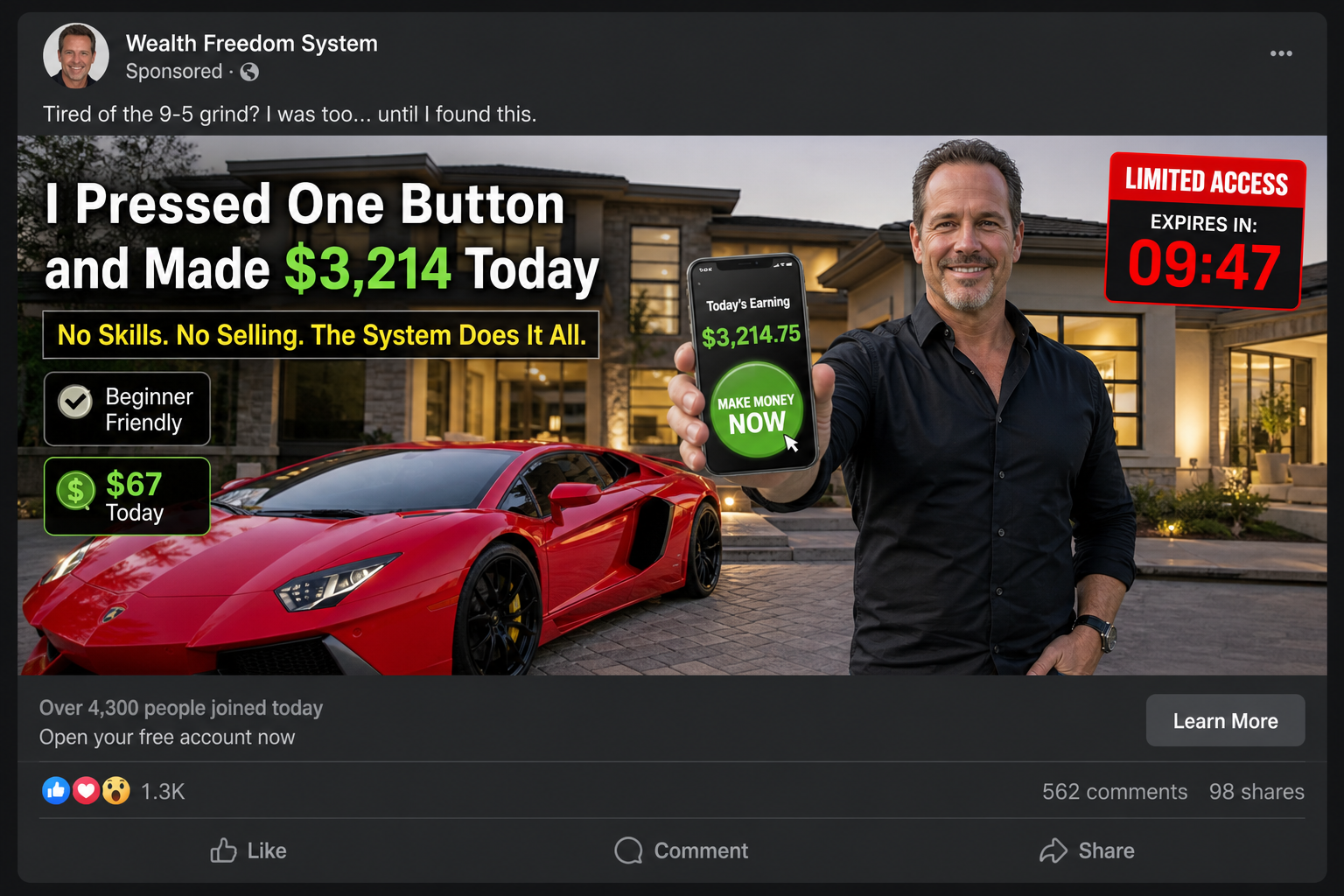
The video deliberately avoids a normal software demonstration. Instead, it circles around the green button, shows a rising balance, and spends most of its time on the presenter's lifestyle and personal transformation.
Campaigns have used names such as Push My Button, Push Button System, and PushTheSystem.
The wording changes enough to look new, but the central claim remains that software, funnels, or internet traffic can produce income almost automatically.
That missing explanation is the point. If the viewer understood the costs, marketing work, conversion risk, refund exposure, and extra purchases, the button would no longer feel magical.
Overview
What it does not provide is credible evidence that pressing a button creates real, repeatable profit for ordinary buyers.
The button is a visual prop, not a business model
A large green button gives the offer a physical action the viewer can understand. Pressing it supposedly activates campaigns, commissions, traffic, or prebuilt sales funnels without the user learning a skill.
Real online revenue requires a product or service, lawful marketing, customers, expenses, support, and a measurable source of margin. Software can automate tasks, but it cannot create willing buyers or guaranteed profit from nothing.
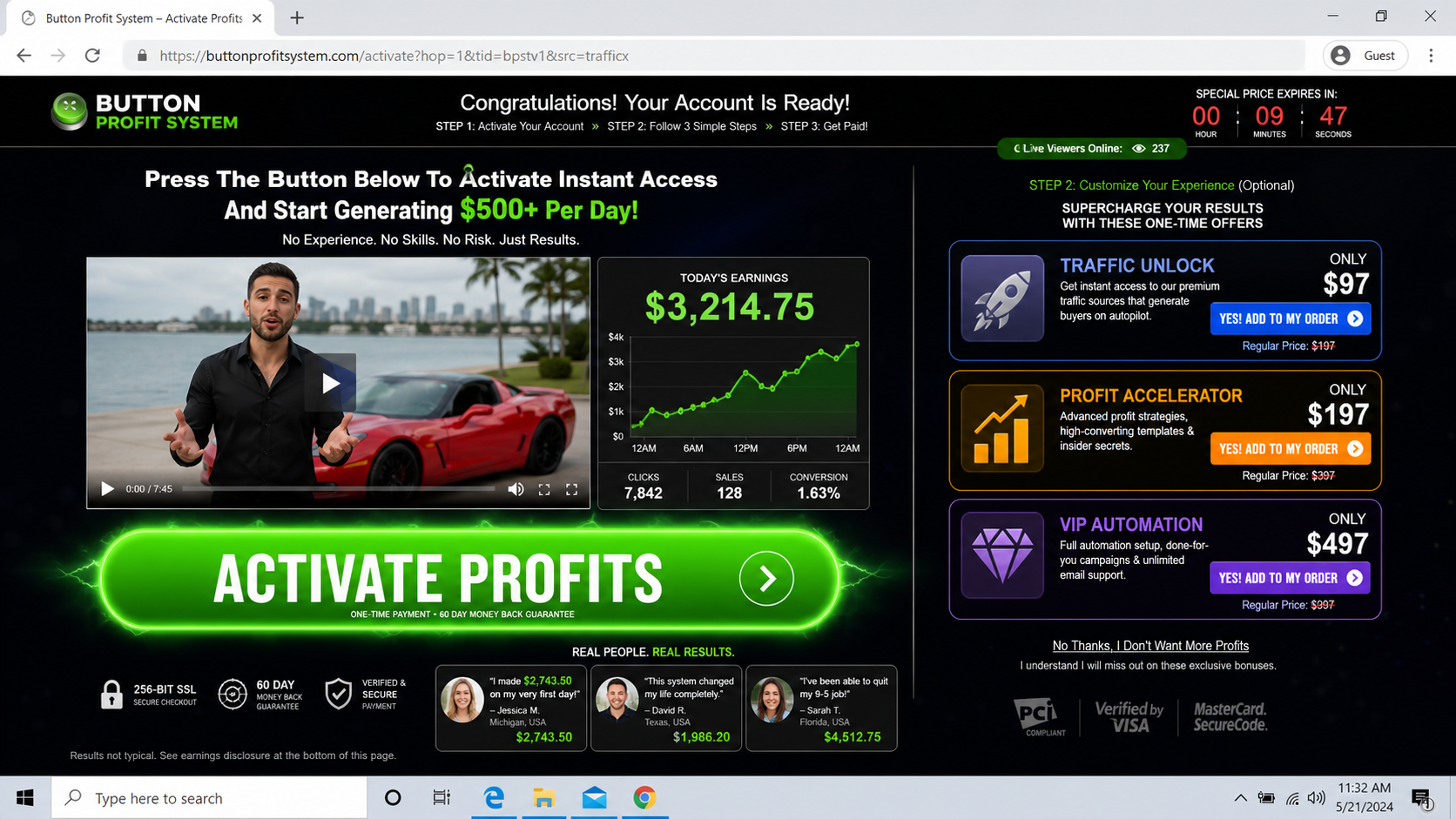
The presentation rarely names the exact networks, products, conversion rates, advertising costs, refund rates, or contracts involved. A fake dashboard fills the space where those details should be.
The $67 starter price is framed as the final obstacle
After showing thousands in daily earnings, the seller asks for $67. The price feels small because it is compared with a sports car and an invented profit figure, not with what the customer actually receives.
Once the payment is made, upgrades can appear for traffic, premium funnels, coaching, automation, or VIP access. Each page says the original system will work faster or better after another purchase.
The Federal Trade Commission warns that low-cost proven systems can become money pits through additional mentoring and services. No business seller can guarantee the purchaser will make money.
Consumer reports show that losses can exceed the entry fee
A Better Business Bureau Scam Tracker report connected with a Push Button System pitch described a $530 loss after promises involving internet sales funnels.
The report is a consumer allegation, not a court finding, but it shows how the cost can move beyond $67.
A separate report involving a related income pitch described $250 lost and later promotional emails for a Push Button System. Again, it is an individual report, but it matches the pattern of follow-on offers.
The current PushTheSystem domain is young, uses hidden registration details, and has presented little public company information outside the sales path. A secure connection does not establish that the earnings claim or merchant is trustworthy.
- A social ad uses a luxury house and sports car as unverified proof.
- A long video delays showing what the software actually does.
- A glowing button and dashboard imply profit appears instantly.
- The $67 offer can be followed by traffic, automation, and coaching upgrades.
- Consumer reports describe losses substantially larger than the entry fee.
- The domain and legal company provide little traceable operating history.
- The product can be renamed while the same push-button script continues.
What Push My Button and PushTheSystem Claim to Sell
The presentation usually describes prebuilt online funnels. A funnel is simply a sequence of pages designed to move a visitor from an advertisement to a purchase. It does not generate visitors or guarantee that they buy.
The seller may say profitable campaigns have already been tested and copied into the user's account. That sounds like a finished business, but the buyer is not shown verified campaign history, advertising invoices, refunds, or the permissions needed to market each offer.
A presenter drives a red sports car or arrives at a large home, then tells a story about escaping ordinary work. A staged conversation with an acquaintance may make the success appear spontaneous and socially confirmed.
For nearly an hour, the video repeats that no selling, experience, or technical work is required. It does not give viewers independent access to the software, public documentation, or a neutral trial.
The $67 payment is called activation or starter access. After purchase, a buyer may discover that the system expects paid traffic, more tools, contact with a coach, or a new upgrade before campaigns can run.
That sequence matters more than the button. A system that needs undisclosed purchases to approach its advertised function was not accurately represented at the first checkout.
Why the Profit Dashboard Is Not Proof
A dashboard can display any number its developer enters. It may contain demonstration data, gross sales, pending commissions, simulated balances, or figures that were never connected to a bank account.
Even authenticated gross revenue would not establish profit. Advertising, software, refunds, chargebacks, payment fees, taxes, support, and product costs can turn apparent sales into a loss.
The presenter should be able to identify the legal business, merchant accounts, offers, ad platforms, date range, and complete expense record behind the displayed amount. The sales video provides none of that independent verification.
Luxury assets are equally weak evidence. A car can be rented, a house can be borrowed, a scene can be filmed at a listing, and an actor can read a script. Ownership records and customer outcomes are not shown.
The strongest test is whether a reasonable purchaser can reproduce the claimed result using only what the $67 offer clearly includes. If traffic, funnels, coaching, or premium access are sold afterward, the starter pitch concealed important costs.
How the One Button Money App Scam Works
Step 1: A luxury social ad creates instant desire
A presenter stands beside a sports car, pool, or mansion and says life changed after finding a simple internet system. The visual result appears before any explanation of the business.
The ad promises beginners can make hundreds or thousands per day without selling. A countdown or limited invitation pressures the viewer to click before checking the page behind the ad.
Comments may contain generic congratulations and earnings claims. The advertiser can moderate the thread and remove warnings from previous buyers.
Step 2: A long video keeps the mechanism vague
The landing page begins another video that cannot be skipped easily. Personal hardship, disbelief, and sudden success take up far more time than the software demonstration.
The narrator repeats one button, automation, and done for you. Those phrases describe convenience, not the source of revenue.
Each time the viewer expects specifics, another testimonial or lifestyle scene appears. The delay increases emotional commitment and makes leaving feel like abandoning an opportunity.
Step 3: A simulated button appears to activate profit
The presentation shows a dashboard with a large green control and a rising daily balance. Pressing the control may trigger an animation, populate sample campaigns, or open generic training.
An animated balance is not a payment. Ask which customer paid, what was sold, where the transaction was processed, what it cost to acquire the customer, and when funds became withdrawable.
If the seller cannot answer those questions with records, the dashboard is theater rather than evidence.
Step 4: The viewer pays $67 for starter access
The price is introduced after a much larger earnings figure so it feels almost risk free. A guarantee badge and timer reduce the remaining hesitation.
The checkout may collect a phone number and ask broad questions about income goals. Those details can support later sales calls.
Save the full authorization screen and terms. Make sure the product, total, renewal status, refund period, company, and support method are all visible before paying.
Step 5: Upsells are framed as essential accelerators
After the card is accepted, pages offer traffic, premium campaigns, automation, templates, or VIP support. The buttons to accept are prominent, while decline links suggest the buyer is choosing slower results.
The new charges can exceed the starter price several times over. Each upgrade may also have separate terms and a different merchant descriptor.
Do not buy another layer to make the first promise true. Pause, list what the starter access actually delivered, and request a refund if it was materially different.
Step 6: Coaches and emails continue the pressure
A representative may call to discuss the buyer's goals, available credit, or willingness to invest. The conversation can lead to expensive coaching or done-for-you services.
Marketing emails promote another system when the first one has not produced results. A consumer who has already paid is treated as a lead for the next offer.
Never share a card limit, bank balance, retirement-account information, or remote computer access. Those details are not necessary to explain a legitimate product.
Step 7: The funnel changes its name and repeats
Push My Button can become Push Button System, Button Profit, or another automation label. The website changes while the sports car, green button, $67 entry, and upgrade ladder remain.
Older warnings may not contain the new product name. Search video sentences, phone numbers, payment descriptors, terms, email addresses, and the presenter's images.
Once the viewer recognizes that a button cannot replace a business model, the rebranding loses much of its power.
Company, Address, and Fulfillment Checks
PushTheSystem is a domain, not a verified operator
A domain name identifies a web address. It does not identify the legal person who owns the product, receives payment, handles customer data, and guarantees refunds.
Current registration information for PushTheSystem has been hidden, and the domain has only a short public history. Privacy registration is common, but it adds risk when the sales page also lacks a clear company record.
Compare the site, terms, receipt, support messages, and card statement. Demand one legal entity that can be located and held responsible.
No usable business address means no clear accountability
A money-making program should publish a current service address and jurisdiction, not only a web form or payment processor. Search the address and confirm the named company occupies it.
A virtual mailbox, residence, unrelated office, or fulfillment center may receive mail without operating the software. Ask who owns the intellectual property and who must honor the refund.
If support refuses to provide those details before payment, the buyer has no reliable destination for a complaint after the sales page disappears.
Support must answer questions about earnings and total cost
Ask for the typical customer's net result, including users who earned nothing, and request the written basis for every earnings claim. Also ask which additional tools and advertising budgets are required.
An honest support agent should explain what happens after $67 and whether coaching calls, subscriptions, or upgrades follow. Scripted urgency is not an answer.
Keep all communication in writing. If a representative promises a refund or income on the phone, request the same statement by email before taking another step.
The fulfillment chain is digital but still must be traceable
Digital products do not have a warehouse, but they do have developers, hosting, payment processors, affiliate networks, customer databases, and service providers. Those relationships should be documented.
A claim that the system is fully automated does not remove obligations around privacy, recurring billing, refunds, tax reporting, advertising compliance, and customer support.
If the company cannot say where data is stored, who processes payments, or who supplies the offers inside its funnels, the buyer is being asked to trust a black box with both money and personal information.
Why Pressing One Button Is Such an Effective Story
The button turns a complicated desire into a simple action. People do not need to imagine learning marketing or building a company. They imagine pressing once and watching their financial anxiety disappear.
The story also protects itself from technical questions. Proprietary automation supposedly handles everything, so the absence of detail is presented as convenience rather than secrecy.
A low starter price makes skepticism feel overly cautious. Once the buyer pays, commitment and embarrassment can make it easier to accept an upgrade rather than admit the original promise failed.
Breaking the spell requires one question: who pays the money shown on the dashboard, and why? If the seller cannot describe a real customer transaction and its full cost, the button is not producing income.
Warning Signs to Watch For
- A sports car or mansion is the main evidence of success.
- The system promises profit without experience, sales, work, or risk.
- A large green button replaces a clear explanation of customers and costs.
- The dashboard shows earnings that cannot be tied to bank records.
- A $67 checkout appears after claims of thousands per day.
- Traffic, automation, and coaching are sold only after the first payment.
- The domain is young and the legal operator is difficult to identify.
- Sales calls ask about credit or investment capacity instead of product performance.
Any software that truly created predictable profit at the press of a button would not need to chase beginners with a $67 countdown.
The lack of a transparent revenue mechanism is not a small omission. It is the center of the offer.
What to Do if You Have Fallen Victim to This Scam
- Capture the sales video and dashboard claims. Save the ad, domain, presenter, profit figures, starter offer, upgrades, terms, support details, receipts, and card descriptors.
- Stop the upsell sequence. Do not buy traffic, VIP access, or coaching to unlock the result you were told came with the first payment.
- Cancel all services in writing. Name every purchase and state that you revoke authorization for subscriptions, follow-up charges, and recurring services. Request confirmation.
- Contact the card issuer quickly. Describe the automatic-income promise and what you received. Ask about dispute deadlines, blocking future charges, and replacing the card.
- Remove digital access. Change reused passwords, revoke unknown store and ad-account users, disable connected payment apps, and uninstall remote-support software.
- Ignore recovery and coaching pitches. Do not pay another person who says they can recover losses, activate profits, or finish the system for an additional fee.
- Run Malwarebytes if software was installed. Scan any device that ran a supplied installer, browser extension, remote tool, or unknown file. Remove detections and change sensitive passwords from a clean device.
- Use AdGuard against repeat ads and redirects. AdGuard can reduce exposure to aggressive funnels and trackers, but continue checking each business independently.
- Report the funnel. Send the evidence to the FTC, the advertising platform, and the payment provider. Include related product names so a renamed version can be connected.
Frequently Asked Questions
Can a one-button app really make money automatically?
Software can automate defined tasks, but it cannot guarantee customers, sales, or profit. A legitimate business must still explain what is sold, to whom, at what cost, and with what risk.
What do buyers get for the $67 payment?
The sales path may provide starter access, training, funnels, or a dashboard, but reports indicate that additional products can be offered. Verify the current written deliverables before paying.
Are the dashboard earnings real?
The videos do not provide independent evidence tying the figures to typical customer bank deposits and complete expenses. A displayed number alone can be simulated or misleading.
Is PushTheSystem a registered company?
A website domain is not proof of a registered legal company. Buyers should identify the entity in the terms, receipt, and card statement and verify its address and jurisdiction.
What if a coach asks how much credit I have?
Do not disclose card limits, savings, or retirement balances. End the call, request written cancellation, and contact the issuer if the conversation follows an earlier payment.
Can I dispute the charge if I received some training?
Your issuer decides based on the evidence and applicable rules. Explain precisely what was promised, delivered, charged, and refunded, and act before the deadline.
The Bottom Line
The one button money app scam is powerful because the action feels so simple. The seller shows the lifestyle, balance, and green button while keeping the actual customers, costs, and work out of view.
A $67 starter purchase does not become safe because it is small. Reports tied to similar push-button pitches show that the path can continue into much larger payments and repeated promotions.
Do not buy another upgrade to rescue an unsupported promise. Save the evidence, cancel every service, secure your accounts, and ask the payment provider what options remain.

Join the discussion
0 commentsShare your experience or ask a question about this article.
Discussion
Start the conversation
Have a question or something useful to share? Add the first comment.