

You list something on OfferUp, and a buyer responds almost immediately. Then an email arrives saying the payment needs one more step.
The OfferUp payment verification scam catches sellers at that tempting moment. Before you touch the button, look closely at what this supposed sale requires.
Overview
A payment email becomes a request for your secrets
The scam is the impersonation, not OfferUp. A stranger poses as a buyer, then supplies an email or link that pretends to handle payment verification.
Instead of completing a sale, the seller is directed toward a page asking for login credentials, card information, or another sensitive detail.
A payment being described as pending does not establish that money exists. The buyer and the email may both belong to the same fraudulent conversation.
OfferUp documents this exact warning pattern
OfferUp’s scam guidance identifies fake payment messages and outside verification links as risks to sellers. Its current guidance directs transactions toward local, in-person meetings.
A recent seller report describes a fast buyer inquiry followed by an email claiming payment needed verification. That account illustrates the approach, not a confirmed financial loss.
We do not know the operator behind that encounter or the contents of its destination page. The deceptive payment-verification mechanism is independently documented.
The decisive check is how payment is actually received
Do not surrender account access or payment information because someone says a buyer has already paid. Check the sale through a route you open yourself.
- An unexpected buyer asks for your email to complete an unusual payment process.
- A message says funds are waiting behind a verification button.
- The destination asks for a password, card number, bank login, or security code.
- The buyer insists that the email is the only way to get paid.
- You are pushed to finish before checking the arrangement independently.
A real inquiry can arrive quickly, and legitimate services send emails. Neither fact validates a stranger’s request to reveal financial information.
Why This Email Arrives at Such a Convincing Moment
Selling something online already involves small administrative tasks: answering questions, arranging a meeting, and deciding which buyer will actually show up.
A verification email looks like another task on that list. You are expecting progress, so a message about your item feels more relevant than ordinary spam.
The supposed buyer also gives the email a backstory. If they say payment is complete, a pending-payment notice appears to explain why you cannot see it yet.
That explanation is convenient for the scammer. Instead of proving they paid, they make you responsible for whatever prevents the money from arriving.
Your item price can appear in the message because you posted it publicly. A matching amount is not evidence of a transaction inside OfferUp.
The same applies to a listing title or photograph. Details copied from an advertisement make a message personalized, but they do not authenticate its sender.
Keep the questions separate. Is someone interested in the item? Has an actual payment happened? Is this request coming from the service it claims to represent?
A scam succeeds when those questions collapse into one assumption: the buyer seems keen, therefore everything they send must be part of the sale.
How the OfferUp Payment Verification Scam Works
Step 1: A buyer creates the expectation of a quick sale
The first contact may be brief and ordinary. The buyer asks whether the item is available or says it is exactly what they need.
Sometimes there is little bargaining. That can feel refreshing after several unreliable inquiries, although enthusiasm alone is not proof that someone is fraudulent.
The important change comes when the conversation stops discussing inspection or pickup and starts imposing an outside payment process.
A seller who wants the item gone may accept the detour because the buyer sounds ready. Slow down when a simple local sale becomes technical.
Step 2: The conversation moves toward an email notice
The stranger may request an email address or tell you to watch your inbox. They describe this as necessary for payment confirmation.
Sharing an email address alone does not give someone your bank account. It does allow them to send a convincing message outside the marketplace conversation.
That separate inbox can make the second message seem independent. In reality, the buyer can arrange both the request and the supposed confirmation.
Keep correspondence in the platform wherever possible. If the buyer invents a mandatory email-based payment step, verify it before providing anything else.
Step 3: The fake notice says payment is waiting
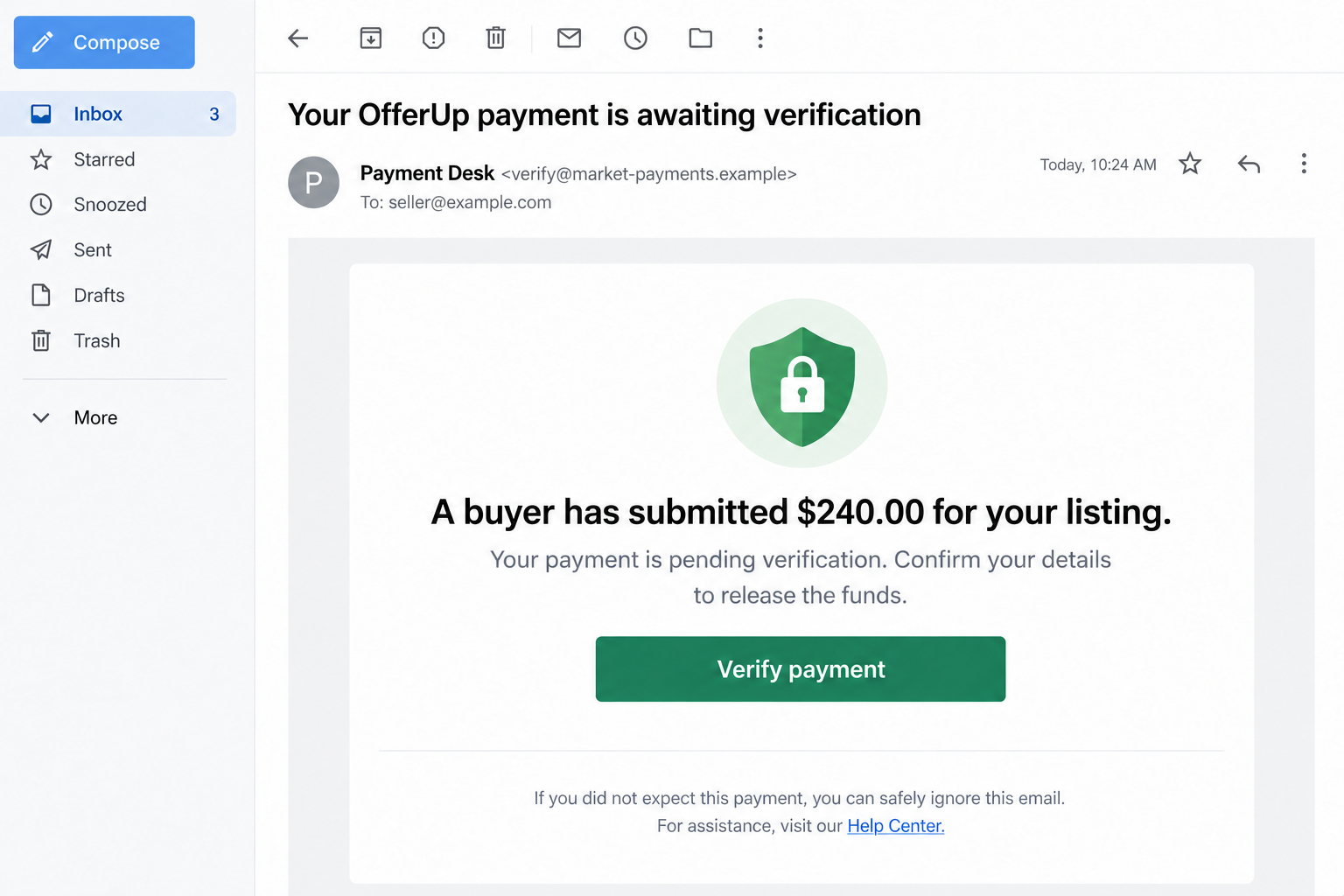
The email presents a problem that only you can solve: money is pending, verification is incomplete, or details must be confirmed before release.
A polished layout can include a button, transaction-style number, support footer, and familiar colors. Those are design elements, not payment records.
The amount may be correct because the scammer already knows the asking price. A reference number can be invented just as easily.
At this point, no payment should be treated as received solely because a stranger’s email says so. Do not hand over the item.
Step 4: The button turns receiving money into giving information
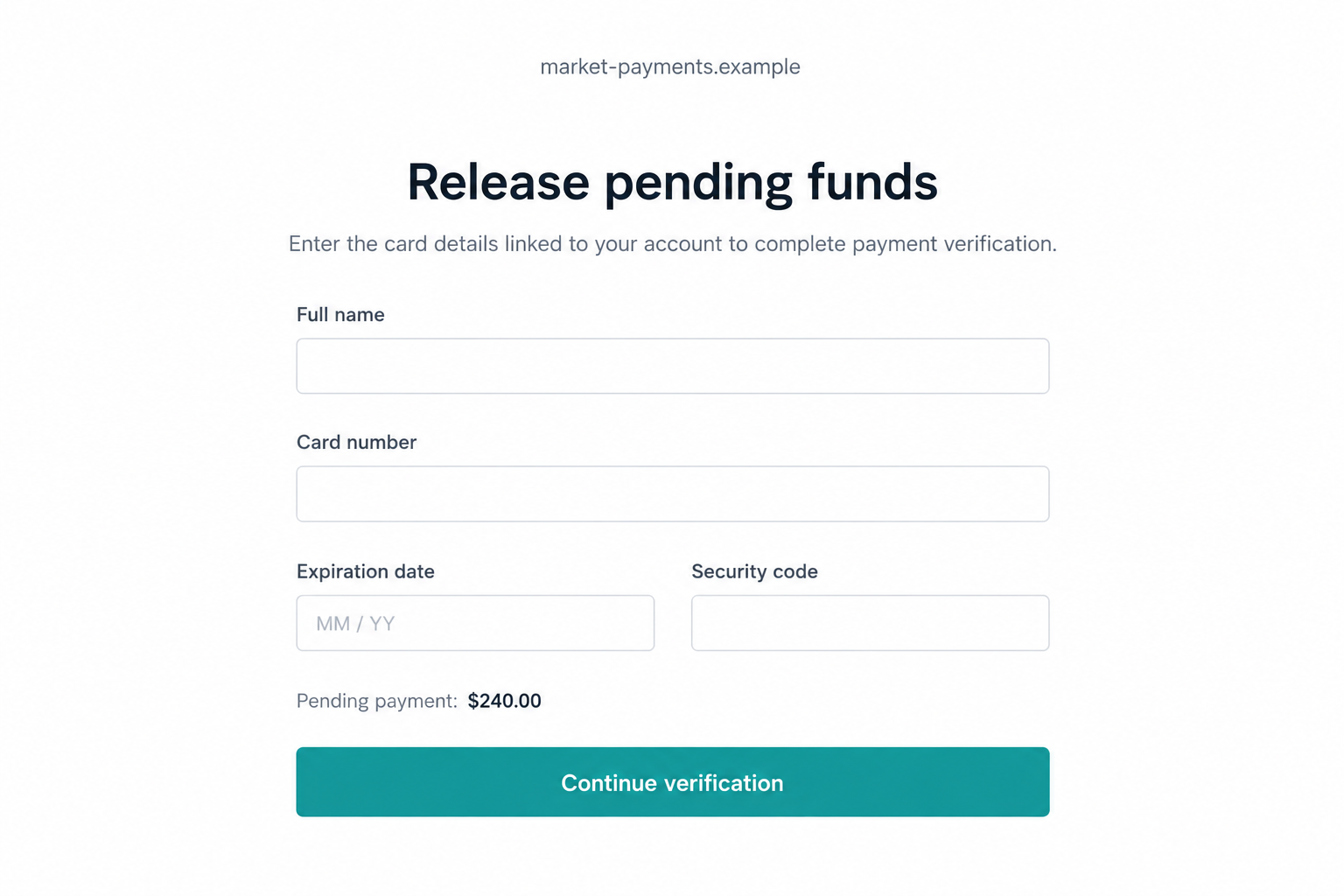
Outside verification pages can ask for a password or financial details. The explanation makes disclosure sound like a harmless prerequisite to receiving funds.
A card’s security code is especially revealing. It is not a receipt number, and providing it can help someone attempt purchases.
A bank password grants access rather than proving your willingness to sell. A one-time code may authorize a login or action the scammer initiated.
The screens in this article are fictional, nonfunctional illustrations of that pattern. Their example details are not captures from the reported encounter.
Step 5: A second instruction keeps you from checking
If you hesitate, the buyer may insist the process is normal. They can say other sellers completed it or that payment cannot be canceled.
Do not treat those assurances as technical support. The stranger benefits from the proposed process and cannot independently verify it.
Some marketplace frauds add fees or refund demands. Those are possible escalations, not outcomes established in the specific seller report reviewed here.
Leave whenever getting paid requires sending a secret or paying an unexplained release charge. You do not need to finish the conversation politely.
Step 6: Stolen details create problems beyond the listing
Exposed card information can lead to attempted charges. A reused password can endanger other accounts. Stolen marketplace access can give scammers a more believable profile.
What happens next depends on what you shared and which protections stopped the attempt. Receiving the email alone is not the same as losing an account.
This distinction matters during recovery. A person who only opened a message needs different help from someone who entered credentials and approved a code.
Check the Sender Without Visiting the Scam Page
Expand the email’s sender information rather than trusting the display name. Anyone can choose a name that includes payments, support, or OfferUp.
Look for mismatches between the claimed organization, sender address, and reply address. An unrelated domain is an obvious reason to stop, not a puzzle to solve.
Do not rely on a logo or a padlock. A copied logo is easy to insert, and an encrypted connection does not make its owner honest.
Read domains as addresses, not sentences. A familiar brand word somewhere in a long address does not mean the website belongs to that brand.
Rather than exploring the button, open OfferUp separately. Use its own Help Center if the transaction or message still concerns you.
Do not upload the email to random verification sites containing personal details. Evidence can be preserved privately without spreading your address or transaction information.
A screenshot of the message is useful, but save the original email too. Headers and timestamps may help investigators understand where it came from.
Do not confront a suspected scammer with the evidence. That can prompt them to delete messages before you have recorded the relevant account.
Keep the Sale Simple and the Item With You
Follow the current process described in OfferUp’s own help pages, not an old tutorial or a buyer’s custom explanation. Services can change their transaction options.
For a local sale, agree on a suitable public meeting place and inspect the arrangement before exchanging property. Avoid being rushed into a private location.
If the buyer cannot meet, you can wait or choose someone else. Their travel plans do not require you to follow an unfamiliar financial workflow.
Do not release the item based on a screenshot, email receipt, or pending status the buyer supplied. Independently establish payment through the agreed method.
If the arrangement has become confusing, cancel the proposed sale before money or property changes hands. A missed sale is manageable; an exposed bank account is not.
Keep your listing separate from your personal financial identity. There is no reason to send a buyer an image of your card or banking screen.
These safeguards also help with honest misunderstandings. A legitimate buyer can respect a clear process without needing your password or a verification code.
What to Do if You Have Fallen Victim to This Scam
-
Stop the transaction immediately. Keep the item, close the outside page, and do not follow additional instructions to cancel, unlock, or refund the supposed payment.
-
Write down what you disclosed. Separate an email address from a password, complete card number, bank credentials, downloaded file, or approved security code.
That list helps support teams choose the right response. You do not need to remember everything perfectly before asking for assistance.
-
Contact your card issuer or bank if financial information was exposed. Use the number on your card or a trusted banking app, not the email.
Explain the fake seller-verification page. Ask about blocking the card, reviewing pending activity, replacing credentials, and reporting any unauthorized transaction.
-
Secure an exposed OfferUp account from the genuine service. Choose a fresh password, review account changes, and follow OfferUp’s account security guidance.
If that password was reused elsewhere, change those passwords too. Pay particular attention to the email account used for recovery.
-
If you supplied a code, tell the relevant provider which message generated it. Read its original purpose without sending the code to anyone else.
A login code, password-reset code, and payment authorization are different exposures. The provider needs to know which action may have been approved.
-
Save the buyer’s profile, conversation, email, destination address, and transaction records. Report the account through OfferUp’s reporting tools.
Record any item handoff separately, including when and where it happened. Contact local police if property or money was stolen.
-
If a download ran or an unfamiliar extension was installed, stop using that device for sensitive accounts until it has been checked.
Malwarebytes can help inspect suspicious software. AdGuard can reduce exposure to known malicious pages; neither reverses a payment or validates a buyer.
-
Watch for messages offering guaranteed recovery. Anyone asking for another payment to retrieve the sale proceeds may be starting a second scam.
For a U.S. incident, IC3 accepts internet-crime reports. Report promptly, but do not assume filing guarantees reimbursement.
If You Only Clicked, Do Not Assume the Worst
Opening a page does not automatically mean your card or marketplace account was taken over. The next actions determine the likely exposure.
If you entered nothing, downloaded nothing, and granted no permissions, close the page and inspect the relevant account directly. Keep an eye on genuine security notices.
If the page downloaded a file, leave it unopened. An unexpected attachment is not a necessary part of selling a used item.
If you allowed browser notifications, remove that permission through your browser settings. Later alerts may simply be messages from the site, not evidence of infection.
Do not accept a caller’s diagnosis that your device is compromised. Use a trusted technician if you need help assessing what actually happened.
And do not feel obliged to explain yourself to the buyer. Once the transaction depends on secrets or an outside payment trap, you can stop responding.
Frequently Asked Questions
Is OfferUp itself running this scam?
No. This article concerns people impersonating OfferUp or using its marketplace to approach sellers. The company’s own support guidance warns about this payment-verification pattern.
Does a payment email prove the buyer paid?
No. A message or screenshot supplied by the buyer is not independent confirmation. Verify the agreed payment method without using the message’s link.
Why would a buyer need my card security code?
They do not need it to inspect or buy your item in a local sale. Stop if a supposed payment-release page requests complete card details.
Is a fast response automatically suspicious?
No. Genuine buyers can respond quickly. The warning is the detour into outside verification, sensitive-data requests, or pressure to bypass independent checks.
What if I entered my password but no card details?
Change that password through the real service, check account access, and replace any reused passwords. Secure the recovery mailbox as well.
Can I safely keep talking to test the buyer?
There is no benefit worth the additional exposure. Preserve what you already have, report the account, and continue with a straightforward sale.
The Bottom Line
The OfferUp payment verification scam makes a fake payment feel almost finished, then asks the seller to supply what the criminal actually wants.
Keep control of the item and the verification route. An eager buyer does not earn access to your card, password, or security codes.

Join the discussion
0 commentsShare your experience or ask a question about this article.
Discussion
Start the conversation
Have a question or something useful to share? Add the first comment.