

A Moltbot MOLTY airdrop page offers a token claim for early adopters. Around a fast-moving AI project, another community announcement can look like something you simply missed.
The invitation asks you to join before the opportunity passes. First, check whether the software story and the token offer actually come from the same people.
Overview
The MOLTY giveaway is separate from the genuine AI assistant
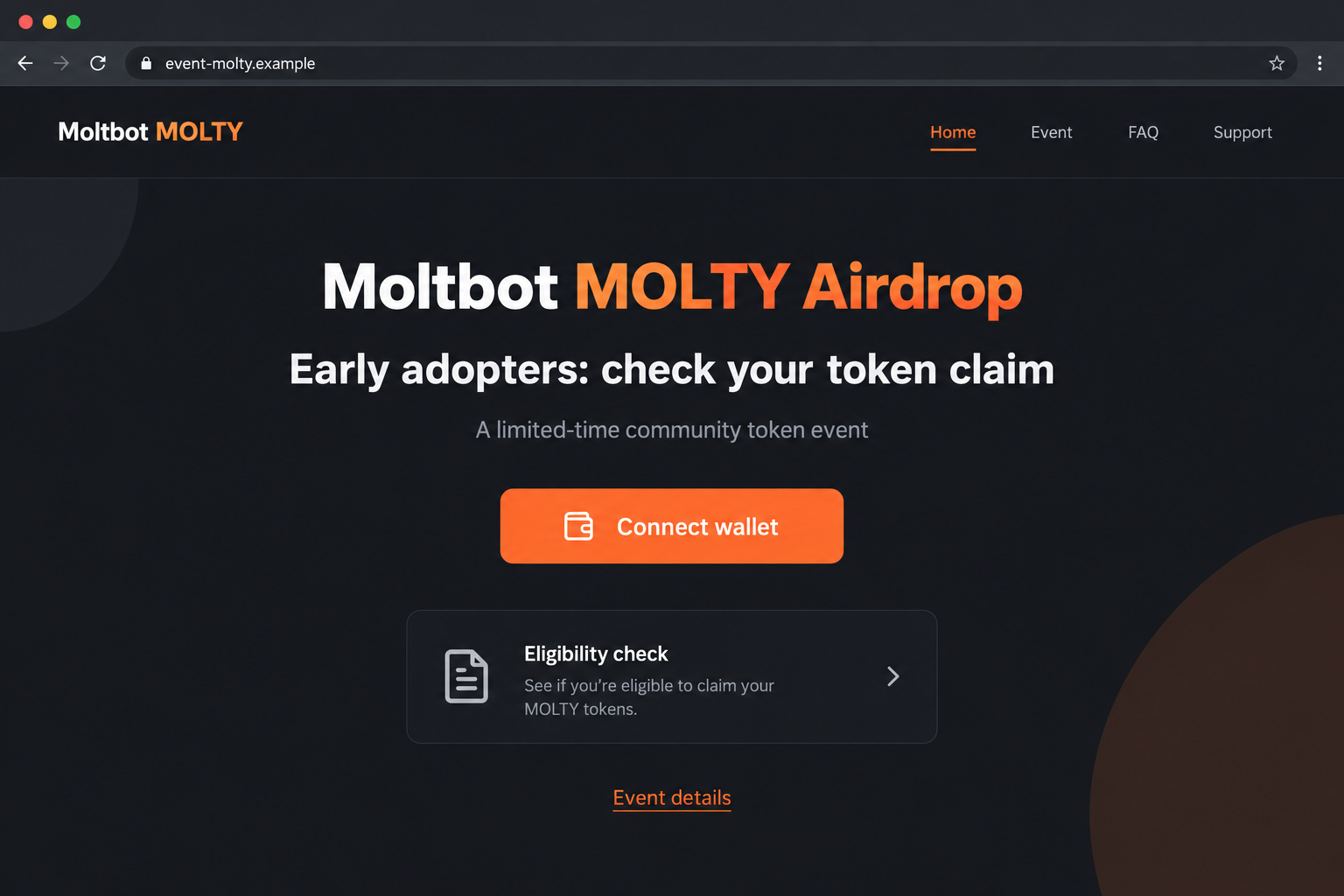
The Moltbot MOLTY airdrop scam promotes a reported counterfeit token event. It should not be mistaken for the actual open-source assistant now known as OpenClaw.
Documented examples used event-molty[.]fun and moitbot[.]com. The offer targeted early adopters and community members with a supposedly limited opportunity to claim cryptocurrency.
The recorded investigation identified a wallet-draining scheme. We did not reproduce its transaction requests or establish a loss amount for particular visitors.
The warning attaches to that token solicitation, not every software installation, community project, or financial tool built around an AI assistant.
Name changes gave impersonators a useful opening
The project’s official history records the transition from Clawdbot to Moltbot and then OpenClaw in January 2026.
It also describes unauthorized token promotion exploiting that period. This independently confirms the broader misuse of the project’s identity, not common ownership of every suspect page.
- A familiar old name does not authenticate a new token event.
- Using an AI assistant does not automatically establish eligibility for a cryptocurrency distribution.
- A separate event hostname needs independent verification.
- The wallet’s requested authority matters more than an early-adopter badge.
Do not treat uncertainty about the project’s current name as a reason to trust a page offering tokens under an older one.
The actual wallet action determines the exposure
Ordinary connection is not unlimited financial authorization. Further signatures, approvals, transfers, or secret disclosure can create risks that the website’s claim label does not explain.
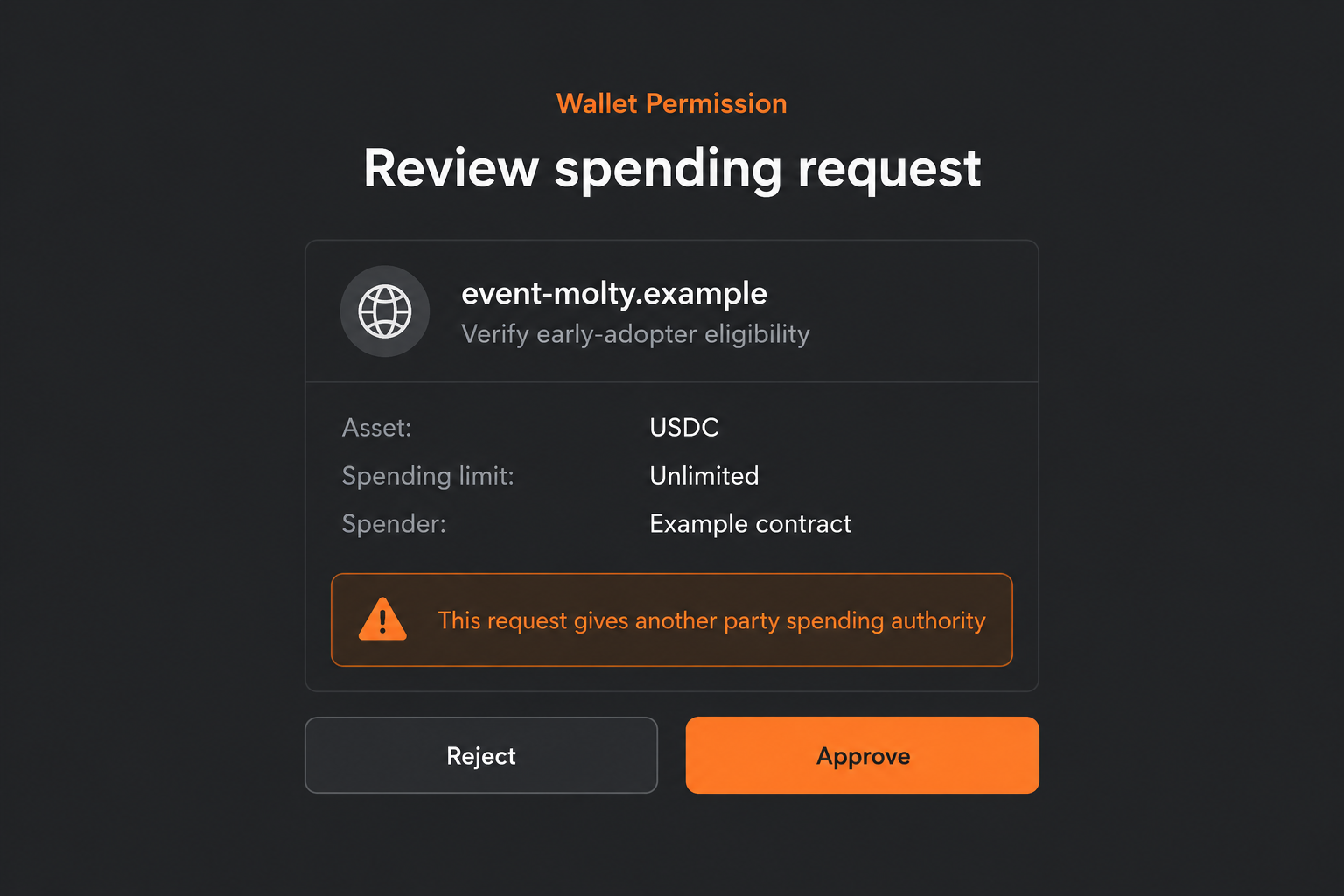
The pictures show fictional interfaces. The USDC spending request is hypothetical and does not identify a verified contract used by the historical MOLTY copy.
This article reviews an earlier documented promotion. It does not establish that the original domains remain active or that a new October 2026 airdrop has appeared.
If you tried the claim, reconstruct what you actually did. A website’s statement that you joined the community is not a reliable account-security record.
Why AI-Project Excitement Can Become a Crypto Trap
Early-adopter status feels like something you have earned
People who tried a project early often feel invested in its success. A reward for those users can sound plausible without any proof that the developers issued one.
The page can rely on that feeling even if it has no access to your software history. Describing you as an early adopter is not verification.
Consider a user who followed the naming changes and then receives a token link. That illustrative scenario explains relevance, not evidence of a particular victim’s experience.
Before considering a claim, ask who issued the reward and which verified announcement defines eligibility. Enthusiasm for the software cannot answer either question.
A changing name makes an unofficial page harder to place
During a rebrand, people encounter old documentation, new handles, forwarded screenshots, and unfamiliar links. An impersonator can present another address as part of the transition.
The official history helps resolve that confusion. A naming change does not transfer authority to every domain that resembles an old project or mascot name.
Do not let a token page explain the software’s identity for you. Find the current project independently, then evaluate the claim separately.
Likewise, a page claiming to represent developers must establish that relationship. A role printed in a profile or announcement is not confirmation from the team.
The word “token” can conceal two different conversations
AI users encounter tokens as units of model processing. Crypto promotions use the same word for blockchain assets. Familiar terminology does not connect those meanings financially.
A software usage counter is not a transferable coin balance. Paying for inference or running an assistant does not inherently create an on-chain reward entitlement.
An operator can exploit the overlap by talking about technology, community, and tokens together. The reader may assume a relationship the offer never establishes.
Translate the proposal into plain actions. Is it about using software, receiving an asset, or giving another party authority over a wallet?
How the Moltbot MOLTY Airdrop Scam Works
Step 1: The invitation borrows a recognizable software name
The reported page promotes a MOLTY distribution using Moltbot-related wording. That makes the offer relevant to people already curious about the AI assistant.
It introduces the event as a community opportunity rather than asking the reader to trust an unrelated financial operator from scratch.
The historical record does not establish one delivery channel for every visitor. A social post, shared link, or message should each be treated as an unverified invitation.
A known account can also be mistaken or compromised. Its visibility does not establish that the genuine project authorized the token distribution.
Locate the current software project first. It provides context that a claim page cannot supply merely by repeating a recognizable name.
Step 2: An event domain makes the offer look organized
The documented event-molty address sounds purpose-built for a campaign. Another recorded copy used moitbot[.]com, a spelling that can resemble familiar project branding at a glance.
An event label is not an institutional relationship. A third party can create a domain, add a title, and describe a distribution without the software team’s involvement.
Compare the entire hostname and the independent announcement trail. Do not stop after recognizing the first few letters or an old project name.
Spelling differences are clues, not the whole verdict. A perfectly spelled domain can still be unauthorized, while genuine projects can use more than one verified address.
There is no reason to open the reported copy to see whether it still exists. Its address is included for recognition, not experimentation.
Step 3: A short participation window discourages verification
The offer emphasizes early adopters and limited availability. That combination can make a reader think the reward was created specifically for people like them.
However, the claim’s actual deadline and eligibility are not established by its promotional wording. We have not verified a genuine allocation behind that historical event.
Do not interpret an urgent message as a deadline imposed by the software developers. Confirm the program outside the solicitation before considering any wallet action.
If there is no independent confirmation, pause. Missing an unverified opportunity is preferable to authorizing a financial request you cannot explain.
A page’s polished event details can make that pause feel unnecessary. They are still statements from the same operator asking for the next interaction.
Step 4: The crypto wallet replaces the software context
The advertised claim asks the visitor to involve a wallet. At that point, the important decision concerns existing blockchain assets, not familiarity with an AI assistant.
Connection may reveal an address and allow proposed interactions. It does not necessarily send money, and it should not be confused with every subsequent request.
A harmful page can request spending authority or another consequential action under a claim or eligibility description. The exact historical request is not independently confirmed here.
The hypothetical picture shows authority over USDC while the page describes a MOLTY eligibility check. A mismatch like that needs explanation before approval.
Do not provide a recovery phrase to “sync” the wallet. A website should not receive the secret controlling your account as part of an ordinary connection.
Step 5: A claim status can hide unwanted authority or asset movement
The site may continue discussing a reward after the wallet action. That language cannot establish whether the user created a valid claim or authorized something harmful.
Review the account’s actual record. A spending approval, direct transfer, rejected request, and disclosed secret have different implications for recovery.
Do not assume a closing tab removes authority recorded on-chain. Equally, do not assume a connection alone means every account is permanently compromised.
A promised allocation can also motivate repeated attempts. Stop rather than signing again to make a spinner, error, or unfinished event badge disappear.
If new payments are requested to complete the reward, treat them as fresh unverified demands. They do not validate the original giveaway.
Verify the AI Project and the Financial Claim Separately
The genuine software route is a starting point, not a crypto endorsement
OpenClaw’s official website provides the current project identity. Its existence does not authenticate a third-party MOLTY page.
The project’s account of unauthorized token promotion is useful context. It does not prove that every unrelated token, integration, or community tool uses the same scam operator.
Keep the allegation tied to the recorded false giveaway. Do not turn a warning about a claim portal into a blanket accusation against open-source software.
A community developer can create a financial integration without making it an official reward. Verify the operator, claimed relationship, and requested permissions individually.
An eligibility signature should not be treated as a meaningless click
Some signatures identify an account; others can have financial consequences. Read what is requested rather than assuming that every unsigned transaction-looking screen is harmless.
If a wallet cannot explain the request clearly, stop and consult its own support documentation. A helper’s reassurance does not replace an understandable authorization.
Never switch off warnings because the site calls them normal for an AI token. The label does not explain the asset, recipient, or authority.
Your ability to reject the request remains intact even after connecting. Do not let earlier curiosity decide the next financial step.
Protect software credentials if the offer expands beyond a wallet
A supposed verifier might ask for an API key, account login, or installed extension. Those are possible additional risks, not established requirements of the documented copy.
Do not disclose software secrets to authenticate token eligibility. If you did, follow the relevant service’s official revocation or recovery process.
Likewise, investigate an unexpected installation as a device-security issue. Wallet permission review alone cannot remove software that may have entered the system.
Separating these exposures keeps the response practical. You need to repair what was actually disclosed or authorized, not every risk a frightening claim can suggest.
What to Do if You Have Fallen Victim to This Scam
- Leave the event and preserve its invitation.
Save the claim address, message, and approximate interaction time. Write down the actions you completed without opening the page again.
A clear account of what happened will be more useful than the event’s progress screen. Do not pay or sign to finish that screen.
- Inspect financial activity in the affected wallet.
Review the chain and accounts you used. Preserve transaction identifiers and details of unexpected transfers or authorizations.
The reward name does not determine the asset affected. Check whether the request involved MOLTY, existing stablecoins, NFTs, or another holding.
- Remove the connection and address any continuing permission.
Disconnect the suspect site, then inspect spending authority separately. Use trusted wallet or explorer instructions that support the relevant chain.
MetaMask’s approval guide explains allowance revocation. A revoked allowance does not reverse a completed transfer or repair secret disclosure.
- Replace exposed control, not just the application’s password.
If a recovery phrase or private key was provided, establish a new wallet with a fresh secret on a clean device.
Do not reuse the compromised phrase for a new-looking account. Get reputable assistance if securing remaining assets requires technical work.
- Review software access and downloads where relevant.
If you shared an API key or account credential, use that service’s official security controls. Review unexpected extensions or purported airdrop utilities.
Updated Malwarebytes can help check unwanted software. AdGuard may reduce deceptive ads and some dangerous destinations, but neither authenticates MOLTY or restores transferred funds.
- Report the false project association.
Notify the genuine project’s verified reporting route and the platform carrying the solicitation. Explain which domain or message used the name.
Report financial losses to appropriate authorities with the available account records. Do not post secrets or full private correspondence when asking for help.
- Keep a recovery offer from becoming another event.
Reject strangers promising guaranteed reimbursement for an advance payment. Claimed developer access or familiarity with the AI community is not identity verification.
The original reward story should not be replaced by another unverified promise. Focus on securing remaining access and preserving useful evidence.
Frequently Asked Questions
Is Moltbot the same project now called OpenClaw?
The project’s official history documents those naming changes. That genuine history does not authenticate a separate cryptocurrency giveaway using an old name.
Does using the assistant entitle me to MOLTY?
Usage alone does not establish a token entitlement. Look for an independently verified issuer, distribution program, and eligibility terms rather than assuming a reward exists.
Are AI usage tokens the same as crypto tokens?
No. Units used to measure model processing are different from blockchain assets. Similar terminology does not create a financial connection between them.
Did the documented page request the pictured USDC permission?
The image is hypothetical. It explains how a reward description can differ from financial authority, not a contract request independently captured from the historical page.
Does an old project name automatically identify a scam?
No. Old names remain in legitimate history and discussions. Verify the particular operator and transaction rather than treating the name alone as proof.
What if I connected but rejected everything afterward?
Disconnect the site and inspect activity if uncertain. Rejected requests differ from granted authority, and a connection alone does not establish that assets were transferred.
The Bottom Line
The Moltbot MOLTY airdrop scam turns interest in an AI project into an unverified crypto claim. Familiar naming and early-adopter language cannot authenticate financial authority.
Confirm the software identity and token offer separately. If you acted, repair the specific wallet or software exposure instead of completing another promised reward step.

Join the discussion
0 commentsShare your experience or ask a question about this article.
Discussion
Start the conversation
Have a question or something useful to share? Add the first comment.