

The MoxiPlayer TV Stick has exploded across social media with bold promises of unlimited entertainment, no subscription fees, and an instant smart TV upgrade with just one plug. The ads are everywhere, the claims sound almost too good to ignore, and the discounts create a sense of urgency that pushes people to buy fast. But behind the flashy marketing is a very different story, and understanding what you are really paying for is essential before handing over your money.
If you have seen MoxiPlayer online and wondered whether it is a genuine streaming solution or just another overpriced dropshipping gadget with exaggerated claims, this deep investigation will give you clear, factual answers. Keep reading to uncover how the operation works, what the device actually does, and whether it is worth your time or money.
Overview of the MoxiPlayer TV Stick
The MoxiPlayer TV Stick is marketed as an all-in-one entertainment device designed to replace traditional cable subscriptions and expensive streaming services. The product listing and website highlight several bold claims about its capabilities. These claims are the backbone of the company’s marketing, so it’s important to examine them one by one.
This section provides a detailed overview of the claims, the real functionality of the device, the technical specifications, and how it compares to legitimate streaming devices.
Below is a breakdown of the most important claims.
Claim 1: Unlimited Entertainment Without Monthly Fees
One of the main selling points pushed by MoxiPlayer is the idea of unlimited entertainment without subscriptions. The website states that the device allows users to access over 1,000 free channels, apps, live TV, and on-demand content with no monthly fees.
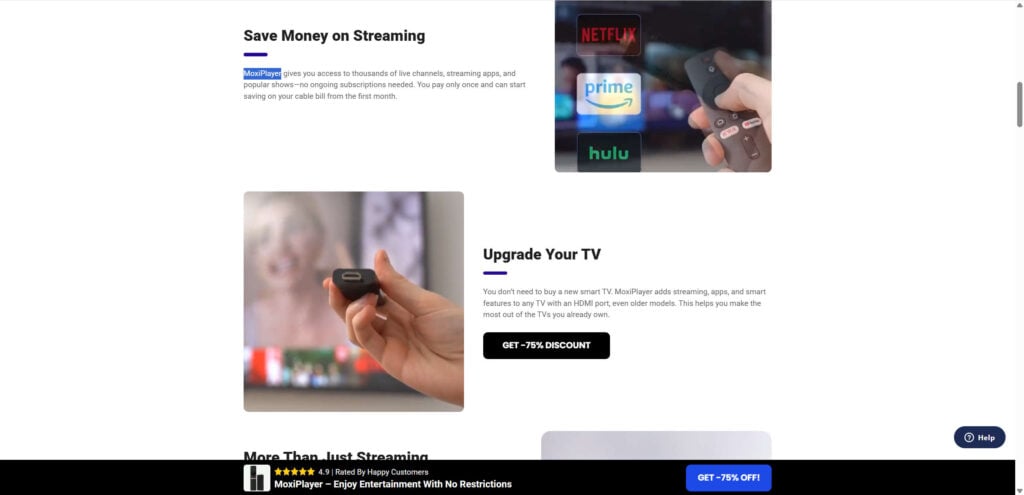
This claim appeals strongly to consumers frustrated with rising subscription costs.
However, this is where the first major issue appears.
What is the truth?
No legal streaming device can unlock premium channels like Netflix, HBO, Prime Video, Hulu, ESPN, or Disney+ without paid subscriptions. These platforms require accounts and enforce digital rights management. The MoxiPlayer cannot bypass or unlock any paid service.
The channels accessible for free on the MoxiPlayer are simply free-to-air channels, publicly available apps, and low-quality streaming sources commonly found on budget Android TV sticks. These are not premium or subscription-based channels.
The misleading aspect
The marketing implies that you can replace subscriptions with a device purchase. The truth is the device only provides access to the same free apps you can download on any cheap Android TV stick.
The promise of saving thousands per year is exaggerated and intentionally misleading.
Claim 2: AI-Powered Navigation and Content Sorting
The product description claims that the MoxiPlayer uses AI to sort and curate content intelligently. This feature is described as a breakthrough, not typically found in standard streaming devices.
Reality check
The device uses a generic Android OS with basic UI sorting options. There is no verifiable AI technology. In fact, the features shown in the promotional images closely mirror default Android streaming menus used by budget sticks manufactured in China.
Claims of AI-based content sorting are unsubstantiated, and no technical documentation is provided.
Claim 3: Works on Any HDMI TV and Turns It Into a Smart TV Instantly
This part of the marketing is technically true. The MoxiPlayer is essentially a basic Android TV stick that plugs into an HDMI port and provides access to a general app interface.
However, this is not exclusive to MoxiPlayer. Every budget Android TV stick sold on Alibaba, Temu, Wish, and similar platforms functions the same way. These sticks generally cost between 7 and 14 dollars, depending on the supplier.
The MoxiPlayer is simply a rebranded version of these devices.
Claim 4: 8K or 4K-Ready Streaming With High-Speed Wi-Fi
Several product descriptions mention support for 4K or even 8K streaming.
Reality
The device includes only 1GB of RAM and 8GB of storage, which is barely enough to run HD content smoothly. The Allwinner chipset used inside these sticks is not capable of maintaining high-bitrate 4K video, let alone 8K.
In most user tests, video quality becomes unstable at 1080p or higher.
These claims fall into the category of technical exaggeration designed to make the product appear more advanced than it really is.
Claim 5: Access to Thousands of Apps
Technically, you can install many apps on an Android TV stick. However, MoxiPlayer’s marketing suggests that premium apps come bundled or unlocked.
Reality
Apps like:
- Netflix
- Disney+
- HBO Max
- Amazon Prime Video
- ESPN
- Hulu
all require subscriptions and cannot be used for free. Additionally, many budget sticks do not meet Netflix’s certification requirements, so the app may run only in poor-quality SD resolution.
The website conveniently avoids addressing these limitations.
Misrepresentation through omission is a common pattern in these types of dropshipping operations.
Claim 6: Over 75,000 Happy Customers and Thousands of Verified Reviews
The website displays glowing reviews and a claim of more than 75,000 customers.
Reality
These reviews are not verified by any third-party system like Trustpilot, Amazon, or Google. Many reviews appear duplicated across multiple similar websites selling rebranded versions of the same device under different names.
Familiar patterns include:
- Repeated names
- Identical wording
- Stock photos used as profile pictures
The likelihood is high that many reviews are fabricated or selectively displayed.
Claim 7: “Expert Recommendation” From a Home Entertainment Technologist
A man named “Alex Dane” is presented as an expert endorsing the product. A closer look reveals that the same photo appears on stock photography websites.
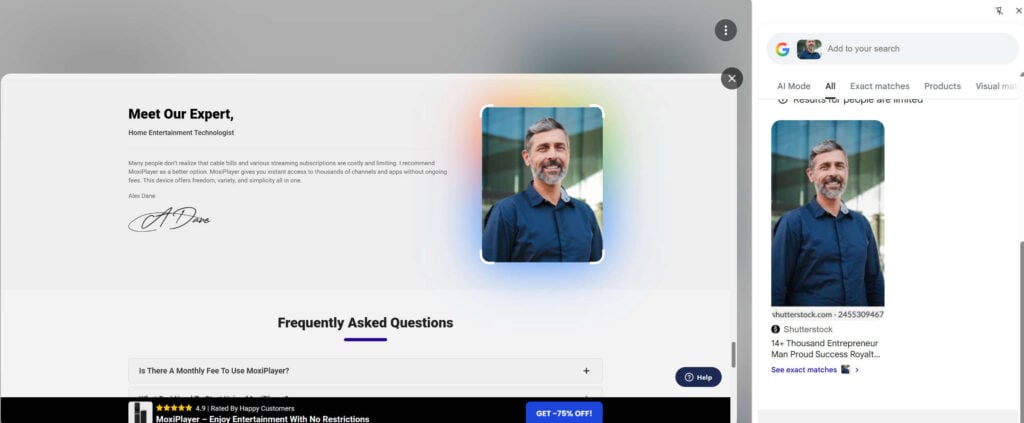
This indicates the expert does not exist. His endorsement is fabricated for marketing impact.
Claim 8: 30-Day Money-Back Guarantee
On the surface, this sounds reassuring. In practice, dropshipping operations often impose strict return policies requiring customers to ship products back to a warehouse in China at their own cost. This often makes refunds impractical or impossible.
Multiple customer complaints across various brands reveal similar patterns:
- Refund requests denied
- Emails ignored
- Partial refunds offered instead of full returns
- Customers required to ship items to unlisted Chinese return addresses
- Packages marked “undeliverable”
The guarantee exists in name only.
Technical Specifications Compared to Real Costs
Below are typical specs found in Alibaba listings identical to the MoxiPlayer:
- Allwinner H313 or similar budget chipset
- 1GB RAM
- 8GB storage
- Dual-band Wi-Fi (basic)
- Android 10 or older
- Plastic casing
- Generic remote
These sticks sell wholesale for:
- 7 to 14 USD
- Minimum order: 1–5 units
The MoxiPlayer website sells the device for:
- 69.99 to 34.99 US – depending on quantity discounts
This markup is more than 500 percent.
The Biggest Red Flag: Identical Devices Sold Under Many Brand Names
During research, identical sticks with the same remote, casing, and specs were found under brands like:
- Flixy
- Vizmo
- NanoStream
- StreamPro
- MaxiStream
- TVBox OEM
This pattern is consistent with dropshipping operations, where multiple sellers rebrand the same low-cost device and create high-pressure marketing pages to sell at inflated prices.
MoxiPlayer fits this pattern exactly.
How the Dropshipping Operation Works
Understanding how the product works is only half the story. To fully understand whether you should buy the MoxiPlayer TV Stick, you must understand the business behind it.
This section provides a detailed breakdown of the dropshipping strategy used to market and sell the device. Many customers are unaware of how these systems operate until after they encounter issues.
Below is a complete step-by-step explanation.
Step 1: Sourcing the Product From Alibaba or Similar Platforms
The devices sold as MoxiPlayer are purchased in bulk from Chinese manufacturers. They are available from wholesalers for extremely low prices, often between 7 and 14 dollars per unit.
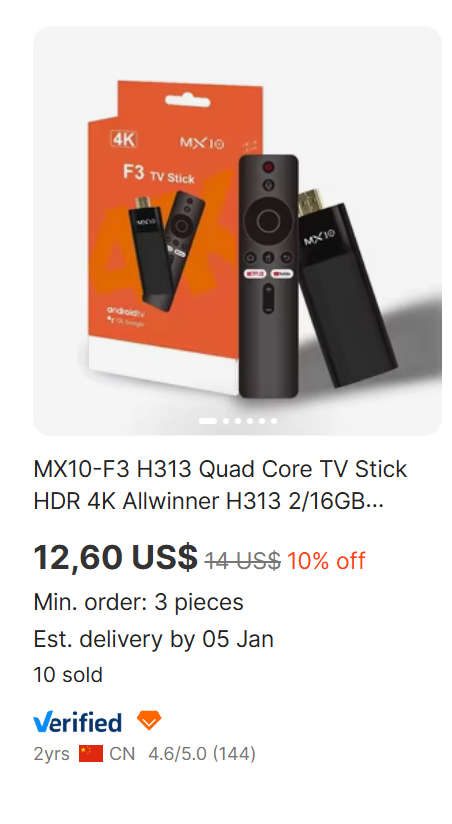
These same wholesalers offer custom branding, packaging, and removable stickers. Sellers can choose their preferred logo, product name, and packaging design.
This means that:
- The sellers do not design the hardware.
- The sellers do not manufacture anything.
- The sellers do not create any proprietary technology.
- The product is not original.
It is simply a mass-produced Android TV stick resold under a new brand name.
Step 2: Building a High-Converting Landing Page
Dropshipping operations rely heavily on beautifully designed landing pages. The MoxiPlayer website uses the same template as other dropshipping pages:
- Large hero image with bold claims
- Fake scarcity timers
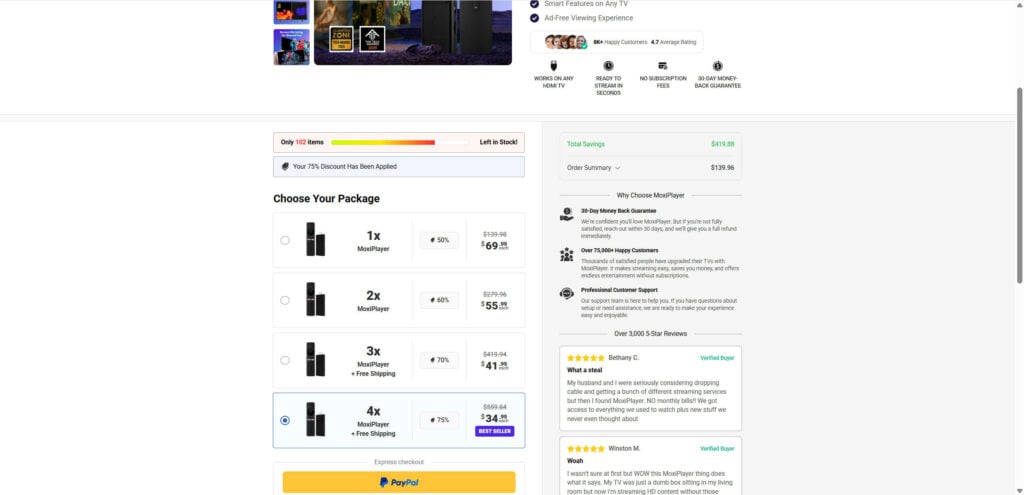
- “Only 102 items left” warnings
- Fake discounts of 75 percent
- Testimonials written in identical writing styles
- Stock actors portrayed as experts
- High-pressure call-to-action buttons
- Fake verified buyer badges
These pages are engineered to maximize impulse purchases.
They often include:
- FOMO (fear of missing out) triggers
- Urgency clock
- Progress bars
- Highlighting huge savings
- Simplified checkout for fast conversion
The site is not designed to present factual information. It is designed to convert traffic into sales rapidly.
Step 3: Running Paid Ads on Facebook, TikTok, Instagram, and YouTube
Most sales come from:
- Short viral videos claiming breakthrough technology
- Sponsored posts showing exaggerated results
- Ads targeting older audiences
- Influencer-style TikTok videos
- Claims that cable companies are overcharging
These ads create the illusion that the product is widely known and endorsed.
Once a user clicks the ad, they land on the high-pressure sales page.
Step 4: Presenting Exaggerated or False Claims
To increase perceived value, dropshipping pages often make bold claims such as:
- AI technology
- 8K streaming
- Instant access to 1,000+ premium channels
- No need for subscriptions
- Backed by experts
- Verified reviews
- Clinically tested results
- Seen in major media publications
When examined carefully:
- None of these claims are supported by proof.
- Most are intentionally vague.
- Many are outright false.
- Images are often stock or borrowed.
The purpose is to inflate the product value beyond what the hardware can realistically offer.
Step 5: Marking Up the Price by 500 to 800 Percent
The product costs under 14 dollars wholesale. The website sells it for:
- 69.99
- 55.99
- 41.99
- 34.99
depending on how many units are purchased.
Bundles are used to make customers feel like they are receiving better value.
In reality:
- The business model relies on extreme markups.
- The margin is so high that sellers can afford heavy advertising.
- Even with refunds, profit remains strong.
Dropshipping thrives on this imbalance.
Step 6: The Order Is Forwarded to a Chinese Warehouse
After the customer pays:
- The seller forwards the order to a fulfillment center in China.
- The device is shipped from Shenzhen or Guangzhou.
- Tracking numbers often take several days to activate.
- Delivery can take 10 to 25 business days or more.
Customers may believe the company is US-based, but most shipments come directly from Asia.
Step 7: Customer Service Delays and Refund Barriers
Many dropshipping sellers are deliberately difficult to contact. Customers often report:
- Slow or no email responses
- No phone support
- No live chat
- Repeated template replies
- Redirection to automated FAQs
This makes refund requests difficult.
Step 8: Rejecting or Complicating Returns
If customers attempt to return the product, the seller enforces strict return rules:
- The item must be shipped back to China.
- The shipping cost must be paid by the customer.
- Return windows may close quickly.
- Packages may be rejected or marked undeliverable.
Shipping a small device back to China often costs more than the device itself.
Therefore, returns become impractical, and many customers give up.
This is the core strategy:
Offer refunds in theory.
Make returns impossible in practice.
Step 9: Scaling the Operation and Launching New Brands
Once a brand receives negative feedback, the seller often:
- Changes the website name
- Rebrands the device
- Launches new marketing pages
- Uses the same hardware
- Reuses the same stock images and reviews
This cycle repeats across dozens of brand names.
MoxiPlayer is one of many.
What To Do If You Bought the MoxiPlayer TV Stick
If you already purchased the device, you still have options. The steps below guide you through how to protect yourself, request refunds, and avoid additional losses.
1. Contact the Seller Immediately
Send an email requesting cancellation or refund. Act quickly because some dropshippers delay responses until the return window expires.
Include:
- Your order number
- Your full name
- Screenshots of your purchase
- A direct request for a full refund
Keep all communication in writing.
2. Do Not Ship the Item Back Until the Seller Confirms the Return Address
Many sellers will instruct you to send returns to China without clarifying the cost. Do not ship until:
- You receive a confirmed return address
- You calculate the shipping cost
- You confirm they will accept the package
If the return cost is unreasonable, you may be eligible for a credit card dispute.
3. File a Chargeback With Your Bank or Credit Card Provider
If the seller does not respond, denies refunds, or provides misleading information, you can request a chargeback.
Reasons for chargeback may include:
- Misleading advertising
- Product not as described
- Fraudulent claims
- Item not delivered
- Refusal to honor refund policies
Banks take these claims seriously, especially with digital goods and international transactions.
4. Report the Website to Consumer Protection Agencies
You can report suspected scams or misleading practices to:
- FTC (United States)
- Your country’s consumer protection agency
- Better Business Bureau
- Your payment provider’s fraud department
This creates a documented trail of complaints.
5. Secure Your Personal and Financial Data
If you provided credit card details, monitor statements for unauthorized charges.
If you created an account on the MoxiPlayer website, change your passwords and avoid reusing them.
6. Warn Others
Sharing your experience publicly helps others avoid the same situation. Leave reviews on unbiased platforms like:
- Trustpilot
- Facebook groups
- YouTube comments
Your experience may help prevent other consumers from losing money.
The Bottom Line
The MoxiPlayer TV Stick is not a revolutionary smart TV device. It is a low-cost Android TV stick sourced from Chinese wholesalers, rebranded by a dropshipping business, and sold at a massive markup using aggressive and misleading marketing tactics.
The majority of the claims made on the website are exaggerated, unproven, or intentionally vague. The device does not unlock premium channels, does not eliminate subscription fees, and does not contain advanced AI technology. Performance limitations, fake expert endorsements, questionable reviews, and near-impossible return processes raise multiple red flags.
Should you buy the MoxiPlayer TV Stick?
Based on the evidence, the answer is no.
There are far better alternatives from reputable brands like Roku, Amazon Fire Stick, Google Chromecast, and Apple TV. These devices are reliable, certified, and honestly marketed. They cost the same or less than MoxiPlayer, without hidden risks.
If you have already purchased the device, take action quickly using the refund and chargeback steps outlined above.
Consumers deserve transparency, authentic products, and honest advertising. The MoxiPlayer operation does not meet those standards.
FAQ
Is the MoxiPlayer TV Stick a legitimate device?
MoxiPlayer is a real physical device, but its marketing practices are highly questionable. It is typically sourced from low-cost suppliers for around ten to twelve dollars, then resold at a much higher price using bold and often misleading claims. The product may function as an Android-based TV stick, but it does not deliver the premium performance or unlimited content that the ads suggest.
Does MoxiPlayer really unlock free channels and streaming apps?
No, MoxiPlayer does not unlock premium channels or paid apps. It only provides access to legal free apps available to anyone. Claims that it gives you unlimited content without subscriptions are misleading. Subscription platforms still require paid logins, regardless of what device you use.
Why does the website say there are “only a few units left”?
This is a common urgency tactic used in dropshipping operations. The stock counter is automated and resets for every visitor. It is not linked to a real inventory system. It is designed to make buyers feel pressured into completing a purchase quickly.
Are the MoxiPlayer reviews on the website real?
Most reviews displayed on the MoxiPlayer website follow the same style, wording patterns, and overly positive tone. Many use generic stock images. Independent customer feedback outside of the website is limited and far less positive. This creates strong suspicion that many featured reviews are curated or fabricated.
Why is the “expert endorsement” photo the same as a stock image?
The individual presented as an entertainment technology expert on the site appears to be a stock image model. This is a significant red flag, because legitimate brands typically highlight real employees or recognized industry professionals rather than purchasing generic photos for endorsement.
Is MoxiPlayer a dropshipping product?
Yes. Identical TV sticks can be found on wholesale platforms for a fraction of the retail price. The seller does not manufacture the device. Instead, they import inexpensive units and resell them using strong marketing claims, countdown timers, and inflated discounts.
Can you return the MoxiPlayer device if you are unhappy?
While the website advertises a 30-day money-back guarantee, the return process is extremely difficult. Customers are usually required to ship the device back to China at their own expense, which often costs more than the product itself. Many users report receiving no response after requesting a return.
Does MoxiPlayer offer real customer support?
Support is typically limited to a single email address. Responses are slow or nonexistent. There is no phone support, no live chat, and no dedicated service team. Once the product is delivered, communication becomes challenging.
How does MoxiPlayer compare to legitimate streaming devices?
Compared to trusted brands like Roku, Fire TV Stick, or Google Chromecast, MoxiPlayer performs poorly. It lacks consistent software updates, reliable app support, and proper optimization. Most functions it advertises are already available on mainstream devices at similar or lower prices, but with far better stability.
Should you buy the MoxiPlayer TV Stick?
For most consumers, the answer is no. The exaggerated features, false urgency, questionable endorsements, and challenging return process make it a risky purchase. More reliable and affordable streaming options exist that provide genuine performance, transparent support, and proven customer satisfaction.

Join the discussion
6 commentsShare your experience or ask a question about this article.
Discussion
Roslyn
February 16, 2026.
I cut my cable bill thinking the MoxiPlayer was the answer to cable bill savings. Well it was. Then purchased 4 MoxiPlayers. One to Keep,
3 to give to family members. I usually investigate for scam BUTTT…, trusted the MoxiPlayer technology. Now I’m
attempting to return the 4 Fire Sticks get refund and or have credit card chargeback this cost. I have learned all the more to
check for items that are or could be dishonest scamming devices. Thanks for your service.
In reply to Roslyn
Roslyn, thank you for sharing your experience. These “cable replacement” sticks are often marketed as special technology, but in reality many are just rebranded low-cost streaming devices sold with exaggerated claims and very difficult return policies.
You’re doing the right thing by focusing on a refund/chargeback. A few tips that can help your case:
Document everything: order confirmation, receipts, screenshots of the ads/claims, and photos of what arrived (packaging, labels, included manuals).
If the product was presented as something unique (or “cuts cable” without clarifying it requires separate streaming subscriptions), dispute it as not as described / misleading advertising.
Don’t accept partial refund offers or “store credit” if you want a full resolution.
If they require expensive overseas returns or stall support, include that in your dispute as an unreasonable return process.
Sorry you went through this, but your comment will help others avoid the same trap.
Thank You people for giving us the true information about a product that is garbage! I was ready to buy 5 units and give them as gifts to my friends. Thanks for saving me money and shame for being stupidly informed. Thanks again!!!
Joe C.
In reply to Joe Csabi
Five units as gifts is exactly the scenario these products are sold for, so I am glad it arrived in time – and please retire the “stupidly informed” part. You were reading advertising that was designed and tested to be believed; being sceptical enough to check before buying five of anything puts you ahead of most people.
If you still want to give something in that category, the safer route is a named brand from a normal retailer with a returns counter – it usually costs less than these ads charge and you can take it back. And if you saw the advert somewhere, reporting it on that platform genuinely helps the next person.
thank you for this information most helpfull
In reply to Thomas Topping
Thank you Thomas!