

You receive a text claiming you have a traffic violation or court notice from the Multnoamah County Circuit Court. It may include a case number, a deadline, and a link or QR code to pay immediately.
It looks official. It feels urgent. It is a scam.
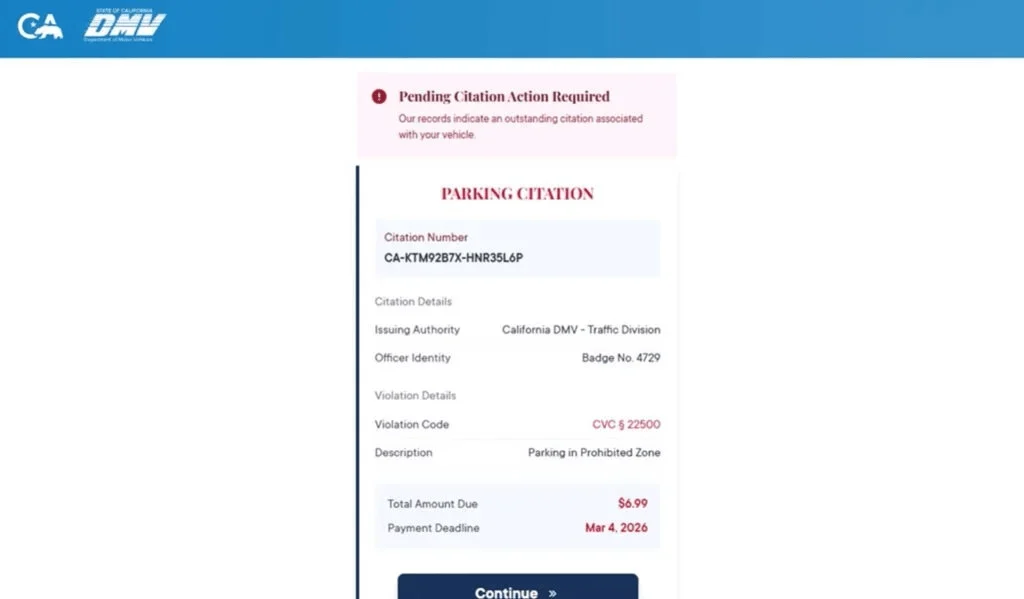
Scam Overview
The Multnomah County Circuit Court scam texts are part of a growing wave of phishing attacks targeting drivers and residents with fake legal notices. These messages impersonate courts, traffic divisions, or government agencies to pressure people into paying fake fines or entering sensitive personal and financial information.
The message typically claims:
- You have an unpaid traffic ticket, toll, or parking violation
- Your case has moved into enforcement or default status
- Immediate action is required to avoid penalties
To increase credibility, scammers include details such as:
- A court name like Multnomah County Circuit Court
- A case number formatted like a real citation
- A violation description
- A hearing date or deadline
- A judge or clerk name
- A QR code or payment link
At first glance, it can look like a real legal notice.
It is not.
Why this scam is effective
This scam works because it combines realistic elements with psychological pressure.
Authority
Using a real court name like Multnomah County Circuit Court makes the message feel legitimate.
Urgency
Phrases like:
- “Final notice”
- “Immediate action required”
- “Failure to comply will result in enforcement”
push recipients to act quickly.
Fear
The message often threatens:
- License suspension
- Additional fines
- Court action
- Collections
These consequences sound real, which makes people more likely to react without verifying.
Common red flags
Watch for these signs:
- Unexpected court notice sent by text
- QR code or link demanding payment
- Pressure to act immediately
- Generic or vague violation details
- Reused case numbers across different states
- Suspicious formatting or minor errors
Real courts do not operate this way.
How The Scam Works
Step 1: Mass text distribution
Scammers send messages to thousands of people at once.
They do not know if you:
- have a violation
- live in the area
- owe any money
They rely on volume.
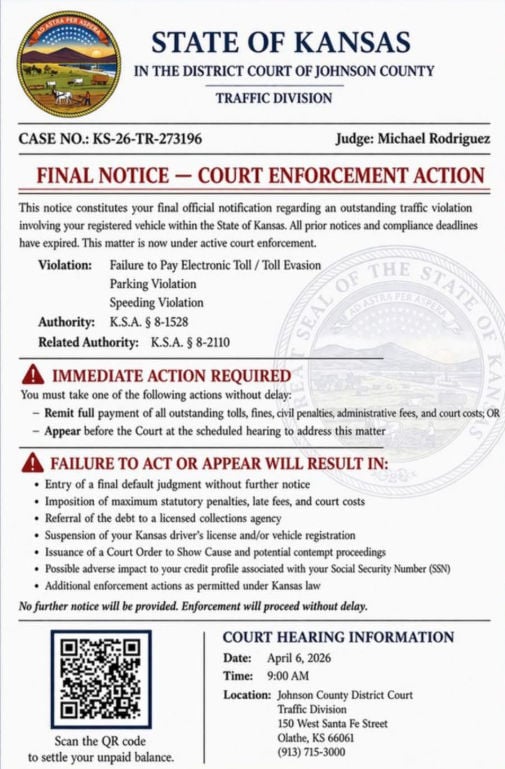
Step 2: The message builds trust
The text includes:
- A court name
- A case number
- Legal language
This creates a sense of legitimacy.
Step 3: Urgency is introduced
The message quickly escalates with warnings such as:
- “Final notice”
- “Immediate enforcement”
- “Failure to act will result in penalties”
This creates pressure to act fast.
Step 4: You are pushed to act
The message provides a “solution”:
- Scan a QR code
- Click a link
- Pay immediately
This is the trap.
Step 5: Fake website
You are redirected to a site that looks official.
It may include:
- Case details
- Payment options
- Government-style design
But it is controlled by scammers.
Step 6: Data collection
The site asks for:
- Name
- Address
- Phone number
- Credit card details
This is the real goal.
Step 7: Fraud occurs
After entering your information:
- Your card may be used for unauthorized charges
- Your data may be sold
- You may receive additional scam messages
The damage may not be immediate.
What To Do If You Have Fallen Victim
1. Contact your bank immediately
- Report your card as compromised
- Request a replacement
- Block suspicious transactions
2. Review your transactions
Look for:
- Unknown charges
- Small test payments
- Recurring subscriptions
Report anything suspicious.
3. Enable alerts
Turn on notifications for all transactions.
4. Stop interacting
- Do not reply
- Do not click again
- Do not scan the QR code
5. Save evidence
Take screenshots of:
- The message
- The link or QR code
- The website
6. Verify through official sources
If you are concerned:
- Visit official court or DMV websites
- Do not use links from the message
7. Report the scam
- Mark the message as spam
- Block the sender
- Forward it to 7726 (SPAM)
The Bottom Line
The Multnomah County Circuit Court scam texts are not real legal notices.
They are phishing attempts designed to:
- create fear
- force quick action
- steal your personal and financial information
If you receive one of these messages:
- Do not click
- Do not pay
- Do not panic
Always verify directly through official government channels. That one habit can protect you from scams like this.
FAQ
What is the Multnomah County Circuit Court text scam?
It is a phishing scam where criminals send fake court-related text messages claiming you have an unpaid traffic ticket, toll, or legal notice. The goal is to trick you into clicking a link, scanning a QR code, or paying a fake fine.
Is a court notice sent by text message real?
An unexpected text demanding immediate payment or linking directly to a payment page is a major red flag. Court matters should always be verified through official court channels.
Why does the message look so official?
Scammers use court names, legal language, case numbers, and formatting that resembles real documents to make the notice appear legitimate and urgent.
What happens if I click the link or scan the QR code?
You are usually taken to a fake website designed to look like a court or payment portal. It may ask for personal details and credit card information.
Why is the payment amount often small?
Small amounts make people less suspicious and more likely to pay quickly. The real goal is to steal your card details and personal information.
What information are scammers trying to steal?
Usually:
- Full name
- Address and ZIP code
- Phone number and email
- Credit card number
- Expiration date and CVV
- Sometimes vehicle-related details
I clicked the link but did not enter anything. Am I still at risk?
Your risk is much lower if you did not submit information. Close the page, do not return, and watch for follow-up scam texts or calls.
I entered my card details. What should I do right away?
- Call your card issuer immediately
- Report that your card details were entered on a fraudulent site
- Freeze or replace the card
- Review recent transactions and dispute anything unfamiliar
- Turn on real-time alerts for new charges
Should I replace my card even if I do not see fraud yet?
Yes. Stolen card details are often used later or sold. Replacing the card quickly is the safest move after a phishing scam.
Can a real court demand payment through a QR code?
A QR code in an unexpected court or traffic text is a major warning sign. Payments should only be made through official websites you access directly.
How do I verify whether I really owe anything?
Do not use the link, QR code, or phone number in the message. Go directly to the official Multnomah County Circuit Court or Oregon court website by typing it yourself, then verify through official contact information.
How do I report the scam?
- Mark the message as spam or junk in your messaging app
- Block the sender
- Forward it to 7726 (SPAM) if your carrier supports it
- Keep screenshots as evidence and report it through official fraud channels








