


An order update lands in your inbox from noreply@notice.edmservice-gamma.com, or from the older noreply@notice.mailservice-im.com. Neither name matches the shop you remember buying from.
That gap makes people wonder whether the email, the shop, or both are a scam. The sender address can answer part of that question, but not all of it.
Overview
A mail-only address, not a store
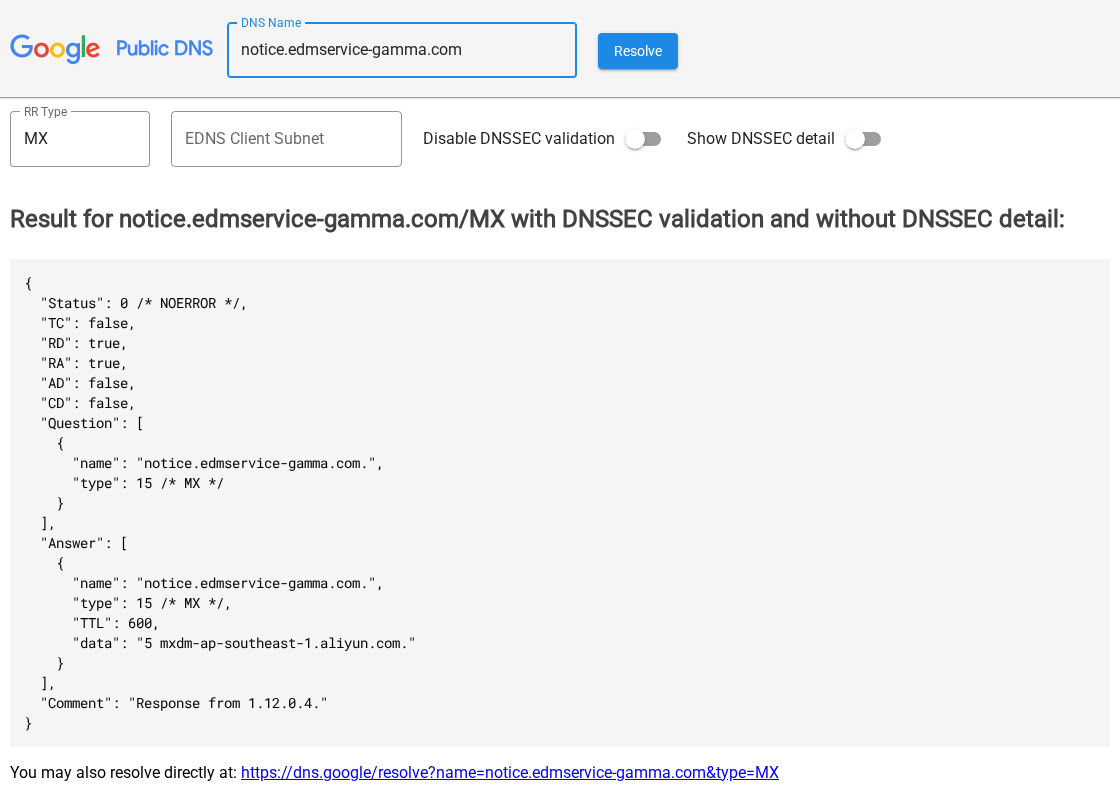
Notice.edmservice-gamma.com and notice.mailservice-im.com have no websites. Their DNS records point only to Alibaba Cloud’s email sending service, so they exist to send automated messages.
One setup behind several look-alike names
Mailservice-im.com and three edmservice domains, alpha, beta and gamma, share a registrar, name servers and mail settings. Two of them were registered in the same second.
Where the risk really sits
The danger is the shop behind the email, not the sender address. Our January 2024 report tied notice.mailservice-im.com to discount stores that it said never delivered or sent cheap substitutes.
- Match any email from these senders to an order you actually placed.
- Don’t pay again or enter card details through a link in these messages.
- Find the real seller name on your receipt or card statement.
- Report messages you never asked for as phishing or spam instead of replying.
Who Sends Email From notice.edmservice-gamma.com?
The domain edmservice-gamma.com was registered on March 31, 2025, through eName Technology, a Chinese registrar. Its DNS is hosted by DNSPod, and it’s paid up until March 2027.
Nothing loads at the main address or at notice.edmservice-gamma.com. The only working records are for email, which tells you what the domain is for.
The notice subdomain’s mail record points to mxdm-ap-southeast-1.aliyun.com. Its SPF record authorizes Alibaba Cloud’s sending servers and marks mail from any other server as unauthorized.
Alibaba Cloud describes DirectMail as an SMTP service for sending notifications and batch emails. Its setup guide uses that same mail host to verify a sender domain.
DirectMail is a legitimate Alibaba Cloud service that businesses pay to use, so the records show which service sends the mail, not which shop paid for it.
EDM is common shorthand for email direct marketing. A domain built around that word, with a notice subdomain and a noreply address, fits automated order and promotional mail.
The Older noreply@notice.mailservice-im.com Address
Mailservice-im.com is the domain our original report covered. It was registered on September 20, 2023, through the same registrar, and it’s been renewed through September 2027.
Its notice subdomain carries the same Alibaba Cloud mail record and SPF rule as the edmservice domains. It also has no website, so there’s nothing to visit.
Our January 2024 report said stores using this sender sold clothing, shoes, jewelry and electric bikes at up to 90% off, promoted through Facebook and Instagram ads.
That report named three of those stores: acpttdem.com, efdau.com and ihualians.com. None of the three domains is registered today.
The storefronts came and went, while the notification address kept running. That’s why the sender name alone can’t vouch for any one shop.
What the Stores Behind mailservice-im Looked Like
Our 2024 report described the stores in some detail, which helps if you’re trying to place an old order email.
Ads showed expensive items such as electric bikes for a fraction of their price. The report quoted one post offering a GenesysGo X electric bike for $17.
According to the report, the sites used ready-made templates, photos taken from other retailers, countdown timers and limited-stock badges, plus unverifiable trust seals and five-star reviews.
The report said the only contact point was the noreply address, with no phone number or physical address. Sites disappeared within days and came back under new names.
If your order email matches that picture, assume the money went to the store, not to the mail service, and focus on getting it back through your payment provider.
Alpha, Beta and Gamma: One Mail Setup
People also search for noreply@notice.edmservice-alpha.com and noreply@notice.edmservice-beta.com. They belong to the same family of sending domains.
- edmservice-alpha.com and edmservice-beta.com were both registered on January 21, 2025, at 02:15:35 UTC.
- edmservice-gamma.com followed on March 31, 2025.
- All three, and mailservice-im.com, use eName Technology as registrar and the same pair of DNSPod name servers.
- Each notice subdomain points its mail to mxdm-ap-southeast-1.aliyun.com with the same SPF rule.
Two domains created in the same second point to a single registration order. The matching records suggest the same administrator set up all four.
Each notice subdomain also publishes the same DMARC record. It takes no action on mail that fails checks and sends reports to an Alibaba Cloud address.
New names in the same style may appear, so judge each email by the order and seller behind it rather than by a list of known senders.
That still doesn’t tell you who sells the products. A mail service can send for many separate storefronts, and nothing public names the operator or its clients.
Our report on noreply@notice.xkcartapps.com found the same Alibaba Cloud mail host behind a different family of shopping notification domains.
Is noreply@dressspecial.com Connected?
Noreply@dressspecial.com turns up in the same searches, but its setup is different. No shared registrar, host or mail service links it to the mailservice or edmservice domains.
Dressspecial.com was registered through GoDaddy in August 2023 and uses GoDaddy’s name servers. Before that, the name pointed to an unrelated manufacturer’s website.
In 2024, the site ran an online shop template that was never filled in.
Archived copies show the Flatsome theme’s demo logo, demo menus and the placeholder line “Add anything here or just remove it.”
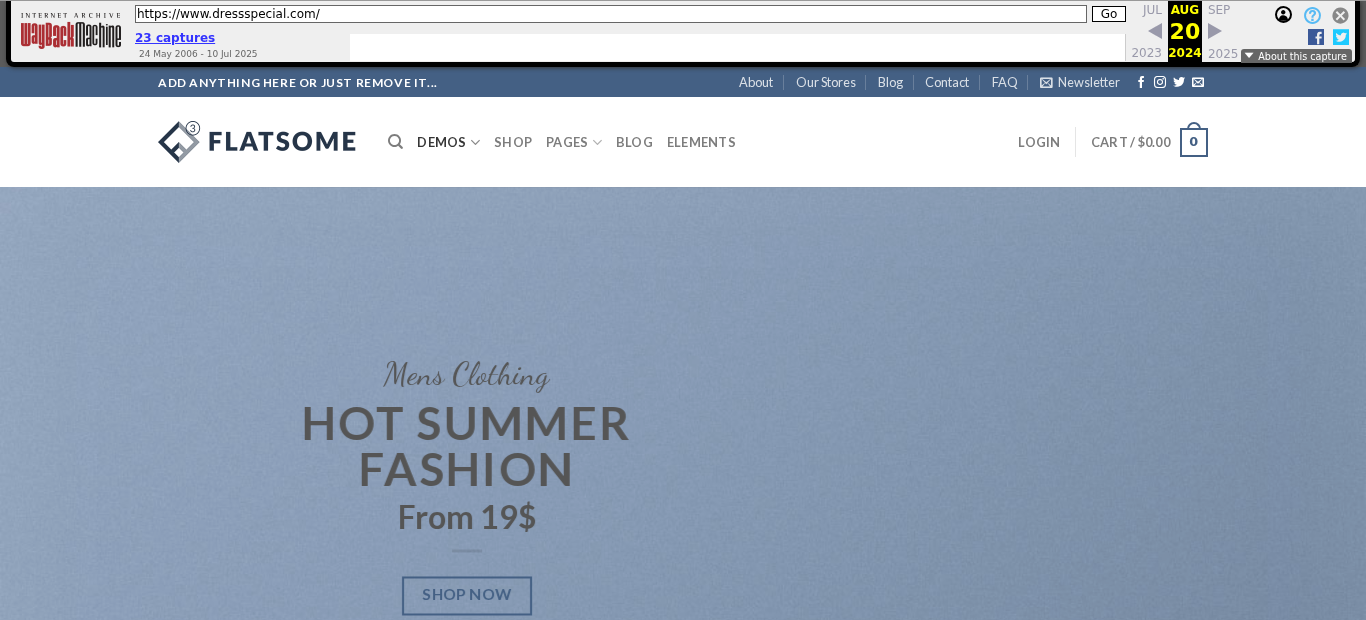
The banner promised Hot Summer Fashion from 19$, the cart read $0.00, and the menus still listed the theme’s demo pages. Nothing looked like a finished shop.
Today, dressspecial.com shows a Chinese-language login page titled SupportAgent, described as a customer service management backend. It’s hosted on servers in Singapore.
The domain has no mail server record and no SPF record, only a DMARC policy set to take no action.
That leaves inboxes with less to check when a message claims to come from it.
So treat noreply@dressspecial.com as a separate sender. If you didn’t order from a shop using it, report the message rather than replying or clicking.
What Mailservice in a Sender Name Means
Some people search for the single word mailservice after seeing it in an address. It’s a generic label, not a company or a brand.
Anyone can register a domain containing mailservice, mailer or notice. The words make an address look official, but they say nothing about who owns it.
The part that counts is the full domain after the @ sign. Compare it with the shop’s own website and the name on your payment.
How to Check an Email From These Senders
Step 1: Match it to a purchase
Look for the order number, item and total in your own records, such as your browser history, card statement or the original checkout confirmation.
If you never ordered anything, there’s nothing to fix. Don’t click a cancel or refund button to find out more.
A reminder to finish paying for an order you already paid is a reason to stop, not to pay twice. Check your statement before anything else.
Step 2: Read the full sender address
Display names like Customer Service or Order Update are easy to fake. Click the sender name to see the complete address and any separate reply-to address.
Step 3: Open the original message
In Gmail on a computer, open the email, click More next to Reply, then Show original. The full header shows which servers handled the message.
Gmail marks unauthenticated mail with a question mark beside the sender. Google also notes that spammers can authenticate their mail, so a passed check doesn’t make a message safe.
Step 4: Find the seller somewhere else
The shop’s name should appear on your receipt, your card statement or the checkout page. That name, not the notice address, is what you research and contact.
Step 5: Go to the shop directly
Type the store’s address yourself and log in to see the order. If the order isn’t there, or the site is gone, deal with it through your card issuer.
How to Check the Shop Itself
- Look up the store’s domain registration date. A domain created weeks before the sale is a warning, as is one that no longer exists.
- Check for a real business name, a physical return address and a phone number on the site, and test that they match each other.
- Compare prices with major retailers. A 90% discount on branded goods should send you looking for the other warning signs.
- Reverse-search a product photo. Images lifted from other stores are a common sign of a copied shop.
- Check the payment page. Requests for gift cards, wire transfers or crypto remove the protection a card dispute gives you.
Phishing Signs in Shopping Notifications
- A request to pay again, confirm card details or settle a customs fee through a link.
- An order you don’t recognize, paired with a button to cancel or dispute it.
- A sender domain that doesn’t match the shop and a reply-to address that differs again.
- Tracking links that open a login page or ask you to download a file.
- Pressure to act within hours to avoid losing the order or being charged.
Even legitimate mail systems can carry scams. Our report on an invoice email with a real unsubscribe link shows a genuine sending platform making a fake request look routine.
Is It Safe to Click Unsubscribe?
If you really bought from the shop and just want fewer emails, use the unsubscribe option inside your email app or in your account on the store’s website.
If you never dealt with the shop, skip the unsubscribe link. It’s another link controlled by the sender, and there’s no reason to trust where it leads.
The FTC notes that many email providers offer their own unsubscribe features, shown as a banner or button when you open the message. Those are the safer route.
How to Report These Emails
- In Gmail, open the message, click More next to Reply, then Report phishing. Use Report spam for unwanted marketing.
- Forward phishing emails to the Anti-Phishing Working Group at reportphishing@apwg.org, as the FTC recommends.
- Report scams and lost money to the FTC at ReportFraud.ftc.gov.
- Forward related scam texts to 7726 (SPAM) and report them in your messaging app.
Shops that advertised on Facebook or Instagram can be reported on the ad itself. That helps take down the promotion that led people to the store.
When you report, include the full sender address and the store’s web address. Both details make the report easier to act on.
What to Do if You Paid a Shop Using These Senders
- Don’t send more money through any link in these emails, whatever the reason given.
- Save the emails, the full headers, screenshots of the shop and your payment confirmation.
- For a credit card, call the issuer and follow up in writing. The FTC says the letter should arrive within 60 days of the first bill showing the charge.
- For PayPal, open a dispute in your account. Disputes close 180 days after payment, so that window has passed for 2024 and 2025 orders.
- For a debit card, report the charge to your bank immediately and ask for your money back, as the FTC advises.
- If you shared your Social Security or bank account number, follow the steps at IdentityTheft.gov.
- Ignore anyone offering to recover your money for a fee. Real disputes through your bank or PayPal cost nothing.
Our guide to 30 N Gould St in Sheridan, Wyoming covers another web of discount stores with similar e-bike and shoe deals, and the warning signs they share.
Frequently Asked Questions
Is noreply@notice.edmservice-gamma.com a scam?
The address is an automated sender on Alibaba Cloud’s mail service. Whether the email is a scam depends on the shop behind it, so check your order and seller.
Who owns notice.mailservice-im.com?
No public record names the owner. The domain was registered in 2023 through eName Technology and shares its setup with the edmservice alpha, beta and gamma domains.
Is noreply@dressspecial.com connected to these senders?
No link appears. Dressspecial.com uses a different registrar, host and mail setup, and its 2024 website was an unfinished store template.
What does mailservice mean in an email address?
It’s a generic word chosen to look official. The full domain after the @ sign and the seller on your receipt matter more than the label.
Can I reply to these emails?
Noreply addresses aren’t meant to receive replies. Contact the shop through its website, or your card issuer if the shop has disappeared.
How do I stop emails from these senders?
Use your email app’s report spam or block option. Unsubscribe through the store only if you really bought from it.
The Bottom Line
Noreply@notice.edmservice-gamma.com and notice.mailservice-im.com are automated mail senders, not shops. They can’t prove an order is real or that a store will deliver.
Don’t pay, confirm card details or click unsubscribe from these messages unless you’ve matched them to an order you placed and found the real seller.
If you paid a shop using these senders and got nothing, call your card issuer now and keep the emails. PayPal disputes must be opened within 180 days of payment.

Join the discussion
0 commentsShare your experience or ask a question about this article.
Community experiences
Did this happen to you?
Your experience could help someone recognize the same scam. Submit a private report for our team to review.
I experienced this tooReports are reviewed before publication. Sharing publicly is always your choice.
Discussion
Start the conversation
Have a question or something useful to share? Add the first comment.