


The order number looks familiar. The sender does not. You open a shopping email and find noreply@notice.xkcartapps.com where you expected the store’s name.
Perhaps you’re waiting for a parcel, or another message is asking you to finish paying. Before following it, separate the receipt from the retailer.
Overview
The email address is not the shop’s identity
Noreply@notice.xkcartapps.com is an email address, not a recognizable retail brand. Its appearance cannot tell you whether a particular order will arrive.
Automated messages can come from infrastructure separate from a storefront. Your purchase still needs a named seller, an understandable charge, and a usable support route.
That distinction matters when an email looks professional but the shop has stopped answering. A confirmation number is a record to preserve, not a delivery guarantee.
The older Xa address and newer variants need separate checks
Shoppers also search for noreply@notice.xmcartapps.com and the older noreply@notice.xacartapps.com. One changed letter creates a different domain, not a proven business relationship.
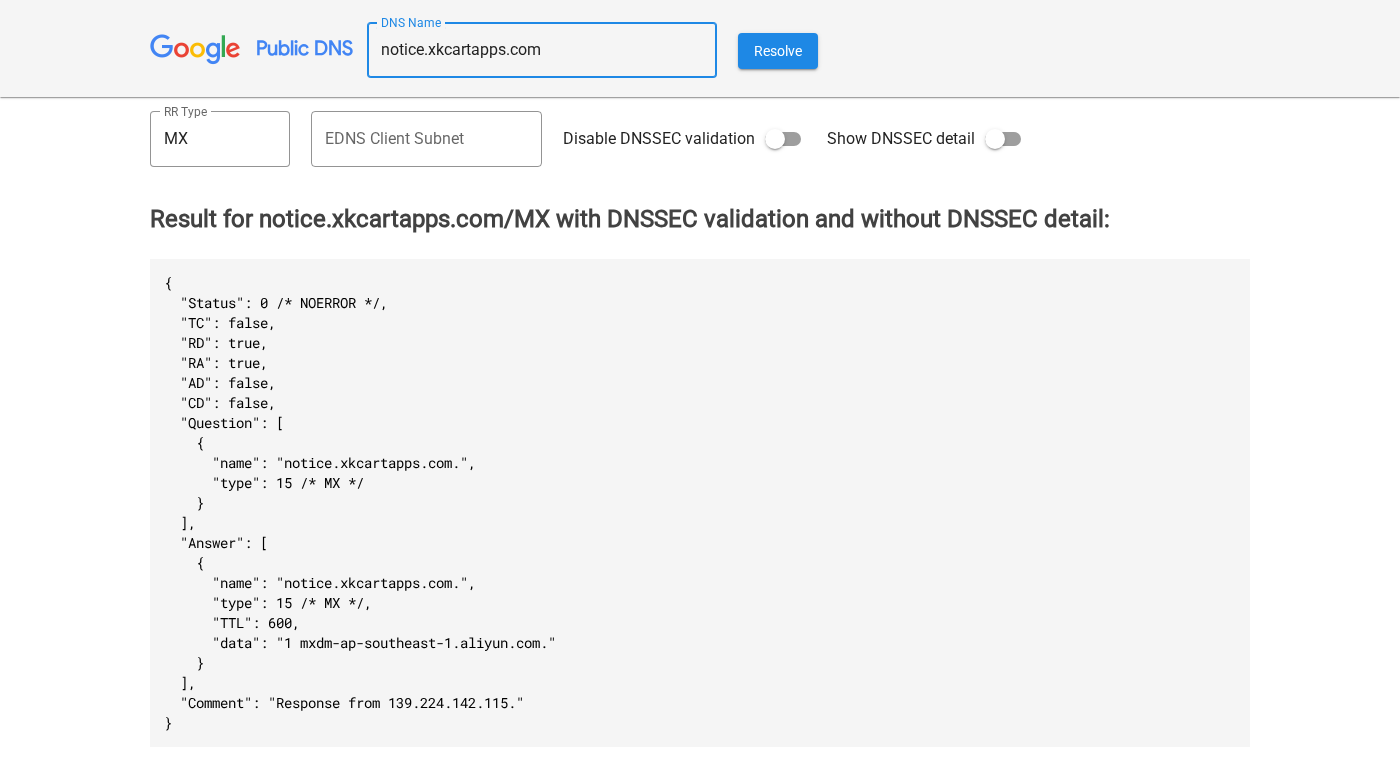
The current Xk and Xm notice subdomains publish mail-related DNS records. The screenshot above shows the Xk lookup, not an order or an authenticated customer-service conversation.
The older xacartapps.com domain returned a nonexistent-domain response. That finding should not be transferred to the differently spelled Xk and Xm domains.
- Older address: noreply@notice.xacartapps.com.
- Xk notification address: noreply@notice.xkcartapps.com.
- Xm notification address: noreply@notice.xmcartapps.com.
- For a payment problem, identify the storefront and the merchant on the transaction as well.
The warning concerns the purchase, not just the word noreply
Older shopper complaints connect the Xa address with disputed purchases and alleged imitation stores. Those reports make careful checking worthwhile.
They do not identify every merchant behind a similarly spelled sender. The decisive questions are whether you ordered, what you approved, and what the seller delivered.
Do not make another payment through an unfamiliar order email. Verify the purchase independently, then use the correct recovery route if something has gone wrong.
Why the Xacartapps Name Appears in Shopping Complaints
A 2024 Scamwatcher report names xacartapps.com and describes a purchase presented as Joannsoutlet craft supplies. The shopper says they needed to cancel the payment.
Separate reports on Signal-Arnaques about olympics-fr.shop include the exact older noreply@notice.xacartapps.com address. Several describe purchases involving Paris 2024 merchandise.
One September report says the buyer’s card was charged, yet an email pressed them to complete the order within another 24 hours.
Other contributors describe missing goods, inaccessible order pages, or a shop they believed imitated an official Olympics retailer.
These shopper reports concern older purchases, so match them to your own order, receipt and card statement before drawing conclusions about your purchase.
A familiar brand and an automated receipt can make an unfamiliar seller feel safer than it is.
If the payment has already posted, an abandoned-cart reminder should not persuade you to pay again. Resolve the first transaction before considering another.
What the Current Xkcartapps and Xmcartapps Records Show
Both notice.xkcartapps.com and notice.xmcartapps.com publish the same MX host, mxdm-ap-southeast-1.aliyun.com. They also publish matching SPF instructions referencing an Aliyun sending service.
Alibaba Cloud documentation describes that mail host in its DirectMail setup, including its use for domain verification.
That is mail-service infrastructure, not the name of the retailer handling your order.
It also does not establish a working support inbox. A domain can have sending-related records without anyone reading replies to its automated notifications.
The Xk and Xm web addresses did not open as storefronts. An email domain does not need a public shopping homepage to be used for notifications.
Look for the seller in the purchase documents instead. Trying different spellings of a notification domain is not a reliable way to find customer support.
How to Check an Xkcartapps Shopping Email
Step 1: Match the message to a purchase you recognize
Start with your own records. Find the advertisement, browser history, saved order page, or earlier receipt associated with the purchase.
Compare the order number, item, quantity, total, and delivery address. A message referring to a real purchase should be consistent with what you approved.
If you never placed the order, do not use a cancellation button simply to investigate it. Check your bank or payment account directly.
No corresponding charge means you should not invent a refund problem to solve. Preserve the message if needed, report suspicious content, and avoid its links.
Step 2: Expand the sender details instead of trusting the display name
A display name such as Customer Service or Order Updates is easy to mistake for a company. Expand the details to see the full address.
Keep From, Reply-To, and the destination of any button separate. They can point to different places and have different roles.
In Gmail on a computer, open the message’s More menu beside Reply and select Show original. Google’s header instructions explain the process.
The original message preserves information that a screenshot of the subject line leaves out. Save it privately if your payment provider needs supporting evidence.
Do not post complete headers publicly. They can reveal addresses, routing details, and other information that belongs in a private dispute file.
Step 3: Check the seller without using the email’s shortcut
If the order claims to come from a known retailer, open that retailer through an independently located address or its genuine app.
Check whether the order appears in your account. A missing order is a reason to investigate, especially when the payment went to an unfamiliar merchant.
For an independent shop, compare the checkout domain, terms, support address, and receipt. You need a coherent seller identity, not just matching logos.
Preserve any mismatch before the page changes. A retailer’s name printed on a banner is not the same as that retailer accepting responsibility for the sale.
Do not telephone a number supplied in a suspicious refund message. Locate support through the business you have independently identified.
Step 4: Confirm the charge before retrying payment
Open your payment account separately and look for the transaction. Compare the merchant description, amount, currency, and whether it is pending or posted.
A pending authorization and a completed charge are different. Ask the issuer to explain an unclear entry rather than repeatedly attempting the checkout.
If a message says payment failed while your account shows a charge, stop there. Keep both records and ask the merchant to reconcile them.
For two posted charges, document both. For one purchase you authorized but never received, describe non-delivery accurately rather than calling the transaction unauthorized.
The correct description helps your payment provider investigate the actual problem. An email’s reassuring order status does not override your account records.
Step 5: Check delivery through the actual carrier
A tracking number is useful only when its details fit your order. Visit the carrier independently rather than relying entirely on a shop’s tracking page.
Look at the shipment date, destination information, delivery event, and any available parcel details. Save discrepancies and ask the carrier about a disputed delivery.
A label being created does not mean a parcel is moving. Likewise, a delivered status does not answer whether the contents match what you purchased.
If the package contains the wrong item, photograph the contents, label, and packaging. Keep everything while you request a resolution.
Do not pay a new redelivery or release fee through an unexpected follow-up. Confirm any genuine charge with the carrier through its own service.
Authentication Is Not a Guarantee That the Shop Is Honest
Email authentication answers a narrower question than most shoppers expect: whether a message was authorized by a domain, not whether its commercial promise is truthful.
Google’s authentication guidance describes mailed-by and signed-by information and warns that spammers can authenticate their messages too.
An SPF or DKIM pass is therefore not a retail trust badge. A sender can correctly configure email and still leave a purchase dispute unresolved.
The reverse also needs care. Authentication problems can occur with legitimate organizations, so a failed check alone does not establish a fraudulent order.
Use the technical information alongside the seller, payment, and delivery records. You do not need to become an email specialist before asking about a missing purchase.
Who Should Answer for the Order?
The notification sender, storefront brand, payment merchant, and carrier may all have different names. Write down which role each one actually performs.
For customer service, look for a support contact published by the seller you bought from. Do not assume a no-reply address doubles as a help desk.
For payment recovery, start with the provider that processed your transaction. A mail-delivery service is not automatically the merchant that can refund you.
For a return, request the seller’s written authorization and destination before posting anything. The dispatch label may identify a warehouse rather than an approved returns department.
Our Newblood66 investigation shows why the shop’s actual delivery and return terms deserve attention alongside its advertising.
Other sender families have separate coverage, including notice.xbcartapps.com and notice.mailservice-im.com. Use the exact address from your own message when comparing cases.
What to Do If You Received the Email or Already Paid
-
Save a complete purchase record. Keep the original email, order page, item description, promised delivery date, payment entry, and any correspondence.
Record the storefront’s full address and the merchant descriptor. An order number without either can be difficult to connect to the correct business.
Keep personal and payment information out of public reviews. Send documents through your provider’s secure dispute channel when requested.
-
Ask the verified seller for a specific resolution. State whether the problem is a duplicate charge, missing goods, incorrect contents, or cancellation.
Request a written answer and a clear deadline. Do not let a string of vague shipping updates replace a response to the actual complaint.
The FTC’s missing-order guidance recommends contacting the seller, then disputing an unresolved credit-card charge for goods not received.
-
Contact the card issuer or payment provider promptly. Use its genuine app, website, or the number on your card, not a number in the email.
Explain what happened accurately and ask which dispute category and deadline apply. Provide the promised delivery date and your attempts to resolve the problem.
For U.S. credit-card billing errors, the FTC explains a 60-day written-dispute window from the first statement showing the error. Other protections and payment methods differ.
-
Stop unauthorized activity without mislabeling an authorized order. If you see purchases you never approved, tell the issuer immediately and follow its card-security instructions.
If you willingly paid but the goods never arrived, report that non-delivery instead. Do not claim your card was stolen unless that actually happened.
Check for additional transactions. Unexplained later charges, even small ones, need their own investigation with your card issuer.
-
Protect credentials if you disclosed them. Change a password entered on an unfamiliar page, especially if you reused it for email or shopping accounts.
Enable account security through the genuine service. Never give a supposed refund agent a one-time code or remote access to your device.
Merely receiving a shopping email is not evidence of malware infection. Device cleanup becomes a separate issue if you installed something or allowed access.
-
Report the specific promotion and refuse paid recovery promises. Include the shop address, sender, transaction details, and misleading claim when reporting suspected fraud.
A person demanding another payment to recover the first one is not your bank’s dispute process. Do not send cryptocurrency, gift cards, or verification fees.
Keep confirmations of your complaints and follow up through the payment provider. Do not wait for the notification domain to become a functioning storefront.
Frequently Asked Questions
Is noreply@notice.xkcartapps.com a scam?
The address alone cannot establish that. It has mail-related DNS records, but those do not verify a retailer, shipment, or refund promise. Check the actual purchase.
What is noreply@notice.xmcartapps.com?
It is another notification-style address whose notice domain publishes similar mail-service settings. Identify the merchant from your receipt rather than assuming Xk and Xm are one company.
Is xacartapps.com the same as xkcartapps.com?
They are different domain names. Older complaints name the Xa version; current Xk and Xm mail records should not be confused with that older domain’s status.
Why won’t the notification address open as a shop?
An email-sending domain may have no public storefront. Use your purchase records to locate the seller. A failed web page does not explain a message’s authenticity.
Should I pay again if an email says my order is incomplete?
No, not before checking your account independently. If a charge already appears, reconcile it with the verified seller and payment provider instead of retrying through the message.
Can I recover money if the order never arrives?
Ask the seller for a resolution and contact your payment provider before its deadline. Recovery depends on the payment method and circumstances, not the sender’s chosen name.
The Bottom Line
Do not trust a purchase because an automated receipt looks convincing, and do not pay again because another message creates urgency.
Match the sender to the store, the store to the charge, and the tracking to your actual delivery. If goods are missing, protect your dispute deadline now.
If noreply@notice.xkcartapps.com appears on your receipt, save it with the merchant’s details. Your payment provider needs the purchase record, not just the notification address.

Join the discussion
1 commentShare your experience or ask a question about this article.
Discussion
Dziękuję za informację