


The PounceBeam cat projector is sold as a toy that makes glowing mice appear to climb out of holes in your floor.
We compared the promotion across storefronts, then checked what each page said about the projector, the number of units selected, and your options if it disappoints.
Overview
One cat photo, two storefront names
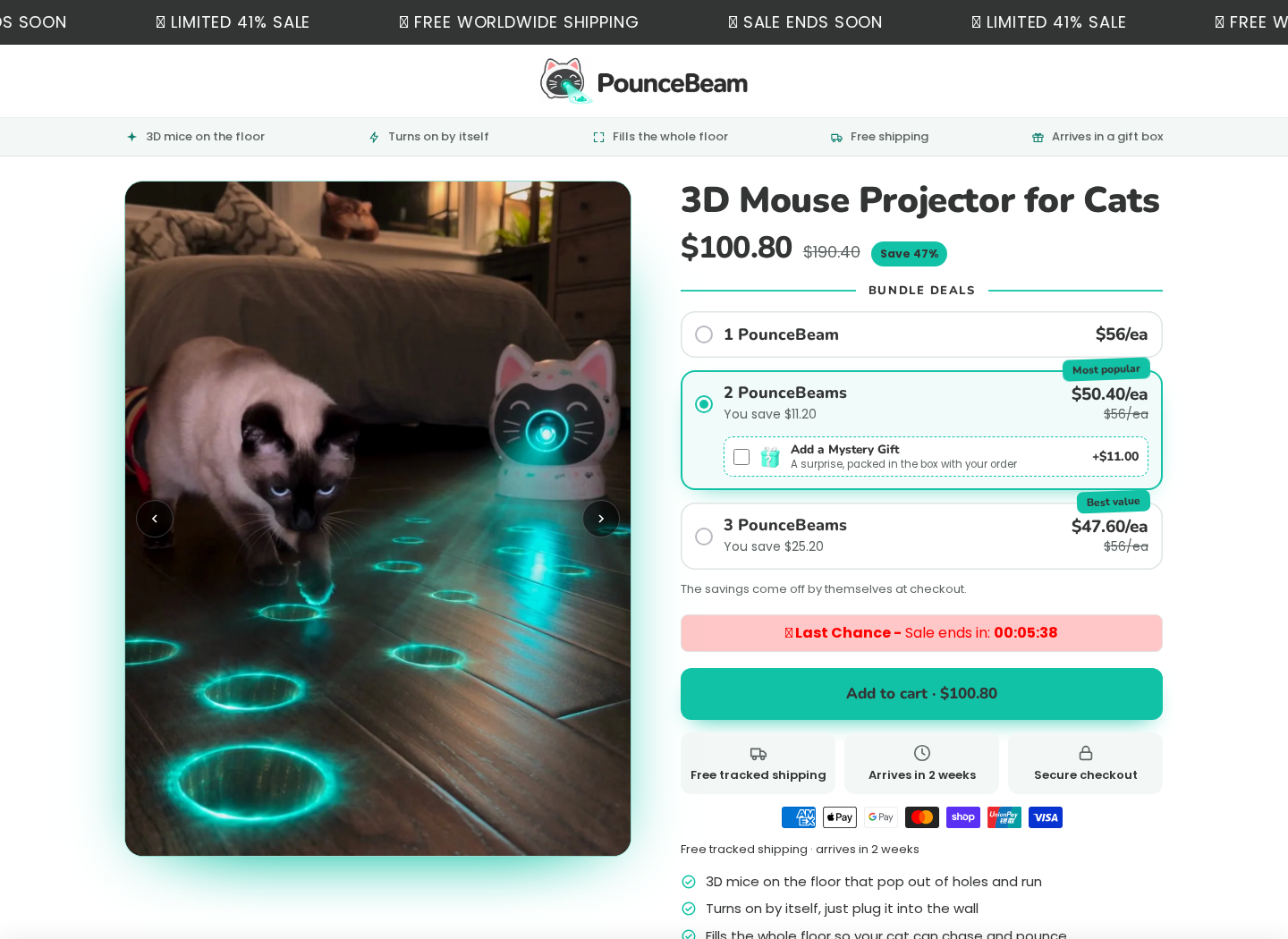
The PounceBeam and Pounceora pages show the same Siamese cat, the same decorated white projector, and the same glowing circles laid across the same wooden floor.
The shops also share a customer support email. Their pages are clearly connected at the marketing level, but neither the image nor the inbox identifies the factory.
A $56 unit can become a $100.80 order
On November 25, 2026, the PounceBeam page at neonhovercar.com opened with the two-pack selected. Its $50.40 unit price put $100.80 on the purchase button.
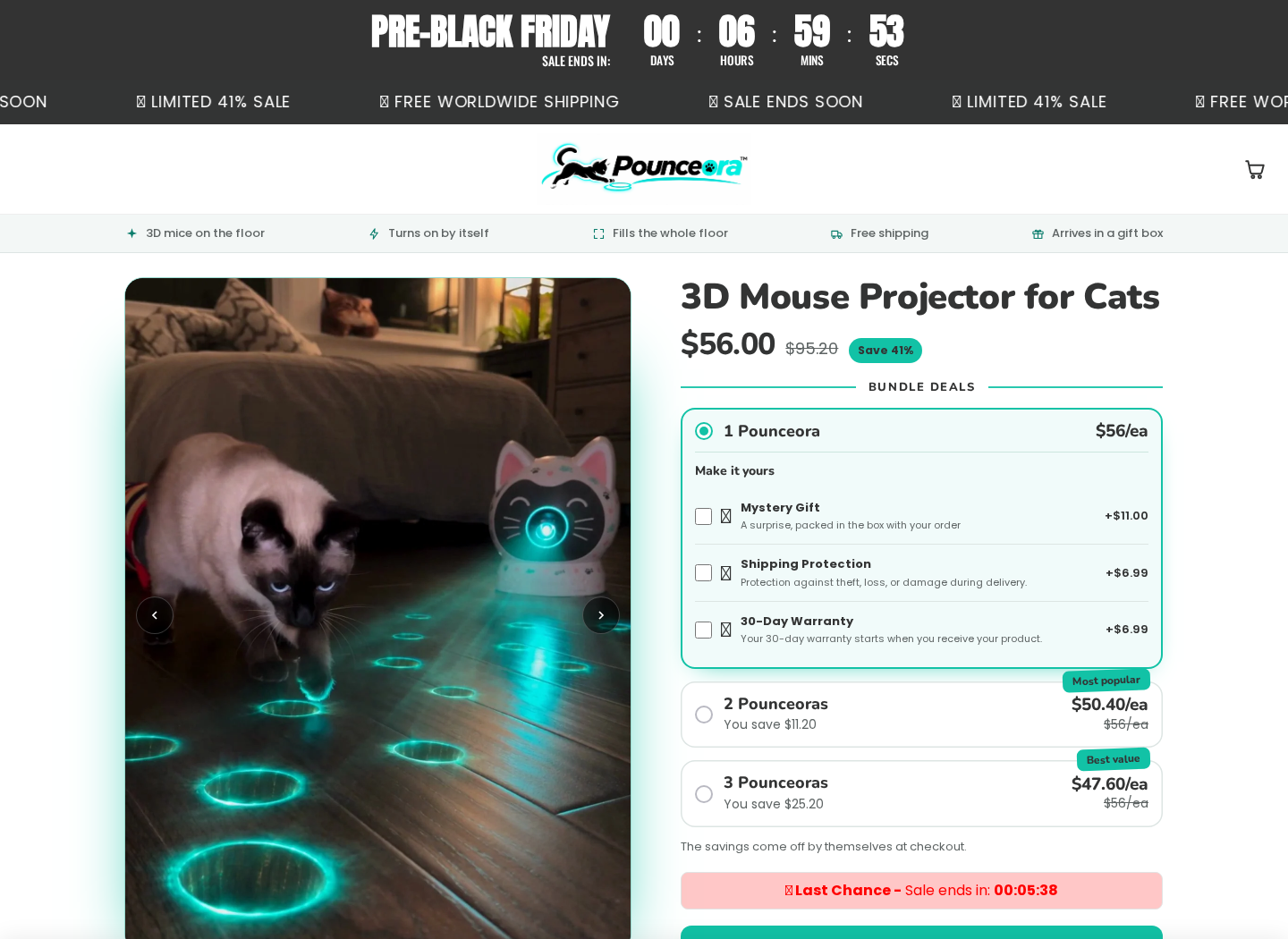
The Pounceora page opened with one unit at $56.00. It also displayed three optional extras, including a paid warranty that shoppers could mistake for an included benefit.
The white housing does not settle the hardware question
- Pounceora shows a white cat-head projector and says it runs automatically when plugged into the wall.
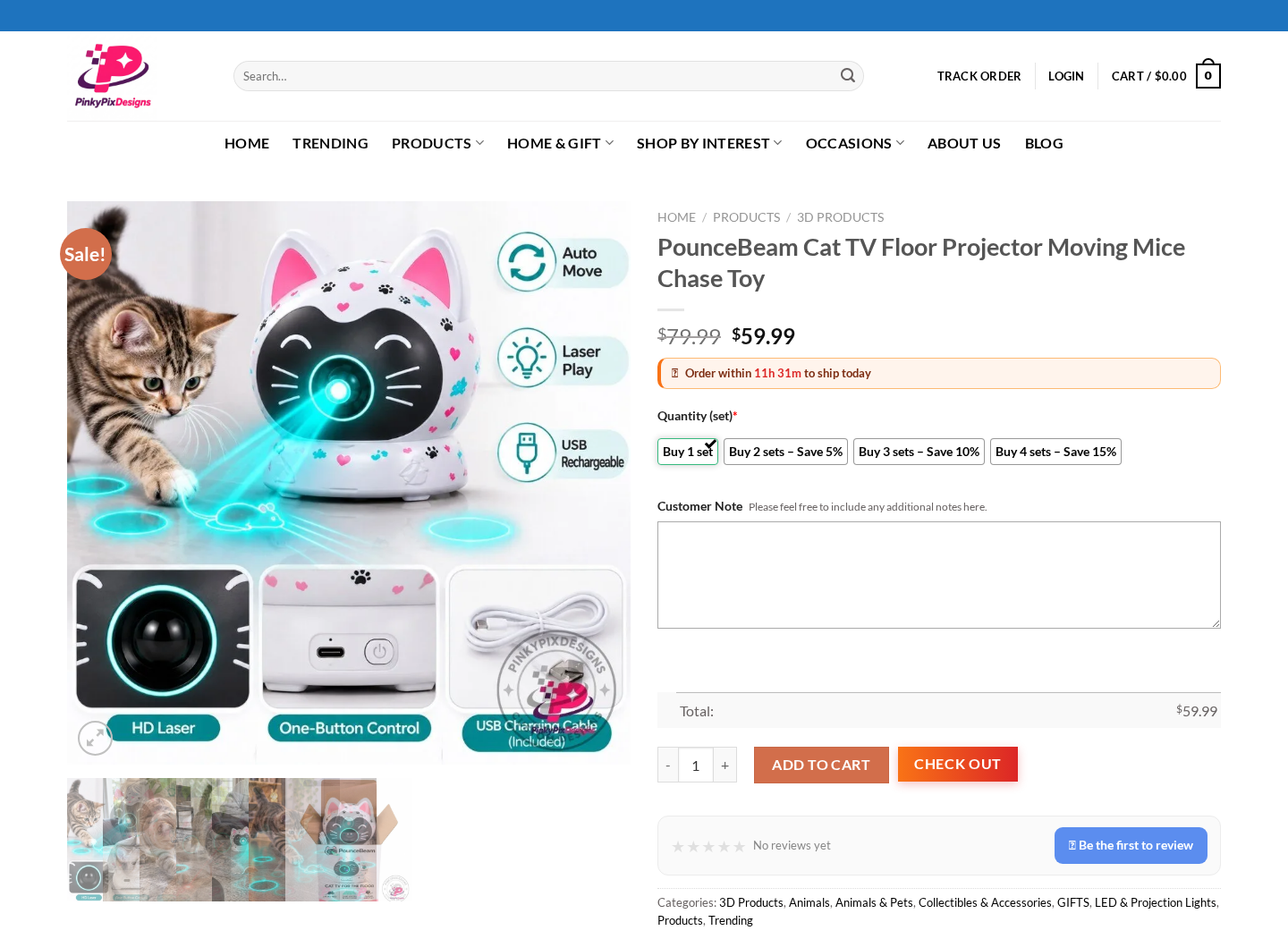
- Pinky Pix Designs advertises a similar casing, but its gallery shows a power button and a USB charging cable.
- Neither storefront supplied a matching model label or an independently verifiable demonstration of the unit shown.
What the PounceBeam Cat Projector Advertisement Actually Shows
Look at the image before reading the copy. The holes have glowing rims, a dark center and reflections, which make them look deeper than the floor.
That is a visual effect, not a specification. You can draw depth, shadows and movement into an animation without projecting any physical depth above the surface.
On the PounceBeam and Pounceora pages, the wording goes further than describing a mouse outline. The offers say that 3D mice pop out of holes and run.
The difference matters when you’re deciding whether this is a new kind of projector or an ordinary light effect dressed up for a product photo.
Pinky Pix Designs describes the output in plainer terms: moving mouse animations that appear on a floor. Its own description says that the mice are images, not objects.
Its listing also says visibility depends on floor color, texture and room lighting. Those limits matter if the dramatic picture is what convinced you to order.
A persuasive demonstration would show the same unit and the floor together, with the camera changing angle while the toy runs. A product collage cannot answer that question.
We would treat this as an unproven floor-projection toy, not pay for the promise of something emerging from the floor. We did not buy or test a unit.
Who Sells PounceBeam and Which Names Match?
PounceBeam and Pounceora use the same sales image
The two shops match at details far beyond the cat-shaped housing. Both pictures put the first foreground ring inside the same floorboard and the cat’s paw beside another ring.
The same bed, cabinet, window and projector decorations appear in both frames. Both shops also use the same product path, ending in /products/pouncebeam-cat-projector.
Pounceora’s page even serves the main picture from neonhovercar.com. The offer changes names and quantities, but the customer-facing artwork is not an independent demonstration from another seller.
The help address matches across the two pages
Both storefronts publish the same Gmail address for customer contact. Pounceora’s terms also use the PounceBeam name when referring to the operator and governing law.
The terms point to the operator’s home jurisdiction but don’t name it in that clause. The matching details connect the offers without independently establishing a legal company or manufacturer.
If you ordered from either page, keep the exact hostname and the merchant shown on the receipt. The label on the picture may not match your card statement.
The refund link at neonhovercar.com opened under the name CHOPPERSIGHT, with a helicopter-themed header. The policy still published the same customer contact as the cat toy pages.
Both refund pages were dated November 16, 2026, and shared the same eligibility and return-postage language. Save whichever version your order actually points to.
Other shops put PounceBeam on different product descriptions
Pinky Pix Designs showed a $59.99 PounceBeam listing. Hawthorne Fabric showed a $59.99 Pounce Beam listing, also described as a floor projection toy with a moving mouse.
JuliandMila calls its PounceBeam listing an LED mouse projector. That sounds definitive until you read the gallery description, which calls one illustrated scene a laser cat toy.
The title and the gallery text do not establish the light source. Ask the store for the actual label rather than assuming you can resolve that difference from a picture.
PawBeam and CatPawGlow aren’t verified hardware matches
Melkistore’s PawBeam offer uses a similar glowing-animal pitch, but it pictures a paw-shaped housing and is primarily marketed for dogs. Resemblance is not a matching model number.
Pinky Pix Designs also lists a product called CatPawGlow. Shoppers should compare the pictures of the unit and its ports, not simply search another store for the cheapest PounceBeam.
We found no wholesale listing with a matching model number and photographs that tie these units to one factory. A cheap mouse light doesn’t establish that link.
Look for a photograph of an actual packaging label if you compare offers. A model identifier and matching electrical rating carry more weight than a matching cartoon face.
A store’s ratings are not a substitute. The Pinky Pix Designs page showed no reviews when captured, so the star artwork beside that message is not customer feedback.
Plug-In, Rechargeable, Laser or LED: Why the Labels Matter
On Pinky Pix Designs, the main picture labels the product USB rechargeable and points out one-button control. It also shows a button next to a charging port.
That same listing describes plug-in operation in its written specifications. It does not explain whether the pictured cable powers the toy continuously or charges an internal battery.
The image also labels the output as laser play and HD laser. Those labels are advertising, not evidence of the actual emitter, its class or its safety.
The wording on the PounceBeam page makes a different promise: connect it to the wall and it starts on its own, without a button to press.
If you want a cordless toy, ask how long the unit runs unplugged. If you need a wall adapter, ask whether one is included for your country.
Ask for a photo of the box label and the device label, including the model identifier, power input and any optical warning. A generic reassurance leaves those questions unanswered.
For a true laser product, follow the FDA’s laser toy guidance and never aim it at people or animals. Don’t use unlabeled equipment that may emit a laser.
A projected outline also cannot be picked up or carried. If you want a toy your cat can actually catch, a simple physical toy makes that choice easy.
If the only sample clip shows the effect in a dark room, ask for a sample on a floor like yours before deciding whether the projection is worth buying.
For a room with glossy flooring or mirrors close to the play area, don’t assume leaving the lens pointed down is enough if the product documentation is unclear.
The Price on the Button and the Terms Behind It
Count the units instead of following the savings badge
The neonhovercar.com page offered one projector for $56, two for $100.80 or three for $142.80. It was the middle option that appeared selected in our capture.
The two-pack saves $11.20 against two units at $56 each. A shopper with one cat would spend $44.80 more than buying the single unit.
On Pounceora, the $11.00 mystery gift and the two $6.99 extras were all unchecked. Adding all three would bring the $56.00 single unit to $80.98 before any taxes.
There was no recurring charge shown beside those extras in the capture. The verified risk here is paying for multiple units or add-ons you don’t actually want.
Work from the cart total rather than the crossed-out price. Free tracked shipping tells you nothing about whether an item added separately has its own refund conditions.
Don’t confuse a countdown with a delivery date
The two near-identical displays give different delivery estimates. The PounceBeam page advertised arrival in two weeks. Pounceora described 5–7 business days to ship and another 15–20 days afterward.
The checkout countdown is separate from either delivery estimate. For a gift, compare the actual delivery window with your deadline and keep the seller’s written estimate.
A paid warranty doesn’t answer the return question
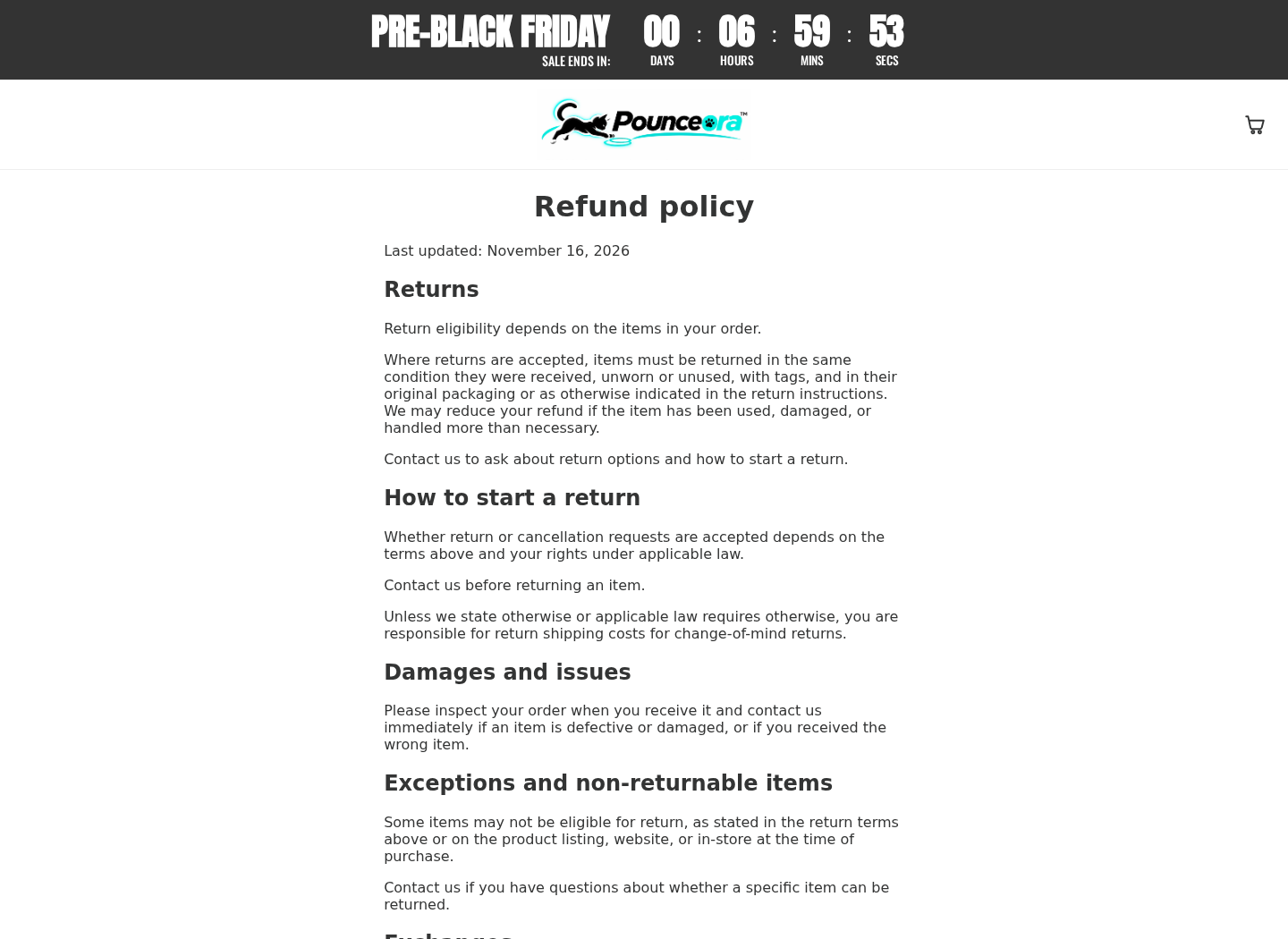
Pounceora offers a $6.99 30-day warranty, but the separate refund policy says eligibility depends on the item. It also tells customers to contact the shop before shipping anything back.
For change-of-mind returns, the policy generally puts return shipping on the buyer. It also says the refund can be reduced if an item is used or handled more than necessary.
That leaves an important question for a projector bought on the strength of a video: can you turn it on once and still return it if the effect disappoints?
Get that answer in writing, along with the return destination and the cost of a tracked parcel. Ask what the warranty covers that the normal refund policy doesn’t.
JuliandMila’s listing says it does not accept returns for personal reasons and treats damaged, defective or wrong items differently. Don’t borrow one store’s policy when ordering from another.
That shop asks customers to request cancellation within 12 hours of placing the order and contact it within five days of delivery for help with an order problem.
If you’re buying a gift that won’t be opened right away, those clocks matter. Ask what happens if the recipient opens the package after the store’s stated window.
What to Do Before Buying or After You Ordered
-
Match the ad to the actual product listing. Save the seller’s hostname, product name, model details and the version of the advertisement that persuaded you.
If the shop cannot show the effect it promised using the actual model, assume you are buying the published specifications rather than the scene in the picture.
-
Check the total and save the offer. Confirm the unit count, whether optional purchases are selected, and the shipping terms before entering payment details.
Keep a screenshot of the total next to the quantity. On these offers, a lower figure may be the price per unit, not the amount charged for the bundle.
-
Act promptly if you want to cancel. Use the contact listed in your actual order confirmation and ask for a written cancellation or updated delivery commitment.
Send the order number, the specific line items and the date you made the request. Keep a copy, especially if the seller later says it had already shipped.
-
Document a different or defective item. Keep the box, model label, manual and cables. If testing it is safe, record what happens with the received unit and the floor together.
Describe the mismatch precisely, such as a fixed dot instead of a moving mouse animation. Ask whether the seller will provide a tracked return label before mailing the parcel.
-
Escalate an unresolved billing problem promptly. If the item wasn’t delivered as agreed or the charge is wrong, ask your issuer how to dispute it.
The FTC’s U.S. credit card guide explains the written billing-error procedure and its 60-day deadline after the first statement with the error was sent.
Use your card issuer’s verified contact details, and ask which deadlines apply to your case. Debit cards and other payment services may follow different rules.
Frequently Asked Questions
Does the PounceBeam cat projector make real 3D mice?
We found no verified demonstration of mice rising above the floor. The product is marketed as a projector, and one seller explicitly describes its output as moving floor images.
Is Pounceora the same thing as PounceBeam?
The two pages reuse the same hero image, product path and support address. Their different delivery language and default quantities are reasons to check the specific page you used.
Does the projector use LED light or a laser?
It depends on the listing, and the advertising is inconsistent. Use the label and manual for the actual model, not a similar product name or seller’s photo.
Are the PounceBeam warranty and shipping protection required?
The Pounceora capture showed both as paid, unchecked options. Before placing an order, check that they remain unchecked if you don’t want them and look at the full total.
Can I return it if the projection looks nothing like the ad?
Request the remedy in writing and show the mismatch. Don’t let a store treat a materially different item as a change of mind without challenging that distinction.
Does the repeated picture prove that the shops never ship?
Reused artwork documents how the product is marketed, not what buyers receive. Nothing in the two captured offers establishes a pattern of non-delivery or denied refunds.
The Bottom Line
Skip the PounceBeam cat projector if you’re buying it for the illusion of mice climbing out of your floor. The listings don’t show enough to justify that promise.
For an ordinary floor animation, buy only when a seller can identify the actual hardware, demonstrate the output and explain whether you can return it after testing.
If you already ordered, start with the receipt. Verify the quantity and extras, then keep the original offer in case the parcel or charge doesn’t match.

Join the discussion
0 commentsShare your experience or ask a question about this article.
Community experiences
Did this happen to you?
Your experience could help someone recognize the same scam. Submit a private report for our team to review.
I experienced this tooReports are reviewed before publication. Sharing publicly is always your choice.
Discussion
Start the conversation
Have a question or something useful to share? Add the first comment.