

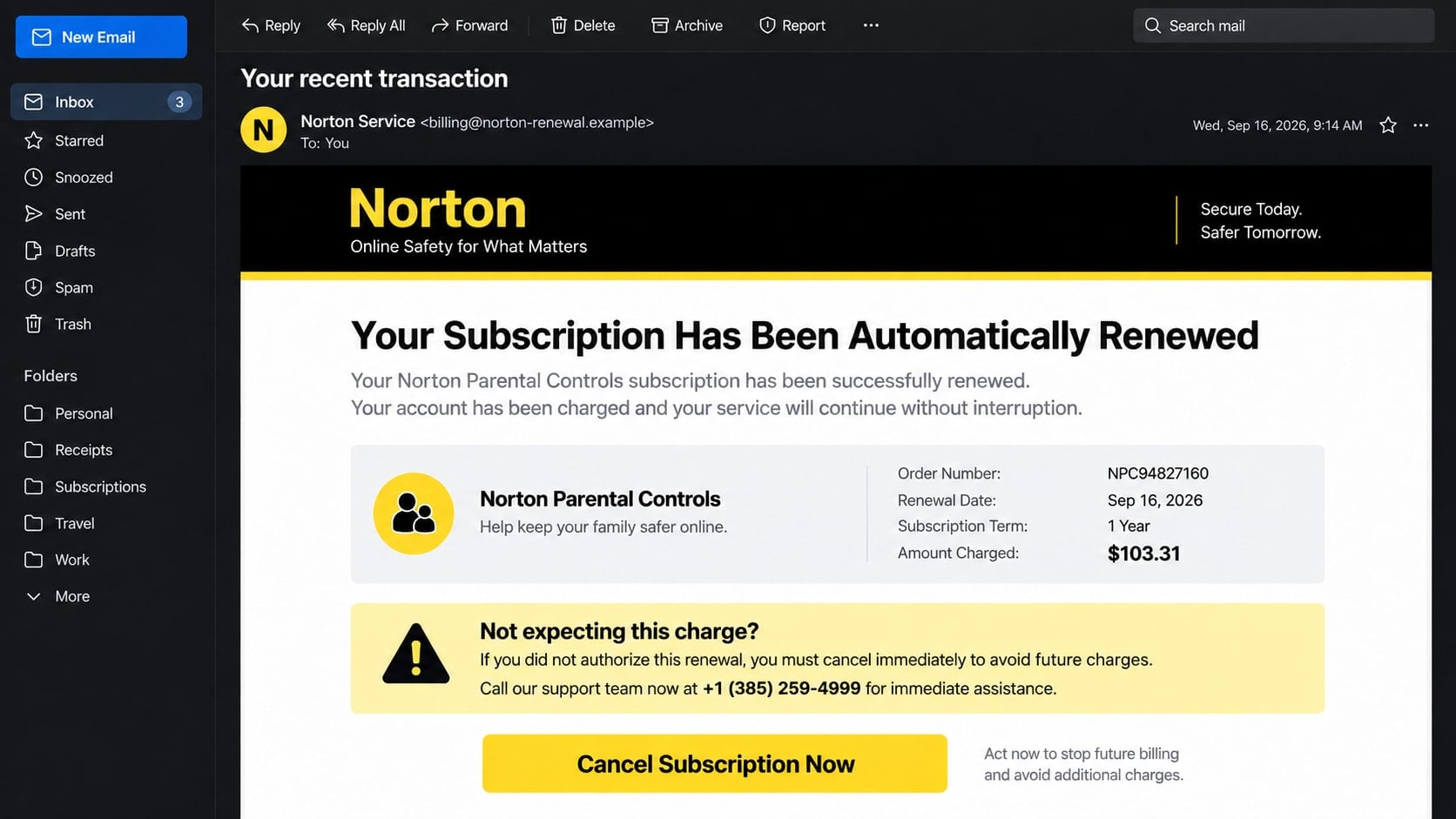
An email with Norton colors says a parental-controls subscription has renewed for $103.31. It provides a transaction number, a billing date, and 1-385-259-4999 for anyone who wants to cancel.
The Norton auto-renewal scam makes the charge feel settled before you have time to ask whether the order exists. The apparent cancellation route is where the real danger begins.
Overview
The message reports a subscription the recipient may not have
A documented version says “Your Subscription Has Been Automatically Renewed” and lists Norton Parental Controls for one year at $103.31. It includes a transaction number and presents the payment as scheduled or completed.
The recipient may never have purchased that product. The invoice uses recognizable security branding to create an immediate question: how can the unwanted renewal be stopped?
The cancellation number belongs to the scam path
The email directs concerned recipients to 1-385-259-4999. Calling a number supplied by the same unexpected message allows the sender to control the identity, account story, and refund instructions from beginning to end.
Norton has publicly warned that criminals impersonate its brand in fake renewals, order confirmations, security alerts, and support messages. Verification should therefore happen through the official account, not through the notice.
The alleged charge is bait for a larger theft
The scammer may request remote access, card details, online banking access, or a payment to correct a supposed refund error. A $103.31 concern can be used to expose accounts worth far more.
- The subscription appears without a known purchase or matching account.
- The message creates urgency around cancellation or a coming debit.
- Its sender address may use a free or lookalike domain.
- The listed support number cannot be verified inside the official account.
- The caller is asked to install a remote-support program.
- The refund process requires banking access, codes, or unusual payments.
Fake Renewals Exploit a Familiar Business Practice
Software subscriptions can renew automatically, so the basic situation does not sound strange. The scam works by inserting a false transaction into a process consumers already recognize.
The invoice amount is also believable. $103.31 is high enough to demand attention but close enough to a yearly software price that some recipients may accept it without checking.
Real renewal messages should connect to an account, product, payment method, and purchase history that the customer can verify independently. A logo and transaction number inside an email do not create that connection.
Norton’s official guide to recognizing scam emails advises recipients not to reply, open attachments, or use embedded links before checking the sender and account. It also provides a reporting route for impersonation messages.
How the Norton Auto-Renewal Scam Works
Step 1: An invoice claims the renewal is already underway
The email thanks the recipient, lists a product such as parental controls or antivirus protection, and says the payment method will be billed. A token, transaction ID, and billing frequency make the message resemble an automated notice.
The wording may say no action is needed to keep the plan but immediate contact is required to cancel. That design sends worried recipients toward the scammer while everyone else simply deletes the message.
Step 2: The victim calls the supplied support line
The operator may answer as “billing,” “renewals,” or “customer care.” They ask for the transaction number, then confirm that a refund is available if the caller completes a few security steps.
Information such as name, address, email, and card type may be collected during this stage. The questions sound like identity checks but can support later fraud.
Step 3: A refund portal requests remote access
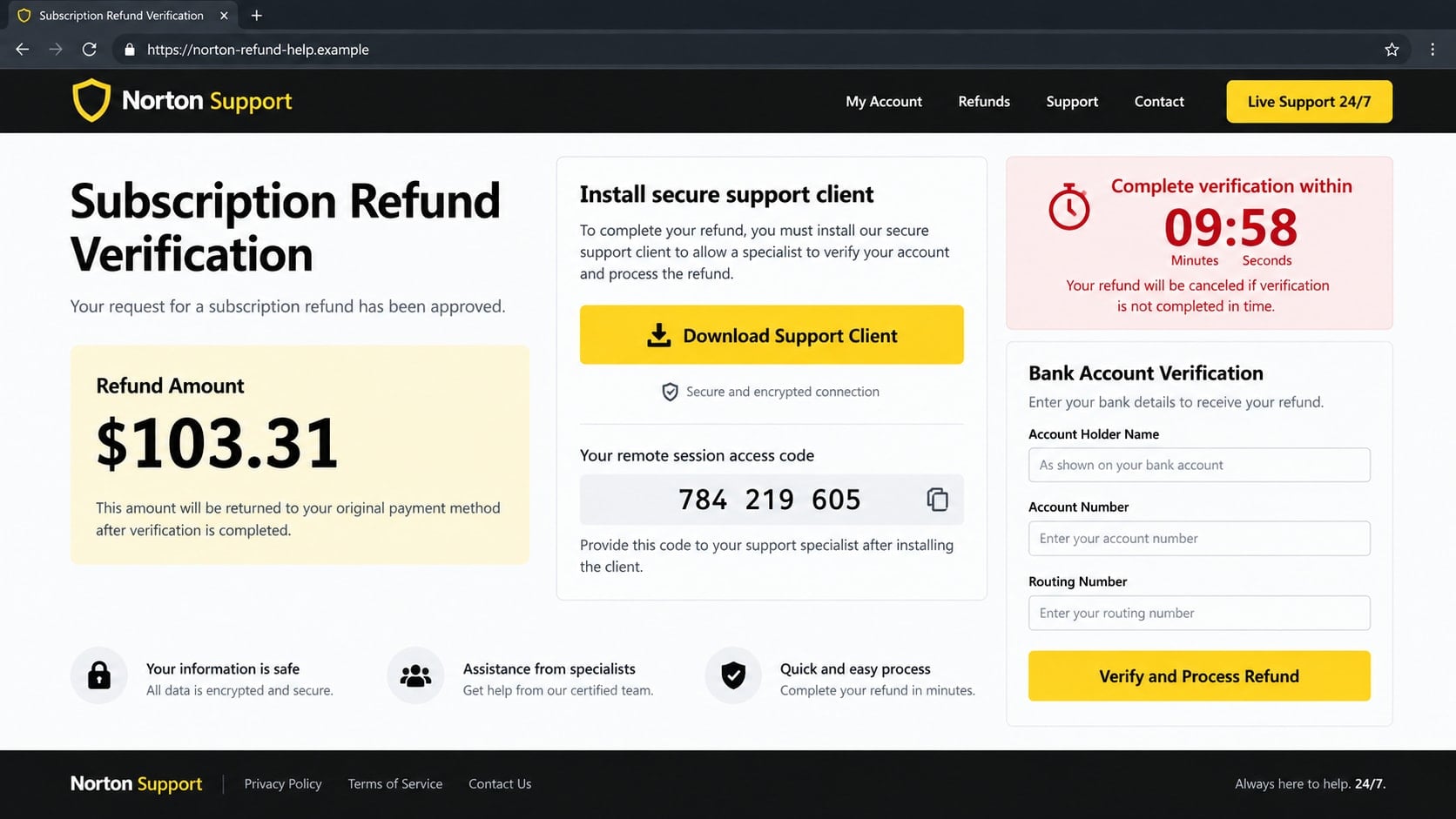
The caller is sent to a website that displays the $103.31 amount and offers a “secure support client.” The operator claims this software is necessary to validate the account or send the refund to the correct place.
Installing it can give the stranger control of the screen. The criminal may view documents, obtain saved credentials, copy files, disable security settings, or maintain access after the conversation.
Step 4: Financial information becomes part of “verification”
The fake portal may ask for an account holder name, bank account number, routing number, card details, or online banking login. A countdown suggests the approved refund will expire if the form is not completed.
A real refund should return through the merchant’s established payment process. It should not require a consumer to disclose complete bank credentials on a page reached through an unsolicited phone call.
Step 5: The operator manufactures a refund mistake
With screen access, the scammer can change what the victim sees or move money between the victim’s own accounts. They then claim that $1,033.10 or $10,331 was sent instead of $103.31.
The victim is told that the representative will be fired or arrested unless the extra amount is returned quickly. Emotional responsibility replaces careful verification.
Step 6: A reversible concern produces an irreversible payment
The victim may be directed to buy gift cards, send a wire, transfer cryptocurrency, use a payment app, or place cash in a package. These methods move real funds outside the normal refund system.
The caller may insist on secrecy, coach the victim to mislead bank staff, and remain connected during the transaction. Those instructions protect the fraud, not the customer.
How to Verify a Norton Renewal Safely
Do not start with the email’s button, attachment, or telephone number. Open a separate browser, type the official Norton address, and sign in only if you already have an account.
Review subscriptions, billing history, saved payment methods, and renewal dates. If the claimed product and $103.31 transaction do not appear, the message is not a valid account record.
Inspect the full sender address rather than the display name. Norton lists official sending domains and warns that it does not use public mailbox providers for genuine company mail.
Check the bank or card app independently as well. An email can say a payment succeeded without any transaction being attempted.
Identity, Contact, and Payment Checks
The sender domain should survive close inspection
Look for misspellings, added words, substituted characters, and unrelated endings. A display name that says “Norton Service” can be placed over any underlying address.
Do not reply to test whether the sender is genuine. Compare the domain with the company’s published list or forward the message through its documented reporting process.
The product must exist inside your account
A legitimate renewal should correspond to a subscription you can see after reaching the official site on your own. The plan name, term, amount, and payment method should make sense together.
An invoice ID known only to the caller and email is not independent confirmation.
Support should not need control of your device
Canceling or questioning a subscription does not require a stranger to install unattended access, watch you sign in to banking, or disable security software.
Terminate the conversation if support access begins from a number you did not obtain through the verified company website.
Refunds should follow the original payment trail
Merchants normally return eligible funds to the payment method used for the purchase. A demand for gift cards, crypto, cash, or a transfer to an individual sits outside that trail.
Never repay a claimed over-refund until the financial institution confirms the credit through its own fraud department.
What if the Email Contains Your Name?
A correct name does not authenticate a message. Names, email addresses, telephone numbers, and other profile details can come from data breaches, marketing lists, public records, or earlier phishing.
Some campaigns address recipients generically, while others merge available data into each invoice. Personalization improves the appearance but does not connect the sender to a real subscription.
Evaluate the parts only a genuine merchant should know and that you can confirm independently: the actual account, purchase history, protected product, payment method, and matching transaction.
If sensitive data in the message is unusually detailed, consider whether an account or mailbox has been compromised and review recent security activity.
Signs the Remote Session Is No Longer Under Your Control
The mouse may move without input, windows may close, or the screen may turn black while the caller says a secure refund is processing. Those actions prevent the victim from seeing what the operator is doing.
A browser can suddenly display a changed bank balance or an unfamiliar transfer form. Never assume that text shown during a remote session reflects a completed transaction.
The representative may ask the victim not to touch the keyboard, disconnect the call, speak to family, or tell bank staff the real purpose of a withdrawal. Isolation protects the script from interruption.
New applications, browser extensions, user accounts, scheduled tasks, or startup entries may appear. Some remote tools can be configured to reconnect without asking the computer owner again.
Email notifications about password resets or new logins can arrive while the call is active. Use another trusted device to protect the mailbox and notify the bank instead of confronting the operator.
After cutting the network connection, photograph visible session details before closing them if it is safe to do so. Evidence can help a technician, bank investigator, or law-enforcement report.
Do not reconnect the device merely because the caller promises to remove the software. Recovery should continue without the stranger’s involvement.
Check whether the remote tool created its own password or unattended-access identifier. Removing the visible shortcut may leave the underlying service installed and available after restart.
Review the browser’s saved passwords, downloads, history, and extensions. The operator may have opened a phishing page or copied login information while another window covered the activity.
If highly sensitive records were visible, consider a professional forensic review and an identity-theft recovery plan. The response should match the access obtained, not merely the $103.31 amount used as bait.
Write down the timeline while it is fresh, including what the caller saw, opened, installed, changed, or asked you to send.
What to Do if You Have Fallen Victim to This Scam
- Break contact with the fake agent. Close the chat or call, disconnect any active remote session, and take the affected computer offline if the cursor is still moving without your control.
- Call the financial institution from a clean device. Tell the fraud team what information was visible and which payments were attempted. Ask about securing cards, online banking, transfers, and new payees.
- Remove remote-access tools. Uninstall the program, revoke unattended permissions, and inspect installed applications and startup entries. Professional help is appropriate if you cannot confirm the connection is gone.
- Reset important credentials in the right order. Secure email first, then banking, payment services, and other accounts. Use unique passwords and remove unfamiliar recovery methods or sessions.
- Run a complete Malwarebytes scan. Malwarebytes can identify many malicious files, unwanted utilities, and persistence mechanisms that may have arrived during the support session. Apply available updates before scanning.
- Use AdGuard against repeat scam destinations. AdGuard can help filter malicious advertising and known fraudulent pages used in follow-up campaigns. Keep treating unexpected invoices as unverified even when a filter is active.
- Keep technical and financial evidence. Preserve the email with headers, attachment, telephone number, website, access code, application name, receipts, wallet addresses, and bank references.
- Request recovery through the payment channel. Contact gift-card issuers, exchanges, wire departments, and payment apps as appropriate. State clearly that social engineering produced the transfer.
- Report the impersonation and reject recovery fees. Forward the email to Norton’s official abuse address, report fraud to the FTC and IC3 where relevant, and ignore anyone promising guaranteed reimbursement for advance payment.
Frequently Asked Questions
Is the $103.31 Norton charge real?
Not because the email says so. Check the official Norton account and the bank or card statement through independently opened services. Both should support a genuine renewal.
Should I call 1-385-259-4999 to cancel?
Do not use the number supplied by this suspicious notice. Obtain current support details from the official company website or a verified account page.
Can a real Norton subscription renew automatically?
Yes, legitimate subscriptions can renew according to their terms. That normal practice is what makes the impersonation believable, so confirm the specific product and billing record.
What if I opened the attached invoice?
Do not enable macros or install anything. Scan the file and device, review what application opened it, and change credentials if the attachment led to a login or support session.
Why does the caller want online banking open?
Access to the bank screen helps the scammer observe balances, capture login activity, manipulate what appears, and create a false refund story. It is not required for a legitimate cancellation.
Can Norton reverse money sent to the scammers?
Norton cannot control payments sent to unrelated criminals. Recovery depends on the bank, card issuer, gift-card company, payment app, or crypto exchange that handled the funds.
The Bottom Line
The Norton auto-renewal scam turns a plausible $103.31 subscription notice into a path toward remote access, banking exposure, and irreversible payment. Verify the account and transaction separately instead of accepting the email’s phone number as support.
A real security company does not need gift cards, crypto, secret transfers, or control of your banking screen to cancel a plan. Stop immediately when the supposed refund leaves normal account and payment channels.

Join the discussion
0 commentsShare your experience or ask a question about this article.
Discussion
Start the conversation
Have a question or something useful to share? Add the first comment.