

You get a text out of the blue about your car having unpaid parking tickets in New York City. It demands immediate payment through NyCityPay.com to avoid fees. But it’s all a ruse to rob you blind if you click.
The NyCityPay scam is spreading rapidly via messages warning drivers of outstanding parking fines. The texts drive victims to a fake website to steal money and personal information. Don’t get hooked by this convincing scheme aimed at hurried New Yorkers.
Read on to learn all about how the NyCityPay scam works, how to identify it, and how to protect yourself from being swindled by these parking violation imposters out for your data and cash.
Overview of the NyCityPay.com Scam
The NyCityPay.com scam starts with an alarming text message about needing to pay NYC parking tickets immediately. The message seems credible at first glance, designed to trick hurried drivers into clicking the link and entering payment information. However, the website is completely fraudulent, set up solely to steal money and personal data.
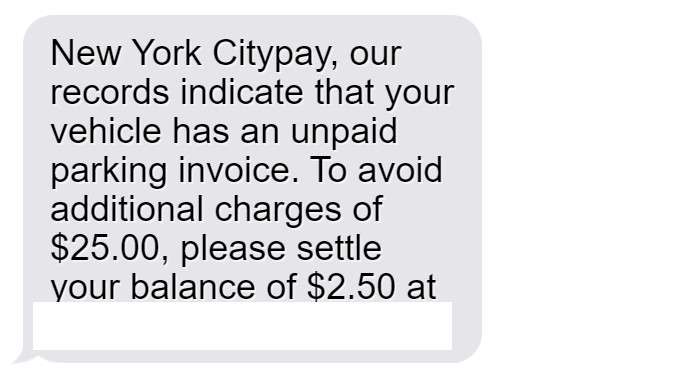
This parking violation scam typically begins with a text stating:
“New York Citypay, our records indicate that your vehicle has an unpaid parking invoice. To avoid additional charges of $25.00, please settle your balance of $2.50 at nycitypay.com.”
The message appears to come from a legitimate municipal source and cites specific unpaid balances and fees. The threat of escalating fines provides urgent pressure to click the link and pay right away before penalties increase.
However, every element of this text is deceptive and fraudulent. The scammers leverage common fears about parking tickets and wanting to promptly resolve government fines. But their only true motives are stealing your information and money.
Here are the many red flags that reveal this as an outright scam:
- There is no real agency called “New York Citypay” – This fictional name is made up to sound vaguely official. The real parking violations department is the NYC Department of Finance.
- Parking tickets are never communicated via text message – Legitimate notices only come through postal mail. The city does not text residents about unpaid fines.
- Threatening additional fees for urgent payment is a deception tactic – While late fees do apply for parking tickets, scammers exaggerate the urgency to pressure victims.
- The website URL does not match any legitimate government site – Nycitypay.com is a total scam site designed to phish victims.
- Parking fines are never as low as $2.50 – Most violations in NYC exceed $50, making the small “balance” clearly dubious.
- The area code on the text is not local to New York City – Scam texts frequently come from distant area codes not where victims reside.
- The hyperlinked text allows no way to opt-out of messages – Legitimate services always allow you to reply STOP to halt texts.
- Caller ID shows an unfamiliar phone number – Scammers use spoofed numbers that are impossible to call back or identify.
The parking scam text appears credible only until you scrutinize its dubious claims and deceptive techniques. It preys on two worries – owing money to the government, and consequences for not paying promptly. However, city agencies would never attempt debt collection via unsolicited text with hard-to-believe details.
Understanding all the inherent red flags in the message allows residents to recognize this scam before becoming victimized. The false authority, unknown links, threats of immediate penalties, and other persuasive tactics reveal a ruse designed explicitly to manipulate.
But an informed public that knows the warning signs can evade the traps set by these parking violation scammers. Do not let an alarming text lure you into giving up personal or financial information carelessly. Protect yourself by learning the earmarks of phishing attempts aimed at tricking you into a fraudulent site.
How the NyCityPay.com Scam Works
The NyCityPay scam aims to convince drivers they have unpaid fines needing immediate payment to prevent fees. Here is the playbook scammers use:
Step 1: Recipients Get a Text About Fake Tickets
The scam starts with a text sent to phones across New York City stating:
“New York Citypay, our records indicate that your vehicle has an unpaid parking invoice. To avoid additional charges of $25.00, please settle your balance of $2.50 at nycitypay.com.”
This fools many hurried people into thinking they have an outstanding violation requiring payment by the next day. In reality, it’s sent randomly to numbers the scammers acquired on the black market.
Step 2: The Text Provides a Link to NyCityPay.com
The text includes a URL linking directly to the fraudulent website NyCityPay.com. It’s made to sound like an official city parking payment portal.
Those concerned about paying fines before late fees click the link, believing it will allow them to resolve the unpaid tickets. But in reality it takes them right into the scammers’ trap.
Step 3: The Fake Site Asks for Personal Information
At NyCityPay.com, users see fields to enter details like:
- Full name
- Home address
- Email address
- Phone number
- Driver’s license number
- Vehicle registration number
- Date of birth
Submitting this information hands all the data scammers need to commit identity theft. And the site claims it’s required before users can view and pay their ticket balance.
Step 4: Scammers Demand Credit Card Details
After capturing users’ personal information, NyCityPay.com redirects to a page demanding credit card information to pay the fake tickets, including:
- Card number
- Expiration date
- CVV code
Visitors must enter the data before proceeding, which the scammers use to make fraudulent charges.
Step 5: Criminals Steal Money and Commit Identity Fraud
Once users submit credit card information, the scammers use it to make unauthorized transactions. They also now possess all the personal details needed to open accounts or commit other identity theft in the victim’s name.
The NyCityPay site displays a confirmation that “fines are paid” to complete the illusion. But the user is actually out money while criminals use their stolen information for ongoing fraud.
Avoiding the NyCityPay.com Parking Scam
The NyCityPay scam succeeds by deceiving hurried New Yorkers into paying fake tickets on the spot. Avoid being victimized using these best practices:
- Never pay unsolicited fines by text or phone – Legit tickets only come via mail from the NYC Department of Finance.
- Check status on official sites – Log into the DoF website or call 311 to verify any real outstanding fines.
- Watch for urgent threats – Scammers say immediate payment by phone is required, which is false.
- Beware fake websites – Type URLs directly instead of clicking text links, which may go to phishing sites.
- Don’t submit personal/financial details online – Avoid entering sensitive information on any site you didn’t intentionally visit or trust.
- Use unique passwords – Having distinct passwords on every account helps limit damage if one is compromised.
- Monitor your accounts and credit – Quickly flag any fraudulent charges or accounts opened without your approval.
With scam awareness, New Yorkers can steer clear of the traps set by the phony NyCityPay parking violators out to abuse your data.
What to Do If You Got Scammed by NyCityPay.com
If you already entered details or paid at NyCityPay.com, take these steps to minimize harm:
- Call your credit card company immediately – Report any charges as fraudulent so they can reverse them and block the card.
- Place fraud alerts – Alert credit bureaus to monitor your credit reports closely for criminal activity.
- Monitor your credit reports and accounts – Watch for signs of identity theft and swiftly dispute any unauthorized accounts opened in your name.
- Change passwords – Update passwords everywhere you reuse them to block access in case the scammers have them.
- Consider a credit freeze – Freezing your credit reports can prevent scammers from opening new fraudulent accounts easily.
- File police reports – File identity theft and cybercrime reports with the NYPD and FBI to aid investigations against the scammers.
- Report details – Provide details on the scam to the FTC, FCC, and your cell provider to help warn others.
You can recover from the NyCityPay scam, but rapid action is key to limit the fallout. And going forward, remembering their techniques will help you steer clear of parking scams.
Frequently Asked Questions About the NyCityPay.com Parking Scam
1. What is the NyCityPay.com scam?
The NyCityPay.com scam sends phishing texts about fake parking tickets, directing victims to a fraudulent website to steal personal and financial information.
2. How does the NyCityPay parking scam work?
You’ll receive a text that your car has unpaid parking tickets in NYC and you must pay immediately on NyCityPay.com before penalties. If you visit the site, it asks for private details to steal your identity and money.
3. Are the parking tickets mentioned in the texts real?
No, the texts are fake tickets sent randomly to frighten people into paying. Any real unpaid parking violations arrive by mail from the NYC Department of Finance.
4. What should I do if I get a text about NyCityPay.com?
Do not click any links. Check your real ticket status at the official NYC parking violations site. Report the scam text to 7726. Monitor your accounts if you shared information.
5. What are signs the parking ticket text is a scam?
Fake texts have grammatical errors, threats of immediate fees, and links to unfamiliar sites. Real ticket info only comes through USPS mail.
6. Is NyCityPay.com a legitimate website?
No, NyCityPay.com is a fake phishing site pretending to collect parking ticket payments but actually stealing your private data.
7. How can I protect myself from the NyCityPay scam?
Avoid clicking text links from unknown senders. Check ticket status at official government sites. Never pay tickets over the phone or input personal data on unfamiliar websites.
8. What should I do if I entered details on NyCityPay.com?
Immediately contact banks about any fraudulent charges. Place fraud alerts and check your credit reports. Reset all passwords you used on the site. Report identity theft if found.
9. Can I get in trouble for not paying the fake tickets?
No, you cannot get in any legal trouble for ignoring the scam texts as they are not real violations. Check your status officially to address any actual unpaid tickets.
10. How can I spot phishing scams in the future?
Look for grammar/spelling errors, threats demanding immediate payment, and unfamiliar sender addresses. Verify legitimacy through official channels, not questionable texts or links.
The Bottom Line
The phony texts and website at NyCityPay.com threaten New York drivers to trick them into paying fake parking tickets. But understanding the scam allows residents to evade it.
Legitimate notices only come by mail after a traffic officer cites your vehicle. Government sites use .gov URLs only. Don’t let these scammers intimidate you into instant payments over the phone or inputting sensitive data.
Stay vigilant against this crafty parking violation ruse aiming for your money and identity. With knowledge on your side, you can hit delete on these texts instead of getting taken for a ride.

Join the discussion
0 commentsShare your experience or ask a question about this article.
Discussion
Start the conversation
Have a question or something useful to share? Add the first comment.