

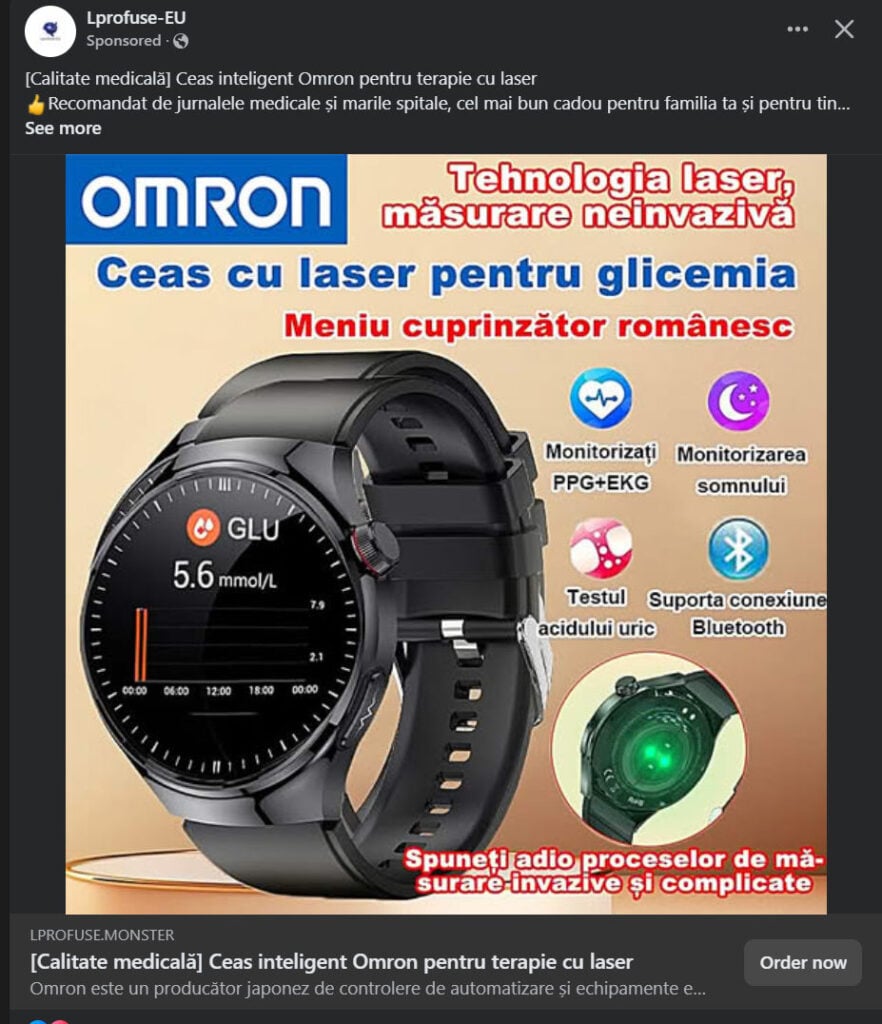
Have you come across a Facebook ad promoting a revolutionary Omron smart watch that can measure blood sugar levels using laser technology without needles? These ads promise an innovative way to monitor glucose, heart health, and even sleep patterns. They feature flashy claims like “Say goodbye to invasive procedures!” and promise cutting-edge laser technology at an incredibly low price. However, this is not a medical breakthrough. It is a scam designed to exploit trust in Omron’s brand and lure buyers into spending money on a device that does not work as advertised.
In this article, we will uncover the truth about these fraudulent ads, explain how the scam works, and guide you on what to do if you’ve already fallen victim.
Scam Overview
The Omron non-invasive glucose monitoring watch scam is spreading quickly on Facebook through paid advertisements. These ads use Omron’s logo, medical-sounding phrases, and high-quality graphics to trick people into believing this product is real and medically approved. Here are the main points that make this offer suspicious and outright fraudulent:
1. False Claims of Non-Invasive Glucose Monitoring
No smartwatch currently available in the consumer market can measure blood sugar accurately without invasive technology. Continuous glucose monitoring (CGM) requires either sensors inserted under the skin or medically-approved devices that are much more expensive and not sold casually online.
2. Misuse of Omron Brand Name
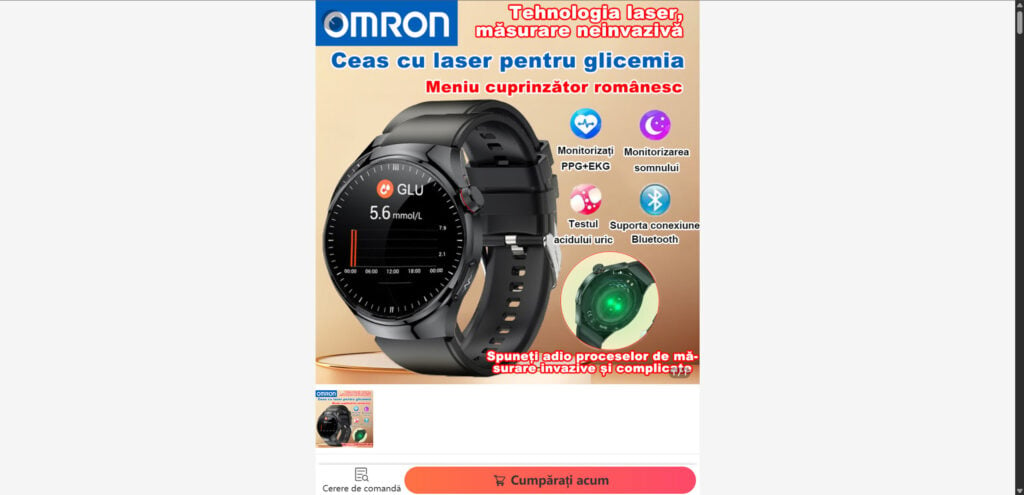
Omron is a legitimate Japanese company known for medical devices like blood pressure monitors. However, Omron does not produce a laser-based glucose monitoring smartwatch. The scammers use Omron’s logo to make the product appear authentic.
3. Unrealistic Features at a Very Low Price
The ads claim the watch can measure:
- Blood glucose levels using lasers
- ECG and heart health metrics
- Sleep monitoring
- Uric acid levels
All of this is supposedly available for less than $60. In reality, even advanced smartwatches from Apple or Samsung costing over $300 cannot measure blood glucose accurately.
4. Fake Urgency and Scarcity Tactics
The ads use phrases like “Limited stock available,” “Order now for free shipping,” and countdown timers to pressure customers into buying quickly without thinking.
5. Suspicious Website Domains
The websites behind these ads often have strange domain names such as lprofuse.monster, which have nothing to do with Omron. These domains are recently created and lack security certifications.
6. No Authentic Contact Information
The websites typically list only an email or an incomplete contact form. There is no physical address, phone number, or verifiable customer service.
7. Medical Claims Without FDA or CE Approval
Legitimate health-monitoring devices must undergo strict regulatory approval. These ads mention nothing about certification, which is a major red flag.
How the Scam Works
Step 1: Fake Ads on Social Media
Scammers run ads on Facebook and Instagram using professional designs, medical terminology, and Omron branding. Headlines often say things like:
- “Monitor blood sugar easily with laser technology.”
- “Non-invasive glucose testing – no more needles.”
- “Revolutionary health watch approved by experts.”
Step 2: Redirecting to a Fake Website
Clicking on the ad takes you to a website that looks like an online store. It features:
- Omron’s name and logo prominently displayed.
- Claims that the watch uses laser technology for glucose monitoring.
- A supposed discount from $199 to $49 or similar.
Step 3: Gathering Personal and Payment Details
To purchase the product, you are asked for:
- Full name
- Address
- Phone number
- Email address
- Credit or debit card details
This is where the scammer gets what they want: your money and sensitive data.
Step 4: Delivery of a Cheap Product or Nothing at All
After payment, the following outcomes are common:
- You receive a cheap smartwatch that does not measure glucose.
- You receive nothing, and the website vanishes within days.
Step 5: Data Exploitation
Because you provided payment details, scammers can:
- Attempt unauthorized transactions.
- Sell your information to other fraudulent networks.
What to Do If You Have Fallen Victim to This Scam
If you purchased this watch or entered your payment details, act quickly:
1. Contact Your Bank Immediately
- Report the transaction as fraudulent.
- Request a chargeback if possible.
- Block your card and get a replacement.
2. Monitor Your Accounts
- Set up alerts for suspicious transactions.
- Review your statements regularly.
3. Report the Scam
- Report the ad on Facebook.
- Notify Omron about the brand misuse.
- Submit the scam site to Google Safe Browsing.
- File a complaint with your local consumer protection authority.
4. Change Any Passwords Used
If you created an account on the scam website, change those passwords and avoid reusing them on other sites.
5. Warn Others
Share your experience on social media and scam-alert forums to prevent others from falling victim.
The Bottom Line
The Omron non-invasive glucose monitoring watch promoted in Facebook ads is a fake medical product scam. It makes false promises about health tracking using non-existent laser technology. Omron does not manufacture such a device, and the websites selling these watches are fraudulent.
Always verify medical product claims through official company websites or reputable health organizations. If the price or promise sounds too good to be true, it probably is. Protect your health and finances by avoiding these scams.
Stay informed. Stay safe.
Frequently Asked Questions About the Omron Non-Invasive Glucose Monitoring Watch Scam
What is the Omron non-invasive glucose monitoring watch scam?
The Omron non-invasive glucose monitoring watch scam is a fraudulent scheme promoted through Facebook ads that falsely claims a smartwatch can measure blood glucose using laser technology without needles. The ads misuse the Omron brand to appear credible and promise advanced health tracking features for a very low price. In reality, these devices cannot measure blood sugar and are not manufactured by Omron.
Does Omron make a laser-based glucose monitoring smartwatch?
No. Omron is a reputable manufacturer of medical devices such as blood pressure monitors, but it does not produce a smartwatch that measures glucose using lasers. Any product claiming to be from Omron and offering non-invasive glucose monitoring at a low price is a scam.
Can a smartwatch accurately measure blood sugar without needles?
Currently, no consumer-grade smartwatch on the market can accurately measure blood glucose non-invasively. Real continuous glucose monitoring systems (CGMs) require medical sensors placed under the skin and cost significantly more than the devices advertised in these scams.
How much do scammers charge for this fake Omron watch?
Scammers typically list the watch at $49–$59, claiming the original price is over $200 to create a sense of urgency and value. This pricing tactic is a major red flag, as real medical devices capable of blood glucose monitoring cost hundreds or even thousands of dollars.
What happens if I buy the advertised Omron watch?
Two outcomes are common:
- You receive a cheap generic smartwatch that does not measure blood sugar or other advertised health metrics.
- You receive nothing at all, and the website disappears soon after.
In both cases, the product will not perform as claimed, and you risk losing your money.
Is my personal and financial data at risk if I purchased this watch?
Yes. Providing your credit card information and personal details on scam websites can result in:
- Unauthorized transactions on your bank account.
- Identity theft if your data is sold on the dark web.
- Additional phishing attempts targeting your email or phone number.
How can I report the Omron watch scam?
You can take the following steps:
- Report the fraudulent ad to Facebook.
- Notify Omron that their brand is being misused.
- Report the scam website to Google Safe Browsing.
- File a complaint with your local consumer protection agency or cybercrime unit.
What are the red flags that show this watch is a scam?
- The ad promises non-invasive glucose monitoring using lasers, which is not medically approved technology.
- The website uses a suspicious domain name, often unrelated to Omron.
- The price is far below what legitimate health devices cost.
- No information about FDA approval, CE certification, or clinical trials.
- No verifiable contact details such as a physical address or phone number.
- Heavy use of urgency tactics like “limited stock” or countdown timers.
What should I do if I already bought the fake watch?
Follow these steps immediately:
- Contact your bank or card issuer to block your card and request a chargeback.
- Monitor your accounts for unauthorized charges.
- Change any passwords used during the purchase process.
- Report the scam to Facebook and relevant authorities.
- Warn others by sharing your experience on social media and scam alert websites.
Where can I buy a legitimate blood glucose monitoring device?
Purchase only from:
- Official Omron website or authorized distributors.
- Certified medical device retailers and reputable pharmacies.
- Trusted e-commerce platforms like Amazon, but ensure the seller is verified.
Avoid unknown websites and deals advertised on social media that seem too good to be true.








