


You notice the wrong name just after sending. Perhaps it was an old contact, an unexpected autocomplete suggestion, or someone who should never have received that attachment.
Outlook offers several ways to interrupt or retrieve a message. Choosing the right one matters, especially when the mistake involves something more sensitive than a missing attachment.
Overview
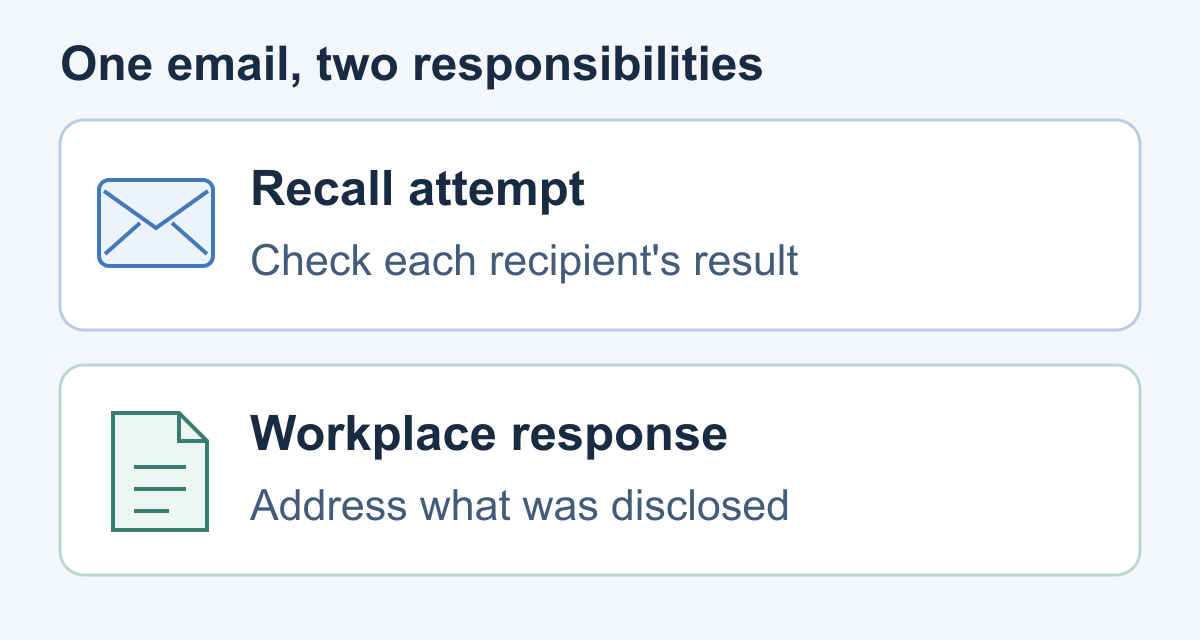
A send mistake needs two separate answers
The first question concerns the message: can you still stop delivery or try a recall? The second concerns the information: what needs protecting now?
Match the response to the content, because an ordinary meeting correction and a disclosed customer file present different problems.
The account matters more than the Outlook name
An Outlook application can connect to different services. Seeing the Outlook logo does not establish which recall features apply to the mailbox or recipient.
Classic Outlook lists account types under File, Account Settings, Account Settings, then Email. If yours is unclear, ask IT which mailbox sent the message.
Your working checklist should stay small
- Identify the exact message and every unintended recipient.
- Use an available delivery cancellation or appropriate recall.
- Record the result separately for each recipient.
- Escalate sensitive information through your established workplace channel.
The goal is not to find a reassuring button. It is to reduce the exposure and give the right people an accurate account of what happened.
Undo Send, Scheduled Delivery, and Recall Are Different
Undo Send is a short delivery delay, not retrieval from another inbox. Once that opportunity has passed, enabling it cannot reverse the earlier delivery.
Microsoft’s scheduled-delivery instructions distinguish messages held in Drafts in new Outlook or the web from delayed messages held in classic Outlook’s Outbox.
If you deliberately scheduled the message, check that pending item before assuming it already reached anyone. Follow the controls for that account and version.
| Situation | Immediate question | Useful next action |
|---|---|---|
| A delivery-cancellation opportunity is still visible | Can this send still be stopped? | Cancel first, then inspect the recipients and content. |
| The message was intentionally scheduled | Is it still waiting for delivery? | Inspect the pending message rather than sending another copy. |
| The message already left your account | Is recall available for this mailbox? | Attempt an appropriate recall and assess the disclosure separately. |
These are different starting points, not three names for the same protection. A setting changed today may help your next email without changing yesterday’s mistake.
How to Request an Outlook Recall
New Outlook and Outlook on the web
Open Sent Items, double-click the message into its own window, select Recall Message, and confirm.
Classic Outlook for Windows
Open the sent message in full. On the classic ribbon, use Message, More Move Actions, then Recall This Message; the simplified ribbon places it under More commands and Actions.
Select the option to delete copies, rather than replace them, and confirm. Check any proposed replacement carefully before sending another attachment.
Outlook for Android or iOS
The current mobile recall procedure is Sent, open the message, select its three-dot menu, then Recall. Feature availability still depends on the work account.
Outlook for Mac
Microsoft’s Mac recall instructions say to open Sent, double-click the message, select Recall on the ribbon, and confirm. A Control-click shortcut is also available.
Mac recall requires version 16.94 or later and is unavailable in legacy Outlook. Ask IT about your installation if the command does not appear.
If the expected command is missing, stop guessing through unrelated menus. Ask your helpdesk which recall experience your mailbox supports while reporting any sensitive disclosure.
You do not need to send a test email to the mistaken recipient. Work with the message that caused the problem and preserve its identity.
Which Copies Can Cloud Recall Reach?
Current Exchange Online cloud documentation allows recall of read messages when policy permits. Cross-tenant recall requires the receiving Exchange Online organization to allow the sender’s tenant.
Same-organization automatically forwarded messages can be recalled. Manual forwards, inbox-rule forwards or redirects, and messages automatically forwarded outside the organization cannot.
Mailboxes outside Exchange Online, including on-premises recipients, are outside that cloud-recall boundary. Settings, message-age limits and client/account conditions also matter; ask IT about uncertain eligibility.
Litigation or In-Place Hold may retain recalled messages for eDiscovery.
For your incident note, uncertainty is an acceptable entry. Guessing how a recipient’s organization is configured produces confidence without producing evidence.
Read the Result for Each Recipient
The recall report distinguishes success, pending and failure. Open the expected report through a trusted work session, and involve IT if its status is unclear.
A report naming one recipient does not answer what happened to another. Check every unintended destination against the original message, including copied recipients.
Use a small incident note alongside Outlook’s report. The following fields are a practical working record, not additional settings you need to find in Outlook.
| Record | What belongs there |
|---|---|
| Message identity | Sending account, subject, send time and the mistaken destination. |
| Action taken | Cancellation or recall attempt, with its time. |
| Observed outcome | The recipient-specific result actually shown, or that no result is available. |
| Information involved | Content category, attachment version or shared-file reference, without duplicating unnecessary sensitive content. |
| Follow-up owner | The internal person or team handling outstanding questions. |
Keep this note in your organization’s approved incident location. A public support post or a widely copied email can create another disclosure while discussing the first.
Add the time you checked the report, not just its status. That helps distinguish a current result from an earlier screenshot or an old note.
If somebody else takes over, the note should let them continue without reconstructing your steps. Include unanswered questions instead of quietly treating them as resolved.
A Retrieved Message Is Not Retrieved Knowledge
Separate the inbox from the information
Someone may already know the contents, have taken a screenshot, or have saved an attachment elsewhere. Removing an inbox item cannot make that knowledge disappear.
A useful question is therefore specific: what information was exposed, and what could an unintended person do with it? “The email is gone” is incomplete.
An unpublished lunch agenda and an employee identification document are not interchangeable incidents. Give the responsible team the content category rather than simply describing an attachment.
If the email contained a shared-file link
For OneDrive or SharePoint, the file owner can inspect access through the file’s Share dialog. Microsoft documents separate permission and link controls.
Removing one access route does not remove permissions granted elsewhere. Ask the owner to review all relevant access rather than merely changing the emailed URL.
Do not delete the underlying project file in a panic. Describe which link was shared and let the authorized owner make the necessary access decision.
If the email contained a password or other secret
Tell IT what type of secret was included, without repeating it in a group conversation. A screenshot of the mistaken message may expose it again.
For an exposed work-account password, use your approved reset process. Microsoft’s password-change instructions distinguish changing a known password from recovering a locked account.
Be precise about the credential’s purpose. A document password, work-account password and application access key require different owners; do not attempt unfamiliar administrative changes yourself.
What to Do After Sending Sensitive Information
-
Notify the established internal response channel promptly. Tell the helpdesk, security team, privacy contact or manager specified by your workplace policy. Explain that information reached an unintended destination.
Report the mistake while the recall is being assessed. You do not need to finish investigating every detail before someone qualified can begin helping.
-
Give the response team a factual account. Include the sending account, time, mistaken recipients, content category and actions already attempted. State explicitly what you still cannot confirm.
The FTC recommends documenting the investigation and preserving evidence. Do not clear relevant messages or records to make the incident look as though it never happened.
-
Coordinate contact with the unintended recipient. Ask the responsible team whether you should request deletion and confirmation, using an appropriate known route.
The UK ICO’s wrong-recipient containment guidance includes asking for deletion. A cooperative reply can help your assessment, but it is not technical proof that every copy vanished.
Keep any contact narrow and professional. Do not resend the attachment as an explanation, request a screenshot of sensitive contents, or copy additional uninvolved people.
-
Address the specific information that was exposed. Ask the authorized owner about access restrictions, credential replacement or other relevant safeguards. Match the action to what was actually disclosed.
Distinguish a file-access link from an attachment containing a separate copy. Tell the file owner which one was sent before asking for a fix.
-
Let the responsible team decide external notifications. Duties depend on the incident, so avoid improvising notices or announcing deadlines.
Ask who owns the next decision and when you should check back. Record the handoff so an outstanding action does not disappear between teams.
Work Through a Mixed-Recipient Mistake
Imagine sending a draft proposal to a colleague and a former consultant whose address remained in your suggestions. The attachment also includes internal comments.
Start with the exact version that was attached, not the polished document currently open on your computer. Explain which comments made this version unsuitable.
Now suppose your recall record shows success for the colleague while the former consultant’s result remains unresolved. Keep those outcomes on separate lines.
The colleague’s row can describe the successful result. The former consultant’s row needs an owner and next action, rather than a copied success label.
Your internal report should identify both destinations and the attachment version. It should not claim the consultant opened it unless you actually have that information.
If the former consultant replies cooperatively, preserve that response through the approved process. Give it to the incident owner alongside the technical result, not instead of it.
Before sending a correction, decide whether another attachment is needed at all. A short correction to an approved recipient may be enough for the business task.
This keeps the practical questions separate: correcting the work, resolving the unintended destination, and managing the content that should not have been shared.
Choose the Next Action for Your Situation
A cancellation option is still available
Stop the send first and inspect the draft. Check every recipient and attachment before deciding whether the message should be sent again.
A recall request has no clear result
Keep its outcome unresolved in your note. Ask IT for help, and continue the sensitive-information response rather than waiting for reassurance.
One recipient’s recall succeeded
Record that specific result without extending it to everybody. Check whether the content still needs an incident owner, especially when secrets or personal information were involved.
The message cannot be recalled
Move directly to the disclosure response. Use your established internal channel, explain the destination and content, and coordinate the next contact or protective action.
Make the Next Message Harder to Misaddress
After the immediate incident is handled, look for the point where your intended recipient became a different address. Improve that step rather than adding unrelated security rituals.
For example, an old autocomplete suggestion calls for checking the full address, not just the display name. A reused attachment calls for checking the attached version.
Before a sensitive send, read the recipient line as a separate task. Review copied recipients too, rather than concentrating only on the person in the greeting.
Then open the actual attachment you intend to send. Check its comments, extra worksheets and relevant content instead of assuming its filename identifies the approved version.
For an especially sensitive message, follow your organization’s approved review process. A second-person check is useful only when that person is authorized to see the material.
A delivery delay can provide breathing space. In supported new Outlook or web accounts, Microsoft places Schedule send beside Send; available options differ for other account types.
Choose a delay you understand and verify the pending message’s location using your version’s instructions. Do not treat scheduling as permission to skip the recipient check.
Frequently Asked Questions
Can a personal email account use Outlook recall?
Using Outlook with a personal Outlook.com or Gmail account does not add Microsoft 365 work-account recall.
Does a pending result mean the recipient never received it?
Pending means unresolved, not that delivery was stopped.
Will the recipient always receive a recall notification?
Exchange Online administrators can control recipient recall notifications. Neither an alert nor silence establishes what the recipient read or saved before the response.
Should I send a replacement immediately?
Only after checking the intended audience and content again. Correcting the business message and responding to the disclosure are separate tasks, with potentially different recipients.
Can I ask the mistaken recipient to delete everything?
Coordinate a narrow deletion request through your workplace’s response process. Keep the reply, but do not demand sensitive screenshots or regard cooperation as proof of complete erasure.
Is a delivery or read receipt the same result?
A delivery receipt concerns delivery, not removal. A missing read receipt cannot establish that nobody read the message, because recipients can decline those receipts.
The Bottom Line
Use an available cancellation or appropriate Outlook recall promptly, then check the result for each recipient. Do not turn one successful result into a claim of universal erasure.
If sensitive information went to the wrong person, involve the responsible workplace team and protect what was disclosed. Retrieving a mailbox copy is only part of that response.

Join the discussion
0 commentsShare your experience or ask a question about this article.
Community experiences
Did this happen to you?
Your experience could help someone recognize the same scam. Submit a private report for our team to review.
I experienced this tooReports are reviewed before publication. Sharing publicly is always your choice.
Discussion
Start the conversation
Have a question or something useful to share? Add the first comment.