

Parking invoice scam texts impersonating the City of Charlotte’s ParkIt program are being sent to unwitting victims in an attempt to steal their personal and financial data. This devious scam preys on unsuspecting citizens by tricking them into believing they have an outstanding parking ticket that must be paid immediately.
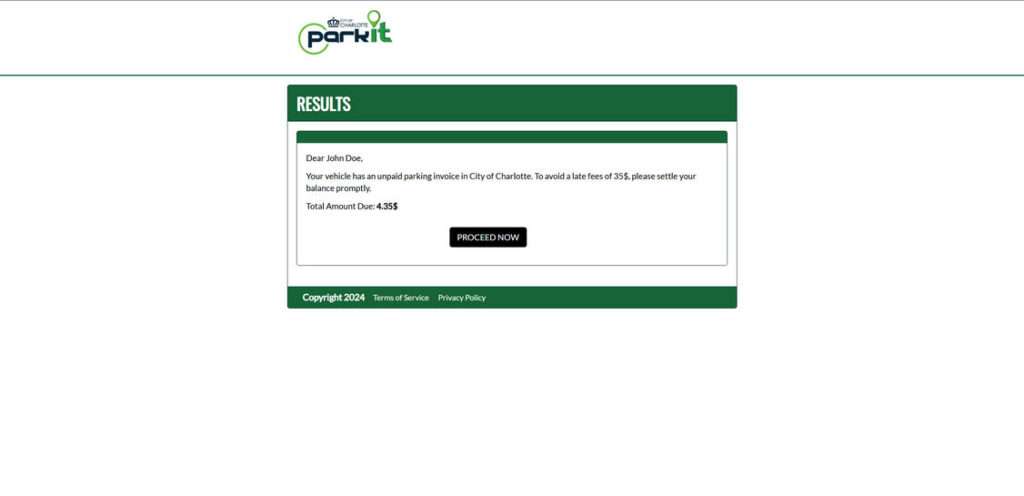
An Overview of the ParkIt Charlotte Parking Invoice Scam
The ParkIt scam texts include the official ParkIt logo and claim the recipient has an unpaid parking invoice of a small amount, usually around $4-5. To avoid additional late fees, which are listed as much higher, the victim is instructed to pay the fine promptly through a link provided in the text.
However, the link does not lead to the official ParkIt website. Instead, victims are taken to a sophisticated fake parking portal designed to mimic a legit parking payment page.
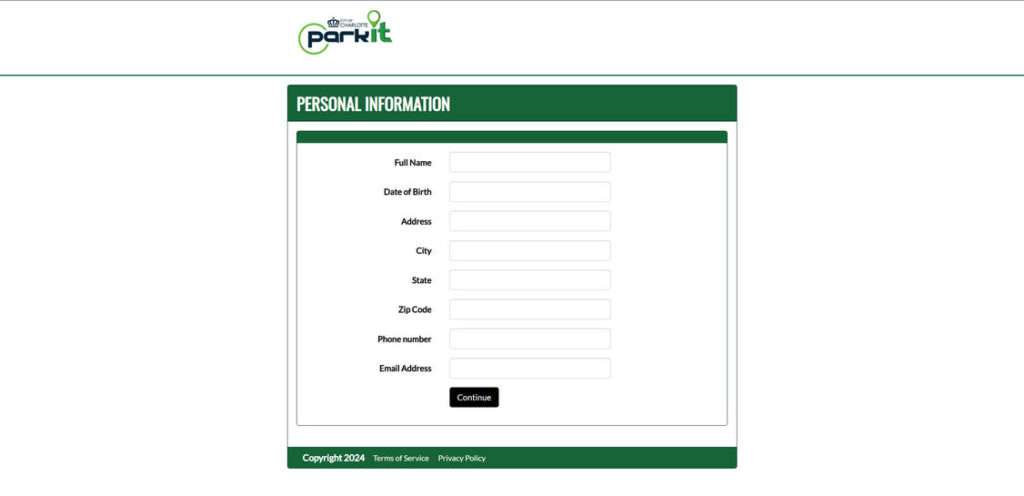
Once on the spoofed website, users are prompted to enter a significant amount of sensitive personal and financial information including:
- Full Name
- Date of Birth
- Home Address
- Phone Number
- Email Address
- Credit Card Details
This data is harvested by the scammers who can then use it for identity theft, credit card fraud, or sell it on the dark web.
There never was an unpaid parking fine. The scam texts are sent en masse to numbers in the Charlotte area with the hopes of duping a percentage of recipients.
How the ParkIt Scam Texts Work
The ParkIt parking invoice scam is relatively simple in nature, but highly effective at stealing personal information from victims. Here’s a step-by-step look at how the scam operates:
Step 1: Victims Receive a Convincing Scam Text
The scam texts are made to look like official notices from the City of Charlotte. They include the ParkIt logo and writing style similar to real parking invoices. The small “unpaid” amount makes the notice seem legitimate and urgent.
Here’s an example of the scam text:
ParkIt

This is a notice from City of Charlotte. Your vehicle has an unpaid parking invoice of $4.35. To avoid a late fee of $35, please settle your balance promptly.

To make a payment, visit:

https://parkit-nc.com
Step 2: The Link Leads to a Sophisticated Spoof Website
When victims click the link included in the text, they are taken to a fake website designed to look like the official ParkIt parking payment portal. The scam site has a similar layout and design elements to the real website.
This fools victims into thinking they’ve arrived at the legitimate ParkIt site to pay their outstanding invoice. In reality, it’s a sophisticated phishing website.
Step 3: Users Are Prompted to Enter Personal and Financial Information
On the scam parking portal, users are prompted to enter significant personal details to “pay” the unpaid invoice. The information requested includes:
- Full legal name
- Date of birth
- Home address
- Phone number
- Email address
- Credit card number
- Credit card expiration date
- CVV code
Step 4: Scammers Harvest Entered Data
When victims enter the requested information into the fake parking payment forms, the data is harvested by the scammers. They now possess all the details needed for identity theft and credit card fraud.
The Full Damage: What Scammers Can Do with Your Information
The ParkIt scam texts allow fraudsters to steal extensive personal and financial information with minimal effort. This data enables them to:
- Commit identity theft: Names, home addresses, dates of birth, and SSNs can be used to open fraudulent accounts and take out loans.
- Access your devices or accounts: Email addresses and phone numbers can be leveraged to compromise other accounts through phishing attacks and password resets.
- Make purchases with your credit card info: Card numbers, expiration dates, and CVV codes let scammers make purchases online or in brick and mortar stores.
- Sell your info on the dark web: Full identities, contact details, and credit card info can fetch high prices on dark web marketplaces.
- Commit tax fraud: Names, DOBs, and SSNs can be used to file fake tax returns and collect refunds.
- Open new credit cards: Full identities let fraudsters take over your credit and open new accounts in your name.
As you can see, the potential financial and legal fallout from having your personal data stolen through these parking scams is immense. Unfortunately, once your information is in the hands of cybercriminals, it can be difficult to recover from identity theft and credit card fraud.
What to Do If You’re a Victim of the ParkIt Text Scam
If you entered your information into one of the ParkIt scam websites, here are important steps to take right away:
Step 1: Contact Your Credit Card Company
If you input your credit card details, immediately call your credit card company to report the incident. Ask them to freeze or cancel your card and issue a new one to prevent fraudulent charges.
Step 2: Place Fraud Alerts on Your Credit Reports
Contact TransUnion, Experian, and Equifax to place fraud alerts on your credit reports. This makes it harder for scammers to open new accounts in your name.
Step 3: Monitor Your Accounts Closely
Carefully monitor all your financial accounts and credit reports for any signs of suspicious activity. Report any unknown charges or accounts to your bank and credit bureaus right away.
Step 4: Change Account Passwords
Reset the passwords on all your online accounts, especially email, social media, and financial accounts. Use complex unique passwords for each account.
Step 5: Consider a Credit Freeze
Place credit freezes on your credit reports to block access to your credit reports to stop scammers from opening new lines of credit. This prevents new accounts from being opened.
Step 6: File a Police Report
File a report with your local police department to make a record of the scam and identity theft. Get a copy of the report to provide to banks and credit bureaus.
Protecting Yourself from Parking Scams
While you can take steps to recover if you shared your personal information through a ParkIt scam text, it’s better to avoid falling for the frauds in the first place. Here are some tips to stay secure:
- Beware of texts demanding immediate payment. Legitimate parking tickets from the City of Charlotte provide options to contest or make payments.
- Verify links are from official sources. Don’t click on links from random texts. Visit ParkItCharlotte.com directly instead.
- Check email addresses on notices. Scam emails use fake addresses. Real invoices come from @charlottenc.gov addresses.
- Never pay with gift cards or wire transfers. These payments can’t be undone – always use credit cards when possible.
- Monitor account statements routinely. Review your credit card and bank transactions regularly to spot unauthorized activity.
- Set up account alerts. Many banks let you customize alerts to notify you of strange charges or password change attempts.
- Limit info shared online. Be selective about sharing private info on social media sites or unverified forms.
Staying vigilant against parking scams can help you avoid the huge hassle of recovering from identity theft and stolen financial data.
Frequently Asked Questions About the ParkIt Parking Violation Scam Texts
1. I got a text saying I have unpaid parking tickets in Charlotte. Is it real?
No, this is likely a scam. The texts pretend to be from ParkIt to trick people into entering personal and financial data. Call ParkIt to verify before clicking any links or providing information.
2. How do I know if a ParkIt parking ticket text is fake?
Warning signs include urgent demands for payment, threats of late fees, and links to non-official websites. Real ParkIt texts provide options to contest or make flexible payments.
3. What happens if I click the link in the fake ParkIt text?
You’ll be taken to a sophisticated phishing website impersonating the real ParkIt payment portal. It will request extensive personal and financial details that scammers can use to commit identity theft.
4. What information did the fake ParkIt texts try to steal?
The phishing sites request full name, birth date, address, phone, email, credit card number, expiration date, and CVV code – more than enough for fraud.
5. Should I ever pay a ticket or fine from a text message link?
No, legitimate parking authorities will never request payments solely via text links. Always verify tickets directly with the city website or customer service line before paying.
6. What should I do if I already entered my information into a ParkIt scam site?
Immediately contact credit card companies to freeze cards used on the site. Monitor all accounts closely for fraudulent activity and place fraud alerts with credit bureaus.
7. Can I get my money back if I paid a fake parking invoice?
If you used a credit card, you can request a chargeback from your credit card company. Act quickly and escalate it as fraud. If you paid by wire or gift card, recovering the money will be very difficult.
8. How can I avoid falling for a ParkIt scam in the future?
Do not click links, provide information, or make payments based solely on a random text. Independently look up city website and contact info to verify tickets. Use official payment portals.
9. Should I report the fake ParkIt text to anyone?
Yes, file reports with the FTC on IdentityTheft.gov and submit the scam text to the North Carolina AG office and ParkIt customer service so they can warn others.
10. What can happen if scammers get my personal information from the fake texts?
They can commit identity theft, access your accounts, make fraudulent purchases, sell your info online, file fake tax returns, and open unauthorized credit cards.
The Bottom Line
The ParkIt parking violation text scams sweeping Charlotte demonstrate how simple phishing efforts can lead to major financial fraud and identity theft.
These scam texts take advantage of peoples’ fear of late fees and legal consequences to trick them into entering credit card and personal information onto fake websites controlled by fraudsters. This data enables a multitude of follow-up crimes including credit card theft, tax fraud, and the sale of stolen identities on the black market.
If you received one of these deceptive texts, visit the official ParkIt website or contact their customer service to verify – never click links or provide information. Should fraud occur, act swiftly to freeze credit reports, monitor your financial accounts, change passwords, and file police reports.
Parking scammers will continue dreaming up new ways to steal personal data for financial gain. But following best practices around verifying links, guarding sensitive info, and monitoring your accounts can help protect you.
The ParkIt scam serves as a sobering reminder that staying vigilant against phishing and fraud, even in routine contexts like a parking ticket notice, is critical to safeguarding our identities and assets in the digital age.

Join the discussion
0 commentsShare your experience or ask a question about this article.
Discussion
Start the conversation
Have a question or something useful to share? Add the first comment.