

Imagine receiving a text message claiming to be from the City of Charlotte, demanding that you pay an overdue parking invoice of $4.35 immediately to avoid a 35$ late fee. The message urges you to click on a link to parkit-nc.com to settle your balance and prevent further penalties. Sounds alarming, right? But hold on – it’s a scam!
The parkit-nc.com parking invoice scam is a sophisticated phishing scheme designed to trick unsuspecting individuals into revealing sensitive financial and personal information. By masquerading as an official notice from the City of Charlotte, these fraudulent texts aim to create a false sense of urgency and manipulate recipients into acting quickly without verifying the message’s legitimacy. In this article, we’ll take a deep dive into how the parkit-nc.com scam works, red flags to watch out for, and crucial steps to take if you’ve fallen victim.
Scam Overview
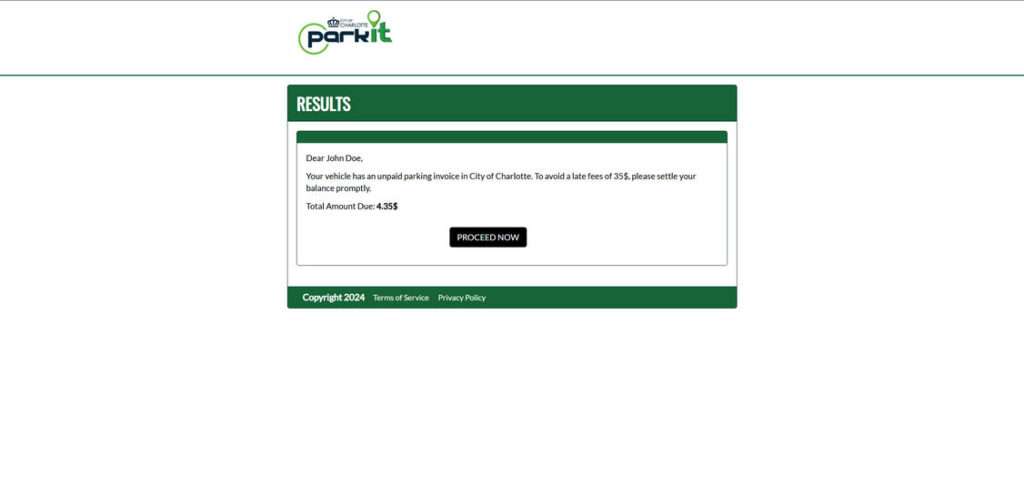
The parkit-nc.com phishing scam revolves around sending out deceptive text messages purportedly from the City of Charlotte, claiming that the recipient has an unpaid parking invoice. These texts typically allege a small outstanding balance, usually around $4.35, to avoid raising immediate suspicion.
However, the scammers add an alarming twist – if you don’t pay up instantly via the provided parkit-nc.com link, you’ll be slapped with a 35$ late penalty. This arbitrary deadline creates a false sense of urgency, pressuring distracted victims into clicking through and submitting payment without scrutinizing the message too closely.
To further enhance the texts’ perceived credibility, the scammers often incorporate language and formatting reminiscent of genuine parking violation notices. They may mention official-sounding consequences like “disconnection” or “further action” to scare recipients into compliance.
But here’s the catch – parkit-nc.com is a fraudulent website carefully crafted to resemble a legitimate parking payment portal. When panicked victims click the link and enter their information, it’s instantly transmitted to the scammers behind the scenes.
The City of Charlotte has confirmed that they will never send unsolicited text messages demanding parking ticket payments via suspicious links. If you have an outstanding parking invoice, they will send you an official notice in the mail with clear instructions on how to pay through secure, verified channels.
Sadly, the parkit-nc.com parking invoice scam has become increasingly widespread, with numerous individuals reporting receiving these deceptive texts. The scammers likely send them out in bulk using automated tools, hoping to snare as many victims as possible.
By exploiting the public’s natural tendency to resolve issues quickly and avoid penalties, these con artists aim to trick people into revealing sensitive data like credit card numbers, bank account details, and personal identifying information. This stolen information can then be used for fraudulent purchases, identity theft, or sold to other criminals on the dark web.
How The Scam Works
The parkit-nc.com phishing scam is a textbook example of social engineering, leveraging psychological manipulation to pressure victims into making hasty decisions. Here’s a step-by-step breakdown of how a typical scam attempt unfolds:
Step 1: The Unexpected Parking Ticket Text
The scam kicks off when you receive an out-of-the-blue text message claiming to be from the City of Charlotte. The message informs you that you have an unpaid parking invoice, usually for a believable amount like $4.35, to avoid raising red flags.
Step 2: Creating a False Sense of Urgency
To crank up the pressure, the text warns of dire consequences if you don’t pay your balance immediately via the provided parkit-nc.com link. Scammers often threaten a 35$ late fee or allude to vague “further actions” or “disconnections” to scare you into acting before thinking.
Step 3: The Convincing Phishing Site
If you fall for the bait and click the link, you’re directed to parkit-nc.com, a website meticulously designed to mirror a real parking payment portal. The page may feature official-looking City of Charlotte logos and branding to further mislead you.
Step 4: Harvesting Your Sensitive Information
The bogus parkit-nc.com site prompts you to enter your credit card number, expiration date, CVV code, and billing ZIP code to supposedly pay the overdue parking invoice. Some versions of the scam may dig for even more sensitive details like your full name, address, driver’s license number, or Social Security number.
Step 5: Scammers Cash In
As soon as you submit your information on the fake form, it’s instantly transmitted to the scammers behind parkit-nc.com. They can then exploit your financial details to make unauthorized purchases, drain your bank account, or steal your identity for other nefarious purposes.
Step 6: The Disappearing Act
After collecting your data, the scam site typically either claims your payment was successful or displays a generic error message. In reality, your money and sensitive information are long gone. Scammers often rapidly take down one fraudulent site and launch new ones to stay ahead of detection efforts.
Step 7: The Scam That Keeps On Giving
Scammers don’t stop at the initial parkit-nc.com con. They frequently use the stolen data to perpetrate additional scams like opening fraudulent credit card accounts, filing phony tax returns, or selling your information to other criminals on the dark web.
What to Do If You’ve Fallen Victim to This Scam
If you suspect you’ve submitted information to the parkit-nc.com scam site, it’s crucial to act quickly with these damage control steps:
- Immediately contact your credit card issuer and bank to report the potential compromise. They can cancel affected cards, issue new ones, and help you dispute any fraudulent charges that may appear.
- Change your passwords for any accounts that may be impacted, especially your online banking and City of Charlotte accounts, if applicable. Always use unique, strong passwords for each login and enable two-factor authentication when available.
- Monitor your upcoming financial statements carefully for signs of unauthorized transactions. If you spot any, report them to the relevant institution right away.
- Check your credit reports from all three major bureaus – Equifax, Experian, and TransUnion – for suspicious activity like mystery accounts or inquiries. You can access free reports at AnnualCreditReport.com. Consider placing a preventative credit freeze or fraud alert on your files.
- Forward the phishing text message to 7726 (SPAM) to alert your mobile carrier about the scam. They can use this information to help block similar messages in the future.
- File a complaint with the Federal Trade Commission at ReportFraud.ftc.gov and the actual City of Charlotte through their official channels. This helps authorities track and combat these scams more effectively.
The Bottom Line
The parkit-nc.com parking invoice scam serves as a stark reminder of the growing sophistication of phishing attempts in our increasingly digital world. By impersonating trusted authorities and leveraging social engineering tactics, scammers manipulate our natural instincts to resolve issues swiftly and avoid negative consequences.
However, by educating ourselves about common red flags – like unexpected payment demands, high-pressure scare tactics, and suspicious links – we can learn to spot and sidestep cons like parkit-nc.com. Always approach unsolicited texts with caution, verify supposed issues through official contact methods, and safeguard your sensitive information diligently.
Promptly reporting suspected scam attempts to the proper authorities and warning others about circulating cons are also crucial steps in thwarting these schemes. Together, through awareness and proactive measures, we can stay one step ahead of scammers and keep our personal and financial details secure. Let’s unite in the fight against phishing and make it harder for these crooks to exploit the trusting nature of hardworking people.








