


A small PDF conversion charge is easy to forget. A much larger payment carrying the name PDFzmart is harder to explain.
If that’s what brought you here, the important questions are how the trial renews, where cancellation happens, and what evidence helps challenge the bill.
Overview
The service sells access, not just a converted document
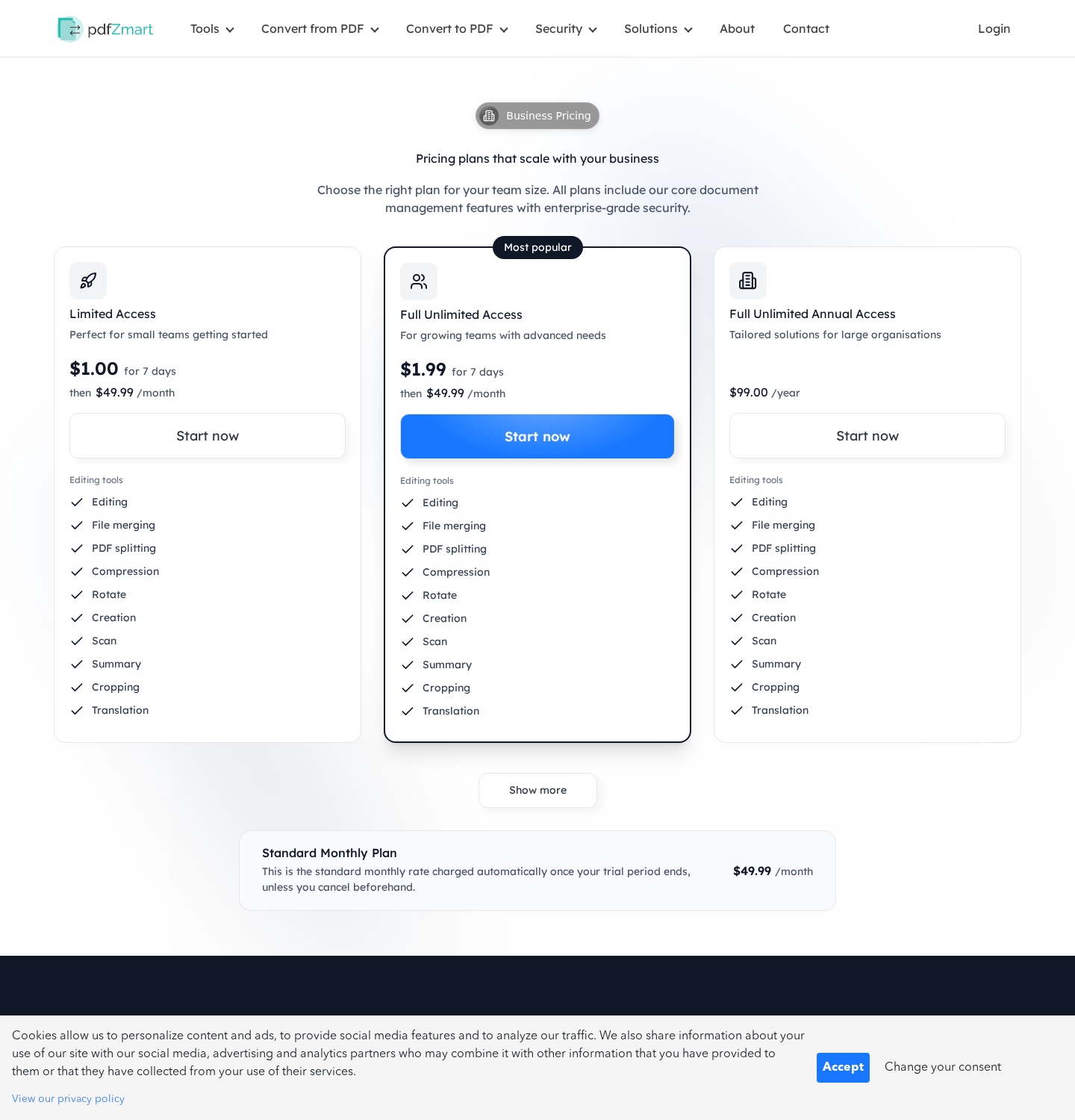
PDFzmart offers online document editing and conversion. Its English pricing page advertises seven days for $1 or $1.99, followed by $49.99 a month.
That changes the purchase completely. Someone needing one file may end up paying for continuing access, whether or not they return to use it.
The billing language does not agree across the site
The terms describe billing every four weeks, then call the same renewal monthly. Those schedules are different, particularly over a full year.
The refund page adds another problem: it calls the trial free, despite the prices displayed elsewhere, and limits its refund offer to seven days.
The complaints describe a recognizable payment problem
A Scamwatcher report includes complaints about unexpected £49.99 charges and difficulty canceling. An October 30, 2026 addition describes continuing billing without usable access.
These are customer allegations, not audited account records. The site’s own recurring-payment terms independently establish the underlying subscription risk.
- Do not treat the introductory fee as a one-off conversion price.
- Cancel unwanted renewal separately from requesting money back.
- Save the offer, receipt, cancellation attempt, and actual statement entry.
- Ask the card issuer about further recurring charges and any disputed payments.
Why a Working PDF Tool Can Still Be a Bad Purchase
You don’t need to prove that the converter is imaginary to question this offer. A real service can still create an expensive, poorly understood commitment.
The distinction matters when asking for a refund. Saying the website doesn’t exist would distract from the actual issue if you successfully downloaded a document.
The stronger question is whether you knowingly agreed to recurring access, at what price, and on which schedule. Your checkout evidence matters more than a general slogan.
PDFzmart’s current pricing page does display renewal amounts. That prevents a fair investigation from claiming the subscription is absent everywhere.
It doesn’t tell us what every customer saw months earlier, what an advertisement emphasized, or how clearly a particular payment screen presented consent.
If your receipt and screen capture show something different, keep them. A redesigned page cannot explain away a specific earlier transaction.
For someone who only wants a single PDF task, the recommendation is straightforward: avoid a renewing trial unless you deliberately want the ongoing service.
How the PDFzmart Trial and Renewal Work
Step 1: A document task brings you to a paid-access offer
The homepage promotes editing, merging, signatures, compression, and conversion. These are ordinary document functions, presented as a convenient online workspace.
The immediate goal is usually concrete: download a converted file, finish a form, or send a document before a deadline.
That urgency makes the small starting price feel like a simple transaction. But the price belongs to a period of access, not necessarily one finished file.
Before paying, identify what the button authorizes. A seven-day plan and a single-document purchase should not be treated as interchangeable.
Step 2: The introductory period opens a recurring arrangement
The displayed limited-access trial costs $1. The unlimited version costs $1.99. Both lead to the same advertised $49.99 recurring price.
The terms also describe an annual $99 option without automatic renewal. That is a different plan, not proof that a trial customer chose annual access.
Currency needs attention. The terms mention charges in pounds or euros according to the customer’s payment method; British complaints describe £49.99, not $49.99.
Use the currency printed on your own receipt. Converting every reported amount into US currency would misstate what individual customers paid.
Step 3: Renewal can arrive after the file is already forgotten
Completing the conversion doesn’t cancel the account. Neither does closing the browser, deleting the downloaded PDF, or deciding you won’t use the tool again.
The contract says cancellation is available inside the subscriber area. Until that arrangement ends, the company describes continuing charges.
This is where one-off expectations become expensive. Three $49.99 renewals total $149.97, before counting the introductory payment.
That calculation illustrates the exposure, not an assertion that every account receives three charges. Compare it with your actual transaction history.
Step 4: Cancellation and refund requests become separate jobs
Canceling should stop an unwanted future commitment. A refund request addresses money already taken. Submit both when both apply to your situation.
The refund page offers repayment within seven days of purchase and says requests after that period won’t be processed under that policy.
Its trial description is inconsistent with paid introductory access. Keep that page alongside your receipt rather than accepting an unexplained rejection as the final answer.
Contract wording doesn’t decide every legal or card-network dispute. Applicable consumer rights and the circumstances of consent may create additional routes.
Monthly Billing Versus Every Four Weeks
Look closely at the period, not just the amount. A calendar month varies in length; four weeks is always 28 days.
Twelve $49.99 payments total $599.88. Thirteen payments at that price total $649.87. The difference is a whole additional charge.
A repeating four-week cycle is roughly thirteen billing periods per year. The exact statement dates depend on when the subscription started and how renewal was implemented.
This doesn’t establish which schedule PDFzmart used for your account. It explains why the conflicting descriptions need a written answer.
Ask support to identify your plan, renewal interval, next billing date, currency, and consent record. A generic link to terms is not a personalized billing explanation.
Also distinguish a pending authorization from a completed charge. The terms mention a possible one-month preauthorization; your bank can explain what actually posted.
Don’t ignore a pending amount, but don’t count it twice if it later becomes the same settled transaction.
The Company, Support Route, and Document Responsibility
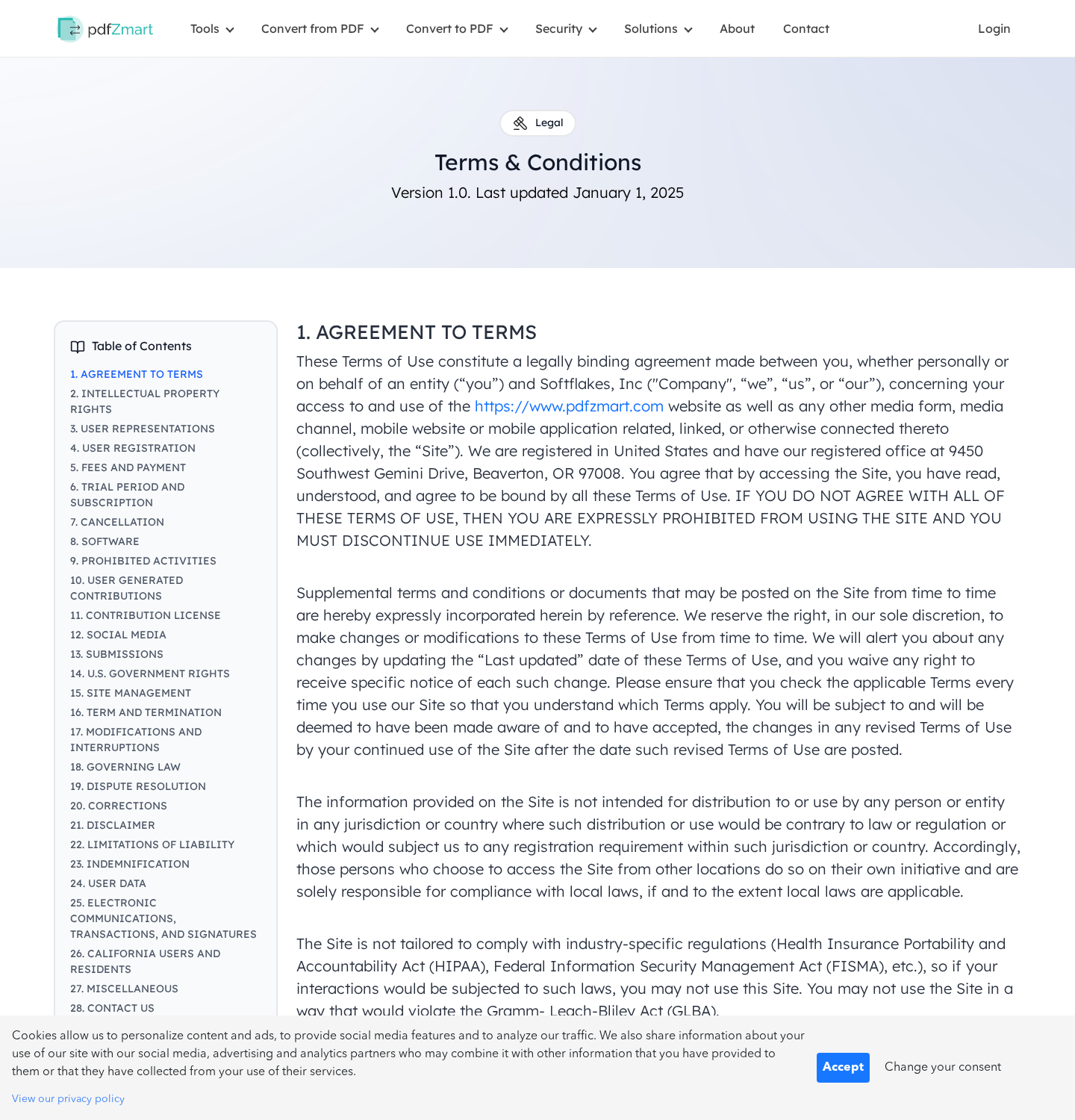
The terms name Softflakes, Inc
PDFzmart’s terms identify Softflakes, Inc and give a Beaverton, Oregon address. That is the operator declared by the website.
Record that name with the statement descriptor. A brand, legal entity, and payment description can differ, but the merchant should explain the relationship.
A published address is not a tested cancellation channel
The listed address is 9450 Southwest Gemini Drive, Beaverton, OR 97008. It should not be mistaken for proof that staff handle cancellations there.
Use the documented account and support routes first. We haven’t mailed a request, visited that address, or independently authenticated a staffed office.
Use the account area and keep a written trail
The terms publish support@pdfzmart.com and point subscribers toward cancellation in their account area. The contact page also provides a request form.
Those are published routes, not a successful support test. Reports of failed contact deserve attention, but they don’t establish that every message goes unanswered.
Your uploaded file creates a separate privacy question
A refund dispute concerns billing. Uploaded documents can contain identity, employment, financial, or medical information, which deserves its own consideration.
The terms say the service isn’t tailored for certain industry-specific compliance requirements, including HIPAA. Don’t infer suitable sensitive-document handling from a generic security badge.
What the Customer Reports Do and Don’t Show
The Scamwatcher thread contains repeated descriptions of a small initial payment followed by a much larger renewal. Some contributors say they couldn’t reach cancellation support.
Others describe obtaining help from their bank. These accounts are useful warning signals, especially because they match the subscription structure published by the site.
They aren’t a guarantee that your bank will reverse a payment. Nor do they establish that every subscriber was charged without consent.
The central finding doesn’t depend on calling every reviewer right: the recurring arrangement is real, and the price, timing, and refund wording require careful attention.
Search results may also confuse PDFzmart with similarly named PDF services. Match the domain, receipt, and statement entry before contacting a different company.
Don’t send a full bank statement or private file to a stranger offering cancellation help. Share only the minimum information needed through a verified channel.
What to Do If PDFzmart Charged You
-
Identify the payment before disputing it. Record the merchant description, date, currency, amount, and whether the charge has settled.
Find the original conversion receipt and account email. Check whether another authorized cardholder started a trial, without assuming that settles a consent dispute.
-
Cancel the unwanted subscription promptly. Open the service through the address you independently checked, not a fresh refund link sent by an unknown caller.
Use the subscriber area and save its confirmation. If the control fails, capture the error and send a written cancellation request to the published support address.
-
Request a specific refund. List the payments you dispute and explain the issue: unclear renewal consent, continued billing after cancellation, or unusable access.
Ask for written confirmation that future billing has ended. Requesting only a refund can leave the recurring arrangement unresolved.
-
Speak to your card issuer without waiting indefinitely. Explain the introductory payment and later renewals accurately, including any cancellation attempts.
Ask about stopping recurring merchant charges and the applicable dispute deadline. Replacing a card is not always enough to end an underlying payment arrangement.
-
Keep the original evidence. Save emails, pricing screenshots, terms, receipts, account errors, and cancellation confirmations together.
Redact unrelated transactions when supplying evidence. Your issuer needs the relevant payment history, not an unrestricted copy of your financial life.
-
Separate account closure from document cleanup. Download anything you legitimately need, then request information about stored files and deletion through the service’s privacy process.
Deleting an account before obtaining billing records can make the dispute harder. Preserve those records first.
Make the Billing History Easy to Follow
A useful complaint can fit on one page. Put the introductory payment first, then each later charge, followed by your cancellation and refund requests.
For every payment, record the posting date and currency. Don’t mix a bank’s currency conversion fee into the merchant’s advertised subscription price.
Distinguish a request you sent from a confirmation you received. A message asking to cancel and a reply confirming cancellation establish different parts of the timeline.
If support says you canceled too late, ask which renewal date it used. Compare that date with the monthly and four-week wording.
If the reply says you used the service, explain what you actually dispute. A completed conversion doesn’t automatically answer whether recurring consent was clear.
If you couldn’t access the account, record the failed route and any error. Avoid repeatedly starting new paid accounts while trying to locate the first subscription.
Keep the company’s full response, even when it refuses repayment. A reviewer needs the actual reason, not just your summary that support was unhelpful.
Finally, retain proof that any promised refund posted. An email saying a refund was approved is not the same as the money reaching your account.
This organized record helps you explain the problem without guessing about motives or claiming that unrelated PDF businesses are responsible for the same payment.
Before Paying Another Online Converter
Start with the task you actually need. Rotating a page or printing to PDF may already be possible in software on your computer.
Check available functions before uploading a private document anywhere. You may not need an online account, a trial, or a recurring payment.
If a paid service is necessary, read the final payment screen before uploading sensitive material. Look for the future amount as carefully as the starting price.
Write down the cancellation deadline and how to cancel. An offer that requires urgent payment but leaves those answers unclear isn’t a good choice.
For confidential workplace documents, follow your employer’s approved-tool rules. A convenient conversion website isn’t automatically authorized to receive customer records or internal files.
A bank dispute, cancellation, and privacy request solve different problems. Handle the parts that apply without paying a third party to supposedly unlock a refund.
Frequently Asked Questions
What is the PDFzmart charge on my statement?
It may relate to recurring access after a document-conversion trial. Match the entry with your receipt and account before deciding which payments to challenge.
Is PDFzmart just a one-time PDF payment?
Not for the advertised trial plans. The pricing page states that introductory access renews at $49.99; other currencies should be checked against your own offer.
Does PDFzmart bill monthly or every four weeks?
Its pages use both descriptions. Ask for your account’s actual schedule and compare it with posted transactions instead of assuming those periods mean the same thing.
Where does PDFzmart say I can cancel?
The terms identify the subscriber area. Keep proof of cancellation, and document any failure before contacting support and the card issuer.
Will canceling automatically refund earlier charges?
No. Request repayment separately. The published refund policy describes a seven-day offer, while any additional rights depend on the transaction and applicable protections.
Do I need antivirus software because I used the converter?
A subscription charge alone is not evidence of malware. Focus on billing and document privacy unless you separately downloaded suspicious software or observed device problems.
The Bottom Line
Don’t buy a renewing PDFzmart trial for a task you expect to pay for once. The ongoing price and conflicting billing descriptions make that a costly mismatch.
If you’ve already been charged, end unwanted renewal, request the disputed payments back, and contact your issuer with the saved evidence before deadlines pass.

Join the discussion
0 commentsShare your experience or ask a question about this article.
Discussion
Start the conversation
Have a question or something useful to share? Add the first comment.