

The envelope is not from your hospital. It is from a company you have never heard of. PerYourHealth. There is a balance. There is a due date. There is a website printed in the same ink as the rest of the bill.
That is why people search PerYourHealth scam after dinner. The name does not sound like a clinic. It sounds like a stranger asking for a card. You had the MRI. You sat in the ER. You never met a billing company called that.
This is the same pattern as the other medical-bill lookalikes. A real visit. A third-party name. A page that looks close enough. Then a card that never reaches the doctor. If the envelope is already on the table, keep it. Do not type the address from the letter until you know who printed it.
Overview
The trap is not that PerYourHealth is fake. The official portal at peryourhealth.com is a real third-party medical billing desk used by U.S. hospitals, physicians, labs, radiology groups, and some EMS departments. It sits under Change Healthcare, now part of Optum. Patients often do not recognize the name. Copies sell that confusion.
What they take is ordinary and expensive. A card number. A bank routing line. The insurance ID on your card. Your date of birth. The account number from a visit you actually had. If a callback gets far enough, they will ask for a Social Security number and call it a file update.
How they get it is simple. They stand next to a name you already saw on paper. A lookalike domain. A mailed statement that already knows the date of service. A voice that says it is billing support and needs one more field to keep you out of collections. You are not being sold a supplement. You are being sold a bill you think you already owe.
After you click or pay, the money does not go to the hospital. It goes to whoever built the copy. Your card is live. A second “final notice” can follow. The provider still shows a balance. The clone already has enough of your visit to try again next month.
The lookalike in the address bar
The pitch is a page that wears the same name as the real desk. You type PerYourHealth because the bill told you to. Search does the rest. The first result can be a site that is not the portal. The title still says pay your bill. The logo still says PerYourHealth. The address bar does not end in .com.
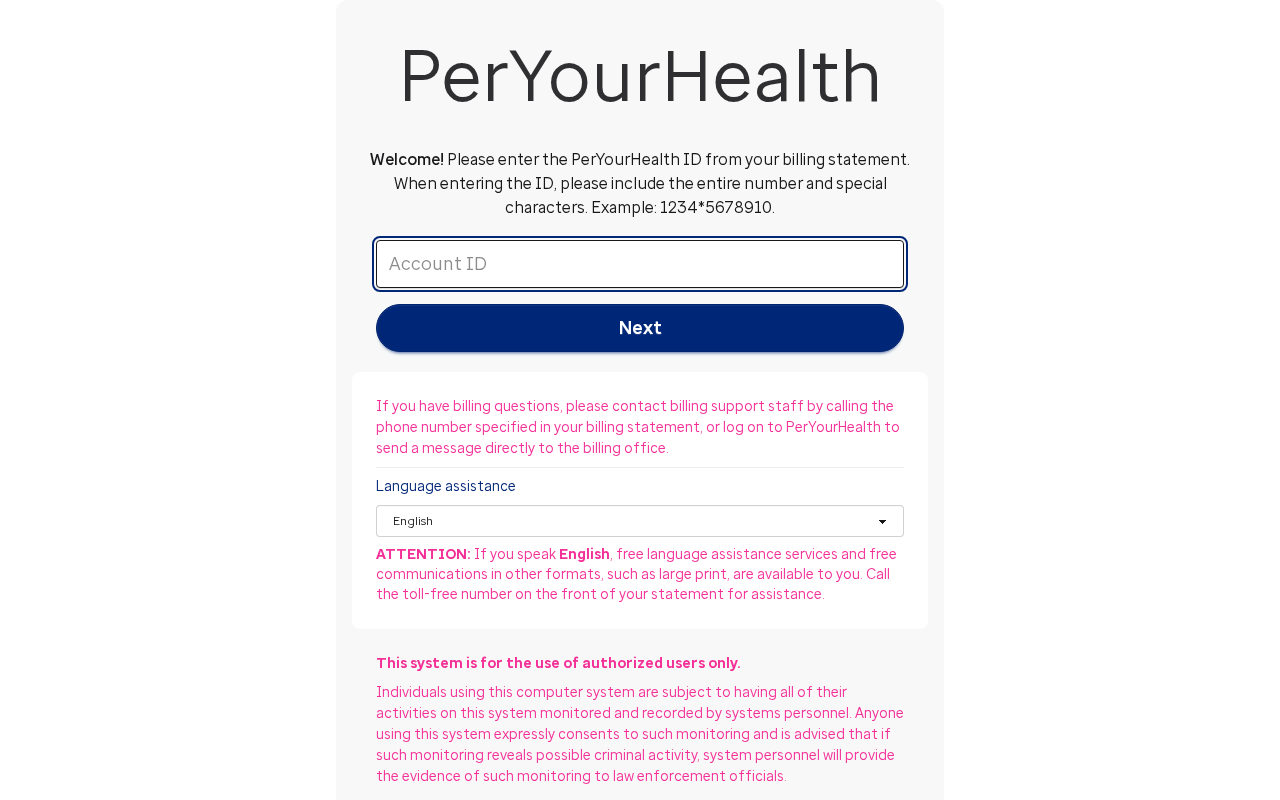
That is the trick. The official login is a quiet white card. It asks for the PerYourHealth ID from your statement, including special characters, with an example like 1234*5678910. It tells you to call the number on that statement if you have a billing question. The footer on the official login is Optum. There is no gaming ad. There is no “Click Here” banner.
The copies are louder. peryourhealth.today sits on the same brand. The masthead uses the brand. The headline says pay at the official .com. Under that sits a “Click Here” strip with an AdChoices mark, then ads for credit cards and gaming hardware. It is not the payment desk. It is a lookalike that sits on the name so a stressed patient lands there first.
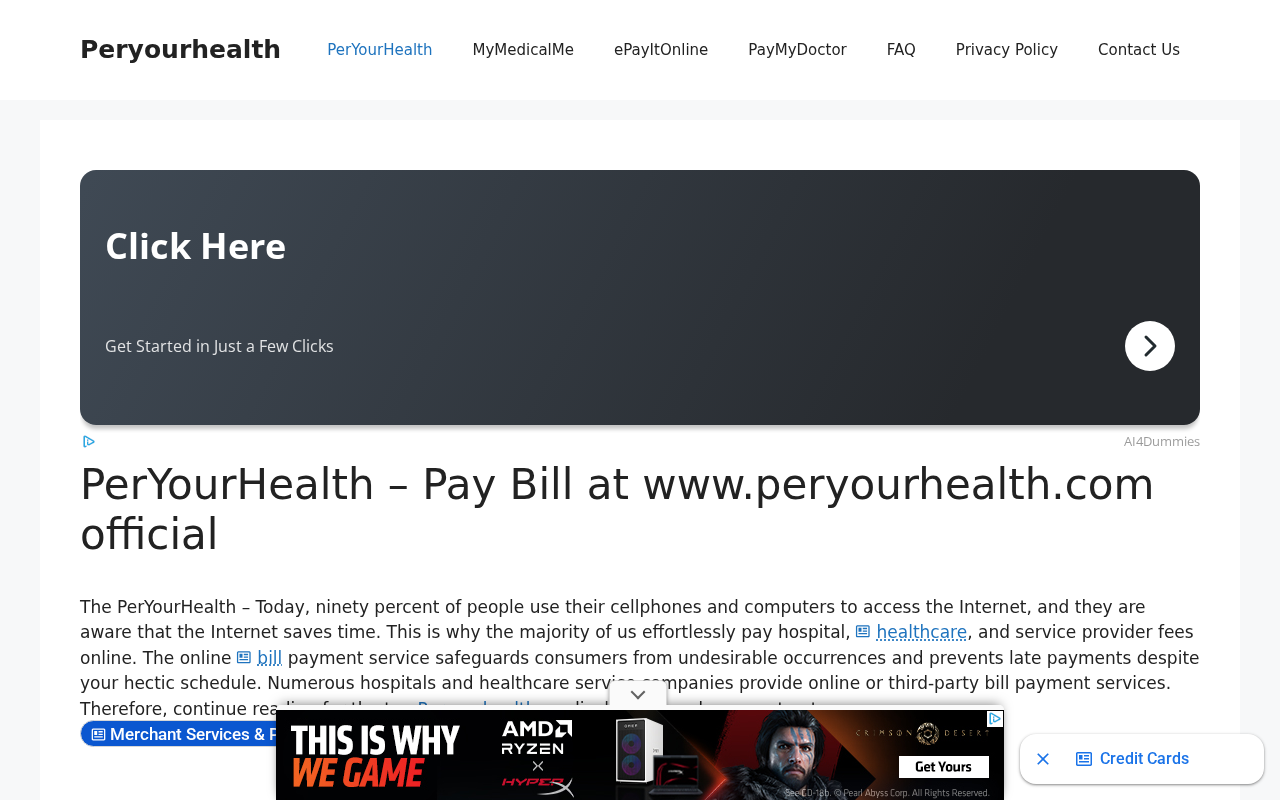
The same pattern is live on other endings. peryourhealth.cc presents itself as a login guide and still uses the brand in the address bar. Nearby unofficial pages on .io and .org do the same job: they harvest the search, talk about paying a bill, and are not the Change Healthcare portal. Type the official address yourself. Do not trust a result that only borrowed the name.
A historical clone is documented. In WIPO case D2022-0063, Change Healthcare Operations asked for peryourhealth.net. The panel found a site built to mimic the real portal, with a “Pay Your Bill” button that sent people to another copy and a PayPal page used to take patient data and money. The domain was ordered transferred on 7 March 2022. That address is no longer a site. The method did not retire with it.
The paper bill that already knows the visit
The pitch on paper is worse than a random spam email, because it can be right about the day you were in the building. Date of service. Doctor or lab name. An insurance line. A patient-responsibility total. A “final request” stamp. You look at the visit and think, yes, that happened. Then you look at the pay-to line and do not recognize it.
That is the trick. Stolen claim data, a leak, or a reused statement layout can put a real visit on a fake invoice. The envelope wants you to treat accuracy as proof of the sender. Accuracy is only proof that someone saw a claim. It is not proof that the lockbox on the letter is your hospital.
BBB Scam Tracker report 1060023, filed 16 September 2025 from New York, describes three bills for hospital lab work from November and December 2024. The latest was a final request. Dates and amounts were largely right. The writer already had a payment plan with the hospital for those same charges.
Hospital social work, Patient Financial Services, central billing, and the lab department all said they do not use PerYourHealth and to keep paying the hospital. The phone desk still asked for an insurance number.
BBB Scam Tracker report 1025919, filed 29 July 2025 from North Carolina, describes three 2025 statements for 2024 doctor and lab work, with insurance payment lines and a remaining balance. The writer said those claims had already been paid in 2024. BBB tagged that file phishing and listed a callback of 737-802-8086. A printed official domain on a letter does not make the letter official. Anyone can typeset .com.
Some paper is real and still confusing. A radiologist, a pathologist, an anesthesiologist, or an ER physician may bill on a different letterhead from the hospital. That is a split bill, not automatic proof of fraud. The test is the same either way. Call the provider from a number on the provider’s own site, not from the sheet in your hand, and ask if they use this portal and if that balance is theirs.
The callback that wants the rest of your file
The pitch on the phone is urgency with a badge. Billing support. Third-party services for the hospital. Collections in ten days if you do not confirm. They already have your name, address, and date of birth, so the first answers feel like a verification you started. Then they need the insurance number. Then a card “to post the payment today.”
That is the trick. The first fields you confirm teach them you will keep talking. The next field is the one they did not have. Report 1060023 is explicit about this. The writer confirmed name, address, and date of birth, then refused the insurance number. The hospital, on a number the writer found independently, said the desk was not theirs.
A real billing office can wait while you hang up and call the clinic back. A copycat cannot. If the voice gets sharp when you say you will verify with the doctor’s office, that is the tell. Gift cards, crypto, wire, Zelle, or a “processing fee” before they will “release” a hold are not how a hospital posts a copay.
The Federal Trade Commission and the Better Business Bureau have the same short instruction on unexpected medical bills. Treat the inbound number as untrusted. Look up the provider yourself. BBB’s medical-bill scam alert is blunt: a collections voice that will not name the provider, or a number on a letter that does not match the clinic, is a reason to stop, not a reason to pay faster.
How The Billing Portal Works
You need the split in your head before you open a browser. PerYourHealth the product is a payment window. PerYourHealth the search result is a crowd. Only one of those is the desk your provider contracted.
The official desk is a .com login, not a brand in Google
The official login is a single account-ID field and a Next button. It asks you to enter the PerYourHealth ID exactly as printed, special characters included. Billing questions go to the phone number on your statement, or to a message after you are in the account. Language help is listed in a long menu. The legal line on the current page is copyright 2026 Optum, Inc., with a privacy policy. That is the portal.
Change Healthcare has said as much in public filings about the mark. The WIPO decision records that PERYOURHEALTH payment portals have been offered to medical practices since 2002, that the .com was first registered in 1999, and that patients logged in more than three million times between 1 July 2019 and 30 June 2020. McKesson assigned the mark to Change Healthcare. Change Healthcare is now part of Optum, which is part of UnitedHealth Group. The name is old.
The confusion is new every time a patient sees it for the first time.
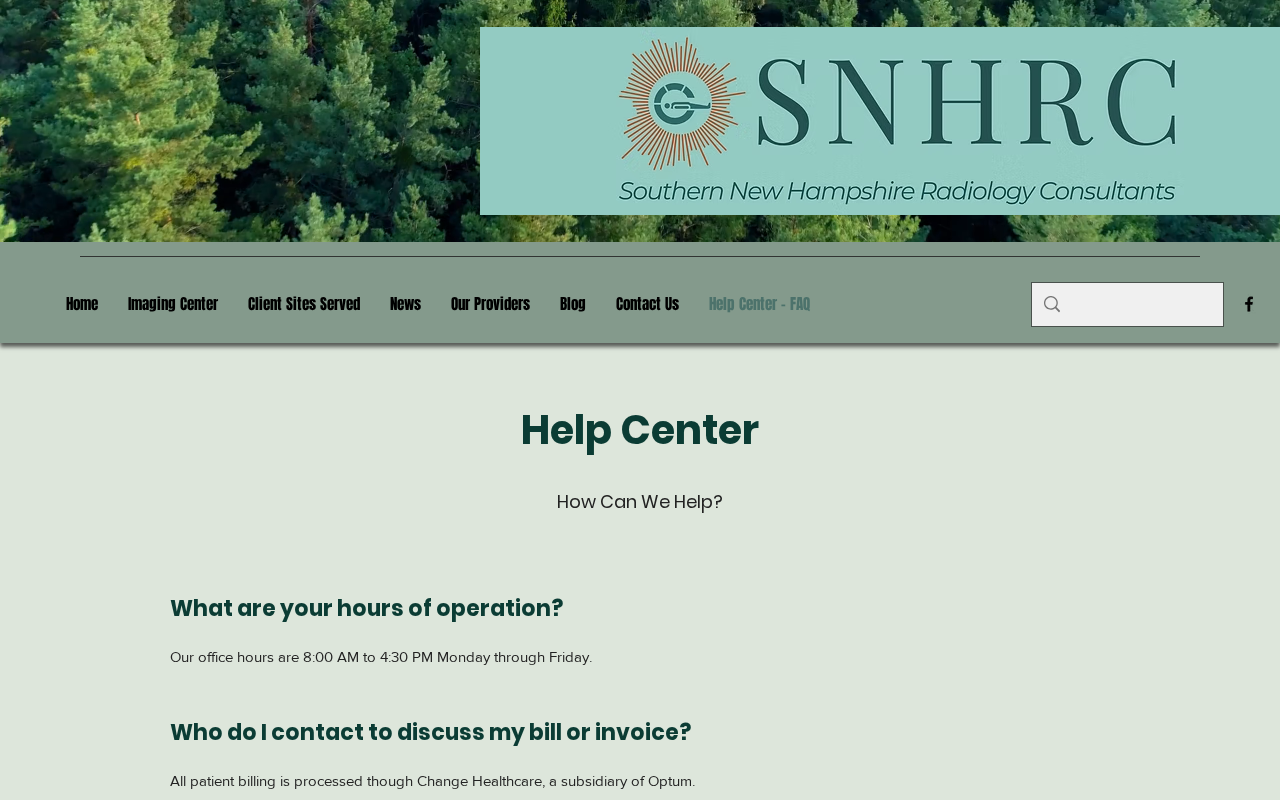
Providers put that address on their own sites when the contract is real. Southern New Hampshire Radiology Consultants tells patients all billing is processed through Change Healthcare, a subsidiary of Optum, and that online pay is at peryourhealth.com with the Access Key from the mailed statement. Their FAQ also explains the two-bill problem: the hospital bills the technical piece, the radiology group bills the read. You can owe both without being double charged for the same line.
The City of Willard, Ohio, does the same for older EMS runs. Its fire and EMS billing page names Change Healthcare as the third-party billing agency, lists 1-866-631-2658, and sends patients to peryourhealth.com with the account number from the statement or a registered user ID. That is what an official referral looks like. It lives on the city’s own domain. It does not arrive as a surprise text with a shortened link.
Bearden Medical Clinic publishes a patient page that says the same thing in plainer language. Pay online at the official .com, or by phone with the account number or access key on the statement. If the site is down, use the provider, not a random lookalike that appeared under the same search.
Why a stranger’s name is on a real visit
Hospitals do not always bill the professional piece. The radiologist who read the scan may be a private group. The pathologist who signed the biopsy may be a contracted lab. The anesthesiologist in the OR may be a separate practice. EMS may use an outside billing vendor. Each of those groups can send its own statement. If that group uses Change Healthcare’s patient-pay tool, the letter says PerYourHealth.
That is why you can leave a hospital with a $0 patient estimate and still get a $214 professional bill six weeks later. It can be legitimate. It can also be a copy of a legitimate layout. The name on the envelope does not settle it. The provider does.
Complaints on the Better Business Bureau mix both problems, and that mix is part of why the trap works. On the Alliance Pathology Consultants complaint file, one writer said they were paying an Anesthesia Services PA balance on the official .com and then hit months of outage messages, including a leftover $40 they could not post. Another writer described a 19 February 2024 bloodwork bill for an 28 November 2023 visit. Dates and some tests matched.
Insurance in the UCHealth app showed $3.15 left. The PerYourHealth totals did not, and the writer said the bill listed a fake insurance payment. That same complaint said the new site “they are morphing to” was peryourhealth.today, and that the page looked like a generic builder, not a card desk.
Read that file as a warning, not as a verdict on every statement. Outages, slow posting, and a third-party name can make a real bill feel like a scam. A lookalike can make a fake bill feel like a real one. You will not sort those from the logo. You sort them from the clinic that treated you and from the Explanation of Benefits in your insurer’s own app.
When the real systems go dark, copies get louder
On 21 February 2024, UnitedHealth Group told the SEC it had isolated Change Healthcare systems after a suspected intrusion. The outage ran for weeks. Pharmacies, hospitals, and billing desks went dark across the country. ALPHV/BlackCat was widely reported as the ransomware group. Patients who already had a PerYourHealth balance hit error pages and “closed due to an outage” recordings. That is a real operational mess. It is also a gift to anyone selling a spare login.
If the official page will not load, do not keep Googling until something with the same name answers. Call the provider from the number on the provider’s site. Ask how they want the balance paid while the vendor is down. A mailed check to the lockbox on a statement the clinic confirms is slower and safer than a “new” portal that appeared the same week the old one broke.
The official login does not show a bill until you are in the account. There is no public sample statement sitting on the open web, which is why fakes invent one. If a search result shows a full bill, a Pay Now button, and a domain that is not peryourhealth.com, you are not on the portal. You are on a page that wants the next click.
What To Do If You Got a Bill
Do not pay from panic. Do not ignore a real balance either. Work the letter like a claim, not like a countdown.
-
Keep the paper and photograph it. Front and back. Envelope too.
Write down the account number, the provider name as printed, the date of service, the amount, and every phone number and web address on the sheet. If a text or email came with it, screenshot the full header, not just the pretty logo.
-
Call the provider from a number you look up. Use the hospital, clinic, lab, or radiology site, or the after-visit summary they already gave you. Do not use the number on the suspicious bill as your first call. Ask three things. Did I have this service on this date. Do you use PerYourHealth or Change Healthcare for patient pay. Is this balance still open on your side.
-
Open your insurer’s own portal. Find the claim and the patient-responsibility line. If the insurer shows $0 and the letter wants $480, stop. If the insurer shows $214 and the letter matches the provider the clinic named, you may have a real professional bill. Match the claim number if you have one. Do not match a feeling.
-
If the clinic says the bill is theirs, type the official address yourself. peryourhealth.com. Nothing else. Enter the ID exactly as printed, including the star or other mark. After login, the provider name on the next screen should match the statement. The official login tells you to call the number on the statement if it does not. If you never get that match, back out. Do not add a card to a page that will not name the doctor.
-
If the clinic says they do not use this vendor, treat the letter as hostile. Do not call the printed callback to “clear it up.” Do not give an insurance number, a card, or a date of birth to a voice that already failed the clinic test. Tell the provider you have a copycat bill so they can flag the account. Keep paying any plan you already have with the hospital.
-
Refuse the payment methods a hospital never uses. Gift cards, crypto, wire, a peer-to-peer app, or a request to “verify” a one-time code are not patient-pay. A real portal takes a card or a bank account after you are in the account, or a check to a lockbox the clinic confirms.
-
If you already typed a lookalike or already paid, move the money first. Call the card or bank and ask for a dispute. Say you paid a medical-bill lookalike, not the provider. Ask them to block further charges from that merchant. If you gave an insurance ID or a Social Security number, put a fraud alert on your credit and tell the insurer.
Then tell the real provider so they do not send the same balance to collections while you wait on the bank.
-
Write it down for the next person. File at ReportFraud.ftc.gov. Add the letter to BBB Scam Tracker if it was a copycat. If a domain other than the official .com asked for a card, include that address. Keep your own copies. The report is not a refund. It is a trail.
If a family member forwarded the bill in a group chat, send them this page instead of a “just pay it” shrug. These letters travel in families the same way the ads do. One person who already had the MRI becomes the proof for everyone else.
One more habit that saves a second loss. After any medical visit, bookmark the provider’s billing page and your insurer app. When a third-party name arrives later, you already have a clean number. You are not searching under pressure. The copycat needs you to use their number, their link, and their clock.
The Bottom Line
PerYourHealth on peryourhealth.com is a real Change Healthcare / Optum patient-pay portal. Hospitals, radiology groups, labs, and some EMS departments send people there with an ID from a statement. The name is ugly and easy to forget. That is not a reason to call the official desk a scam. It is the reason fakes work.
The lookalikes are the other half of the story. A .today page with a Click Here ad strip. A .cc guide that still wears the brand in the address bar. A .net clone that, in 2022, funneled “Pay Your Bill” into a phishing payment page until WIPO ordered the name transferred. Paper that knows your visit and still is not the hospital. A callback that already has your date of birth and now wants the insurance number.
If the envelope is in your kitchen, do the unglamorous thing. Call the provider from the provider’s own site. Match the claim in your insurer app. Type the official .com yourself, or do not pay online at all. The bill can wait long enough for that. The clone is counting on the idea that it cannot.

Reviews & discussion
0 commentsShare a firsthand experience, or ask a question.
Community reviews
PerYourHealth
Moderated reader experiences, not an editorial verdict.
Start the conversation
Have a question or something useful to share? Add the first comment.