


You can see a Polymarket price in a news story, open the website and still be looking at a different service from the one that holds your account.
That distinction matters if a position is still open, a withdrawal hasn’t arrived, or a message tells you to move your money to keep access.
Overview
One name appears on two different services
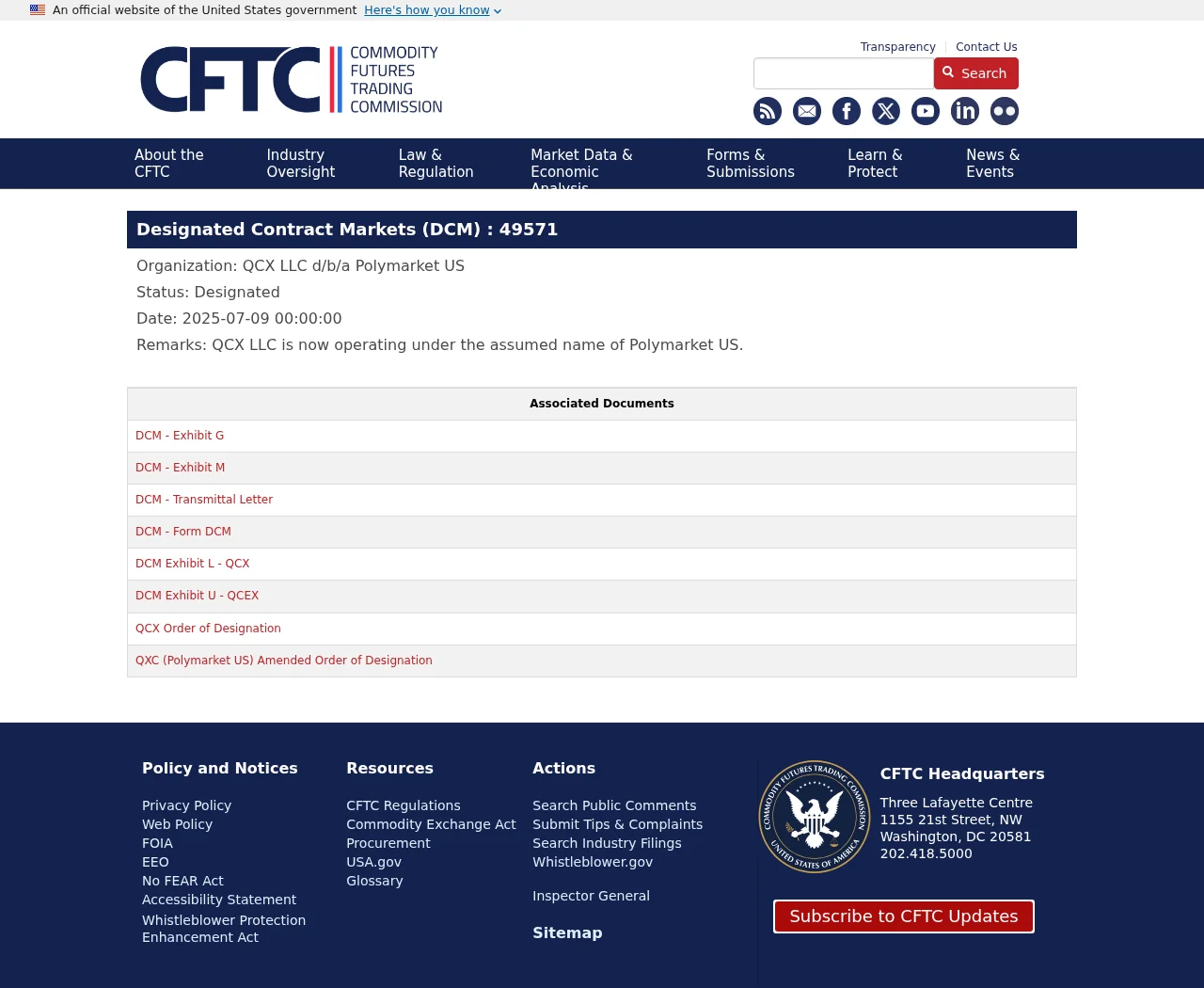
The U.S. exchange is QCX LLC, doing business as Polymarket US. The Commodity Futures Trading Commission lists that entity as a designated contract market.
The international website says it operates independently of the U.S. exchange and isn’t regulated by the CFTC. The company describes their accounts and support teams as separate.
The answer can change at a state or national border
Michigan announced a November 25, 2026 deadline for closing remaining sports positions covered by its U.S. agreement. France ordered access blocked to the international website in July.
Those actions aren’t interchangeable. Michigan’s announcement concerns particular contracts on Polymarket US. France’s decision names the international operator and website.
Identify your account before you trust a notice
Go back to the account you originally used. Check its legal name and transaction history, then find support from that account, not from a message offering to move funds.
- New to the service: don’t deposit based on a federal registration screenshot or a link in a social post.
- Already have a balance: keep the account and transaction records before contacting the right support team.
- Received an unsolicited recovery offer: don’t pay a release fee, share a recovery phrase or approve a wallet request.
Which Polymarket Holds Your Account?
QCX LLC is the company on the U.S. exchange register
The CFTC’s designation record lists QCX LLC under its Polymarket US trade name. That’s a check on the exchange’s legal identity, not a certificate for every similarly named platform.
The agency also lists QC Clearing LLC under the name Polymarket Clearing. The clearing organization and the exchange have separate entries. Neither listing certifies a link someone sends you.
Use the legal name from your own account terms or correspondence when you describe the problem. “Polymarket won’t let me withdraw” doesn’t tell support which system to check.
Polymarket.com is the international service
The international site’s own legal page separates it from the U.S. exchange. The Dutch and French regulator notices identify Adventure One QSS Inc. as the operator involved there.
The company’s account comparison says the accounts aren’t linked. The U.S. app isn’t another screen for seeing the same international balance.
If one version shows no account history, first check whether you opened the wrong service or used a different sign-in. Don’t send a second payment to test the explanation.
The 2022 federal case names a different entity
In January 2022, the CFTC settled charges against Blockratize Inc., then doing business as Polymarket. The order imposed a $1.4 million penalty over unregistered event markets.
That settlement wasn’t a revocation of QCX’s later designation. Likewise, the later designation doesn’t erase the old case or extend U.S. exchange status to the international site.
If you’re reading a review from before the U.S. launch, check which entity it actually describes. Older comments about offshore accounts don’t establish how the U.S. account works today.
Your actual account gives you the right contact
The company’s help page lists different support routes for the two services. For an existing U.S. account, the app’s support is one route it gives.
For an international account, use that site’s official help center rather than a U.S. service ticket. Start with a saved sign-in route or account record you already trust.
A public brand name, logo and legal address are easy to copy. Secure contact starts with knowing where you opened the account, not recognizing the image in a message.
What the Michigan, Nevada and New York Actions Actually Say
The federal listing answers who the U.S. exchange is. It doesn’t tell you whether a court order, agreement or state action affects the exact position you’re looking at.
The Michigan Gaming Control Board’s October 28 notice says QCX agreed to stop offering new sports contracts to Michigan customers. Remaining covered positions are due to close by November 25.
The notice puts the deadline at the end of that day in Eastern time. The regulator describes a court-approved agreement, not an instruction to transfer money to another website.
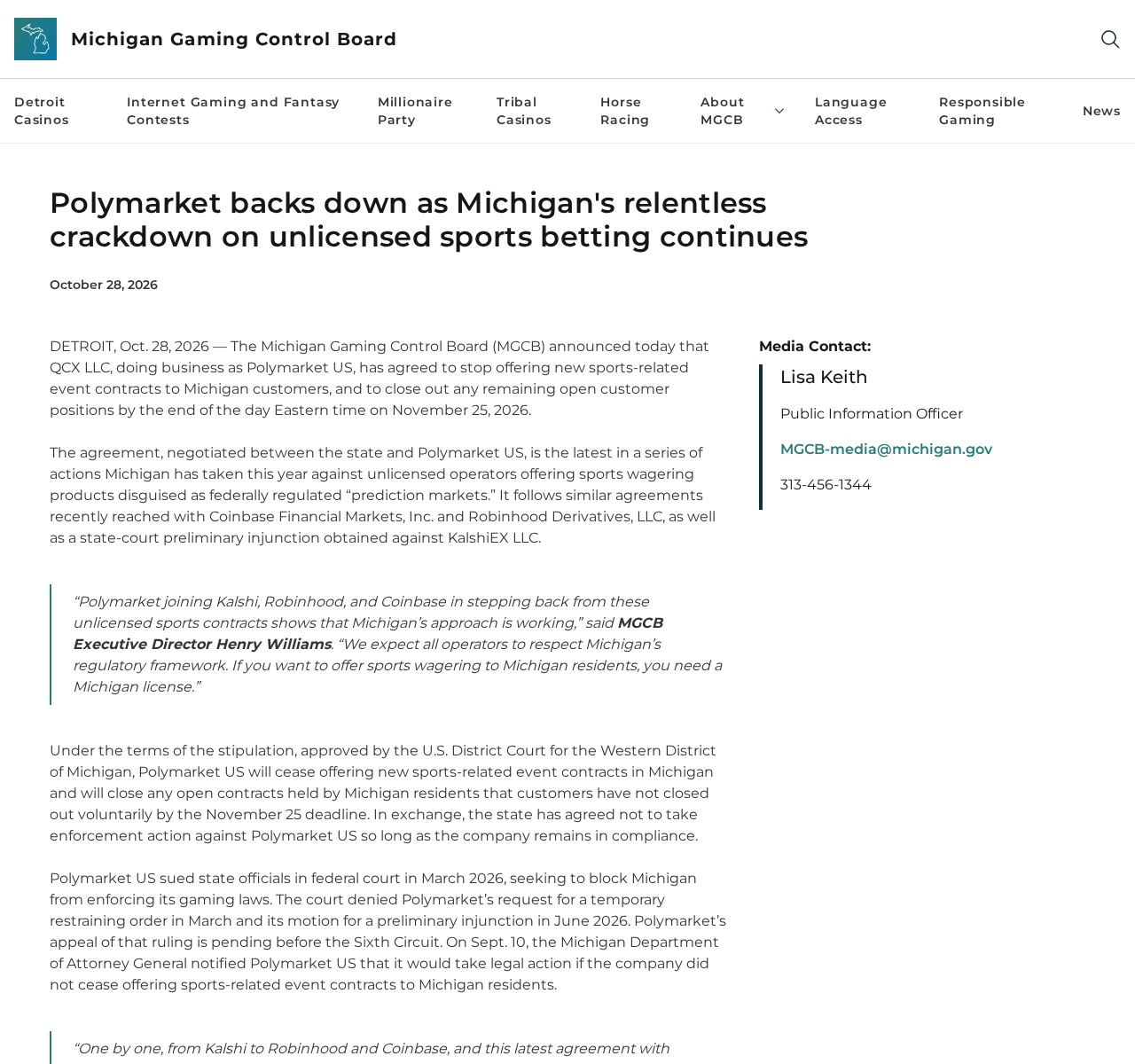
Michigan: preserve records of any open sports position
If this affects you, record the position and its status in your own account. Ask official support how the closure will show up in your account history.
Don’t assume a closure deadline is a withdrawal deadline. The board’s announcement concerns the covered contracts, not a promise that all balances will be paid out that day.
The notice says the exchange will close remaining positions that customers haven’t closed themselves. It doesn’t say how much each person will see credited on their statement.
Ask how any closure was priced and where it appears in the transaction record. Save the statement before and after the change if you need to raise a discrepancy.
It also doesn’t order the international service to act or announce a nationwide shutdown. You don’t need to pay a third party to comply with the Michigan agreement.
Nevada: a preliminary injunction, not a final verdict
Nevada’s gaming regulator lists a May 29 preliminary injunction against QCX on its enforcement timeline. The state’s announcement describes sports, election and entertainment event contracts.
An injunction can affect availability while a case proceeds. It doesn’t mean everyone with a Polymarket account is a victim or that the court has decided every dispute.
Polymarket US’s own safety page says trading is unavailable in Nevada. That is more relevant to a Nevada account than a federal designation record viewed on its own.
New York: a lawsuit seeking relief, not a refund program
In September 2026, the New York attorney general announced a lawsuit alleging unlicensed gambling by Polymarket US. It seeks an order to stop the alleged conduct and to obtain remedies.
Requested restitution isn’t money that readers can claim through an email link. Look to the court or the attorney general for a verified notice if the case changes.
The Michigan agreement, Nevada injunction and New York lawsuit differ in scope and stage. Don’t use a screenshot of one announcement to predict what happens in another state.
Why a Market Can Be Visible Where Trading Is Restricted
France’s National Gambling Authority announced that it ordered French internet providers to block access to the international website on July 16, 2026. Its notice identifies the relevant domains.
The Dutch gambling authority separately announced an enforcement order in February against Adventure One QSS Inc. for offering gambling without a Dutch license. The notice isn’t about QCX’s federal designation.
International access isn’t a simple yes or no. The site’s restrictions documentation distinguishes viewing market data, opening positions, closing them and redeeming after a result in certain places.
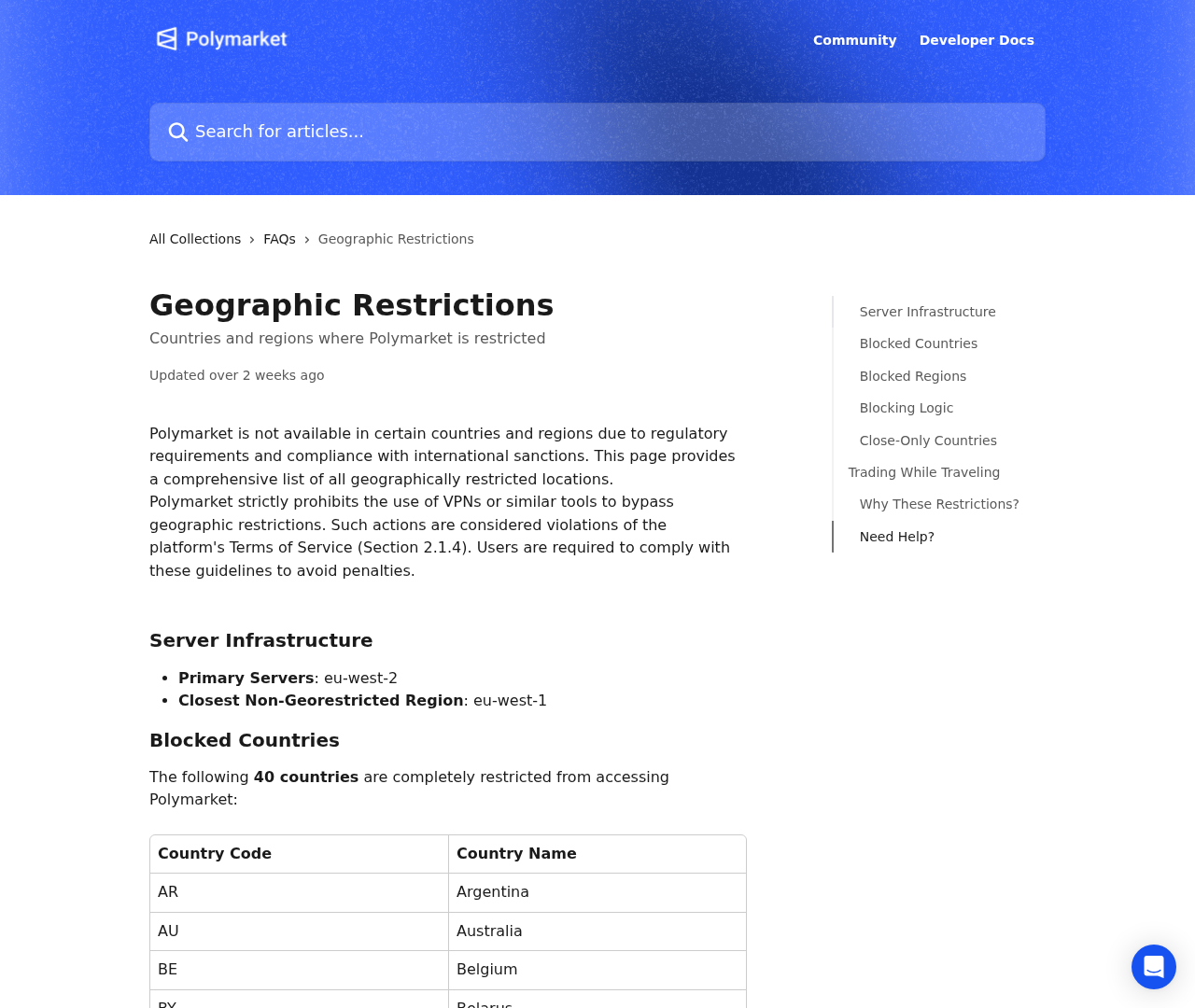
Ontario is one example the help page uses: someone can see market data but can’t deposit or trade, including through the iOS app it discusses.
Germany illustrates a different problem. The same guidance says restricted users with existing positions must wait for those markets to resolve before redeeming. That isn’t the same as closing today.
Don’t treat the fact that a page loads as permission to trade. Don’t use a VPN to bypass restrictions, either. The platform specifically prohibits using one that way.
When your screen doesn’t match the help page, record the error and ask support about the account and position. Avoid posting bank or wallet details in public.
France’s order targeted internet access after the regulator said transaction restrictions hadn’t kept the service out of reach. A website block and a ban on transactions are different measures.
If you’re traveling, note where you were when the error appeared. Ask which account terms apply instead of assuming that your mailing address matches the rule for your location.
Read the Position Before Reading the Balance
An event contract is tied to a specified outcome. Check the contract name and the stated criteria for deciding the result. A headline about the event isn’t those criteria.
A portfolio value can reflect a position before it settles. It isn’t proof that the same amount is available to withdraw. Look for actual settlement entries and available balances.
If the date passes without an entry, ask for the published resolution criteria and whether the position settled. That lets you distinguish a rules dispute from missing payment.
The U.S. safety page also describes self-exclusion and deposit limits. Those controls are for your existing account. An intermediary does not need your login to set them for you.
Polymarket US says those tools affect new positions or deposits, with separate treatment for open positions and available balances. Check which rule applies before interpreting any restriction message.
How to Tell a Withdrawal Problem From a Fake Support Message
A usable case description starts with the action that failed. Closing a position, redeeming an already resolved contract and withdrawing an available balance aren’t the same thing.
Start with your account history, not somebody else’s screenshot. If support says the withdrawal was processed, ask for the transaction reference you can check with the receiving service.
If an on-chain transfer already has a public transaction identifier, preserve it along with the date, amount and network. You don’t need to disclose wallet secrets to provide that information.
On the U.S. side, keep the confirmation the actual account provided. Check the payment provider’s own records if a bank transfer is involved. Don’t infer a freeze from one screen.
A real losing position, a legitimate account restriction and a transfer signed on a fake website require different responses. Tell support what happened, not just what you fear happened.
An unsolicited offer to unlock, migrate or recover a balance isn’t proof of a problem with the real service. Don’t authenticate it by replying to the same sender.
Watch for requests to sign a wallet message to release funds. MetaMask’s signature-phishing guidance explains why an approval can have financial consequences even when no transfer is immediately visible.
If the sender calls it a fee for the state closure or a regulatory payout, verify that claim through the official announcement. Don’t let a deadline rush the decision.
MalwareTips has separately documented a fake Polymarket member-access email that tried to get readers to connect a wallet. That was impersonation, not either official service asking for access.
What to Do If Your Balance or Account Access Is in Question
- Identify which service you used. Compare your own original sign-in, legal terms and order or transfer history. Don’t log in through a new recovery link.
- Keep evidence before changing anything. Record the error, dates, position, balance and support ticket. Hide personal details from any copy you share publicly.
- Check the relevant notice. Look for the legal entity, location, affected contract and deadline. Don’t assume a closure of some contracts affects every balance.
- Ask the correct support team for a written explanation. Ask whether the issue is an open position, a restriction, a pending withdrawal or a transfer already sent.
- Protect an exposed account. If you gave away login details, use the official service to secure it. If you signed a wallet request, follow your wallet provider’s security guidance.
- Escalate through an official channel if unresolved. Use your local regulator’s complaint route or ask your payment provider about an unauthorized payment. Save all replies.
For a complaint involving the U.S. exchange, the CFTC’s contact page lists consumer assistance and tips. A regulator’s complaint process isn’t a promise that you’ll get money back.
If the issue is ordinary account access, start with the account’s own support. If money moved without authorization, notify the relevant provider promptly. Don’t send money to a recovery agent.
Save any messages that demand a new deposit to release a balance. Give them to the payment provider or regulator if relevant. Don’t post the screenshots with personal information visible.
Request a ticket number when you contact support. If another message arrives claiming to handle the case, check for it inside the original account before responding.
Frequently Asked Questions
Is Polymarket US the same service as Polymarket.com?
No. The company describes separate accounts and support teams. QCX LLC operates the U.S. exchange; the international service doesn’t share its CFTC status.
Did the CFTC ban Polymarket everywhere in 2022?
No. Its order addressed Blockratize’s operation and noncompliant markets. Read that case separately from the agency’s later designation record for QCX.
What happens in Michigan on November 25, 2026?
The state says covered open sports contracts must be closed by the end of that day Eastern time. Check your own account for how an affected position is handled.
Does the New York lawsuit mean I can claim a refund now?
No. The attorney general requested relief in a lawsuit. That’s not an approved payment program. Don’t open an unsolicited refund link or pay for early access.
Can I use a VPN if a specific feature is blocked?
Don’t bypass the restriction. Seeing market data doesn’t establish account eligibility. Ask official support what’s allowed for your location and existing position.
Is my money at risk if I signed a recovery request?
It may be. Stop using the recovery page, preserve the request and follow security guidance from your wallet provider. Don’t share your recovery phrase with anyone offering help.
The Bottom Line
Don’t move money based on a Polymarket logo, a regulator’s registration screenshot or someone claiming your balance will expire. Establish which service and rules apply first.
If you’ve already used the platform, save your account records and contact its own support. If the warning came from an unsolicited link, don’t approve anything through it.

Join the discussion
0 commentsShare your experience or ask a question about this article.
Discussion
Start the conversation
Have a question or something useful to share? Add the first comment.