


A caller says your Proximus SIM needs a security renewal. They sound helpful, and a WhatsApp message arrives while they’re explaining what to do.
There’s an app attached. Before you open it, take a closer look at what this supposed renewal actually asks you to change.
Overview
The caller turns a SIM renewal into an app installation
The Proximus SIM renewal scam starts with a false security problem and ends with an attempt to put malicious software on your Android phone.
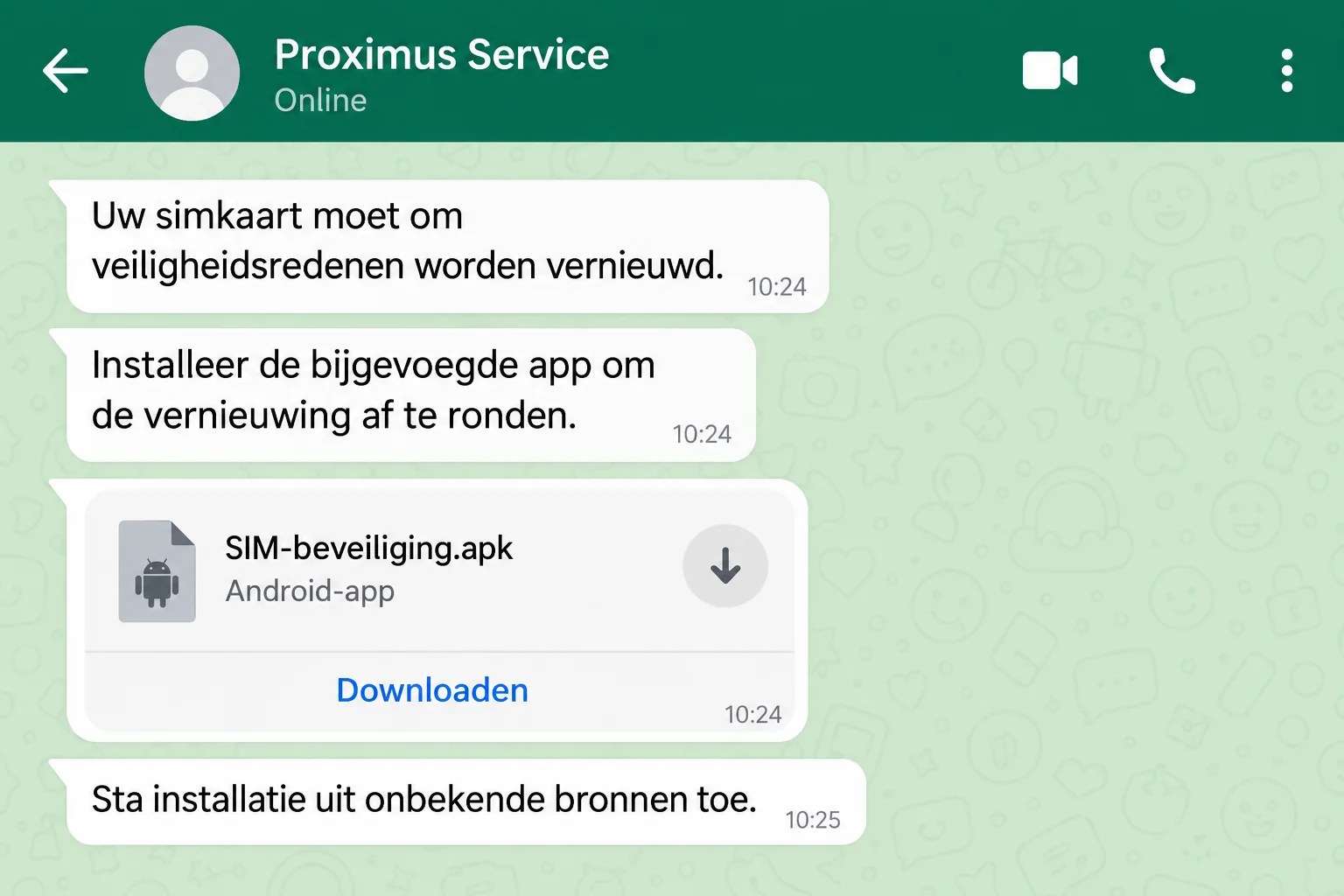
Belgium’s Safeonweb has warned about this specific campaign: callers impersonate Proximus, send an APK through WhatsApp, and tell recipients to permit installation from unknown sources.
The interface above illustrates that approach. It isn’t a recovered conversation, and the attachment name is fictional.
The danger is access to your phone, not an overdue renewal fee
Safeonweb describes attackers taking control of the phone and accessing mobile banking after installation. PINs or itsme approvals can also become part of the deception.
That doesn’t mean every unanswered call or downloaded file has already compromised an account. Installing the app and granting access are much more serious exposures.
Proximus is the impersonated provider. The fraudulent app and the caller’s instructions are the problem, not a legitimate Proximus service.
The warning signs appear before you install anything
- An unexpected caller says your SIM must be renewed for security reasons.
- The supposed update arrives as a WhatsApp attachment rather than through an independently verified support process.
- The file ends in .apk, an Android application package.
- You’re asked to allow unknown installations or disregard a protection warning.
- The caller stays involved while you change settings or approve sensitive actions.
Don’t install that attachment. If you already did, switch off the affected phone and reach your bank from another device before attempting routine cleanup.
Why a SIM Security Story Gets Your Attention
Your mobile number isn’t just for calls. It can be tied to account recovery, delivery messages, bank notifications, and the people who need to reach you.
A warning about losing that connection feels urgent. You may worry that refusing the caller could leave you without service or make an existing security problem worse.
The attacker offers an easy solution at exactly that moment. Stay on the line, open the message, install the update, and the supposed problem disappears.
Notice who controls the explanation. The same stranger invents the risk, chooses the software, and explains away the warning that would normally stop you.
A real concern about your SIM can wait while you contact your provider yourself. You don’t need to let an unsolicited caller supervise your phone.
Professional language isn’t authentication. Someone can understand mobile terminology, speak your language fluently, and still be lying about the organization they represent.
Likewise, a familiar logo or contact name in WhatsApp proves very little. An ordinary account can choose a businesslike display name and send an attachment.
How the Proximus SIM Renewal Scam Works
Step 1: A fake provider representative announces a security problem
The call presents the SIM renewal as necessary maintenance. You aren’t asked whether you want an unfamiliar product, only whether you want your connection to remain safe.
That framing matters. People who would refuse a sales pitch may cooperate with a supposed technician trying to prevent disruption.
You don’t have to establish whether the displayed number was spoofed. An unverified call cannot authorize a security change just because the caller knows the provider’s name.
Step 2: The conversation moves to a WhatsApp attachment
The attacker sends the application while keeping the support story going. The message becomes an apparent continuation of the call, rather than a separate download to question.
An APK is a file used to install an Android app. APK files aren’t inherently malicious, but this unsolicited delivery route is central to the confirmed scam.
Don’t forward the file to relatives to ask whether it looks genuine. Share a screenshot without the attachment if you need help describing what happened.
Step 3: A protection setting becomes the obstacle to remove
Android may prevent the installation or require permission for the app supplying the file. The caller tells you how to get past that barrier.
At this point, the supposed security fix is asking you to weaken a security boundary. You can stop without completing the remaining instructions.
Don’t treat a blocked installation as evidence that you need a different copy. A replacement link from the same caller doesn’t resolve the underlying impersonation.
Step 4: The installed app creates a route toward financial access
Safeonweb’s warning describes control of the smartphone and access to mobile banking. The attack can involve further manipulation around a PIN or an itsme confirmation.
Don’t approve an unexpected banking or identity request to finish a telecom update. Read what the request actually authorizes, regardless of what the caller says it means.
The precise permissions and malware behavior can vary. You don’t need to identify a malware family before treating an attacker-directed installation as an urgent incident.
Why Deleting the App Isn’t the Whole Recovery
Deleting an app doesn’t cancel a transfer that already happened. Changing a bank password doesn’t necessarily remove harmful software from the phone.
Those are separate jobs. First interrupt the attack and contact the bank safely; then follow a trusted recovery process for the device and affected accounts.
Don’t reconnect just to reassure the caller or finish the renewal. Their continued involvement is not part of the solution.
The Three Moments That Change Your Response
You answered, but didn’t install the app
End the conversation and refuse the attachment. Answering a call alone isn’t the same as installing software or authorizing access to your account.
Write down what you disclosed. A mobile number and a bank approval code are not equivalent, and accurate details help support assess the risk.
If the caller learned personal information, expect more convincing follow-up approaches. Don’t assume a second caller is genuine because they mention the first conversation.
You downloaded the file, but didn’t open or install it
Leave it unopened and delete it. Don’t use a file manager to inspect the package or attempt a trial installation to see whether Android objects.
Check whether the installation actually completed if you’re uncertain. A new app icon, an installer confirmation, or changed permissions can help describe events to trusted support.
If you can’t confidently distinguish downloading from installing, explain that uncertainty. Don’t minimize the incident simply because you don’t remember every screen.
You installed it or approved a sensitive request
Treat the phone as potentially compromised. Safeonweb advises switching it off and contacting the bank; use another phone or computer to avoid continuing through the suspect device.
Tell the bank whether you opened its app, entered a PIN, shared a code, or accepted an identity request during the call.
Even if no loss appears yet, prompt intervention can matter. Don’t wait for the next statement or for the caller to admit something is wrong.
Verify the Provider Without Following the Caller
Use contact information you obtained independently, such as your established customer account or the provider’s official website. Don’t use a support link supplied in the suspicious chat.
Explain that someone claimed your SIM required renewal and sent an APK. Ask whether any genuine service action is necessary on your account.
Keep an actual loss of mobile service separate from the caller’s story. If service has stopped unexpectedly, report that promptly rather than assuming the app will restore it.
Proximus publishes digital safety and reporting guidance. You can report messages impersonating the provider without replying to the sender.
Don’t change an account setting to prove you’re cooperating. Verify the supposed SIM problem with Proximus before accepting any instructions.
For shared or work phones, involve the account owner or IT team. Don’t independently reset a managed device and destroy information they need to investigate.
What to Do if You Have Fallen Victim to This Scam
-
Stop the caller’s instructions. Hang up, don’t reply to the WhatsApp account, and don’t approve another request, even if it’s described as reversing the previous one.
Pressure to keep the incident secret is another reason to involve a trusted person, not a reason to continue alone.
-
Switch off the phone if the app was installed. Use a different device to reach your bank and explain the malicious installation before doing everyday banking.
If the phone belongs to an employer, notify its security team too. Follow its containment instructions rather than improvising a cleanup.
-
Ask the bank to protect the affected access. Describe transactions, approvals, exposed codes, and any accounts opened during the call.
Let the bank decide which cards, banking sessions, or payment facilities need blocking. Ask about disputing unauthorized activity and record the incident reference.
-
Recover the device through trusted instructions. Follow Google’s Play Protect guidance and your phone manufacturer’s support, with professional help if you can’t remove the suspicious app.
Malwarebytes can assist with checking supported devices for malicious software. A clean scan alone doesn’t prove that account access or prior approvals are safe.
AdGuard can help reduce exposure to some malicious web destinations afterward. It doesn’t make a WhatsApp APK trustworthy or replace removal of an installed threat.
-
Reset exposed credentials from a clean device. Prioritize banking, email, and any account whose password you typed while the suspicious software could observe your activity.
Review active sessions and recovery settings where available. If an itsme approval was involved, contact its official support and tell your bank exactly what you confirmed.
-
Keep a useful incident record. Save the caller’s displayed number, chat details, approximate times, attachment name, and transaction references without reopening the APK.
Don’t post the file publicly or send it to friends for testing. Report the impersonation through the provider and Safeonweb’s established channels.
-
Report financial loss and reject paid recovery promises. Contact the police if money was stolen, and keep copies of the information you give your bank.
Anyone offering guaranteed recovery for another transfer may be exploiting the same incident. Don’t pay a stranger to unlock your supposedly frozen money.
Keep Recovery From Repeating the Exposure
During recovery, don’t use the suspect phone as your trusted second factor merely because it still receives messages. Tell the bank which device was involved.
If the caller instructed you to enable unfamiliar permissions, list them for the person helping with cleanup. Avoid changing dozens of settings without understanding their purpose.
Google explains that Play Protect can check apps from outside its store and warn about harmful behavior. Keep that protection enabled rather than following an installer’s objections.
If trusted support recommends resetting the device, discuss backups first. Restoring the same suspicious application can undermine the recovery you just completed.
Also ask how to preserve information needed for a bank or police report. The priority is safe containment, not keeping a compromised phone active to collect evidence.
Don’t assume that buying a new SIM fixes a software infection. The caller’s SIM story and the installed application’s access are different parts of the incident.
Likewise, replacing the phone doesn’t automatically reverse a banking approval or invalidate every exposed password. Follow the account-specific instructions given by genuine support.
Once service and accounts are secured, remove the malicious attachment from chats and downloads so nobody helping later accidentally opens it.
A Short Warning You Can Give Someone Else
If a relative received this call, start with the attachment rather than a lecture. Ask whether they installed an app sent through WhatsApp.
That question quickly distinguishes a disturbing conversation from a potentially compromised phone. It also avoids making someone feel foolish before they’ve explained what happened.
Help them reach the bank from another device if installation occurred. Don’t borrow the affected phone to search for support numbers or log into their accounts.
For future calls, agree on a simple pause: no new app, security-setting change, or financial approval until the provider has been reached independently.
Frequently Asked Questions
Does Proximus require a WhatsApp APK to renew a SIM securely?
The confirmed scam uses that claim to deliver malware. Don’t install the caller’s file; verify any actual SIM requirement through Proximus contact details you already trust.
Can this APK attack an iPhone?
The Android package installation described in this warning targets Android. An iPhone user should still reject the impersonation and avoid alternative links or approval requests.
Am I infected just because I answered the call?
Answering alone isn’t the installation step. Risk changes if you installed software, disclosed sensitive information, granted permissions, or approved a banking or identity action.
What if Android blocked the installation?
Leave that protection in place. Don’t enable unknown installations, try another copy, or accept the caller’s explanation that the warning is normal maintenance.
Is deleting the app enough after I used mobile banking?
No. Contact your bank from another device about account exposure and transactions, while separately following trusted instructions to recover the phone.
Can a security scan recover money stolen during the call?
A scan addresses software, not financial recovery. Report the payment to your bank promptly and ask about the available investigation and dispute process.
The Bottom Line
Don’t install a WhatsApp attachment to complete a supposed Proximus SIM security renewal. The documented trap turns a provider call into access to an Android phone.
If you installed it, switch off that phone and contact your bank elsewhere. Protect the money and accounts first, then recover the device through trusted support.

Join the discussion
0 commentsShare your experience or ask a question about this article.
Discussion
Start the conversation
Have a question or something useful to share? Add the first comment.