


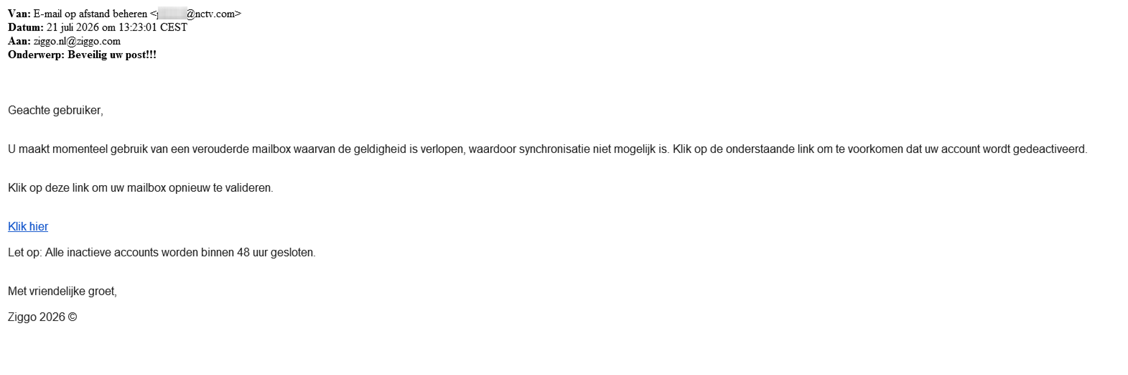
Your mailbox is supposedly outdated, synchronization has stopped, and inactive accounts will close within 48 hours. A Ziggo email offers one link to keep everything working.
If that address holds years of messages, the warning can be hard to ignore. Before you validate anything, look at what the message is asking you to trust.
Overview
The closure warning is a confirmed phishing pretext
The Ziggo mailbox scam uses fear of losing email access to push recipients toward a false validation or account-update process.
Ziggo identifies the email above as phishing in its official collection of fraudulent messages. It isn’t an instruction to rescue your mailbox through the supplied link.
Scammers are borrowing Ziggo’s identity. The real provider isn’t asking you to protect your mailbox through this fraudulent message.
The link is where a maintenance story becomes a credential risk
The reproduced message claims the mailbox is old, has expired, and needs validation. Its 48-hour warning encourages action before you can check independently.
A copied login page can collect information entered into it. The exact appearance and fields can vary, so don’t depend on remembering one fraudulent design.
Receiving the email doesn’t prove account access has been stolen. The response changes if you submitted a password, installed something, or granted a permission.
Protect the address through Ziggo, not through the warning
- Don’t sign in through the message’s validation link.
- Open the service from your usual bookmark or Ziggo’s official website.
- Investigate a genuine mail problem separately from the sender’s explanation.
- Change any password supplied to a fake page through the real account settings.
- Review the mailbox for unwanted access and rules if a login may have been exposed.
If you supplied a password, protect the account promptly. The email’s countdown isn’t a reason to return to its validation page.
Why Losing a Mailbox Feels Like Losing More Than Email
An established address can contain bills, family conversations, purchase records, and messages you haven’t thought about in years. A deletion threat lands on all of that at once.
It may also receive password-reset emails for other services. That makes protecting access important, but it doesn’t make an unsolicited validation request genuine.
The scam uses the first concern to interfere with the second. You try to preserve the mailbox by handing its access details to a page you haven’t authenticated.
The supposed repair sounds small. Validate the address, accept an update, or confirm that you’re still using the account.
Those ordinary verbs hide the important question: who receives the information you type? The button’s wording can’t answer that.
Don’t let a temporary synchronization problem supply missing proof. Even if your mail app really isn’t refreshing, the email sender may have nothing to do with the cause.
Work through the actual problem with trusted support. You can investigate delivery errors without accepting instructions from every message that mentions them.
How the Ziggo Mailbox Scam Works
Step 1: A familiar provider appears to announce an account problem
The email adopts a support or maintenance tone. It presents the mailbox as outdated rather than offering something obviously unrelated to email.
In the published example, the greeting is generic and the sender details don’t establish Ziggo as the source. The sign-off still uses the provider’s name.
Don’t conclude that a better greeting would fix the problem. A message can use your real name and remain a fraudulent request.
Step 2: The message attaches a consequence to inaction
The example warns that inactive accounts will close within 48 hours. That turns routine-looking maintenance into a possible loss of access.
The aim is to make checking feel slower and riskier than obeying. You’re nudged toward the link because ignoring it supposedly has consequences.
An asserted deadline doesn’t create authority. If the underlying request can’t be verified outside the email, urgency is a reason to pause.
Step 3: A link becomes the proposed way to keep the mailbox
The message directs you to validate through its chosen destination. Ziggo’s phishing guidance explains that fraudulent pages can resemble the real service.
Watch the change in trust: opening a familiar inbox doesn’t make every site linked from a message part of that inbox’s provider.
Rather than exploring the link, open the real service separately. That avoids making an unfamiliar page your starting point for account recovery.
Step 4: The false process asks for information or access
If a fake page requests your password, the information goes to whoever controls that page. A professional appearance doesn’t protect the submission.
Another version may request account details or lead through additional screens. Don’t complete them simply because the first stage looked plausible.
Unexpected downloads, notification permissions, or payment demands would require separate scrutiny. They aren’t necessary evidence to recognize the documented mailbox-validation deception.
Step 5: The mailbox may become a route to further impersonation
If someone gains email access, they may read messages or misuse the address. Other accounts can also become relevant when their recovery messages arrive there.
That is a possible consequence of compromise, not proof that every recipient lost every account. Check the actual exposure before assuming the worst.
Protect the mailbox promptly, then investigate related activity. Don’t let the breadth of possible risks stop you from taking the first useful step.
Why the 48-Hour Warning Isn’t a Service Notice
The screenshot shows a real phishing example supplied by Ziggo. It preserves the false maintenance story, validation request, and closure threat in one view.
It doesn’t establish a genuine shutdown schedule for your mailbox. The claimed 48-hour window belongs to the fraudulent message.
Nor does a provider’s copyright-style sign-off authenticate the email. Anyone composing a message can type a company name and a year at the bottom.
The absence of elaborate design isn’t reassuring either. Some scam emails are plain, while genuine support messages may also look simple.
Focus on the relationship between the sender, the requested action, and the destination. Appearance can support your judgment, but it can’t replace that check.
Don’t visit an old malicious destination just to compare it with the screenshot. Fraudulent pages can disappear, redirect, or change, while the underlying trick remains recognizable.
The lasting warning is the forced choice: follow this link now or lose your mail. You can reject that choice and verify the account through another route.
How to Check a Real Mail Problem Safely
Begin with the service you normally use
Use a known bookmark or enter Ziggo’s official address yourself. Follow its account or mail links from there rather than from the unexpected message.
If you can access your mailbox normally, don’t create a problem by validating through another site. Look for genuine service notices within trusted channels.
If access fails, note the actual error. An incorrect-password message, connection failure, and delayed incoming mail aren’t interchangeable symptoms.
Keep email and customer-account access distinct
You may have different credentials or settings for email and the provider’s customer account. Tell support which login you used on the suspicious page.
Don’t assume changing one password protects a different account with separate access. Review any place where the exposed password was reused.
Conversely, don’t replace working settings at random because the scam email mentioned an upgrade. Unnecessary changes can make a genuine delivery issue harder to diagnose.
Check mailbox controls if access was exposed
Review forwarding, filters, recovery details, and active sessions where your service offers those controls. An attacker may try to retain access or hide relevant messages.
Ask Ziggo for help if a setting is unclear. Record unfamiliar changes before removing them, without leaving an unwanted forwarding rule active longer than necessary.
For a shared household address, notify the other users. They need to know why a password changed and why unusual messages shouldn’t be trusted automatically.
What to Do if You Have Fallen Victim to This Scam
-
Leave the validation page. Don’t submit another password, an extra code, or a payment because the page says the first attempt failed.
A failed-login message can keep you entering credentials. Recover through the real service instead of trying to satisfy the unfamiliar form.
-
Change the exposed password through Ziggo. Start from the official site or your established account route on a trusted device.
If the address is already inaccessible, contact genuine support about account recovery. Don’t buy access from a person responding to a public help request.
-
Secure other accounts that reused that password. Give priority to important services and any account connected to the affected mailbox for recovery.
Use different passwords rather than small variations of the stolen one. Check available authentication protections and recovery contacts while you’re in the legitimate settings.
-
Look for signs of mailbox misuse. Check sent mail, deleted items, forwarding instructions, and filters. Review available login history without assuming an unfamiliar location proves everything by itself.
If messages went to your contacts without permission, warn those contacts through another reliable channel. Explain which messages to disregard without circulating working phishing links.
-
Address any financial information you submitted. If the false flow collected card or bank details, tell the relevant provider and describe what you entered.
The real mailbox doesn’t require you to pay a stranger to reverse this scam. Treat an unexpected rescue charge as a separate warning sign.
-
Check the device when software or risky permissions were involved. Remove unwanted downloads and follow trusted help for any installation, extension, or notification permission.
Malwarebytes can assist with inspecting supported systems for harmful software. Password theft still needs account action even when no malware is detected.
AdGuard can help filter some malicious pages and advertising. It doesn’t revoke a password already submitted or make a validation form legitimate.
-
Report the message with useful details. Ziggo’s phishing guidance lists phishing@ziggo.nl and explains how message headers can help an investigation.
Keep the original email, approximate time, and destination if available. Don’t include passwords or authentication codes in your report.
Recover the Mailbox Without Spreading the Confusion
If a compromised mailbox sent requests to other people, those recipients may initially trust the real address. Explain the situation using a separate contact method.
Be specific about which messages weren’t yours. A short warning is more useful than forwarding the suspicious email with a vague question attached.
Don’t ask contacts to send passwords or private documents while you sort things out. They should verify unusual requests independently, even when they appear connected to you.
For accounts that use this mailbox for recovery, look for reset notices you didn’t initiate. Check those services from their own sites rather than through unfamiliar links.
An unwanted reset email doesn’t by itself prove a takeover succeeded. Investigate its actual account activity without treating every notification as confirmation of another loss.
Keep a record of changes you make so you can distinguish your own recovery actions from suspicious ones when reviewing later alerts.
If you store important mail locally or in backups, don’t delete those copies out of panic. Ask trusted support how to preserve them during account recovery.
The goal is to restore a reliable mailbox and understand the exposure. You don’t need to follow the phishing email’s countdown to do either.
What If You Only Opened the Email?
Reading the message isn’t equivalent to submitting a password. Don’t let the dramatic wording make you believe the claimed shutdown has already happened.
If you clicked but didn’t enter anything, close the page. Check for a download or permission request rather than assuming a banking theft occurred.
If you can’t remember whether you submitted the form, changing the relevant password through the genuine account is a practical precaution.
Don’t revisit the false page to reconstruct your actions. Browser history or a saved message can help describe the incident without another interaction.
Someone who helps you should use the same boundary. They shouldn’t test the form with your credentials or share them with a supposed recovery expert.
Finally, don’t let this experience make you ignore all future mail problems. Genuine issues deserve attention through the provider, not obedience to an unverified sender.
Frequently Asked Questions
Will Ziggo close my mailbox if I ignore this email?
The 48-hour closure statement in the reproduced message is a phishing claim. Verify any actual account notice through Ziggo rather than its validation link.
Why does the message mention an outdated mailbox?
It gives you a plausible maintenance reason to click. The technical-sounding explanation doesn’t establish that your email service needs the sender’s proposed repair.
Does a secure-looking login page make validation safe?
No. A page can look professional and use an encrypted connection while belonging to an impostor. Open the service independently instead.
What if I entered the wrong password first?
Replace any real password you subsequently supplied. If an entered password is used elsewhere, protect that account too, even if the form rejected it.
Can attackers use my email to reach other accounts?
Compromised mail may expose recovery messages and other sensitive correspondence. Secure the mailbox and review important linked accounts according to the actual signs of exposure.
Should I scan my computer after seeing the warning?
A scan is relevant if suspicious software or downloads were involved. It isn’t a substitute for changing a password entered on a false page.
The Bottom Line
Don’t validate your Ziggo mailbox through this closure email. The documented 48-hour warning is designed to rush you toward an untrusted account process.
Open Ziggo independently to check real access. If you supplied a password, replace it there and review the mailbox before an intruder can misuse it.

Join the discussion
0 commentsShare your experience or ask a question about this article.
Discussion
Start the conversation
Have a question or something useful to share? Add the first comment.