

HYDRACRYPT is a file-encrypting ransomware, which will encrypt the personal documents found on victim’s computer using RSA-2048 key (AES CBC 256-bit encryption algorithm), appending the .hydracrypt_ID_[8 random characters] extension to encrypted files.
HYDRACRYPT then displays a message which offers to decrypt the data if a payment of 1 BTC (around $400) ransom is made within 72 hours. If the user does not pay within this time frame, the ransom will increase.
1. How did the HYDRACRYPT virus got on my computer?
2. What is HYDRACRYPT Ransomware?
3. Is my computer infected with HYDRACRYPT virus?
4. Is it possible to decrypt files encrypted by HYDRACRYPT?
5. How to remove the HYDRACRYPT ransomware (Virus Removal Guide)
6. How to prevent your computer from becoming infected by HYDRACRYPT
1. How did the HYDRACRYPT virus got on my computer?
The HYDRACRYPT virus is distributed through several means. Malicious websites, or legitimate websites that have been hacked, can infect your machine through exploit kits that use vulnerabilities on your computer to install this Trojan without your permission of knowledge.
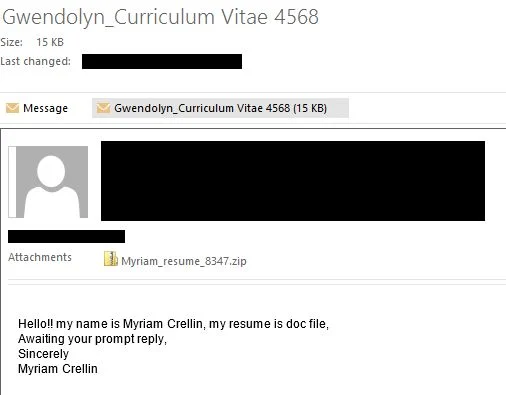
Another method used to propagate this type of malware is spam email containing infected attachments or links to malicious websites. Cyber-criminals spam out an email, with forged header information, tricking you into believing that it is from a shipping company like DHL or FedEx. The email tells you that they tried to deliver a package to you, but failed for some reason. Sometimes the emails claim to be notifications of a shipment you have made. Either way, you can’t resist being curious as to what the email is referring to – and open the attached file (or click on a link embedded inside the email). And with that, your computer is infected with the HYDRACRYPT virus.
The threat may also be downloaded manually by tricking the user into thinking they are installing a useful piece of software, for instance a bogus update for Adobe Flash Player or another piece of software.
2. What is HYDRACRYPT Ransomware?
The HYDRACRYPT ransomware targets all versions of Windows including Windows XP, Windows Vista, Windows 7, Windows 8 and Windows 10. This infection is notable due to how it encrypts the user’s files – namely, it uses AES-265 and RSA encryption method – in order to ensure that the affected user has no choice but to purchase the private key.
When the HYDRACRYPT ransomware is first installed on your computer it will create a random named executable in the %AppData% or %LocalAppData% folder. This executable will be launched and begin to scan all the drive letters on your computer for data files to encrypt.
HYDRACRYPT ransomware searches for files with certain file extensions to encrypt. The files it encrypts include important productivity documents and files such as .doc, .docx, .xls, .pdf, among others. When these files are detected, this infection will change the extension to .hydracrypt_ID_[8 random characters], so they are no longer able to be opened.
Files targeted are those commonly found on most PCs today; a list of file extensions for targeted files include:
.sql, .mp4, .7z, .rar, .m4a, .wma, .avi, .wmv, .csv, .d3dbsp, .zip, .sie, .sum, .ibank, .t13, .t12, .qdf, .gdb, .tax, .pkpass, .bc6, .bc7, .bkp, .qic, .bkf, .sidn, .sidd, .mddata, .itl, .itdb, .icxs, .hvpl, .hplg, .hkdb, .mdbackup, .syncdb, .gho, .cas, .svg, .map, .wmo, .itm, .sb, .fos, .mov, .vdf, .ztmp, .sis, .sid, .ncf, .menu, .layout, .dmp, .blob, .esm, .vcf, .vtf, .dazip, .fpk, .mlx, .kf, .iwd, .vpk, .tor, .psk, .rim, .w3x, .fsh, .ntl, .arch00, .lvl, .snx, .cfr, .ff, .vpp_pc, .lrf, .m2, .mcmeta, .vfs0, .mpqge, .kdb, .db0, .dba, .rofl, .hkx, .bar, .upk, .das, .iwi, .litemod, .asset, .forge, .ltx, .bsa, .apk, .re4, .sav, .lbf, .slm, .bik, .epk, .rgss3a, .pak, .big, wallet, .wotreplay, .xxx, .desc, .py, .m3u, .flv, .js, .css, .rb, .png, .jpeg, .txt, .p7c, .p7b, .p12, .pfx, .pem, .crt, .cer, .der, .x3f, .srw, .pef, .ptx, .r3d, .rw2, .rwl, .raw, .raf, .orf, .nrw, .mrwref, .mef, .erf, .kdc, .dcr, .cr2, .crw, .bay, .sr2, .srf, .arw, .3fr, .dng, .jpe, .jpg, .cdr, .indd, .ai, .eps, .pdf, .pdd, .psd, .dbf, .mdf, .wb2, .rtf, .wpd, .dxg, .xf, .dwg, .pst, .accdb, .mdb, .pptm, .pptx, .ppt, .xlk, .xlsb, .xlsm, .xlsx, .xls, .wps, .docm, .docx, .doc, .odb, .odc, .odm, .odp, .ods, .odt
Once your files are encrypted, the HYDRACRYPT ransomware will create the README_DECRYPT_HYDRA_ID_[8 random characters].txt text files ransom note in each folder that a file has been encrypted and on the Windows desktop. The ransomware will also change your Windows desktop wallpaper to README_DECRYPT_HYDRA_ID_[8 random characters].png.
These files are located in every folder that a file was encrypted as well as in the users Startup folder so that they are automatically displayed when a user logs in. These files will contain the informations on how to access the payment site and get your files back.
When the infection has finished scanning your computer it will also delete all of the Shadow Volume Copies that are on the affected computer. It does this so that you cannot use the shadow volume copies to restore your encrypted files.
3. Is my computer infected with HYDRACRYPT virus?
If your computer is infected with the HYDRACRYPT ransomware will display a red README_DECRYPT_HYDRA_ID_[8 random characters].png wallpaper that covers the entire desktop, and all your documents will have a .hydracrypt_ID_[8 random characters] extension. A README_DECRYPT_HYDRA_ID_[8 random characters].txt text file will be placed on your desktop. Both files contain instruction on how or recover the encrypted files.
The messages displayed by this ransomware infection can be localized depending on the user’s location, with text written in the appropriate language.
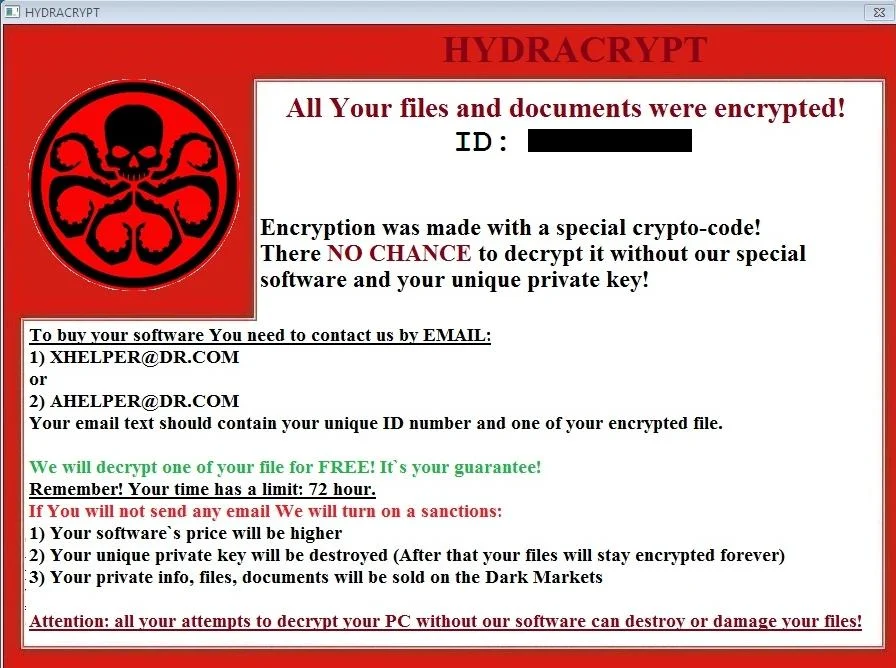
This the message that the HYDRACRYPT ransomware may display:
HYDRACRYPT
All Your files and documents were encrypted!
Encryption was made with a special crypto-code! There NO CHANCE to decrypt it without our special software and your unique private key!
To buy your software You need to contact us by EMAIL:
1) XHELPER @ DR.com or 2) AHELPER @ DR.com
Your email text should contain your unique ID number and one of your encrypted files.
We will decrypt one of your files for FREE! It’s your guarantee! Remember!
Your time has a limit: 72 hours.
If you will not send any email We will turn on a sanctions:
1) Your software’s price will be higher.
2)Your unique private key will be destroyed (After that your files will stay encrypted forever).
3) Your private info, files, documents will be sold on the Dark Markets
Attention: all your attempts to decrypt your PC without our software can destroy or damage your files!
5. How to remove the HYDRACRYPT ransomware (Virus Removal Guide)
This page is a comprehensive guide, which will remove the HYDRACRYPT infection from your computer, however we cannot guarantee that your personal files will be recovered. We cannot be held responsible for losing the documents during this removal process.
A. Remove HYDRACRYPT ransomware from your computer
Malwarebytes and HitmanPro can detect and remove this infection, but these programs cannot recover your encrypted files due to the nature of asymmetric encryption, which requires a private key to decrypt files encrypted with the public key.
STEP 1: Remove HYDRACRYPT virus with Malwarebytes Anti-Malware Free
Malwarebytes Anti-Malware Free uses industry-leading technology to detect and remove all traces of malware, including worms, Trojans, rootkits, rogues, dialers, spyware, and more.
It is important to note that Malwarebytes Anti-Malware works well and should run alongside antivirus software without conflicts.
- You can download download Malwarebytes Anti-Malware from the below link.
Download MalwarebytesFree official installer. Your download starts right away. - Once downloaded, close all programs, then double-click on the icon on your desktop named “mbam-setup” to start the installation of Malwarebytes Anti-Malware.
 You may be presented with a User Account Control dialog asking you if you want to run this file. If this happens, you should click “Yes” to continue with the installation.
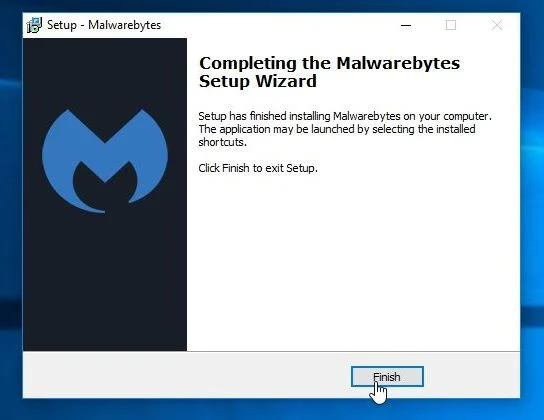
 - When the installation begins, you will see the Malwarebytes Anti-Malware Setup Wizard which will guide you through the installation process.
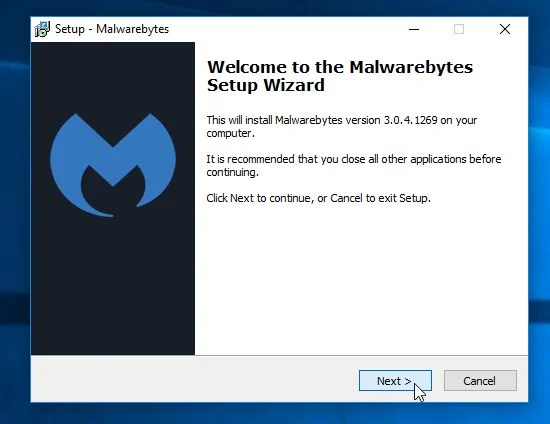
To install Malwarebytes Anti-Malware on your machine, keep following the prompts by clicking the “Next” button.
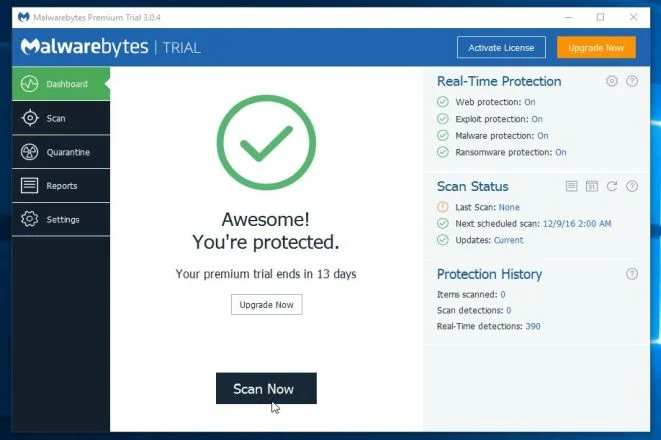
- Once installed, Malwarebytes Anti-Malware will automatically start and you will see a message stating that you should update the program, and that a scan has never been run on your system. To start a system scan you can click on the “Scan Now” button.
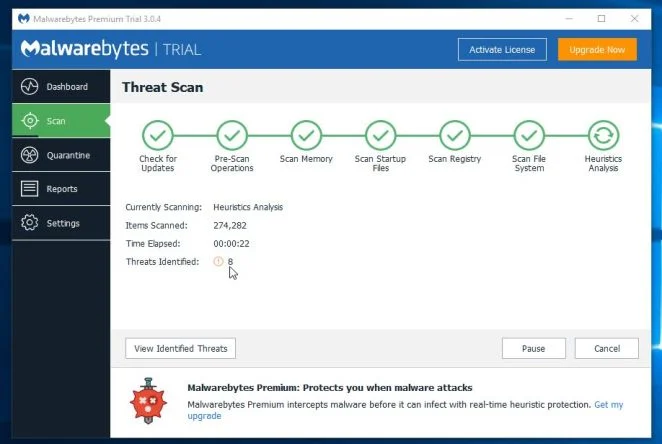
- Malwarebytes Anti-Malware will now start scanning your computer for malware. When Malwarebytes Anti-Malware is scanning it will look like the image below.
- When the scan has completed, you will be presented with a screen showing the malware infections that Malwarebytes Anti-Malware has detected. To remove the malicious programs that Malwarebytes Anti-malware has found, click on the “Remove Selected” button.
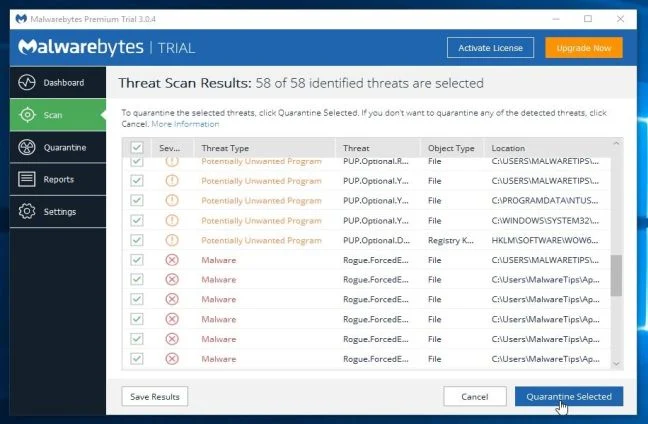
Please note that the infections found may be different than what is shown in the image. - Malwarebytes Anti-Malware will now quarantine all the malicious files and registry keys that it has found. When removing the files, Malwarebytes Anti-Malware may require a reboot in order to remove some of them. If it displays a message stating that it needs to reboot your computer, please allow it to do so.
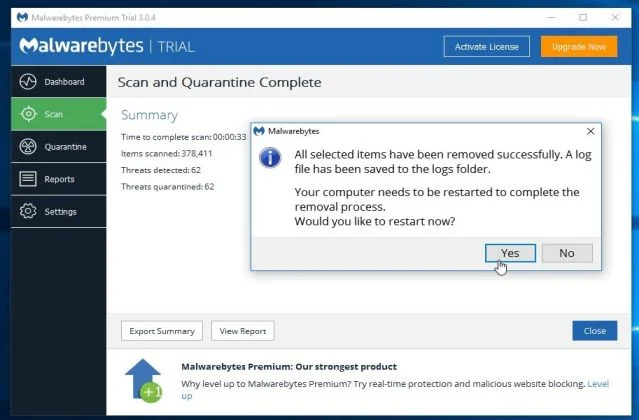
After your computer will restart, you should open Malwarebytes Anti-Malware and perform another “Threat Scan” scan to verify that there are no remaining threats
STEP 2: Double-check for the HYDRACRYPT malware infection with HitmanPro
HitmanPro is a second opinion scanner, designed to rescue your computer from malware (viruses, trojans, rootkits, etc.) that have infected your computer despite all the security measures you have taken (such as anti-virus software, firewalls, etc.). HitmanPro is designed to work alongside existing security programs without any conflicts. It scans the computer quickly (less than 5 minutes) and does not slow down the computer.
- You can download HitmanPro from the below link:
Download HitmanProOfficial Sophos download. Free scan, free 30-day trial to remove threats. - Double-click on the file named “HitmanPro.exe” (for 32-bit versions of Windows) or “HitmanPro_x64.exe” (for 64-bit versions of Windows). When the program starts you will be presented with the start screen as shown below.
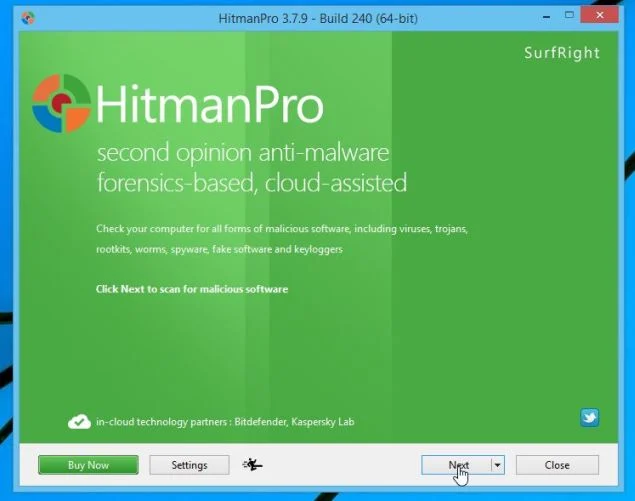
Click on the “Next” button, to install HitmanPro on your computer.
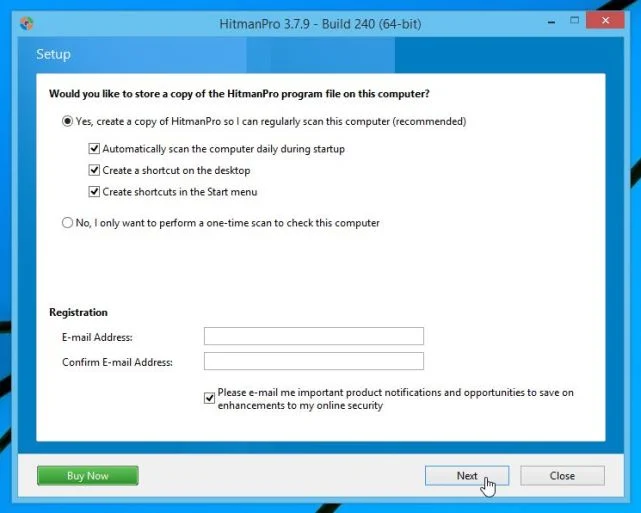
- HitmanPro will now begin to scan your computer for HYDRACRYPT malicious files.
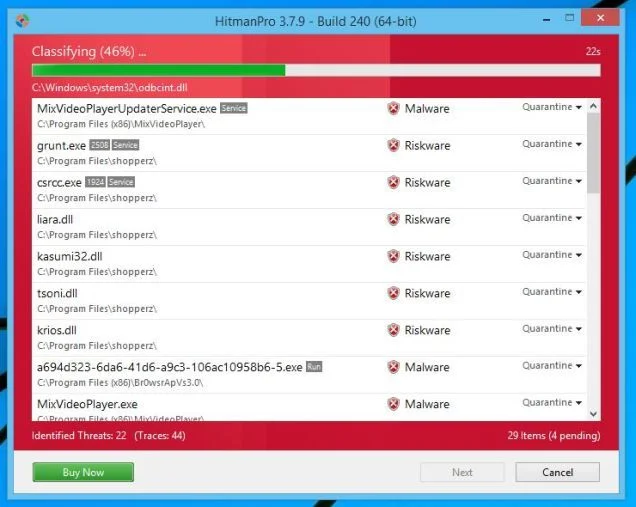
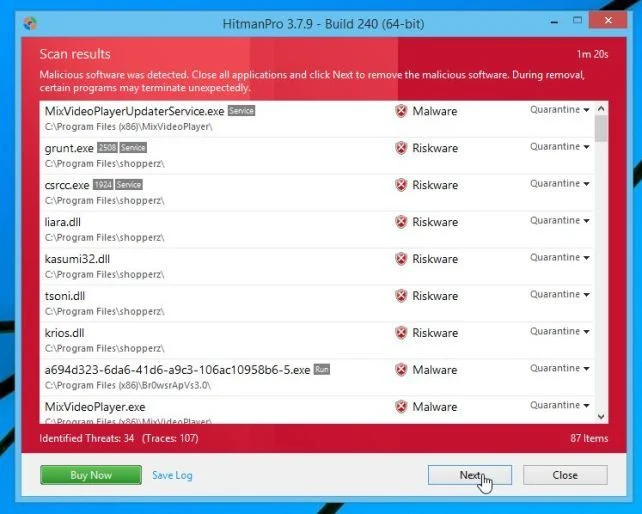
- When it has finished it will display a list of all the malware that the program found as shown in the image below. Click on the “Next” button, to remove HYDRACRYPT virus.
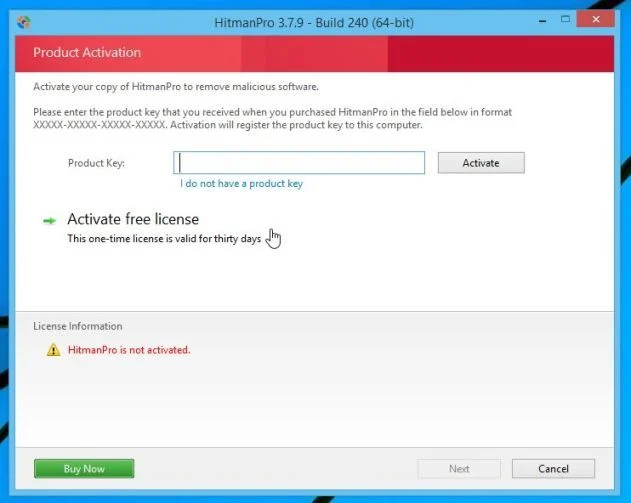
- Click on the “Activate free license” button to begin the free 30 days trial, and remove all the malicious files from your computer.
B. How (try) to restore your files encrypted by HYDRACRYPT ransomware
In some cases, it may be possible to recover previous versions of the encrypted files using System Restore or other recovery software used to obtain “shadow copies” of files.
Option 1: Restore your files encrypted by HYDRACRYPT ransomware with ShadowExplorer
HYDRACRYPT will attempt to delete all shadow copies when you first start any executable on your computer after becoming infected. Thankfully, the infection is not always able to remove the shadow copies, so you should continue to try restoring your files using this method.
- You can download ShadowExplorer from the below link:
Download ShadowExplorerOpens the download page in a new tab. - Once you have downloaded and installed ShadowExplorer, you can follow the below video guide on how to restore your files while using this program.
Alternatively, you can use the System Restore to try to recover the encrypted documents.
Option 2: Restore your files encrypted by HYDRACRYPT ransomware with File Recovery Software
When HYDRACRYPT encrypts a file it first makes a copy of it, encrypts the copy, and then deletes the original. Due to this you can use file recovery software such as:
- Recuva
You can follow the below guide on how to use Recuva:
- EaseUS Data Recovery Wizard Free
- R-Studio
How to prevent your computer from becoming infected by HYDRACRYPT
To protect your computer from the Cryptowall ransomware, you should always have an antivirus installed on your computer and always have a backup for your personal documents. As an extra protection method, you can use programs called HitmanPro.Alert or CryptoPrevent, which will prevent any file encrypting malware from running.
If you are still experiencing problems while trying to remove virus from your machine, please do one of the following:
- Run a system scan with Emsisoft Emergency Kit.
- Start a new thread in our Malware Removal Assistance forum.

Join the discussion
0 commentsShare your experience or ask a question about this article.
Your progress
Did these steps help?
Let us know how the guide worked for you.
Describe what you see and the step you reached. Keep passwords and other private information out.
Discussion
Start the conversation
Have a question or something useful to share? Add the first comment.