


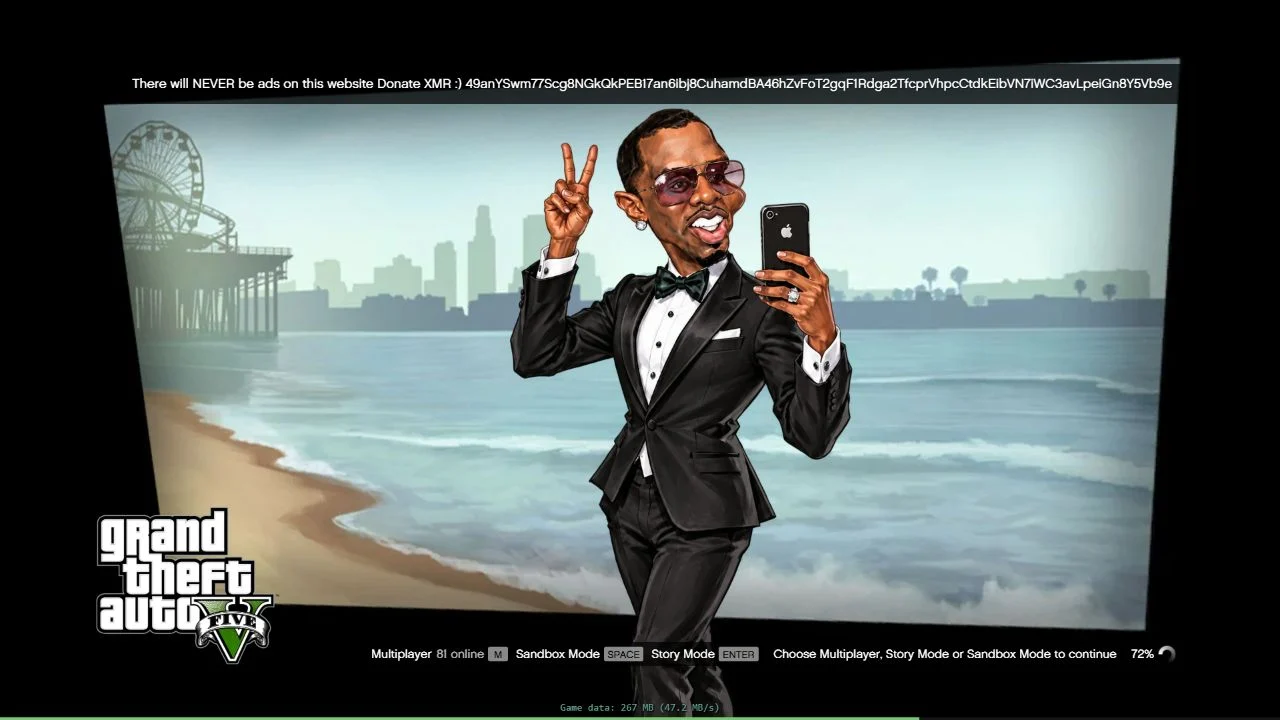
You open PlayGTA5.com and see the familiar Grand Theft Auto V loading screen. There’s a progress bar, a Sandbox button, and nothing that looks like the usual installer.
It’s easy to make a convincing loading screen. The harder part is getting past it. We opened the site in a browser to see what would happen.
Overview
Yes, PlayGTA5.com was playable in our browser
We selected Sandbox Mode and the GTA V map. Once loading finished, the browser showed a character on a street, with pedestrians, buildings and a minimap.
Holding W moved the character forward. Holding A moved him left. The change in direction mattered more than the polished loading art: the scene reacted to our inputs.
That’s a working free-roam session. It’s not a promise that the entire campaign runs, that progress carries over, or that the button labeled Multiplayer connects to Rockstar.
What happened between the menu and the street
The browser fetched game data while we waited. The page’s own counter passed 900 MB before the scene appeared. We didn’t download a separate installer or create an account.
- The opening screen offered Multiplayer, Sandbox Mode and Story Mode.
- Sandbox then offered a GTA V map and a separate GTA VI Map option. We selected only the GTA V map.
- The startup banner asked for an optional Monero donation. Reaching gameplay did not require sending money.
The number on the loading bar described startup progress, not the percentage of the full retail game we had downloaded. A working browser tab can still use substantial data.
Playable is not the same as official
This was an unofficial browser build, not a release listed on Rockstar’s Grand Theft Auto V page. Familiar artwork and responsive controls do not change who published the game.
We didn’t encounter a payment gate, an installer prompt or a login in Sandbox. There’s no reason to hand over a password or send crypto to get past loading.
For the full campaign, supported saves or GTA Online, start with Rockstar or an authorized platform. This test answered a narrower question: could we move around in GTA V?
What We Actually Played on PlayGTA5.com
From a progress bar to an interactive map
Mode selection appeared while the page was still loading. Clicking Sandbox opened a map picker instead of jumping into the game. We picked GTA V and let the engine start.
At 81%, the site’s counter showed 621 MB. It later showed 811 MB and then 912 MB, both before we could move the character.
The screen cycled through GTA V artwork while we waited. If you only saw that part, you’d have no way to tell whether a playable session was about to start.
Then the loading overlay disappeared. The character was standing near a stop sign, with storefronts across the road and mountains behind them.
We held W and walked toward the road. Another forward input brought the character closer to the curb. Holding A then took him left alongside the building.
The camera followed. The stop sign shifted across the frame, and the character turned into the movement. That was the difference between playing and watching a clip.
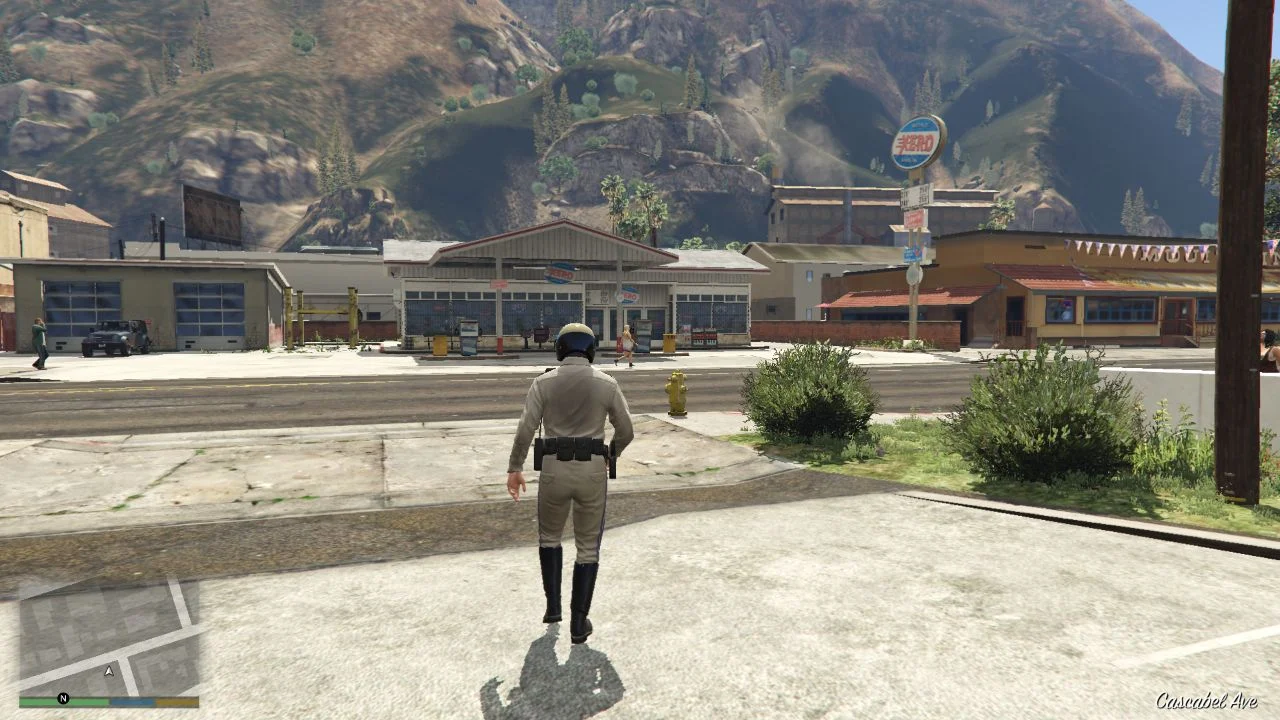
We didn’t drive, play a mission, or try to transfer a save. Those would be useful follow-up tests, but none is necessary to establish that this Sandbox session was playable.
Keyboard movement did not require a browser permission
After loading, a small hint offered to capture the mouse for game controls and said Escape would release it. Our keyboard movement worked without doing that.
Mouse capture keeps pointer movement inside the game so you can turn the camera. It’s not the same as allowing the site to use your microphone or send notifications.
A browser request for your microphone, camera or notifications is a separate choice. We didn’t need to approve any of those to move the character.
Why This Is More Than a Video Stream
The page contains a canvas for the game view. The visible page had no embedded video player or frame carrying the session when we inspected it in the browser.
The startup code backs that up. It creates a background worker, hands off the canvas, and describes fetching a WebAssembly engine and preparing graphics through WebGPU.
WebAssembly lets compiled code run inside a browser. In this case, the page’s loading log even showed a WebAssembly memory message while the engine started.
Those clues point to a build doing game work inside the browser, rather than a conventional cloud session where a remote machine sends you a video of the game.
Local rendering doesn’t mean offline play. The visible data counter grew after we selected the map, even though the browser was doing the work of drawing the scene.
Think of a car: in a browser build, your device can receive the model and draw it. With cloud gaming, it receives video frames of the finished scene.
That helps explain why two people may get different results from the same address. Browser graphics support and available memory matter alongside the speed of the connection.
A frozen load doesn’t tell you which part failed. It could be game data arriving slowly, the graphics system failing to start, or something else entirely.
Nor is the menu’s data counter a storage estimate. A reading above 900 MB tells you what the page reported during startup, not how much another mode will use.
If you’re on a metered connection, that distinction matters. You can use a substantial part of your allowance before you’ve moved the character a single step.
Don’t assume a second attempt will resume from the same point. We didn’t measure how much the browser caches between visits, so a reload could use more data.
What the Other Buttons Do Not Prove
Story Mode is a menu option, not a campaign test
The menu offered Story Mode with Enter as its shortcut. The loader mentions continuing a save, but we didn’t launch the mode or check whether progress survives a restart.
To verify that feature, we’d need to create a save, end the session, return in a fresh tab, and check that the game actually resumes at the expected point.
Even that wouldn’t establish that you can move your progress to a console or an official PC copy. Rockstar describes its own supported migration routes on its product page.
If you try the mode, don’t clear site data as a troubleshooting shortcut if you want to keep any progress that the site stored in your browser.
Multiplayer is not proof of access to Rockstar’s GTA Online
The Multiplayer button displayed an online count while we were in the menu. That counter was the site’s display, not a player count we could verify.
The page code describes its own way for browser players to find and connect to each other. The launch arguments also explicitly disable Social Club integration.
We didn’t enter multiplayer or test joining, character creation or voice chat. The button alone doesn’t show that your Rockstar character or purchases are available.
If a lookalike page says you need to sign in to unlock your existing Online character, stop there. Reach your account through the official platform you already use.
The GTA VI Map label isn’t a release of GTA VI
We saw that label in the Sandbox map selector beside GTA V Map. It describes an option in this launcher, not an official release of Rockstar’s sequel.
We left that option alone. The street scene and keyboard response described here are from the GTA V map. They’re not evidence that a GTA VI beta is playable.
How It Compares With FivePlay.lol and GTA.Deloskiyt.pl
The closest comparison is our earlier GTA.Deloskiyt.pl test. That site eventually reached gameplay, but our initial attempt took about an hour and was cut short by an error.
The old address later displayed a migration notice sending visitors to FivePlay.lol. That notice connects those two addresses. It doesn’t connect either one to the operator of PlayGTA5.com.
In the FivePlay.lol follow-up, we drove vehicles, saw mission gameplay and observed autosave. Those are results from that domain, not features we tested at PlayGTA5.com.
The difference you can see before gameplay is what surrounds the loading bar. FivePlay’s page included third-party advertising scripts in that earlier test.
On PlayGTA5.com, the banner instead promised no ads and displayed a Monero donation address. We saw no ad or pop-up on our route into Sandbox.
A banner isn’t a permanent guarantee. A site can change what it serves, and a link shared tomorrow could point somewhere else even if it uses the same artwork.
Compare the address first. Another site can reuse the artwork or menu without running the same game. Matching screenshots don’t tell you what the page will ask you to do.
Availability can also change without the address changing. In October, our PlayGTA5.com scan recorded a connection error. That was a different visit from the playable session described here.
Is PlayGTA5.com Safe to Use?
There’s a difference between trying a game and trusting the page with something valuable. Our test reached working controls without a login, an executable, a certificate or a payment.
The play button delivered a session, not a payment trap. That answers what happened on our visit; it doesn’t certify the site’s code or guarantee what comes next.
The clearest decision is to keep the boundary where our test did: no password, no crypto, no installed software, and no change to browser or system security.
The donation is easy to distinguish from a paywall. It appeared in the banner, but the menu and the map worked without it. Sending funds won’t fix a failed load.
A game asset fetched into a tab is also different from a file you’re asked to open. An executable or extension can have access a web page doesn’t have.
If a new page says you need a special launcher, a certificate or an exception in your security software, you’ve left the path we tested. Close that page.
The same applies to a request to paste something into a terminal or browser console. The game accepted ordinary keyboard controls, not commands you had to run on your computer.
What to Do If You Opened PlayGTA5.com
-
If you just played, close the tab when you’re done. There’s no basis to reset your computer or change passwords solely because the loading screen appeared.
-
If the tab froze, exit it. An unresponsive graphics-heavy page doesn’t justify installing a repair utility or turning off a browser warning. Check for normal browser updates separately.
-
If a lookalike got notification access, remove that permission. Use your browser’s site controls for the exact domain. Chrome’s permissions guide shows where to manage it.
-
If you saved a launcher, don’t open it. If you already ran an untrusted file or installed a suspicious extension, treat that as a separate exposure and check your device.
-
If you entered a Rockstar password elsewhere, act from a trusted device. Go to the real account site, change the password and secure other accounts that use it.
-
If you sent crypto, keep the transaction ID. Save the receiving address and any promise attached to the payment. Don’t pay someone who claims they can guarantee recovery.
Those steps depend on what happened, not how alarming a warning looked. A loading screen, a notification you allowed and an executable you ran are three different situations.
If your aim was simply to play GTA V, return to the publisher’s platform listings. For cloud play, check the provider’s own current catalog, regional availability and account requirements.
Frequently Asked Questions
Can you actually play GTA 5 on PlayGTA5.com?
Yes, the GTA V Sandbox worked in our browser. We reached a street scene and moved the character forward and left using the keyboard.
Does PlayGTA5.com require you to install anything?
Our session needed no separate installer. The browser itself still fetched game data, and the startup counter showed more than 900 MB before gameplay.
Do I need to donate Monero to start playing?
No. The donation address appeared in the loading banner, but we entered Sandbox and played without a payment. Don’t send crypto to try to get past a stalled loader.
Is the Multiplayer mode the official GTA Online?
Don’t treat it as such. The page shows its own Multiplayer option, and the loader disables Social Club integration. We didn’t connect to the mode or test its features.
Is PlayGTA5.com the same site as FivePlay.lol?
No, they are distinct domains. We observed browser gameplay on both, but the migration notice linking GTA.Deloskiyt.pl to FivePlay.lol does not establish who runs PlayGTA5.com.
Should I install a launcher if PlayGTA5.com won’t load?
No. A separate launcher was not part of our successful browser session. Use Rockstar’s official options if the tab won’t run or you want a supported way to play.
The Bottom Line
PlayGTA5.com passed the test that matters for a browser demo: we got into the GTA V Sandbox and moved around. It wasn’t a trailer pretending to be a game.
Keep it in that category. Don’t pay to unlock a stuck load, install a lookalike launcher, or enter your Rockstar login. Choose an official copy for supported play.

Reviews & discussion
0 commentsShare a firsthand experience, or ask a question.
Community reviews
playgta5.com
Moderated reader experiences, not an editorial verdict.
Start the conversation
Have a question or something useful to share? Add the first comment.