


Vtsale2.xyz is a site that tries to trick you into subscribing to its push notifications so that it can send notification spam directly to your desktop or phone.
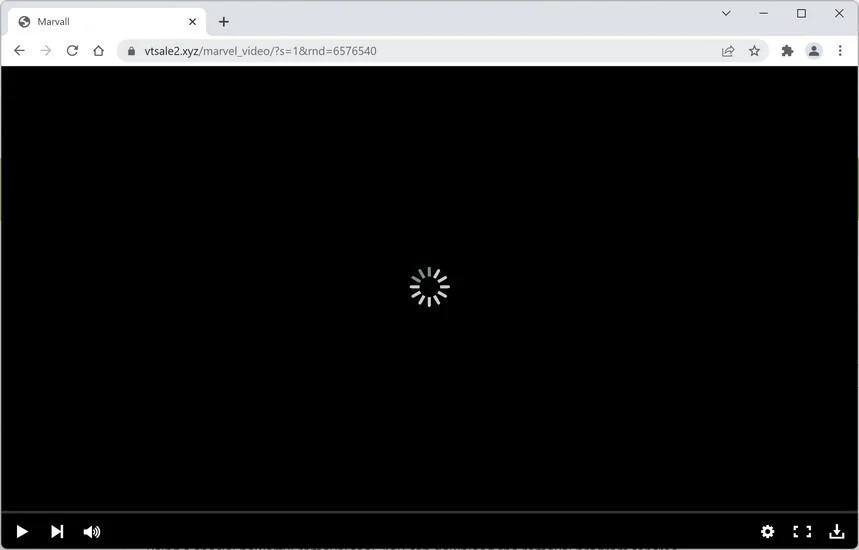
What is Vtsale2.xyz?
Vtsale2.xyz is a malicious site that displays fake messages to trick you into subscribing to its spam push notifications.
These are a few of the fake error messages that the Vtsale2.xyz site will display to trick you into clicking the “Allow” button:
Type Allow to verify that you are not a robot
Click Allow to watch the video
Download is ready. Click Allow to download your file
Press Allow to verify that you are not a robot
You should not click on the Allow button when you see such messages. If you click on the “Allow” button, you will start seeing spam push notifications from Vtsale2.xyz on your computer or phone, even when the browser is closed. The Vtsale2.xyz malicious push notifications are for adult sites, online web games, fake software updates, and unwanted programs.
Why am I seeing the Vtsale2.xyz pop-up ads?
You are seeing the Vtsale2.xyz advertisements because your computer is infected with a malicious program or a site that you have visited has redirected your browser to this page.
Less than reputable sites can display malicious ads that redirect your browser to Vtsale2.xyz to generate advertising revenue. If this happens, you can close the page and install an ad blocker like AdGuard [recommended] to remove ads from the sites you visit.
However, if you continuously see pop-ups from Vtsale2.xyz, then your computer might be infected with a malicious program, and we will need to scan your device for malware and remove it.
Here are a few typical signs that you have a malicious program installed on your computer:
- Advertisements appear in places they shouldn’t be.
- Your web browser’s homepage has mysteriously changed without your permission.
- Web pages that you typically visit are not displaying properly.
- Website links redirect to sites different from what you expected.
- Browser popups appear which recommend fake updates or other software.
- Other unwanted programs might get installed without your knowledge.
To check your computer for the Vtsale2.xyz adware and remove it for free, please use the guide below.
Remove Vtsale2.xyz pop-up ads (Virus Removal Guide)
This malware removal guide may appear overwhelming due to the number of steps and numerous programs that are being used. We have only written it this way to provide clear, detailed, and easy-to-understand instructions that anyone can use to remove malware for free.
Please perform all the steps in the correct order. If you have any questions or doubts at any point, stop and ask for our assistance.
The Vtsale2.xyz pop-up ads can happen on Windows, Mac, or Android, so we’ve covered below all these operating systems. Depending on which operating system is installed on the device, follow one of the below removal guides.
 Remove Vtsale2.xyz from Windows
 Remove Vtsale2.xyz from Mac
 Remove Vtsale2.xyz from Android
- STEP 1: Remove Vtsale2.xyz spam push notifications from your Windows browser
- STEP 2: Use Malwarebytes to remove Vtsale2.xyz browser hijacker
- STEP 3: Use HitmanPro to scan your computer for Vtsale2.xyz and other malware
STEP 1: Remove Vtsale2.xyz spam push notifications from your Windows browser
In this first step, we will remove the Vtsale2.xyz permission to send pop-up notifications to your computer.
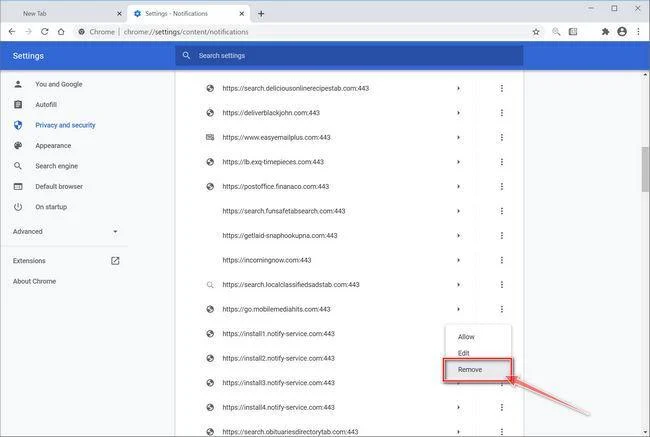
Remove Vtsale2.xyz pop-up ads from Chrome for Windows
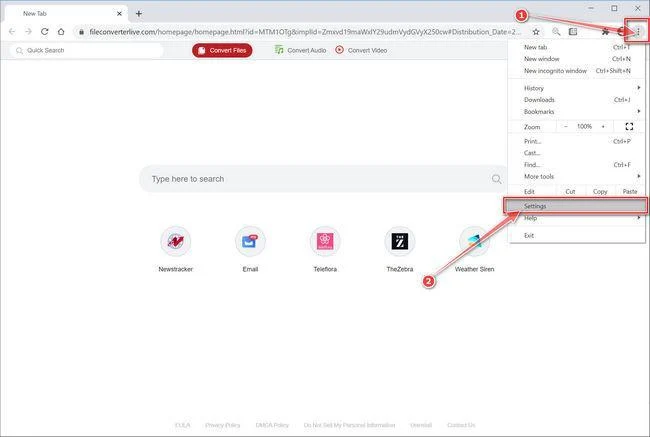
- In the top right corner, click “More” (three vertical dots), then click on “Settings”.
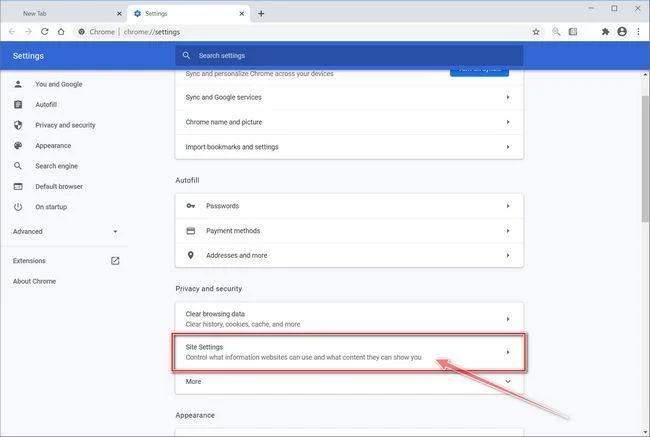
- In the Privacy and Security section, click on “Site settings“.
- Click on “Notifications“.
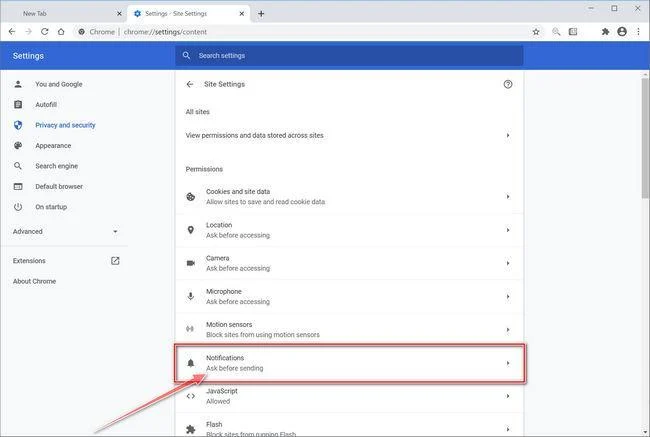
- Find the Vtsale2.xyz site and click the three vertical dots button, then click on “Remove”.
Remove Vtsale2.xyz pop-up ads from Firefox
- In the top right corner, click on Firefox’s main menu button, represented by three horizontal lines.
- When the drop-down menu appears, select the option labeled “Options”.
- Click on “Privacy & Security” on the left side of the window.
- Scroll down to the Permissions section and click on the “Settings…” button next to Notifications.
- Find the Vtsale2.xyz site, then click on the drop-down menu and select “Block”.
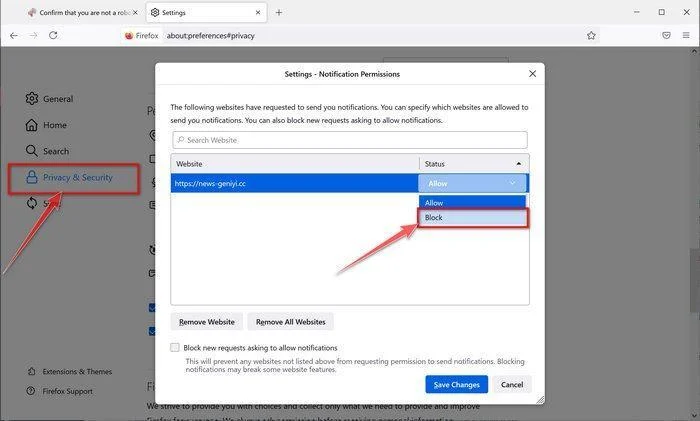
- Click on the “Save Changes” button.
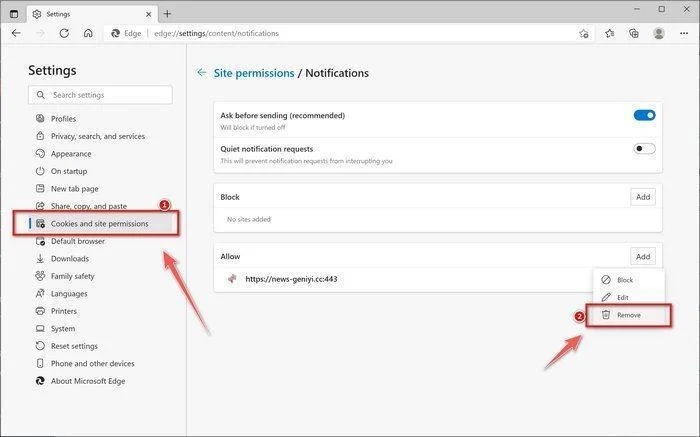
Remove Vtsale2.xyz pop-up ads from Microsoft Edge
- In the top right corner, click on the three dots to expand the Edge menu.
- When the drop-down menu appears, select the option labeled Settings.
- On the left side of the window, click on “Cookies and site permissions”.
- Click on the “Notifications“.
- Find the Vtsale2.xyz site and click the three horizontal dots button next to it, then click on “Remove”.
Remove Vtsale2.xyz pop-up ads from Internet Explorer
To remove the Vtsale2.xyz pop-up ads from Internet Explorer we will reset the browser settings to its default. You can reset Internet Explorer settings to return them to the state they were in when Internet Explorer was first installed on your computer.
-
Go to “Internet Options”.
Open Internet Explorer, click on the gear icon in the upper right part of your browser, then select “Internet Options“.
-
Select the “Advanced” tab, then click “Reset”
In the “Internet Options” dialog box, select the “Advanced” tab, then click on the “Reset” button.
-
Click on “Reset”.
In the “Reset Internet Explorer settings” section, select the “Delete personal settings” checkbox, then click on the “Reset” button.
-
Click on “Close”.
When Internet Explorer has completed its task, click on the “Close” button in the confirmation dialogue box.
Close your browser and then you can open Internet Explorer again.
STEP 2: Use Malwarebytes to remove Vtsale2.xyz browser hijacker
In this second step, we will download, install and run a scan with Malwarebytes to scan and remove adware, browser hijackers, and other malware from your computer.
Malwarebytes is one of the most popular and most used anti-malware software for Windows, and for good reasons. It is able to destroy many types of malware that other software tends to miss without costing you absolutely nothing. When it comes to cleaning up an infected device, Malwarebytes has always been free, and we recommend it as an essential tool in the fight against malware.
-
Download Malwarebytes for Windows.
You can download Malwarebytes for Windows by clicking the link below.
 Malwarebytes Free for WindowsScans and removes malware at no cost
Download MalwarebytesOfficial installer for Windows 11 and 10. Your download starts right away.Want real-time protection? See Malwarebytes Premium
-
Double-click on the Malwarebytes setup file.
When Malwarebytes has finished downloading, double-click on the MBSetup file to install Malwarebytes on your computer. In most cases, downloaded files are saved to the Downloads folder.
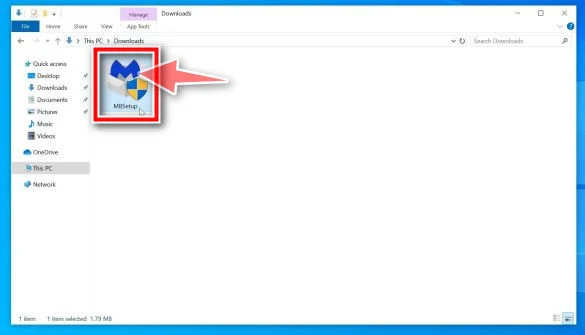
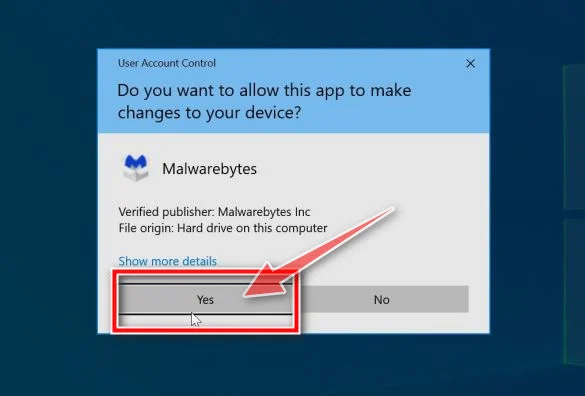
You may be presented with an User Account Control pop-up asking if you want to allow Malwarebytes to make changes to your device. If this happens, you should click “Yes” to continue with the Malwarebytes installation.
-
Follow the on-screen prompts to install Malwarebytes.
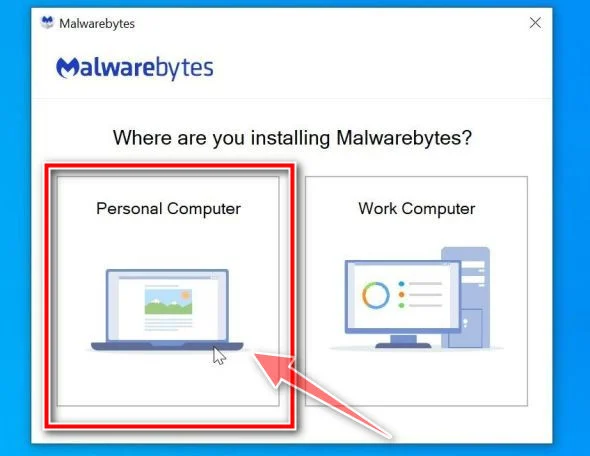
When the Malwarebytes installation begins, you will see the Malwarebytes setup wizard which will guide you through the installation process. The Malwarebytes installer will first ask you on what type of computer are you installing this program, click either Personal Computer or Work Computer.
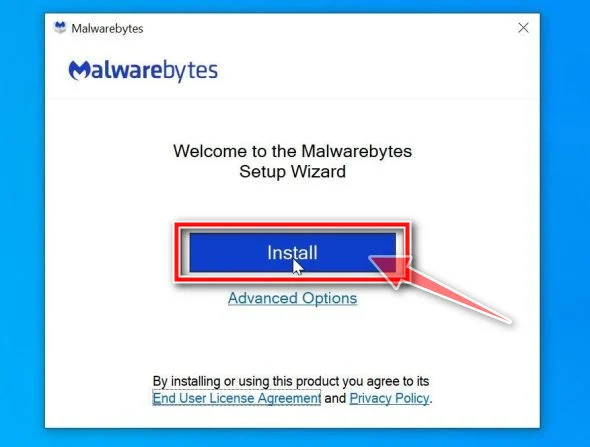
On the next screen, click “Install” to install Malwarebytes on your computer.
When your Malwarebytes installation completes, the program opens to the Welcome to Malwarebytes screen. Click the “Get started” button.
-
Click on “Scan”.
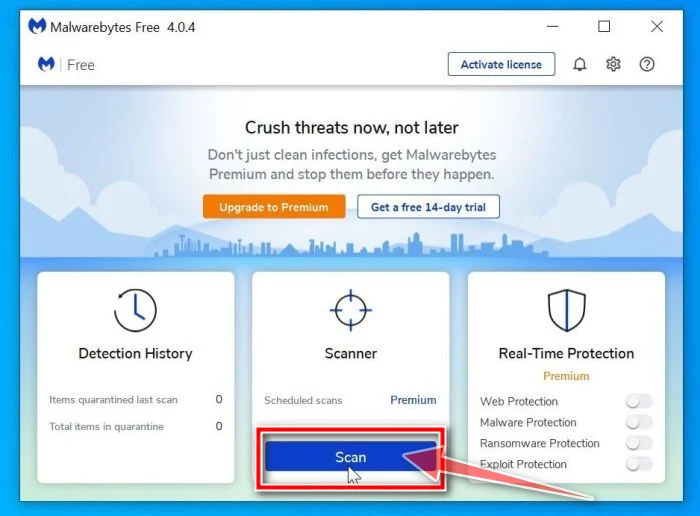
To scan your computer with Malwarebytes, click on the “Scan” button. Malwarebytes will automatically update the antivirus database and start scanning your computer for malware.
-
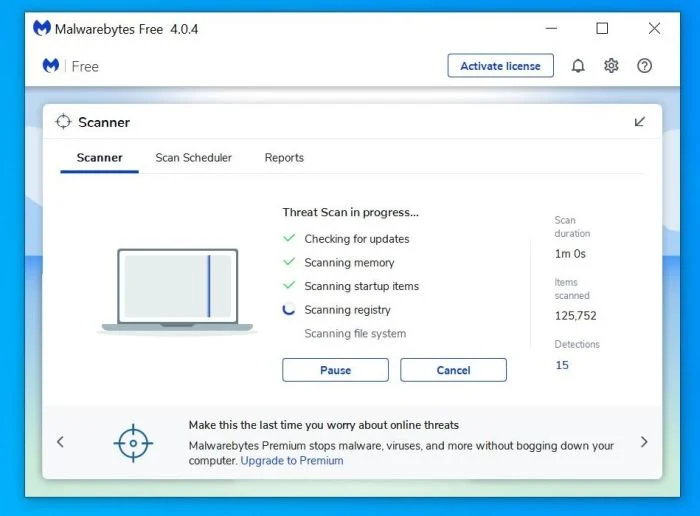
Wait for the Malwarebytes scan to complete.
Malwarebytes will scan your computer for the Vtsale2.xyz adware and other malicious programs. This process can take a few minutes, so we suggest you do something else and periodically check on the status of the scan to see when it is finished.
-
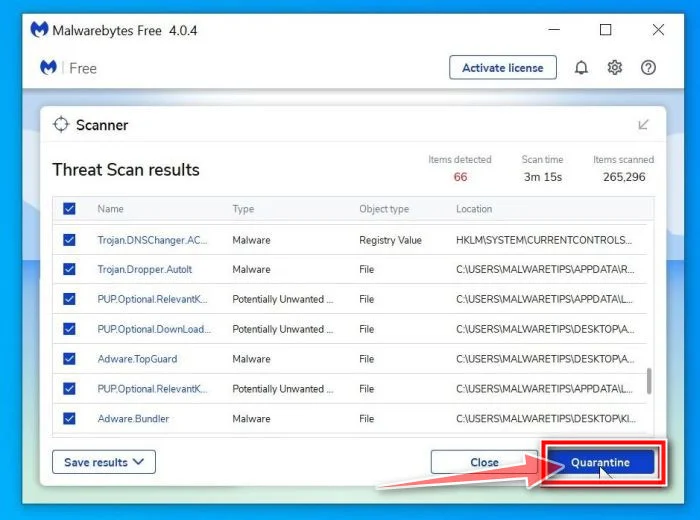
Click on “Quarantine”.
When the scan has completed, you will be presented with a screen showing the malware infections that Malwarebytes has detected. To remove the malicious programs that Malwarebytes has found, click on the “Quarantine” button.
-
Restart computer.
Malwarebytes will now remove all the malicious files and registry keys that it has found. To complete the malware removal process, Malwarebytes may ask you to restart your computer.
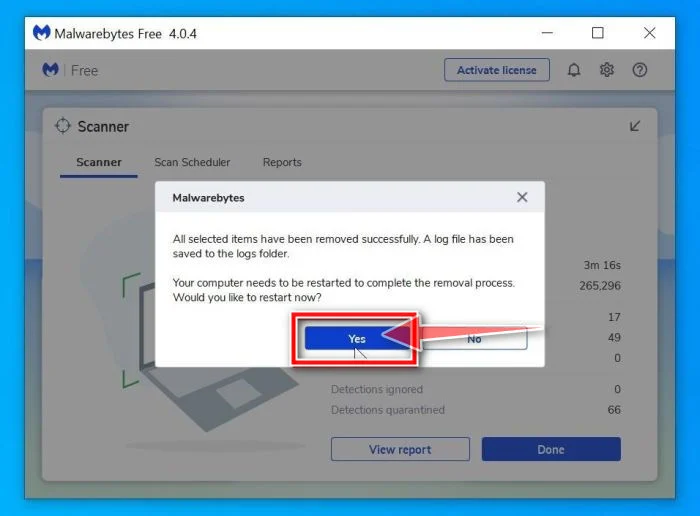
When the malware removal process is complete, you can close Malwarebytes and continue with the rest of the instructions.
STEP 3: Use HitmanPro to scan your computer for Vtsale2.xyz and other malware
In this final step, we will scan the computer with HitmanPro to ensure that no other malicious programs are installed on your device.
HitmanPro is a second opinion scanner that takes a unique cloud-based approach to malware scanning. HitmanPro scans the behavior of active files and also files in locations where malware normally resides for suspicious activity. If it finds a suspicious file that’s not already known, HitmanPro sends it to its clouds to be scanned by two of the best antivirus engines today, which are Bitdefender and Kaspersky.
Although HitmanPro is shareware and costs $24.95 for 1 year on 1 PC, there is actually no limit in scanning. The limitation only kicks in when there is a need to remove or quarantine detected malware by HitmanPro on your system and by then, you can activate the one time 30-days trial to enable the cleanup.
-
Download HitmanPro.
You can download HitmanPro by clicking the link below.
 HitmanProSecond-opinion malware scanner from Sophos
Download HitmanProFree scan. Removing threats needs the free 30-day trial. Your download starts right away.
-
Install HitmanPro.
When HitmanPro has finished downloading, double-click on “hitmanpro.exe” (for 32-bit versions of Windows) or “hitmanpro_x64.exe” (for 64-bit versions of Windows) to install this program on your PC. In most cases, downloaded files are saved to the Downloads folder.
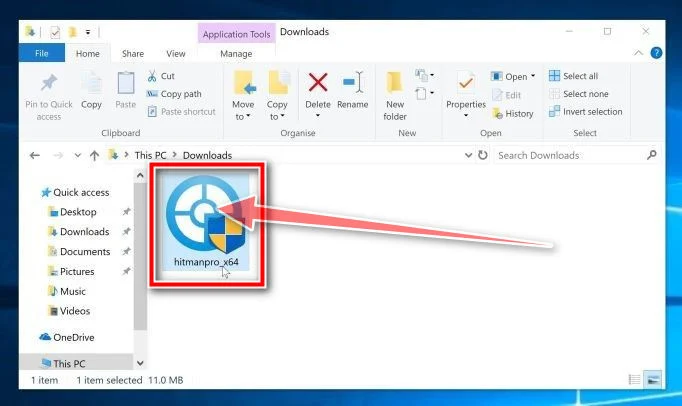
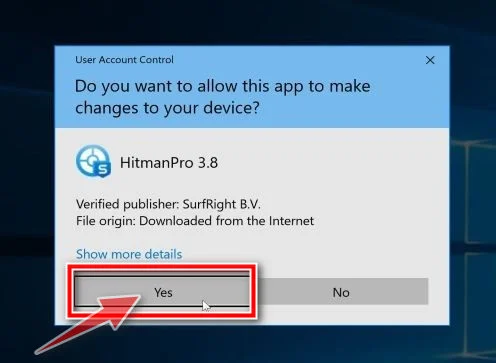
You may be presented with an User Account Control pop-up asking if you want to allow HitmanPro to make changes to your device. If this happens, you should click “Yes” to continue with the installation.
-
Follow the on-screen prompts.
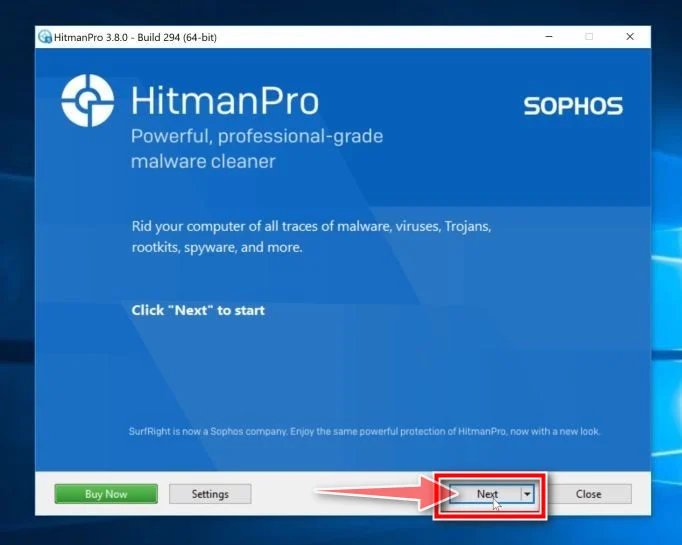
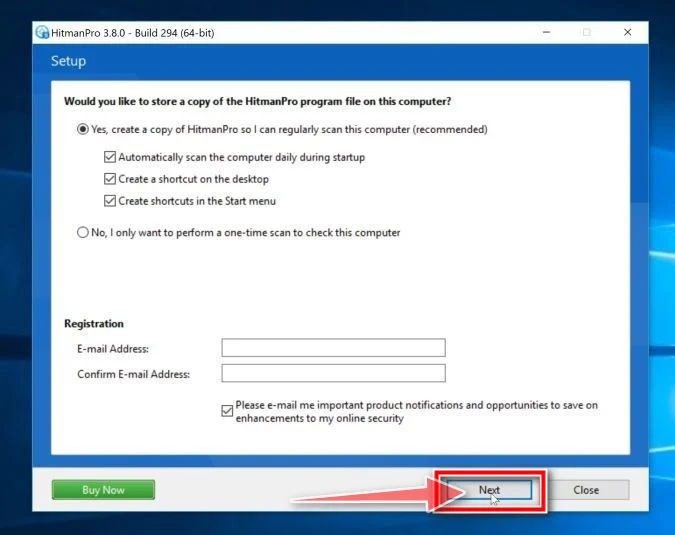
When HitmanPro starts you will be presented with the start screen as shown below. Click on the “Next” button to perform a system scan.
-
Wait for the HitmanPro scan to complete.
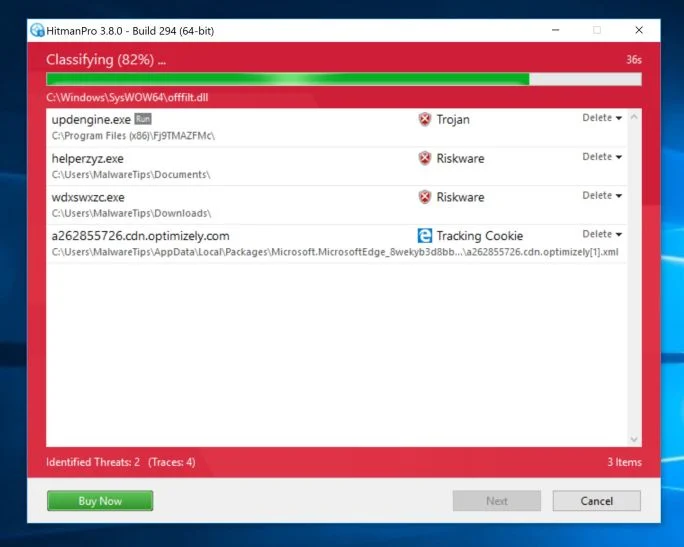
HitmanPro will now begin to scan your computer for Vtsale2.xyz browser hijacker and other malicious programs.
-
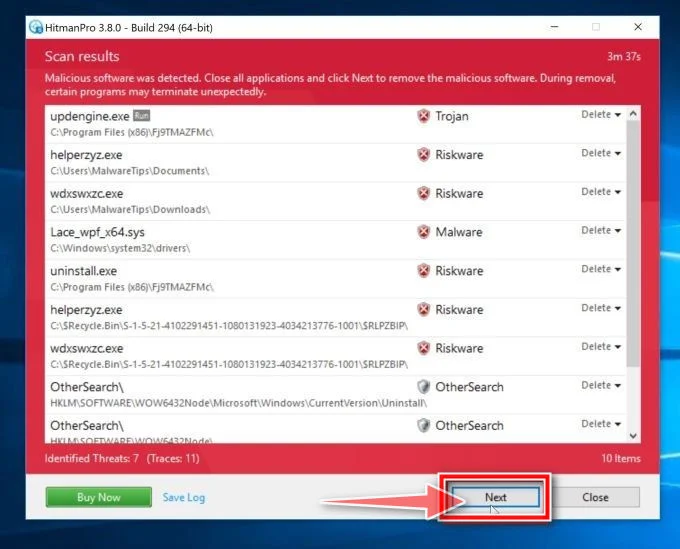
Click on “Next”.
When HitmanPro has finished the scan, it will display a list of all the malware that the program has found. Click on the “Next” button to remove Vtsale2.xyz adware and other malicious programs.
-
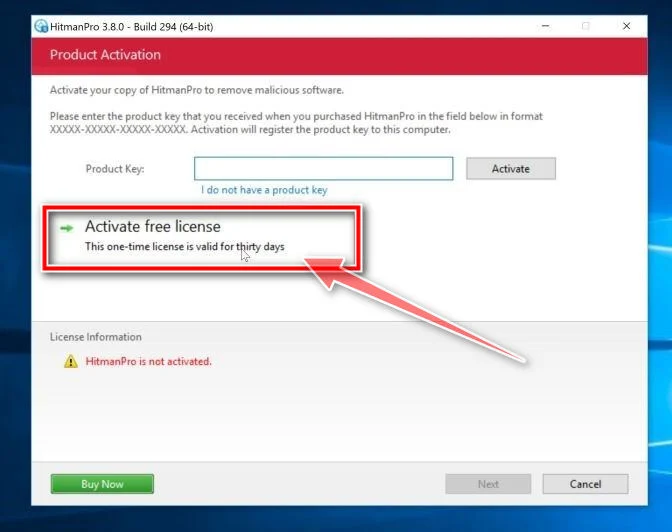
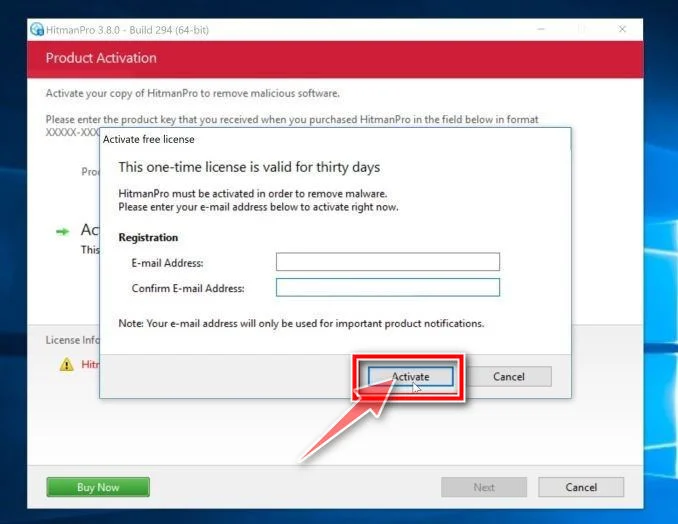
Click on “Activate free license”.
Click on the “Activate free license” button to begin the free 30 days trial and remove all the malicious files from your PC.
Your computer should now be free of the Vtsale2.xyz pop-up ads and malware. If your current antivirus allowed a malicious program on your computer, you might want to consider purchasing Malwarebytes Premium to protect against these types of threats in the future.
If you are still having problems with your computer after completing these instructions, then please follow one of the steps:
- Run a computer scan with ESET Online Scanner
- Ask for help in our Windows Malware Removal Help & Support forum.
- STEP 1: Remove Vtsale2.xyz spam push notifications from your Mac browser
- STEP 2: Use Malwarebytes for Mac to remove Vtsale2.xyz adware
STEP 1: Remove Vtsale2.xyz spam push notifications from your Mac browser
In this first step, we will go to your browser settings and remove Vtsale2.xyz from the list of websites allowed to send push notifications to your Mac.
Remove Vtsale2.xyz pop-up ads from Safari browser
- Open Safari. In the top left corner, click on Safari.
- Click Preferences, click Websites, then click Notifications. Deselect “Allow websites to ask for permission to send push notifications”.
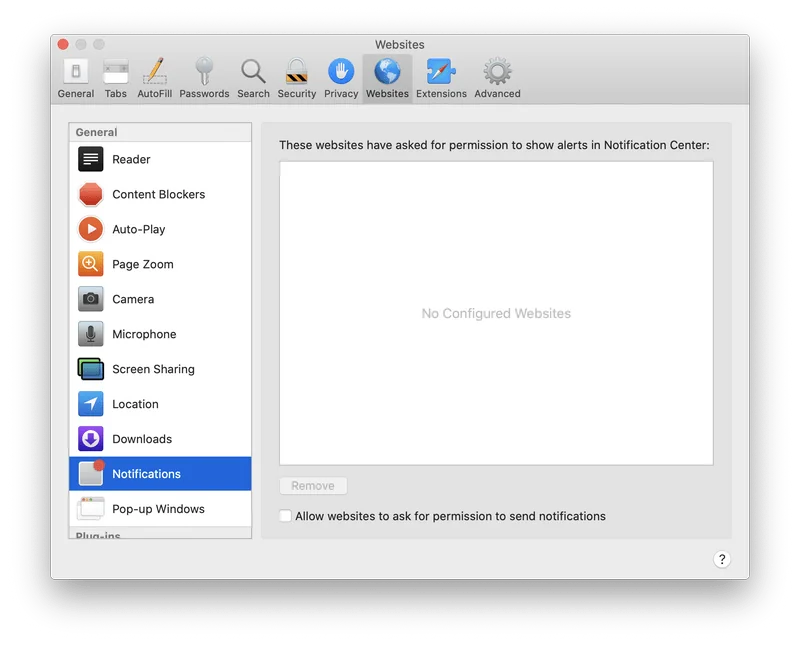
- Next, in the Notifications section, find the Vtsale2.xyz site and select it, then click the Deny button.
Remove Vtsale2.xyz pop-up ads from Chrome for Mac
- Open Chrome for Mac.
- In the top-right corner, expand the Chrome menu.
- In the Google Chrome menu, open Settings.
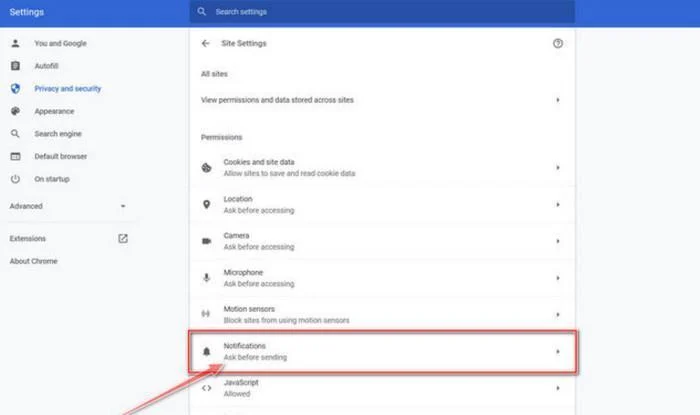
- At the Privacy and Security section, click Site settings.
- Open the Notifications settings.
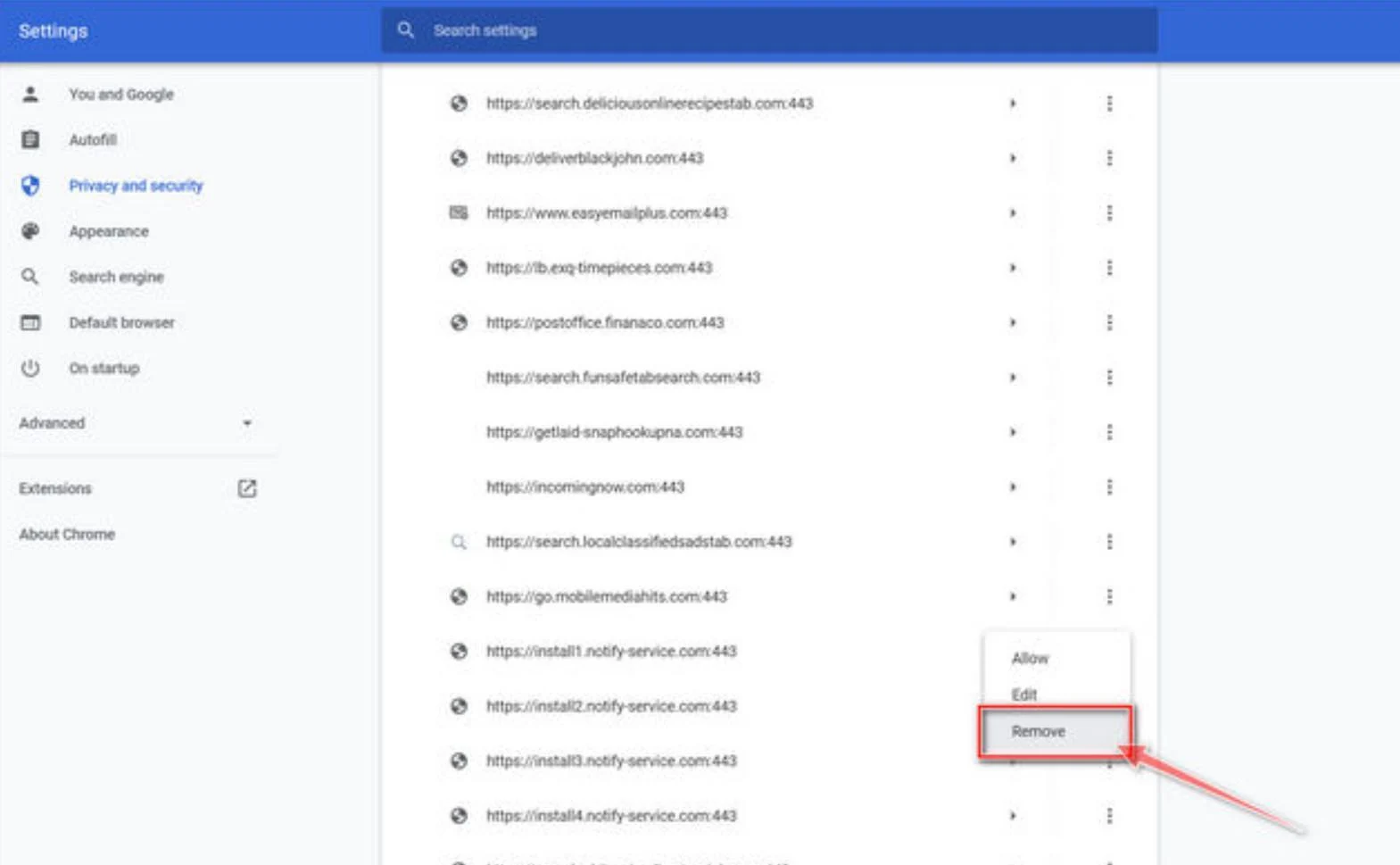
- Remove Vtsale2.xyz by clicking the three dots on the right next to the Vtsale2.xyz URL and click Remove.
Remove Vtsale2.xyz pop-up ads from Firefox for Mac
- Open Firefox
- In the top-right corner, click the Firefox menu (three horizontal stripes).
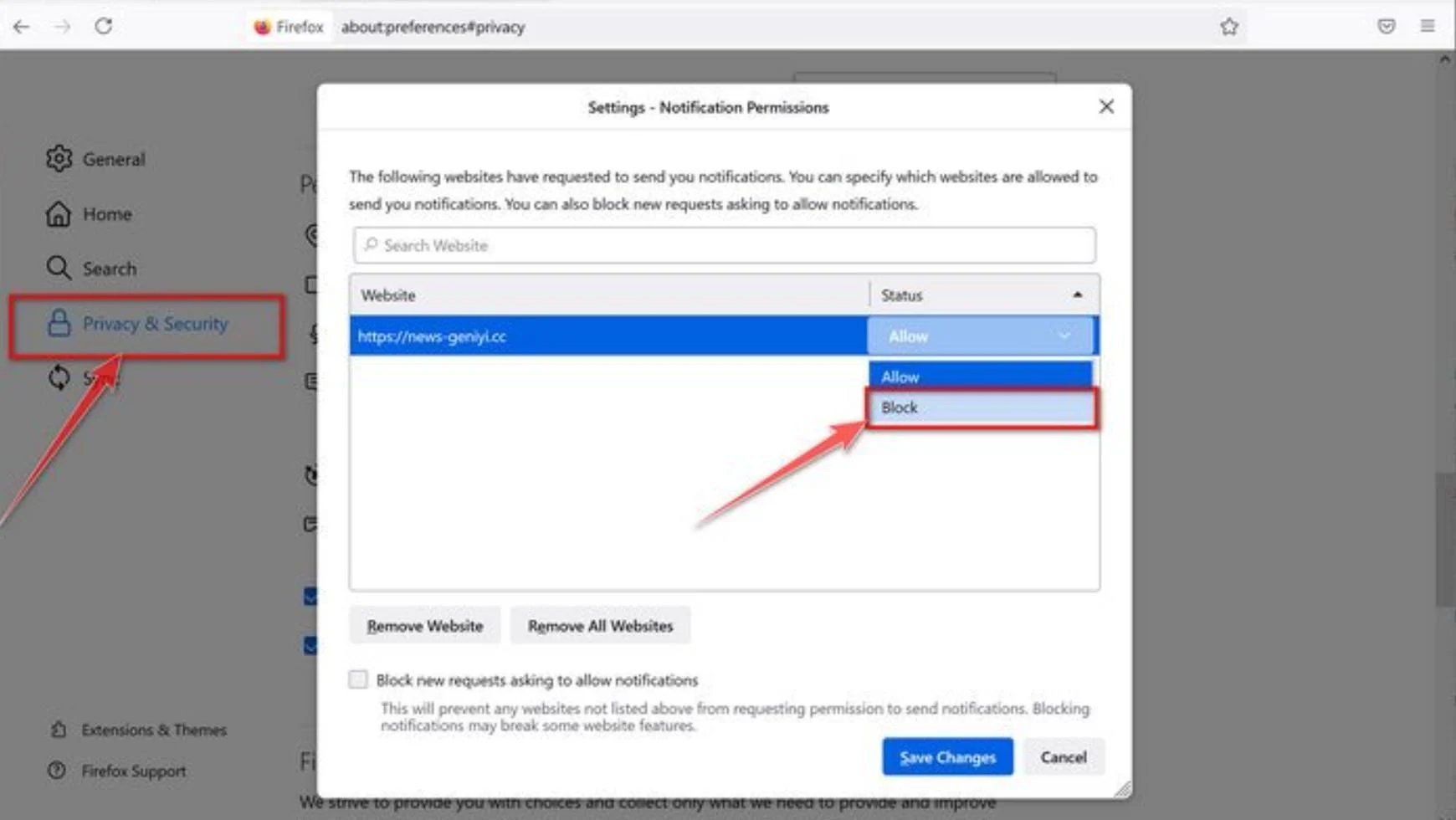
- In the menu go to Options, in the list on the left go to Privacy & Security.
- Scroll down to Permissions and then to Settings next to Notifications.
- Select the Vtsale2.xyz URL from the list, and change the status to Block, save Firefox changes.
STEP 2: Use Malwarebytes for Mac to remove Vtsale2.xyz adware
In this second step, we will download, install and run a scan with Malwarebytes to find and remove browser hijackers, adware, malicious browser extensions, and other malware from your Mac.
Malwarebytes for Mac is an on-demand scanner that is able to destroy many types of malware that other software tends to miss without costing you absolutely nothing. When it comes to cleaning up an infected device, Malwarebytes has always been free, and we recommend it as an essential tool in the fight against malware.
-
-
Download Malwarebytes for Mac.
You can download Malwarebytes for Mac by clicking the link below.
Malwarebytes Free for MacScans and removes malware at no costDownload MalwarebytesOfficial installer for macOS. Your download starts right away.Want real-time protection? See Malwarebytes Premium
-
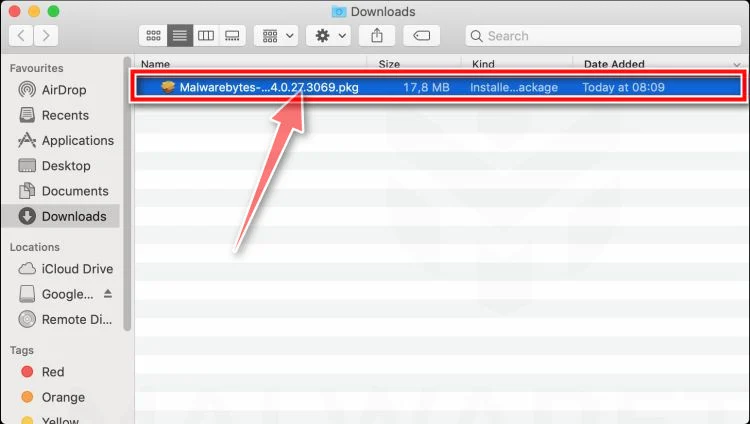
Double-click on the Malwarebytes setup file.
When Malwarebytes has finished downloading, double-click on the setup file to install Malwarebytes on your computer. In most cases, downloaded files are saved to the Downloads folder.
-
Follow the on-screen prompts to install Malwarebytes for Mac.
When the Malwarebytes installation begins, you will see the Malwarebytes for Mac Installer which will guide you through the installation process. Click “Continue“, then keep following the prompts in order to continue with the installation process.
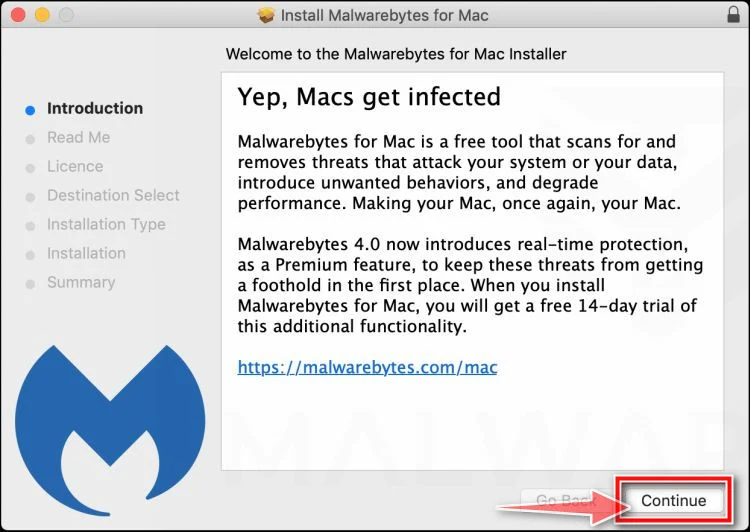
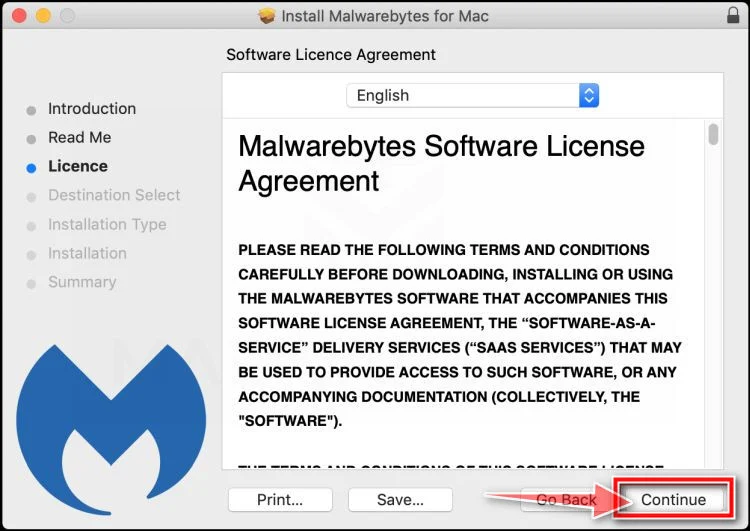
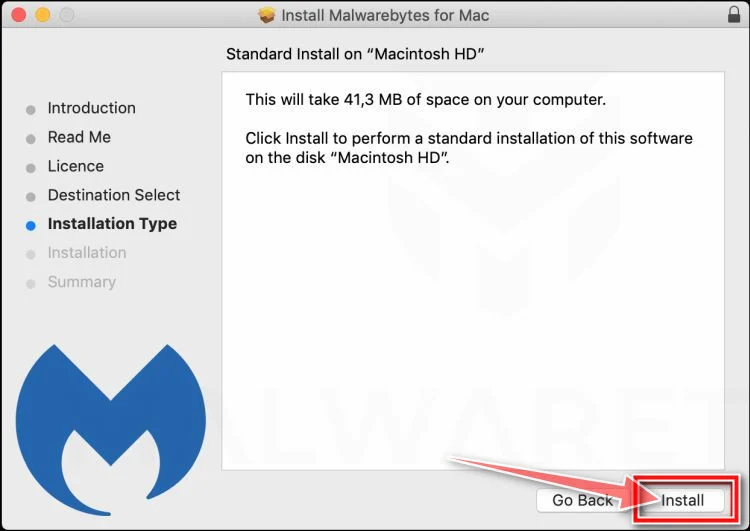
When your Malwarebytes installation completes, the program opens to the Welcome to Malwarebytes screen. Click the “Get started” button.
-
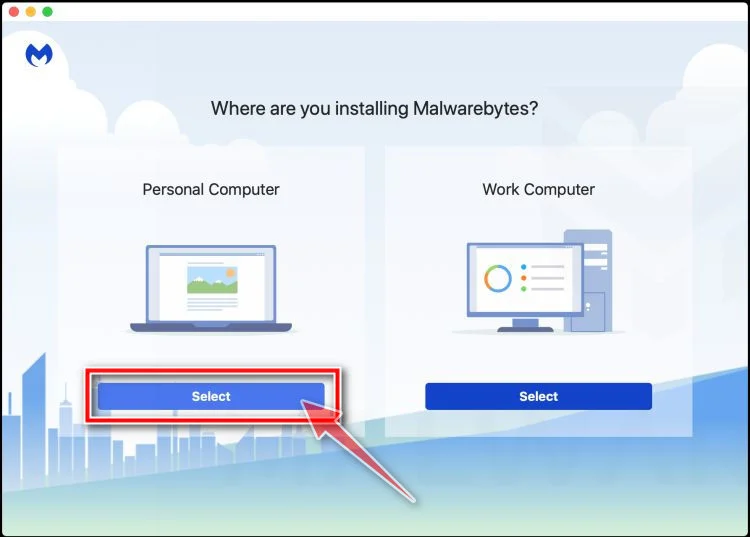
Select “Personal Computer” or “Work Computer”.
The Malwarebytes Welcome screen will first ask you on what type of computer are you installing this program, click either Personal Computer or Work Computer.
-
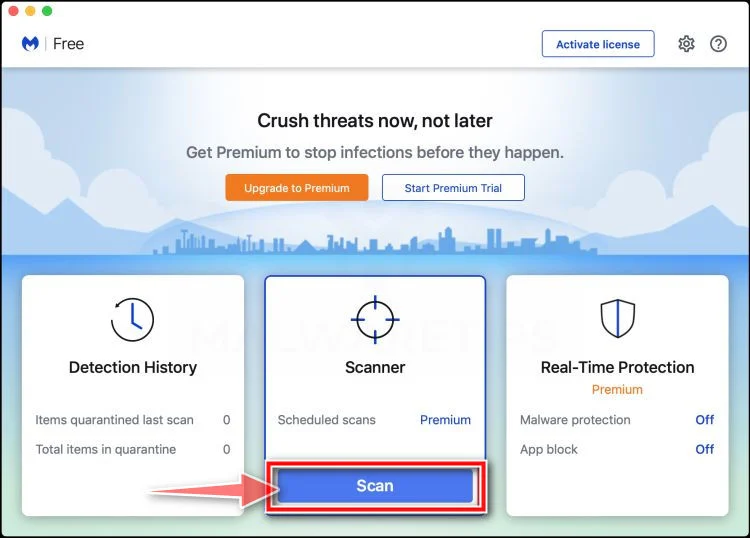
Click on “Scan”.
To scan your computer with Malwarebytes, click on the “Scan” button. Malwarebytes for Mac will automatically update the antivirus database and start scanning your computer for malware.
-
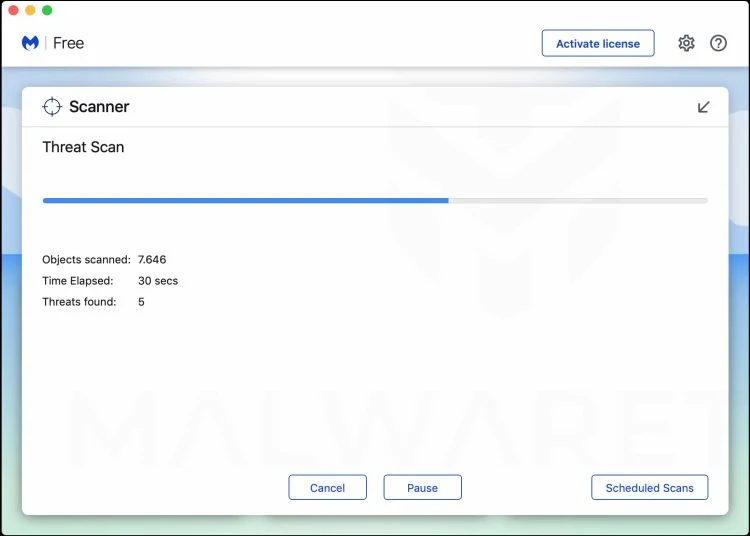
Wait for the Malwarebytes scan to complete.
Malwarebytes will scan your computer for pop-up ads and other malicious programs. This process can take a few minutes, so we suggest you do something else and periodically check on the status of the scan to see when it is finished.
-
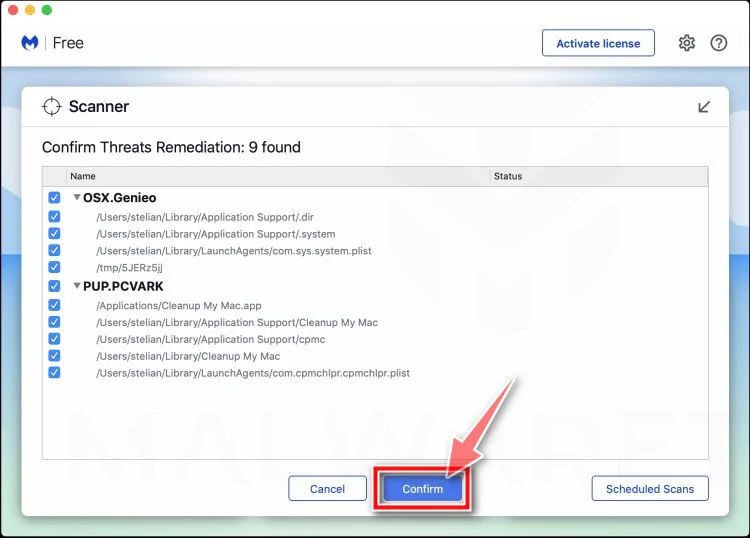
Click on “Quarantine”.
When the scan has completed, you will be presented with a screen showing the malware infections that Malwarebytes has detected. To remove the malicious programs that Malwarebytes has found, click on the “Quarantine” button.
-
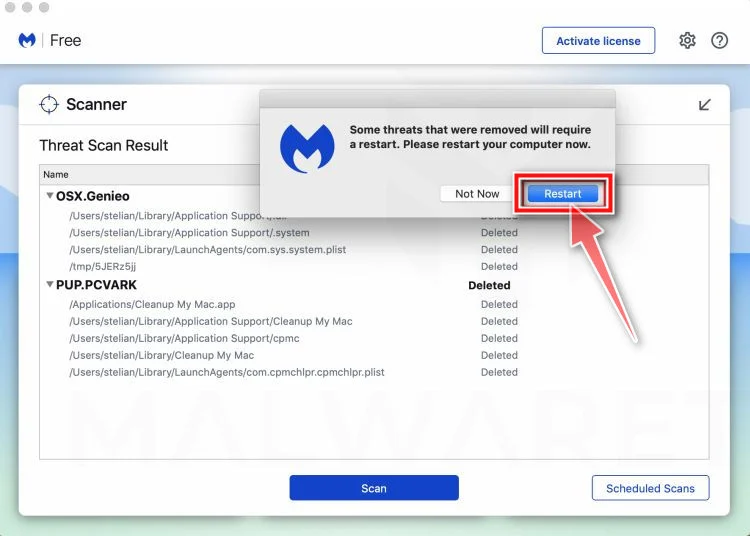
Restart computer.
Malwarebytes will now remove all the malicious files that it has found. To complete the malware removal process, Malwarebytes may ask you to restart your computer.
When the malware removal process is complete, you can close Malwarebytes and continue with the rest of the instructions.
Your Mac should now be free of the Vtsale2.xyz pop-up ads. If your current antivirus allowed a malicious program on your Mac, you might want to consider purchasing Malwarebytes for Mac Premium to protect against these types of threats in the future.
If you are still experiencing problems while trying to a malicious program from your computer, please ask for help in our Mac Malware Removal Help & Support forum.
- STEP 1: Remove the Vtsale2.xyz notifications from your Android browser
- STEP 2: Use Malwarebytes for Android to remove Vtsale2.xyz adware
STEP 1: Remove the Vtsale2.xyz pop-up ads from your Android browser
In this first step, we will remove the Vtsale2.xyz permissions to send push notifications to your phone’s browser. Depending on which browser are you seeing the Vtsale2.xyz pop-up ads, click on the below browser tab.
Remove Vtsale2.xyz pop-up ads from Chrome for Android
- On your Android phone, open Google Chrome
- In the top right corner, tap “More” (three vertical dots), then click on “Settings”.
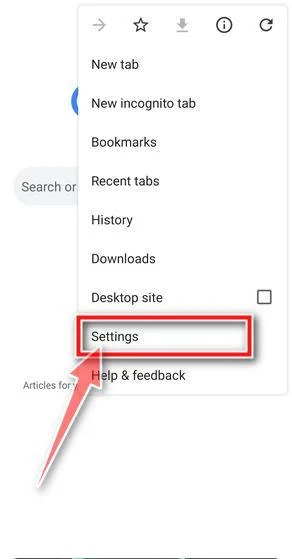
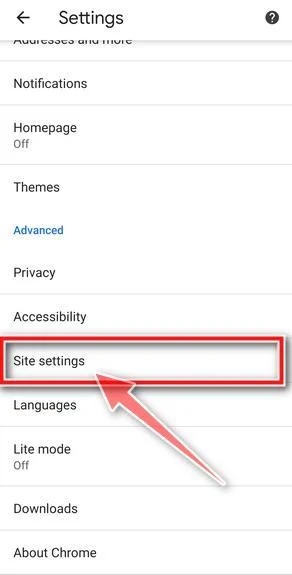
- Chrome’s “Settings” menu should now be displayed, scroll down to the “Advanced” section, and tap on “Site Settings“.
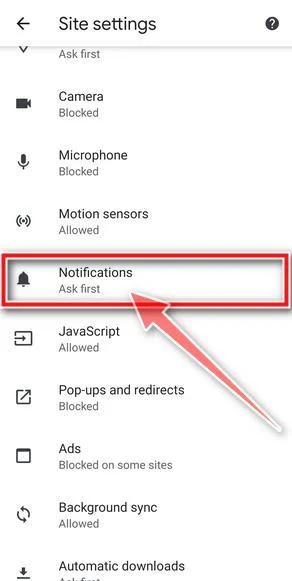
- In the “Site Settings” menu, tap on “Notifications“.
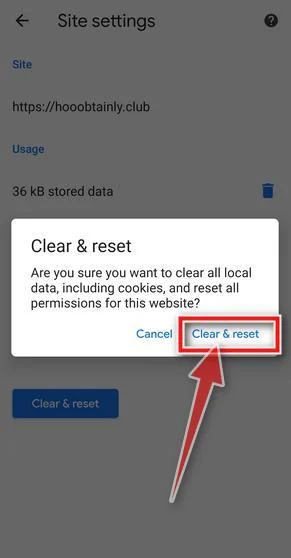
- The “Notifications” options will open and you will be presented with a list of sites that you have “Blocked” and “Allowed” to send you notifications. In the “Allowed” section, scroll through the list until you find the Vtsale2.xyz site, then tap on it, then click the “Clean & Reset” button that appears on the bottom of the window.
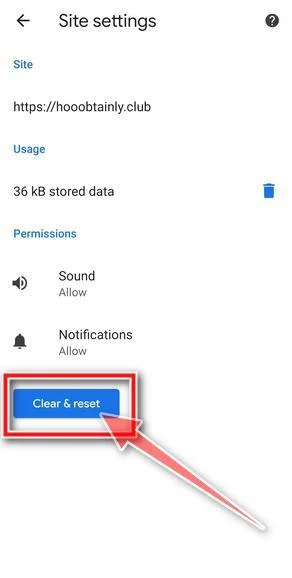
- A confirmation dialog should now be displayed, detailing the actions that will be taken should you continue on with the reset process. To complete the clean-up process, click on the “Clean & Reset” button.
Remove Vtsale2.xyz pop-up ads from Firefox for Android
To remove the Vtsale2.xyz advertisements from Firefox we will reset the browser settings to its default. This will remove all the cookies, cache, and other site settings that may have been saved.
-
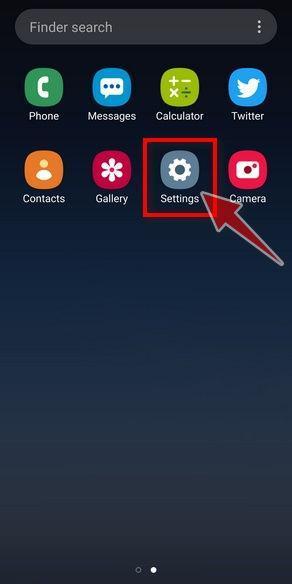
Open the “Settings” menu.
Tap on the “Settings” app from your phone menu or home screen.
-
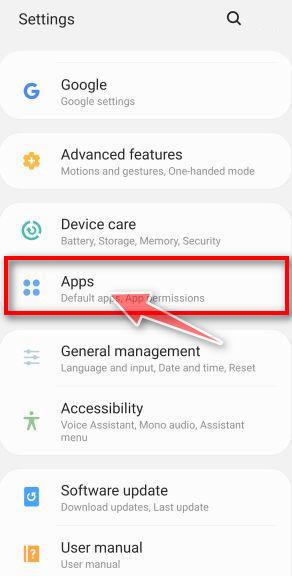
Tap on “Apps”.
When the “Settings” menu opens, tap on “Apps” (or “App Manager”) to see all the installed applications on your phone.
-
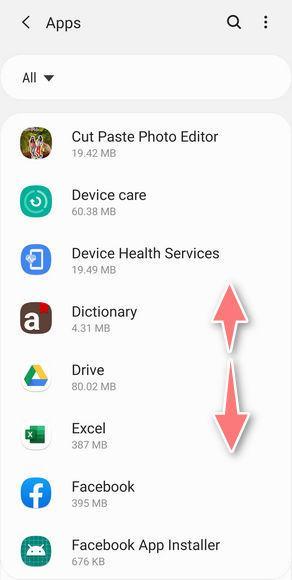
Find and tap on Firefox.
The “Apps” screen will be displayed with a list of all the apps installed on your phone. Scroll through the list until you find the Firefox app, then tap on it to open the apps details.
-
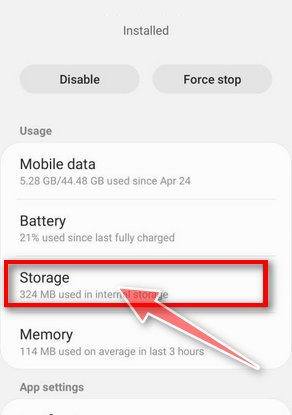
Tap “Storage”.
When the Firefox’s app info menu is displayed, tap on “Storage“.
-
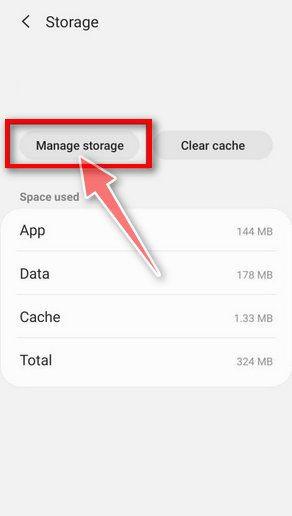
Tap “Manage Space”.
Under the storage settings, you will get two options — Manage Space and Clear Cache. Tap on “Manage Space“.
-
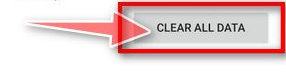
Tap “Clear all data”.
Tap “Clear all data” to delete all Firefox’s data including accounts, bookmarks and your settings in order to reset the default settings.
-
Confirm by tapping “Ok”.
A confirmation dialog should now be displayed, detailing the components that will be restored to their default state should you continue on with the reset process. To complete the restoration process, tap “Ok“.
Remove Vtsale2.xyz pop-up ads from Opera
To remove the Vtsale2.xyz advertisements from Opera browser we will reset the browser settings to its default. This will remove all the cookies, cache, and other site settings that may have been saved.
-
Open the “Settings” menu.
Tap on the “Settings” app from your phone menu or home screen.
-
Tap on “Apps”.
When the “Settings” menu opens, tap on “Apps” (or “App Manager”) to see all the installed applications on your phone.
-
Find and tap on Opera.
The “Apps” screen will be displayed with a list of all the apps installed on your phone. Scroll through the list until you find the Opera app, then tap on it to open the apps details.
-
Tap “Storage”.
When the Opera’s app info menu is displayed, tap on “Storage“.
-
Tap “Manage Space”.
Under the storage settings, you will get two options — Manage Space and Clear Cache. Tap on “Manage Space“.
-
Tap “Clear all data”.
Tap “Clear all data” to delete all Opera’s data including accounts, bookmarks and your settings in order to reset the default settings.
-
Confirm by tapping “Ok”.
A confirmation dialog should now be displayed, detailing the components that will be restored to their default state should you continue on with the reset process. To complete the restoration process, tap “Ok“.
Remove Vtsale2.xyz pop-up ads from Brave
To remove the Vtsale2.xyz advertisements from Brave browser we will reset the browser settings to its default. This will remove all the cookies, cache, and other site settings that may have been saved.
-
Open the “Settings” menu.
Tap on the “Settings” app from your phone menu or home screen.
-
Tap on “Apps”.
When the “Settings” menu opens, tap on “Apps” (or “App Manager”) to see all the installed applications on your phone.
-
Find and tap on Brave.
The “Apps” screen will be displayed with a list of all the apps installed on your phone. Scroll through the list until you find the Brave app, then tap on it to open the apps details.
-
Tap “Storage”.
When the Brave’s app info menu is displayed, tap on “Storage“.
-
Tap “Manage Space”.
Under the storage settings, you will get two options — Manage Space and Clear Cache. Tap on “Manage Space“.
-
Tap “Clear all data”.
Tap “Clear all data” to delete all Brave’s data including accounts, bookmarks, and your settings in order to reset the default settings.
-
Confirm by tapping “Ok”.
A confirmation dialog should now be displayed, detailing the components that will be restored to their default state should you continue on with the reset process. To complete the restoration process, tap “Ok“.
Remove Vtsale2.xyz pop-up ads from Samsung Internet Browser
To remove the Vtsale2.xyz advertisements from Samsung Internet Browser we will reset the browser settings to its default. This will remove all the cookies, cache, and other site settings that may have been saved.
-
Open the “Settings” menu.
Tap on the “Settings” app from your phone menu or home screen.
-
Tap on “Apps”.
When the “Settings” menu opens, tap on “Apps” (or “App Manager”) to see all the installed applications on your phone.
-
Find and tap on Samsung Internet Browser.
The “Apps” screen will be displayed with a list of all the apps installed on your phone. Scroll through the list until you find the Samsung Internet Browser app, then tap on it to open the apps details.
-
Tap “Storage”.
When the Samsung Internet Browser’s app info menu is displayed, tap on “Storage“.
-
Tap “Manage Space”.
Under the storage settings, you will get two options — Manage Space and Clear Cache. Tap on “Manage Space“.
-
Tap “Clear all data”.
Tap “Clear all data” to delete all Samsung Internet Browser’s data including accounts, bookmarks, and your settings in order to reset the default settings.
-
Confirm by tapping “Ok”.
A confirmation dialog should now be displayed, detailing the components that will be restored to their default state should you continue on with the reset process. To complete the restoration process, tap “Ok“.
Remove Vtsale2.xyz pop-up ads from Microsoft Edge
To remove the Vtsale2.xyz advertisements from Microsoft Edge we will reset the browser settings to its default. This will remove all the cookies, cache, and other site settings that may have been saved.
-
Open the “Settings” menu.
Tap on the “Settings” app from your phone menu or home screen.
-
Tap on “Apps”.
When the “Settings” menu opens, tap on “Apps” (or “App Manager”) to see all the installed applications on your phone.
-
Find and tap on Microsoft Edge.
The “Apps” screen will be displayed with a list of all the apps installed on your phone. Scroll through the list until you find the Microsoft Edge app, then tap on it to open the apps details.
-
Tap “Storage”.
When the Microsoft Edge’s app info menu is displayed, tap on “Storage“.
-
Tap “Manage Space”.
Under the storage settings, you will get two options — Manage Space and Clear Cache. Tap on “Manage Space“.
-
Tap “Clear all data”.
Tap “Clear all data” to delete all Microsoft Edge’s data including accounts, bookmarks, and your settings in order to reset the default settings.
-
Confirm by tapping “Ok”.
A confirmation dialog should now be displayed, detailing the components that will be restored to their default state should you continue on with the reset process. To complete the restoration process, tap “Ok“.
STEP 2: Use Malwarebytes for Android to remove Vtsale2.xyz adware
In this second step, we will install Malwarebytes to scan and remove the Vtsale2.xyz browser hijackers from your phone.
Malwarebytes for Android searches all files and apps quickly and effectively for malware or potentially unwanted programs such as screen lockers or adware, freeing your phone from bloatware.
-
Download Malwarebytes for Android.
You can download Malwarebytes for Android by clicking the link below.
Malwarebytes for AndroidScans your phone and removes malwareGet Malwarebytes for AndroidOpens the download page in a new tab.
-
Install Malwarebytes on your phone
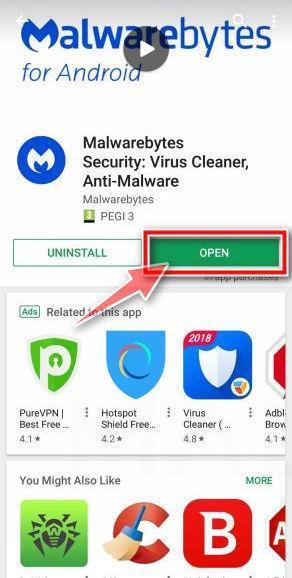
In the Google Play Store, tap “Install” to install Malwarebytes on your device.
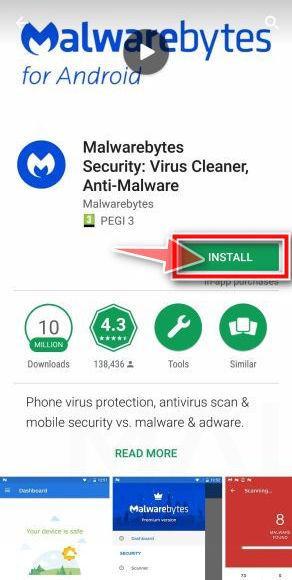
When the installation process has finished, tap “Open” to begin using Malwarebytes for Android. You can also open Malwarebytes by tapping on its icon in your phone menu or home screen.
-
Follow the on-screen prompts to complete the setup process
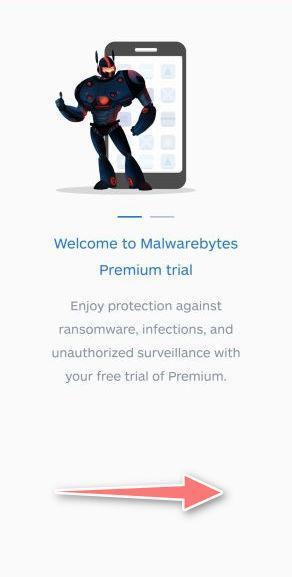
When the Malwarebytes will open, you will see the Malwarebytes Setup Wizard which will guide you through a series of permissions and other setup options.
This is the first of two screens which explain the difference between the Premium and Free version. Swipe this screen to continue.
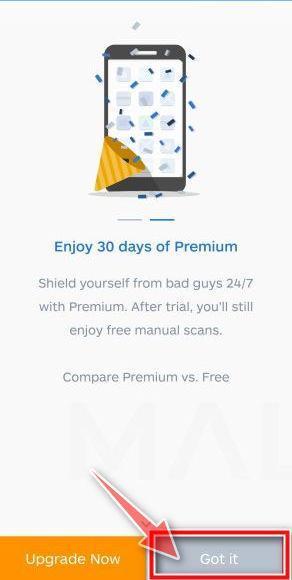
Tap on “Got it” to proceed to the next step.
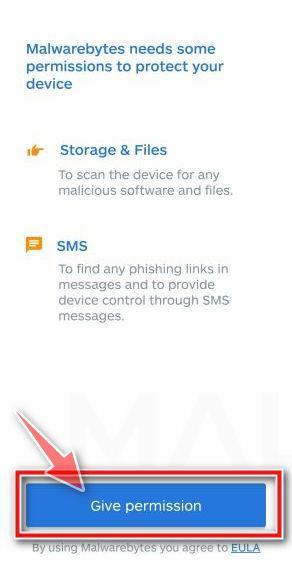
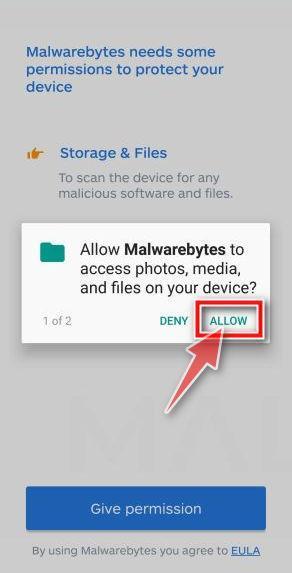
Malwarebytes for Android will now ask for a set of permissions that are required to scan your device and protect it from malware. Tap on “Give permission” to continue.
Tap on “Allow” to give permission to Malwarebytes to access the files on your phone.
-
Update database and run a scan with Malwarebytes for Android
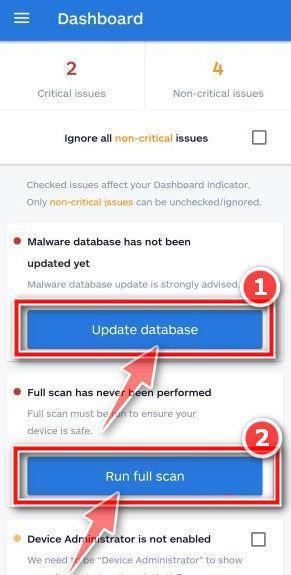
You will now be prompted to update the Malwarebytes database and run a full system scan.
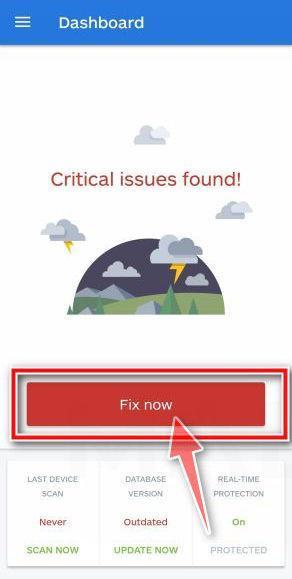
Click on “Update database” to update the Malwarebytes definitions to the latest version, then click on “Run full scan” to perform a system scan.
-
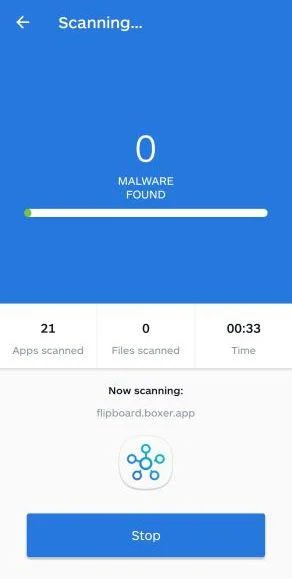
Wait for the Malwarebytes scan to complete.
Malwarebytes will now start scanning your phone for the Vtsale2.xyz adware and other malicious apps. This process can take a few minutes, so we suggest you do something else and periodically check on the status of the scan to see when it is finished.
-
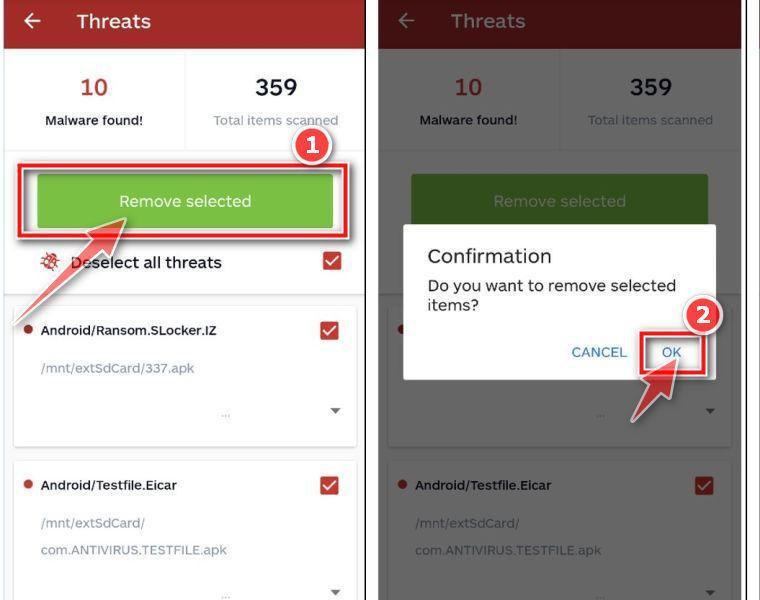
Click on “Remove Selected”.
When the scan has completed, you will be presented with a screen showing the malware infections that Malwarebytes has detected. To remove the Vtsale2.xyz adware and other malicious apps that Malwarebytes has found, tap on the “Remove Selected” button.
-
Restart your phone.
Malwarebytes will now remove all the malicious apps that it has found. To complete the malware removal process, Malwarebytes may ask you to restart your device.
Your phone should now be free of the Vtsale2.xyz pop-up ads. If your current antivirus allowed a malicious app on your phone, you might want to consider purchasing Malwarebytes Premium to protect against these types of threats in the future.
If you are still experiencing problems while trying to remove a malicious program from your phone, please ask for help in our Mobile Malware Removal Help & Support forum.

Join the discussion
0 commentsShare your experience or ask a question about this article.
Your progress
Did these steps help?
Let us know how the guide worked for you.
Describe what you see and the step you reached. Keep passwords and other private information out.
Discussion
Start the conversation
Have a question or something useful to share? Add the first comment.