

Receiving a parking ticket is never a pleasant experience. But imagine the sinking feeling of getting a text stating your car was ticketed in Salt Lake City – a place you haven’t visited in months. This ticket doesn’t even exist, yet the text demands immediate payment before heavy late fees apply. A headache-inducing situation, for sure.
Unfortunately, this is the grim reality facing many these days thanks to an insidious parking ticket scam sweeping Salt Lake City. Savvy scammers are leveraging the ubiquity of parking fines to craft realistic-looking texts duping unsuspecting people into surrendering their personal details and money. Don’t let them succeed!
This article will outline how to recognize this fraudulent scam and avoid becoming its next victim. We’ll examine exactly how the ploy works, provide advice if you got hooked, and offer tips to protect yourself going forward.
Overview of the SLC Parking Ticket Scam
The Salt Lake City parking ticket scam is a growing fraud that uses phony text messages to trick unsuspecting people into giving away their personal and financial information. This insidious scam exploits the fact that parking tickets are a common occurrence that require prompt payment, catching people off guard with its deceptive tactics.
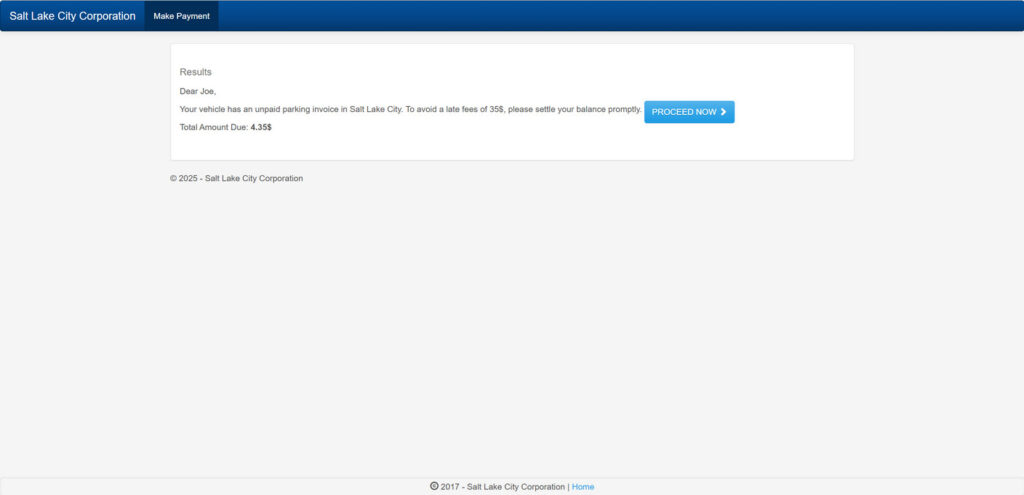
The scam works like this – victims receive a text message claiming to be from the Salt Lake City government stating that their vehicle has an unpaid parking invoice. The message cites details like owing $4.35 in ticket fees and threatening late penalties if not paid immediately. This makes the text appear credible at first glance since parking tickets do need to be paid right away before fines increase.
However, the message is not actually from Salt Lake City at all. It is from clever scammers who disguise their phone numbers to impersonate the city government. The texts are completely fake and part of an elaborate ruse to steal personal identities, credit card details and money.
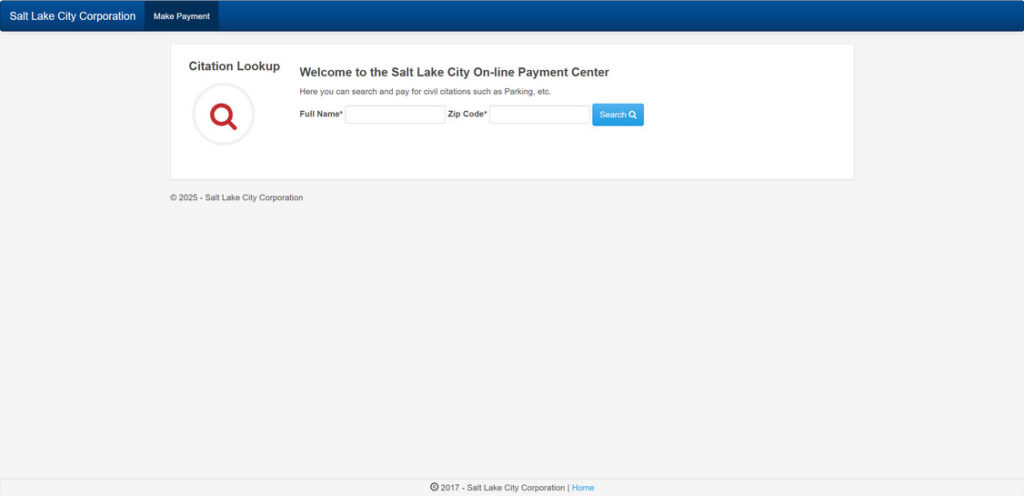
When unsuspecting recipients click on the payment link included in the fraudulent parking ticket text, they are directed to sophisticated fake websites designed to mimic official Salt Lake City sites. These sham websites feature city logos and branding, creating the illusion that people are paying a real ticket to the proper authorities. But in reality, they are handing over their sensitive personal data directly to criminals.
This parking ticket scam shows how fraudsters exploit the urgency of paying city fines on time. People are accustomed to quickly addressing parking tickets to avoid late fees. By pretending to collect payment for a real ticket, the scammers catch victims off guard and lower their defenses. This allows them to reel in targets with their credible-looking texts and websites.
Some red flags to watch for include text sender IDs that don’t match official Salt Lake City contacts, misspellings or grammatical errors, and web addresses that don’t lead to “slc.gov” sites. But the scammers are growing more sophisticated at disguising their texts and websites to appear legitimate. This makes it crucial for consumers to be vigilant against this fraud.
One giveaway is that Salt Lake City only communicates parking ticket notices by mail – not text. Checking directly with the city about any supposed unpaid tickets is the best way to verify a text is a scam. Exposing and spreading awareness about this fraud is key to preventing more innocent people from having their personal data stolen through this insidious parking ticket ruse. Don’t let the scammers fool you!
How the Salt Lake City Parking Scam Unfolds
Here is a step-by-step breakdown of how the parking ticket scam works to expose the fraud:
Step 1: You Get a Text About an Unpaid Parking Ticket
The first step is receiving a text message claiming you have an unpaid parking invoice in Salt Lake City that must be paid immediately to avoid late fees.
The message looks credible at first glance, mentioning legitimate details like Salt Lake City, an amount owed, and threatening penalties for non-payment.
But it is not actually from SLC – it is from scammers disguising their number to appear official.
Here is how the scam text might look:
This is a notice from Salt Lake City. Your vehicle has an unpaid parking invoice of $4.35. To avoid a late fees of 35$, please settle your balance promptly. To avoid late fees, access your file by typing the following link in your browser slcpark.com.
Step 2: The Text Provides a Link to Pay the Fake Ticket
The scam text will include a link supposedly to pay the unpaid parking ticket online before you incur late fees.
However, the link does not go to the real SLC government website. Instead it goes to a sophisticated fake website dressed up to impersonate the city.
This is a tactic to make victims think they are paying a real ticket, when the link actually leads to a fraudulent site.
Step 3: You Are Asked to Enter Personal and Payment Details
Once you click the link, you are taken to the sham website made to look like the official SLC site. It will use city branding and logos to appear legitimate.
You will then be prompted to enter personal and payment information to “pay” the fake ticket, including:
- Full name
- Date of birth
- Address
- Phone number
- Credit card number
The scammers want this sensitive data to steal your identity and money.
Step 4: The Crooks Steal Your Information for Fraud
With your details entered, the scammers can now commit identity theft and drain your accounts through fraudulent purchases or selling your information online.
You may only discover you were scammed after seeing unrecognized charges or suspicious account activity indicating your data was misused.
Meanwhile, the fraudsters continue perpetuating this parking ticket scam on other unaware victims.
What to Do If You Get a Fake SLC Parking Ticket Message
If you receive one of these fraudulent parking ticket texts, it is crucial not to click any links or provide any personal or financial details. The scammers are phishing for information to steal identities, so you want to avoid their hooks at all costs. Instead, take the following steps:
- Carefully verify the sender. These text scams often originate from phone numbers completely unaffiliated with Salt Lake City. Look up official city contacts and compare to double check. Also watch for slight variations in words like “SLC” vs “Salt Lake City” that signal a scam.
- Analyze any web links with scrutiny. Hover over the link to preview the URL and see if it leads to a legitimate city website. The fake sites look convincing but URLs will be slightly off.
- Check directly with the city about any supposed unpaid tickets. Log into your official city account to view legitimate outstanding fines. The scam texts always reference fake tickets that do not actually exist.
- Report the fraudulent text immediately. Forward the message to parking enforcement contacts and consumer protection agencies. File complaints with the FCC and FTC to aid investigations and warn other potential victims.
- Monitor accounts closely for signs of fraud. Review credit card and bank statements for any unauthorized or unfamiliar activity indicating your information was stolen and accounts compromised. Report anything suspicious to financial institutions right away.
- Consider placing fraud alerts and credit freezes as precautions. Fraud alerts require creditors to verify your identity before opening new accounts. Credit freezes restrict access to your credit report to block new accounts without your consent.
- Change passwords as a preventive measure. Even if you did not provide information, update passwords and security questions for online accounts as a precaution.
Exercising these diligent steps can help protect you from major headaches if targeted by a fake parking ticket text scam. Don’t let the clever fraudsters win by carelessly providing the data they phish for. With caution and awareness, you can preserve your identity, money, and peace of mind.
Frequently Asked Questions About the SLC Parking Ticket Scam
1. How do I know if a parking ticket text message is a scam?
The biggest red flag is if the text message comes from a number not affiliated with Salt Lake City. The city only communicates about parking tickets through official mail, not text. Hover over any links to see if they lead to legitimate government sites, which scammers are unable to replicate exactly. Log into your city account to double check for real unpaid tickets.
2. What details do the scam parking texts reference?
The fraudulent texts cite credible details like owing Salt Lake City $4.35 in parking ticket fees that must be paid immediately to avoid late penalties. This makes the messages appear real at first glance when paired with a spoofed city number.
3. What government agencies should I report parking ticket scam texts to?
Forward the fraudulent messages to Salt Lake City parking enforcement contacts. You should also file complaints with the Federal Communications Commission (FCC), Federal Trade Commission (FTC), and your state consumer protection agency.
4. If I provided personal details, what steps should I take?
Immediately contact your bank and credit card companies to report compromised accounts and implement heightened security measures. Place fraud alerts on your credit reports and consider a credit freeze to restrict access. Monitor your credit reports and financial statements vigilantly for signs of identity theft.
5. How can I protect myself from future parking ticket text scams?
Carefully scrutinize any texts demanding quick fine payment, verify ticket details directly with the city, avoid clicking links or providing info, report scam texts to authorities, and implement fraud alerts as a precaution. Staying vigilant is key.
6. Why do scammers focus specifically on parking ticket scams?
Parking tickets are a common occurrence that require fast payment, so people often comply quickly. Scammers exploit this context, counting on people to let their guard down and perceive their fake tickets as real. The ubiquity of parking fines makes this scam highly effective.
7. How are the fake ticket websites designed to deceive users?
The websites use sophisticated techniques to impersonate official city pages. They feature convincing logos, branding, navigation links, and forms mimicking a real ticket payment portal. Only inspecting the URL reveals the sham.
8. Has Salt Lake City issued any warnings about parking ticket scams?
Yes, the city has released several warnings about fraudulent texts and fake ticket websites. They advise residents to call the parking services office to verify any supposed tickets, and report texts or sites that seem suspicious.
9. What precautions can I take beyond ignoring scam texts?
Don’t store sensitive info on your phone that scammers could access if you click a link. Use strong passwords and enable two-factor authentication where possible. Consider a credit freeze to restrict access to your credit report as a protective measure.
10. What should I do if I mistakenly provided payment information?
Immediately contact your credit card company or bank to report the charges as fraudulent so they can reverse the charges, shut down your card, and issue a new one. Change account passwords and examine statements closely for further unauthorized charges.
The Bottom Line on Avoiding the Salt Lake City Parking Scam
Bogus texts about Salt Lake City parking tickets aim to deceive. These messages pretend to collect payment for unpaid parking invoices, luring victims with credible details. In reality, it is a fraud to pilfer your personal data.
Apply healthy skepticism if you receive one of these texts. Verify the sender, links, and ticket details directly with the city before acting. Reporting these phony texts prevents others from falling prey.
Staying alert safeguards your identity and money. Scrutinize these messages, confirm ticket status with the city, and steer clear of providing any information to unknown senders. With vigilance, you can evade this clever scam.
Now that you know how this parking ticket ruse operates, you can confidently delete these fraudulent texts and warnings others. Awareness of this fraud is your best protection. Share this knowledge so fewer innocent people have their personal details swindled through this deceptive tactic. Working together, we can keep our private information secure.








