

A new text message scam related to unpaid parking tickets is making the rounds. The message claims your car has outstanding parking fines in Salt Lake City that must be paid immediately to avoid additional late fees. But the payment link goes to a fraudulent website set up to steal your personal and financial information. This article will provide an in-depth examination of how the slcpark.com parking scam works, how to protect yourself, and what to do if you fell victim.
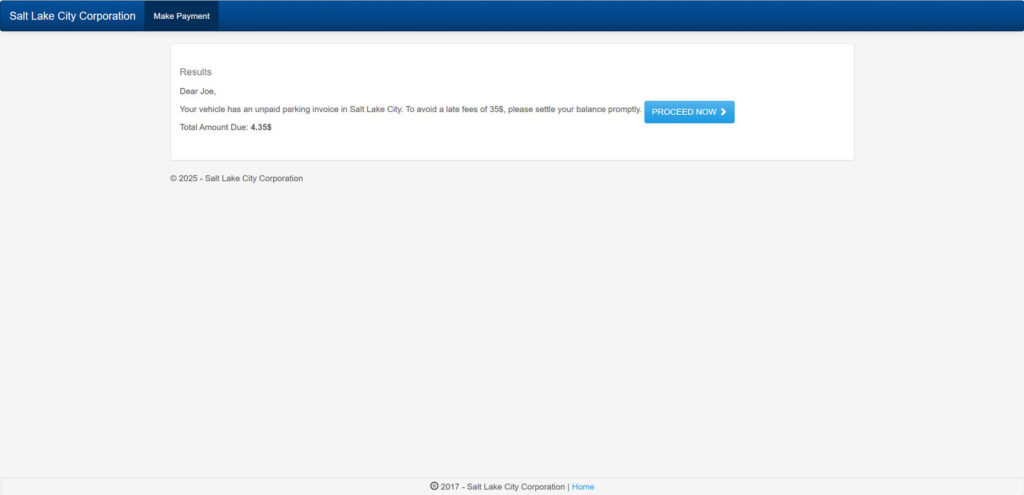
An Overview of the Slcpark.com Scam
The Slcpark.com scam begins with an urgent text message stating:
“This is a notice from Salt Lake City. Your vehicle has an unpaid parking invoice of 4.35.Toavoidalatefeesof354.35. To avoid a late fees of 354.35.Toavoidalatefeesof35, please settle your balance promptly. To avoid late fees, access your file by typing the following link in your browser slcpark.com.”
The message is designed to make you panic about late fees and urgently click the link to pay right away. However, slcpark.com is a fraudulent website set up solely to steal sensitive personal and financial information from victims.
The site may look somewhat official using Salt Lake City branding. But it is not affiliated with the real Salt Lake City government in any way. Any unpaid parking tickets referenced in the texts are completely fabricated.
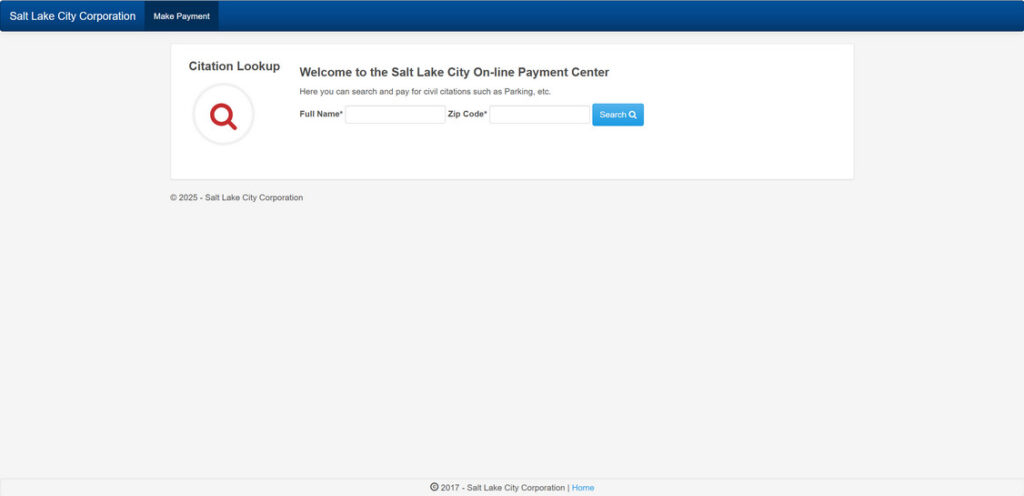
Unfortunately, many worried citizens rush to pay the fake ticket and end up having their identity, credit cards, and bank accounts stolen. The scammers are able to collect social security numbers, birth dates, addresses, and other personal data. As well as credit card information, bank logins, and more.
This sly scam has been rampant across Utah, with phony “Salt Lake City” texts being reported statewide. Hundreds have already had their information compromised or money stolen. It’s crucial to be aware of how this scam works so you can identify red flags and avoid being manipulated.
How the Slcpark.com Scam Operates
Here is a detailed breakdown of exactly how the scammers behind slcpark.com carry out this insidious con:
1. You Receive an Urgent Text About Unpaid Parking Fees
The first point of contact is a text message sent to your phone. The message is made to look like an official notice from Salt Lake City about an unpaid parking ticket linked to your vehicle.
The text emphasizes urgency, threatening late fees if you don’t pay promptly. This pressures recipients to click the link and provide payment information right away, before looking deeper into the red flags.
2. The Text Provides a Link to the Fraudulent Slcpark.com Site
The text includes a link to slcpark.com, which is made to appear like Salt Lake City’s parking ticket payment portal. But the .com site is completely fraudulent and unaffiliated with the real city government.
The criminals register the domain to look somewhat legitimate to trick victims. The site even uses Salt Lake City logos and branding, which adds to the guise.
3. You Input Personal and Payment Details on the Fake Site
Once you click the text link, you are directed to the fraudulent slcpark.com website. It has a form where you can supposedly pay the unpaid parking fine immediately.
First, you are prompted to enter personal information including your full name, birth date, home address, phone number, email address, and more.
Then it asks for financial information such as credit card number, security code, expiration date, and billing details.
The form claims this info is required to look up and process your unpaid parking fee payment. But in reality, they are stealing everything you input.
4. The Scammers Steal All Your Information
As soon as you click Submit on the payment form, all the sensitive personal and financial details are sent directly to the scammers behind the site.
They now have enough information to easily commit identity theft and financial fraud in your name. This can lead to massive headaches such as credit card fraud, bank account draining, higher insurance premiums, and ruined credit scores.
Yet from your end, you think you simply paid a small parking fine and will avoid late fees. You likely get no payment confirmation or receipt.
5. You Suffer Identity Theft, Credit Card Fraud, or Worse
In the coming days or weeks, you may start to notice the impacts from having your information stolen through the site. This includes:
- Fraudulent charges on your credit or debit cards used on the site.
- Suspicious activity in your bank accounts linked to the scam.
- Credit cards or loans opened in your name that you didn’t apply for.
- Collection calls for debts you don’t owe.
- Declined payments as accounts now have holds.
- Notably lower credit score from new fraudulent accounts opened.
- Other signs of identity theft.
The ramifications can be severe if the scammers are able to steal enough information to successfully impersonate you. It’s critical to act fast if you suspect you were scammed.
What To Do If You Shared Information on Slcpark.com
If you input any personal or financial details into slcpark.com, here are essential steps to take right away:
- Contact banks and card issuers – Alert them if your card details were input on the site so they can monitor for fraud. Consider canceling compromised cards.
- Run credit reports – Check reports from Equifax, Experian and TransUnion for any fraudulent accounts opened in your name. Consider adding a credit freeze.
- Change passwords – Update passwords on all online accounts, especially if you used the same password on slcpark.com. Enable two-factor authentication where possible.
- Monitor finances closely – Watch all financial accounts diligently for any unauthorized withdrawals or charges. Report anything suspicious.
- Place fraud alerts – Contact the credit bureaus to place fraud alerts on your credit reports to help prevent identity theft damages.
- File an identity theft report – Submit an identity theft report through the FTC at IdentityTheft.gov and get an recovery plan. Provide this to police and creditors.
- Report the scam – File reports with the FTC, FCC, IC3, and your local police to help authorities stop the scammers and assist other victims.
- Learn more about protection – Read FTC and USA.gov guidance on identity theft steps, your rights, and how to minimize damages. Knowledge is power.
The faster you can take action, the less potential impact. But if significant financial or identity theft has already occurred, it’s vital to start remediation promptly.
How to Avoid Falling Victim to the Slcpark.com Scam
Here are some smart tips to avoid becoming a victim of the slcpark.com parking ticket payment scam:
- Know legitimate payment options – Only pay Salt Lake City parking tickets through official channels like the city website, mail, municipal courthouse, etc.
- Beware texts requesting urgent action – Real parking ticket notices generally come via mail with reasonable response times. Texts insisting immediate payment are always red flags.
- Verify directly with the city – If you receive a ticket notice that seems suspicious, call the Salt Lake City justice court or parking authority directly to confirm legitimacy before taking any action.
- Avoid clicking links – Never click links in unsolicited texts, emails, or calls regarding ticket payments. Manually look up official payment portals instead.
- Watch for typos – Fraudulent messages often contain spelling, grammar, or formatting errors. These are telltale signs of scams.
- Double check URLs – Carefully examine the full website address before entering info. Scam sites often appear similar to real URLs.
Staying vigilant against common parking ticket scam tactics is key to protecting your identity and money. Report fake communications to help stop these ruthless criminals from claiming more innocent victims.
Frequently Asked Questions about the Slcpark.com Parking Scam
1. What exactly is the Slcpark.com scam?
The Slcpark.com scam involves receiving a fraudulent text message claiming your vehicle has unpaid parking fines in Salt Lake City. The message urges you to pay through a link to Slcpark.com, but the site is a scam to steal your information.
2. How does the Slcpark.com parking scam work?
You’ll get a text saying your car has outstanding Salt Lake City parking fees threatening added late fees if not paid immediately. The link goes to Slcpark.com which pretends to be the payment portal but actually just steals your personal and payment details.
3. What information do the scammers ask for?
The fake Slcpark.com site asks for your full name, birth date, home address, phone, email, credit card number, CVV, expiration date, and other sensitive info under the guise of processing your parking fee payment.
4. What do the scammers do with my information?
The criminals use your personal and financial details stolen through the site to commit identity theft, steal your money, open fraudulent accounts, make unauthorized purchases, and more.
5. What are red flags of the Slcpark.com scam?
Red flags include getting urgent texts instead of mailed notices, threats of late fees, typos/grammar mistakes, asking for payment via suspicious sites, and requesting too much personal information.
6. What should I do if I shared my information?
If you entered any details on Slcpark.com, contact banks immediately, run credit reports, set fraud alerts, file an identity theft report, change all account passwords, and monitor your finances.
7. How can I avoid the Slcpark.com parking ticket scam?
Avoid clicking any links in texts related to parking tickets. Manually look up official payment websites instead. Verify tickets directly with the city first. Watch for typos, urgent pleas, and shady links.
8. How can I report the Slcpark.com scam?
You can report the fraudulent website, texts, and any damages to the FTC, FCC, IC3, and your local police department to aid investigations.
9. Where can I learn more about protecting myself?
Resources like IdentityTheft.gov and USA.gov have guides on identity theft prevention, damage control, and reducing impacts if you unfortunately do become a victim.
10. What is the legitimate website to pay Salt Lake City parking tickets?
The official website is https://www.slc.gov/. Never go through any other site, especially those sent unexpectedly via text, to pay city parking citations.
The Bottom Line
The slcpark.com scam is a dangerous fraud that refuses to relent. Scammers are experts at making their communications look official and urgent to manipulate worried recipients. But any text demanding immediate parking ticket payment via an outside website should raise eyebrows.
Never let fear over supposed late fees or punishments cloud your judgement. Carefully verify the source of any ticket notice through official municipal channels first. Legitimate payment platforms will never require excessive personal or financial details either.
With awareness of common parking ticket scam tactics, we can work together to halt these criminals in their tracks. Share this information, report fake texts and sites, and keep your friends and family protected. The more light we shine on sneaky scams like slcpark.com, the less victims they can claim.








