

Have you recently received a suspicious text message claiming you have an unpaid parking invoice from the City of San Diego? Watch out – it’s a clever new scam designed to steal your money and sensitive personal information. In this article, we’ll take an in-depth look at how this parking invoice scam works, what to do if you’re targeted, and how to protect yourself from falling victim to these fraudsters.
Scam Overview
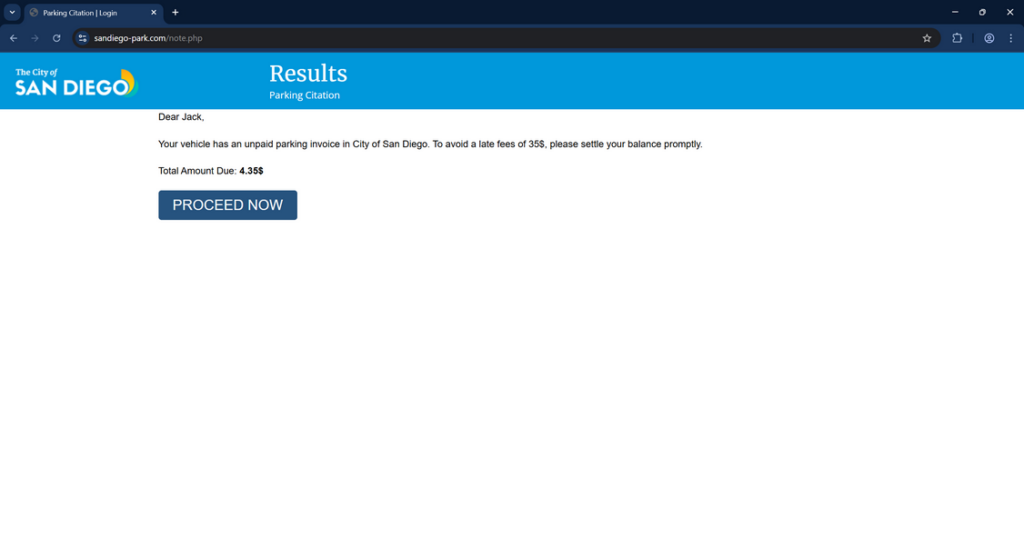
The San Diego “unpaid parking invoice” scam typically starts with an unsolicited text message that appears to be from the City of San Diego. The message claims your vehicle has an outstanding parking invoice, usually for a relatively small amount like $4.35. It urges you to pay the invoice immediately via a provided link to avoid incurring a much larger late fee, often $35 or more.
Here’s an example of what the scam text message might say:
“This is a notice from City of San Diego. Your vehicle has an unpaid parking invoice of $4.35. To avoid a late fees of 35$, please settle your balance promptly. To avoid disconnection, please make a payment immediately by typing the link in your browser: https://sandiego-park.com“
The linked website is designed to closely mimic an official City of San Diego website. It uses official logos, color schemes, and terminology to trick you into thinking it’s legitimate. The fake site prompts you to enter sensitive personal and financial details, including your full name, birthdate, address, phone number, email address, and credit card information. The scammers claim this data is needed to process your parking invoice payment.
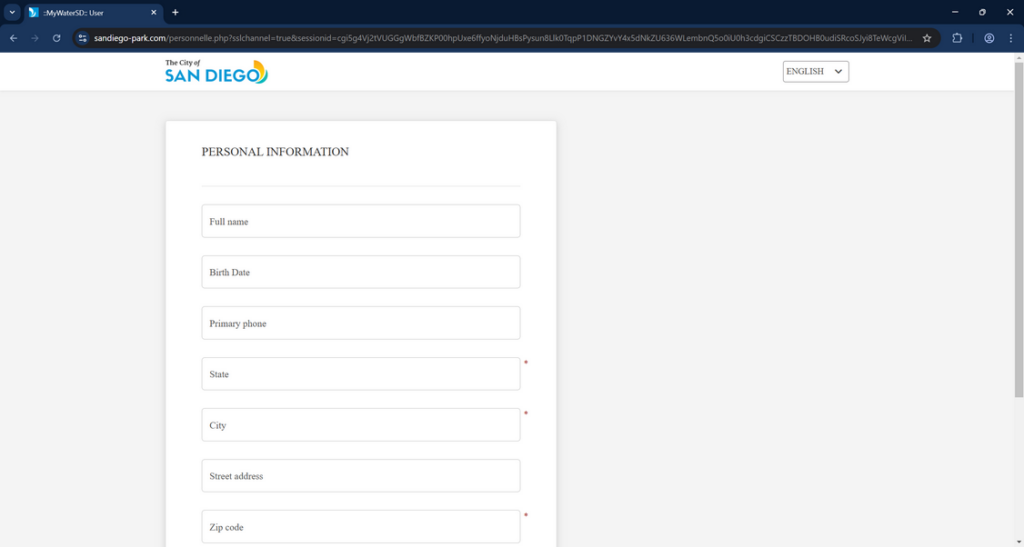
In reality, there is no unpaid parking invoice. It’s all a ruse to steal your money and identity. If you submit your credit card details, the scammers can make fraudulent charges and drain your bank account. With your personal information, the criminals can commit identity theft, opening new accounts or lines of credit in your name. They may also sell your data on the dark web to other fraudsters.
This scam is particularly insidious because it preys on people’s fear of expensive fines and uses high-pressure tactics to manipulate victims into acting quickly without scrutinizing the message too closely. The scammers blast out these phishing texts to thousands of random phone numbers, hoping to snare a small percentage of victims. They may even spoof their phone number so the text appears to come from the real City of San Diego.
How the Scam Works
To help you spot and avoid this nefarious “unpaid parking invoice” scam, let’s break down how it typically unfolds:
Step 1: You receive an unsolicited text message
The scam begins when you receive an out-of-the-blue text message that claims to be from the City of San Diego. The message states your vehicle has an unpaid parking invoice and urges you to pay a small amount immediately to avoid a much larger late penalty. There’s a link in the text that supposedly leads to an official payment portal.
Step 2: You click on the link in the text message
If you click on the link provided in the scam text, it opens up what appears to be an official City of San Diego parking services website in your phone’s browser. The site is designed to closely resemble a legitimate government portal, complete with official seals, logos, legal disclaimers and more. Many people don’t realize it’s a convincing fake.
Step 3: The fake site asks for your personal and financial information
The fraudulent website prompts you to input an array of sensitive personal and financial details in order to supposedly pay your outstanding parking invoice and avoid late penalties. This information often includes:
- Your full name
- Birthdate
- Street address
- City, state and zip code
- Home phone number
- Email address
- Credit card number, expiration date and CVV security code
The website assures you this data is needed to process your parking invoice payment securely. In reality, it’s a trick to steal your identity and money.
Step 4: The scammers steal your data and money
Once you enter all your sensitive details into the scam website and hit submit, the information is sent directly to the cybercriminals behind the scheme. They can use your credit card number to make unauthorized purchases or siphon money from your bank account.
The crooks can also exploit your personal information like name, birthdate and address to commit various forms of identity fraud, such as opening new credit accounts or filing for government benefits in your name. In some cases, they might sell your information to other scammers on the dark web.
Step 5: You realize you’ve been scammed
Most victims only realize they’ve been conned after unusual charges start appearing on their credit card statement or they’re contacted about suspicious activity on accounts they didn’t open. By then, undoing the damage can be an uphill battle.
What to Do If You’ve Fallen Victim to This Scam
If you believe you’ve fallen prey to the San Diego “unpaid parking invoice” text message scam, don’t panic. Swift action can help minimize the damage and get you on the road to recovery. Here are the key steps to take:
- Contact your bank or credit card issuer immediately to report the fraudulent charges and request a new card. Ask them to reverse any unauthorized transactions if possible. Consider setting up transaction alerts for the future.
- Report the scam text to your mobile carrier by forwarding it to 7726 (SPAM). This helps them identify and block scam numbers.
- Notify the real City of San Diego that crooks are impersonating them in this phishing scam. Call their official parking services number to double check if you have any legitimate unpaid parking invoices on record.
- File a report with the Federal Trade Commission at FTC.gov/Complaint. They can’t resolve your individual case but your report helps them investigate and crack down on scammers.
- Notify the three major credit bureaus that you’ve been a victim of identity theft and request a free credit report to check for suspicious activity. Consider placing a temporary fraud alert or credit freeze on your file.
- Change the login credentials of any online accounts that may have been compromised. Use strong, unique passwords for each one and enable two-factor authentication whenever possible.
- Review all recent and upcoming financial statements carefully for any other fraudulent activity. Don’t just focus on credit cards but also bank accounts, utilities, online shopping sites, etc.
- Stay vigilant against follow-up scams. Once crooks have some of your info, they may try to trick you into giving up even more through phony debt collection calls, phishing emails and smishing texts.
- Educate your friends and family about this scam to help protect your community. If you spot future scam messages, report them to help others avoid falling victim.
- If scammers have used your info to commit serious identity crimes like filing fake tax returns or opening new accounts, you may need to file a police report and work with a trusted identity theft recovery service.
Frequently Asked Questions About the San Diego Unpaid Parking Invoice Text Scam
Q1: What is the San Diego unpaid parking invoice text scam?
A: The San Diego unpaid parking invoice text scam is a phishing scheme where cybercriminals send out fake SMS messages claiming to be from the City of San Diego’s parking services department. The texts falsely state that the recipient’s vehicle has an overdue parking invoice and urges them to pay a small fine immediately through a provided link to avoid larger late penalties. However, the linked website is a fraudulent portal designed to steal the victim’s sensitive personal and financial information.
Q2: How can I tell if a parking invoice text message is a scam?
A: There are several red flags that can help you spot a fake parking invoice text:
- It comes from an unknown number, not an official city government account
- The message has a generic greeting like “Dear [blank]” instead of your name
- It includes a link to an unfamiliar website (official city sites usually end in .gov)
- The message creates a false sense of urgency, threatening high late fees for not paying quickly
- It has spelling and grammar errors (real city agencies proofread carefully)
- If you hover over the web link (without clicking), the URL looks suspicious
As a rule, never click links in unsolicited texts unless you can verify the sender. When in doubt, contact your city parking services through their official channels to check if you actually owe any fines.
Q3: What kind of information do parking invoice text scammers try to steal?
A: These phishing schemes typically try to trick victims into entering a wide range of sensitive personal and financial details, such as:
- Full name, birthdate, and address
- Phone number and email
- Social Security number or driver’s license details
- Credit card or bank account numbers
Armed with this information, the scammers can make unauthorized purchases, drain bank accounts, or commit identity fraud like opening new lines of credit in the victim’s name. They may also sell the data to other criminals on the dark web.
Q4: What should I do if I get a suspicious parking ticket text?
A: If you receive an unsolicited text about an unpaid parking invoice, do not reply, click any links, or call any numbers provided. Delete the message immediately. If you’re unsure if you might actually have outstanding city parking fines, look up the phone number for your local parking authority and contact them directly to inquire. But never share sensitive info via text or email.
Q5: How can I report a parking invoice text scam?
A: If you’re targeted by a scam parking ticket text, there are several ways you can report it:
- Forward the text to 7726 (SPAM) to alert your cellular carrier
- Report it to the Federal Trade Commission at FTC.gov/Complaint
- Contact your local police department’s non-emergency number
- Notify the real parking authority that scammers are impersonating them
- File a complaint with the FBI’s Internet Crime Complaint Center at IC3.gov
Reporting parking invoice text scams helps authorities investigate and shut down these schemes, even if they can’t resolve your individual case.
Q6: What should I do if I fell for a parking scam text and shared my info?
A: If you realize you’ve mistakenly given your personal or financial details to parking invoice text scammers, act quickly to minimize the damage:
- Contact your bank and credit card companies to alert them of the scam
- Request a freeze or alert on your credit reports with the three major bureaus
- Change login passwords on any accounts that may be compromised
- Carefully review your statements for any fraudulent charges or activity
- Consider identity theft protection services for extra monitoring
- Stay alert to other scam attempts using your stolen info
The sooner you notice and respond to parking invoice text fraud, the easier it is to recover and prevent further losses. But remember, you are not to blame for the scammer’s crimes.
Q7: How can I protect myself from parking ticket text scams?
A: The best defense against these scams is awareness and caution:
- Be wary of any unsolicited texts, even if they appear to come from a government agency
- Independently verify suspected parking fines with your local authorities before paying
- Check if the web links match the organization’s official URL
- Never send sensitive personal or financial details via text
- Keep your phone’s operating system and security apps updated
- Use strong, unique passwords on all your accounts
- Enable two-factor authentication when available
If you stay vigilant and take proactive steps to safeguard your data, you can significantly reduce your risk of falling victim to parking invoice texting scams.
The Bottom Line
In short, the San Diego “unpaid parking invoice” text scam is a serious threat designed to steal your money and identity. By impersonating official City of San Diego parking services, the scammers pressure you into clicking a link and “paying” a small fine to avoid larger late penalties. In reality, the linked website is a fake designed to trick you into giving up your credit card details and sensitive personal information.
If you receive one of these phony parking invoice texts, do not click on any links or call any numbers provided. Delete the message immediately. Remember, government agencies will never request sensitive data or payments via text message.
By knowing how to spot the red flags of a scam text, you can avoid falling victim to these identity thieves. Always be cautious of unsolicited messages demanding urgent payment and carefully examine any links before clicking. If you’ve been targeted, report the scam and check your financial statements for fraud. Staying alert and proactive is key to protecting yourself from smishing scams.

Join the discussion
0 commentsShare your experience or ask a question about this article.
Discussion
Start the conversation
Have a question or something useful to share? Add the first comment.