

In recent weeks, residents across San Diego have reported receiving suspicious text messages claiming their vehicle has an unpaid parking ticket that must be paid immediately. These texts include a link to a website, sandiego-park.com, that looks like a city parking violations site but is actually a scam designed to steal personal and financial information.
This article will provide an in-depth overview of how the San Diego parking invoice scam works, what to look out for, and most importantly, how to protect yourself from falling victim. With parking fines being a common occurrence in the city, it’s easy to let your guard down. But awareness and caution are key to avoiding this predatory scam.
Scam Overview
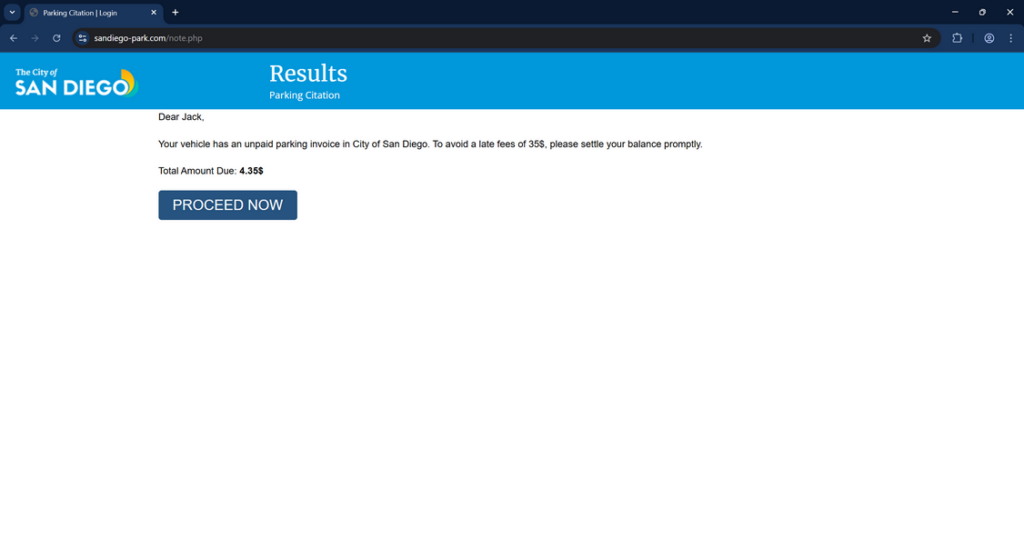
The San Diego parking invoice scam starts with an unsolicited text message sent to the target’s mobile phone. The message claims the recipient’s vehicle has an unpaid $4.35 parking ticket that must be paid immediately to avoid additional late fees.
The text includes an official-looking link to a site called sandiego-park.com. However, despite its professional appearance and domain name, this site has no actual affiliation with the City of San Diego.
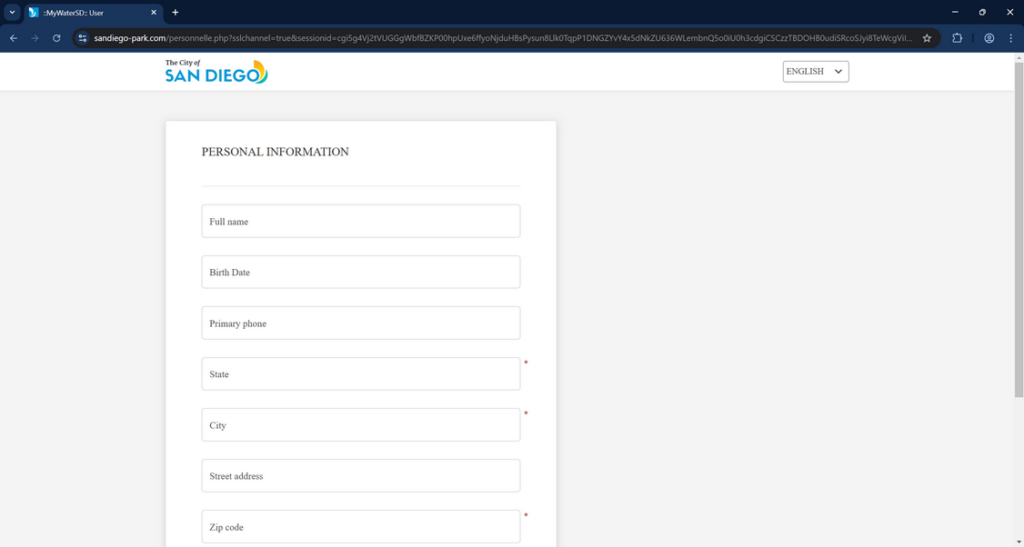
If the recipient goes to the site, they are prompted to enter extensive personal and financial details, including:
- Full name
- Birth date
- Address
- Phone number
- Email address
- Credit card number
- Expiry date
- CVV code
The sandiego-park.com site claims this information is needed to process payment for the unpaid parking ticket. But in reality, the scammers behind it are phishing for account and identity theft.
Once submitted, the scammers can use the credit card details for fraudulent purchases. And the personal information like name, birth date, and address can facilitate larger scale identity theft.
How The Scam Works
To fully grasp the gravity of this scam, it’s crucial to understand its step-by-step mechanics. Here’s how these swindlers operate:
Step 1: Casting a Wide Net
The scammers blast out a mass of texts to random phone numbers, not knowing who will bite. The more texts they send, the higher the likelihood someone will fall for it. They rely on sheer probability, not precision targeting.
Step 2: Creating False Urgency
The fraudulent text message is carefully crafted to instill a sense of urgency and panic in the recipient. By claiming a late penalty will be incurred if not paid immediately, the scammers pressure victims to act quickly without thinking rationally.
Step 3: Directing to a Phishing Site
The text includes a link that leads to the scam website Sandiego-park.com. This malicious site is designed to look like an official City of San Diego webpage, complete with logos and official-sounding text. Its aim is to trick people into believing it’s a legitimate government portal.
Step 4: Harvesting Personal Information
Once on the phishing site, victims are instructed to input a disturbingly large amount of personal data, including their full name, birthdate, address, phone number, and email. This information is highly valuable to scammers for committing identity fraud.
Step 5: Stealing Financial Details
After entering their personal information, victims are then directed to input their credit card details to make the supposed $4.35 parking fine payment. However, there is no parking invoice. It’s all a ruse to steal the victim’s financial information.
Step 6: Fraudulent Charges and Identity Theft
With the victim’s credit card and personal details in hand, the scammers then go on a fraudulent buying spree, racking up purchases in the victim’s name. They also sell the personal data to other criminals on the dark web for profit. The victim is left with an empty bank account and a stolen identity.
Sandiego-park.com is a Fake Website
It’s important to emphasize that the website sandiego-park.com has absolutely no affiliation with the City of San Diego or its parking violations bureau.
Despite its official look and feel, as well as a name designed to sound like a city agency, sandiego-park.com is a fake phishing website set up by scammers.
The site is made to mimic an official parking violations payment page in order to trick victims into thinking it’s legitimate. But it is not associated with any government organization.
Sandiego-park.com engages in phishing by requesting personal and financial details under the false pretense of processing parking ticket payments. It then uses the submitted information for activities like identity theft and credit card fraud.
No matter how convincing the website looks, residents should remember that sandiego-park.com is not a city domain. Links to it in unsolicited texts related to parking tickets are sure signs of a scam attempt.
Citizens should avoid visiting, entering information on, or making any payments through sandiego-park.com. Instead, parking ticket notices must be verified through official city channels like https://www.sandiego.gov/parking.
Exercising caution and double checking sources can help residents avoid being deceived by this sophisticated parking invoice phishing scam.
What to Do If You’ve Fallen Victim to This Scam
If you’ve made the mistake of clicking the link and inputting your information, don’t panic. Swift action can help mitigate the damage. Here are the steps to take if you’ve been scammed:
- Immediately contact your bank or credit card issuer and report the fraudulent activity. Request that your card be canceled and reissued.
- Place a fraud alert on your credit reports with the three major credit bureaus (Equifax, Experian, TransUnion). This makes it harder for scammers to open new accounts in your name.
- File a police report with your local law enforcement. Having an official record can be beneficial when dealing with creditors or credit agencies.
- Report the scam to the Federal Trade Commission at ftc.gov/complaint. This helps track scam trends and inform public awareness efforts.
- Closely monitor your credit reports and financial statements over the coming months. Contest any fraudulent activity you find with the respective institutions.
- Consider enrolling in an identity theft protection service. They can help monitor your personal information and quickly alert you to suspicious activity.
Frequently Asked Questions About the Sandiego-park.com Parking Invoice Scam
Q1: What is the Sandiego-park.com Parking Invoice Scam?
A: The Sandiego-park.com Parking Invoice Scam is a fraudulent scheme where scammers send out fake text messages claiming the recipient has an unpaid parking fine from the City of San Diego. The texts pressure people to pay a small fee immediately via a provided link to avoid a larger late penalty. However, the linked website is a scam designed to steal personal and financial information.
Q2: How can I tell if a parking invoice text message is a scam?
A: There are several red flags that can help you identify a scam parking invoice text:
- The message creates a false sense of urgency, demanding immediate payment.
- The text includes a suspicious link to an unfamiliar website.
- The alleged fine is for a small amount, usually under $5.
- You haven’t recently parked in the city mentioned in the text.
- Legitimate cities and parking authorities typically communicate through official channels, not unsolicited texts.
Q3: What should I do if I receive a suspicious parking invoice text message?
A: If you receive a parking invoice text that seems suspicious, do not click any links in the message. Independently contact the city or parking authority the text claims to be from to verify if you actually have an outstanding fine. Report the scam text to your local authorities and the Federal Trade Commission.
Q4: What information do the Sandiego-park.com scammers try to steal?
A: The scammers behind this scheme aim to harvest a wide range of sensitive personal and financial data, including:
- Full name and date of birth
- Home address and phone number
- Email address
- Credit card number, expiration date, and CVV code
This information is then used for fraudulent purchases, identity theft, and sold to other criminals on the dark web.
Q5: I accidentally clicked the link and entered my information. What should I do now?
A: If you’ve fallen victim to the scam, quick action is essential. Immediately contact your bank or credit card issuer to report the fraud and request a new card. Place a fraud alert on your credit reports with the major credit bureaus. File a police report and a complaint with the FTC. Monitor your financial statements and credit reports closely for any signs of fraudulent activity.
Q6: How can I protect myself from falling for parking invoice scams?
A: To safeguard yourself against these scams:
- Be wary of any unsolicited text messages demanding payment, especially via a provided link.
- Independently verify any claims of outstanding fines directly with the alleged authority.
- Never input sensitive personal or financial information into unfamiliar websites.
- Keep your phone and computer software up-to-date with the latest security patches.
- Regularly monitor your financial accounts and credit reports for suspicious activity.
- Spread awareness about these scams to friends and family to protect your community.
Q7: Are there any other variations of this parking invoice scam?
A: Scammers are constantly evolving their tactics, but the core elements remain the same. Variations might use different city names, fine amounts, or late fee penalties. Some might impersonate private parking companies instead of city authorities. Regardless of the specifics, the goal is always to pressure you into clicking a malicious link and inputting your sensitive information.
Q8: What should I do if I’m unsure if a parking invoice is legitimate?
A: If you’re unsure about the legitimacy of a parking invoice, whether received via text, email, or mail, always err on the side of caution. Contact the alleged issuing authority through their official channels, which can typically be found on their government website or public directories. They will be able to confirm if you have any outstanding fines and provide safe payment methods if needed.
The Bottom Line
The Sandiego-park.com Parking Invoice Scam is a stark reminder of the ever-present threat of digital fraud. As our lives increasingly move online, so do the tactics of scammers looking to exploit the unwary. The best defense against these schemes is awareness and caution.
If you receive an unsolicited text message demanding urgent payment, pause before acting. Independently verify the claim through official channels, not the provided link. No legitimate government agency will pressure you to pay immediately via text or email.
By spreading awareness of this insidious scam, we can help protect our communities from these financial predators. Stay informed, stay vigilant, and stay safe in the digital world.

Reviews & discussion
0 commentsShare a firsthand experience, or ask a question.
Community reviews
sandiego-park.com
Moderated reader experiences, not an editorial verdict.
Start the conversation
Have a question or something useful to share? Add the first comment.