

The post says a $SatoshiVM distribution program is live. Bitcoin-based Layer 2. EVM compatible. Native BTC as gas. ZK rollups. Cross-ecosystem. Connect a wallet to participate. That is how it arrives in a feed: Satoshi in the name, Bitcoin in the stack, and a button that sounds like a reward.
The page is not handing out Bitcoin. It is not a Bitcoin.org campaign. It is not a gas rebate from the Bitcoin network. Connect Wallet is the product. Approve that connection and a drainer can empty the wallet, often in seconds. Blockchain transfers do not come with an undo button. Free $SatoshiVM is the costume. The wallet is the prize.
A fake distribution can borrow Satoshi’s name and a Bitcoin Layer 2 story without touching Bitcoin. That is the whole trick. You are not late to an L2 drop. You are early to a drain that needs you to confuse a throwaway claim page with a Bitcoin-related event.
Do not connect. Do not approve. Do not sign. Close the tab. Participation is the bait. The session is the theft.
Overview
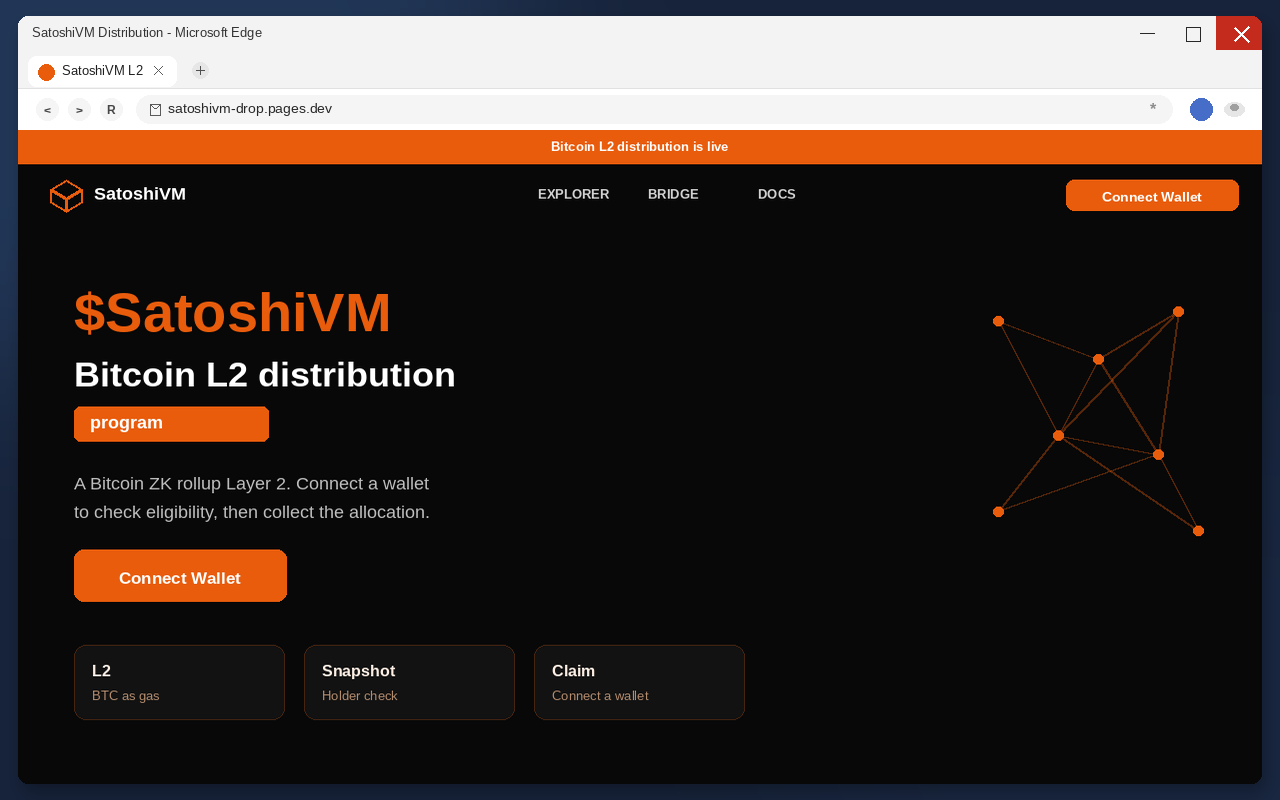
The $SatoshiVM distribution program scam is a fake Layer 2 pitch built to steal cryptocurrency. It presents an advanced Bitcoin-based L2 that is compatible with the EVM ecosystem, uses native BTC as gas, and talks about ZK rollups and cross-ecosystem reach. Then it asks you to connect a wallet to participate. The only action that matters is Connect Wallet. That click is not a participation check. It is the handoff to a drainer.
The mechanism stays stable even when the hostname does not. A Satoshi-named Bitcoin L2 bait. A connect-to-participate step. A drain. Operators stand up throwaway claim hosts, push them for a few days, then move. Pages.dev names and clones are disposable. The next page will not keep the same spelling. The tell is the claim-and-connect pattern, not the address you happened to see first.
One current example in this wave is listing-satoshiv.pages.dev. Treat that address as a snapshot, not the story. Bookmarking it does not keep you safe tomorrow. The operators will change the logo, the badge, and the URL. They will not change the funnel.
Once a wallet is connected, a malicious approval can move assets to an attacker-controlled address. The transfer is public, fast, and final. Closing the tab does not claw the coins back. Changing a browser password does not either. If you already tapped Connect, treat that wallet as burned and work the recovery steps below before you do anything else.
A Bitcoin Layer 2 project using the SatoshiVM name does exist, with public docs people can type themselves, and the throwaway $SatoshiVM distribution page is not that project.
This write-up is not a review of Bitcoin. It is not a price call. It is not a token audit. Bitcoin is a separate asset with a separate history. $SatoshiVM on a stranger’s distribution page is a costume. The costume works because people already trust the words Satoshi and Bitcoin. The drain works because connecting a wallet feels like logging in, not like signing a check.
Satoshi and Bitcoin L2 are the bait
Read the headline the way a tired person reads it between two other tabs. $SatoshiVM. Distribution program. Bitcoin-based Layer 2. EVM compatible. Native BTC as gas. ZK rollups. Cross-ecosystem. The stack is doing one job. It makes a stranger’s button feel like a technical event you already meant to join.
Satoshi is the most loaded name in Bitcoin. Layer 2 is the most loaded phrase in the current Bitcoin conversation. Put them in the same headline and a person who would ignore a random meme ticker will still pause. That pause is the product. The page needs you to import the trust you already have for Bitcoin and paste it onto a distribution that did not earn it.
The Bitcoin project did not send you $SatoshiVM. The Bitcoin network does not airdrop a cousin ticker to random wallets because a claim page said a distribution program was open. Real BTC is not waiting behind a Connect button on a disposable host. If someone has to borrow Bitcoin’s Layer 2 story to make a free token feel serious, the token is the lure, not the payout.
The technical list is precise. EVM compatible sounds like you can use the wallet you already have. Native BTC as gas sounds like you will not be buying some random fee token. ZK rollups sound like a paper you half-read last year. Cross-ecosystem sounds like bridges, which people already fear missing. None of those phrases prove a distribution is real. They prove the copywriter knows which words lower a pulse.
A real Bitcoin-related claim, when one exists, is boring on purpose. It lives on channels the project has used for years. It does not need you to panic about a live window in the next five minutes. It does not need a brand-new host to check whether you can participate. Participation that can only be proven by connecting a wallet is not participation. It is access.
The page never has to say it is Bitcoin. It only has to sit close enough that a skim reads it that way. $SatoshiVM. Bitcoin Layer 2. Native BTC as gas. People fill in the rest because Bitcoin is already in their head. That is cheaper than building a real distribution, and it is why the same costume keeps coming back under new hosts.
Do not treat a Satoshi-looking L2 page as a Bitcoin product. Name proximity is not a contract. A claim page that needs Bitcoin’s reputation to get the first click is telling you what it does not have: its own. The asset you can lose is the BTC, ETH, stablecoins, and NFTs already sitting in the wallet you connect. The fake distribution is just the story that gets you to the permission.
Connect to participate
The second hook is participation. Connect your wallet to join the $SatoshiVM distribution program. That sentence is doing three jobs at once. It makes the fake L2 feel like a live event. It makes waiting feel expensive. It makes Connect Wallet feel like the start of an allocation instead of a permission.
Participate is a magic verb for a scam. It is short enough that it sounds like a product step. It is vague enough that it does not name a dollar amount. It is not a real eligibility check you can verify on a published contract. It is a ramp. The page wants your wallet session so you do not ask who runs the distribution.
Distribution language also does a quieter trick. It implies you already qualify, or that you will in a moment. Join the program. Participate. Claim. Those verbs assume a holding is coming. If you do not hold $SatoshiVM yet, the obvious next step is to connect. Connect requires a wallet. The participation story is a ramp to the same button.
Real distributions, when they are real, are slow to explain. You get a contract address. You get a snapshot. You get a risk disclosure that talks about smart contract bugs and the chance the token goes to $0. Fake distributions are the opposite. Connect to participate. No lockup lecture. No contract you can paste into an explorer before you connect. The missing paperwork is the tell.
Free also hides the price. You are not being asked to wire $500. You are being asked to start participating. Participating sounds like the opposite of paying. That is why the pitch works on people who would never send crypto to a stranger. A distribution program feels like a faucet. The faucet is pointed at your existing balance, not at a new $SatoshiVM mint.
Urgency is the rest of the engine. Live program. Limited window. Bitcoin L2 moment. If the distribution is happening now, then every minute you are not connected is an allocation you are missing. That math is fake, and it is effective. The page does not need you to believe in $SatoshiVM for a decade. It needs you to believe that waiting is how you lose.
There is no distribution program that needs your live wallet session to start a drop. If a project were actually sending $SatoshiVM, that flow would be visible on-chain without you handing a drainer a signature. The program is a story. The L2 stack is a story. The only timed event is how fast the coins can leave after you approve.
Then the drain
Connect Wallet does not mint $SatoshiVM. Participate does not either. Those labels exist so the next window looks like a product step instead of a permission request. You have used Connect buttons on real apps. The muscle memory is the exploit.
The button is doing one job. It opens a wallet connection. After that, the page can ask for a signature, a token approval, a permit, or a spending permission dressed as a claim. None of those actions drops $SatoshiVM into your balance. All of them can let a script spend what you already hold.
On this strain, the connection itself can be enough. You do not get a second, obvious screen that asks whether you want to send everything. You connect because the button said participate. The drainer starts because the session is live. Waiting for a later warning is how people lose the window to disconnect.
Do not open a distribution page to just look. On a phone the address bar is easy to ignore, and looking is how a Connect Wallet tap becomes a connected wallet. If a friend forwarded the link, tell them the same thing. The page is the attack, not a preview of an attack.
Hardware wallets are not magic here. A device still signs what you tell it to sign. If the prompt is a drain dressed as a distribution, the device will do the harm you authorize. The metal box protects the key from malware on the computer. It does not protect you from saying yes to the wrong page.
People stall at this step because the names look right. Wallet connection flows are everywhere in 2026. The presence of a known brand in a list is not the same as that brand endorsing the site. Your usual wallet app did not send you $SatoshiVM. The claim page borrowed the logos the way a fake invoice borrows a bank’s.
If the dialog asks for a signature, a token approval, a permit, or unlimited spending, that is not a gasless hello. That is the drain being armed. Decline it. Disconnect. Leave. There is no $SatoshiVM allocation hiding behind the next yes.
How The Scam Works
The $SatoshiVM drain is a short funnel. A social or ad lure that says Bitcoin Layer 2 and Satoshi in the same breath. A distribution page that looks like a live L2 launch. A wallet connect that feels like logging in. A drainer that spends the approval. Each stage exists to make the next one feel small.
The lure rides a Bitcoin L2 headline
These pages do not wait for you to type SatoshiVM into a search bar. They arrive as a post, a reply, a quote-tweet, a Telegram forward, a Discord alpha ping, or a paid ad that looks like coverage. The account may be stolen. It may be brand new with an orange logo and a few thousand fake followers. The caption is the payload: $SatoshiVM distribution live, Bitcoin L2, connect to participate.
The Bitcoin word does the heavy lifting in that caption. People already search for Bitcoin news. They already follow Bitcoin accounts. A reply under a real BTC thread is a cheap way to borrow an audience that did not ask for $SatoshiVM. You are not finding a drop. The drop is finding you, in the place you go to read about an asset that is not this page.
Phishing mail and rogue ads still carry some of these links. Compromised sites and shady ad networks do too. Fake social accounts do the rest. The delivery method is less important than the promise. Free tokens. Satoshi-named L2. A connect button. If those three show up in the same sentence, you are looking at a lure, not a launch.
The Federal Trade Commission has already said the quiet part about crypto fraud out loud. Since the start of 2021, more than 46,000 people reported losing over $1 billion in cryptocurrency to scams. That is about 25% of all reported fraud losses in that mix, more than any other payment method in those complaints. $SatoshiVM is not a new category of crime. It is a Bitcoin L2 sticker on a funnel that already prints.
You do not need to be greedy for this to work. You need to be busy. A person who holds BTC, who has claimed a real airdrop once, who has bridged to a real L2, already has the habits the page is counting on. The lure is written for that person. It sounds like the last legitimate thing they did, plus a distribution bonus.
That is also why the Satoshi name travels so well in replies. It looks like commentary on Bitcoin, not an ad for a stranger’s dapp. People who mute airdrop spam still read Bitcoin threads. The lure sits where those people already are. The click feels like research. It is recruitment.
The page sells a live distribution
The landing page has one job: make Connect feel like the next step in a launch you already missed. $SatoshiVM. Distribution program. Bitcoin ZK Rollup Layer 2. EVM compatible. Native BTC as gas. The layout is a costume of a real L2 site. The missing pieces are the ones that would make it real: a long-lived official domain, a contract you can read before connecting, and a claim path that does not require a stranger’s dapp.
This write-up is not a tour of one layout. Operators change the art. They change the headline spelling. They change the host. What they keep is the sequence. A Satoshi-named Bitcoin L2 story. A distribution pitch. A connect button labeled as participate. If you can see those three, you do not need the rest of the page. You already know the ending.
Docs, Bridge, and Paper links are layout. They make the filled button look like the serious choice, the way a real launch site has a docs link beside a start button. Clicking them does not make the host official. The official part was supposed to exist before anyone asked you to connect.
A live distribution is also a social proof trick. If the program is live, then other people are already connecting. If other people are already connecting, then you are late. Lateness is the emotion that skips the contract read. The Bitcoin L2 copy pours gasoline on that feeling. Every minute you hesitate is framed as an allocation left on the table.
Nothing on that page can put real BTC in your wallet. Nothing on that page can put a real Bitcoin-project reward in your wallet. The page can only ask your wallet to talk to a contract the operators control. That is the entire product. The rest is copy.
Do not try to outsmart the page by connecting a dust wallet “just to see.” A session still attaches. A signature still arms a spender. Some drainers sweep whatever they can reach across the accounts that wallet controls. Curiosity is how the first approval happens. The first approval is how the rest of the balance leaves.
The connect step is the handoff
When you hit Connect, the wallet app opens a session with the page. That session is not a viewer. It is a live pipe. The page can then present a transaction, a signature, or an approval that looks like participation. People confirm because the previous screen said join the program, and joining sounds like a status check, not a spend.
Drainers hide in that gap between what the button says and what the wallet is actually asked to sign. The claim page says participate. The wallet says sign. The user thinks those are the same sentence. They are not. Signing can grant a spender the right to move tokens. It can grant a permit. It can set an allowance to the maximum. It can look like a $0 transaction and still be a blank check.
This is why looking is dangerous. A preview connection still attaches the dapp. A later prompt still looks like part of the same flow. If you connected to see whether you qualified for $SatoshiVM, you already did the part the operator needed. The rest is a signature you can still refuse. Refuse it.
Phone users get a worse version of the same trap. The address bar is tiny. Wallet apps deep-link. The L2 copy wraps. By the time the signature sheet appears, the $SatoshiVM headline is the only context left. Slow down there. Read the spender. Read the permission. If it is not a transfer you initiated to an address you typed, it is not a distribution. It is the drain.
Seed phrases should never enter this story. A real claim does not ask for 12 words. A real L2 onboarding does not either. If a $SatoshiVM page, a popup, or a helper in DMs wants the recovery phrase to verify the drop, that is a straight theft. Close it. The connect-and-approve path is already bad. Typing the seed makes it final in a different way.
A genuine distribution for one ticker does not need to greet every wallet on earth in one breath. A drainer does. The operator does not care which app you like. The operator cares that you approve a session. The long list is not hospitality. It is coverage.
The drainer spends the approval
After the signature, a malicious spender can pull tokens, stablecoins, ETH, BTC wrapped on that chain, and NFTs, depending on what you granted and what the wallet holds. The move is a normal-looking transfer on a public ledger. Explorers will show it. Your wallet will show it. What they will not show is a refund button.
Speed is part of the design. Drainers often empty a wallet in seconds, not hours. That is why the live distribution story is such a useful lie. You were promised an allocation in. The actual interval is a near-instant drip out. By the time you refresh to see your $SatoshiVM, the real balances are already gone.
Some drains leave a little dust so the wallet still looks alive. That leftover is not kindness. It is a hook for a second sweep, or for a recovery pitch that asks you to send more to unlock the rest. Do not feed the old address. Do not treat leftover dust as proof the first transfer was a mistake.
Closing the tab after a drain can delete the site from history. The chain does not care. The new owner of those coins is the address the drainer specified, and there is no $SatoshiVM support desk that can freeze it. There is no Bitcoin-project ticket that covers a fake L2 page you connected to on a throwaway host.
This is the same family of fake airdrop drains that has already worn other tickers and other throwaway hosts. The costume changes. The connect-and-empty step does not. $SatoshiVM is not a new kind of crime. It is a Bitcoin L2 sticker on a funnel that already works, which is why the recovery advice below is the same advice you should follow for any wallet you connected to a stranger’s claim button.
The coins do not come back
There is no disputes team on a public chain. There is no chargeback. There is no $SatoshiVM support that can reverse a confirmed transfer. Once the network includes the transaction, the coins belong to the new address. Closing the claim tab after that moment is hygiene, not recovery.
That finality is why the lure has to be free. If the page asked you to wire $2,000 to a stranger, more people would stop. If it asks you to participate in a $SatoshiVM distribution, the cost is hidden until the explorer updates. The $ figure appears after the permission, not before it. By then the argument is over.
Exchanges can sometimes freeze funds that later land in a custodial account they control. That is a maybe, not a plan. It depends on speed, on the path the coins took, and on whether anyone can see that path from the hashes. It does not depend on a helper in DMs who wants a seed phrase. Save the transaction IDs first. Then file the reports. Then stop talking to strangers about the wallet.
Do not send more crypto to unlock a claim, release a distribution, or pay a recovery fee. That is a second payment to the same crime. The program will not start if you top up. The tokens will not land if you try again from a funded wallet. The old address is hostile territory. Leave it.
A second crew hunts the same wallet
After a drain, the DMs arrive fast. People offering to trace the funds for a small fee. People who need you to share the seed so they can deploy a recovery contract. People who want a USDT prepayment to unlock a case ID. People posing as exchange staff, law firms, wallet support, or $SatoshiVM support.
They are hunting the same wallet a second time. A drained address is a lead. It proves you will click, you held enough to steal, and you are now desperate. The recovery pitch is cheaper to run than the first claim page because you already did the hard part. You already connected once.
Nobody legitimate needs your recovery phrase. Nobody legitimate needs you to send more crypto to get the first batch back. A real investigator asks for transaction hashes you already have, through a form you typed yourself, not through a reply under the $SatoshiVM post. Block the helpers. Do not argue. The report you file is the only official path.
Watch for the Bitcoin costume on the second pass too. Recovery agents will say they can talk to Bitcoin support, or that a $SatoshiVM team can reverse a distribution. Bitcoin does not run a helpdesk that refunds fake L2 drains. A token that only existed as bait does not have a support team with a freeze button. If the helper needs access to the old wallet, the helper is the next drainer.
What To Do If You Have Fallen Victim to This Scam
If you connected a wallet to a fake $SatoshiVM distribution page, assume the attacker can still spend what is left. Work in this order. Do not send more coins to the same address to unlock a claim or join a program. Do not paste a seed phrase into any site that offers to reverse the drain. Those are second scams that feed on the first.
- Disconnect and close the tab. In the wallet app, disconnect the site session. Revoke the connected dapp if the app has a connected-sites list. Then close the browser tab. This does not move coins back. It stops you from signing a second approval while you are still rattled. Stay off the claim page. Do not reload it to see if the $SatoshiVM distribution went through.
- Create a brand-new wallet. Generate a fresh recovery phrase on a device you trust, write it down offline, and never type those words into a website. The old wallet’s seed is still yours, but any dapp it approved may still be able to pull from the old address. A new wallet means a new seed. Do not import the compromised phrase into a clean app and call that a migration. Importing copies the risk.
- Revoke approvals on the old wallet. Use the official explorer tools for the chains that wallet used. On Ethereum-style networks, open the address in a block explorer and review token approvals. Revoke anything you do not recognize, anything granted today, and anything tied to a claim, airdrop, or distribution spender. On other chains, revoke unknown token delegations in the wallet or a reputable revoke tool you typed yourself, not a link from a helper in DMs. Hardware wallet users should still revoke. The device does not cancel an approval you already signed.
- Move remaining assets to the new wallet. After you revoke what you can, send what is left to the new address. Do this while you can. Drainers sometimes leave dust or a second sweep for later. Do not leave a little bit on the old address as a test. If an NFT or a staked position cannot move until an unlock date, document it, revoke related spenders, and treat that position as still at risk until it can be migrated. Never fund the old wallet again.
- Preserve transaction IDs and screenshots. Copy every outbound hash from the time of the connect. Save the from address, the to address, the token, and the time. Screenshot the claim page URL only if you already visited it. Do not return to capture a prettier picture. Export the wallet activity if the app allows it. Those records are what an exchange, an investigator, or a report form can actually use. A vibe that a Bitcoin L2 drop stole my coins is not a record.
- Report the theft. File at the FTC fraud report form if you are in the United States, and at the FBI Internet Crime Complaint Center. Add the TXIDs. If the coins passed through a centralized exchange you can identify from the explorer, use that exchange’s theft-report path with the same hashes. Tell your wallet vendor through its official support page, not through a reply guy under the $SatoshiVM post. Local police reports help some insurance and tax records even when the coins cannot be frozen.
- Ignore recovery agents. After a drain, the DMs arrive fast. People offering to trace the funds for a small fee. People who need you to share the seed so they can deploy a recovery contract. People who want a USDT prepayment to unlock a case ID. People posing as exchange staff, law firms, or $SatoshiVM support. They are hunting the same wallet a second time. Nobody legitimate needs your recovery phrase. Nobody legitimate needs you to send more crypto to get the first batch back. Block them. Do not argue. The report you already filed is the only official path.
If you signed nothing and only opened the page, disconnect any preview connection the wallet created and leave it there. Curiosity is not a crime, but it is how the next tap happens. If you shared the link in a group chat, go back and warn the thread. One quiet edit is worth more than a later apology.
Tax and recordkeeping are unglamorous and still worth a calendar reminder. Stolen crypto is still a transaction history you may need. Keep the TXIDs with the date you connected. If you use an accountant, send that packet once rather than reconstructing it from memory in April. Do not pay anyone who promises to turn the hashes into a refund.
Going forward, keep airdrop hunting off the wallet that holds your rent. A burner address with a tiny balance can survive a bad click. The main wallet cannot. Official claims, when they are real, will wait for you on a site you already use. They will not need you to connect a stranger’s page because a Satoshi-named Bitcoin L2 said a distribution program was already paying.
Treat Bitcoin as Bitcoin. Treat a random $SatoshiVM claim host as a stranger asking for spending permission. If the only way to participate is to connect, you already have the answer. You are not eligible for a drop that needs your keys. You are eligible to be drained.
The Bottom Line
The $SatoshiVM distribution program on a throwaway claim page is not a Bitcoin-project event and not a live BTC Layer 2 payout. It is a wallet drain wearing a Satoshi-named L2 story, an EVM-and-ZK costume, and a Connect button. Free $SatoshiVM is the story. Participate is the urgency. Connect Wallet is the product. Once that connection is approved, the coins can leave in seconds, and the chain will not give them back.
A headline that contains Satoshi and Bitcoin L2 does not make a random claim host official. Native BTC as gas does not either. Official claims do not need you to panic-click a disposable URL to prove you deserve a fake token. The hostname will rotate. The pattern will not. If you already connected, disconnect, open a new seed, revoke, move what is left, save the hashes, file the reports, and hang up on anyone selling a recovery. The drop was never yours. The wallet still can be.

Join the discussion
0 commentsShare your experience or ask a question about this article.
Discussion
Start the conversation
Have a question or something useful to share? Add the first comment.