


The email says someone tried to deliver a package while you were out. Now it’s supposedly at a depot, waiting for you to tell the driver what to do.
If you’re expecting something, the message may fit your day perfectly. The trick is working out which package it actually means.
Overview
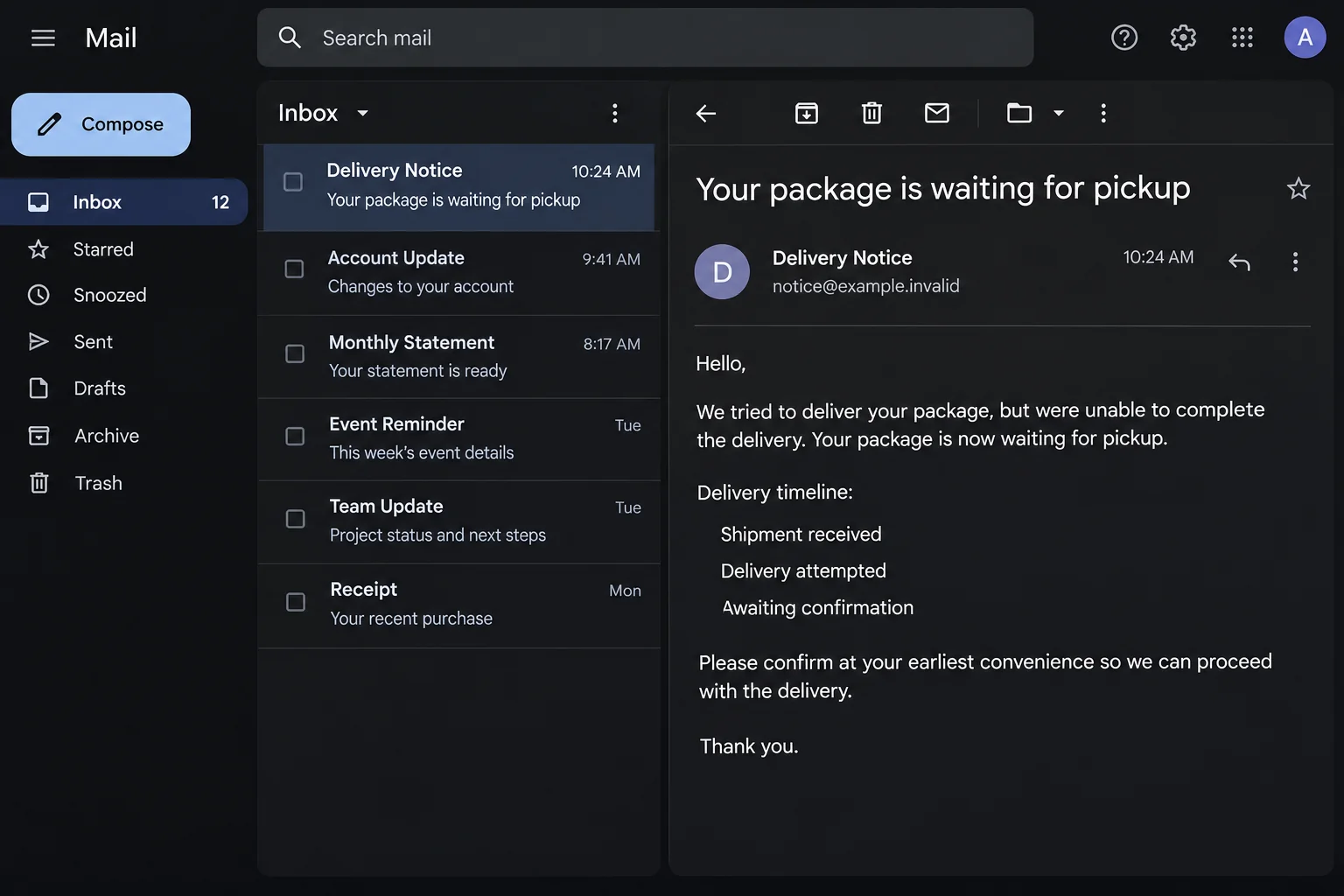
Three delivery updates, zero verified tracking events
The Schedule Package Delivery email puts an attempted delivery between two tidy status updates. It says a parcel arrived locally, a driver tried, and your response is now needed.
Those are statements printed in the notice. They aren’t scans from a carrier’s tracking history, and the displayed reference isn’t proof that a shipment exists.
The subject in the documented copy was “Your package is waiting for pickup.” The body made the proposed next action sound like arranging redelivery rather than going to collect it.
The reconstructed message above shows the three displayed status labels without the original call to action. It isn’t a tracking record for a real parcel.
You may have a parcel on the way anyway. Check the order you placed before deciding that this notice belongs to it.
The email gives you two reasons to rush
The first deadline is 48 hours to confirm shipping details. The second is five business days before the parcel supposedly goes back to the sender.
Both came from the email. Neither can tell you how long an actual carrier will hold your parcel. Verify that through the seller or carrier for your order.
The notice doesn’t establish which carrier is responsible. It uses general words about a household, depot, and delivery attempt that could fit almost anyone.
Don’t treat the notice’s unsubscribe line as an opt-out from a genuine subscription. You don’t need to interact with the message to stop it from influencing your delivery decisions.
The final form wasn’t independently visible
The linked destination was unavailable when described in the public case record. The bait is documented; the exact questions shown to visitors aren’t confirmed.
A redelivery page might ask for contact details, card information, or a login. None of those requests was independently confirmed for this particular destination.
Look for evidence you didn’t get from the email:
- A purchased item you can find in your order history.
- A tracking number or ID that came from the seller or merchant portal.
- The genuine carrier, with event times that match your actual shipment.
- A local pickup address you can confirm through the carrier’s official support.
An expected package is a reason to check your orders, not a reason to trust every delivery message you get that day.
How the Schedule Package Delivery Email Scam Works
Step 1: The inbox makes the failed delivery sound personal
An at-home delivery can be missed for plenty of reasons. Maybe you were at work, the buzzer didn’t ring, or a driver couldn’t get through the gate.
The email doesn’t have to know any of that. It leaves room for readers to supply their own explanation for an event that hasn’t been verified.
If you ordered several items, don’t pick the one that best fits the story. Find the actual delivery status for each item through the merchant or carrier.
Step 2: A polished timeline stands in for evidence
Three numbered events make the notice feel like a tracking page. But the sample didn’t give the reader the independently verifiable details that a reliable tracking record would offer.
A reference can label a customer service ticket, an order, or nothing at all. Don’t search it through random tracking sites to see which one will accept it.
If a neighbor or housemate was expecting something, check with them separately. The email doesn’t establish that anybody at your address owes a response.
Step 3: Redelivery becomes something you must arrange through the message
The link is presented as the next sensible step before the parcel goes back. The two deadlines add pressure, even though an actual carrier hasn’t verified either one.
An email button saying it will schedule delivery doesn’t tell you what information the destination will request. There’s no need to find out through an untrusted link.
Open the seller’s real order page, then follow the confirmed carrier’s normal tracking route. Pause if someone asks you to handle payment or login through a new channel.
Step 4: Anything you entered determines the next move
If you used a linked page, write down what you gave it. An address and phone number call for different precautions than a card number or an email password.
Someone with a delivery address can make a later message sound more convincing. That doesn’t prove they accessed a bank account or installed anything on your computer.
Where a payment or login was involved, act on that exposure rather than waiting for the package. A promised delivery confirmation isn’t part of your recovery.
How to Find the Real Package Without the Email
Check each shipment on your merchant’s account page
Start at the store, app, or marketplace where you placed the order. Look for the orders marked shipped and inspect the carrier names listed there.
A single order can arrive in more than one carton. One item may be in transit while another genuinely needs pickup, so match the tracking ID to the specific item.
If someone else sent a gift, contact them using details you already have. Ask for the carrier and tracking reference. They don’t need to see the suspect message.
Get the number from a trusted record before visiting the carrier’s website. Don’t take a printed reference from the suspect notice and assume it belongs to your order.
Ask the genuine carrier if a delivery was attempted
The carrier can tell you whether it recorded a delivery attempt or left the package for collection. Don’t travel to an address supplied only by the email.
If you’re asked to pick up a parcel, confirm the location, opening hours, and identification requirements through the carrier directly. Different services handle pickup in different ways.
For U.S. mail, the Postal Inspection Service’s package scam guidance covers similar deceptive text messages. This case was an email, not a verified USPS message.
Verify a genuine fee separately
Real shipments can sometimes involve a legitimate charge. An unexpected notification is not evidence you owe one, and this documented email didn’t establish a fee.
If the carrier says money is due, look for the amount and reason through its official route. Ask the seller what its order terms say about delivery charges.
Don’t send payment or give a caller a bank code just because they know a shipment detail. A claim about your parcel doesn’t authorize a transaction.
What to Do if You Have Fallen Victim to This Scam
-
If you only received the notice, report it as phishing. Leave the email’s scheduling and unsubscribe links alone. Look up your order separately if you’re expecting a package.
Preserve a redacted screenshot if you need to show a seller or household member why the notice concerned you.
-
If you visited the page, close it and reconstruct what you did. Record whether you only looked, entered contact information, typed a login, or attempted a payment.
Check whether the browser downloaded anything you weren’t expecting. If it did, don’t open that file to see what it contains.
-
If you gave an address or phone number, expect targeted follow-up. Warn anyone else at that address to verify new delivery notices and callers asking for a fee.
You don’t have to abandon the address or change every password just because this information was visible. Focus on new requests that exploit it.
-
If you entered card details, call the card issuer promptly. Use the number on the card or the bank app. Ask about locking or replacing it and reporting unwanted charges.
Have the time, amount if any, and merchant descriptor ready. Don’t try to collect a refund from a contact given only by the same message.
-
If you gave a password or approved an unexpected login, recover that account. Start at the genuine provider, replace the exposed password, and review ongoing sessions.
If a marketplace account was affected, check delivery addresses and order history too. Tell the platform about orders or account changes you don’t recognize.
When a Real Order and a Fake Notice Arrive Together
Keep the two timelines apart
An actual delay doesn’t make the email authentic. Save the genuine tracking events in one place and record the suspicious message separately if you’re reporting it.
If a store says your parcel was delivered, ask which carrier logged that event. Verify what the scan means before giving a new caller your order or payment information.
If your building has a mailroom, ask there. The front desk may be able to verify a delivery without asking you to provide anything sensitive.
Don’t let the message dictate who you contact
An unsolicited notice may appear to hand you off from a driver to a service desk. You don’t have to follow that chain to resolve a shipping question.
Your seller can usually identify which carrier it hired. If it cannot, use the marketplace’s support portal before making a payment or traveling to a pickup address.
The FTC’s phishing advice explains why a phone number or site you already know is safer than one supplied in an unexpected message.
Handle a Missed Delivery Like a Real Shipping Problem
Check for a verified notice at the delivery address
If a genuine carrier tried to deliver, its own tracking record may show what happened. A door notice can be another clue, but check any unfamiliar URL independently.
For deliveries to a workplace, confirm whether the mailroom uses a separate check-in system. A package can be logged there without appearing as delivered in your personal email.
For a parcel locker, use the provider’s usual app or contact its host. Keep your pickup code private if someone offers to verify the collection.
The layout of a message isn’t decisive. A real delivery event is something the confirmed carrier or merchant can explain without asking you to trust an unrecognized inbox link.
Ask about redelivery and pickup as separate options
The email uses pickup in the subject but asks you to arrange redelivery. A carrier’s actual rules can differ depending on the service, shipper restrictions, and destination.
Ask the carrier whether it can attempt delivery again, hold for collection, or send the parcel back. Confirm which options apply to that tracking number before changing your plans.
If you’re away, ask the real carrier if someone else can collect it. Don’t send identification to an address provided only by the notice.
If the merchant arranged shipping and only the sender can make a correction, let the merchant do it from its own system. Don’t pay an intermediary who contacts you first.
Preserve evidence if another notice arrives
You may receive a second message describing the same alleged delivery but using a different reference. Record the time and subject without opening either link for comparison.
If it appears to contain information you entered on an earlier page, tell your payment or account provider what was disclosed. That context can help explain a more convincing follow-up.
Make sure everyone at the address understands which parcel you’re expecting. Share a trusted tracking route instead of forwarding the false notification into the family chat.
If none of your orders match, stop there. There’s no obligation to reply to an unknown sender or locate a depot for a shipment you can’t independently confirm.
For a shared account, ask the purchaser whether the order has already been collected. Keep that conversation to the item and trusted carrier, not an unverified redelivery deadline.
Frequently Asked Questions
Is “Your package is waiting for pickup” always a scam?
No. The subject can appear in legitimate mail too. The reported version used an unverified reference, an alleged depot, and a button asking you to confirm delivery details.
Does the reference in this notice prove the parcel exists?
No. Compare it against the seller’s order record and the genuine carrier’s tracking system. The email’s own reference is not independent evidence.
Is the 48-hour deadline a real carrier policy?
Not on the strength of this message. Ask the confirmed carrier how long it will hold the particular parcel and what it requires for collection.
Did the email definitely collect card information?
That isn’t confirmed. The landing page was unavailable. If you personally provided a card number on a suspicious page, call your issuer right away.
Should I reply with my correct address to fix delivery?
No. Use the official merchant or carrier account to request a correction. Don’t send additional information by replying to the notice.
Does reading this email mean a file infected my device?
No. This documented case was a deceptive link. If you installed something or ran an unexpected download, tell a trusted technician what happened.
The Bottom Line
Don’t arrange a delivery through this unexpected pickup notice. Match the parcel to your actual order and verify its status with the carrier named by the seller.
If you sent card information or entered a password, report that exposure through the bank or affected account provider. Don’t wait for the sender to confirm the delivery.

Join the discussion
0 commentsShare your experience or ask a question about this article.
Discussion
Start the conversation
Have a question or something useful to share? Add the first comment.