

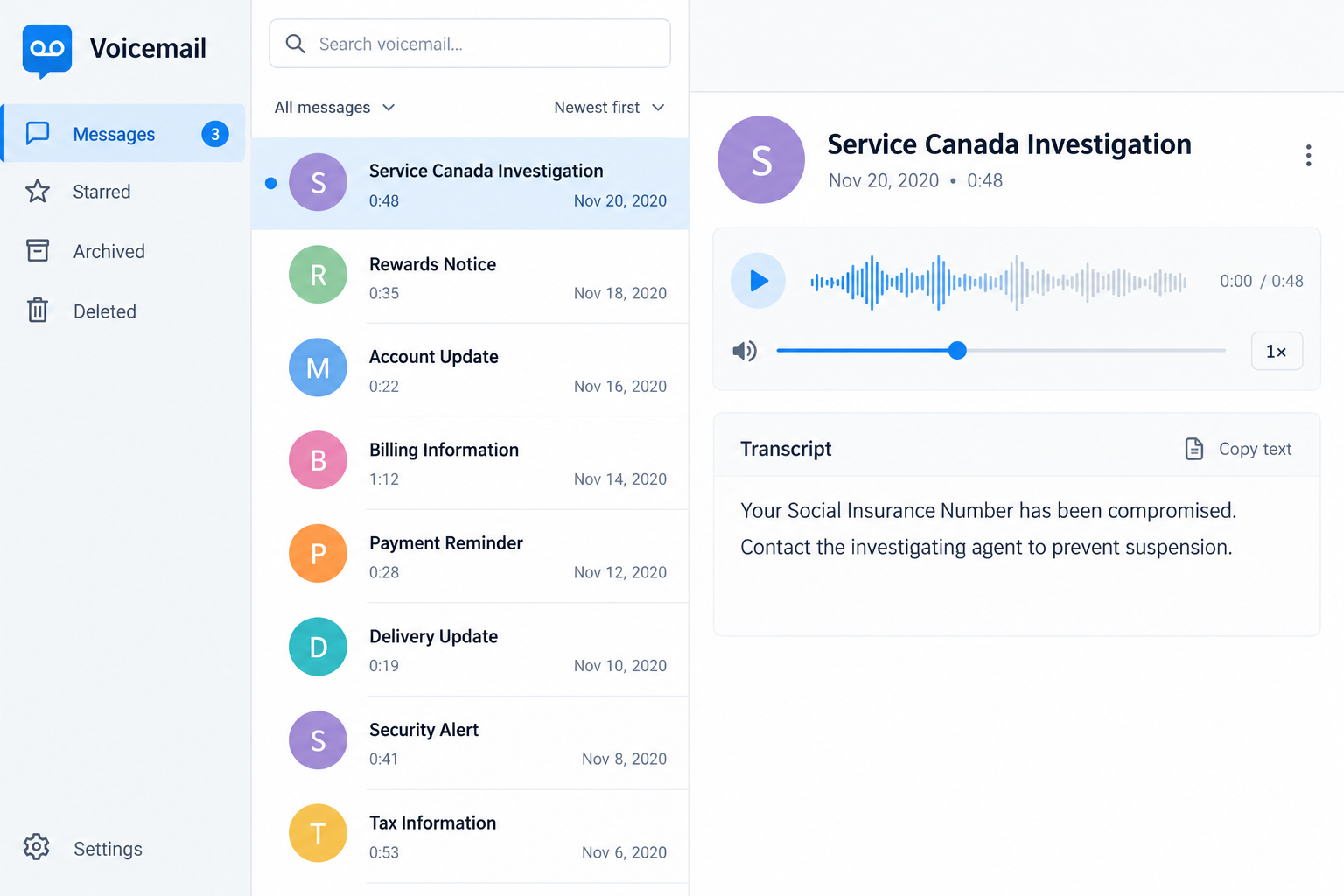
The caller introduces an investigation and says your Social Insurance Number has been compromised. You are asked to verify information before the situation becomes more serious.
Service Canada scam calls use that interruption to put you on the defensive. It helps to separate the alarming story from what you can actually verify.
Overview
The SIN threat is a government-impersonation tactic
These calls pretend that an official investigation requires you to disclose information, protect money, or deal with a supposed suspension of your Social Insurance Number.
The goal is to make an unsolicited contact sound like the only person who can prevent trouble. That does not establish an authentic government case.
Service Canada’s SIN Code of Practice warns about compromised-number, replacement, lock, cancellation, and payment claims used in fraudulent communications.
The historical recipient accounts discussed here date to 2020. They are leads to a documented pattern, not proof of a newly captured caller or agency breach.
Service Canada is legitimate. The impersonation and coercive information or payment request are the scam, not every genuine government call or application process.
Verifying the caller should not require surrendering your SIN
A caller’s display name, telephone number, badge claim, or knowledge of your circumstances does not establish authority. Display information can be misleading.
Use Service Canada’s independent contact guidance to check the claimed program or investigator through a route you choose yourself.
That page lists 1-800-622-6232, also known as 1 800 O-Canada, as a verification starting point. Do not substitute a number supplied by the suspicious caller.
Your SIN can be legally required in genuine circumstances. The issue is the unverified demand, not a blanket rule against every authorized disclosure.
Act on actual exposure rather than the caller’s diagnosis
A threatening call does not prove identity theft already occurred. If you shared information or sent money, those actions create concrete questions to investigate.
- Did you disclose your SIN, date of birth, address, or document images?
- Did the contact obtain a password or security code?
- Did you approve a payment or transfer?
- Did you use a linked identity-review website?
- Do your own records show unfamiliar accounts, employment, or financial activity?
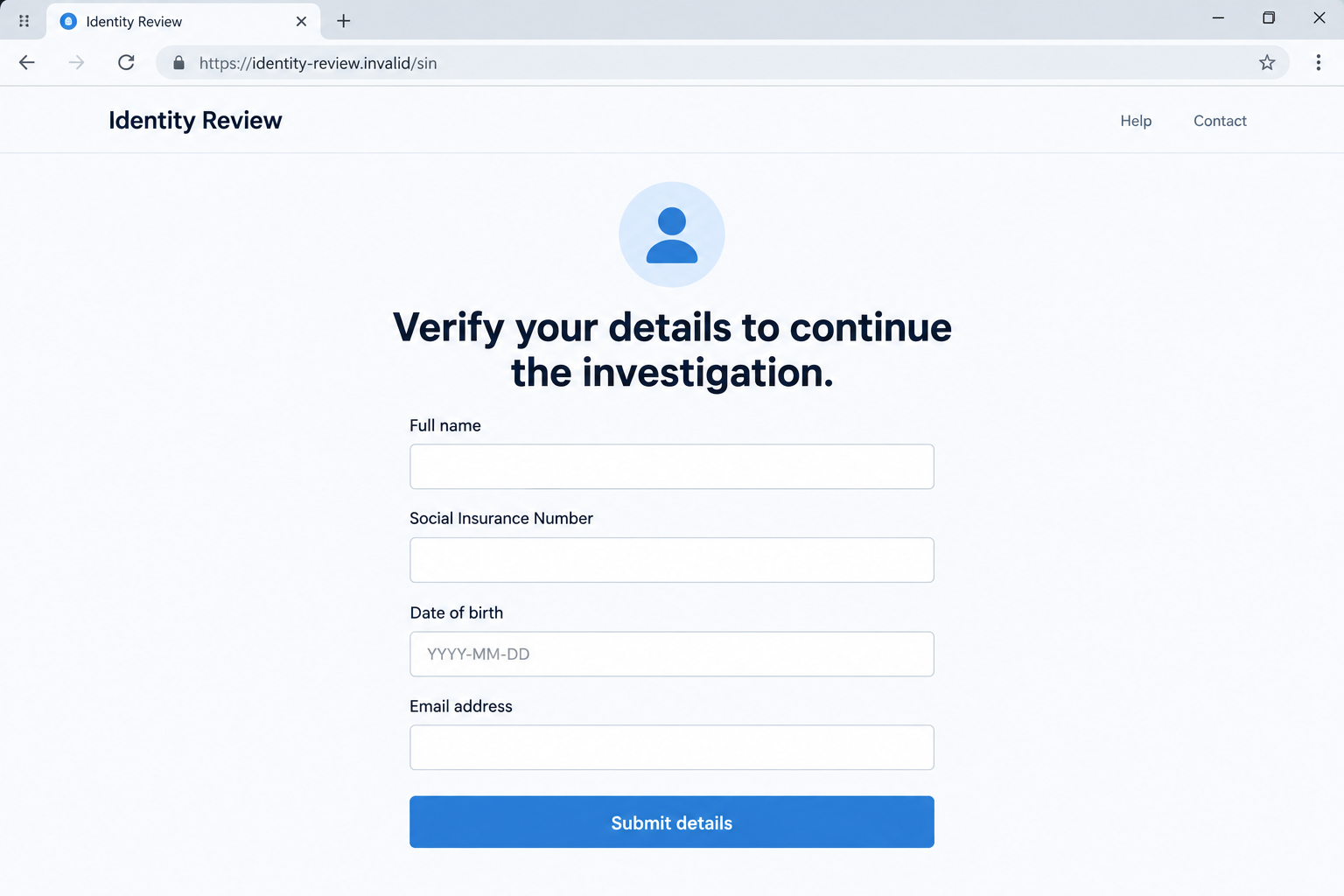
The images are fictional software screens. They do not contain a real SIN, official investigator’s message, genuine suspension notice, or live identity-check website.
Why Service Canada Scam Calls Sound Official
A private identifier makes the threat feel personal
Your Social Insurance Number connects to important records. A caller who invokes it can make a broad story feel closer to your life than a random sales pitch.
The caller may describe a problem before proving who they are. The recipient starts trying to explain innocence or correct an error that has not been established.
You do not need to disclose the number to demonstrate that you take the matter seriously. Independent verification is a responsible response.
A partial piece of accurate information should not change that boundary. A name, address, or other familiar detail can come from sources outside a government investigation.
This article does not identify the source of any recipient’s information. A convincing call is not evidence that Service Canada’s systems were breached.
Urgency makes the caller seem indispensable
The story can imply that leaving the conversation will worsen the situation. That makes a normal safety check feel like a failure to cooperate.
A genuine program question can be pursued through official channels. It should not depend on remaining with an unverified person while they dictate your financial decisions.
Do not negotiate the threat by supplying one more detail. Once the caller controls the definition of verification, every answer can lead to another demand.
Take a moment to write down the claim and contact the real organization. You can check an administrative matter without accepting the caller’s version of events.
How the Service Canada Scam Works
Step 1: The caller claims official investigative authority
The contact may introduce a division, an investigator, or a problem involving your number. An official-sounding title encourages immediate attention.
Names and references can be invented or copied. A person named in a call may be a real employee whose identity is being abused.
Do not publish the claimed name as a proven offender. Record what the caller said and let the appropriate authority assess the identity.
If a number is displayed, preserve it as part of the report. Do not assume the person who owns that number actually made the call.
The strongest next step is not questioning the caller more cleverly. It is starting a separate conversation with the program through its published contact route.
Step 2: A compromised or suspended number becomes the emergency
The story presents your SIN as unsafe or about to be locked. The proposed solution is immediate cooperation with the person delivering the warning.
The government warning identifies this type of claim as a fraud signal. It is not a reason to pay a stranger for number protection.
You might worry about employment, benefits, or an application. Those concerns are understandable, but the call itself does not establish an actual change in your status.
Check any genuine notice or account issue independently. Do not use the caller’s threat as the basis for changing records or transferring funds.
A legitimate concern about misuse also deserves a separate response. Monitoring your own records is different from buying a supposed suspension-prevention service.
Step 3: Verification turns into information collection
The caller may ask you to confirm identity details or complete an online form. The request is presented as protection even though its recipient remains unverified.
Some fake Service Canada websites imitate an identity check. Their appearance does not connect them to the genuine agency or an authorized investigation.
A form can collect information even if it never produces a useful result. An error page after submission does not mean the details stayed private.
Do not enter invented or partial identifiers to test the site. Leave it and provide the visible address to a verified reporting channel if needed.
The second illustration shows a fictional review form. Its fields explain the exposure, not a legitimate way to confirm or replace a SIN.
Step 4: A payment or access demand can expand the harm
A contact may move from identity questions to a payment demand or an instruction to protect money elsewhere. Not every call follows that additional stage.
Gift-card codes, a stranger’s transfer destination, or account access do not establish a lawful administrative process. Treat the demand as another unverified transaction.
If a real bank sends an alert during the conversation, read its purpose carefully. The alert does not prove that the caller’s investigation is authentic.
Never allow the caller to supervise your contact with the bank. Reach it independently and explain what was shared or approved.
A genuine investigation question and a financial protection request should be checked separately. The scammer benefits when they are treated as one inseparable emergency.
Step 5: The recipient is left to untangle the exposure
The caller can disappear after obtaining information or money. The story about suspension may remain frightening even when nothing confirms it.
Start with an accurate chronology. Receiving a call, completing a form, sending a document, and authorizing a payment are different events.
Each can require a different response. You do not need to assume the worst possible outcome before taking sensible protective steps.
Do not return to the caller to ask whether the investigation is finished. Their reassurance cannot verify either your identity records or your bank account.
What Current SIN Guidance Actually Recommends
Monitoring is more useful than a supposed emergency replacement
The current SIN fraud and data-breach guidance emphasizes reviewing credit, financial, and relevant government records for unauthorized activity.
It does not recommend a second SIN as a simple solution. A new number does not erase the old one or automatically protect it against misuse.
Do not pay an unsolicited agent to replace or reactivate a number. A genuine replacement request has official requirements, not a private instant-service fee.
If you want to discuss that option, use the published program process. This article does not determine eligibility for a new number or guarantee approval.
Suspected exposure and confirmed misuse need different reporting
The current program page says you do not need to notify the SIN Program simply because you suspect misuse or learn of a data breach.
That is not advice to ignore the problem. Keep monitoring and report actual fraud through the appropriate police, financial, credit, and anti-fraud routes.
If a benefit program was used fraudulently, contact the affected program. A general report does not necessarily stop activity in that specific account.
Follow the current guidance rather than an old social post promising one universal cancellation or replacement step. Government response instructions can change.
Look for records you do not recognize
An unfamiliar credit inquiry, account, employment record, or earnings-related notice may provide a concrete sign to investigate. A caller’s accusation supplies much less evidence.
Do not dismiss a real official notice because you recently received a scam call. Verify the notice independently and address any documented discrepancy.
Keep copies of disputed entries and the provider’s case references. You may need to explain why a particular transaction or record does not belong to you.
Your financial institution and credit bureaus can discuss protective options. Avoid assuming that another country’s identity-theft procedures apply unchanged in Canada.
What to Do if You Have Fallen Victim to This Scam
-
Break contact with the supposed investigator. Do not disclose another identifier, accept another payment instruction, or stay on the line to prove cooperation.
Write down the claimed program, displayed number, time, and request. Preserve existing messages without making another call to the suspected contact.
-
Verify any genuine Service Canada matter independently. Use the published agency guidance and contact the program through a route you selected yourself.
Explain the claimed investigator and what they requested. Do not ask the suspicious caller to transfer you to someone who supposedly verifies them.
If a real application is pending, keep that enquiry separate. Rejecting the impostor does not mean abandoning a legitimate administrative process.
-
Tell your financial institution about payment or access exposure. Describe what you authorized and whether credentials or security approvals were involved.
Request the protective steps appropriate to your account and payment method. An authorized transfer under deception should be reported accurately, not disguised as an unrelated charge.
A refund is not guaranteed. Prompt reporting and useful transaction records give the provider a clearer basis for investigating.
-
Review identity and credit records if personal details were shared. Consult Canada’s current SIN guidance and contact the relevant credit bureaus about suspicious entries or alerts.
Keep a private list of the information exposed. Do not publish your SIN, full identification documents, or account screenshots in a community warning.
Contact individual creditors about accounts you did not open. That targeted follow-up is different from assuming one report corrects every record.
-
Report confirmed fraud and affected program activity. The official SIN guidance identifies local police and the Canadian Anti-Fraud Centre as reporting routes.
Keep the case references and identify any benefit or financial program involved. Contact that program directly if its records or payments were misused.
The same guidance distinguishes monitoring from notifying the SIN Program. Do not rely on an unsolicited offer to erase the old number or its history.
-
Secure disclosed login access. Change exposed or reused passwords through the genuine services, using a device you have reason to trust.
Review recovery contacts and unexpected account changes. A private identifier and a password are different kinds of exposure, and both may need attention.
If you approved an unfamiliar prompt, tell the provider what it said. Do not grant further approvals to someone offering to undo the first one.
-
Address a separate technical incident when one occurred. If the call led to a download, remote-access session, or persistent browser problem, obtain trusted assistance.
Malwarebytes can help check suspicious software, while AdGuard can reduce malicious browsing advertisements. Neither product verifies an investigator or replaces identity and payment reporting.
The phone call itself does not prove malware infection. A work-device incident should also be reported through your organization’s IT process.
-
Decline follow-up recovery and protection fees. Someone who knows the story may still be an impostor promising a refund, new SIN, or expedited case closure.
Continue with institutions you contacted through verified routes. Do not transfer account control to a new helper whose identity rests on the same threatening narrative.
Frequently Asked Questions
Can caller ID prove that Service Canada contacted me?
No. Display information can be misleading. Use the agency’s independently reached contact guidance to check the claimed program or investigator.
Should I disclose my SIN to prevent a threatened suspension?
Not to an unverified caller. The SIN Code of Practice warns about compromised, locked, canceled, and replacement-number stories used to obtain information or money.
Does receiving the call prove my SIN was stolen?
No. Investigate information actually shared and records you do not recognize. The caller’s story is not a confirmed finding about your identity.
Will getting a new SIN erase the old one?
No. Current program guidance explains that a new number does not erase the original or automatically prevent its misuse. It is not an instant universal fix.
Must I report suspected exposure directly to the SIN Program?
Its current guidance says that alone does not require notification. It emphasizes monitoring and appropriate reporting of actual fraud, including affected accounts or benefit programs.
Is every genuine request for a SIN prohibited?
No. Authorized circumstances can legally require it. Verify the organization and purpose rather than complying with an unsolicited threat or rejecting every legitimate process.
The Bottom Line
Service Canada scam calls turn a SIN-compromise story into pressure for information, access, or money. The caller cannot establish authority by making the threat more urgent.
Verify the matter independently and act on your actual exposure. Monitor relevant records, contact affected providers, and reject offers to fix the situation through a private payment.

Join the discussion
0 commentsShare your experience or ask a question about this article.
Discussion
Start the conversation
Have a question or something useful to share? Add the first comment.